Scep
These scenarios show how to configure the SCEP protocol to retrieve certificates from a PKI server.
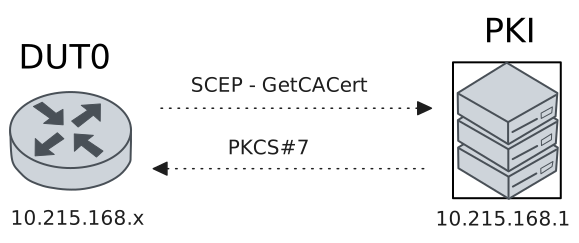
Test SCEP Protocol With Linux PKI
Description
In this scenario, the SCEP protocol is used to retrieve digital certificates (X509) from a Linux PKI server.
Scenario
Step 1: Set the following configuration in DUT0 :
set interfaces ethernet eth0 address 10.215.168.64/24
set protocols static route 192.168.212.0/22 next-hop 10.215.168.1
set system certificate scep csr CSR cgi-path /scep
set system certificate scep csr CSR cipher aes
set system certificate scep csr CSR digest sha256
set system certificate scep csr CSR distinguished-names CN=MyUserCert
set system certificate scep csr CSR encrypted-password U2FsdGVkX18NiXNX49xn3+FWH6gpXsQxClgm41fiQVU=
set system certificate scep csr CSR port 8080
set system certificate scep csr CSR url 'http://10.215.168.1'
set system login user admin authentication encrypted-password '$6$GSjsCj8gHLv$/VcqU6FLi6CT2Oxn0MJQ2C2tqnRDrYKNF8HIYWJp68nvXvPdFccDsT04.WtigUONbKYrgKg8d6rEs8PjljMkH0'
Step 2: Ping the IP address 10.215.168.1 from DUT0:
admin@DUT0$ ping 10.215.168.1 count 1 size 56 timeout 1Show output
PING 10.215.168.1 (10.215.168.1) 56(84) bytes of data.
64 bytes from 10.215.168.1: icmp_seq=1 ttl=64 time=0.225 ms

--- 10.215.168.1 ping statistics ---
1 packets transmitted, 1 received, 0% packet loss, time 0ms
rtt min/avg/max/mdev = 0.225/0.225/0.225/0.000 ms
Step 3: Run the command pki scep show CSR on DUT0 and check whether the output matches the following regular expressions:
ca\s+Valid
usercert\s+Valid
Show output
-------------------------------------------------------------------------------------------------
Certificate  Status           Usage                   NotBefore                  NotAfter
-------------------------------------------------------------------------------------------------
ca           Valid   Encipherment & Signature  Apr 16 09:19:39 2025 GMT  Apr 11 09:19:39 2045 GMT
usercert     Valid   -                         Sep 16 20:02:40 2026 GMT  Sep 16 20:02:40 2027 GMT
Step 4: Run the command pki show certificate running://auth/certificates/scep/CSR/ca/ca.der on DUT0 and check whether the output contains the following tokens:
Subject: CN = Teldat-PKI, O = Teldat, L = Madrid, C = ESShow output
Certificate:
Data:
Version: 3 (0x2)
Serial Number:
7c:28:60:8a:6f:42:5d:c8:44:f0:10:0d:61:e5:ca:40:11:bc:ea:f2
Signature Algorithm: sha256WithRSAEncryption
Issuer: CN = Teldat-PKI, O = Teldat, L = Madrid, C = ES
Validity
Not Before: Apr 16 09:19:39 2025 GMT
Not After : Apr 11 09:19:39 2045 GMT
Subject: CN = Teldat-PKI, O = Teldat, L = Madrid, C = ES
Subject Public Key Info:
Public Key Algorithm: rsaEncryption
Public-Key: (2048 bit)
Modulus:
00:de:b7:3b:d9:9b:e3:d3:57:9b:b0:33:67:c0:40:
4f:45:84:ea:c2:35:a6:08:3b:3a:fd:6d:fa:d7:2b:
3d:7f:1c:a1:92:15:08:8b:5c:02:ec:6a:66:46:c5:
6f:7f:9b:9d:c3:86:e1:97:47:9b:5e:ea:96:5b:bf:
68:35:96:4f:6e:64:c6:7d:f6:da:6b:f9:bf:98:b1:
32:63:ae:f4:5b:2f:cd:6d:d7:ef:db:01:12:b0:a4:
54:95:6e:e8:84:4a:0a:f1:13:83:13:a1:7a:1d:f4:
06:3f:e3:53:5d:9f:68:a1:a0:5c:51:05:ba:8c:da:
00:11:64:4b:e8:37:c3:70:43:9c:16:dd:46:fb:34:
e4:3c:ae:a4:9a:a1:da:cf:a1:f5:93:13:a6:0e:68:
51:31:f7:26:63:a3:8b:47:c3:94:e4:34:d2:b0:36:
cf:22:e5:81:dd:a4:01:e8:79:08:37:ad:7a:b9:da:
24:37:cc:53:f4:51:f8:b5:67:09:15:63:52:60:7f:
b0:e2:f0:38:cd:3c:13:42:81:5f:e2:dd:e2:c5:37:
f3:ef:05:8c:85:2f:2a:0a:f4:94:2f:70:56:7f:7d:
a9:f6:ca:69:0b:a7:40:e1:fa:bc:f0:f4:01:7a:76:
55:f4:2a:57:43:8b:f1:87:58:f2:f4:db:23:26:33:
f8:4f
Exponent: 65537 (0x10001)
X509v3 extensions:
X509v3 Subject Key Identifier:
D3:97:2E:56:37:6A:89:77:01:D4:E3:42:0D:EC:E7:10:79:9C:E8:7C
X509v3 Authority Key Identifier:
keyid:D3:97:2E:56:37:6A:89:77:01:D4:E3:42:0D:EC:E7:10:79:9C:E8:7C
DirName:/CN=Teldat-PKI/O=Teldat/L=Madrid/C=ES
serial:7C:28:60:8A:6F:42:5D:C8:44:F0:10:0D:61:E5:CA:40:11:BC:EA:F2
X509v3 Basic Constraints: critical
CA:TRUE, pathlen:0
X509v3 Key Usage: critical
Digital Signature, Key Encipherment, Certificate Sign, CRL Sign
Signature Algorithm: sha256WithRSAEncryption
Signature Value:
5e:0d:47:96:a2:24:38:fa:62:5b:0c:c2:4e:59:23:79:40:1b:
88:d1:63:11:0b:ce:bc:63:46:cd:70:33:52:75:4b:85:c1:39:
be:3c:ce:7c:66:53:63:b4:39:07:ec:ef:52:fe:fa:dc:c1:fb:
e4:51:61:28:58:4f:90:71:83:50:7d:62:a9:16:fa:45:89:08:
5f:39:43:6a:b1:bb:ad:4e:6f:50:bc:07:4f:1c:5b:07:df:63:
ec:44:20:48:b6:97:00:e2:9d:8e:42:9e:96:5f:71:7a:43:96:
de:fd:66:6b:45:85:5d:e4:dc:bf:e9:34:64:4f:3a:7b:33:a0:
54:80:3b:9a:5b:1f:3f:3f:1c:09:a3:8e:d8:b6:2a:ba:b2:07:
87:fa:0f:a5:69:41:06:b1:14:6f:09:4f:bb:88:60:87:70:83:
31:73:ed:2a:03:ca:3c:19:0a:b2:24:61:c6:ce:09:97:ac:6e:
da:cb:47:88:c5:f5:a7:74:d2:96:e0:cc:c3:b6:b7:f6:64:9f:
ad:1c:7f:36:fd:39:7c:57:54:a5:e9:8a:82:90:4d:cd:74:99:
27:4d:f6:62:a6:96:c5:6e:d3:02:ec:c1:4d:5f:46:b6:82:75:
12:61:d7:a3:d6:70:f6:35:9d:9c:30:06:84:af:b2:cb:a5:a0:
5e:d3:1d:6c
Step 5: Run the command pki show certificate running://auth/certificates/scep/CSR/user/cert on DUT0 and check whether the output contains the following tokens:
Subject: CN = MyUserCertShow output
Certificate:
Data:
Version: 3 (0x2)
Serial Number: 8 (0x8)
Signature Algorithm: sha256WithRSAEncryption
Issuer: CN = Teldat-PKI, O = Teldat, L = Madrid, C = ES
Validity
Not Before: Sep 16 20:02:40 2026 GMT
Not After : Sep 16 20:02:40 2027 GMT
Subject: CN = MyUserCert
Subject Public Key Info:
Public Key Algorithm: rsaEncryption
Public-Key: (2048 bit)
Modulus:
00:d8:25:29:74:93:30:97:90:35:6e:ee:c0:69:aa:
88:af:c4:2a:59:7e:ce:a4:c4:c3:26:5a:37:5b:bc:
c3:d1:19:25:8c:3b:3c:b8:bc:76:15:59:47:d7:ec:
03:31:c0:2f:90:b8:34:e7:36:90:d7:25:99:87:3f:
6c:26:71:fb:ec:96:99:71:73:77:dd:37:8c:c4:1b:
c1:5f:74:48:52:ce:01:19:0d:dd:c5:da:32:70:58:
61:7d:6a:91:c7:e5:bd:bb:ab:bd:e7:29:ab:8d:97:
29:5a:70:9e:f6:44:d9:ca:42:de:60:69:a5:05:88:
3b:2a:cd:96:9b:6f:ec:5e:0e:c7:32:63:11:c2:ca:
bb:25:87:4f:08:1c:cc:c5:54:39:62:cf:27:e8:0a:
d6:74:68:82:af:5a:7f:5b:c8:0b:41:0e:65:b8:f6:
5a:59:d0:23:63:80:7e:3d:6f:01:d0:6a:75:5d:37:
b8:52:f3:94:aa:67:18:7d:5f:cd:5e:ce:11:dc:ec:
ca:87:cd:e6:5a:7b:04:4a:88:03:00:f3:1c:86:ff:
6e:6b:2b:59:11:cf:08:d6:cd:70:55:06:31:0d:6f:
57:04:48:15:f9:f6:44:23:3a:98:84:68:38:f9:ab:
32:30:aa:8b:3a:a3:6f:07:9d:2c:94:ee:b0:81:48:
3f:b5
Exponent: 65537 (0x10001)
X509v3 extensions:
X509v3 Key Usage: critical
Digital Signature
X509v3 Extended Key Usage:
TLS Web Client Authentication
X509v3 Subject Key Identifier:
B8:66:10:26:07:C3:D6:E7:C8:E9:B4:5A:0E:E8:30:4F:17:74:F0:FB
X509v3 Authority Key Identifier:
D3:97:2E:56:37:6A:89:77:01:D4:E3:42:0D:EC:E7:10:79:9C:E8:7C
Signature Algorithm: sha256WithRSAEncryption
Signature Value:
98:d6:82:b4:c7:83:dd:94:9e:dc:c2:aa:d7:85:7d:b9:fc:20:
2a:3d:f2:0a:8d:cd:05:69:ff:93:96:56:29:20:d7:11:b4:ca:
4f:a3:d0:1e:10:38:dc:1e:11:a0:49:fd:ed:e3:7a:1f:23:29:
ab:a5:c9:86:18:a6:d7:16:6b:55:b3:63:72:5c:f1:0a:f5:18:
84:93:cd:25:7f:4b:41:49:3f:9e:bd:25:27:8e:87:49:e4:85:
9b:5f:8e:e1:44:11:32:20:22:17:e4:d1:a6:89:6e:12:3d:67:
47:44:95:85:3c:da:81:52:37:92:b4:b9:cd:7f:e1:59:98:81:
53:e5:1b:54:35:9e:8f:ba:df:ab:48:8e:6c:89:7f:34:60:72:
da:47:7c:e1:6b:19:3b:57:89:8e:d7:ea:25:d5:6a:1c:b6:89:
1e:f5:a8:88:3d:42:2e:18:c0:8c:9b:1a:a1:95:c2:08:b9:8c:
b5:a0:ff:26:56:55:ff:dc:f3:9a:bd:b7:25:a0:9b:32:d7:a2:
66:8b:72:0c:f2:f9:4e:e0:f9:01:05:25:30:c4:8c:f8:41:16:
8f:f6:72:34:71:9b:a5:29:fe:73:7d:7a:29:a9:80:00:ad:81:
ea:4e:01:f0:cc:e4:96:45:7a:8c:3a:9e:35:4e:4f:82:1d:98:
e9:f2:3a:72
Test SCEP Protocol With Windows Server PKI
Description
In this scenario, the SCEP protocol is used to retrieve digital certificates (X509) from a Windows PKI server.
Scenario
Step 1: Set the following configuration in DUT0 :
set interfaces ethernet eth0 address 10.215.168.64/24
set protocols static route 192.168.212.0/22 next-hop 10.215.168.1
set system certificate scep csr CSR cgi-path CertSrv/mscep/mscep.dll/pkiclient.exe
set system certificate scep csr CSR distinguished-names CN=MyUserCert
set system certificate scep csr CSR encrypted-password U2FsdGVkX18lhFd5M2ArStZLkae7Htg3Y36tfbOkiAgfcVEdcRqlflBlynQQ3PrPTBfSgJueC8SQWYjr0V2m6Q==
set system certificate scep csr CSR url 'http://192.168.213.25/'
set system login user admin authentication encrypted-password '$6$GSjsCj8gHLv$/VcqU6FLi6CT2Oxn0MJQ2C2tqnRDrYKNF8HIYWJp68nvXvPdFccDsT04.WtigUONbKYrgKg8d6rEs8PjljMkH0'
Step 2: Ping the IP address 10.215.168.1 from DUT0:
admin@DUT0$ ping 10.215.168.1 count 1 size 56 timeout 1Show output
PING 10.215.168.1 (10.215.168.1) 56(84) bytes of data.
64 bytes from 10.215.168.1: icmp_seq=1 ttl=64 time=0.278 ms

--- 10.215.168.1 ping statistics ---
1 packets transmitted, 1 received, 0% packet loss, time 0ms
rtt min/avg/max/mdev = 0.278/0.278/0.278/0.000 ms
Step 3: Ping the IP address 192.168.213.25 from DUT0:
admin@DUT0$ ping 192.168.213.25 count 1 size 56 timeout 1Show output
PING 192.168.213.25 (192.168.213.25) 56(84) bytes of data.
64 bytes from 192.168.213.25: icmp_seq=1 ttl=126 time=0.591 ms

--- 192.168.213.25 ping statistics ---
1 packets transmitted, 1 received, 0% packet loss, time 0ms
rtt min/avg/max/mdev = 0.591/0.591/0.591/0.000 ms
Step 4: Run the command pki scep show CSR on DUT0 and check whether the output matches the following regular expressions:
ca\s+Valid
usercert\s+Valid
Show output
-------------------------------------------------------------------------------------
Certificate  Status     Usage             NotBefore                  NotAfter
-------------------------------------------------------------------------------------
ca           Valid   Signature     Jan  9 09:34:41 2026 GMT  Jan  9 09:44:41 2056 GMT
ra           Valid   Encipherment  Jan  9 09:37:26 2026 GMT  Jan  9 09:37:26 2028 GMT
ra-2         Valid   Signature     Jan  9 09:37:25 2026 GMT  Jan  9 09:37:25 2028 GMT
usercert     Valid   -             Sep 16 19:28:19 2026 GMT  Sep 16 19:38:19 2028 GMT
Step 5: Run the command pki show certificate running://auth/certificates/scep/CSR/ca/ca.der on DUT0 and check whether the output contains the following tokens:
Subject: DC = com, DC = scep, CN = scep-TELDATPKI-CAShow output
Certificate:
Data:
Version: 3 (0x2)
Serial Number:
2e:aa:77:9e:fd:8d:47:8d:42:5f:96:57:64:8a:da:d1
Signature Algorithm: sha256WithRSAEncryption
Issuer: DC = com, DC = scep, CN = scep-TELDATPKI-CA
Validity
Not Before: Jan  9 09:34:41 2026 GMT
Not After : Jan  9 09:44:41 2056 GMT
Subject: DC = com, DC = scep, CN = scep-TELDATPKI-CA
Subject Public Key Info:
Public Key Algorithm: rsaEncryption
Public-Key: (2048 bit)
Modulus:
00:be:22:9c:cd:53:99:06:1b:31:57:cd:72:1b:d7:
5d:99:b4:e2:e1:88:80:d4:40:53:49:be:ff:e0:5b:
8b:41:8c:96:e8:99:cd:19:ab:98:4c:99:77:ad:01:
fc:51:cf:ea:d8:43:fc:5b:d2:dd:b5:05:04:ae:01:
28:e9:53:5d:bb:d2:65:71:d9:69:3c:04:4d:6b:6e:
8b:95:92:e4:e7:84:57:90:b3:5e:1f:76:34:7f:15:
e2:fb:c0:78:bb:ec:a5:be:2f:33:9e:98:06:f1:4c:
1f:cc:ee:85:c2:f1:8f:3c:23:52:a2:94:af:0e:b8:
d2:e3:0c:b7:07:49:b9:91:87:3e:76:89:61:f0:88:
4c:2f:da:6b:b9:75:93:6e:e4:e2:f1:19:48:00:f7:
af:1b:70:19:15:2b:30:b3:78:24:dc:14:c4:e8:a0:
61:f9:68:09:7d:e9:3e:6f:e0:a3:44:d5:43:f8:78:
aa:5f:a8:7a:3a:7c:2c:4e:21:69:24:be:2f:cb:57:
bd:60:e8:b9:a5:3b:ad:0c:7b:d9:8d:82:3e:13:96:
8b:59:5a:2b:ec:b6:63:33:21:69:a5:30:b6:bb:84:
e9:80:8d:db:3c:94:f7:52:05:76:6a:ed:d6:03:24:
d8:97:46:a4:15:41:4d:17:98:7d:20:64:ac:fb:e9:
30:1d
Exponent: 65537 (0x10001)
X509v3 extensions:
1.3.6.1.4.1.311.20.2:
...C.A
X509v3 Key Usage: critical
Digital Signature, Certificate Sign, CRL Sign
X509v3 Basic Constraints: critical
CA:TRUE
X509v3 Subject Key Identifier:
18:DA:43:2C:11:47:FC:1A:DA:19:D4:6C:8B:2D:58:AA:75:ED:17:94
1.3.6.1.4.1.311.21.1:
...
Signature Algorithm: sha256WithRSAEncryption
Signature Value:
3b:f8:53:b9:17:78:98:fa:4a:63:a8:5b:57:bc:f6:67:d8:47:
48:8a:22:2f:d8:39:22:44:c9:f8:aa:fd:e8:81:13:c4:5f:9b:
b2:72:0a:35:b1:0c:64:ff:ff:89:05:f0:d7:2a:e4:5f:da:6b:
7b:90:88:5e:6c:77:e5:17:83:19:43:10:35:f8:b5:e3:b8:b5:
16:c1:79:5e:cc:71:00:91:6a:aa:b7:7e:e8:35:99:b3:74:c1:
b7:d9:93:8c:6b:4e:64:5a:0a:aa:09:ce:00:d6:f2:f0:f6:87:
ec:cd:dc:d0:07:d5:cb:6d:7f:34:72:80:7b:8c:71:f3:d8:f6:
a4:38:45:0e:19:79:bd:07:d6:91:a0:4f:4f:2e:55:f1:ca:f7:
f3:b1:94:33:7b:f0:76:2b:10:d6:9b:49:ef:96:83:f3:f5:2e:
b3:c4:48:13:2f:19:f3:18:7f:4c:7a:09:79:3b:52:94:d9:86:
65:58:32:34:ba:89:6e:54:99:ab:12:7b:f5:3d:61:f3:39:22:
08:ef:7b:77:ba:95:7e:8e:ca:51:4d:80:45:2b:43:d8:b1:37:
fb:0c:69:7a:c8:5c:dc:4c:16:5f:a1:09:5c:d6:85:ed:93:76:
fa:56:67:fe:fc:97:3c:8d:f8:3c:39:d7:31:07:e6:69:42:3d:
3d:d2:86:1e
Step 6: Run the command pki show certificate running://auth/certificates/scep/CSR/user/cert on DUT0 and check whether the output contains the following tokens:
Subject: CN = MyUserCertShow output
Certificate:
Data:
Version: 3 (0x2)
Serial Number:
11:00:00:35:bd:1b:e0:28:32:c6:81:03:b2:00:00:00:00:35:bd
Signature Algorithm: sha256WithRSAEncryption
Issuer: DC = com, DC = scep, CN = scep-TELDATPKI-CA
Validity
Not Before: Sep 16 19:28:19 2026 GMT
Not After : Sep 16 19:38:19 2028 GMT
Subject: CN = MyUserCert
Subject Public Key Info:
Public Key Algorithm: rsaEncryption
Public-Key: (2048 bit)
Modulus:
00:a2:fe:bd:1c:47:56:1b:cc:e4:2c:10:77:77:af:
ad:b5:ec:e5:dd:84:36:10:21:55:12:b5:e5:71:eb:
82:ce:d7:df:b8:c2:b5:bf:b6:b2:87:54:a6:b4:08:
67:0e:a9:96:59:9a:41:19:a0:b2:d8:e6:df:03:9c:
d4:c1:1a:83:b1:87:8a:46:ba:d0:0b:cb:31:06:c4:
90:d8:b9:1a:d8:46:6b:c0:45:06:b5:44:4c:71:b5:
9a:ce:d5:e8:f4:51:ee:75:eb:02:41:88:3b:81:99:
c3:f0:3d:5b:5b:f9:ee:84:b0:18:1e:92:1c:19:7e:
c9:50:81:48:d6:b0:9e:0e:ed:3d:cd:82:ff:5b:ec:
d6:08:2a:3e:d0:7d:10:a7:ea:fd:26:f1:55:af:ba:
3f:d9:26:72:9a:db:4b:f8:78:31:9d:ea:05:81:c5:
54:ff:b7:ae:c1:76:48:67:73:84:ee:43:ed:16:74:
d2:20:d2:db:1d:78:bf:d2:61:0f:95:06:5c:2f:82:
e8:b5:a3:97:c0:4a:ff:1f:99:17:a1:b4:5a:1e:72:
f5:b5:21:53:03:4a:80:e4:5b:ec:2e:ba:6e:a7:ef:
ef:24:1b:53:84:5d:ff:a8:2a:ee:75:2f:bb:0b:53:
04:ae:5b:1d:a6:3a:17:5d:cc:57:be:de:b8:37:81:
3c:f5
Exponent: 65537 (0x10001)
X509v3 extensions:
X509v3 Subject Key Identifier:
06:E8:6E:FA:06:22:94:E6:98:7B:F7:4A:D8:57:41:C1:D2:94:CA:85
X509v3 Authority Key Identifier:
18:DA:43:2C:11:47:FC:1A:DA:19:D4:6C:8B:2D:58:AA:75:ED:17:94
Authority Information Access:
CA Issuers - URI:ldap:///CN=scep-TELDATPKI-CA,CN=AIA,CN=Public%20Key%20Services,CN=Services,CN=Configuration,DC=scep,DC=com?cACertificate?base?objectClass=certificationAuthority
X509v3 Key Usage: critical
Digital Signature, Key Encipherment, Data Encipherment
1.3.6.1.4.1.311.21.7:
0..&+.....7.....3......./...(...f<...[...]..d...
X509v3 Extended Key Usage:
1.3.6.1.4.1.311.20.1, Microsoft Encrypted File System, Code Signing, Any Extended Key Usage, TLS Web Server Authentication, Signing KDC Response, TLS Web Client Authentication, 1.3.6.1.4.1.311.21.5, 1.3.6.1.4.1.311.20.2.1, 1.3.6.1.5.5.8.2.2
1.3.6.1.4.1.311.21.10:
0y0...+.....7..0..
+.....7
..0
..+.......0...U.%.0
..+.......0...+......0
..+.......0...+.....7..0..
+.....7...0
..+.......
S/MIME Capabilities:
050...*.H..
......0...*.H..
......0...+....0
..*.H..
..
Signature Algorithm: sha256WithRSAEncryption
Signature Value:
09:c9:8c:40:f5:aa:4e:71:b4:f4:5c:f4:20:41:0e:d5:8b:ca:
2e:69:1b:1f:74:08:3a:5e:d0:14:06:8c:23:40:46:d8:58:ea:
7f:9b:e6:af:a8:b6:fa:06:8b:91:1f:49:84:e9:d8:04:38:23:
a1:de:7f:3d:43:cf:50:ad:9a:96:bc:f7:40:ac:3f:62:16:73:
28:31:34:bf:5d:b5:9c:0c:95:e7:0f:43:98:8c:a7:cc:5d:f0:
16:d1:ce:0a:e1:77:a0:22:17:5e:fe:51:aa:1e:bb:07:e4:5e:
95:a8:27:bd:ac:a2:49:51:0d:25:95:9e:55:a0:7c:c5:06:7b:
6d:ce:f3:0a:c9:cf:43:8e:04:84:ea:d9:49:bf:b6:2f:5f:10:
f9:2c:ac:9c:ac:36:10:80:7a:ac:ba:13:c4:60:c8:e2:e7:41:
4e:c7:84:4a:14:90:86:d1:b3:82:32:96:92:a9:77:aa:8f:69:
e4:19:7c:51:df:1f:f2:2c:de:37:45:67:5c:fc:95:31:1f:37:
d8:2f:23:19:ba:b2:33:29:57:87:dc:ac:3d:7e:ba:9a:54:e9:
48:97:cc:d0:93:d9:4e:2e:49:22:d4:27:2e:e0:19:3e:74:22:
7f:31:fe:7e:d1:e9:49:7d:ed:61:14:ab:40:e5:33:86:76:8f:
d3:2f:ce:e0