Rtc
This scenario shows how to configure NTP client/server authentication.
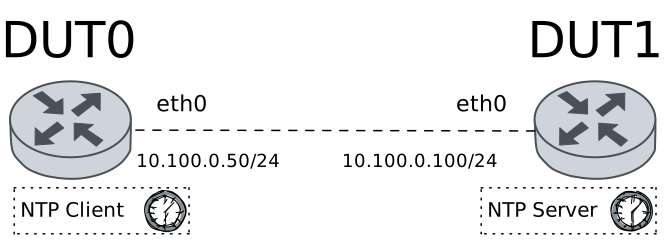
Test RTC Synchronization
Description
Checks that RTC is working properly on machines that have an RTC device.
Scenario
Step 1: Set the following configuration in DUT1 :
set interfaces ethernet eth0 address 10.100.0.100/24
set protocols static route 0.0.0.0/0 next-hop 10.100.0.50
set system login user admin authentication encrypted-password '$6$GSjsCj8gHLv$/VcqU6FLi6CT2Oxn0MJQ2C2tqnRDrYKNF8HIYWJp68nvXvPdFccDsT04.WtigUONbKYrgKg8d6rEs8PjljMkH0'
set system ntp master prefer
set system ntp master stratum 3
Step 2: Set the following configuration in DUT0 :
set interfaces ethernet eth0 address 10.100.0.50/24
set system login user admin authentication encrypted-password '$6$GSjsCj8gHLv$/VcqU6FLi6CT2Oxn0MJQ2C2tqnRDrYKNF8HIYWJp68nvXvPdFccDsT04.WtigUONbKYrgKg8d6rEs8PjljMkH0'
Step 3: Ping the IP address 10.100.0.100 from DUT0:
admin@DUT0$ ping 10.100.0.100 count 1 size 56 timeout 1Show output
PING 10.100.0.100 (10.100.0.100) 56(84) bytes of data.
64 bytes from 10.100.0.100: icmp_seq=1 ttl=64 time=0.440 ms

--- 10.100.0.100 ping statistics ---
1 packets transmitted, 1 received, 0% packet loss, time 0ms
rtt min/avg/max/mdev = 0.440/0.440/0.440/0.000 ms
Step 4: Run the command set date 2026-09-15 12:00:00 on DUT0 and expect no output.
Step 5: Run the command set date ntp 10.100.0.100 on DUT0 and check whether the output does not contain the following tokens:
skipping this serverShow output
Date was successfully updated!
Step 6: Run the command show date on DUT0 and check whether the output does not contain the following tokens:
TueShow output
Wed 16 Sep 2026 19:25:47 +00:00
Step 7: Run the command set date hwclock from-system debug on DUT0 and expect the following output:
Show output
hwclock from util-linux 2.38.1
System Time: 1789586747.680162
Trying to open: /dev/rtc0
Using the rtc interface to the clock.
Last drift adjustment done at 1789586746 seconds after 1969
Last calibration done at 1789586746 seconds after 1969
Hardware clock is on UTC time
Assuming hardware clock is kept in UTC time.
RTC type: 'rtc_cmos'
Using delay: 0.500000 seconds
missed it - 1789586747.680403 is too far past 1789586747.500000 (0.180403 > 0.001000)
1789586748.500000 is close enough to 1789586748.500000 (0.000000 < 0.002000)
Set RTC to 1789586748 (1789586747 + 1; refsystime = 1789586747.000000)
Setting Hardware Clock to 19:25:48 = 1789586748 seconds since 1969
ioctl(RTC_SET_TIME) was successful.
Not adjusting drift factor because the --update-drift option was not used.
New /etc/adjtime data:
0.000000 1789586747 0.000000
1789586747
UTC
Step 8: Run the command set date hwclock to-system debug on DUT0 and expect the following output:
Show output
hwclock from util-linux 2.38.1
System Time: 1789586748.580027
Trying to open: /dev/rtc0
Using the rtc interface to the clock.
Last drift adjustment done at 1789586747 seconds after 1969
Last calibration done at 1789586747 seconds after 1969
Hardware clock is on UTC time
Assuming hardware clock is kept in UTC time.
Waiting for clock tick...
...got clock tick
Time read from Hardware Clock: 2026/09/16 19:25:49
Hw clock time : 2026/09/16 19:25:49 = 1789586749 seconds since 1969
Time since last adjustment is 2 seconds
Calculated Hardware Clock drift is 0.000000 seconds
Calling settimeofday(NULL, 0) to lock the warp_clock function.
Calling settimeofday(1789586749.000000, NULL) to set the System time.
Step 9: Run the command show date on DUT0 and check whether the output does not contain the following tokens:
TueShow output
Wed 16 Sep 2026 19:25:49 +00:00
Test RTC Synchronization With Drift
Description
Tests that RTC is working properly on machines that have an RTC device (while adjusting the drift too).
Scenario
Step 1: Set the following configuration in DUT1 :
set interfaces ethernet eth0 address 10.100.0.100/24
set protocols static route 0.0.0.0/0 next-hop 10.100.0.50
set system login user admin authentication encrypted-password '$6$GSjsCj8gHLv$/VcqU6FLi6CT2Oxn0MJQ2C2tqnRDrYKNF8HIYWJp68nvXvPdFccDsT04.WtigUONbKYrgKg8d6rEs8PjljMkH0'
set system ntp master prefer
set system ntp master stratum 3
Step 2: Set the following configuration in DUT0 :
set interfaces ethernet eth0 address 10.100.0.50/24
set system login user admin authentication encrypted-password '$6$GSjsCj8gHLv$/VcqU6FLi6CT2Oxn0MJQ2C2tqnRDrYKNF8HIYWJp68nvXvPdFccDsT04.WtigUONbKYrgKg8d6rEs8PjljMkH0'
Step 3: Ping the IP address 10.100.0.100 from DUT0:
admin@DUT0$ ping 10.100.0.100 count 1 size 56 timeout 1Show output
PING 10.100.0.100 (10.100.0.100) 56(84) bytes of data.
64 bytes from 10.100.0.100: icmp_seq=1 ttl=64 time=0.424 ms

--- 10.100.0.100 ping statistics ---
1 packets transmitted, 1 received, 0% packet loss, time 0ms
rtt min/avg/max/mdev = 0.424/0.424/0.424/0.000 ms
Step 4: Run the command set date 2026-09-15 12:00:00 on DUT0 and expect no output.
Step 5: Run the command set date ntp 10.100.0.100 on DUT0 and check whether the output does not contain the following tokens:
skipping this serverShow output
Date was successfully updated!
Step 6: Run the command show date on DUT0 and check whether the output does not contain the following tokens:
TueShow output
Wed 16 Sep 2026 19:25:58 +00:00
Step 7: Run the command set date hwclock from-system update-drift debug on DUT0 and expect the following output:
Show output
hwclock from util-linux 2.38.1
System Time: 1789586758.678009
Trying to open: /dev/rtc0
Using the rtc interface to the clock.
Last drift adjustment done at 1789586758 seconds after 1969
Last calibration done at 1789586758 seconds after 1969
Hardware clock is on UTC time
Assuming hardware clock is kept in UTC time.
Waiting for clock tick...
...got clock tick
Time read from Hardware Clock: 2026/09/16 19:25:59
Hw clock time : 2026/09/16 19:25:59 = 1789586759 seconds since 1969
Time since last adjustment is 1 second
Calculated Hardware Clock drift is 0.000000 seconds
RTC type: 'rtc_cmos'
Using delay: 0.500000 seconds
1789586759.500000 is close enough to 1789586759.500000 (0.000000 < 0.001000)
Set RTC to 1789586759 (1789586759 + 0; refsystime = 1789586759.000000)
Setting Hardware Clock to 19:25:59 = 1789586759 seconds since 1969
ioctl(RTC_SET_TIME) was successful.
Not adjusting drift factor because it has been less than four hours since the last calibration.
New /etc/adjtime data:
0.000000 1789586759 0.000000
1789586759
UTC
Step 8: Run the command set date hwclock to-system debug on DUT0 and expect the following output:
Show output
hwclock from util-linux 2.38.1
System Time: 1789586759.601760
Trying to open: /dev/rtc0
Using the rtc interface to the clock.
Last drift adjustment done at 1789586759 seconds after 1969
Last calibration done at 1789586759 seconds after 1969
Hardware clock is on UTC time
Assuming hardware clock is kept in UTC time.
Waiting for clock tick...
...got clock tick
Time read from Hardware Clock: 2026/09/16 19:26:00
Hw clock time : 2026/09/16 19:26:00 = 1789586760 seconds since 1969
Time since last adjustment is 1 second
Calculated Hardware Clock drift is 0.000000 seconds
Calling settimeofday(NULL, 0) to lock the warp_clock function.
Calling settimeofday(1789586760.000000, NULL) to set the System time.
Step 9: Run the command show date on DUT0 and check whether the output does not contain the following tokens:
TueShow output
Wed 16 Sep 2026 19:26:00 +00:00