Traffic Control
The following scenario shows how to configure a basic
traffic control discipline, which can be used on OSDx for traffic
shaping and scheduling purposes. The monitor test
performance operational command can be used to calculate
the throughput.
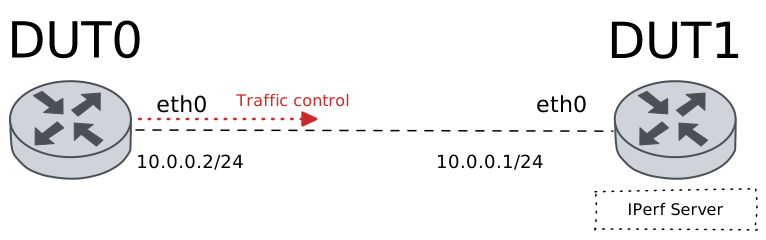
Test Traffic Control
Description
In this scenario, a simple HTB qdisc is configured in DUT0.
Scenario
Step 1: Set the following configuration in DUT0 :
set interfaces ethernet eth0 address 10.0.0.2/24
set interfaces ethernet eth0 traffic control out QDISC
set system login user admin authentication encrypted-password '$6$GSjsCj8gHLv$/VcqU6FLi6CT2Oxn0MJQ2C2tqnRDrYKNF8HIYWJp68nvXvPdFccDsT04.WtigUONbKYrgKg8d6rEs8PjljMkH0'
set traffic control QDISC type htb bandwidth 100
set traffic control QDISC type htb class 1 bandwidth percentage 34
set traffic control QDISC type htb class 2 bandwidth percentage 33
set traffic control QDISC type htb class 3 bandwidth percentage 33
set traffic control QDISC type htb default-class 3
set traffic control QDISC type htb match 1 class 1
set traffic control QDISC type htb match 1 ip protocol icmp
set traffic control QDISC type htb match 2 class 2
set traffic control QDISC type htb match 2 ip protocol tcp
Step 2: Set the following configuration in DUT1 :
set interfaces ethernet eth0 address 10.0.0.1/24
set system login user admin authentication encrypted-password '$6$GSjsCj8gHLv$/VcqU6FLi6CT2Oxn0MJQ2C2tqnRDrYKNF8HIYWJp68nvXvPdFccDsT04.WtigUONbKYrgKg8d6rEs8PjljMkH0'
Step 3: Ping the IP address 10.0.0.1 from DUT0:
admin@DUT0$ ping 10.0.0.1 count 1 size 56 timeout 1Show output
PING 10.0.0.1 (10.0.0.1) 56(84) bytes of data.
64 bytes from 10.0.0.1: icmp_seq=1 ttl=64 time=0.538 ms

--- 10.0.0.1 ping statistics ---
1 packets transmitted, 1 received, 0% packet loss, time 0ms
rtt min/avg/max/mdev = 0.538/0.538/0.538/0.000 ms
Step 4: Run the command traffic control show on DUT0 and check whether the output matches the following regular expressions:
class 1\s+1:0\s+[1-9]\d*Show output
Traffic control for interface 'eth0' - 'egress' mode

------------------------------------------------------------------------------------
ID   traffic control        type         parent  bytes sent  pkts sent  pkts dropped
------------------------------------------------------------------------------------
1:0  QDISC            htb                root           376          4             0
1:1  QDISC            class 1            1:0             98          1             0
1:2  QDISC            class 2            1:0              0          0             0
1:3  QDISC            class 3 (default)  1:0            278          3             0
2:0  -                htb                1:1             98          1             0
3:0  -                htb                1:2              0          0             0
4:0  -                htb                1:3            278          3             0
Step 5: Run the command traffic control show on DUT0 and check whether the output matches the following regular expressions:
class 2\s+1:0\s+0Show output
Traffic control for interface 'eth0' - 'egress' mode

------------------------------------------------------------------------------------
ID   traffic control        type         parent  bytes sent  pkts sent  pkts dropped
------------------------------------------------------------------------------------
1:0  QDISC            htb                root           676          6             0
1:1  QDISC            class 1            1:0             98          1             0
1:2  QDISC            class 2            1:0              0          0             0
1:3  QDISC            class 3 (default)  1:0            578          5             0
2:0  -                htb                1:1             98          1             0
3:0  -                htb                1:2              0          0             0
4:0  -                htb                1:3            578          5             0
Step 6: Initiate a bandwidth test from DUT0 to DUT1
admin@DUT1$ monitor test performance server port 8080
admin@DUT0$ monitor test performance client 10.0.0.1 duration 5 port 8080 parallel 1
Expect the following output on
DUT0:Connecting to host 10.0.0.1, port 8080 [ 5] local 10.0.0.2 port 55484 connected to 10.0.0.1 port 8080 [ ID] Interval Transfer Bitrate Retr Cwnd [ 5] 0.00-1.00 sec 5.47 MBytes 45.9 Mbits/sec 179 26.9 KBytes [ 5] 1.00-2.00 sec 3.79 MBytes 31.8 Mbits/sec 61 32.5 KBytes [ 5] 2.00-3.00 sec 3.73 MBytes 31.3 Mbits/sec 55 25.5 KBytes [ 5] 3.00-4.00 sec 3.91 MBytes 32.8 Mbits/sec 62 26.9 KBytes [ 5] 4.00-5.00 sec 3.67 MBytes 30.8 Mbits/sec 59 25.5 KBytes - - - - - - - - - - - - - - - - - - - - - - - - - [ ID] Interval Transfer Bitrate Retr [ 5] 0.00-5.00 sec 20.6 MBytes 34.5 Mbits/sec 416 sender [ 5] 0.00-5.00 sec 19.3 MBytes 32.3 Mbits/sec receiver iperf Done.
Step 7: Run the command traffic control show on DUT0 and check whether the output matches the following regular expressions:
class 2\s+1:0\s+[1-9]\d*Show output
Traffic control for interface 'eth0' - 'egress' mode

------------------------------------------------------------------------------------
ID   traffic control        type         parent  bytes sent  pkts sent  pkts dropped
------------------------------------------------------------------------------------
1:0  QDISC            htb                root      21173077      14012            34
1:1  QDISC            class 1            1:0             98          1             0
1:2  QDISC            class 2            1:0       21172161      14004             0
1:3  QDISC            class 3 (default)  1:0            818          7             0
2:0  -                htb                1:1             98          1             0
3:0  -                htb                1:2       21172161      14004            34
4:0  -                htb                1:3            818          7             0
Step 8: Run the command traffic control show on DUT0 and check whether the output matches the following regular expressions:
class 2\s+1:0\s+[1-9]\d*Show output
Traffic control for interface 'eth0' - 'egress' mode

------------------------------------------------------------------------------------
ID   traffic control        type         parent  bytes sent  pkts sent  pkts dropped
------------------------------------------------------------------------------------
1:0  QDISC            htb                root      21173077      14012            34
1:1  QDISC            class 1            1:0             98          1             0
1:2  QDISC            class 2            1:0       21172161      14004             0
1:3  QDISC            class 3 (default)  1:0            818          7             0
2:0  -                htb                1:1             98          1             0
3:0  -                htb                1:2       21172161      14004            34
4:0  -                htb                1:3            818          7             0
Step 9: Run the command traffic control clear on DUT0 and expect no output.
Step 10: Run the command traffic control show on DUT0 and check whether the output matches the following regular expressions:
class 1\s+1:0\s+0Show output
Traffic control for interface 'eth0' - 'egress' mode

------------------------------------------------------------------------------------
ID   traffic control        type         parent  bytes sent  pkts sent  pkts dropped
------------------------------------------------------------------------------------
1:0  QDISC            htb                root             0          0             0
1:1  QDISC            class 1            1:0              0          0             0
1:2  QDISC            class 2            1:0              0          0             0
1:3  QDISC            class 3 (default)  1:0              0          0             0
2:0  -                htb                1:1              0          0             0
3:0  -                htb                1:2              0          0             0
4:0  -                htb                1:3              0          0             0
Step 11: Run the command traffic control show on DUT0 and check whether the output matches the following regular expressions:
class 2\s+1:0\s+0Show output
Traffic control for interface 'eth0' - 'egress' mode

------------------------------------------------------------------------------------
ID   traffic control        type         parent  bytes sent  pkts sent  pkts dropped
------------------------------------------------------------------------------------
1:0  QDISC            htb                root             0          0             0
1:1  QDISC            class 1            1:0              0          0             0
1:2  QDISC            class 2            1:0              0          0             0
1:3  QDISC            class 3 (default)  1:0              0          0             0
2:0  -                htb                1:1              0          0             0
3:0  -                htb                1:2              0          0             0
4:0  -                htb                1:3              0          0             0
Step 12: Initiate a bandwidth test from DUT0 to DUT1
admin@DUT1$ monitor test performance server port 8080
admin@DUT0$ monitor test performance client 10.0.0.1 duration 5 port 8080 parallel 1
Expect the following output on
DUT0:Connecting to host 10.0.0.1, port 8080 [ 5] local 10.0.0.2 port 55490 connected to 10.0.0.1 port 8080 [ ID] Interval Transfer Bitrate Retr Cwnd [ 5] 0.00-1.00 sec 5.25 MBytes 44.0 Mbits/sec 155 28.3 KBytes [ 5] 1.00-2.00 sec 3.91 MBytes 32.8 Mbits/sec 70 25.5 KBytes [ 5] 2.00-3.00 sec 3.48 MBytes 29.2 Mbits/sec 57 22.6 KBytes [ 5] 3.00-4.00 sec 3.91 MBytes 32.8 Mbits/sec 73 26.9 KBytes [ 5] 4.00-5.00 sec 3.91 MBytes 32.8 Mbits/sec 52 32.5 KBytes - - - - - - - - - - - - - - - - - - - - - - - - - [ ID] Interval Transfer Bitrate Retr [ 5] 0.00-5.00 sec 20.5 MBytes 34.3 Mbits/sec 407 sender [ 5] 0.00-5.00 sec 19.3 MBytes 32.3 Mbits/sec receiver iperf Done.
Step 13: Run the command traffic control show on DUT0 and check whether the output matches the following regular expressions:
class 1\s+1:0\s+0Show output
Traffic control for interface 'eth0' - 'egress' mode

------------------------------------------------------------------------------------
ID   traffic control        type         parent  bytes sent  pkts sent  pkts dropped
------------------------------------------------------------------------------------
1:0  QDISC            htb                root      21182675      14010            34
1:1  QDISC            class 1            1:0              0          0             0
1:2  QDISC            class 2            1:0       21182675      14010             0
1:3  QDISC            class 3 (default)  1:0              0          0             0
2:0  -                htb                1:1              0          0             0
3:0  -                htb                1:2       21182675      14010            34
4:0  -                htb                1:3              0          0             0
Step 14: Run the command traffic control show on DUT0 and check whether the output matches the following regular expressions:
class 2\s+1:0\s+[1-9]\d*Show output
Traffic control for interface 'eth0' - 'egress' mode

------------------------------------------------------------------------------------
ID   traffic control        type         parent  bytes sent  pkts sent  pkts dropped
------------------------------------------------------------------------------------
1:0  QDISC            htb                root      21182675      14010            34
1:1  QDISC            class 1            1:0              0          0             0
1:2  QDISC            class 2            1:0       21182675      14010             0
1:3  QDISC            class 3 (default)  1:0              0          0             0
2:0  -                htb                1:1              0          0             0
3:0  -                htb                1:2       21182675      14010            34
4:0  -                htb                1:3              0          0             0