Connlimit
The following scenario shows how to filter packets based on the number of simultaneous connections.
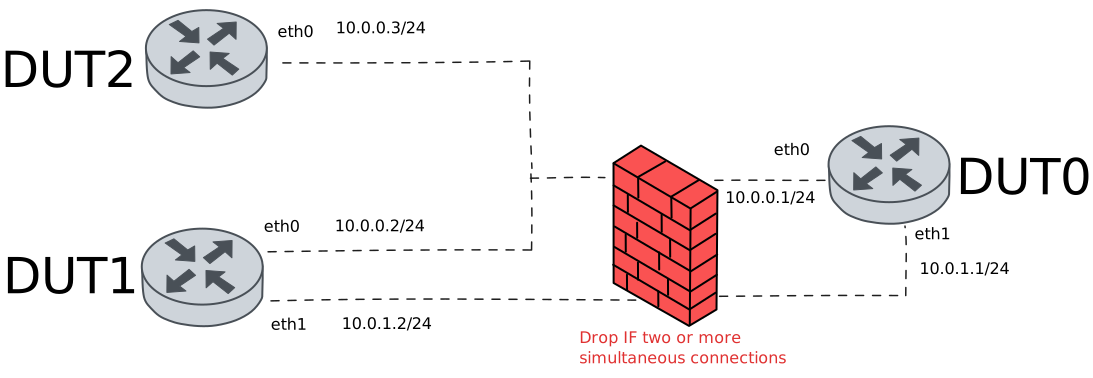
Test System Drop Over Connections
Description
This scenario shows how to limit the number of simultaneous system connections using traffic selectors
Scenario
Note
In the example below, we use NSM operation on both DUT1 and DUT2 devices to establish two ICMP connections.
Step 1: Set the following configuration in DUT0 :
set interfaces ethernet eth0 address 10.0.0.1/24
set interfaces ethernet eth1 address 10.0.1.1/24
set system login user admin authentication encrypted-password '$6$GSjsCj8gHLv$/VcqU6FLi6CT2Oxn0MJQ2C2tqnRDrYKNF8HIYWJp68nvXvPdFccDsT04.WtigUONbKYrgKg8d6rEs8PjljMkH0'
set system traffic policy local-in DROP_CONNLIMIT
set traffic policy DROP_CONNLIMIT rule 1 action drop
set traffic policy DROP_CONNLIMIT rule 1 selector CONNLIMIT_SEL
set traffic selector CONNLIMIT_SEL rule 1 connlimit 2
set traffic selector CONNLIMIT_SEL rule 1 protocol icmp
set traffic selector CONNLIMIT_SEL rule 1 state new
Step 2: Set the following configuration in DUT1 :
set interfaces ethernet eth0 address 10.0.0.2/24
set interfaces ethernet eth1 address 10.0.1.2/24
set service nsm operation TEST_OPER_1 destination-address 10.0.0.1
set service nsm operation TEST_OPER_1 interval 0.10
set service nsm operation TEST_OPER_1 type icmp
set system login user admin authentication encrypted-password '$6$GSjsCj8gHLv$/VcqU6FLi6CT2Oxn0MJQ2C2tqnRDrYKNF8HIYWJp68nvXvPdFccDsT04.WtigUONbKYrgKg8d6rEs8PjljMkH0'
Step 3: Set the following configuration in DUT2 :
set interfaces ethernet eth0 address 10.0.0.3/24
set service nsm operation TEST_OPER_1 destination-address 10.0.0.1
set service nsm operation TEST_OPER_1 interval 0.10
set service nsm operation TEST_OPER_1 type icmp
set system login user admin authentication encrypted-password '$6$GSjsCj8gHLv$/VcqU6FLi6CT2Oxn0MJQ2C2tqnRDrYKNF8HIYWJp68nvXvPdFccDsT04.WtigUONbKYrgKg8d6rEs8PjljMkH0'
Step 4: Run the command system conntrack show protocol icmp destination 10.0.0.1 on DUT1 and expect the following output:
Show output
icmp     1 29 src=10.0.0.2 dst=10.0.0.1 type=8 code=0 id=2470 packets=15 bytes=480 src=10.0.0.1 dst=10.0.0.2 type=0 code=0 id=2470 packets=15 bytes=480 mark=0 use=1
conntrack v1.4.7 (conntrack-tools): 1 flow entries have been shown.
Step 5: Run the command service nsm operation show on DUT1 and expect the following output:
Show output
-------------------------------------------------------------------------------------------
 Operation   Alarm  Status    RTT(s)    Jitter(s)   Loss(%)   Window  Toggled  Prev-toggled
-------------------------------------------------------------------------------------------
TEST_OPER_1  ---    ---     0.000261    0.000050    0.000000  2/2     ---      ---
Step 6: Run the command system conntrack show protocol icmp destination 10.0.0.1 on DUT2 and expect the following output:
Show output
icmp     1 29 src=10.0.0.3 dst=10.0.0.1 type=8 code=0 id=39591 packets=7 bytes=224 src=10.0.0.1 dst=10.0.0.3 type=0 code=0 id=39591 packets=7 bytes=224 mark=0 use=1
conntrack v1.4.7 (conntrack-tools): 1 flow entries have been shown.
Step 7: Run the command service nsm operation show on DUT2 and expect the following output:
Show output
-------------------------------------------------------------------------------------------
 Operation   Alarm  Status    RTT(s)    Jitter(s)   Loss(%)   Window  Toggled  Prev-toggled
-------------------------------------------------------------------------------------------
TEST_OPER_1  ---    ---     0.000182    0.000008    0.000000  2/2     ---      ---
Step 8: Expect a failure in the following command:
Ping the IP address 10.0.0.1 from DUT1:
admin@DUT1$ ping 10.0.0.1 count 5 size 56 timeout 1Show output
PING 10.0.0.1 (10.0.0.1) 56(84) bytes of data.

--- 10.0.0.1 ping statistics ---
5 packets transmitted, 0 received, 100% packet loss, time 4103ms
Step 9: Expect a failure in the following command:
Ping the IP address 10.0.1.1 from DUT1:
admin@DUT1$ ping 10.0.1.1 count 5 size 56 timeout 1Show output
PING 10.0.1.1 (10.0.1.1) 56(84) bytes of data.

--- 10.0.1.1 ping statistics ---
5 packets transmitted, 0 received, 100% packet loss, time 4081ms
Note
In this case, both pings fail because the policy is applied at system level.
Test Interface Drop Over Connections
Description
This scenario shows how to limit the number of simultaneous interface connections using traffic selectors
Scenario
Note
In the example below, we use NSM operation on both DUT1 and DUT2 devices to establish two ICMP connections.
Step 1: Set the following configuration in DUT0 :
set interfaces ethernet eth0 address 10.0.0.1/24
set interfaces ethernet eth0 traffic policy local-in DROP_CONNLIMIT
set interfaces ethernet eth1 address 10.0.1.1/24
set system login user admin authentication encrypted-password '$6$GSjsCj8gHLv$/VcqU6FLi6CT2Oxn0MJQ2C2tqnRDrYKNF8HIYWJp68nvXvPdFccDsT04.WtigUONbKYrgKg8d6rEs8PjljMkH0'
set traffic policy DROP_CONNLIMIT rule 1 action drop
set traffic policy DROP_CONNLIMIT rule 1 selector CONNLIMIT_SEL
set traffic selector CONNLIMIT_SEL rule 1 connlimit 2
set traffic selector CONNLIMIT_SEL rule 1 protocol icmp
set traffic selector CONNLIMIT_SEL rule 1 state new
Step 2: Set the following configuration in DUT1 :
set interfaces ethernet eth0 address 10.0.0.2/24
set interfaces ethernet eth1 address 10.0.1.2/24
set service nsm operation TEST_OPER_1 destination-address 10.0.0.1
set service nsm operation TEST_OPER_1 interval 0.10
set service nsm operation TEST_OPER_1 type icmp
set system login user admin authentication encrypted-password '$6$GSjsCj8gHLv$/VcqU6FLi6CT2Oxn0MJQ2C2tqnRDrYKNF8HIYWJp68nvXvPdFccDsT04.WtigUONbKYrgKg8d6rEs8PjljMkH0'
Step 3: Set the following configuration in DUT2 :
set interfaces ethernet eth0 address 10.0.0.3/24
set service nsm operation TEST_OPER_1 destination-address 10.0.0.1
set service nsm operation TEST_OPER_1 interval 0.10
set service nsm operation TEST_OPER_1 type icmp
set system login user admin authentication encrypted-password '$6$GSjsCj8gHLv$/VcqU6FLi6CT2Oxn0MJQ2C2tqnRDrYKNF8HIYWJp68nvXvPdFccDsT04.WtigUONbKYrgKg8d6rEs8PjljMkH0'
Step 4: Run the command system conntrack show protocol icmp destination 10.0.0.1 on DUT1 and expect the following output:
Show output
icmp     1 29 src=10.0.0.2 dst=10.0.0.1 type=8 code=0 id=2972 packets=18 bytes=576 src=10.0.0.1 dst=10.0.0.2 type=0 code=0 id=2972 packets=18 bytes=576 mark=0 use=1
conntrack v1.4.7 (conntrack-tools): 1 flow entries have been shown.
Step 5: Run the command service nsm operation show on DUT1 and expect the following output:
Show output
-------------------------------------------------------------------------------------------
 Operation   Alarm  Status    RTT(s)    Jitter(s)   Loss(%)   Window  Toggled  Prev-toggled
-------------------------------------------------------------------------------------------
TEST_OPER_1  ---    ---     0.000303    0.000044    0.000000  2/2     ---      ---
Step 6: Run the command system conntrack show protocol icmp destination 10.0.0.1 on DUT2 and expect the following output:
Show output
icmp     1 29 src=10.0.0.3 dst=10.0.0.1 type=8 code=0 id=39970 packets=9 bytes=288 src=10.0.0.1 dst=10.0.0.3 type=0 code=0 id=39970 packets=9 bytes=288 mark=0 use=1
conntrack v1.4.7 (conntrack-tools): 1 flow entries have been shown.
Step 7: Run the command service nsm operation show on DUT2 and expect the following output:
Show output
-------------------------------------------------------------------------------------------
 Operation   Alarm  Status    RTT(s)    Jitter(s)   Loss(%)   Window  Toggled  Prev-toggled
-------------------------------------------------------------------------------------------
TEST_OPER_1  ---    ---     0.000825    0.000603    0.000000  2/2     ---      ---
Step 8: Expect a failure in the following command:
Ping the IP address 10.0.0.1 from DUT1:
admin@DUT1$ ping 10.0.0.1 count 5 size 56 timeout 1Show output
PING 10.0.0.1 (10.0.0.1) 56(84) bytes of data.

--- 10.0.0.1 ping statistics ---
5 packets transmitted, 0 received, 100% packet loss, time 4073ms
Step 9: Ping the IP address 10.0.1.1 from DUT1:
admin@DUT1$ ping 10.0.1.1 count 5 size 56 timeout 1Show output
PING 10.0.1.1 (10.0.1.1) 56(84) bytes of data.
64 bytes from 10.0.1.1: icmp_seq=1 ttl=64 time=0.436 ms
64 bytes from 10.0.1.1: icmp_seq=2 ttl=64 time=0.278 ms
64 bytes from 10.0.1.1: icmp_seq=3 ttl=64 time=0.162 ms
64 bytes from 10.0.1.1: icmp_seq=4 ttl=64 time=0.178 ms
64 bytes from 10.0.1.1: icmp_seq=5 ttl=64 time=0.199 ms

--- 10.0.1.1 ping statistics ---
5 packets transmitted, 5 received, 0% packet loss, time 4081ms
rtt min/avg/max/mdev = 0.162/0.250/0.436/0.100 ms
Note
In this case, the second ping succeeds because the policy is applied at interface level.
Test Interface Log Under Connections
Description
This scenario shows how to log new incomming connections using traffic selectors
Scenario
Note
In the example below, we use NSM operation on both DUT1 and DUT2 devices to establish two ICMP connections.
Step 1: Set the following configuration in DUT0 :
set interfaces ethernet eth0 address 10.0.0.1/24
set interfaces ethernet eth0 traffic policy local-in DROP_CONNLIMIT
set interfaces ethernet eth1 address 10.0.1.1/24
set system login user admin authentication encrypted-password '$6$GSjsCj8gHLv$/VcqU6FLi6CT2Oxn0MJQ2C2tqnRDrYKNF8HIYWJp68nvXvPdFccDsT04.WtigUONbKYrgKg8d6rEs8PjljMkH0'
set traffic policy DROP_CONNLIMIT rule 1 action accept
set traffic policy DROP_CONNLIMIT rule 1 log prefix Incomming_connection
set traffic policy DROP_CONNLIMIT rule 1 selector CONNLIMIT_SEL
set traffic selector CONNLIMIT_SEL rule 1 not connlimit 2
set traffic selector CONNLIMIT_SEL rule 1 protocol icmp
set traffic selector CONNLIMIT_SEL rule 1 state new
Step 2: Set the following configuration in DUT1 :
set interfaces ethernet eth0 address 10.0.0.2/24
set interfaces ethernet eth1 address 10.0.1.2/24
set service nsm operation TEST_OPER_1 destination-address 10.0.0.1
set service nsm operation TEST_OPER_1 interval 0.10
set service nsm operation TEST_OPER_1 type icmp
set system login user admin authentication encrypted-password '$6$GSjsCj8gHLv$/VcqU6FLi6CT2Oxn0MJQ2C2tqnRDrYKNF8HIYWJp68nvXvPdFccDsT04.WtigUONbKYrgKg8d6rEs8PjljMkH0'
Step 3: Set the following configuration in DUT2 :
set interfaces ethernet eth0 address 10.0.0.3/24
set service nsm operation TEST_OPER_1 destination-address 10.0.0.1
set service nsm operation TEST_OPER_1 interval 0.10
set service nsm operation TEST_OPER_1 type icmp
set system login user admin authentication encrypted-password '$6$GSjsCj8gHLv$/VcqU6FLi6CT2Oxn0MJQ2C2tqnRDrYKNF8HIYWJp68nvXvPdFccDsT04.WtigUONbKYrgKg8d6rEs8PjljMkH0'
Step 4: Run the command system conntrack show protocol icmp destination 10.0.0.1 on DUT1 and expect the following output:
Show output
icmp     1 29 src=10.0.0.2 dst=10.0.0.1 type=8 code=0 id=3542 packets=11 bytes=352 src=10.0.0.1 dst=10.0.0.2 type=0 code=0 id=3542 packets=11 bytes=352 mark=0 use=1
conntrack v1.4.7 (conntrack-tools): 1 flow entries have been shown.
Step 5: Run the command service nsm operation show on DUT1 and expect the following output:
Show output
-------------------------------------------------------------------------------------------
 Operation   Alarm  Status    RTT(s)    Jitter(s)   Loss(%)   Window  Toggled  Prev-toggled
-------------------------------------------------------------------------------------------
TEST_OPER_1  ---    ---     0.000273    0.000074    0.000000  2/2     ---      ---
Step 6: Run the command system conntrack show protocol icmp destination 10.0.0.1 on DUT2 and expect the following output:
Show output
icmp     1 29 src=10.0.0.3 dst=10.0.0.1 type=8 code=0 id=40406 packets=4 bytes=128 src=10.0.0.1 dst=10.0.0.3 type=0 code=0 id=40406 packets=4 bytes=128 mark=0 use=1
conntrack v1.4.7 (conntrack-tools): 1 flow entries have been shown.
Step 7: Run the command service nsm operation show on DUT2 and expect the following output:
Show output
-------------------------------------------------------------------------------------------
 Operation   Alarm  Status    RTT(s)    Jitter(s)   Loss(%)   Window  Toggled  Prev-toggled
-------------------------------------------------------------------------------------------
TEST_OPER_1  ---    ---     0.000284    0.000050    0.000000  2/2     ---      ---
Step 8: Ping the IP address 10.0.1.1 from DUT1:
admin@DUT1$ ping 10.0.1.1 count 5 size 56 timeout 1Show output
PING 10.0.1.1 (10.0.1.1) 56(84) bytes of data.
64 bytes from 10.0.1.1: icmp_seq=1 ttl=64 time=0.754 ms
64 bytes from 10.0.1.1: icmp_seq=2 ttl=64 time=0.137 ms
64 bytes from 10.0.1.1: icmp_seq=3 ttl=64 time=0.218 ms
64 bytes from 10.0.1.1: icmp_seq=4 ttl=64 time=0.190 ms
64 bytes from 10.0.1.1: icmp_seq=5 ttl=64 time=0.350 ms

--- 10.0.1.1 ping statistics ---
5 packets transmitted, 5 received, 0% packet loss, time 4094ms
rtt min/avg/max/mdev = 0.137/0.329/0.754/0.223 ms
Step 9: Run the command system journal show | grep "kernel:.*Incomming_connection-1.*ACCEPT" on DUT0 and expect the following output:
Show output
Sep 16 18:14:32.471113 osdx kernel: [Incomming_connection-1] ACCEPT IN=eth0 OUT= MAC=de:ad:be:ef:6c:00:de:ad:be:ef:6c:10:08:00 SRC=10.0.0.2 DST=10.0.0.1 LEN=32 TOS=0x00 PREC=0x00 TTL=64 ID=49443 DF PROTO=ICMP TYPE=8 CODE=0 ID=3542 SEQ=1
Sep 16 18:14:33.328049 osdx kernel: [Incomming_connection-1] ACCEPT IN=eth0 OUT= MAC=de:ad:be:ef:6c:00:de:ad:be:ef:6c:20:08:00 SRC=10.0.0.3 DST=10.0.0.1 LEN=32 TOS=0x00 PREC=0x00 TTL=64 ID=26038 DF PROTO=ICMP TYPE=8 CODE=0 ID=40406 SEQ=1
Note
As you can see in the output of the previous command, only the first two incoming connections are logged in the journal.