Site-To-Site
This scenario shows how to configure and connect two subnets
with each other through a VPN tunnel and automatically configure
the negotiated remote prefixes as routes. DUT0 acts as a
responder and DUT1 as a initiator.
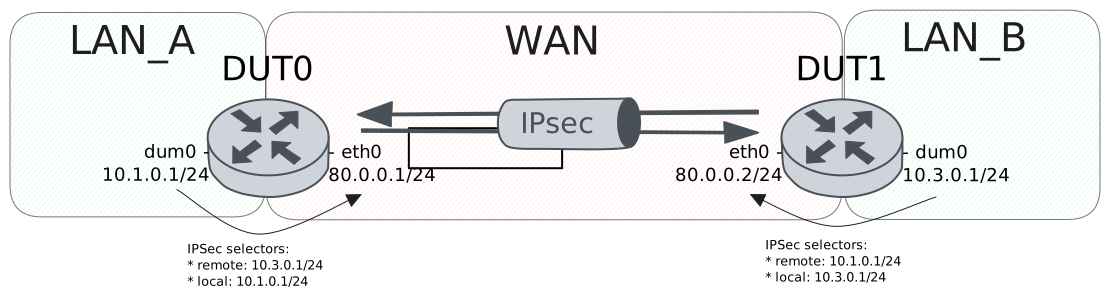
Test Site-To-Site With Basic Route Installation
Description
In this scenario, both devices install routes
for the VPN traffic in the main table.
Scenario
Step 1: Run the command protocols ip show route on DUT0 and check whether the output does not contain the following tokens:
K>* 10.3.0.0/24
Step 2: Set the following configuration in DUT0 :
set interfaces dummy dum0 address 10.1.0.1/24
set interfaces ethernet eth0 address 80.0.0.1/24
set system login user admin authentication encrypted-password '$6$GSjsCj8gHLv$/VcqU6FLi6CT2Oxn0MJQ2C2tqnRDrYKNF8HIYWJp68nvXvPdFccDsT04.WtigUONbKYrgKg8d6rEs8PjljMkH0'
set system vrf main
set vpn ipsec auth-profile AUTH-SA global-secrets ike-psk %any encrypted-secret U2FsdGVkX1/7OKhcY1LkAurTc906qNPo6zEY/Q6u6As=
set vpn ipsec auth-profile AUTH-SA local auth ike-psk id %any
set vpn ipsec auth-profile AUTH-SA remote auth ike-psk id %any
set vpn ipsec esp-group CHILD-SA mode tunnel
set vpn ipsec esp-group CHILD-SA proposal 1 encryption aes256gcm128
set vpn ipsec esp-group CHILD-SA proposal 1 pfs dh-group19
set vpn ipsec ike-group IKE-SA key-exchange ikev2
set vpn ipsec ike-group IKE-SA proposal 1 dh-group 19
set vpn ipsec ike-group IKE-SA proposal 1 encryption aes256gcm128
set vpn ipsec ike-group IKE-SA proposal 1 hash sha256
set vpn ipsec site-to-site peer PEER auth-profile AUTH-SA
set vpn ipsec site-to-site peer PEER connection-type respond
set vpn ipsec site-to-site peer PEER default-esp-group CHILD-SA
set vpn ipsec site-to-site peer PEER ike-group IKE-SA
set vpn ipsec site-to-site peer PEER local-address 80.0.0.1
set vpn ipsec site-to-site peer PEER remote-address 80.0.0.2
set vpn ipsec site-to-site peer PEER tunnel 1 install-routes main
set vpn ipsec site-to-site peer PEER tunnel 1 local prefix 10.1.0.0/24
set vpn ipsec site-to-site peer PEER tunnel 1 remote prefix 10.3.0.0/24
Step 3: Set the following configuration in DUT1 :
set interfaces dummy dum0 address 10.3.0.1/24
set interfaces ethernet eth0 address 80.0.0.2/24
set protocols static route 0.0.0.0/0 next-hop 80.0.0.1
set system login user admin authentication encrypted-password '$6$GSjsCj8gHLv$/VcqU6FLi6CT2Oxn0MJQ2C2tqnRDrYKNF8HIYWJp68nvXvPdFccDsT04.WtigUONbKYrgKg8d6rEs8PjljMkH0'
set system vrf main
set vpn ipsec auth-profile AUTH-SA global-secrets ike-psk %any encrypted-secret U2FsdGVkX19QUWOYKmFuywzP/xytQNzoDaKwSucsI0o=
set vpn ipsec auth-profile AUTH-SA local auth ike-psk id %any
set vpn ipsec auth-profile AUTH-SA remote auth ike-psk id %any
set vpn ipsec esp-group CHILD-SA mode tunnel
set vpn ipsec esp-group CHILD-SA proposal 1 encryption aes256gcm128
set vpn ipsec esp-group CHILD-SA proposal 1 pfs dh-group19
set vpn ipsec ike-group IKE-SA key-exchange ikev2
set vpn ipsec ike-group IKE-SA proposal 1 dh-group 19
set vpn ipsec ike-group IKE-SA proposal 1 encryption aes256gcm128
set vpn ipsec ike-group IKE-SA proposal 1 hash sha256
set vpn ipsec site-to-site peer PEER auth-profile AUTH-SA
set vpn ipsec site-to-site peer PEER connection-type initiate
set vpn ipsec site-to-site peer PEER default-esp-group CHILD-SA
set vpn ipsec site-to-site peer PEER ike-group IKE-SA
set vpn ipsec site-to-site peer PEER local-address 80.0.0.2
set vpn ipsec site-to-site peer PEER remote-address 80.0.0.1
set vpn ipsec site-to-site peer PEER tunnel 1 install-routes main
set vpn ipsec site-to-site peer PEER tunnel 1 local prefix 10.3.0.0/24
set vpn ipsec site-to-site peer PEER tunnel 1 remote prefix 10.1.0.0/24
Step 4: Ping the IP address 80.0.0.1 from DUT1:
admin@DUT1$ ping 80.0.0.1 count 1 size 56 timeout 1Show output
PING 80.0.0.1 (80.0.0.1) 56(84) bytes of data.
64 bytes from 80.0.0.1: icmp_seq=1 ttl=64 time=0.630 ms

--- 80.0.0.1 ping statistics ---
1 packets transmitted, 1 received, 0% packet loss, time 0ms
rtt min/avg/max/mdev = 0.630/0.630/0.630/0.000 ms
Step 5: Ping the IP address 80.0.0.2 from DUT0:
admin@DUT0$ ping 80.0.0.2 count 1 size 56 timeout 1Show output
PING 80.0.0.2 (80.0.0.2) 56(84) bytes of data.
64 bytes from 80.0.0.2: icmp_seq=1 ttl=64 time=0.497 ms

--- 80.0.0.2 ping statistics ---
1 packets transmitted, 1 received, 0% packet loss, time 0ms
rtt min/avg/max/mdev = 0.497/0.497/0.497/0.000 ms
Step 6: Run the command vpn ipsec show sa on DUT0 and check whether the output matches the following regular expressions:
peer-PEER-tunnel-\d+.+INSTALLEDShow output
vpn-peer-PEER: #1, ESTABLISHED, IKEv2, 909488f2b0334083_i 9955beecb679ff8c_r*
local  '80.0.0.1' @ 80.0.0.1[500]
remote '80.0.0.2' @ 80.0.0.2[500]
AES_GCM_16-256/PRF_HMAC_SHA2_256/ECP_256
established 1s ago, rekeying in 21009s
peer-PEER-tunnel-1: #1, reqid 1, INSTALLED, TUNNEL, ESP:AES_GCM_16-256
installed 1s ago, rekeying in 3399s, expires in 3959s
in  c3d4cd97,      0 bytes,     0 packets
out cc442e12,      0 bytes,     0 packets
local  10.1.0.0/24
remote 10.3.0.0/24
Step 7: Run the command protocols ip show route on DUT0 and check whether the output contains the following tokens:
K>* 10.3.0.0/24Show output
Codes: K - kernel route, C - connected, L - local, S - static,
R - RIP, O - OSPF, I - IS-IS, B - BGP, E - EIGRP, N - NHRP,
T - Table, v - VNC, V - VNC-Direct, A - Babel, F - PBR,
f - OpenFabric, t - Table-Direct,
> - selected route, * - FIB route, q - queued, r - rejected, b - backup
t - trapped, o - offload failure

IPv4 unicast VRF default:
C>* 10.1.0.0/24 is directly connected, dum0, weight 1, 00:00:07
L>* 10.1.0.1/32 is directly connected, dum0, weight 1, 00:00:07
K>* 10.3.0.0/24 [0/0] via 80.0.0.2, eth0, weight 1, 00:00:01
C>* 80.0.0.0/24 is directly connected, eth0, weight 1, 00:00:06
L>* 80.0.0.1/32 is directly connected, eth0, weight 1, 00:00:06
Step 8: Run the command vpn ipsec clear sa on DUT1 and expect the following output:
Show output
Closed tunnels: 1
Step 9: Run the command vpn ipsec initiate peer PEER on DUT1 and expect the following output:
Show output
Initiated tunnels: 1
Step 10: Ping the IP address 10.1.0.1 from DUT1:
admin@DUT1$ ping 10.1.0.1 local-address 10.3.0.1 count 1 size 56 timeout 1Show output
PING 10.1.0.1 (10.1.0.1) from 10.3.0.1 : 56(84) bytes of data.
64 bytes from 10.1.0.1: icmp_seq=1 ttl=64 time=0.647 ms

--- 10.1.0.1 ping statistics ---
1 packets transmitted, 1 received, 0% packet loss, time 0ms
rtt min/avg/max/mdev = 0.647/0.647/0.647/0.000 ms
Step 11: Initiate a tcp connection from DUT1 to DUT0 and exchange messages between both endpoints
admin@DUT0$ monitor test connection server 8080 tcp
admin@DUT1$ monitor test connection client 10.1.0.1 8080 tcp local-address 10.3.0.1
Step 12: Run the command vpn ipsec show sa on DUT0 and check whether the output matches the following regular expressions:
[1-9]\d? packetsShow output
vpn-peer-PEER: #2, ESTABLISHED, IKEv2, ca33bdea2c7041d0_i cb32ef689281b0d3_r*
local  '80.0.0.1' @ 80.0.0.1[500]
remote '80.0.0.2' @ 80.0.0.2[500]
AES_GCM_16-256/PRF_HMAC_SHA2_256/ECP_256
established 3s ago, rekeying in 17422s
peer-PEER-tunnel-1: #2, reqid 1, INSTALLED, TUNNEL, ESP:AES_GCM_16-256
installed 3s ago, rekeying in 3373s, expires in 3957s
in  c65795e2,    764 bytes,    12 packets,     1s ago
out cd57e7f9,    712 bytes,    11 packets,     1s ago
local  10.1.0.0/24
remote 10.3.0.0/24
Test Site-To-Site With VRF Route Installation
Description
In this scenario, DUT0 install reoutes
in a separate VRF called LAN.
Scenario
Step 1: Run the command protocols vrf LAN ip show route on DUT0 and check whether the output does not contain the following tokens:
K>* 10.3.0.0/24Show output
% VRF LAN not found
Step 2: Set the following configuration in DUT0 :
set interfaces dummy dum0 address 10.1.0.1/24
set interfaces dummy dum0 vrf LAN
set interfaces ethernet eth0 address 80.0.0.1/24
set interfaces ethernet eth0 vrf WAN
set protocols vrf WAN static route 10.1.0.0/24 next-hop-vrf LAN
set system login user admin authentication encrypted-password '$6$GSjsCj8gHLv$/VcqU6FLi6CT2Oxn0MJQ2C2tqnRDrYKNF8HIYWJp68nvXvPdFccDsT04.WtigUONbKYrgKg8d6rEs8PjljMkH0'
set system vrf LAN
set system vrf WAN
set vpn ipsec auth-profile AUTH-SA global-secrets ike-psk %any encrypted-secret U2FsdGVkX19wkMXVDl/o1EwcVoH84TIHGi2tJrXkryI=
set vpn ipsec auth-profile AUTH-SA local auth ike-psk id %any
set vpn ipsec auth-profile AUTH-SA remote auth ike-psk id %any
set vpn ipsec esp-group CHILD-SA mode tunnel
set vpn ipsec esp-group CHILD-SA proposal 1 encryption aes256gcm128
set vpn ipsec esp-group CHILD-SA proposal 1 pfs dh-group19
set vpn ipsec ike-group IKE-SA key-exchange ikev2
set vpn ipsec ike-group IKE-SA proposal 1 dh-group 19
set vpn ipsec ike-group IKE-SA proposal 1 encryption aes256gcm128
set vpn ipsec ike-group IKE-SA proposal 1 hash sha256
set vpn ipsec site-to-site peer PEER auth-profile AUTH-SA
set vpn ipsec site-to-site peer PEER connection-type respond
set vpn ipsec site-to-site peer PEER default-esp-group CHILD-SA
set vpn ipsec site-to-site peer PEER ike-group IKE-SA
set vpn ipsec site-to-site peer PEER local-address 80.0.0.1
set vpn ipsec site-to-site peer PEER local-vrf WAN
set vpn ipsec site-to-site peer PEER remote-address 80.0.0.2
set vpn ipsec site-to-site peer PEER tunnel 1 install-routes LAN
set vpn ipsec site-to-site peer PEER tunnel 1 local prefix 10.1.0.0/24
set vpn ipsec site-to-site peer PEER tunnel 1 remote prefix 10.3.0.0/24
Step 3: Set the following configuration in DUT1 :
set interfaces dummy dum0 address 10.3.0.1/24
set interfaces ethernet eth0 address 80.0.0.2/24
set protocols static route 0.0.0.0/0 next-hop 80.0.0.1
set system login user admin authentication encrypted-password '$6$GSjsCj8gHLv$/VcqU6FLi6CT2Oxn0MJQ2C2tqnRDrYKNF8HIYWJp68nvXvPdFccDsT04.WtigUONbKYrgKg8d6rEs8PjljMkH0'
set system vrf main
set vpn ipsec auth-profile AUTH-SA global-secrets ike-psk %any encrypted-secret U2FsdGVkX1+lNysfYiK28uRwYeJc+7LAJN4uy1C2mPQ=
set vpn ipsec auth-profile AUTH-SA local auth ike-psk id %any
set vpn ipsec auth-profile AUTH-SA remote auth ike-psk id %any
set vpn ipsec esp-group CHILD-SA mode tunnel
set vpn ipsec esp-group CHILD-SA proposal 1 encryption aes256gcm128
set vpn ipsec esp-group CHILD-SA proposal 1 pfs dh-group19
set vpn ipsec ike-group IKE-SA key-exchange ikev2
set vpn ipsec ike-group IKE-SA proposal 1 dh-group 19
set vpn ipsec ike-group IKE-SA proposal 1 encryption aes256gcm128
set vpn ipsec ike-group IKE-SA proposal 1 hash sha256
set vpn ipsec site-to-site peer PEER auth-profile AUTH-SA
set vpn ipsec site-to-site peer PEER connection-type initiate
set vpn ipsec site-to-site peer PEER default-esp-group CHILD-SA
set vpn ipsec site-to-site peer PEER ike-group IKE-SA
set vpn ipsec site-to-site peer PEER local-address 80.0.0.2
set vpn ipsec site-to-site peer PEER remote-address 80.0.0.1
set vpn ipsec site-to-site peer PEER tunnel 1 install-routes main
set vpn ipsec site-to-site peer PEER tunnel 1 local prefix 10.3.0.0/24
set vpn ipsec site-to-site peer PEER tunnel 1 remote prefix 10.1.0.0/24
Step 4: Ping the IP address 80.0.0.1 from DUT1:
admin@DUT1$ ping 80.0.0.1 count 1 size 56 timeout 1Show output
PING 80.0.0.1 (80.0.0.1) 56(84) bytes of data.
64 bytes from 80.0.0.1: icmp_seq=1 ttl=64 time=0.434 ms

--- 80.0.0.1 ping statistics ---
1 packets transmitted, 1 received, 0% packet loss, time 0ms
rtt min/avg/max/mdev = 0.434/0.434/0.434/0.000 ms
Step 5: Ping the IP address 80.0.0.2 from DUT0:
admin@DUT0$ ping 80.0.0.2 vrf WAN count 1 size 56 timeout 1Show output
ping: Warning: source address might be selected on device other than: WAN
PING 80.0.0.2 (80.0.0.2) from 80.0.0.1 WAN: 56(84) bytes of data.
64 bytes from 80.0.0.2: icmp_seq=1 ttl=64 time=0.316 ms

--- 80.0.0.2 ping statistics ---
1 packets transmitted, 1 received, 0% packet loss, time 0ms
rtt min/avg/max/mdev = 0.316/0.316/0.316/0.000 ms
Step 6: Run the command vpn ipsec show sa on DUT0 and check whether the output matches the following regular expressions:
peer-PEER-tunnel-\d+.+INSTALLEDShow output
vpn-peer-PEER: #1, ESTABLISHED, IKEv2, 477a0b4617fea88b_i c0fd879778212dfb_r*
local  '80.0.0.1' @ 80.0.0.1[500]
remote '80.0.0.2' @ 80.0.0.2[500]
AES_GCM_16-256/PRF_HMAC_SHA2_256/ECP_256
established 0s ago, rekeying in 21960s
peer-PEER-tunnel-1: #1, reqid 1, INSTALLED, TUNNEL, ESP:AES_GCM_16-256
installed 0s ago, rekeying in 3295s, expires in 3960s
in  c2e735e7,      0 bytes,     0 packets
out c27cccdb,      0 bytes,     0 packets
local  10.1.0.0/24
remote 10.3.0.0/24
Step 7: Run the command protocols vrf LAN ip show route on DUT0 and check whether the output contains the following tokens:
K>* 10.3.0.0/24Show output
Codes: K - kernel route, C - connected, L - local, S - static,
R - RIP, O - OSPF, I - IS-IS, B - BGP, E - EIGRP, N - NHRP,
T - Table, v - VNC, V - VNC-Direct, A - Babel, F - PBR,
f - OpenFabric, t - Table-Direct,
> - selected route, * - FIB route, q - queued, r - rejected, b - backup
t - trapped, o - offload failure

IPv4 unicast VRF LAN:
K>* 0.0.0.0/0 [255/8192] unreachable (ICMP unreachable), weight 1, 00:00:06
C>* 10.1.0.0/24 is directly connected, dum0, weight 1, 00:00:06
L>* 10.1.0.1/32 is directly connected, dum0, weight 1, 00:00:06
K>* 10.3.0.0/24 [0/0] via 80.0.0.2, eth0 (vrf WAN), weight 1, 00:00:00
K>* 127.0.0.0/8 [0/0] is directly connected, LAN, weight 1, 00:00:06
Step 8: Run the command vpn ipsec clear sa on DUT1 and expect the following output:
Show output
Closed tunnels: 1
Step 9: Run the command vpn ipsec initiate peer PEER on DUT1 and expect the following output:
Show output
Initiated tunnels: 1
Step 10: Ping the IP address 10.1.0.1 from DUT1:
admin@DUT1$ ping 10.1.0.1 local-address 10.3.0.1 count 1 size 56 timeout 1Show output
PING 10.1.0.1 (10.1.0.1) from 10.3.0.1 : 56(84) bytes of data.
64 bytes from 10.1.0.1: icmp_seq=1 ttl=64 time=0.663 ms

--- 10.1.0.1 ping statistics ---
1 packets transmitted, 1 received, 0% packet loss, time 0ms
rtt min/avg/max/mdev = 0.663/0.663/0.663/0.000 ms
Step 11: Initiate a tcp connection from DUT1 to DUT0 and exchange messages between both endpoints
admin@DUT0$ monitor test connection server 8080 tcp vrf LAN
admin@DUT1$ monitor test connection client 10.1.0.1 8080 tcp local-address 10.3.0.1
Step 12: Run the command vpn ipsec show sa on DUT0 and check whether the output matches the following regular expressions:
[1-9]\d? packetsShow output
vpn-peer-PEER: #2, ESTABLISHED, IKEv2, 8df667cf98d215f9_i 655d4ec0c232f4e2_r*
local  '80.0.0.1' @ 80.0.0.1[500]
remote '80.0.0.2' @ 80.0.0.2[500]
AES_GCM_16-256/PRF_HMAC_SHA2_256/ECP_256
established 3s ago, rekeying in 19967s
peer-PEER-tunnel-1: #2, reqid 1, INSTALLED, TUNNEL, ESP:AES_GCM_16-256
installed 3s ago, rekeying in 3346s, expires in 3957s
in  c58eb305,    712 bytes,    11 packets,     0s ago
out cf086c87,    712 bytes,    11 packets,     0s ago
local  10.1.0.0/24
remote 10.3.0.0/24
Test Site-To-Site With Route Installation And Metrics
Description
In this scenario, DUT0 installs routes with
differents metrics for both IPsec peers. The point is
to check if the routes are installed correctly and most
importantly, whenever the prioritized route is down, the
backup route is used.
Scenario
Step 1: Run the command protocols ip show route on DUT0 and check whether the output does not contain the following tokens:
K>* 10.3.0.0/24
Step 2: Set the following configuration in DUT0 :
set interfaces dummy dum0 address 10.1.0.1/24
set interfaces ethernet eth0 address 80.0.0.1/24
set interfaces ethernet eth1 address 90.0.0.1/24
set system login user admin authentication encrypted-password '$6$GSjsCj8gHLv$/VcqU6FLi6CT2Oxn0MJQ2C2tqnRDrYKNF8HIYWJp68nvXvPdFccDsT04.WtigUONbKYrgKg8d6rEs8PjljMkH0'
set system vrf main
set vpn ipsec auth-profile AUTH-SA global-secrets ike-psk %any encrypted-secret U2FsdGVkX1+13G5oz9yx6YCquLaZyLdA8npXv5BgukI=
set vpn ipsec auth-profile AUTH-SA local auth ike-psk id %any
set vpn ipsec auth-profile AUTH-SA remote auth ike-psk id %any
set vpn ipsec esp-group CHILD-SA mode tunnel
set vpn ipsec esp-group CHILD-SA proposal 1 encryption aes256gcm128
set vpn ipsec esp-group CHILD-SA proposal 1 pfs dh-group19
set vpn ipsec ike-group IKE-SA key-exchange ikev2
set vpn ipsec ike-group IKE-SA proposal 1 dh-group 19
set vpn ipsec ike-group IKE-SA proposal 1 encryption aes256gcm128
set vpn ipsec ike-group IKE-SA proposal 1 hash sha256
set vpn ipsec logging log-types any log-level 2
set vpn ipsec site-to-site peer PEER auth-profile AUTH-SA
set vpn ipsec site-to-site peer PEER connection-type respond
set vpn ipsec site-to-site peer PEER default-esp-group CHILD-SA
set vpn ipsec site-to-site peer PEER ike-group IKE-SA
set vpn ipsec site-to-site peer PEER local-address 80.0.0.1
set vpn ipsec site-to-site peer PEER remote-address 80.0.0.2
set vpn ipsec site-to-site peer PEER tunnel 1 install-routes main
set vpn ipsec site-to-site peer PEER tunnel 1 local prefix 10.1.0.0/24
set vpn ipsec site-to-site peer PEER tunnel 1 remote prefix 10.3.0.0/24
set vpn ipsec site-to-site peer PEER tunnel 1 route-priority 10
set vpn ipsec site-to-site peer PEER1 auth-profile AUTH-SA
set vpn ipsec site-to-site peer PEER1 connection-type respond
set vpn ipsec site-to-site peer PEER1 default-esp-group CHILD-SA
set vpn ipsec site-to-site peer PEER1 ike-group IKE-SA
set vpn ipsec site-to-site peer PEER1 local-address 90.0.0.1
set vpn ipsec site-to-site peer PEER1 remote-address 90.0.0.3
set vpn ipsec site-to-site peer PEER1 tunnel 1 install-routes main
set vpn ipsec site-to-site peer PEER1 tunnel 1 local prefix 10.1.0.0/24
set vpn ipsec site-to-site peer PEER1 tunnel 1 remote prefix 10.3.0.0/24
set vpn ipsec site-to-site peer PEER1 tunnel 1 route-priority 100
Step 3: Set the following configuration in DUT1 :
set interfaces dummy dum0 address 10.3.0.1/24
set interfaces ethernet eth0 address 80.0.0.2/24
set protocols static route 0.0.0.0/0 next-hop 80.0.0.1
set system login user admin authentication encrypted-password '$6$GSjsCj8gHLv$/VcqU6FLi6CT2Oxn0MJQ2C2tqnRDrYKNF8HIYWJp68nvXvPdFccDsT04.WtigUONbKYrgKg8d6rEs8PjljMkH0'
set system vrf main
set vpn ipsec auth-profile AUTH-SA global-secrets ike-psk %any encrypted-secret U2FsdGVkX19Ym64CJRQarqeOLUcYGerl1oWSQtx9V4U=
set vpn ipsec auth-profile AUTH-SA local auth ike-psk id %any
set vpn ipsec auth-profile AUTH-SA remote auth ike-psk id %any
set vpn ipsec esp-group CHILD-SA mode tunnel
set vpn ipsec esp-group CHILD-SA proposal 1 encryption aes256gcm128
set vpn ipsec esp-group CHILD-SA proposal 1 pfs dh-group19
set vpn ipsec ike-group IKE-SA key-exchange ikev2
set vpn ipsec ike-group IKE-SA proposal 1 dh-group 19
set vpn ipsec ike-group IKE-SA proposal 1 encryption aes256gcm128
set vpn ipsec ike-group IKE-SA proposal 1 hash sha256
set vpn ipsec site-to-site peer PEER auth-profile AUTH-SA
set vpn ipsec site-to-site peer PEER connection-type initiate
set vpn ipsec site-to-site peer PEER default-esp-group CHILD-SA
set vpn ipsec site-to-site peer PEER ike-group IKE-SA
set vpn ipsec site-to-site peer PEER local-address 80.0.0.2
set vpn ipsec site-to-site peer PEER remote-address 80.0.0.1
set vpn ipsec site-to-site peer PEER tunnel 1 install-routes main
set vpn ipsec site-to-site peer PEER tunnel 1 local prefix 10.3.0.0/24
set vpn ipsec site-to-site peer PEER tunnel 1 remote prefix 10.1.0.0/24
Step 4: Set the following configuration in DUT2 :
set interfaces dummy dum0 address 10.3.0.1/24
set interfaces ethernet eth1 address 90.0.0.3/24
set protocols static route 0.0.0.0/0 next-hop 90.0.0.1
set system login user admin authentication encrypted-password '$6$GSjsCj8gHLv$/VcqU6FLi6CT2Oxn0MJQ2C2tqnRDrYKNF8HIYWJp68nvXvPdFccDsT04.WtigUONbKYrgKg8d6rEs8PjljMkH0'
set vpn ipsec auth-profile AUTH-SA global-secrets ike-psk %any encrypted-secret U2FsdGVkX1+efSr73mvc0/sP0cTNHEMI1mBUXcQUN70=
set vpn ipsec auth-profile AUTH-SA local auth ike-psk id %any
set vpn ipsec auth-profile AUTH-SA remote auth ike-psk id %any
set vpn ipsec esp-group CHILD-SA mode tunnel
set vpn ipsec esp-group CHILD-SA proposal 1 encryption aes256gcm128
set vpn ipsec esp-group CHILD-SA proposal 1 pfs dh-group19
set vpn ipsec ike-group IKE-SA key-exchange ikev2
set vpn ipsec ike-group IKE-SA proposal 1 dh-group 19
set vpn ipsec ike-group IKE-SA proposal 1 encryption aes256gcm128
set vpn ipsec ike-group IKE-SA proposal 1 hash sha256
set vpn ipsec site-to-site peer PEER auth-profile AUTH-SA
set vpn ipsec site-to-site peer PEER connection-type initiate
set vpn ipsec site-to-site peer PEER default-esp-group CHILD-SA
set vpn ipsec site-to-site peer PEER ike-group IKE-SA
set vpn ipsec site-to-site peer PEER local-address 90.0.0.3
set vpn ipsec site-to-site peer PEER remote-address 90.0.0.1
set vpn ipsec site-to-site peer PEER tunnel 1 local prefix 10.3.0.0/24
set vpn ipsec site-to-site peer PEER tunnel 1 remote prefix 10.1.0.0/24
Step 5: Ping the IP address 80.0.0.1 from DUT1:
admin@DUT1$ ping 80.0.0.1 count 1 size 56 timeout 1Show output
PING 80.0.0.1 (80.0.0.1) 56(84) bytes of data.
64 bytes from 80.0.0.1: icmp_seq=1 ttl=64 time=0.536 ms

--- 80.0.0.1 ping statistics ---
1 packets transmitted, 1 received, 0% packet loss, time 0ms
rtt min/avg/max/mdev = 0.536/0.536/0.536/0.000 ms
Step 6: Ping the IP address 80.0.0.2 from DUT0:
admin@DUT0$ ping 80.0.0.2 count 1 size 56 timeout 1Show output
PING 80.0.0.2 (80.0.0.2) 56(84) bytes of data.
64 bytes from 80.0.0.2: icmp_seq=1 ttl=64 time=0.340 ms

--- 80.0.0.2 ping statistics ---
1 packets transmitted, 1 received, 0% packet loss, time 0ms
rtt min/avg/max/mdev = 0.340/0.340/0.340/0.000 ms
Step 7: Ping the IP address 90.0.0.3 from DUT2:
admin@DUT2$ ping 90.0.0.3 count 1 size 56 timeout 1Show output
PING 90.0.0.3 (90.0.0.3) 56(84) bytes of data.
64 bytes from 90.0.0.3: icmp_seq=1 ttl=64 time=0.036 ms

--- 90.0.0.3 ping statistics ---
1 packets transmitted, 1 received, 0% packet loss, time 0ms
rtt min/avg/max/mdev = 0.036/0.036/0.036/0.000 ms
Step 8: Run the command vpn ipsec show sa on DUT0 and check whether the output matches the following regular expressions:
peer-PEER-tunnel-\d+.+INSTALLEDShow output
vpn-peer-PEER1: #2, ESTABLISHED, IKEv2, 7c945c4d2410df06_i a2bddf1669b8bc07_r*
local  '90.0.0.1' @ 90.0.0.1[500]
remote '90.0.0.3' @ 90.0.0.3[500]
AES_GCM_16-256/PRF_HMAC_SHA2_256/ECP_256
established 1s ago, rekeying in 22853s
peer-PEER1-tunnel-1: #2, reqid 1, INSTALLED, TUNNEL, ESP:AES_GCM_16-256
installed 1s ago, rekeying in 3297s, expires in 3959s
in  c0ae0885,      0 bytes,     0 packets
out cd6fb4da,      0 bytes,     0 packets
local  10.1.0.0/24
remote 10.3.0.0/24
vpn-peer-PEER: #1, ESTABLISHED, IKEv2, 37f937d96ab14192_i c7374751183ecf8e_r*
local  '80.0.0.1' @ 80.0.0.1[500]
remote '80.0.0.2' @ 80.0.0.2[500]
AES_GCM_16-256/PRF_HMAC_SHA2_256/ECP_256
established 6s ago, rekeying in 14238s
peer-PEER-tunnel-1: #1, reqid 1, INSTALLED, TUNNEL, ESP:AES_GCM_16-256
installed 6s ago, rekeying in 3264s, expires in 3954s
in  c25217d1,      0 bytes,     0 packets
out c6c6a284,      0 bytes,     0 packets
local  10.1.0.0/24
remote 10.3.0.0/24
Step 9: Run the command protocols ip show route on DUT0 and check whether the output contains the following tokens:
K>* 10.3.0.0/24Show output
Codes: K - kernel route, C - connected, L - local, S - static,
R - RIP, O - OSPF, I - IS-IS, B - BGP, E - EIGRP, N - NHRP,
T - Table, v - VNC, V - VNC-Direct, A - Babel, F - PBR,
f - OpenFabric, t - Table-Direct,
> - selected route, * - FIB route, q - queued, r - rejected, b - backup
t - trapped, o - offload failure

IPv4 unicast VRF default:
C>* 10.1.0.0/24 is directly connected, dum0, weight 1, 00:00:11
L>* 10.1.0.1/32 is directly connected, dum0, weight 1, 00:00:11
K * 10.3.0.0/24 [0/100] via 90.0.0.3, eth1, weight 1, 00:00:01
K>* 10.3.0.0/24 [0/10] via 80.0.0.2, eth0, weight 1, 00:00:06
C>* 80.0.0.0/24 is directly connected, eth0, weight 1, 00:00:11
L>* 80.0.0.1/32 is directly connected, eth0, weight 1, 00:00:11
C>* 90.0.0.0/24 is directly connected, eth1, weight 1, 00:00:11
L>* 90.0.0.1/32 is directly connected, eth1, weight 1, 00:00:11
Step 10: Run the command show system route ip on DUT0 and check whether the output contains the following tokens:
10.3.0.0/24 via 90.0.0.3 dev eth1 proto static metric 100
10.3.0.0/24 via 80.0.0.2 dev eth0 proto static metric 10
Show output
10.1.0.0/24 dev dum0 proto kernel scope link src 10.1.0.1
10.3.0.0/24 via 80.0.0.2 dev eth0 proto static metric 10
10.3.0.0/24 via 90.0.0.3 dev eth1 proto static metric 100
80.0.0.0/24 dev eth0 proto kernel scope link src 80.0.0.1
90.0.0.0/24 dev eth1 proto kernel scope link src 90.0.0.1
Note
The tunnel with the lowest metric configured in the route-priority parameter should be the one used to route the traffic.
Step 11: Run the command vpn ipsec clear sa on DUT1 and expect the following output:
Show output
Closed tunnels: 1
Step 12: Run the command vpn ipsec initiate peer PEER on DUT1 and expect the following output:
Show output
Initiated tunnels: 1
Step 13: Ping the IP address 10.1.0.1 from DUT1:
admin@DUT1$ ping 10.1.0.1 local-address 10.3.0.1 count 1 size 56 timeout 1Show output
PING 10.1.0.1 (10.1.0.1) from 10.3.0.1 : 56(84) bytes of data.
64 bytes from 10.1.0.1: icmp_seq=1 ttl=64 time=0.493 ms

--- 10.1.0.1 ping statistics ---
1 packets transmitted, 1 received, 0% packet loss, time 0ms
rtt min/avg/max/mdev = 0.493/0.493/0.493/0.000 ms
Step 14: Initiate a tcp connection from DUT1 to DUT0 and exchange messages between both endpoints
admin@DUT0$ monitor test connection server 8080 tcp
admin@DUT1$ monitor test connection client 10.1.0.1 8080 tcp local-address 10.3.0.1
Step 15: Run the command vpn ipsec show sa on DUT0 and check whether the output matches the following regular expressions:
[1-9]\d? packetsShow output
vpn-peer-PEER: #3, ESTABLISHED, IKEv2, 16ac8d12a85d552d_i 6257cb89a3c6bfa5_r*
local  '80.0.0.1' @ 80.0.0.1[500]
remote '80.0.0.2' @ 80.0.0.2[500]
AES_GCM_16-256/PRF_HMAC_SHA2_256/ECP_256
established 2s ago, rekeying in 14989s
peer-PEER-tunnel-1: #3, reqid 1, INSTALLED, TUNNEL, ESP:AES_GCM_16-256
installed 2s ago, rekeying in 3440s, expires in 3958s
in  c9380539,    712 bytes,    11 packets,     1s ago
out ce3224aa,    660 bytes,    10 packets,     1s ago
local  10.1.0.0/24
remote 10.3.0.0/24
vpn-peer-PEER1: #2, ESTABLISHED, IKEv2, 7c945c4d2410df06_i a2bddf1669b8bc07_r*
local  '90.0.0.1' @ 90.0.0.1[500]
remote '90.0.0.3' @ 90.0.0.3[500]
AES_GCM_16-256/PRF_HMAC_SHA2_256/ECP_256
established 4s ago, rekeying in 22850s
peer-PEER1-tunnel-1: #2, reqid 1, INSTALLED, TUNNEL, ESP:AES_GCM_16-256
installed 4s ago, rekeying in 3294s, expires in 3956s
in  c0ae0885,      0 bytes,     0 packets
out cd6fb4da,      0 bytes,     0 packets
local  10.1.0.0/24
remote 10.3.0.0/24
Note
Now we will shutdown the tunnel with the lowest metric from DUT1 and check if the traffic is routed through the backup tunnel.
Step 16: Run the command vpn ipsec clear sa on DUT1 and expect the following output:
Show output
Closed tunnels: 1
Step 17: Run the command vpn ipsec clear sa on DUT2 and expect the following output:
Show output
Closed tunnels: 1
Step 18: Run the command vpn ipsec initiate peer PEER on DUT2 and expect the following output:
Show output
Initiated tunnels: 1
Step 19: Ping the IP address 10.1.0.1 from DUT2:
admin@DUT2$ ping 10.1.0.1 local-address 10.3.0.1 count 1 size 56 timeout 1Show output
PING 10.1.0.1 (10.1.0.1) from 10.3.0.1 : 56(84) bytes of data.
64 bytes from 10.1.0.1: icmp_seq=1 ttl=64 time=0.874 ms

--- 10.1.0.1 ping statistics ---
1 packets transmitted, 1 received, 0% packet loss, time 0ms
rtt min/avg/max/mdev = 0.874/0.874/0.874/0.000 ms
Step 20: Initiate a tcp connection from DUT2 to DUT0 and exchange messages between both endpoints
admin@DUT0$ monitor test connection server 8080 tcp
admin@DUT2$ monitor test connection client 10.1.0.1 8080 tcp local-address 10.3.0.1
Step 21: Run the command vpn ipsec show sa on DUT0 and check whether the output matches the following regular expressions:
[1-9]\d? packetsShow output
vpn-peer-PEER1: #4, ESTABLISHED, IKEv2, 5e5461f21f4f632b_i 6c82e8f4ade39d8c_r*
local  '90.0.0.1' @ 90.0.0.1[500]
remote '90.0.0.3' @ 90.0.0.3[500]
AES_GCM_16-256/PRF_HMAC_SHA2_256/ECP_256
established 3s ago, rekeying in 15842s
peer-PEER1-tunnel-1: #4, reqid 1, INSTALLED, TUNNEL, ESP:AES_GCM_16-256
installed 3s ago, rekeying in 3246s, expires in 3957s
in  c78c2a9c,    712 bytes,    11 packets,     0s ago
out c609e995,    712 bytes,    11 packets,     0s ago
local  10.1.0.0/24
remote 10.3.0.0/24
Step 22: Run the command show system route ip on DUT0 and check whether the output contains the following tokens:
10.3.0.0/24 via 90.0.0.3 dev eth1 proto static metric 100Show output
10.1.0.0/24 dev dum0 proto kernel scope link src 10.1.0.1
10.3.0.0/24 via 90.0.0.3 dev eth1 proto static metric 100
80.0.0.0/24 dev eth0 proto kernel scope link src 80.0.0.1
90.0.0.0/24 dev eth1 proto kernel scope link src 90.0.0.1
Step 23: Run the command show system route ip on DUT0 and check whether the output does not contain the following tokens:
10.3.0.0/24 via 80.0.0.2 dev eth0 proto static metric 10Show output
10.1.0.0/24 dev dum0 proto kernel scope link src 10.1.0.1
10.3.0.0/24 via 90.0.0.3 dev eth1 proto static metric 100
80.0.0.0/24 dev eth0 proto kernel scope link src 80.0.0.1
90.0.0.0/24 dev eth1 proto kernel scope link src 90.0.0.1