Same-Remote
This scenario shows how to configure a VPN responder that can receive incoming connections from the same virtual IP address.
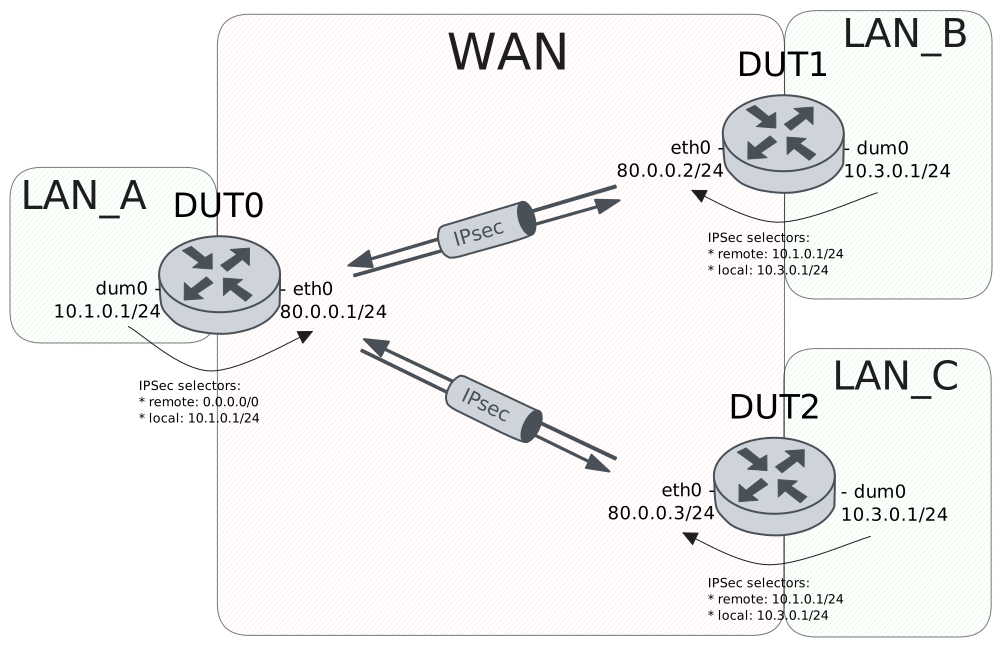
Test Site-To-Site With Same Remote Address
Description
VPN site-to-site configuration to connect two subnets to an end-point using the same virtual IP address.
Scenario
Attention
In order to make this scenario work, the device needs a way to respond and reinject traffic through the appropriate VPN tunnel. This can be achieved by copying the packet mark into the conntrack mark and restoring it later. Therefore, the following configuration lines are needed:
Show output
set vpn ipsec esp-group CHILD-SA mark-in unique
set vpn ipsec esp-group CHILD-SA mark-out unique
set traffic policy IN_MARK_TO_FLOW rule 1 copy mark connmark
set traffic policy OUT_FLOW_TO_MARK rule 1 copy connmark mark
set interfaces eth0 traffic policy in IN_MARK_TO_FLOW
set interfaces dum0 traffic policy local-out OUT_FLOW_TO_MARK
Step 1: Set the following configuration in DUT0 :
set interfaces dummy dum0 address 10.1.0.1/24
set interfaces dummy dum0 traffic policy local-out OUT_FLOW_TO_MARK
set interfaces ethernet eth0 address 80.0.0.1/24
set interfaces ethernet eth0 traffic policy in IN_MARK_TO_FLOW
set protocols static route 0.0.0.0/0 interface dum0
set system login user admin authentication encrypted-password '$6$GSjsCj8gHLv$/VcqU6FLi6CT2Oxn0MJQ2C2tqnRDrYKNF8HIYWJp68nvXvPdFccDsT04.WtigUONbKYrgKg8d6rEs8PjljMkH0'
set traffic policy IN_MARK_TO_FLOW rule 1 copy mark connmark
set traffic policy OUT_FLOW_TO_MARK rule 1 copy connmark mark
set vpn ipsec auth-profile AUTH-SA global-secrets ike-psk %any encrypted-secret U2FsdGVkX1/2oP9RG+Lk/RWoACERbJ5MCn0+EAGKFT4=
set vpn ipsec auth-profile AUTH-SA local auth ike-psk id %any
set vpn ipsec auth-profile AUTH-SA remote auth ike-psk id %any
set vpn ipsec esp-group CHILD-SA mark-in unique
set vpn ipsec esp-group CHILD-SA mark-out unique
set vpn ipsec esp-group CHILD-SA proposal 1 encryption aes256gcm128
set vpn ipsec esp-group CHILD-SA proposal 1 pfs dh-group19
set vpn ipsec ike-group IKE-SA key-exchange ikev2
set vpn ipsec ike-group IKE-SA proposal 1 dh-group 19
set vpn ipsec ike-group IKE-SA proposal 1 encryption aes256gcm128
set vpn ipsec ike-group IKE-SA proposal 1 hash sha256
set vpn ipsec site-to-site peer PEER auth-profile AUTH-SA
set vpn ipsec site-to-site peer PEER connection-type respond
set vpn ipsec site-to-site peer PEER default-esp-group CHILD-SA
set vpn ipsec site-to-site peer PEER ike-group IKE-SA
set vpn ipsec site-to-site peer PEER local-address 80.0.0.1
set vpn ipsec site-to-site peer PEER tunnel 1 local prefix 10.1.0.0/24
set vpn ipsec site-to-site peer PEER tunnel 1 local-interface dum0
set vpn ipsec site-to-site peer PEER tunnel 1 remote prefix 0.0.0.0/0
Step 2: Set the following configuration in DUT1 :
set interfaces dummy dum0 address 10.3.0.1/24
set interfaces ethernet eth0 address 80.0.0.2/24
set protocols static route 0.0.0.0/0 next-hop 80.0.0.1
set system login user admin authentication encrypted-password '$6$GSjsCj8gHLv$/VcqU6FLi6CT2Oxn0MJQ2C2tqnRDrYKNF8HIYWJp68nvXvPdFccDsT04.WtigUONbKYrgKg8d6rEs8PjljMkH0'
set vpn ipsec auth-profile AUTH-SA global-secrets ike-psk %any encrypted-secret U2FsdGVkX1/87HEh67Ru7JP1YWz+P0kmpC7O+8Kf3Po=
set vpn ipsec auth-profile AUTH-SA local auth ike-psk id %any
set vpn ipsec auth-profile AUTH-SA remote auth ike-psk id %any
set vpn ipsec esp-group CHILD-SA proposal 1 encryption aes256gcm128
set vpn ipsec esp-group CHILD-SA proposal 1 pfs dh-group19
set vpn ipsec ike-group IKE-SA key-exchange ikev2
set vpn ipsec ike-group IKE-SA proposal 1 dh-group 19
set vpn ipsec ike-group IKE-SA proposal 1 encryption aes256gcm128
set vpn ipsec ike-group IKE-SA proposal 1 hash sha256
set vpn ipsec site-to-site peer PEER auth-profile AUTH-SA
set vpn ipsec site-to-site peer PEER connection-type initiate
set vpn ipsec site-to-site peer PEER default-esp-group CHILD-SA
set vpn ipsec site-to-site peer PEER ike-group IKE-SA
set vpn ipsec site-to-site peer PEER local-address 80.0.0.2
set vpn ipsec site-to-site peer PEER remote-address 80.0.0.1
set vpn ipsec site-to-site peer PEER tunnel 1 local prefix 10.3.0.0/24
set vpn ipsec site-to-site peer PEER tunnel 1 remote prefix 10.1.0.0/24
Step 3: Set the following configuration in DUT2 :
set interfaces dummy dum0 address 10.3.0.1/24
set interfaces ethernet eth0 address 80.0.0.3/24
set protocols static route 0.0.0.0/0 next-hop 80.0.0.1
set system login user admin authentication encrypted-password '$6$GSjsCj8gHLv$/VcqU6FLi6CT2Oxn0MJQ2C2tqnRDrYKNF8HIYWJp68nvXvPdFccDsT04.WtigUONbKYrgKg8d6rEs8PjljMkH0'
set vpn ipsec auth-profile AUTH-SA global-secrets ike-psk %any encrypted-secret U2FsdGVkX18VzSFN0eYSOwv7G1xzezl0uTzalO97se8=
set vpn ipsec auth-profile AUTH-SA local auth ike-psk id %any
set vpn ipsec auth-profile AUTH-SA remote auth ike-psk id %any
set vpn ipsec esp-group CHILD-SA proposal 1 encryption aes256gcm128
set vpn ipsec esp-group CHILD-SA proposal 1 pfs dh-group19
set vpn ipsec ike-group IKE-SA key-exchange ikev2
set vpn ipsec ike-group IKE-SA proposal 1 dh-group 19
set vpn ipsec ike-group IKE-SA proposal 1 encryption aes256gcm128
set vpn ipsec ike-group IKE-SA proposal 1 hash sha256
set vpn ipsec site-to-site peer PEER auth-profile AUTH-SA
set vpn ipsec site-to-site peer PEER connection-type initiate
set vpn ipsec site-to-site peer PEER default-esp-group CHILD-SA
set vpn ipsec site-to-site peer PEER ike-group IKE-SA
set vpn ipsec site-to-site peer PEER local-address 80.0.0.3
set vpn ipsec site-to-site peer PEER remote-address 80.0.0.1
set vpn ipsec site-to-site peer PEER tunnel 1 local prefix 10.3.0.0/24
set vpn ipsec site-to-site peer PEER tunnel 1 remote prefix 10.1.0.0/24
Step 4: Ping the IP address 80.0.0.2 from DUT0:
admin@DUT0$ ping 80.0.0.2 count 1 size 56 timeout 1Show output
PING 80.0.0.2 (80.0.0.2) 56(84) bytes of data.
64 bytes from 80.0.0.2: icmp_seq=1 ttl=64 time=0.655 ms

--- 80.0.0.2 ping statistics ---
1 packets transmitted, 1 received, 0% packet loss, time 0ms
rtt min/avg/max/mdev = 0.655/0.655/0.655/0.000 ms
Step 5: Ping the IP address 80.0.0.3 from DUT0:
admin@DUT0$ ping 80.0.0.3 count 1 size 56 timeout 1Show output
PING 80.0.0.3 (80.0.0.3) 56(84) bytes of data.
64 bytes from 80.0.0.3: icmp_seq=1 ttl=64 time=0.276 ms

--- 80.0.0.3 ping statistics ---
1 packets transmitted, 1 received, 0% packet loss, time 0ms
rtt min/avg/max/mdev = 0.276/0.276/0.276/0.000 ms
Step 6: Run the command vpn ipsec show sa on DUT0 and check whether the output contains the following tokens:
80.0.0.2
80.0.0.3
Show output
vpn-peer-PEER: #2, ESTABLISHED, IKEv2, b01f27cc64c559be_i 007dce06ebba20d2_r*
local  '80.0.0.1' @ 80.0.0.1[500]
remote '80.0.0.3' @ 80.0.0.3[500]
AES_GCM_16-256/PRF_HMAC_SHA2_256/ECP_256
established 0s ago, rekeying in 25911s
peer-PEER-tunnel-1: #2, reqid 2, INSTALLED, TUNNEL, ESP:AES_GCM_16-256
installed 0s ago, rekeying in 3363s, expires in 3960s
in  ce0562aa (0x00000002),      0 bytes,     0 packets
out c7f23051 (0x00000002),      0 bytes,     0 packets
local  10.1.0.0/24
remote 10.3.0.0/24
vpn-peer-PEER: #1, ESTABLISHED, IKEv2, 7193e65e8b85b7c8_i bef363a001ced6d9_r*
local  '80.0.0.1' @ 80.0.0.1[500]
remote '80.0.0.2' @ 80.0.0.2[500]
AES_GCM_16-256/PRF_HMAC_SHA2_256/ECP_256
established 3s ago, rekeying in 13823s
peer-PEER-tunnel-1: #1, reqid 1, INSTALLED, TUNNEL, ESP:AES_GCM_16-256
installed 3s ago, rekeying in 3460s, expires in 3957s
in  ceabeda2 (0x00000001),      0 bytes,     0 packets
out c1394d1c (0x00000001),      0 bytes,     0 packets
local  10.1.0.0/24
remote 10.3.0.0/24
Step 7: Ping the IP address 10.1.0.1 from DUT1:
admin@DUT1$ ping 10.1.0.1 local-address 10.3.0.1 count 1 size 56 timeout 1Show output
PING 10.1.0.1 (10.1.0.1) from 10.3.0.1 : 56(84) bytes of data.
64 bytes from 10.1.0.1: icmp_seq=1 ttl=64 time=0.765 ms

--- 10.1.0.1 ping statistics ---
1 packets transmitted, 1 received, 0% packet loss, time 0ms
rtt min/avg/max/mdev = 0.765/0.765/0.765/0.000 ms
Step 8: Ping the IP address 10.1.0.1 from DUT2:
admin@DUT2$ ping 10.1.0.1 local-address 10.3.0.1 count 1 size 56 timeout 1Show output
PING 10.1.0.1 (10.1.0.1) from 10.3.0.1 : 56(84) bytes of data.
64 bytes from 10.1.0.1: icmp_seq=1 ttl=64 time=0.318 ms

--- 10.1.0.1 ping statistics ---
1 packets transmitted, 1 received, 0% packet loss, time 0ms
rtt min/avg/max/mdev = 0.318/0.318/0.318/0.000 ms
Step 9: Run the command vpn ipsec show sa remote 80.0.0.2 on DUT0 and check whether the output matches the following regular expressions:
[1-9]\d? packetsShow output
vpn-peer-PEER: #1, ESTABLISHED, IKEv2, 7193e65e8b85b7c8_i bef363a001ced6d9_r*
local  '80.0.0.1' @ 80.0.0.1[500]
remote '80.0.0.2' @ 80.0.0.2[500]
AES_GCM_16-256/PRF_HMAC_SHA2_256/ECP_256
established 4s ago, rekeying in 13822s
peer-PEER-tunnel-1: #1, reqid 1, INSTALLED, TUNNEL, ESP:AES_GCM_16-256
installed 4s ago, rekeying in 3459s, expires in 3956s
in  ceabeda2 (0x00000001),     84 bytes,     1 packets,     0s ago
out c1394d1c (0x00000001),     84 bytes,     1 packets,     0s ago
local  10.1.0.0/24
remote 10.3.0.0/24
Step 10: Run the command vpn ipsec show sa remote 80.0.0.3 on DUT0 and check whether the output matches the following regular expressions:
[1-9]\d? packetsShow output
vpn-peer-PEER: #2, ESTABLISHED, IKEv2, b01f27cc64c559be_i 007dce06ebba20d2_r*
local  '80.0.0.1' @ 80.0.0.1[500]
remote '80.0.0.3' @ 80.0.0.3[500]
AES_GCM_16-256/PRF_HMAC_SHA2_256/ECP_256
established 1s ago, rekeying in 25910s
peer-PEER-tunnel-1: #2, reqid 2, INSTALLED, TUNNEL, ESP:AES_GCM_16-256
installed 1s ago, rekeying in 3362s, expires in 3959s
in  ce0562aa (0x00000002),     84 bytes,     1 packets,     0s ago
out c7f23051 (0x00000002),     84 bytes,     1 packets,     0s ago
local  10.1.0.0/24
remote 10.3.0.0/24
Attention
The command vpn show ipsec policy can be used to debug
the IPSec selectors that have been installed in OSDx devices.
Example for device DUT0:
Show output
src 10.1.0.0/24 dst 10.3.0.0/24 dev dum0
        dir out priority 375421
        mark 0x2/0xffffffff
        tmpl src 80.0.0.1 dst 80.0.0.3
                proto esp spi 0xc7f23051 reqid 2 mode tunnel
src 10.3.0.0/24 dst 10.1.0.0/24
        dir fwd priority 375423
        mark 0x2/0xffffffff
        tmpl src 80.0.0.3 dst 80.0.0.1
                proto esp reqid 2 mode tunnel
src 10.3.0.0/24 dst 10.1.0.0/24
        dir in priority 375423
        mark 0x2/0xffffffff
        tmpl src 80.0.0.3 dst 80.0.0.1
                proto esp reqid 2 mode tunnel
src 10.1.0.0/24 dst 10.3.0.0/24 dev dum0
        dir out priority 375421
        mark 0x1/0xffffffff
        tmpl src 80.0.0.1 dst 80.0.0.2
                proto esp spi 0xc1394d1c reqid 1 mode tunnel
src 10.3.0.0/24 dst 10.1.0.0/24
        dir fwd priority 375423
        mark 0x1/0xffffffff
        tmpl src 80.0.0.2 dst 80.0.0.1
                proto esp reqid 1 mode tunnel
src 10.3.0.0/24 dst 10.1.0.0/24
        dir in priority 375423
        mark 0x1/0xffffffff
        tmpl src 80.0.0.2 dst 80.0.0.1
                proto esp reqid 1 mode tunnel
src 0.0.0.0/0 dst 0.0.0.0/0
        socket in priority 0
src 0.0.0.0/0 dst 0.0.0.0/0
        socket out priority 0
src 0.0.0.0/0 dst 0.0.0.0/0
        socket in priority 0
src 0.0.0.0/0 dst 0.0.0.0/0
        socket out priority 0
src ::/0 dst ::/0
        socket in priority 0
src ::/0 dst ::/0
        socket out priority 0
src ::/0 dst ::/0
        socket in priority 0
src ::/0 dst ::/0
        socket out priority 0