Xfrm-Interface
Test suite to check IPsec with xfrm interface
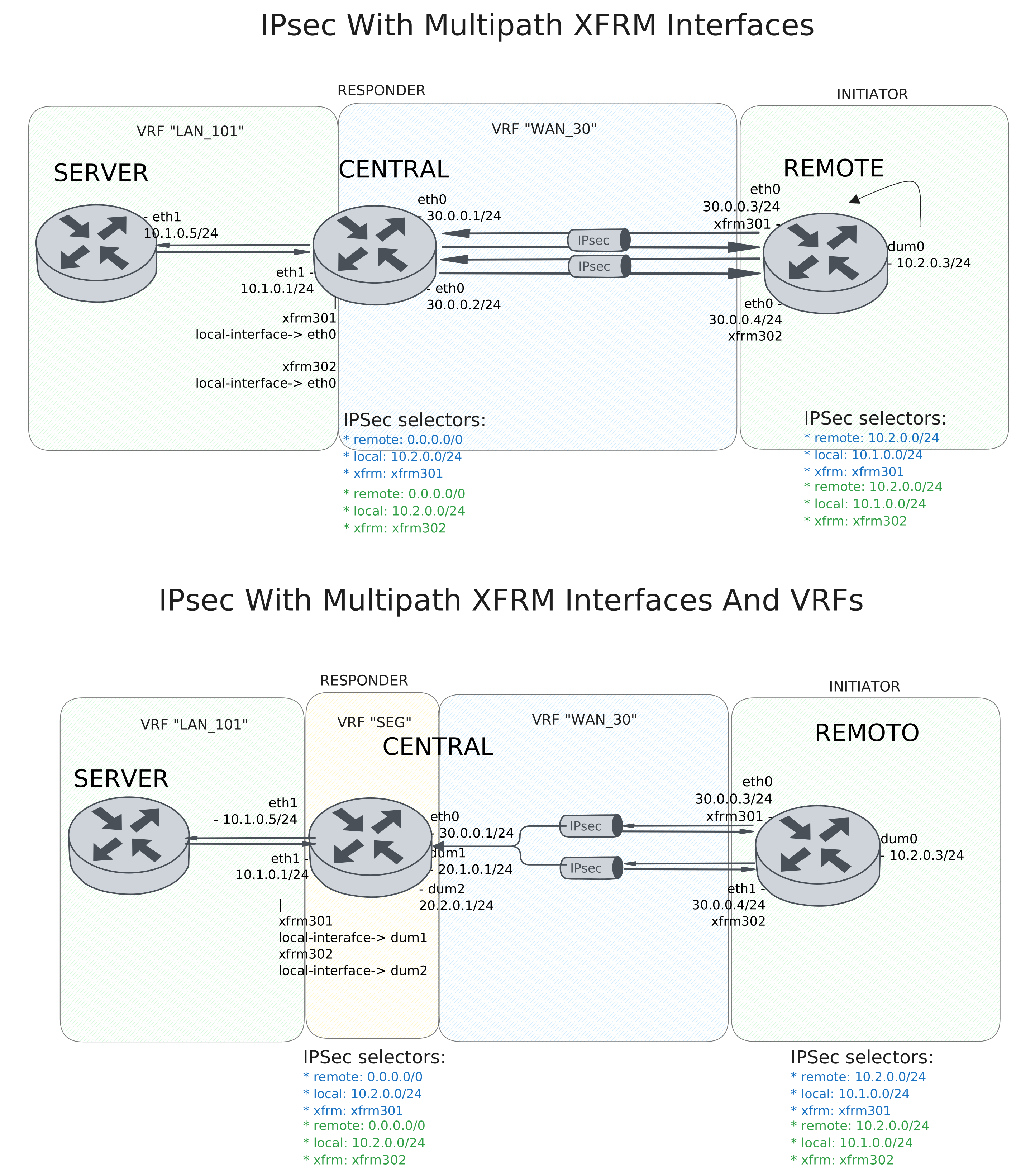
Test IPsec With Multipath XFRM Interfaces
Description
DUT0 and DUT1 are connected to each other through multiple IPsec tunnels with the same local and remote prefixes.
In this test case, we will check IPsec tunnels are correctly installing through two peers directly connected to the DUT0 and DUT1 devices.
Scenario
Step 1: Set the following configuration in DUT0 :
set interfaces ethernet eth0 address 30.0.0.1/24
set interfaces ethernet eth0 address 30.0.0.2/24
set interfaces ethernet eth0 vrf WAN_30
set interfaces ethernet eth1 address 10.1.0.1/24
set interfaces ethernet eth1 vrf LAN_101
set interfaces xfrm xfrm301 local-interface eth0
set interfaces xfrm xfrm301 mtu 1400
set interfaces xfrm xfrm301 multipath traffic-steering reverse
set interfaces xfrm xfrm301 vrf LAN_101
set interfaces xfrm xfrm302 local-interface eth0
set interfaces xfrm xfrm302 mtu 1400
set interfaces xfrm xfrm302 multipath traffic-steering reverse
set interfaces xfrm xfrm302 vrf LAN_101
set protocols vrf WAN_30 static route 10.1.0.0/24 next-hop-vrf LAN_101
set service ssh
set system login user admin authentication encrypted-password '$6$GSjsCj8gHLv$/VcqU6FLi6CT2Oxn0MJQ2C2tqnRDrYKNF8HIYWJp68nvXvPdFccDsT04.WtigUONbKYrgKg8d6rEs8PjljMkH0'
set system vrf LAN_101
set system vrf WAN_30
set system vrf main
set vpn ipsec auth-profile AUTH-SA global-secrets ike-psk test encrypted-secret U2FsdGVkX1/cr3+DoMP44ddcZP/izcfT1OBW3yCPEfo=
set vpn ipsec auth-profile AUTH-SA local auth ike-psk id test
set vpn ipsec auth-profile AUTH-SA remote auth ike-psk id %any
set vpn ipsec esp-group CHILD-SA mode tunnel
set vpn ipsec esp-group CHILD-SA proposal 1 encryption aes256gcm128
set vpn ipsec esp-group CHILD-SA proposal 1 pfs dh-group19
set vpn ipsec ike-group IKE-SA key-exchange ikev2
set vpn ipsec ike-group IKE-SA proposal 1 dh-group 19
set vpn ipsec ike-group IKE-SA proposal 1 encryption aes256gcm128
set vpn ipsec ike-group IKE-SA proposal 1 hash sha256
set vpn ipsec site-to-site peer PEER301 auth-profile AUTH-SA
set vpn ipsec site-to-site peer PEER301 connection-type respond
set vpn ipsec site-to-site peer PEER301 default-esp-group CHILD-SA
set vpn ipsec site-to-site peer PEER301 ike-group IKE-SA
set vpn ipsec site-to-site peer PEER301 local-address 30.0.0.1
set vpn ipsec site-to-site peer PEER301 local-vrf WAN_30
set vpn ipsec site-to-site peer PEER301 remote-address %any
set vpn ipsec site-to-site peer PEER301 tunnel 1 install-routes LAN_101
set vpn ipsec site-to-site peer PEER301 tunnel 1 local prefix 10.1.0.0/24
set vpn ipsec site-to-site peer PEER301 tunnel 1 remote prefix 0.0.0.0/0
set vpn ipsec site-to-site peer PEER301 tunnel 1 xfrm-interface-out xfrm301
set vpn ipsec site-to-site peer PEER302 auth-profile AUTH-SA
set vpn ipsec site-to-site peer PEER302 connection-type respond
set vpn ipsec site-to-site peer PEER302 default-esp-group CHILD-SA
set vpn ipsec site-to-site peer PEER302 ike-group IKE-SA
set vpn ipsec site-to-site peer PEER302 local-address 30.0.0.2
set vpn ipsec site-to-site peer PEER302 local-vrf WAN_30
set vpn ipsec site-to-site peer PEER302 remote-address %any
set vpn ipsec site-to-site peer PEER302 tunnel 1 install-routes LAN_101
set vpn ipsec site-to-site peer PEER302 tunnel 1 local prefix 10.1.0.0/24
set vpn ipsec site-to-site peer PEER302 tunnel 1 remote prefix 0.0.0.0/0
set vpn ipsec site-to-site peer PEER302 tunnel 1 xfrm-interface-out xfrm302
Step 2: Set the following configuration in DUT1 :
set interfaces dummy dum0 address 10.2.0.3/24
set interfaces ethernet eth0 address 30.0.0.3/24
set interfaces ethernet eth0 address 30.0.0.4/24
set interfaces xfrm xfrm301 mtu 1400
set interfaces xfrm xfrm302 mtu 1400
set service ssh
set system login user admin authentication encrypted-password '$6$GSjsCj8gHLv$/VcqU6FLi6CT2Oxn0MJQ2C2tqnRDrYKNF8HIYWJp68nvXvPdFccDsT04.WtigUONbKYrgKg8d6rEs8PjljMkH0'
set system vrf main
set vpn ipsec auth-profile AUTH-SA global-secrets ike-psk test encrypted-secret U2FsdGVkX1/Q2xFvIIMyN3lVIZp8YKXz4e0+uIXveRk=
set vpn ipsec auth-profile AUTH-SA local auth ike-psk id test
set vpn ipsec auth-profile AUTH-SA remote auth ike-psk id %any
set vpn ipsec esp-group CHILD-SA mode tunnel
set vpn ipsec esp-group CHILD-SA proposal 1 encryption aes256gcm128
set vpn ipsec esp-group CHILD-SA proposal 1 pfs dh-group19
set vpn ipsec ike-group IKE-SA key-exchange ikev2
set vpn ipsec ike-group IKE-SA proposal 1 dh-group 19
set vpn ipsec ike-group IKE-SA proposal 1 encryption aes256gcm128
set vpn ipsec ike-group IKE-SA proposal 1 hash sha256
set vpn ipsec site-to-site peer PEER301 auth-profile AUTH-SA
set vpn ipsec site-to-site peer PEER301 connection-type initiate
set vpn ipsec site-to-site peer PEER301 default-esp-group CHILD-SA
set vpn ipsec site-to-site peer PEER301 ike-group IKE-SA
set vpn ipsec site-to-site peer PEER301 local-address 30.0.0.3
set vpn ipsec site-to-site peer PEER301 remote-address 30.0.0.1
set vpn ipsec site-to-site peer PEER301 tunnel 1 install-routes main
set vpn ipsec site-to-site peer PEER301 tunnel 1 local prefix 10.2.0.0/24
set vpn ipsec site-to-site peer PEER301 tunnel 1 remote prefix 10.1.0.0/24
set vpn ipsec site-to-site peer PEER301 tunnel 1 xfrm-interface-out xfrm301
set vpn ipsec site-to-site peer PEER302 auth-profile AUTH-SA
set vpn ipsec site-to-site peer PEER302 connection-type initiate
set vpn ipsec site-to-site peer PEER302 default-esp-group CHILD-SA
set vpn ipsec site-to-site peer PEER302 ike-group IKE-SA
set vpn ipsec site-to-site peer PEER302 local-address 30.0.0.4
set vpn ipsec site-to-site peer PEER302 remote-address 30.0.0.2
set vpn ipsec site-to-site peer PEER302 tunnel 1 install-routes main
set vpn ipsec site-to-site peer PEER302 tunnel 1 local prefix 10.2.0.0/24
set vpn ipsec site-to-site peer PEER302 tunnel 1 remote prefix 10.1.0.0/24
set vpn ipsec site-to-site peer PEER302 tunnel 1 xfrm-interface-out xfrm302
Step 3: Set the following configuration in DUT2 :
set interfaces ethernet eth1 address 10.1.0.5/24
set protocols static route 10.2.0.0/24 next-hop 10.1.0.1
set service ssh
set system login user admin authentication encrypted-password '$6$GSjsCj8gHLv$/VcqU6FLi6CT2Oxn0MJQ2C2tqnRDrYKNF8HIYWJp68nvXvPdFccDsT04.WtigUONbKYrgKg8d6rEs8PjljMkH0'
Note
Check that the IPsec tunnels are established and the routes are installed. The routes are installed in the VRF that holds the xfrm interfaces (LAN_101).
Step 4: Run the command protocols vrf LAN_101 ip show route on DUT0 and check whether the output matches the following regular expressions:
K>\* 10\.2\.0\.0/24 \[0\/0\] is directly connected.*xfrm\d+.*\n.*xfrm\d+Show output
Codes: K - kernel route, C - connected, L - local, S - static,
R - RIP, O - OSPF, I - IS-IS, B - BGP, E - EIGRP, N - NHRP,
T - Table, v - VNC, V - VNC-Direct, A - Babel, F - PBR,
f - OpenFabric, t - Table-Direct,
> - selected route, * - FIB route, q - queued, r - rejected, b - backup
t - trapped, o - offload failure

IPv4 unicast VRF LAN_101:
K>* 0.0.0.0/0 [255/8192] unreachable (ICMP unreachable), weight 1, 00:00:08
C>* 10.1.0.0/24 is directly connected, eth1, weight 1, 00:00:07
L>* 10.1.0.1/32 is directly connected, eth1, weight 1, 00:00:07
K>* 10.2.0.0/24 [0/0] is directly connected, xfrm302, weight 1, 00:00:02
*                   is directly connected, xfrm301, weight 1, 00:00:02
K>* 127.0.0.0/8 [0/0] is directly connected, LAN_101, weight 1, 00:00:08
Note
Check that both IPsec tunnels are established and traffic steering is working as expected. Once the remote client is trying to connect randomly from either of the two tunnels, hub always responds with the same tunnel.
Step 5: Run the command vpn ipsec clear sa on DUT0 and expect the following output:
Show output
Closed tunnels: 2
Step 6: Initiate an SSH connection from DUT1 to IP address 10.1.0.5 using user admin:
admin@DUT1$ ssh admin@10.1.0.5 option StrictHostKeyChecking=no option UserKnownHostsFile=/dev/null local-address 10.2.0.3Show output
Warning: Permanently added '10.1.0.5' (ECDSA) to the list of known hosts.
admin@10.1.0.5's password:
Welcome to Teldat OSDx v4.2.10.4

This system includes free software.
Contact Teldat for licenses information and source code.

Last login: Wed Sep 16 13:34:59 2026
admin@osdx$
Step 7: Run the command vpn ipsec show sa on DUT0 and expect the following output:
Show output
vpn-peer-PEER301: #4, ESTABLISHED, IKEv2, f4fd875d2734ec87_i 37eaa3697b0608c1_r*
  local  'test' @ 30.0.0.1[500]
  remote 'test' @ 30.0.0.3[500]
  AES_GCM_16-256/PRF_HMAC_SHA2_256/ECP_256
  established 1s ago, rekeying in 16739s
  peer-PEER301-tunnel-1: #4, reqid 2, INSTALLED, TUNNEL, ESP:AES_GCM_16-256
    installed 1s ago, rekeying in 3344s, expires in 3959s
    in  cca17e14 (-|0x0000012e),   5057 bytes,    24 packets,     1s ago
    out c700e7d5 (-|0x0000012e),   4917 bytes,    22 packets,     1s ago
    local  10.1.0.0/24
    remote 10.2.0.0/24
vpn-peer-PEER302: #3, ESTABLISHED, IKEv2, e4a1283bb0621357_i 0dbc6c9d36217c1c_r*
  local  'test' @ 30.0.0.2[500]
  remote 'test' @ 30.0.0.4[500]
  AES_GCM_16-256/PRF_HMAC_SHA2_256/ECP_256
  established 1s ago, rekeying in 17018s
  peer-PEER302-tunnel-1: #3, reqid 1, INSTALLED, TUNNEL, ESP:AES_GCM_16-256
    installed 1s ago, rekeying in 3355s, expires in 3959s
    in  cd70611a (-|0x0000012f),      0 bytes,     0 packets
    out ce051bab (-|0x0000012f),      0 bytes,     0 packets
    local  10.1.0.0/24
    remote 10.2.0.0/24
Step 8: Run the command vpn ipsec clear sa on DUT0 and expect the following output:
Show output
Closed tunnels: 2
Step 9: Initiate an SSH connection from DUT1 to IP address 10.1.0.5 using user admin:
admin@DUT1$ ssh admin@10.1.0.5 option StrictHostKeyChecking=no option UserKnownHostsFile=/dev/null local-address 10.2.0.3Show output
Warning: Permanently added '10.1.0.5' (ECDSA) to the list of known hosts.
admin@10.1.0.5's password:
Welcome to Teldat OSDx v4.2.10.4

This system includes free software.
Contact Teldat for licenses information and source code.

Last login: Wed Sep 16 18:58:15 2026 from 10.2.0.3
admin@osdx$
Step 10: Run the command vpn ipsec show sa on DUT0 and expect the following output:
Show output
vpn-peer-PEER302: #6, ESTABLISHED, IKEv2, 7b37847f4287e4d9_i 686e0161207a08eb_r*
  local  'test' @ 30.0.0.2[500]
  remote 'test' @ 30.0.0.4[500]
  AES_GCM_16-256/PRF_HMAC_SHA2_256/ECP_256
  established 0s ago, rekeying in 17288s
  peer-PEER302-tunnel-1: #6, reqid 1, INSTALLED, TUNNEL, ESP:AES_GCM_16-256
    installed 0s ago, rekeying in 3249s, expires in 3960s
    in  cecafa1f (-|0x0000012f),   5057 bytes,    24 packets,     0s ago
    out ccbfe3bc (-|0x0000012f),   4793 bytes,    20 packets,     0s ago
    local  10.1.0.0/24
    remote 10.2.0.0/24
vpn-peer-PEER301: #5, ESTABLISHED, IKEv2, e26ab03a4b53bd45_i 1d6bd186164f0930_r*
  local  'test' @ 30.0.0.1[500]
  remote 'test' @ 30.0.0.3[500]
  AES_GCM_16-256/PRF_HMAC_SHA2_256/ECP_256
  established 0s ago, rekeying in 14757s
  peer-PEER301-tunnel-1: #5, reqid 2, INSTALLED, TUNNEL, ESP:AES_GCM_16-256
    installed 0s ago, rekeying in 3374s, expires in 3960s
    in  c3338a2c (-|0x0000012e),      0 bytes,     0 packets
    out cf0c0e3a (-|0x0000012e),      0 bytes,     0 packets
    local  10.1.0.0/24
    remote 10.2.0.0/24
Note
Testing the traffic from the hub to the spoke. The difference is that the IPsec tunnel chosen by the hub not always the same as the one chosen by the spoke. So if the spoke responds to the hub through the another tunnel, the hub needs to change the tunnel to the one used by the spoke.
Step 11: Run the command vpn ipsec clear sa on DUT0 and expect the following output:
Show output
Closed tunnels: 2
Step 12: Initiate an SSH connection from DUT2 to IP address 10.2.0.3 using user admin:
admin@DUT2$ ssh admin@10.2.0.3 option StrictHostKeyChecking=no option UserKnownHostsFile=/dev/null local-address 10.1.0.5Show output
Warning: Permanently added '10.2.0.3' (ECDSA) to the list of known hosts.
admin@10.2.0.3's password:
Welcome to Teldat OSDx v4.2.10.4

This system includes free software.
Contact Teldat for licenses information and source code.

Last login: Wed Sep 16 18:45:27 2026
admin@osdx$
Step 13: Run the command vpn ipsec show sa on DUT0 and expect the following output:
Show output
vpn-peer-PEER302: #7, ESTABLISHED, IKEv2, 87333e427fb76eb2_i d7eb55b1e82950fc_r*
  local  'test' @ 30.0.0.2[500]
  remote 'test' @ 30.0.0.4[500]
  AES_GCM_16-256/PRF_HMAC_SHA2_256/ECP_256
  established 0s ago, rekeying in 18510s
  peer-PEER302-tunnel-1: #7, reqid 1, INSTALLED, TUNNEL, ESP:AES_GCM_16-256
    installed 0s ago, rekeying in 3475s, expires in 3960s
    in  c287263b (-|0x0000012f),   4841 bytes,    21 packets,     0s ago
    out c8048666 (-|0x0000012f),   5373 bytes,    26 packets,     0s ago
    local  10.1.0.0/24
    remote 10.2.0.0/24
vpn-peer-PEER301: #8, ESTABLISHED, IKEv2, 3b496cf2504aee10_i 58cb8f17a4af1179_r*
  local  'test' @ 30.0.0.1[500]
  remote 'test' @ 30.0.0.3[500]
  AES_GCM_16-256/PRF_HMAC_SHA2_256/ECP_256
  established 0s ago, rekeying in 20956s
  peer-PEER301-tunnel-1: #8, reqid 2, INSTALLED, TUNNEL, ESP:AES_GCM_16-256
    installed 0s ago, rekeying in 3428s, expires in 3960s
    in  c7bb2af2 (-|0x0000012e),      0 bytes,     0 packets
    out cbc3ad11 (-|0x0000012e),      0 bytes,     0 packets
    local  10.1.0.0/24
    remote 10.2.0.0/24
Step 14: Run the command vpn ipsec clear sa on DUT0 and expect the following output:
Show output
Closed tunnels: 2
Step 15: Initiate an SSH connection from DUT2 to IP address 10.2.0.3 using user admin:
admin@DUT2$ ssh admin@10.2.0.3 option StrictHostKeyChecking=no option UserKnownHostsFile=/dev/null local-address 10.1.0.5Show output
Warning: Permanently added '10.2.0.3' (ECDSA) to the list of known hosts.
admin@10.2.0.3's password:
Welcome to Teldat OSDx v4.2.10.4

This system includes free software.
Contact Teldat for licenses information and source code.

Last login: Wed Sep 16 18:58:17 2026 from 10.1.0.5
admin@osdx$
Step 16: Run the command vpn ipsec show sa on DUT0 and expect the following output:
Show output
vpn-peer-PEER301: #10, ESTABLISHED, IKEv2, 04a7af47b7cd7214_i 60c419dd9c32e74b_r*
  local  'test' @ 30.0.0.1[500]
  remote 'test' @ 30.0.0.3[500]
  AES_GCM_16-256/PRF_HMAC_SHA2_256/ECP_256
  established 1s ago, rekeying in 19470s
  peer-PEER301-tunnel-1: #10, reqid 2, INSTALLED, TUNNEL, ESP:AES_GCM_16-256
    installed 1s ago, rekeying in 3238s, expires in 3959s
    in  cd98a706 (-|0x0000012e),      0 bytes,     0 packets
    out cb6d62d1 (-|0x0000012e),      0 bytes,     0 packets
    local  10.1.0.0/24
    remote 10.2.0.0/24
vpn-peer-PEER302: #9, ESTABLISHED, IKEv2, a480928f6bd3651c_i bd446452ca75ff28_r*
  local  'test' @ 30.0.0.2[500]
  remote 'test' @ 30.0.0.4[500]
  AES_GCM_16-256/PRF_HMAC_SHA2_256/ECP_256
  established 1s ago, rekeying in 14000s
  peer-PEER302-tunnel-1: #9, reqid 1, INSTALLED, TUNNEL, ESP:AES_GCM_16-256
    installed 1s ago, rekeying in 3394s, expires in 3959s
    in  cb5251a9 (-|0x0000012f),   4881 bytes,    21 packets,     0s ago
    out c48ab45a (-|0x0000012f),   5109 bytes,    25 packets,     0s ago
    local  10.1.0.0/24
    remote 10.2.0.0/24
Step 17: Run the command system conntrack show on DUT0 and check whether the output matches the following regular expressions:
unknown\s+50.*[OFFLOAD, [^]]*packets=[1-9]\d* bytes=[1-9]\d* [^]]*packets=[1-9]\d* bytes=[1-9]\d*]Show output
tcp      6 src=10.1.0.5 dst=10.2.0.3 sport=57849 dport=22 opref=xfrm302-0.0.0.0 vrf=LAN_101 packets=25 bytes=5109 src=10.2.0.3 dst=10.1.0.5 sport=22 dport=57849 vrf=LAN_101 packets=20 bytes=4829 [ASSURED] [OFFLOAD, packets=20 bytes=4841 packets=15 bytes=4496] mark=0 use=4
unknown  50 src=30.0.0.2 dst=30.0.0.4 vrf=WAN_30 packets=25 bytes=6508 src=30.0.0.4 dst=30.0.0.2 vrf=WAN_30 packets=21 bytes=6056 [OFFLOAD, packets=23 bytes=6284 packets=19 bytes=5832] mark=0 use=2
udp      17 29 src=30.0.0.1 dst=30.0.0.3 sport=500 dport=500 vrf=WAN_30 packets=1 bytes=221 [UNREPLIED] src=30.0.0.3 dst=30.0.0.1 sport=500 dport=500 vrf=WAN_30 packets=0 bytes=0 mark=0 use=1
conntrack v1.4.7 (conntrack-tools): 3 flow entries have been shown.
Test IPsec With Multipath XFRM Interfaces And VRFs
Description
The difference here is that the hub peer has its addresses behind the VRFs, it is not directly connected like in the previous test case.
Scenario
Step 1: Set the following configuration in DUT0 :
set interfaces dummy dum1 address 20.1.0.1/24
set interfaces dummy dum1 vrf WAN_30
set interfaces dummy dum2 address 20.2.0.1/24
set interfaces dummy dum2 vrf WAN_30
set interfaces ethernet eth0 address 30.0.0.1/24
set interfaces ethernet eth0 vrf WAN_30
set interfaces ethernet eth1 address 10.1.0.1/24
set interfaces ethernet eth1 traffic policy in SET_VRF_SEG
set interfaces ethernet eth1 vrf LAN_101
set interfaces xfrm xfrm301 local-interface dum1
set interfaces xfrm xfrm301 mtu 1400
set interfaces xfrm xfrm301 multipath traffic-steering reverse
set interfaces xfrm xfrm301 traffic policy in SET_VRF_LAN_101
set interfaces xfrm xfrm301 vrf SEG
set interfaces xfrm xfrm302 local-interface dum2
set interfaces xfrm xfrm302 mtu 1400
set interfaces xfrm xfrm302 multipath traffic-steering reverse
set interfaces xfrm xfrm302 traffic policy in SET_VRF_LAN_101
set interfaces xfrm xfrm302 vrf SEG
set service ssh
set system login user admin authentication encrypted-password '$6$GSjsCj8gHLv$/VcqU6FLi6CT2Oxn0MJQ2C2tqnRDrYKNF8HIYWJp68nvXvPdFccDsT04.WtigUONbKYrgKg8d6rEs8PjljMkH0'
set system vrf LAN_101
set system vrf SEG
set system vrf WAN_30
set system vrf main
set traffic policy SET_VRF_LAN_101 rule 1 selector LAN_LEFT
set traffic policy SET_VRF_LAN_101 rule 1 set vrf LAN_101
set traffic policy SET_VRF_SEG rule 1 selector LAN_RIGHT
set traffic policy SET_VRF_SEG rule 1 set vrf SEG
set traffic selector LAN_LEFT rule 1 destination address 10.1.0.0/24
set traffic selector LAN_RIGHT rule 1 destination address 10.2.0.0/24
set vpn ipsec auth-profile AUTH-SA global-secrets ike-psk test encrypted-secret U2FsdGVkX1+HV3iWG/2ntA8t516geM67ivL04EJHDIw=
set vpn ipsec auth-profile AUTH-SA local auth ike-psk id test
set vpn ipsec auth-profile AUTH-SA remote auth ike-psk id %any
set vpn ipsec esp-group CHILD-SA mode tunnel
set vpn ipsec esp-group CHILD-SA proposal 1 encryption aes256gcm128
set vpn ipsec esp-group CHILD-SA proposal 1 pfs dh-group19
set vpn ipsec ike-group IKE-SA key-exchange ikev2
set vpn ipsec ike-group IKE-SA proposal 1 dh-group 19
set vpn ipsec ike-group IKE-SA proposal 1 encryption aes256gcm128
set vpn ipsec ike-group IKE-SA proposal 1 hash sha256
set vpn ipsec site-to-site peer PEER301 auth-profile AUTH-SA
set vpn ipsec site-to-site peer PEER301 connection-type respond
set vpn ipsec site-to-site peer PEER301 default-esp-group CHILD-SA
set vpn ipsec site-to-site peer PEER301 ike-group IKE-SA
set vpn ipsec site-to-site peer PEER301 local-address 20.1.0.1
set vpn ipsec site-to-site peer PEER301 local-vrf WAN_30
set vpn ipsec site-to-site peer PEER301 remote-address %any
set vpn ipsec site-to-site peer PEER301 tunnel 1 install-routes SEG
set vpn ipsec site-to-site peer PEER301 tunnel 1 local prefix 10.1.0.0/24
set vpn ipsec site-to-site peer PEER301 tunnel 1 remote prefix 0.0.0.0/0
set vpn ipsec site-to-site peer PEER301 tunnel 1 xfrm-interface-out xfrm301
set vpn ipsec site-to-site peer PEER302 auth-profile AUTH-SA
set vpn ipsec site-to-site peer PEER302 connection-type respond
set vpn ipsec site-to-site peer PEER302 default-esp-group CHILD-SA
set vpn ipsec site-to-site peer PEER302 ike-group IKE-SA
set vpn ipsec site-to-site peer PEER302 local-address 20.2.0.1
set vpn ipsec site-to-site peer PEER302 local-vrf WAN_30
set vpn ipsec site-to-site peer PEER302 remote-address %any
set vpn ipsec site-to-site peer PEER302 tunnel 1 install-routes SEG
set vpn ipsec site-to-site peer PEER302 tunnel 1 local prefix 10.1.0.0/24
set vpn ipsec site-to-site peer PEER302 tunnel 1 remote prefix 0.0.0.0/0
set vpn ipsec site-to-site peer PEER302 tunnel 1 xfrm-interface-out xfrm302
Step 2: Set the following configuration in DUT1 :
set interfaces dummy dum0 address 10.2.0.3/24
set interfaces ethernet eth0 address 30.0.0.3/24
set interfaces ethernet eth0 address 30.0.0.4/24
set interfaces xfrm xfrm301 mtu 1400
set interfaces xfrm xfrm302 mtu 1400
set protocols static route 20.1.0.0/24 next-hop 30.0.0.1
set protocols static route 20.2.0.0/24 next-hop 30.0.0.1
set service ssh
set system login user admin authentication encrypted-password '$6$GSjsCj8gHLv$/VcqU6FLi6CT2Oxn0MJQ2C2tqnRDrYKNF8HIYWJp68nvXvPdFccDsT04.WtigUONbKYrgKg8d6rEs8PjljMkH0'
set system vrf main
set vpn ipsec auth-profile AUTH-SA global-secrets ike-psk test encrypted-secret U2FsdGVkX1+yBLM01J7UiqlTnIJfi5dreWti9knNU1Y=
set vpn ipsec auth-profile AUTH-SA local auth ike-psk id test
set vpn ipsec auth-profile AUTH-SA remote auth ike-psk id %any
set vpn ipsec esp-group CHILD-SA mode tunnel
set vpn ipsec esp-group CHILD-SA proposal 1 encryption aes256gcm128
set vpn ipsec esp-group CHILD-SA proposal 1 pfs dh-group19
set vpn ipsec ike-group IKE-SA key-exchange ikev2
set vpn ipsec ike-group IKE-SA proposal 1 dh-group 19
set vpn ipsec ike-group IKE-SA proposal 1 encryption aes256gcm128
set vpn ipsec ike-group IKE-SA proposal 1 hash sha256
set vpn ipsec site-to-site peer PEER301 auth-profile AUTH-SA
set vpn ipsec site-to-site peer PEER301 connection-type initiate
set vpn ipsec site-to-site peer PEER301 default-esp-group CHILD-SA
set vpn ipsec site-to-site peer PEER301 ike-group IKE-SA
set vpn ipsec site-to-site peer PEER301 local-address 30.0.0.3
set vpn ipsec site-to-site peer PEER301 remote-address 20.1.0.1
set vpn ipsec site-to-site peer PEER301 tunnel 1 install-routes main
set vpn ipsec site-to-site peer PEER301 tunnel 1 local prefix 10.2.0.0/24
set vpn ipsec site-to-site peer PEER301 tunnel 1 remote prefix 10.1.0.0/24
set vpn ipsec site-to-site peer PEER301 tunnel 1 xfrm-interface-out xfrm301
set vpn ipsec site-to-site peer PEER302 auth-profile AUTH-SA
set vpn ipsec site-to-site peer PEER302 connection-type initiate
set vpn ipsec site-to-site peer PEER302 default-esp-group CHILD-SA
set vpn ipsec site-to-site peer PEER302 ike-group IKE-SA
set vpn ipsec site-to-site peer PEER302 local-address 30.0.0.4
set vpn ipsec site-to-site peer PEER302 remote-address 20.2.0.1
set vpn ipsec site-to-site peer PEER302 tunnel 1 install-routes main
set vpn ipsec site-to-site peer PEER302 tunnel 1 local prefix 10.2.0.0/24
set vpn ipsec site-to-site peer PEER302 tunnel 1 remote prefix 10.1.0.0/24
set vpn ipsec site-to-site peer PEER302 tunnel 1 xfrm-interface-out xfrm302
Step 3: Set the following configuration in DUT2 :
set interfaces ethernet eth1 address 10.1.0.5/24
set protocols static route 10.2.0.0/24 next-hop 10.1.0.1
set service ssh
set system login user admin authentication encrypted-password '$6$GSjsCj8gHLv$/VcqU6FLi6CT2Oxn0MJQ2C2tqnRDrYKNF8HIYWJp68nvXvPdFccDsT04.WtigUONbKYrgKg8d6rEs8PjljMkH0'
Note
Check that the IPsec tunnels are established and the routes are installed. The routes are installed in the VRF that holds the xfrm interfaces (SEG).
Step 4: Run the command protocols vrf SEG ip show route on DUT0 and check whether the output matches the following regular expressions:
K>\* 10\.2\.0\.0/24 \[0\/0\] is directly connected.*xfrm\d+.*\n.*xfrm\d+Show output
Codes: K - kernel route, C - connected, L - local, S - static,
R - RIP, O - OSPF, I - IS-IS, B - BGP, E - EIGRP, N - NHRP,
T - Table, v - VNC, V - VNC-Direct, A - Babel, F - PBR,
f - OpenFabric, t - Table-Direct,
> - selected route, * - FIB route, q - queued, r - rejected, b - backup
t - trapped, o - offload failure

IPv4 unicast VRF SEG:
K>* 0.0.0.0/0 [255/8192] unreachable (ICMP unreachable), weight 1, 00:00:08
K>* 10.2.0.0/24 [0/0] is directly connected, xfrm301, weight 1, 00:00:02
*                   is directly connected, xfrm302, weight 1, 00:00:02
K>* 127.0.0.0/8 [0/0] is directly connected, SEG, weight 1, 00:00:08
Note
Check that both IPsec tunnels are established and traffic steering is working as expected. Once the remote client is trying to connect randomly from either of the two tunnels, hub always responds with the same tunnel.
Step 5: Run the command vpn ipsec clear sa on DUT0 and expect the following output:
Show output
Closed tunnels: 2
Step 6: Initiate an SSH connection from DUT1 to IP address 10.1.0.5 using user admin:
admin@DUT1$ ssh admin@10.1.0.5 option StrictHostKeyChecking=no option UserKnownHostsFile=/dev/null local-address 10.2.0.3Show output
Warning: Permanently added '10.1.0.5' (ECDSA) to the list of known hosts.
admin@10.1.0.5's password:
Welcome to Teldat OSDx v4.2.10.4

This system includes free software.
Contact Teldat for licenses information and source code.

Last login: Wed Sep 16 18:58:16 2026 from 10.2.0.3
admin@osdx$
Step 7: Run the command vpn ipsec show sa on DUT0 and expect the following output:
Show output
vpn-peer-PEER302: #4, ESTABLISHED, IKEv2, 4b98430527b3d6b5_i 469cc69ebc872746_r*
  local  'test' @ 20.2.0.1[500]
  remote 'test' @ 30.0.0.4[500]
  AES_GCM_16-256/PRF_HMAC_SHA2_256/ECP_256
  established 0s ago, rekeying in 13967s
  peer-PEER302-tunnel-1: #4, reqid 1, INSTALLED, TUNNEL, ESP:AES_GCM_16-256
    installed 0s ago, rekeying in 3320s, expires in 3960s
    in  c56b6e23 (-|0x0000012f),      0 bytes,     0 packets
    out c5c55c4c (-|0x0000012f),      0 bytes,     0 packets
    local  10.1.0.0/24
    remote 10.2.0.0/24
vpn-peer-PEER301: #3, ESTABLISHED, IKEv2, bcd3da204c6ad652_i 19512ebe10d97efe_r*
  local  'test' @ 20.1.0.1[500]
  remote 'test' @ 30.0.0.3[500]
  AES_GCM_16-256/PRF_HMAC_SHA2_256/ECP_256
  established 0s ago, rekeying in 25838s
  peer-PEER301-tunnel-1: #3, reqid 2, INSTALLED, TUNNEL, ESP:AES_GCM_16-256
    installed 0s ago, rekeying in 3323s, expires in 3960s
    in  c3427e68 (-|0x0000012e),   5057 bytes,    24 packets,     0s ago
    out cb2a948f (-|0x0000012e),   4881 bytes,    21 packets,     0s ago
    local  10.1.0.0/24
    remote 10.2.0.0/24
Step 8: Run the command vpn ipsec clear sa on DUT0 and expect the following output:
Show output
Closed tunnels: 2
Step 9: Initiate an SSH connection from DUT1 to IP address 10.1.0.5 using user admin:
admin@DUT1$ ssh admin@10.1.0.5 option StrictHostKeyChecking=no option UserKnownHostsFile=/dev/null local-address 10.2.0.3Show output
Warning: Permanently added '10.1.0.5' (ECDSA) to the list of known hosts.
admin@10.1.0.5's password:
Welcome to Teldat OSDx v4.2.10.4

This system includes free software.
Contact Teldat for licenses information and source code.

Last login: Wed Sep 16 18:58:39 2026 from 10.2.0.3
admin@osdx$
Step 10: Run the command vpn ipsec show sa on DUT0 and expect the following output:
Show output
vpn-peer-PEER302: #5, ESTABLISHED, IKEv2, 286bb90be4ae5799_i e776a9d09d81c7fb_r*
  local  'test' @ 20.2.0.1[500]
  remote 'test' @ 30.0.0.4[500]
  AES_GCM_16-256/PRF_HMAC_SHA2_256/ECP_256
  established 0s ago, rekeying in 21036s
  peer-PEER302-tunnel-1: #5, reqid 1, INSTALLED, TUNNEL, ESP:AES_GCM_16-256
    installed 0s ago, rekeying in 3269s, expires in 3960s
    in  c3b854f4 (-|0x0000012f),      0 bytes,     0 packets
    out cba9259b (-|0x0000012f),      0 bytes,     0 packets
    local  10.1.0.0/24
    remote 10.2.0.0/24
vpn-peer-PEER301: #6, ESTABLISHED, IKEv2, 13182deb55f33a19_i 2ca18b374a8c7084_r*
  local  'test' @ 20.1.0.1[500]
  remote 'test' @ 30.0.0.3[500]
  AES_GCM_16-256/PRF_HMAC_SHA2_256/ECP_256
  established 0s ago, rekeying in 25287s
  peer-PEER301-tunnel-1: #6, reqid 2, INSTALLED, TUNNEL, ESP:AES_GCM_16-256
    installed 0s ago, rekeying in 3331s, expires in 3960s
    in  cbfdb3af (-|0x0000012e),   5161 bytes,    26 packets,     0s ago
    out cdf4b1b0 (-|0x0000012e),   4785 bytes,    20 packets,     0s ago
    local  10.1.0.0/24
    remote 10.2.0.0/24
Note
Testing the traffic from the hub to the spoke. The difference is that the IPsec tunnel chosen by the hub not always the same as the one chosen by the spoke. So if the spoke responds to the hub through the another tunnel, the hub needs to change the tunnel to the one used by the spoke.
Step 11: Run the command vpn ipsec clear sa on DUT0 and expect the following output:
Show output
Closed tunnels: 2
Step 12: Initiate an SSH connection from DUT2 to IP address 10.2.0.3 using user admin:
admin@DUT2$ ssh admin@10.2.0.3 option StrictHostKeyChecking=no option UserKnownHostsFile=/dev/null local-address 10.1.0.5Show output
Warning: Permanently added '10.2.0.3' (ECDSA) to the list of known hosts.
admin@10.2.0.3's password:
Welcome to Teldat OSDx v4.2.10.4

This system includes free software.
Contact Teldat for licenses information and source code.

Last login: Wed Sep 16 18:58:17 2026 from 10.1.0.5
admin@osdx$
Step 13: Run the command vpn ipsec show sa on DUT0 and expect the following output:
Show output
vpn-peer-PEER302: #7, ESTABLISHED, IKEv2, 0a1a7f85035510e9_i b954a37974c35727_r*
  local  'test' @ 20.2.0.1[500]
  remote 'test' @ 30.0.0.4[500]
  AES_GCM_16-256/PRF_HMAC_SHA2_256/ECP_256
  established 1s ago, rekeying in 21928s
  peer-PEER302-tunnel-1: #7, reqid 1, INSTALLED, TUNNEL, ESP:AES_GCM_16-256
    installed 1s ago, rekeying in 3334s, expires in 3959s
    in  c012bfa6 (-|0x0000012f),      0 bytes,     0 packets
    out c47a96f5 (-|0x0000012f),      0 bytes,     0 packets
    local  10.1.0.0/24
    remote 10.2.0.0/24
vpn-peer-PEER301: #8, ESTABLISHED, IKEv2, a64917e03d8bb546_i 9b69a73e268f0121_r*
  local  'test' @ 20.1.0.1[500]
  remote 'test' @ 30.0.0.3[500]
  AES_GCM_16-256/PRF_HMAC_SHA2_256/ECP_256
  established 1s ago, rekeying in 25809s
  peer-PEER301-tunnel-1: #8, reqid 2, INSTALLED, TUNNEL, ESP:AES_GCM_16-256
    installed 1s ago, rekeying in 3240s, expires in 3959s
    in  cee9a705 (-|0x0000012e),   4969 bytes,    22 packets,     0s ago
    out ca0d41b0 (-|0x0000012e),   5161 bytes,    26 packets,     0s ago
    local  10.1.0.0/24
    remote 10.2.0.0/24
Step 14: Run the command vpn ipsec clear sa on DUT0 and expect the following output:
Show output
Closed tunnels: 2
Step 15: Initiate an SSH connection from DUT2 to IP address 10.2.0.3 using user admin:
admin@DUT2$ ssh admin@10.2.0.3 option StrictHostKeyChecking=no option UserKnownHostsFile=/dev/null local-address 10.1.0.5Show output
Warning: Permanently added '10.2.0.3' (ECDSA) to the list of known hosts.
admin@10.2.0.3's password:
Welcome to Teldat OSDx v4.2.10.4

This system includes free software.
Contact Teldat for licenses information and source code.

Last login: Wed Sep 16 18:58:41 2026 from 10.1.0.5
admin@osdx$
Step 16: Run the command vpn ipsec show sa on DUT0 and expect the following output:
Show output
vpn-peer-PEER301: #10, ESTABLISHED, IKEv2, dc8dd204d645ec41_i 18103895a42e1b62_r*
  local  'test' @ 20.1.0.1[500]
  remote 'test' @ 30.0.0.3[500]
  AES_GCM_16-256/PRF_HMAC_SHA2_256/ECP_256
  established 1s ago, rekeying in 13606s
  peer-PEER301-tunnel-1: #10, reqid 2, INSTALLED, TUNNEL, ESP:AES_GCM_16-256
    installed 1s ago, rekeying in 3353s, expires in 3959s
    in  ccd62263 (-|0x0000012e),   4793 bytes,    20 packets,     0s ago
    out c3f23f2c (-|0x0000012e),   5109 bytes,    25 packets,     0s ago
    local  10.1.0.0/24
    remote 10.2.0.0/24
vpn-peer-PEER302: #9, ESTABLISHED, IKEv2, 1ff08dd68c9d02ac_i 1c119f84ec6cd47c_r*
  local  'test' @ 20.2.0.1[500]
  remote 'test' @ 30.0.0.4[500]
  AES_GCM_16-256/PRF_HMAC_SHA2_256/ECP_256
  established 1s ago, rekeying in 20651s
  peer-PEER302-tunnel-1: #9, reqid 1, INSTALLED, TUNNEL, ESP:AES_GCM_16-256
    installed 1s ago, rekeying in 3376s, expires in 3959s
    in  caae0c9f (-|0x0000012f),      0 bytes,     0 packets
    out c70f3ab3 (-|0x0000012f),      0 bytes,     0 packets
    local  10.1.0.0/24
    remote 10.2.0.0/24
Step 17: Run the command system conntrack show on DUT0 and check whether the output matches the following regular expressions:
unknown\s+50.*[OFFLOAD, [^]]*packets=[1-9]\d* bytes=[1-9]\d* [^]]*packets=[1-9]\d* bytes=[1-9]\d*]Show output
unknown  50 src=20.1.0.1 dst=30.0.0.3 vrf=WAN_30 packets=25 bytes=6508 src=30.0.0.3 dst=20.1.0.1 vrf=WAN_30 packets=20 bytes=5912 [OFFLOAD, packets=23 bytes=6284 packets=18 bytes=5688] mark=0 use=2
udp      17 29 src=20.1.0.1 dst=30.0.0.3 sport=500 dport=500 vrf=WAN_30 packets=1 bytes=221 [UNREPLIED] src=30.0.0.3 dst=20.1.0.1 sport=500 dport=500 vrf=WAN_30 packets=0 bytes=0 mark=0 use=1
tcp      6 src=10.1.0.5 dst=10.2.0.3 sport=36803 dport=22 opref=xfrm301-0.0.0.0 vrf=LAN_101 packets=25 bytes=5109 src=10.2.0.3 dst=10.1.0.5 sport=22 dport=36803 vrf=SEG packets=19 bytes=4741 [ASSURED] [OFFLOAD, mark=2147484659 packets=20 bytes=4841 mark=2147484658 packets=14 bytes=4408] mark=0 use=4
conntrack v1.4.7 (conntrack-tools): 3 flow entries have been shown.