Snat
These scenarios show how to configure SNAT (Source Network Address Translation) on OSDx.
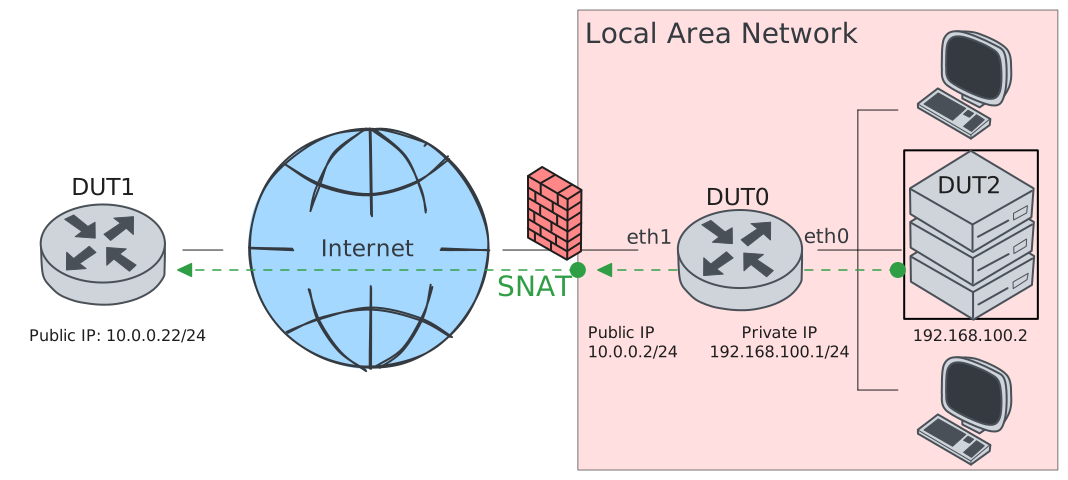
Test SNAT
Description
In this scenario, DUT0 modifies the source address
of outgoing packets generated at the LAN side. The
address is translated to a custom one: 10.0.0.1.
Scenario
Step 1: Set the following configuration in DUT0 :
set interfaces ethernet eth0 address 192.168.100.1/24
set interfaces ethernet eth1 address 10.0.0.2/24
set interfaces ethernet eth1 traffic nat source rule 1 address 10.0.0.2
set interfaces ethernet eth1 traffic nat source rule 1 selector SEL
set system login user admin authentication encrypted-password '$6$GSjsCj8gHLv$/VcqU6FLi6CT2Oxn0MJQ2C2tqnRDrYKNF8HIYWJp68nvXvPdFccDsT04.WtigUONbKYrgKg8d6rEs8PjljMkH0'
set traffic selector SEL rule 1 protocol tcp,udp
Step 2: Set the following configuration in DUT1 :
set interfaces ethernet eth0 address 10.0.0.22/24
set system login user admin authentication encrypted-password '$6$GSjsCj8gHLv$/VcqU6FLi6CT2Oxn0MJQ2C2tqnRDrYKNF8HIYWJp68nvXvPdFccDsT04.WtigUONbKYrgKg8d6rEs8PjljMkH0'
Step 3: Set the following configuration in DUT2 :
set interfaces ethernet eth0 address 192.168.100.2/24
set protocols static route 0.0.0.0/0 next-hop 192.168.100.1
set system login user admin authentication encrypted-password '$6$GSjsCj8gHLv$/VcqU6FLi6CT2Oxn0MJQ2C2tqnRDrYKNF8HIYWJp68nvXvPdFccDsT04.WtigUONbKYrgKg8d6rEs8PjljMkH0'
Step 4: Ping IP address 192.168.100.2 from DUT0:
admin@DUT0$ ping 192.168.100.2 count 1 size 56 timeout 1Show output
PING 192.168.100.2 (192.168.100.2) 56(84) bytes of data.
64 bytes from 192.168.100.2: icmp_seq=1 ttl=64 time=0.378 ms

--- 192.168.100.2 ping statistics ---
1 packets transmitted, 1 received, 0% packet loss, time 0ms
rtt min/avg/max/mdev = 0.378/0.378/0.378/0.000 ms
Step 5: Ping IP address 10.0.0.22 from DUT0:
admin@DUT0$ ping 10.0.0.22 count 1 size 56 timeout 1Show output
PING 10.0.0.22 (10.0.0.22) 56(84) bytes of data.
64 bytes from 10.0.0.22: icmp_seq=1 ttl=64 time=0.327 ms

--- 10.0.0.22 ping statistics ---
1 packets transmitted, 1 received, 0% packet loss, time 0ms
rtt min/avg/max/mdev = 0.327/0.327/0.327/0.000 ms
Step 6: Initiate a tcp connection from DUT2 to DUT1 and try to send some messages between both endpoints
admin@DUT1$ monitor test connection server 8080 tcp
admin@DUT2$ monitor test connection client 10.0.0.22 8080 tcp
Step 7: Initiate a udp connection from DUT2 to DUT1 and try to send some messages between both endpoints
admin@DUT1$ monitor test connection server 5050 udp
admin@DUT2$ monitor test connection client 10.0.0.22 5050 udp
Step 8: Run command system conntrack show nat at DUT0 and check if output contains the following tokens:
src=192.168.100.2 dst=10.0.0.22
src=10.0.0.22 dst=10.0.0.2
Show output
icmp     1 24 src=10.0.0.2 dst=10.0.0.22 type=8 code=0 id=641 packets=1 bytes=84 src=10.0.0.22 dst=10.0.0.2 type=0 code=0 id=641 packets=1 bytes=84 mark=0 use=1
udp      17 src=192.168.100.2 dst=10.0.0.22 sport=46828 dport=5050 packets=5 bytes=240 src=10.0.0.22 dst=10.0.0.2 sport=5050 dport=46828 packets=5 bytes=240 [OFFLOAD, packets=3 bytes=144 packets=4 bytes=192] mark=0 use=2
tcp      6 src=192.168.100.2 dst=10.0.0.22 sport=43424 dport=8080 packets=12 bytes=732 src=10.0.0.22 dst=10.0.0.2 sport=8080 dport=43424 packets=10 bytes=628 [ASSURED] [OFFLOAD, packets=8 bytes=516 packets=7 bytes=464] mark=0 use=2
icmp     1 24 src=192.168.100.1 dst=192.168.100.2 type=8 code=0 id=640 packets=1 bytes=84 src=192.168.100.2 dst=192.168.100.1 type=0 code=0 id=640 packets=1 bytes=84 mark=0 use=1
conntrack v1.4.7 (conntrack-tools): 4 flow entries have been shown.
Test SNAT Masquerade
Description
This scenario is similar to the previous one, but when masquerade is specified, the route uses the IP address of the outgoing interface. Therefore, masquerading should be configured if the outgoing interface uses a dynamic IP address.
Scenario
Step 1: Set the following configuration in DUT0 :
set interfaces ethernet eth0 address 192.168.100.1/24
set interfaces ethernet eth1 address 10.0.0.2/24
set interfaces ethernet eth1 traffic nat source rule 1 address masquerade
set interfaces ethernet eth1 traffic nat source rule 1 selector SEL
set system login user admin authentication encrypted-password '$6$GSjsCj8gHLv$/VcqU6FLi6CT2Oxn0MJQ2C2tqnRDrYKNF8HIYWJp68nvXvPdFccDsT04.WtigUONbKYrgKg8d6rEs8PjljMkH0'
set traffic selector SEL rule 1 protocol tcp,udp
Step 2: Set the following configuration in DUT1 :
set interfaces ethernet eth0 address 10.0.0.22/24
set system login user admin authentication encrypted-password '$6$GSjsCj8gHLv$/VcqU6FLi6CT2Oxn0MJQ2C2tqnRDrYKNF8HIYWJp68nvXvPdFccDsT04.WtigUONbKYrgKg8d6rEs8PjljMkH0'
Step 3: Set the following configuration in DUT2 :
set interfaces ethernet eth0 address 192.168.100.2/24
set protocols static route 0.0.0.0/0 next-hop 192.168.100.1
set system login user admin authentication encrypted-password '$6$GSjsCj8gHLv$/VcqU6FLi6CT2Oxn0MJQ2C2tqnRDrYKNF8HIYWJp68nvXvPdFccDsT04.WtigUONbKYrgKg8d6rEs8PjljMkH0'
Step 4: Ping IP address 192.168.100.2 from DUT0:
admin@DUT0$ ping 192.168.100.2 count 1 size 56 timeout 1Show output
PING 192.168.100.2 (192.168.100.2) 56(84) bytes of data.
64 bytes from 192.168.100.2: icmp_seq=1 ttl=64 time=0.346 ms

--- 192.168.100.2 ping statistics ---
1 packets transmitted, 1 received, 0% packet loss, time 0ms
rtt min/avg/max/mdev = 0.346/0.346/0.346/0.000 ms
Step 5: Ping IP address 10.0.0.22 from DUT0:
admin@DUT0$ ping 10.0.0.22 count 1 size 56 timeout 1Show output
PING 10.0.0.22 (10.0.0.22) 56(84) bytes of data.
64 bytes from 10.0.0.22: icmp_seq=1 ttl=64 time=0.304 ms

--- 10.0.0.22 ping statistics ---
1 packets transmitted, 1 received, 0% packet loss, time 0ms
rtt min/avg/max/mdev = 0.304/0.304/0.304/0.000 ms
Step 6: Initiate a tcp connection from DUT2 to DUT1 and try to send some messages between both endpoints
admin@DUT1$ monitor test connection server 8080 tcp
admin@DUT2$ monitor test connection client 10.0.0.22 8080 tcp
Step 7: Initiate a udp connection from DUT2 to DUT1 and try to send some messages between both endpoints
admin@DUT1$ monitor test connection server 5050 udp
admin@DUT2$ monitor test connection client 10.0.0.22 5050 udp
Step 8: Run command system conntrack show nat at DUT0 and check if output contains the following tokens:
src=192.168.100.2 dst=10.0.0.22
src=10.0.0.22 dst=10.0.0.2
Show output
icmp     1 24 src=192.168.100.1 dst=192.168.100.2 type=8 code=0 id=642 packets=1 bytes=84 src=192.168.100.2 dst=192.168.100.1 type=0 code=0 id=642 packets=1 bytes=84 mark=0 use=1
icmp     1 24 src=10.0.0.2 dst=10.0.0.22 type=8 code=0 id=643 packets=1 bytes=84 src=10.0.0.22 dst=10.0.0.2 type=0 code=0 id=643 packets=1 bytes=84 mark=0 use=1
udp      17 src=192.168.100.2 dst=10.0.0.22 sport=53054 dport=5050 packets=5 bytes=240 src=10.0.0.22 dst=10.0.0.2 sport=5050 dport=53054 packets=5 bytes=240 [OFFLOAD, packets=3 bytes=144 packets=4 bytes=192] mark=0 use=2
tcp      6 src=192.168.100.2 dst=10.0.0.22 sport=46126 dport=8080 packets=14 bytes=836 src=10.0.0.22 dst=10.0.0.2 sport=8080 dport=46126 packets=13 bytes=784 [ASSURED] [OFFLOAD, packets=10 bytes=620 packets=10 bytes=620] mark=0 use=2
conntrack v1.4.7 (conntrack-tools): 4 flow entries have been shown.
Test SNAT Port Pool
Description
In this scenario, the translation is performed using masquerade with a pool of 3 ports. If at any time there are 3 active connections, the next one will be rejected.
Scenario
Step 1: Set the following configuration in DUT0 :
set interfaces ethernet eth0 address 192.168.100.1/24
set interfaces ethernet eth1 address 10.0.0.2/24
set interfaces ethernet eth1 traffic nat source rule 1 address masquerade
set interfaces ethernet eth1 traffic nat source rule 1 port 1000-1003
set interfaces ethernet eth1 traffic nat source rule 1 protocol tcp
set interfaces ethernet eth1 traffic nat source rule 1 selector SEL
set interfaces ethernet eth1 traffic nat source rule 2 address masquerade
set interfaces ethernet eth1 traffic nat source rule 2 port 1000-1003
set interfaces ethernet eth1 traffic nat source rule 2 protocol udp
set system login user admin authentication encrypted-password '$6$GSjsCj8gHLv$/VcqU6FLi6CT2Oxn0MJQ2C2tqnRDrYKNF8HIYWJp68nvXvPdFccDsT04.WtigUONbKYrgKg8d6rEs8PjljMkH0'
set traffic selector SEL rule 1 protocol tcp,udp
Step 2: Set the following configuration in DUT1 :
set interfaces ethernet eth0 address 10.0.0.22/24
set system login user admin authentication encrypted-password '$6$GSjsCj8gHLv$/VcqU6FLi6CT2Oxn0MJQ2C2tqnRDrYKNF8HIYWJp68nvXvPdFccDsT04.WtigUONbKYrgKg8d6rEs8PjljMkH0'
Step 3: Set the following configuration in DUT2 :
set interfaces ethernet eth0 address 192.168.100.2/24
set protocols static route 0.0.0.0/0 next-hop 192.168.100.1
set system login user admin authentication encrypted-password '$6$GSjsCj8gHLv$/VcqU6FLi6CT2Oxn0MJQ2C2tqnRDrYKNF8HIYWJp68nvXvPdFccDsT04.WtigUONbKYrgKg8d6rEs8PjljMkH0'
Step 4: Ping IP address 192.168.100.2 from DUT0:
admin@DUT0$ ping 192.168.100.2 count 1 size 56 timeout 1Show output
PING 192.168.100.2 (192.168.100.2) 56(84) bytes of data.
64 bytes from 192.168.100.2: icmp_seq=1 ttl=64 time=0.437 ms

--- 192.168.100.2 ping statistics ---
1 packets transmitted, 1 received, 0% packet loss, time 0ms
rtt min/avg/max/mdev = 0.437/0.437/0.437/0.000 ms
Step 5: Ping IP address 10.0.0.22 from DUT0:
admin@DUT0$ ping 10.0.0.22 count 1 size 56 timeout 1Show output
PING 10.0.0.22 (10.0.0.22) 56(84) bytes of data.
64 bytes from 10.0.0.22: icmp_seq=1 ttl=64 time=0.453 ms

--- 10.0.0.22 ping statistics ---
1 packets transmitted, 1 received, 0% packet loss, time 0ms
rtt min/avg/max/mdev = 0.453/0.453/0.453/0.000 ms
Step 6: Initiate a tcp connection from DUT2 to DUT1 and try to send some messages between both endpoints
admin@DUT1$ monitor test connection server 8080 tcp
admin@DUT2$ monitor test connection client 10.0.0.22 8080 tcp
Step 7: Initiate a udp connection from DUT2 to DUT1 and try to send some messages between both endpoints
admin@DUT1$ monitor test connection server 5050 udp
admin@DUT2$ monitor test connection client 10.0.0.22 5050 udp
Step 8: Run command system conntrack show nat at DUT0 and check if output contains the following tokens:
src=192.168.100.2 dst=10.0.0.22
src=10.0.0.22 dst=10.0.0.2
Show output
icmp     1 24 src=10.0.0.2 dst=10.0.0.22 type=8 code=0 id=645 packets=1 bytes=84 src=10.0.0.22 dst=10.0.0.2 type=0 code=0 id=645 packets=1 bytes=84 mark=0 use=1
tcp      6 src=192.168.100.2 dst=10.0.0.22 sport=33662 dport=8080 packets=10 bytes=628 src=10.0.0.22 dst=10.0.0.2 sport=8080 dport=1003 packets=9 bytes=576 [ASSURED] [OFFLOAD, packets=6 bytes=412 packets=6 bytes=412] mark=0 use=2
udp      17 src=192.168.100.2 dst=10.0.0.22 sport=39971 dport=5050 packets=5 bytes=240 src=10.0.0.22 dst=10.0.0.2 sport=5050 dport=1002 packets=5 bytes=240 [OFFLOAD, packets=3 bytes=144 packets=4 bytes=192] mark=0 use=2
icmp     1 24 src=192.168.100.1 dst=192.168.100.2 type=8 code=0 id=644 packets=1 bytes=84 src=192.168.100.2 dst=192.168.100.1 type=0 code=0 id=644 packets=1 bytes=84 mark=0 use=1
conntrack v1.4.7 (conntrack-tools): 4 flow entries have been shown.
Test SNAT Network Prefix
Description
In this scenario, the translation is performed using a network prefix. The host part of the original IP address is kept, but the network part is mangled using a subnet prefix.
Scenario
Step 1: Set the following configuration in DUT0 :
set interfaces ethernet eth0 address 192.168.100.1/24
set interfaces ethernet eth1 address 10.0.0.2/24
set interfaces ethernet eth1 traffic nat source rule 1 network 10.0.0.0/24
set interfaces ethernet eth1 traffic nat source rule 1 selector SEL
set system login user admin authentication encrypted-password '$6$GSjsCj8gHLv$/VcqU6FLi6CT2Oxn0MJQ2C2tqnRDrYKNF8HIYWJp68nvXvPdFccDsT04.WtigUONbKYrgKg8d6rEs8PjljMkH0'
set traffic selector SEL rule 1 protocol tcp,udp
Step 2: Set the following configuration in DUT1 :
set interfaces ethernet eth0 address 10.0.0.22/24
set system login user admin authentication encrypted-password '$6$GSjsCj8gHLv$/VcqU6FLi6CT2Oxn0MJQ2C2tqnRDrYKNF8HIYWJp68nvXvPdFccDsT04.WtigUONbKYrgKg8d6rEs8PjljMkH0'
Step 3: Set the following configuration in DUT2 :
set interfaces ethernet eth0 address 192.168.100.2/24
set protocols static route 0.0.0.0/0 next-hop 192.168.100.1
set system login user admin authentication encrypted-password '$6$GSjsCj8gHLv$/VcqU6FLi6CT2Oxn0MJQ2C2tqnRDrYKNF8HIYWJp68nvXvPdFccDsT04.WtigUONbKYrgKg8d6rEs8PjljMkH0'
Step 4: Ping IP address 192.168.100.2 from DUT0:
admin@DUT0$ ping 192.168.100.2 count 1 size 56 timeout 1Show output
PING 192.168.100.2 (192.168.100.2) 56(84) bytes of data.
64 bytes from 192.168.100.2: icmp_seq=1 ttl=64 time=0.343 ms

--- 192.168.100.2 ping statistics ---
1 packets transmitted, 1 received, 0% packet loss, time 0ms
rtt min/avg/max/mdev = 0.343/0.343/0.343/0.000 ms
Step 5: Ping IP address 10.0.0.22 from DUT0:
admin@DUT0$ ping 10.0.0.22 count 1 size 56 timeout 1Show output
PING 10.0.0.22 (10.0.0.22) 56(84) bytes of data.
64 bytes from 10.0.0.22: icmp_seq=1 ttl=64 time=0.354 ms

--- 10.0.0.22 ping statistics ---
1 packets transmitted, 1 received, 0% packet loss, time 0ms
rtt min/avg/max/mdev = 0.354/0.354/0.354/0.000 ms
Step 6: Initiate a tcp connection from DUT2 to DUT1 and try to send some messages between both endpoints
admin@DUT1$ monitor test connection server 8080 tcp
admin@DUT2$ monitor test connection client 10.0.0.22 8080 tcp
Step 7: Initiate a udp connection from DUT2 to DUT1 and try to send some messages between both endpoints
admin@DUT1$ monitor test connection server 5050 udp
admin@DUT2$ monitor test connection client 10.0.0.22 5050 udp
Step 8: Run command system conntrack show nat at DUT0 and check if output contains the following tokens:
src=192.168.100.2 dst=10.0.0.22
src=10.0.0.22 dst=10.0.0.2
Show output
udp      17 src=192.168.100.2 dst=10.0.0.22 sport=48268 dport=5050 packets=5 bytes=240 src=10.0.0.22 dst=10.0.0.2 sport=5050 dport=48268 packets=5 bytes=240 [OFFLOAD, packets=3 bytes=144 packets=4 bytes=192] mark=0 use=2
tcp      6 src=192.168.100.2 dst=10.0.0.22 sport=53480 dport=8080 packets=13 bytes=784 src=10.0.0.22 dst=10.0.0.2 sport=8080 dport=53480 packets=13 bytes=784 [ASSURED] [OFFLOAD, packets=9 bytes=568 packets=10 bytes=620] mark=0 use=2
icmp     1 24 src=192.168.100.1 dst=192.168.100.2 type=8 code=0 id=646 packets=1 bytes=84 src=192.168.100.2 dst=192.168.100.1 type=0 code=0 id=646 packets=1 bytes=84 mark=0 use=1
icmp     1 24 src=10.0.0.2 dst=10.0.0.22 type=8 code=0 id=647 packets=1 bytes=84 src=10.0.0.22 dst=10.0.0.2 type=0 code=0 id=647 packets=1 bytes=84 mark=0 use=1
conntrack v1.4.7 (conntrack-tools): 4 flow entries have been shown.