Relay
This scenario shows how to configure service dhcp-relay. The
relay agent must be used when the DHCP server and the DHCP
clients are not connected to the same layer 2 domain.
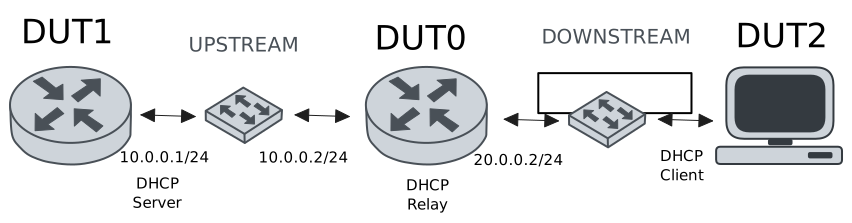
Test DHCP Relay
Description
This example demonstrates how to configure a DHCP relay instance in DUT0 to forward DHCP requests from DUT2 to DUT1.
Scenario
Step 1: Set the following configuration in DUT0 :
set interfaces ethernet eth0 vif 100 address 10.0.0.2/24
set interfaces ethernet eth1 vif 200 address 20.0.0.2/24
set service dhcp-relay INS downstream-interface eth1.200
set service dhcp-relay INS server 10.0.0.1
set service dhcp-relay INS upstream-interface eth0.100
set system login user admin authentication encrypted-password '$6$GSjsCj8gHLv$/VcqU6FLi6CT2Oxn0MJQ2C2tqnRDrYKNF8HIYWJp68nvXvPdFccDsT04.WtigUONbKYrgKg8d6rEs8PjljMkH0'
Step 2: Set the following configuration in DUT1 :
set interfaces ethernet eth0 vif 100 address 10.0.0.1/24
set protocols static route 0.0.0.0/0 next-hop 10.0.0.2
set service dhcp-server shared-network dummy subnet 10.0.0.1/32
set service dhcp-server shared-network remote subnet 20.0.0.0/24 start 20.0.0.50 stop 20.0.0.50
set system login user admin authentication encrypted-password '$6$GSjsCj8gHLv$/VcqU6FLi6CT2Oxn0MJQ2C2tqnRDrYKNF8HIYWJp68nvXvPdFccDsT04.WtigUONbKYrgKg8d6rEs8PjljMkH0'
Step 3: Set the following configuration in DUT2 :
set interfaces ethernet eth0 vif 200 address dhcp
set system login user admin authentication encrypted-password '$6$GSjsCj8gHLv$/VcqU6FLi6CT2Oxn0MJQ2C2tqnRDrYKNF8HIYWJp68nvXvPdFccDsT04.WtigUONbKYrgKg8d6rEs8PjljMkH0'
Step 4: Ping IP address 10.0.0.1 from DUT0:
admin@DUT0$ ping 10.0.0.1 count 1 size 56 timeout 1Show output
PING 10.0.0.1 (10.0.0.1) 56(84) bytes of data.
64 bytes from 10.0.0.1: icmp_seq=1 ttl=64 time=0.230 ms

--- 10.0.0.1 ping statistics ---
1 packets transmitted, 1 received, 0% packet loss, time 0ms
rtt min/avg/max/mdev = 0.230/0.230/0.230/0.000 ms
Step 5: Run command interfaces ethernet show at DUT2 and check if output contains the following tokens:
20.0.0.50Show output
---------------------------------------------------------------------
  Name             IP Address           Admin  Oper  Vrf  Description
---------------------------------------------------------------------
    eth0  fe80::dcad:beff:feef:6c20/64  up     up
eth0.200  20.0.0.50/24                  up     up
          fe80::dcad:beff:feef:6c20/64
    eth1                                down   down
Test DHCP Relay With Giaddr
Description
This example demonstrates how to set the gateway IP address (giaddr) in the IP address. This value must be set in an IP address that the DHCP server can reach.
Scenario
Step 1: Set the following configuration in DUT0 :
set interfaces ethernet eth0 vif 100 address 10.0.0.2/24
set interfaces ethernet eth1 vif 200 address 20.0.0.2/24
set interfaces ethernet eth1 vif 200 address 20.0.0.3/24
set service dhcp-relay INS downstream-interface eth1.200
set service dhcp-relay INS server 10.0.0.1 giaddr 20.0.0.3
set service dhcp-relay INS upstream-interface eth0.100
set system login user admin authentication encrypted-password '$6$GSjsCj8gHLv$/VcqU6FLi6CT2Oxn0MJQ2C2tqnRDrYKNF8HIYWJp68nvXvPdFccDsT04.WtigUONbKYrgKg8d6rEs8PjljMkH0'
Step 2: Set the following configuration in DUT1 :
set interfaces ethernet eth0 vif 100 address 10.0.0.1/24
set protocols static route 0.0.0.0/0 next-hop 10.0.0.2
set service dhcp-server shared-network dummy subnet 10.0.0.1/32
set service dhcp-server shared-network remote subnet 20.0.0.0/24 start 20.0.0.50 stop 20.0.0.50
set system login user admin authentication encrypted-password '$6$GSjsCj8gHLv$/VcqU6FLi6CT2Oxn0MJQ2C2tqnRDrYKNF8HIYWJp68nvXvPdFccDsT04.WtigUONbKYrgKg8d6rEs8PjljMkH0'
Step 3: Set the following configuration in DUT2 :
set interfaces ethernet eth0 vif 200 address dhcp
set system login user admin authentication encrypted-password '$6$GSjsCj8gHLv$/VcqU6FLi6CT2Oxn0MJQ2C2tqnRDrYKNF8HIYWJp68nvXvPdFccDsT04.WtigUONbKYrgKg8d6rEs8PjljMkH0'
Step 4: Ping IP address 10.0.0.1 from DUT0:
admin@DUT0$ ping 10.0.0.1 count 1 size 56 timeout 1Show output
PING 10.0.0.1 (10.0.0.1) 56(84) bytes of data.
64 bytes from 10.0.0.1: icmp_seq=1 ttl=64 time=0.250 ms

--- 10.0.0.1 ping statistics ---
1 packets transmitted, 1 received, 0% packet loss, time 0ms
rtt min/avg/max/mdev = 0.250/0.250/0.250/0.000 ms
Step 5: Run command interfaces ethernet show at DUT2 and check if output contains the following tokens:
20.0.0.50Show output
---------------------------------------------------------------------
  Name             IP Address           Admin  Oper  Vrf  Description
---------------------------------------------------------------------
    eth0  fe80::dcad:beff:feef:6c20/64  up     up
eth0.200  20.0.0.50/24                  up     up
          fe80::dcad:beff:feef:6c20/64
    eth1                                down   down
Step 6: Run command system journal show | cat at DUT1 and check if output matches the following regular expressions:
DHCPACK on 20.0.0.50 to [^\)]+\) via 20.0.0.3Show output
Nov 25 09:38:53.290397 osdx systemd-journald[1748]: Runtime Journal (/run/log/journal/c23349e7d2664277b4fe16aa8bcc979f) is 968.0K, max 6.5M, 5.5M free.
Nov 25 09:38:53.291640 osdx systemd-journald[1748]: Received client request to rotate journal, rotating.
Nov 25 09:38:53.291699 osdx systemd-journald[1748]: Vacuuming done, freed 0B of archived journals from /run/log/journal/c23349e7d2664277b4fe16aa8bcc979f.
Nov 25 09:38:53.301284 osdx OSDxCLI[2045]: User 'admin' executed a new command: 'system journal clear'.
Nov 25 09:38:53.530895 osdx OSDxCLI[2045]: User 'admin' executed a new command: 'system coredump delete all'.
Nov 25 09:38:54.894682 osdx OSDxCLI[2045]: User 'admin' entered the configuration menu.
Nov 25 09:38:54.972829 osdx OSDxCLI[2045]: User 'admin' added a new cfg line: 'set interfaces eth0.100 address 10.0.0.1/24'.
Nov 25 09:38:55.058296 osdx OSDxCLI[2045]: User 'admin' added a new cfg line: 'set service dhcp-server shared-network dummy subnet 10.0.0.1/32'.
Nov 25 09:38:55.122417 osdx OSDxCLI[2045]: User 'admin' added a new cfg line: 'set service dhcp-server shared-network remote subnet 20.0.0.0/24 start 20.0.0.50 stop 20.0.0.50'.
Nov 25 09:38:55.223708 osdx OSDxCLI[2045]: User 'admin' added a new cfg line: 'set protocols static route 0.0.0.0/0 next-hop 10.0.0.2'.
Nov 25 09:38:55.290771 osdx OSDxCLI[2045]: User 'admin' added a new cfg line: 'show working'.
Nov 25 09:38:55.402240 osdx ubnt-cfgd[11097]: inactive
Nov 25 09:38:55.431486 osdx INFO[11107]: FRR daemons did not change
Nov 25 09:38:55.455613 osdx kernel: 8021q: adding VLAN 0 to HW filter on device eth0
Nov 25 09:38:55.476942 osdx (udev-worker)[11154]: Network interface NamePolicy= disabled on kernel command line.
Nov 25 09:38:55.588008 osdx systemd[1]: Started dhcpd@main.service - "DHCP Server Service instance main".
Nov 25 09:38:55.589705 osdx cfgd[1449]: [2045]Completed change to active configuration
Nov 25 09:38:55.591162 osdx dhcpd[11228]: Wrote 0 leases to leases file.
Nov 25 09:38:55.602189 osdx OSDxCLI[2045]: User 'admin' committed the configuration.
Nov 25 09:38:55.608506 osdx dhcpd[11228]:
Nov 25 09:38:55.608512 osdx dhcpd[11228]: No subnet declaration for eth0 (no IPv4 addresses).
Nov 25 09:38:55.608514 osdx dhcpd[11228]: ** Ignoring requests on eth0.  If this is not what
Nov 25 09:38:55.608517 osdx dhcpd[11228]:    you want, please write a subnet declaration
Nov 25 09:38:55.608519 osdx dhcpd[11228]:    in your dhcpd.conf file for the network segment
Nov 25 09:38:55.608522 osdx dhcpd[11228]:    to which interface eth0 is attached. **
Nov 25 09:38:55.608524 osdx dhcpd[11228]:
Nov 25 09:38:55.619884 osdx OSDxCLI[2045]: User 'admin' left the configuration menu.
Nov 25 09:38:55.627788 osdx dhcpd[11228]: Server starting service.
Nov 25 09:38:56.250576 osdx dhcpd[11228]: DHCPDISCOVER from de:ad:be:ef:6c:20 via 20.0.0.3
Nov 25 09:38:57.250784 osdx dhcpd[11228]: DHCPOFFER on 20.0.0.50 to de:ad:be:ef:6c:20 (osdx) via 20.0.0.3
Nov 25 09:38:57.251362 osdx dhcpd[11228]: DHCPREQUEST for 20.0.0.50 (10.0.0.1) from de:ad:be:ef:6c:20 (osdx) via 20.0.0.3
Nov 25 09:38:57.276777 osdx dhcpd[11228]: DHCPACK on 20.0.0.50 to de:ad:be:ef:6c:20 (osdx) via 20.0.0.3
Test DHCP Relay With GRE Tunnel
Description
This example demonstrates how to configure a DHCP relay that forwards DHCP requests to the DHCP server through a GRE tunnel (upstream).
Scenario
Step 1: Set the following configuration in DUT0 :
set interfaces ethernet eth0 vif 100 address 10.0.0.2/24
set interfaces ethernet eth1 vif 200 address 20.0.0.2/24
set interfaces tunnel tun1 address 1.0.0.2/32
set interfaces tunnel tun1 encapsulation gre
set interfaces tunnel tun1 local-address 10.0.0.2
set interfaces tunnel tun1 local-interface eth0.100
set interfaces tunnel tun1 nhrp holdtime 5
set interfaces tunnel tun1 nhrp nhs 1.0.0.1 nbma 10.0.0.1
set service dhcp-relay INS downstream-interface eth1.200
set service dhcp-relay INS server 1.0.0.1
set service dhcp-relay INS upstream-interface eth0.100
set service dhcp-relay INS upstream-interface tun1
set system login user admin authentication encrypted-password '$6$GSjsCj8gHLv$/VcqU6FLi6CT2Oxn0MJQ2C2tqnRDrYKNF8HIYWJp68nvXvPdFccDsT04.WtigUONbKYrgKg8d6rEs8PjljMkH0'
Step 2: Set the following configuration in DUT1 :
set interfaces ethernet eth0 vif 100 address 10.0.0.1/24
set interfaces tunnel tun1 address 1.0.0.1/32
set interfaces tunnel tun1 encapsulation gre
set interfaces tunnel tun1 local-address 10.0.0.1
set interfaces tunnel tun1 local-interface eth0.100
set interfaces tunnel tun1 nhrp
set protocols static route 0.0.0.0/0 next-hop 10.0.0.2
set protocols static route 20.0.0.0/24 next-hop 1.0.0.2
set service dhcp-server shared-network dummy subnet 1.0.0.1/32
set service dhcp-server shared-network remote subnet 20.0.0.0/24 start 20.0.0.50 stop 20.0.0.50
set system login user admin authentication encrypted-password '$6$GSjsCj8gHLv$/VcqU6FLi6CT2Oxn0MJQ2C2tqnRDrYKNF8HIYWJp68nvXvPdFccDsT04.WtigUONbKYrgKg8d6rEs8PjljMkH0'
Step 3: Set the following configuration in DUT2 :
set interfaces ethernet eth0 vif 200 address dhcp
set system login user admin authentication encrypted-password '$6$GSjsCj8gHLv$/VcqU6FLi6CT2Oxn0MJQ2C2tqnRDrYKNF8HIYWJp68nvXvPdFccDsT04.WtigUONbKYrgKg8d6rEs8PjljMkH0'
Step 4: Ping IP address 10.0.0.1 from DUT0:
admin@DUT0$ ping 10.0.0.1 count 1 size 56 timeout 1Show output
PING 10.0.0.1 (10.0.0.1) 56(84) bytes of data.
64 bytes from 10.0.0.1: icmp_seq=1 ttl=64 time=0.195 ms

--- 10.0.0.1 ping statistics ---
1 packets transmitted, 1 received, 0% packet loss, time 0ms
rtt min/avg/max/mdev = 0.195/0.195/0.195/0.000 ms
Step 5: Ping IP address 1.0.0.1 from DUT0:
admin@DUT0$ ping 1.0.0.1 count 1 size 56 timeout 1Show output
PING 1.0.0.1 (1.0.0.1) 56(84) bytes of data.
64 bytes from 1.0.0.1: icmp_seq=1 ttl=64 time=0.235 ms

--- 1.0.0.1 ping statistics ---
1 packets transmitted, 1 received, 0% packet loss, time 0ms
rtt min/avg/max/mdev = 0.235/0.235/0.235/0.000 ms
Step 6: Run command interfaces ethernet show at DUT2 and check if output contains the following tokens:
20.0.0.50Show output
---------------------------------------------------------------------
  Name             IP Address           Admin  Oper  Vrf  Description
---------------------------------------------------------------------
    eth0  fe80::dcad:beff:feef:6c20/64  up     up
eth0.200  20.0.0.50/24                  up     up
          fe80::dcad:beff:feef:6c20/64
    eth1                                down   down
Test DHCP Relay With Multiple Instances
Description
This example demonstrates how to configure multiple DHCP relay instances.
Scenario
Step 1: Set the following configuration in DUT0 :
set interfaces ethernet eth0 vif 100 address 10.0.0.2/24
set interfaces ethernet eth1 vif 200 address 20.0.0.2/24
set interfaces ethernet eth1 vif 300 address 30.0.0.2/24
set service dhcp-relay INS downstream-interface eth1.200
set service dhcp-relay INS server 10.0.0.1
set service dhcp-relay INS upstream-interface eth0.100
set service dhcp-relay INS2 downstream-interface eth1.300
set service dhcp-relay INS2 server 10.0.0.1
set service dhcp-relay INS2 upstream-interface eth0.100
set system login user admin authentication encrypted-password '$6$GSjsCj8gHLv$/VcqU6FLi6CT2Oxn0MJQ2C2tqnRDrYKNF8HIYWJp68nvXvPdFccDsT04.WtigUONbKYrgKg8d6rEs8PjljMkH0'
Step 2: Set the following configuration in DUT1 :
set interfaces ethernet eth0 vif 100 address 10.0.0.1/24
set protocols static route 0.0.0.0/0 next-hop 10.0.0.2
set service dhcp-server shared-network dummy subnet 10.0.0.1/32
set service dhcp-server shared-network remote subnet 20.0.0.0/24 start 20.0.0.50 stop 20.0.0.50
set service dhcp-server shared-network remote2 subnet 30.0.0.0/24 start 30.0.0.50 stop 30.0.0.50
set system login user admin authentication encrypted-password '$6$GSjsCj8gHLv$/VcqU6FLi6CT2Oxn0MJQ2C2tqnRDrYKNF8HIYWJp68nvXvPdFccDsT04.WtigUONbKYrgKg8d6rEs8PjljMkH0'
Step 3: Set the following configuration in DUT2 :
set interfaces ethernet eth0 vif 200 address dhcp
set interfaces ethernet eth0 vif 300 address dhcp
set system login user admin authentication encrypted-password '$6$GSjsCj8gHLv$/VcqU6FLi6CT2Oxn0MJQ2C2tqnRDrYKNF8HIYWJp68nvXvPdFccDsT04.WtigUONbKYrgKg8d6rEs8PjljMkH0'
Step 4: Ping IP address 10.0.0.1 from DUT0:
admin@DUT0$ ping 10.0.0.1 count 1 size 56 timeout 1Show output
PING 10.0.0.1 (10.0.0.1) 56(84) bytes of data.
64 bytes from 10.0.0.1: icmp_seq=1 ttl=64 time=0.244 ms

--- 10.0.0.1 ping statistics ---
1 packets transmitted, 1 received, 0% packet loss, time 0ms
rtt min/avg/max/mdev = 0.244/0.244/0.244/0.000 ms
Step 5: Run command interfaces ethernet show at DUT2 and check if output contains the following tokens:
20.0.0.50Show output
---------------------------------------------------------------------
  Name             IP Address           Admin  Oper  Vrf  Description
---------------------------------------------------------------------
    eth0  fe80::dcad:beff:feef:6c20/64  up     up
eth0.200  20.0.0.50/24                  up     up
          fe80::dcad:beff:feef:6c20/64
eth0.300  30.0.0.50/24                  up     up
          fe80::dcad:beff:feef:6c20/64
    eth1                                down   down
Step 6: Run command interfaces ethernet show at DUT2 and check if output contains the following tokens:
30.0.0.50Show output
---------------------------------------------------------------------
  Name             IP Address           Admin  Oper  Vrf  Description
---------------------------------------------------------------------
    eth0  fe80::dcad:beff:feef:6c20/64  up     up
eth0.200  20.0.0.50/24                  up     up
          fe80::dcad:beff:feef:6c20/64
eth0.300  30.0.0.50/24                  up     up
          fe80::dcad:beff:feef:6c20/64
    eth1                                down   down
Step 7: Run command system journal show | cat at DUT1 and check if output matches the following regular expressions:
DHCPACK on 20.0.0.50 to [^\)]+\) via 20.0.0.2
DHCPACK on 30.0.0.50 to [^\)]+\) via 30.0.0.2
Show output
Nov 25 09:39:17.274117 osdx systemd-journald[1748]: Runtime Journal (/run/log/journal/c23349e7d2664277b4fe16aa8bcc979f) is 932.0K, max 6.5M, 5.6M free.
Nov 25 09:39:17.275590 osdx systemd-journald[1748]: Received client request to rotate journal, rotating.
Nov 25 09:39:17.275652 osdx systemd-journald[1748]: Vacuuming done, freed 0B of archived journals from /run/log/journal/c23349e7d2664277b4fe16aa8bcc979f.
Nov 25 09:39:17.284968 osdx OSDxCLI[2045]: User 'admin' executed a new command: 'system journal clear'.
Nov 25 09:39:17.497317 osdx OSDxCLI[2045]: User 'admin' executed a new command: 'system coredump delete all'.
Nov 25 09:39:19.150029 osdx OSDxCLI[2045]: User 'admin' entered the configuration menu.
Nov 25 09:39:19.223449 osdx OSDxCLI[2045]: User 'admin' added a new cfg line: 'set interfaces eth0.100 address 10.0.0.1/24'.
Nov 25 09:39:19.316793 osdx OSDxCLI[2045]: User 'admin' added a new cfg line: 'set service dhcp-server shared-network dummy subnet 10.0.0.1/32'.
Nov 25 09:39:19.376608 osdx OSDxCLI[2045]: User 'admin' added a new cfg line: 'set service dhcp-server shared-network remote subnet 20.0.0.0/24 start 20.0.0.50 stop 20.0.0.50'.
Nov 25 09:39:19.481566 osdx OSDxCLI[2045]: User 'admin' added a new cfg line: 'set protocols static route 0.0.0.0/0 next-hop 10.0.0.2'.
Nov 25 09:39:19.566545 osdx OSDxCLI[2045]: User 'admin' added a new cfg line: 'set service dhcp-server shared-network remote2 subnet 30.0.0.0/24 start 30.0.0.50 stop 30.0.0.50'.
Nov 25 09:39:19.666718 osdx OSDxCLI[2045]: User 'admin' added a new cfg line: 'show working'.
Nov 25 09:39:19.735025 osdx ubnt-cfgd[12046]: inactive
Nov 25 09:39:19.762839 osdx INFO[12058]: FRR daemons did not change
Nov 25 09:39:19.783587 osdx kernel: 8021q: adding VLAN 0 to HW filter on device eth0
Nov 25 09:39:19.803495 osdx (udev-worker)[12105]: Network interface NamePolicy= disabled on kernel command line.
Nov 25 09:39:19.923941 osdx systemd[1]: Started dhcpd@main.service - "DHCP Server Service instance main".
Nov 25 09:39:19.926384 osdx cfgd[1449]: [2045]Completed change to active configuration
Nov 25 09:39:19.927040 osdx dhcpd[12179]: Wrote 0 leases to leases file.
Nov 25 09:39:19.938347 osdx OSDxCLI[2045]: User 'admin' committed the configuration.
Nov 25 09:39:19.939018 osdx dhcpd[12179]:
Nov 25 09:39:19.939024 osdx dhcpd[12179]: No subnet declaration for eth0 (no IPv4 addresses).
Nov 25 09:39:19.939026 osdx dhcpd[12179]: ** Ignoring requests on eth0.  If this is not what
Nov 25 09:39:19.939029 osdx dhcpd[12179]:    you want, please write a subnet declaration
Nov 25 09:39:19.939031 osdx dhcpd[12179]:    in your dhcpd.conf file for the network segment
Nov 25 09:39:19.939033 osdx dhcpd[12179]:    to which interface eth0 is attached. **
Nov 25 09:39:19.939036 osdx dhcpd[12179]:
Nov 25 09:39:19.947740 osdx dhcpd[12179]: Server starting service.
Nov 25 09:39:19.959331 osdx OSDxCLI[2045]: User 'admin' left the configuration menu.
Nov 25 09:39:20.766798 osdx dhcpd[12179]: DHCPDISCOVER from de:ad:be:ef:6c:20 via 20.0.0.2
Nov 25 09:39:20.938555 osdx dhcpd[12179]: DHCPDISCOVER from de:ad:be:ef:6c:20 via 30.0.0.2
Nov 25 09:39:21.767512 osdx dhcpd[12179]: DHCPOFFER on 20.0.0.50 to de:ad:be:ef:6c:20 (osdx) via 20.0.0.2
Nov 25 09:39:21.768166 osdx dhcpd[12179]: DHCPREQUEST for 20.0.0.50 (10.0.0.1) from de:ad:be:ef:6c:20 (osdx) via 20.0.0.2
Nov 25 09:39:21.784715 osdx dhcpd[12179]: DHCPACK on 20.0.0.50 to de:ad:be:ef:6c:20 (osdx) via 20.0.0.2
Nov 25 09:39:21.938747 osdx dhcpd[12179]: DHCPOFFER on 30.0.0.50 to de:ad:be:ef:6c:20 (osdx) via 30.0.0.2
Nov 25 09:39:21.939456 osdx dhcpd[12179]: DHCPREQUEST for 30.0.0.50 (10.0.0.1) from de:ad:be:ef:6c:20 (osdx) via 30.0.0.2
Nov 25 09:39:21.950355 osdx dhcpd[12179]: DHCPACK on 30.0.0.50 to de:ad:be:ef:6c:20 (osdx) via 30.0.0.2