Bonding
These scenarios cover some aspects related to link-aggregation, which is the technique of combining multiple network connections in parallel in order to increase throughput, to provide redundancy or both. On OSDx, this can be achieved by using bonding interfaces.
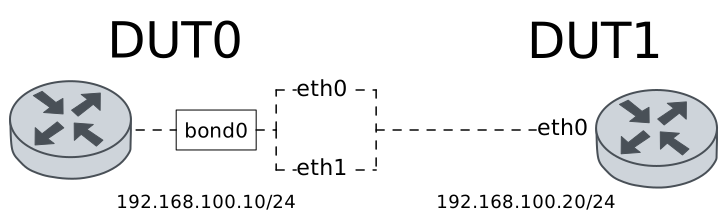
Test Round-Robin Mode
Description
A bonding interface is configured in DUT0 using the round-robin mode. This mode can be used to achieve load-balancing.
Scenario
Step 1: Set the following configuration in DUT0 :
set interfaces bonding bond0 address 192.168.100.10/24
set interfaces bonding bond0 miimon 100
set interfaces bonding bond0 mode round-robin
set interfaces ethernet eth0 bond-group bond0
set interfaces ethernet eth1 bond-group bond0
set system login user admin authentication encrypted-password '$6$GSjsCj8gHLv$/VcqU6FLi6CT2Oxn0MJQ2C2tqnRDrYKNF8HIYWJp68nvXvPdFccDsT04.WtigUONbKYrgKg8d6rEs8PjljMkH0'
Step 2: Set the following configuration in DUT1 :
set interfaces ethernet eth0 address 192.168.100.20/24
set system login user admin authentication encrypted-password '$6$GSjsCj8gHLv$/VcqU6FLi6CT2Oxn0MJQ2C2tqnRDrYKNF8HIYWJp68nvXvPdFccDsT04.WtigUONbKYrgKg8d6rEs8PjljMkH0'
Step 3: Run command interfaces bonding show at DUT0 and check if output matches the following regular expressions:
bond0\s+192.168.100\.10\/24\s+up\s+upShow output
------------------------------------------------------------------
Name            IP Address           Admin  Oper  Vrf  Description
------------------------------------------------------------------
bond0  192.168.100.10/24             up     up
       fe80::dcad:beff:feef:6c01/64
Step 4: Run command interfaces bonding bond0 show ports at DUT0 and check if output contains the following tokens:
Bonding Mode: load balancing (round-robin)Show output
Ethernet Channel Bonding Driver: v6.1.128

Bonding Mode: load balancing (round-robin)
MII Status: up
MII Polling Interval (ms): 100
Up Delay (ms): 0
Down Delay (ms): 0
Peer Notification Delay (ms): 0

Slave Interface: eth1
MII Status: up
Speed: Unknown
Duplex: Unknown
Link Failure Count: 0
Permanent HW addr: de:ad:be:ef:6c:01
Slave queue ID: 0

Slave Interface: eth0
MII Status: up
Speed: Unknown
Duplex: Unknown
Link Failure Count: 0
Permanent HW addr: de:ad:be:ef:6c:00
Slave queue ID: 0
Step 5: Ping IP address 192.168.100.20 from DUT0:
admin@DUT0$ ping 192.168.100.20 count 1 size 56 timeout 1Show output
PING 192.168.100.20 (192.168.100.20) 56(84) bytes of data.
64 bytes from 192.168.100.20: icmp_seq=1 ttl=64 time=0.351 ms

--- 192.168.100.20 ping statistics ---
1 packets transmitted, 1 received, 0% packet loss, time 0ms
rtt min/avg/max/mdev = 0.351/0.351/0.351/0.000 ms
Step 6: Run command interfaces ethernet clear at DUT0.
Step 7: Initiate a bandwidth test from DUT0 to DUT1
admin@DUT1$ monitor test performance server port 5001
admin@DUT0$ monitor test performance client 192.168.100.20 duration 5 port 5001 parallel 1
Expect this output in
DUT0:Connecting to host 192.168.100.20, port 5001 [ 5] local 192.168.100.10 port 57720 connected to 192.168.100.20 port 5001 [ ID] Interval Transfer Bitrate Retr Cwnd [ 5] 0.00-1.00 sec 400 MBytes 3.36 Gbits/sec 687 827 KBytes [ 5] 1.00-2.00 sec 432 MBytes 3.63 Gbits/sec 391 962 KBytes [ 5] 2.00-3.00 sec 442 MBytes 3.71 Gbits/sec 273 994 KBytes [ 5] 3.00-4.00 sec 449 MBytes 3.76 Gbits/sec 588 1.11 MBytes [ 5] 4.00-5.00 sec 468 MBytes 3.92 Gbits/sec 243 1.28 MBytes - - - - - - - - - - - - - - - - - - - - - - - - - [ ID] Interval Transfer Bitrate Retr [ 5] 0.00-5.00 sec 2.14 GBytes 3.68 Gbits/sec 2182 sender [ 5] 0.00-5.00 sec 2.14 GBytes 3.67 Gbits/sec receiver iperf Done.
Step 8: Run command interfaces ethernet show counters at DUT0 and check if output matches the following regular expressions:
eth0\s+up\s+\d+\s+\d+\s+0\s+\d{2,}
eth1\s+up\s+\d+\s+\d+\s+0\s+\d{2,}
Show output
------------------------------------------------------------------------------
Name  Oper  Rx Packets  Rx Bytes  Rx Errors  Tx Packets   Tx Bytes   Tx Errors
------------------------------------------------------------------------------
eth0  up        192449  16026082          0      794732  1203201932          0
eth1  up        186321  15483273          0      794376  1202657137          0
Test Active-Backup Mode
Description
A bonding interface is configured in DUT0 using the active-backup mode. This mode can be used to achieve a higher degree of fault-tolerance.
Scenario
Step 1: Set the following configuration in DUT0 :
set interfaces bonding bond0 address 192.168.100.10/24
set interfaces bonding bond0 miimon 100
set interfaces bonding bond0 mode active-backup
set interfaces ethernet eth0 bond-group bond0
set interfaces ethernet eth1 bond-group bond0
set system login user admin authentication encrypted-password '$6$GSjsCj8gHLv$/VcqU6FLi6CT2Oxn0MJQ2C2tqnRDrYKNF8HIYWJp68nvXvPdFccDsT04.WtigUONbKYrgKg8d6rEs8PjljMkH0'
Step 2: Set the following configuration in DUT1 :
set interfaces ethernet eth0 address 192.168.100.20/24
set system login user admin authentication encrypted-password '$6$GSjsCj8gHLv$/VcqU6FLi6CT2Oxn0MJQ2C2tqnRDrYKNF8HIYWJp68nvXvPdFccDsT04.WtigUONbKYrgKg8d6rEs8PjljMkH0'
Step 3: Run command interfaces bonding show at DUT0 and check if output matches the following regular expressions:
bond0\s+192.168.100\.10\/24\s+up\s+upShow output
------------------------------------------------------------------
Name            IP Address           Admin  Oper  Vrf  Description
------------------------------------------------------------------
bond0  192.168.100.10/24             up     up
       fe80::dcad:beff:feef:6c01/64
Step 4: Run command interfaces bonding bond0 show ports at DUT0 and check if output contains the following tokens:
Bonding Mode: fault-tolerance (active-backup)Show output
Ethernet Channel Bonding Driver: v6.1.128

Bonding Mode: fault-tolerance (active-backup)
Primary Slave: None
Currently Active Slave: eth1
MII Status: up
MII Polling Interval (ms): 100
Up Delay (ms): 0
Down Delay (ms): 0
Peer Notification Delay (ms): 0

Slave Interface: eth1
MII Status: up
Speed: Unknown
Duplex: Unknown
Link Failure Count: 0
Permanent HW addr: de:ad:be:ef:6c:01
Slave queue ID: 0

Slave Interface: eth0
MII Status: up
Speed: Unknown
Duplex: Unknown
Link Failure Count: 0
Permanent HW addr: de:ad:be:ef:6c:00
Slave queue ID: 0
Step 5: Ping IP address 192.168.100.20 from DUT0:
admin@DUT0$ ping 192.168.100.20 count 1 size 56 timeout 1Show output
PING 192.168.100.20 (192.168.100.20) 56(84) bytes of data.
64 bytes from 192.168.100.20: icmp_seq=1 ttl=64 time=0.341 ms

--- 192.168.100.20 ping statistics ---
1 packets transmitted, 1 received, 0% packet loss, time 0ms
rtt min/avg/max/mdev = 0.341/0.341/0.341/0.000 ms
Step 6: Initiate a bandwidth test from DUT0 to DUT1
admin@DUT1$ monitor test performance server port 5001
admin@DUT0$ monitor test performance client 192.168.100.20 duration 5 port 5001 parallel 1
Expect this output in
DUT0:Connecting to host 192.168.100.20, port 5001 [ 5] local 192.168.100.10 port 56654 connected to 192.168.100.20 port 5001 [ ID] Interval Transfer Bitrate Retr Cwnd [ 5] 0.00-1.00 sec 365 MBytes 3.06 Gbits/sec 94 1.49 MBytes [ 5] 1.00-2.00 sec 342 MBytes 2.87 Gbits/sec 0 1.63 MBytes [ 5] 2.00-3.00 sec 352 MBytes 2.96 Gbits/sec 14 1.26 MBytes [ 5] 3.00-4.00 sec 365 MBytes 3.06 Gbits/sec 0 1.35 MBytes [ 5] 4.00-5.00 sec 401 MBytes 3.37 Gbits/sec 0 1.42 MBytes - - - - - - - - - - - - - - - - - - - - - - - - - [ ID] Interval Transfer Bitrate Retr [ 5] 0.00-5.00 sec 1.78 GBytes 3.06 Gbits/sec 108 sender [ 5] 0.00-5.00 sec 1.78 GBytes 3.06 Gbits/sec receiver iperf Done.
Step 7: Run command interfaces bonding bond0 show ports at DUT0 and check if output contains the following tokens:
Currently Active Slave: eth0Show output
Ethernet Channel Bonding Driver: v6.1.128

Bonding Mode: fault-tolerance (active-backup)
Primary Slave: None
Currently Active Slave: eth0
MII Status: up
MII Polling Interval (ms): 100
Up Delay (ms): 0
Down Delay (ms): 0
Peer Notification Delay (ms): 0

Slave Interface: eth1
MII Status: down
Speed: Unknown
Duplex: Unknown
Link Failure Count: 1
Permanent HW addr: de:ad:be:ef:6c:01
Slave queue ID: 0

Slave Interface: eth0
MII Status: up
Speed: Unknown
Duplex: Unknown
Link Failure Count: 0
Permanent HW addr: de:ad:be:ef:6c:00
Slave queue ID: 0
Step 8: Initiate a bandwidth test from DUT0 to DUT1
admin@DUT1$ monitor test performance server port 5001
admin@DUT0$ monitor test performance client 192.168.100.20 duration 5 port 5001 parallel 1
Expect this output in
DUT0:Connecting to host 192.168.100.20, port 5001 [ 5] local 192.168.100.10 port 52626 connected to 192.168.100.20 port 5001 [ ID] Interval Transfer Bitrate Retr Cwnd [ 5] 0.00-1.00 sec 414 MBytes 3.46 Gbits/sec 210 1.25 MBytes [ 5] 1.00-2.00 sec 412 MBytes 3.48 Gbits/sec 0 1.37 MBytes [ 5] 2.00-3.00 sec 391 MBytes 3.28 Gbits/sec 0 1.43 MBytes [ 5] 3.00-4.00 sec 398 MBytes 3.33 Gbits/sec 0 1.49 MBytes [ 5] 4.00-5.00 sec 434 MBytes 3.64 Gbits/sec 0 1.54 MBytes - - - - - - - - - - - - - - - - - - - - - - - - - [ ID] Interval Transfer Bitrate Retr [ 5] 0.00-5.00 sec 2.00 GBytes 3.44 Gbits/sec 210 sender [ 5] 0.00-5.00 sec 2.00 GBytes 3.43 Gbits/sec receiver iperf Done.
Step 9: Run command interfaces bonding bond0 show ports at DUT0 and check if output contains the following tokens:
Currently Active Slave: eth1Show output
Ethernet Channel Bonding Driver: v6.1.128

Bonding Mode: fault-tolerance (active-backup)
Primary Slave: None
Currently Active Slave: eth1
MII Status: up
MII Polling Interval (ms): 100
Up Delay (ms): 0
Down Delay (ms): 0
Peer Notification Delay (ms): 0

Slave Interface: eth1
MII Status: up
Speed: Unknown
Duplex: Unknown
Link Failure Count: 1
Permanent HW addr: de:ad:be:ef:6c:01
Slave queue ID: 0

Slave Interface: eth0
MII Status: down
Speed: Unknown
Duplex: Unknown
Link Failure Count: 1
Permanent HW addr: de:ad:be:ef:6c:00
Slave queue ID: 0