Check Accessibility Control
This scenario shows how to configure a cellular interface, enabling the accessibility control mechanism that triggers reconnections when network connectivity is lost.
Test Reconnection By Accessibility Control
Description
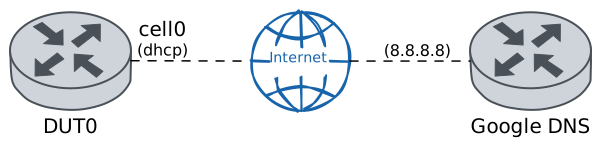
In DUT0, the cell0 cellular interface is configured with a cellular profile for which accessibility control is enabled. Once connectivity with Google’s DNS public server has been verified, a situation where 100% of the packets received by the network are lost is emulated to verify that the accessibility control mechanism triggers a reconnection.
Scenario
Step 1: Set the following configuration in DUT0 :
set cellular logging level info
set cellular profile CELPROFILE accessibility-control ping address 8.8.8.8
set cellular profile CELPROFILE accessibility-control ping interval 10
set cellular profile CELPROFILE apn movistar.es
set interfaces cellular cell0 address dhcp
set interfaces cellular cell0 encrypted-pin U2FsdGVkX19LZkp9I+gAjoVL0CQYqd+94fgN7buYezk=
set interfaces cellular cell0 profile CELPROFILE
set system login user admin authentication encrypted-password '$6$GSjsCj8gHLv$/VcqU6FLi6CT2Oxn0MJQ2C2tqnRDrYKNF8HIYWJp68nvXvPdFccDsT04.WtigUONbKYrgKg8d6rEs8PjljMkH0'
Note
Once the cellular interface is configured, it can be verified that there is network connectivity by pinging Google’s DNS public server.
Step 2: Ping IP address 8.8.8.8 from DUT0:
admin@DUT0$ ping 8.8.8.8 count 1 size 56 timeout 1Show output
PING 8.8.8.8 (8.8.8.8) 56(84) bytes of data.
64 bytes from 8.8.8.8: icmp_seq=1 ttl=117 time=39.7 ms

--- 8.8.8.8 ping statistics ---
1 packets transmitted, 1 received, 0% packet loss, time 0ms
rtt min/avg/max/mdev = 39.682/39.682/39.682/0.000 ms
Note
The accessibility control is a mechanism where pings are sent at an interval, and to the IP address, configured by the user. The mechanism then waits for a response within this interval. If no response is received before it times out, a second ping is sent and a response is expected within 10 seconds. If there is still no response, two more pings are sent at 5-second intervals. Finally, if there is still no response, the device reconnects to the network.
Note
As a result, you can verify that no reconnection has been recorded in the system logs if you wait long enough.
Step 3: Run command system journal clear at DUT0.
Step 4: Run command system journal show | cat at DUT0 and check if output does not contain the following tokens:
[Core/cell0] Info: Signal '12' received to reconnect device
[Device/cell0] Info: Stopping network connection
[Device/cell0] Info: Establishing network connection
Show output
Mar 24 18:01:28.199457 osdx systemd-journald[146046]: Runtime Journal (/run/log/journal/0d96b913a9024eafb0703bc2dae5ba5b) is 8.2M, max 77.8M, 69.5M free.
Mar 24 18:01:28.206515 osdx systemd-journald[146046]: Received client request to rotate journal, rotating.
Mar 24 18:01:28.206715 osdx systemd-journald[146046]: Vacuuming done, freed 0B of archived journals from /run/log/journal/0d96b913a9024eafb0703bc2dae5ba5b.
Mar 24 18:01:28.229434 osdx sudo[608890]: pam_limits(sudo:session): invalid line '@200:215        hard        maxlogins        ' - skipped
Mar 24 18:01:28.310313 osdx OSDxCLI[605473]: User 'admin' executed a new command: 'system journal clear'.
Mar 24 18:02:01.600703 osdx CRON[608942]: pam_limits(cron:session): invalid line '@200:215        hard        maxlogins        ' - skipped
Note
However, when traffic control is applied, it is possible to prove the ‘ping’ command is failing because ICMP packets are being dropped.
Step 5: Modify the following configuration lines in DUT0 :
set interfaces cellular cell0 traffic control in PLOSS
set traffic control PLOSS type network-emulator packet-loss 100
Step 6: Expect a failure in the following command:
Ping IP address 8.8.8.8 from DUT0:
admin@DUT0$ ping 8.8.8.8 count 1 size 56 timeout 1Show output
PING 8.8.8.8 (8.8.8.8) 56(84) bytes of data.

--- 8.8.8.8 ping statistics ---
1 packets transmitted, 0 received, 100% packet loss, time 0ms
Note
You can verify that a reconnection has been recorded in the system logs if you wait long enough.
Step 7: Run command system journal clear at DUT0.
Step 8: Run command system journal show | cat at DUT0 and check if output does not contain the following tokens:
[Core/cell0] Info: Signal '12' received to reconnect device
[Device/cell0] Info: Stopping network connection
[Device/cell0] Info: Establishing network connection
Show output
Mar 24 18:02:12.762006 osdx systemd-journald[146046]: Runtime Journal (/run/log/journal/0d96b913a9024eafb0703bc2dae5ba5b) is 8.0M, max 77.8M, 69.8M free.
Mar 24 18:02:12.769117 osdx systemd-journald[146046]: Received client request to rotate journal, rotating.
Mar 24 18:02:12.769320 osdx systemd-journald[146046]: Vacuuming done, freed 0B of archived journals from /run/log/journal/0d96b913a9024eafb0703bc2dae5ba5b.
Mar 24 18:02:12.792129 osdx sudo[609020]: pam_limits(sudo:session): invalid line '@200:215        hard        maxlogins        ' - skipped
Mar 24 18:02:12.858227 osdx OSDxCLI[605473]: User 'admin' executed a new command: 'system journal clear'.
Step 9: Run command system journal show | cat at DUT0 and check if output contains the following tokens:
[Core/cell0] Info: Signal '12' received to reconnect device
[Device/cell0] Info: Stopping network connection
[Device/cell0] Info: Establishing network connection
Show output
Mar 24 18:02:12.762006 osdx systemd-journald[146046]: Runtime Journal (/run/log/journal/0d96b913a9024eafb0703bc2dae5ba5b) is 8.0M, max 77.8M, 69.8M free.
Mar 24 18:02:12.769117 osdx systemd-journald[146046]: Received client request to rotate journal, rotating.
Mar 24 18:02:12.769320 osdx systemd-journald[146046]: Vacuuming done, freed 0B of archived journals from /run/log/journal/0d96b913a9024eafb0703bc2dae5ba5b.
Mar 24 18:02:12.792129 osdx sudo[609020]: pam_limits(sudo:session): invalid line '@200:215        hard        maxlogins        ' - skipped
Mar 24 18:02:12.858227 osdx OSDxCLI[605473]: User 'admin' executed a new command: 'system journal clear'.
Mar 24 18:02:33.048124 osdx OSDxCLI[605473]: User 'admin' executed a new command: 'system journal show | cat'.
Mar 24 18:02:33.252222 osdx OSDxCLI[605473]: User 'admin' executed a new command: 'system journal show | cat'.
Mar 24 18:02:34.476119 osdx OSDxCLI[605473]: User 'admin' executed a new command: 'system journal show | cat'.
Mar 24 18:02:35.692117 osdx OSDxCLI[605473]: User 'admin' executed a new command: 'system journal show | cat'.
Mar 24 18:02:36.928117 osdx OSDxCLI[605473]: User 'admin' executed a new command: 'system journal show | cat'.
Mar 24 18:02:38.180131 osdx OSDxCLI[605473]: User 'admin' executed a new command: 'system journal show | cat'.
Mar 24 18:02:39.440130 osdx OSDxCLI[605473]: User 'admin' executed a new command: 'system journal show | cat'.
Mar 24 18:02:40.692130 osdx OSDxCLI[605473]: User 'admin' executed a new command: 'system journal show | cat'.
Mar 24 18:02:41.976120 osdx OSDxCLI[605473]: User 'admin' executed a new command: 'system journal show | cat'.
Mar 24 18:02:43.248133 osdx OSDxCLI[605473]: User 'admin' executed a new command: 'system journal show | cat'.
Mar 24 18:02:43.286450 osdx wwan-module[608752]: [Core/cell0] Info: Signal '12' received to reconnect device.
Mar 24 18:02:43.286496 osdx wwan-module[608752]: [Device/cell0] Info: Stopping network connection...
Mar 24 18:02:43.304394 osdx wwan-module[609118]: Network cancelled... releasing resources
Mar 24 18:02:43.440068 osdx wwan-module[609118]: [/dev/cdc-wdm0] Network stopped
Mar 24 18:02:43.440068 osdx wwan-module[609118]: [/dev/cdc-wdm0] Client ID not released:
Mar 24 18:02:43.440068 osdx wwan-module[609118]:         Service: 'wds'
Mar 24 18:02:43.440068 osdx wwan-module[609118]:             CID: '21'
Mar 24 18:02:43.441976 osdx wwan-module[608752]: [Device/cell0] Info: Network connection was stopped!
Mar 24 18:02:43.444123 osdx wwan-module[608752]: [Network/cell0] Info: Stopping accessibility control...
Mar 24 18:02:43.444356 osdx wwan-module[608752]: [Network/cell0] Info: Accessibility control was stopped!
Mar 24 18:02:43.447011 osdx kernel: net cell0: link_state 0x1 -> 0x0
Mar 24 18:02:43.457296 osdx modulelauncher[609125]: stop DHCP client for cell0
Mar 24 18:02:43.461835 osdx dhclient[608840]: receive_packet failed on cell0: Network is down
Mar 24 18:02:43.463769 osdx wwan-module[608752]: [Device/cell0] Info: Checking registration state...
Mar 24 18:02:43.469233 osdx dhclient[609130]: Killed old client process
Mar 24 18:02:43.568104 osdx wwan-module[608752]: [Device/cell0] Info: Device registered and PS attached successfully
Mar 24 18:02:43.568125 osdx wwan-module[608752]: [Device/cell0] Info: Establishing network connection...
Mar 24 18:02:43.611277 osdx dhclient[609130]: DHCPRELEASE of 88.31.31.173 on cell0 to 88.31.31.174 port 67
Mar 24 18:02:43.611305 osdx dhclient[609130]: send_packet: Network is down
Mar 24 18:02:43.611316 osdx dhclient[609130]: dhclient.c:3146: Failed to send 300 byte long packet over cell0 interface.
Mar 24 18:02:43.828918 osdx wwan-module[608752]: [Device/cell0] Info: Network connection was successfully started: PDH=[2175575424]
Mar 24 18:02:43.954822 osdx kernel: net cell0: link_state 0x0 -> 0x1
Mar 24 18:02:43.960543 osdx wwan-module[608752]: [Network/cell0] Info: Starting accessibility control...
Mar 24 18:02:43.960897 osdx wwan-module[608752]: [Network/cell0] Info: Accessibility control was started!
Mar 24 18:02:44.225066 osdx modulelauncher[609180]: start DHCP client for cell0