Check Vti To Vti
These scenarios show how to configure and route traffic via VTI (Virtual Tunnel Interface) devices.
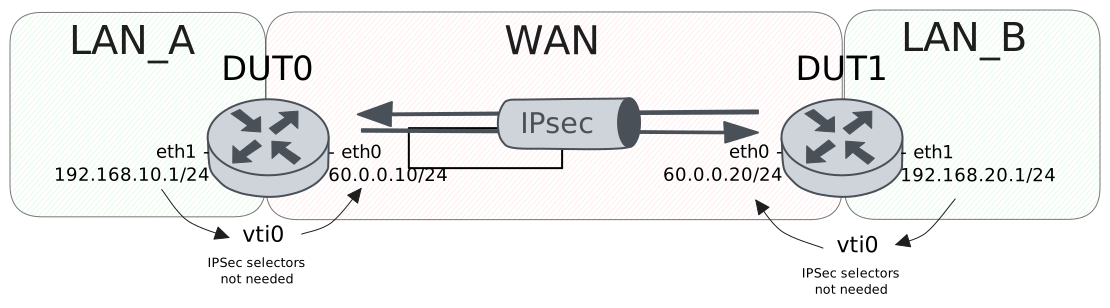
Test VTI Responder To VTI
Description
A VTI device is configured in each
end-point. DUT1 acts as an initiator
and DUT0 as a responder.
Scenario
Step 1: Set the following configuration in DUT0 :
set interfaces ethernet eth0 address 60.0.0.10/24
set interfaces ethernet eth1 address 192.168.10.1/24
set interfaces vti vti0 ipsec PEER
set interfaces vti vti0 local-address 60.0.0.10
set protocols static route 0.0.0.0/0 interface vti0
set system login user admin authentication encrypted-password '$6$GSjsCj8gHLv$/VcqU6FLi6CT2Oxn0MJQ2C2tqnRDrYKNF8HIYWJp68nvXvPdFccDsT04.WtigUONbKYrgKg8d6rEs8PjljMkH0'
set vpn ipsec auth-profile AUTH-SA local auth encrypted-pre-shared-secret U2FsdGVkX19oyAUb5HTV0M2ajDgBWv4lMJCg0M5DtdU=
set vpn ipsec esp-group CHILD-SA proposal 1 encryption aes256gcm128
set vpn ipsec esp-group CHILD-SA proposal 1 pfs dh-group19
set vpn ipsec ike-group IKE-SA key-exchange ikev2
set vpn ipsec ike-group IKE-SA proposal 1 dh-group 19
set vpn ipsec ike-group IKE-SA proposal 1 encryption aes256gcm128
set vpn ipsec ike-group IKE-SA proposal 1 hash sha256
set vpn ipsec site-to-site peer PEER auth-profile AUTH-SA
set vpn ipsec site-to-site peer PEER connection-type respond
set vpn ipsec site-to-site peer PEER default-esp-group CHILD-SA
set vpn ipsec site-to-site peer PEER ike-group IKE-SA
set vpn ipsec site-to-site peer PEER local-address 60.0.0.10
set vpn ipsec site-to-site peer PEER remote-address 60.0.0.20
set vpn ipsec site-to-site peer PEER vti local prefix 192.168.0.0/16
set vpn ipsec site-to-site peer PEER vti remote prefix 192.168.0.0/16
Step 2: Set the following configuration in DUT1 :
set interfaces ethernet eth0 address 60.0.0.20/24
set interfaces ethernet eth1 address 192.168.20.1/24
set interfaces vti vti0 ipsec PEER
set interfaces vti vti0 local-address 60.0.0.20
set protocols static route 0.0.0.0/0 interface vti0
set system login user admin authentication encrypted-password '$6$GSjsCj8gHLv$/VcqU6FLi6CT2Oxn0MJQ2C2tqnRDrYKNF8HIYWJp68nvXvPdFccDsT04.WtigUONbKYrgKg8d6rEs8PjljMkH0'
set vpn ipsec auth-profile AUTH-SA local auth encrypted-pre-shared-secret U2FsdGVkX1/bQV/EdBAhSQ1pgspaR2N7nHL6yr+K3C8=
set vpn ipsec esp-group CHILD-SA proposal 1 encryption aes256gcm128
set vpn ipsec esp-group CHILD-SA proposal 1 pfs dh-group19
set vpn ipsec ike-group IKE-SA key-exchange ikev2
set vpn ipsec ike-group IKE-SA proposal 1 dh-group 19
set vpn ipsec ike-group IKE-SA proposal 1 encryption aes256gcm128
set vpn ipsec ike-group IKE-SA proposal 1 hash sha256
set vpn ipsec site-to-site peer PEER auth-profile AUTH-SA
set vpn ipsec site-to-site peer PEER connection-type initiate
set vpn ipsec site-to-site peer PEER default-esp-group CHILD-SA
set vpn ipsec site-to-site peer PEER ike-group IKE-SA
set vpn ipsec site-to-site peer PEER local-address 60.0.0.20
set vpn ipsec site-to-site peer PEER remote-address 60.0.0.10
set vpn ipsec site-to-site peer PEER vti local prefix 192.168.0.0/16
set vpn ipsec site-to-site peer PEER vti remote prefix 192.168.0.0/16
Step 3: Ping IP address 60.0.0.20 from DUT0:
admin@DUT0$ ping 60.0.0.20 count 1 size 56 timeout 1Show output
PING 60.0.0.20 (60.0.0.20) 56(84) bytes of data.
64 bytes from 60.0.0.20: icmp_seq=1 ttl=64 time=0.240 ms

--- 60.0.0.20 ping statistics ---
1 packets transmitted, 1 received, 0% packet loss, time 0ms
rtt min/avg/max/mdev = 0.240/0.240/0.240/0.000 ms
Step 4: Run command vpn ipsec show sa at DUT0 and check if output contains the following tokens:
ESTABLISHEDShow output
vpn-peer-PEER: #1, ESTABLISHED, IKEv2, 9d54f2f9cca15c8b_i 6f73fd3f8bb4e2f3_r*
  local  '60.0.0.10' @ 60.0.0.10[500]
  remote '60.0.0.20' @ 60.0.0.20[500]
  AES_GCM_16-256/PRF_HMAC_SHA2_256/ECP_256
  established 0s ago, rekeying in 25815s
  peer-PEER-tunnel-VTI: #1, reqid 1, INSTALLED, TUNNEL, ESP:AES_GCM_16-256
    installed 0s ago, rekeying in 3472s, expires in 3960s
    in  cdb9a1ca (0x90000000),      0 bytes,     0 packets
    out cc1beedc (0x90000000),      0 bytes,     0 packets
    local  192.168.0.0/16
    remote 192.168.0.0/16
Step 5: Ping IP address 192.168.10.1 from DUT1:
admin@DUT1$ ping 192.168.10.1 local-address 192.168.20.1 count 1 size 56 timeout 1Show output
PING 192.168.10.1 (192.168.10.1) from 192.168.20.1 : 56(84) bytes of data.
64 bytes from 192.168.10.1: icmp_seq=1 ttl=64 time=0.278 ms

--- 192.168.10.1 ping statistics ---
1 packets transmitted, 1 received, 0% packet loss, time 0ms
rtt min/avg/max/mdev = 0.278/0.278/0.278/0.000 ms
Step 6: Run command vpn ipsec show sa at DUT0 and check if output matches the following regular expressions:
,\s+[^0] packetsShow output
vpn-peer-PEER: #1, ESTABLISHED, IKEv2, 9d54f2f9cca15c8b_i 6f73fd3f8bb4e2f3_r*
  local  '60.0.0.10' @ 60.0.0.10[500]
  remote '60.0.0.20' @ 60.0.0.20[500]
  AES_GCM_16-256/PRF_HMAC_SHA2_256/ECP_256
  established 0s ago, rekeying in 25815s
  peer-PEER-tunnel-VTI: #1, reqid 1, INSTALLED, TUNNEL, ESP:AES_GCM_16-256
    installed 0s ago, rekeying in 3472s, expires in 3960s
    in  cdb9a1ca (0x90000000),     84 bytes,     1 packets,     1s ago
    out cc1beedc (0x90000000),     84 bytes,     1 packets,     1s ago
    local  192.168.0.0/16
    remote 192.168.0.0/16
Test VTI On-Demand To VTI
Description
A VTI device is configured in each
end-point. In this scenario, DUT0 is
configured to only set the tunnel up
when the first plaintext IP payload
needs to go through the vti tunnel.
Scenario
Step 1: Set the following configuration in DUT0 :
set interfaces ethernet eth0 address 60.0.0.10/24
set interfaces ethernet eth1 address 192.168.10.1/24
set interfaces vti vti0 ipsec PEER
set interfaces vti vti0 local-address 60.0.0.10
set protocols static route 0.0.0.0/0 interface vti0
set system login user admin authentication encrypted-password '$6$GSjsCj8gHLv$/VcqU6FLi6CT2Oxn0MJQ2C2tqnRDrYKNF8HIYWJp68nvXvPdFccDsT04.WtigUONbKYrgKg8d6rEs8PjljMkH0'
set vpn ipsec auth-profile AUTH-SA local auth encrypted-pre-shared-secret U2FsdGVkX19cOgUNJO9/SWfqVhE+UyW3WTMJ5vGVyMI=
set vpn ipsec esp-group CHILD-SA proposal 1 encryption aes256gcm128
set vpn ipsec esp-group CHILD-SA proposal 1 pfs dh-group19
set vpn ipsec ike-group IKE-SA key-exchange ikev2
set vpn ipsec ike-group IKE-SA proposal 1 dh-group 19
set vpn ipsec ike-group IKE-SA proposal 1 encryption aes256gcm128
set vpn ipsec ike-group IKE-SA proposal 1 hash sha256
set vpn ipsec site-to-site peer PEER auth-profile AUTH-SA
set vpn ipsec site-to-site peer PEER connection-type on-demand
set vpn ipsec site-to-site peer PEER default-esp-group CHILD-SA
set vpn ipsec site-to-site peer PEER ike-group IKE-SA
set vpn ipsec site-to-site peer PEER local-address 60.0.0.10
set vpn ipsec site-to-site peer PEER remote-address 60.0.0.20
set vpn ipsec site-to-site peer PEER vti local prefix 192.168.0.0/16
set vpn ipsec site-to-site peer PEER vti remote prefix 192.168.0.0/16
Step 2: Set the following configuration in DUT1 :
set interfaces ethernet eth0 address 60.0.0.20/24
set interfaces ethernet eth1 address 192.168.20.1/24
set interfaces vti vti0 ipsec PEER
set interfaces vti vti0 local-address 60.0.0.20
set protocols static route 0.0.0.0/0 interface vti0
set system login user admin authentication encrypted-password '$6$GSjsCj8gHLv$/VcqU6FLi6CT2Oxn0MJQ2C2tqnRDrYKNF8HIYWJp68nvXvPdFccDsT04.WtigUONbKYrgKg8d6rEs8PjljMkH0'
set vpn ipsec auth-profile AUTH-SA local auth encrypted-pre-shared-secret U2FsdGVkX1/g9hDy4Wtf0hlrFOZty9sJ4KrfM7AAsw0=
set vpn ipsec esp-group CHILD-SA proposal 1 encryption aes256gcm128
set vpn ipsec esp-group CHILD-SA proposal 1 pfs dh-group19
set vpn ipsec ike-group IKE-SA key-exchange ikev2
set vpn ipsec ike-group IKE-SA proposal 1 dh-group 19
set vpn ipsec ike-group IKE-SA proposal 1 encryption aes256gcm128
set vpn ipsec ike-group IKE-SA proposal 1 hash sha256
set vpn ipsec site-to-site peer PEER auth-profile AUTH-SA
set vpn ipsec site-to-site peer PEER connection-type initiate
set vpn ipsec site-to-site peer PEER default-esp-group CHILD-SA
set vpn ipsec site-to-site peer PEER ike-group IKE-SA
set vpn ipsec site-to-site peer PEER local-address 60.0.0.20
set vpn ipsec site-to-site peer PEER remote-address 60.0.0.10
set vpn ipsec site-to-site peer PEER vti local prefix 192.168.0.0/16
set vpn ipsec site-to-site peer PEER vti remote prefix 192.168.0.0/16
Step 3: Ping IP address 60.0.0.20 from DUT0:
admin@DUT0$ ping 60.0.0.20 count 1 size 56 timeout 1Show output
PING 60.0.0.20 (60.0.0.20) 56(84) bytes of data.
64 bytes from 60.0.0.20: icmp_seq=1 ttl=64 time=0.355 ms

--- 60.0.0.20 ping statistics ---
1 packets transmitted, 1 received, 0% packet loss, time 0ms
rtt min/avg/max/mdev = 0.355/0.355/0.355/0.000 ms
Step 4: Run command vpn ipsec show sa at DUT0 and check if output contains the following tokens:
ESTABLISHEDShow output
vpn-peer-PEER: #1, ESTABLISHED, IKEv2, b69e777febdef349_i 3517c1deeb4365d8_r*
  local  '60.0.0.10' @ 60.0.0.10[500]
  remote '60.0.0.20' @ 60.0.0.20[500]
  AES_GCM_16-256/PRF_HMAC_SHA2_256/ECP_256
  established 0s ago, rekeying in 25305s
  peer-PEER-tunnel-VTI: #2, reqid 1, INSTALLED, TUNNEL, ESP:AES_GCM_16-256
    installed 0s ago, rekeying in 3374s, expires in 3960s
    in  c01480ae (0x90000000),      0 bytes,     0 packets
    out cada320c (0x90000000),      0 bytes,     0 packets
    local  192.168.0.0/16
    remote 192.168.0.0/16
Step 5: Ping IP address 192.168.10.1 from DUT1:
admin@DUT1$ ping 192.168.10.1 local-address 192.168.20.1 count 1 size 56 timeout 1Show output
PING 192.168.10.1 (192.168.10.1) from 192.168.20.1 : 56(84) bytes of data.
64 bytes from 192.168.10.1: icmp_seq=1 ttl=64 time=0.275 ms

--- 192.168.10.1 ping statistics ---
1 packets transmitted, 1 received, 0% packet loss, time 0ms
rtt min/avg/max/mdev = 0.275/0.275/0.275/0.000 ms
Step 6: Ping IP address 192.168.20.1 from DUT0:
admin@DUT0$ ping 192.168.20.1 local-address 192.168.10.1 count 1 size 56 timeout 1Show output
PING 192.168.20.1 (192.168.20.1) from 192.168.10.1 : 56(84) bytes of data.
64 bytes from 192.168.20.1: icmp_seq=1 ttl=64 time=0.282 ms

--- 192.168.20.1 ping statistics ---
1 packets transmitted, 1 received, 0% packet loss, time 0ms
rtt min/avg/max/mdev = 0.282/0.282/0.282/0.000 ms
Step 7: Run command vpn ipsec show sa at DUT0 and check if output matches the following regular expressions:
,\s+[^0] packetsShow output
vpn-peer-PEER: #1, ESTABLISHED, IKEv2, b69e777febdef349_i 3517c1deeb4365d8_r*
  local  '60.0.0.10' @ 60.0.0.10[500]
  remote '60.0.0.20' @ 60.0.0.20[500]
  AES_GCM_16-256/PRF_HMAC_SHA2_256/ECP_256
  established 0s ago, rekeying in 25305s
  peer-PEER-tunnel-VTI: #2, reqid 1, INSTALLED, TUNNEL, ESP:AES_GCM_16-256
    installed 0s ago, rekeying in 3374s, expires in 3960s
    in  c01480ae (0x90000000),    168 bytes,     2 packets,     0s ago
    out cada320c (0x90000000),    168 bytes,     2 packets,     0s ago
    local  192.168.0.0/16
    remote 192.168.0.0/16