Netflow Forward
These scenarios show how to configure and use Netflow to collect and export TCP forwarded flows. Different NAT topologies are described.
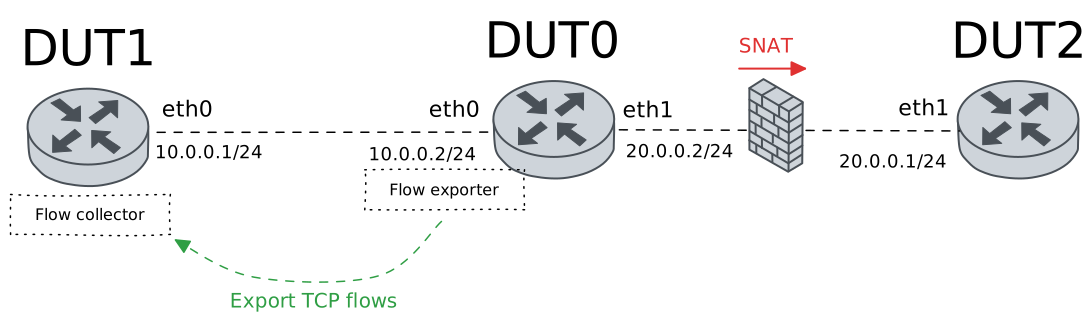
Netflow Without NAT
Description
Simple scenario without NAT configuration.
Scenario
Step 1: Set the following configuration in DUT0 :
set interfaces ethernet eth0 address 10.0.0.2/24
set interfaces ethernet eth0 flow egress selector TCP_SEL
set interfaces ethernet eth0 flow ingress selector TCP_SEL
set interfaces ethernet eth1 address 20.0.0.2/24
set system conntrack app-detect
set system login user admin authentication encrypted-password '$6$GSjsCj8gHLv$/VcqU6FLi6CT2Oxn0MJQ2C2tqnRDrYKNF8HIYWJp68nvXvPdFccDsT04.WtigUONbKYrgKg8d6rEs8PjljMkH0'
set system netflow app-id
set system netflow destination 10.0.0.1
set system netflow engine-id 1111
set traffic selector TCP_SEL rule 1 protocol tcp
Step 2: Set the following configuration in DUT1 :
set interfaces ethernet eth0 address 10.0.0.1/24
set protocols static route 0.0.0.0/0 next-hop 10.0.0.2
set system conntrack app-detect
set system login user admin authentication encrypted-password '$6$GSjsCj8gHLv$/VcqU6FLi6CT2Oxn0MJQ2C2tqnRDrYKNF8HIYWJp68nvXvPdFccDsT04.WtigUONbKYrgKg8d6rEs8PjljMkH0'
Step 3: Set the following configuration in DUT2 :
set interfaces ethernet eth0 address 20.0.0.1/24
set protocols static route 0.0.0.0/0 next-hop 20.0.0.2
set system login user admin authentication encrypted-password '$6$GSjsCj8gHLv$/VcqU6FLi6CT2Oxn0MJQ2C2tqnRDrYKNF8HIYWJp68nvXvPdFccDsT04.WtigUONbKYrgKg8d6rEs8PjljMkH0'
Step 4: Run command system conntrack clear at DUT1.
Step 5: Ping IP address 10.0.0.1 from DUT0:
admin@DUT0$ ping 10.0.0.1 count 1 size 56 timeout 1Show output
PING 10.0.0.1 (10.0.0.1) 56(84) bytes of data.
64 bytes from 10.0.0.1: icmp_seq=1 ttl=64 time=0.220 ms

--- 10.0.0.1 ping statistics ---
1 packets transmitted, 1 received, 0% packet loss, time 0ms
rtt min/avg/max/mdev = 0.220/0.220/0.220/0.000 ms
Step 6: Ping IP address 20.0.0.1 from DUT0:
admin@DUT0$ ping 20.0.0.1 count 1 size 56 timeout 1Show output
PING 20.0.0.1 (20.0.0.1) 56(84) bytes of data.
64 bytes from 20.0.0.1: icmp_seq=1 ttl=64 time=0.324 ms

--- 20.0.0.1 ping statistics ---
1 packets transmitted, 1 received, 0% packet loss, time 0ms
rtt min/avg/max/mdev = 0.324/0.324/0.324/0.000 ms
Step 7: Initiate a tcp connection from DUT1 to DUT2 and try to send some messages between both endpoints
admin@DUT2$ monitor test connection server 8080 tcp
admin@DUT1$ monitor test connection client 20.0.0.1 8080 tcp
Step 8: Run command system netflow show flows detailed at DUT0 and check if output matches the following regular expressions:
2\s+3\s+10.0.0.1:\d+\s+20.0.0.1:\d+\s*\d*\s*\d+[^\[]*\[L4:8080\]Show output
------------------------------------------------------------------------------------------
Field       Description
------------------------------------------------------------------------------------------
#           Numeric flow identifier
hash        Hash of the flow
a           Shows if the flow is pending of being exported
iif         Input interface
oif         Output interface
src         Source IP:PORT
dst         Destination IP:PORT
protocol    Protocol identifier
nexthop     Next-hop [Layer 4:Port]
tos         Type of service identificator
tcpflags    TCP flags
options     Optional IP options
tcpoptions  TCP Options (MSS, Window Scaling, Selective Acknowledgements, Timestamps, Nop)
pkts        Packets counter
bytes       Bytes counter
ts_first    Timestamp of fist packet that passed through the flow
ts_last     Timestamp of last packet that passed through the flow


----------------------------------------------------------------------------------------------------------------------------------------------------
#  hash  a  iif  oif  src             dst             protocol  nexthop           tos  tcpflags  options  tcpoptions  pkts  bytes  ts_first  ts_last
----------------------------------------------------------------------------------------------------------------------------------------------------
1  d241  0  2    3    10.0.0.1:47878  20.0.0.1:8080   8080      0.0.0.0[L4:8080]  0x0  0x1b      0x0      0xf1000000  12    732    385       29
2  50fc  0  3    2    20.0.0.1:8080   10.0.0.1:47878  47878     0.0.0.0[L4:8080]  0x0  0x1b      0x0      0xf1000000  11    680    385       29
Step 9: Run command system netflow show flows detailed at DUT0 and check if output matches the following regular expressions:
3\s+2\s+20.0.0.1:\d+\s+10.0.0.1:\d+\s*\d*\s*\d+[^\[]*\[L4:8080\]Show output
------------------------------------------------------------------------------------------
Field       Description
------------------------------------------------------------------------------------------
#           Numeric flow identifier
hash        Hash of the flow
a           Shows if the flow is pending of being exported
iif         Input interface
oif         Output interface
src         Source IP:PORT
dst         Destination IP:PORT
protocol    Protocol identifier
nexthop     Next-hop [Layer 4:Port]
tos         Type of service identificator
tcpflags    TCP flags
options     Optional IP options
tcpoptions  TCP Options (MSS, Window Scaling, Selective Acknowledgements, Timestamps, Nop)
pkts        Packets counter
bytes       Bytes counter
ts_first    Timestamp of fist packet that passed through the flow
ts_last     Timestamp of last packet that passed through the flow


----------------------------------------------------------------------------------------------------------------------------------------------------
#  hash  a  iif  oif  src             dst             protocol  nexthop           tos  tcpflags  options  tcpoptions  pkts  bytes  ts_first  ts_last
----------------------------------------------------------------------------------------------------------------------------------------------------
1  d241  0  2    3    10.0.0.1:47878  20.0.0.1:8080   8080      0.0.0.0[L4:8080]  0x0  0x1b      0x0      0xf1000000  12    732    406       50
2  50fc  0  3    2    20.0.0.1:8080   10.0.0.1:47878  47878     0.0.0.0[L4:8080]  0x0  0x1b      0x0      0xf1000000  11    680    406       50
Step 10: Run command system netflow show status at DUT0 and check if output matches the following regular expressions:
Protocol\sversion\s10\s\(ipfix\)
Export:.*Errors 0 pkts
sock0:\s127.0.0.1:2055,.*err: sndbuf reached 0, connect 0, cberr 0, other 0
Show output
ipt_NETFLOW 2.6, srcversion CD987E168253A3FC4B86722; dir
Protocol version 10 (ipfix), refresh-rate 20, timeout-rate 30, (templates 0, active 1).
Timeouts: active 1800s, inactive 15s. Maxflows 2000000
Flows: active 2 (peak 8 reached 0d0h0m ago), mem 492K, worker delay 25/250 [1..25] (52 ms, 0 us, 2:0 [cpu0]).
Hash: size 62967 (mem 491K), metric 1.00 [1.00, 1.00, 1.00]. InHash: 23 pkt, 1 K, InPDU 0, 0.
Rate: 344 bits/sec, 0 packets/sec; Avg 1 min: 530 bps, 0 pps; 5 min: 234 bps, 0 pps
cpu#     pps; <search found new [metric], trunc frag alloc maxflows>, traffic: <pkt, bytes>, drop: <pkt, bytes>
Total      0;      0    160     20 [1.00],    0    0    0    0, traffic: 100, 0 MB, drop: 0, 0 K
cpu0       0;      0    160     19 [1.00],    0    0    0    0, traffic: 99, 0 MB, drop: 0, 0 K
cpu1       0;      0      0      1 [1.00],    0    0    0    0, traffic: 1, 0 MB, drop: 0, 0 K
cpu2       0;      0      0      0 [1.00],    0    0    0    0, traffic: 0, 0 MB, drop: 0, 0 K
cpu3       0;      0      0      0 [1.00],    0    0    0    0, traffic: 0, 0 MB, drop: 0, 0 K
Export: Rate 29 bytes/s; Total 12 pkts, 0 MB, 6 flows; Errors 0 pkts; Traffic lost 67 pkts, 3 Kbytes, 12 flows.
sock0: 127.0.0.1:2055, sndbuf 212992, filled 1, peak 1; err: sndbuf reached 0, connect 0, cberr 0, other 0
Netflow With SNAT
Description
Scenario with SNAT in DUT0 WAN interface (eth1).
Scenario
Step 1: Set the following configuration in DUT0 :
set interfaces ethernet eth0 address 10.0.0.2/24
set interfaces ethernet eth0 flow egress selector TCP_SEL
set interfaces ethernet eth0 flow ingress selector TCP_SEL
set interfaces ethernet eth1 address 20.0.0.2/24
set interfaces ethernet eth1 traffic nat source rule 1 address masquerade
set interfaces ethernet eth1 traffic nat source rule 1 selector TCP_SEL
set system conntrack app-detect
set system login user admin authentication encrypted-password '$6$GSjsCj8gHLv$/VcqU6FLi6CT2Oxn0MJQ2C2tqnRDrYKNF8HIYWJp68nvXvPdFccDsT04.WtigUONbKYrgKg8d6rEs8PjljMkH0'
set system netflow app-id
set system netflow destination 10.0.0.1
set system netflow engine-id 1111
set traffic selector TCP_SEL rule 1 protocol tcp
Step 2: Set the following configuration in DUT1 :
set interfaces ethernet eth0 address 10.0.0.1/24
set protocols static route 0.0.0.0/0 next-hop 10.0.0.2
set system conntrack app-detect
set system login user admin authentication encrypted-password '$6$GSjsCj8gHLv$/VcqU6FLi6CT2Oxn0MJQ2C2tqnRDrYKNF8HIYWJp68nvXvPdFccDsT04.WtigUONbKYrgKg8d6rEs8PjljMkH0'
Step 3: Set the following configuration in DUT2 :
set interfaces ethernet eth0 address 20.0.0.1/24
set system login user admin authentication encrypted-password '$6$GSjsCj8gHLv$/VcqU6FLi6CT2Oxn0MJQ2C2tqnRDrYKNF8HIYWJp68nvXvPdFccDsT04.WtigUONbKYrgKg8d6rEs8PjljMkH0'
Step 4: Run command system conntrack clear at DUT1.
Step 5: Ping IP address 10.0.0.1 from DUT0:
admin@DUT0$ ping 10.0.0.1 count 1 size 56 timeout 1Show output
PING 10.0.0.1 (10.0.0.1) 56(84) bytes of data.
64 bytes from 10.0.0.1: icmp_seq=1 ttl=64 time=2.34 ms

--- 10.0.0.1 ping statistics ---
1 packets transmitted, 1 received, 0% packet loss, time 0ms
rtt min/avg/max/mdev = 2.337/2.337/2.337/0.000 ms
Step 6: Ping IP address 20.0.0.1 from DUT0:
admin@DUT0$ ping 20.0.0.1 count 1 size 56 timeout 1Show output
PING 20.0.0.1 (20.0.0.1) 56(84) bytes of data.
64 bytes from 20.0.0.1: icmp_seq=1 ttl=64 time=0.435 ms

--- 20.0.0.1 ping statistics ---
1 packets transmitted, 1 received, 0% packet loss, time 0ms
rtt min/avg/max/mdev = 0.435/0.435/0.435/0.000 ms
Step 7: Initiate a tcp connection from DUT1 to DUT2 and try to send some messages between both endpoints
admin@DUT2$ monitor test connection server 8080 tcp
admin@DUT1$ monitor test connection client 20.0.0.1 8080 tcp
Step 8: Run command system netflow show flows detailed at DUT0 and check if output matches the following regular expressions:
2\s+3\s+10.0.0.1:\d+\s+20.0.0.1:\d+\s*\d*\s*\d+[^\[]*\[L4:8080\]Show output
------------------------------------------------------------------------------------------
Field       Description
------------------------------------------------------------------------------------------
#           Numeric flow identifier
hash        Hash of the flow
a           Shows if the flow is pending of being exported
iif         Input interface
oif         Output interface
src         Source IP:PORT
dst         Destination IP:PORT
protocol    Protocol identifier
nexthop     Next-hop [Layer 4:Port]
tos         Type of service identificator
tcpflags    TCP flags
options     Optional IP options
tcpoptions  TCP Options (MSS, Window Scaling, Selective Acknowledgements, Timestamps, Nop)
pkts        Packets counter
bytes       Bytes counter
ts_first    Timestamp of fist packet that passed through the flow
ts_last     Timestamp of last packet that passed through the flow


----------------------------------------------------------------------------------------------------------------------------------------------------
#  hash  a  iif  oif  src             dst             protocol  nexthop           tos  tcpflags  options  tcpoptions  pkts  bytes  ts_first  ts_last
----------------------------------------------------------------------------------------------------------------------------------------------------
1  0d59  0  3    2    20.0.0.1:8080   10.0.0.1:55546  55546     0.0.0.0[L4:8080]  0x0  0x1b      0x0      0xf1000000  12    732    441       45
2  5b68  0  2    3    10.0.0.1:55546  20.0.0.1:8080   8080      0.0.0.0[L4:8080]  0x0  0x1b      0x0      0xf1000000  14    836    441       45
Step 9: Run command system netflow show flows detailed at DUT0 and check if output matches the following regular expressions:
3\s+2\s+20.0.0.1:\d+\s+10.0.0.1:\d+\s*\d*\s*\d+[^\[]*\[L4:8080\]Show output
------------------------------------------------------------------------------------------
Field       Description
------------------------------------------------------------------------------------------
#           Numeric flow identifier
hash        Hash of the flow
a           Shows if the flow is pending of being exported
iif         Input interface
oif         Output interface
src         Source IP:PORT
dst         Destination IP:PORT
protocol    Protocol identifier
nexthop     Next-hop [Layer 4:Port]
tos         Type of service identificator
tcpflags    TCP flags
options     Optional IP options
tcpoptions  TCP Options (MSS, Window Scaling, Selective Acknowledgements, Timestamps, Nop)
pkts        Packets counter
bytes       Bytes counter
ts_first    Timestamp of fist packet that passed through the flow
ts_last     Timestamp of last packet that passed through the flow


----------------------------------------------------------------------------------------------------------------------------------------------------
#  hash  a  iif  oif  src             dst             protocol  nexthop           tos  tcpflags  options  tcpoptions  pkts  bytes  ts_first  ts_last
----------------------------------------------------------------------------------------------------------------------------------------------------
1  0d59  0  3    2    20.0.0.1:8080   10.0.0.1:55546  55546     0.0.0.0[L4:8080]  0x0  0x1b      0x0      0xf1000000  12    732    467       71
2  5b68  0  2    3    10.0.0.1:55546  20.0.0.1:8080   8080      0.0.0.0[L4:8080]  0x0  0x1b      0x0      0xf1000000  14    836    467       71
Step 10: Run command system netflow show status at DUT0 and check if output matches the following regular expressions:
Protocol\sversion\s10\s\(ipfix\)
Export:.*Errors 0 pkts
sock0:\s127.0.0.1:2055,.*err: sndbuf reached 0, connect 0, cberr 0, other 0
Show output
ipt_NETFLOW 2.6, srcversion CD987E168253A3FC4B86722; dir
Protocol version 10 (ipfix), refresh-rate 20, timeout-rate 30, (templates 0, active 1).
Timeouts: active 1800s, inactive 15s. Maxflows 2000000
Flows: active 2 (peak 8 reached 0d0h0m ago), mem 492K, worker delay 25/250 [1..25] (44 ms, 0 us, 2:0 [cpu0]).
Hash: size 62967 (mem 491K), metric 1.00 [1.00, 1.00, 1.00]. InHash: 26 pkt, 1 K, InPDU 0, 0.
Rate: 344 bits/sec, 0 packets/sec; Avg 1 min: 634 bps, 0 pps; 5 min: 284 bps, 0 pps
cpu#     pps; <search found new [metric], trunc frag alloc maxflows>, traffic: <pkt, bytes>, drop: <pkt, bytes>
Total      0;      0    198     22 [1.00],    0    0    0    0, traffic: 126, 0 MB, drop: 0, 0 K
cpu0       0;      0    198     21 [1.00],    0    0    0    0, traffic: 125, 0 MB, drop: 0, 0 K
cpu1       0;      0      0      1 [1.00],    0    0    0    0, traffic: 1, 0 MB, drop: 0, 0 K
cpu2       0;      0      0      0 [1.00],    0    0    0    0, traffic: 0, 0 MB, drop: 0, 0 K
cpu3       0;      0      0      0 [1.00],    0    0    0    0, traffic: 0, 0 MB, drop: 0, 0 K
Export: Rate 117 bytes/s; Total 16 pkts, 0 MB, 6 flows; Errors 0 pkts; Traffic lost 90 pkts, 5 Kbytes, 14 flows.
sock0: 127.0.0.1:2055, sndbuf 212992, filled 1, peak 1; err: sndbuf reached 0, connect 0, cberr 0, other 0
Netflow With DNAT
Description
Scenario with DNAT in DUT0 LAN interface (eth0).
Scenario
Step 1: Set the following configuration in DUT0 :
set interfaces ethernet eth0 address 10.0.0.2/24
set interfaces ethernet eth0 flow egress selector TCP_SEL
set interfaces ethernet eth0 flow ingress selector TCP_SEL
set interfaces ethernet eth0 traffic nat destination rule 1 address 20.0.0.1
set interfaces ethernet eth0 traffic nat destination rule 1 selector TCP_SEL
set interfaces ethernet eth1 address 20.0.0.2/24
set system conntrack app-detect
set system login user admin authentication encrypted-password '$6$GSjsCj8gHLv$/VcqU6FLi6CT2Oxn0MJQ2C2tqnRDrYKNF8HIYWJp68nvXvPdFccDsT04.WtigUONbKYrgKg8d6rEs8PjljMkH0'
set system netflow app-id
set system netflow destination 10.0.0.1
set system netflow engine-id 1111
set traffic selector TCP_SEL rule 1 protocol tcp
Step 2: Set the following configuration in DUT1 :
set interfaces ethernet eth0 address 10.0.0.1/24
set system conntrack app-detect
set system login user admin authentication encrypted-password '$6$GSjsCj8gHLv$/VcqU6FLi6CT2Oxn0MJQ2C2tqnRDrYKNF8HIYWJp68nvXvPdFccDsT04.WtigUONbKYrgKg8d6rEs8PjljMkH0'
Step 3: Set the following configuration in DUT2 :
set interfaces ethernet eth0 address 20.0.0.1/24
set protocols static route 0.0.0.0/0 next-hop 20.0.0.2
set system login user admin authentication encrypted-password '$6$GSjsCj8gHLv$/VcqU6FLi6CT2Oxn0MJQ2C2tqnRDrYKNF8HIYWJp68nvXvPdFccDsT04.WtigUONbKYrgKg8d6rEs8PjljMkH0'
Step 4: Run command system conntrack clear at DUT1.
Step 5: Ping IP address 10.0.0.1 from DUT0:
admin@DUT0$ ping 10.0.0.1 count 1 size 56 timeout 1Show output
PING 10.0.0.1 (10.0.0.1) 56(84) bytes of data.
64 bytes from 10.0.0.1: icmp_seq=1 ttl=64 time=0.223 ms

--- 10.0.0.1 ping statistics ---
1 packets transmitted, 1 received, 0% packet loss, time 0ms
rtt min/avg/max/mdev = 0.223/0.223/0.223/0.000 ms
Step 6: Ping IP address 20.0.0.1 from DUT0:
admin@DUT0$ ping 20.0.0.1 count 1 size 56 timeout 1Show output
PING 20.0.0.1 (20.0.0.1) 56(84) bytes of data.
64 bytes from 20.0.0.1: icmp_seq=1 ttl=64 time=0.315 ms

--- 20.0.0.1 ping statistics ---
1 packets transmitted, 1 received, 0% packet loss, time 0ms
rtt min/avg/max/mdev = 0.315/0.315/0.315/0.000 ms
Step 7: Initiate a tcp connection from DUT1 to DUT2 and try to send some messages between both endpoints
admin@DUT2$ monitor test connection server 8080 tcp
admin@DUT1$ monitor test connection client 10.0.0.2 8080 tcp
Step 8: Run command system netflow show flows detailed at DUT0 and check if output matches the following regular expressions:
2\s+3\s+10.0.0.1:\d+\s+20.0.0.1:\d+\s*\d*\s*\d+[^\[]*\[L4:8080\]Show output
------------------------------------------------------------------------------------------
Field       Description
------------------------------------------------------------------------------------------
#           Numeric flow identifier
hash        Hash of the flow
a           Shows if the flow is pending of being exported
iif         Input interface
oif         Output interface
src         Source IP:PORT
dst         Destination IP:PORT
protocol    Protocol identifier
nexthop     Next-hop [Layer 4:Port]
tos         Type of service identificator
tcpflags    TCP flags
options     Optional IP options
tcpoptions  TCP Options (MSS, Window Scaling, Selective Acknowledgements, Timestamps, Nop)
pkts        Packets counter
bytes       Bytes counter
ts_first    Timestamp of fist packet that passed through the flow
ts_last     Timestamp of last packet that passed through the flow


----------------------------------------------------------------------------------------------------------------------------------------------------
#  hash  a  iif  oif  src             dst             protocol  nexthop           tos  tcpflags  options  tcpoptions  pkts  bytes  ts_first  ts_last
----------------------------------------------------------------------------------------------------------------------------------------------------
1  4c45  0  3    2    20.0.0.1:8080   10.0.0.1:52084  52084     0.0.0.0[L4:8080]  0x0  0x1b      0x0      0xf1000000  9     576    388       29
2  009f  0  2    3    10.0.0.1:52084  20.0.0.1:8080   8080      0.0.0.0[L4:8080]  0x0  0x1b      0x0      0xf1000000  13    784    388       29
Step 9: Run command system netflow show flows detailed at DUT0 and check if output matches the following regular expressions:
3\s+2\s+20.0.0.1:\d+\s+10.0.0.1:\d+\s*\d*\s*\d+[^\[]*\[L4:8080\]Show output
------------------------------------------------------------------------------------------
Field       Description
------------------------------------------------------------------------------------------
#           Numeric flow identifier
hash        Hash of the flow
a           Shows if the flow is pending of being exported
iif         Input interface
oif         Output interface
src         Source IP:PORT
dst         Destination IP:PORT
protocol    Protocol identifier
nexthop     Next-hop [Layer 4:Port]
tos         Type of service identificator
tcpflags    TCP flags
options     Optional IP options
tcpoptions  TCP Options (MSS, Window Scaling, Selective Acknowledgements, Timestamps, Nop)
pkts        Packets counter
bytes       Bytes counter
ts_first    Timestamp of fist packet that passed through the flow
ts_last     Timestamp of last packet that passed through the flow


----------------------------------------------------------------------------------------------------------------------------------------------------
#  hash  a  iif  oif  src             dst             protocol  nexthop           tos  tcpflags  options  tcpoptions  pkts  bytes  ts_first  ts_last
----------------------------------------------------------------------------------------------------------------------------------------------------
1  4c45  0  3    2    20.0.0.1:8080   10.0.0.1:52084  52084     0.0.0.0[L4:8080]  0x0  0x1b      0x0      0xf1000000  9     576    409       50
2  009f  0  2    3    10.0.0.1:52084  20.0.0.1:8080   8080      0.0.0.0[L4:8080]  0x0  0x1b      0x0      0xf1000000  13    784    409       50
Step 10: Run command system netflow show status at DUT0 and check if output matches the following regular expressions:
Protocol\sversion\s10\s\(ipfix\)
Export:.*Errors 0 pkts
sock0:\s127.0.0.1:2055,.*err: sndbuf reached 0, connect 0, cberr 0, other 0
Show output
ipt_NETFLOW 2.6, srcversion CD987E168253A3FC4B86722; dir
Protocol version 10 (ipfix), refresh-rate 20, timeout-rate 30, (templates 0, active 1).
Timeouts: active 1800s, inactive 15s. Maxflows 2000000
Flows: active 2 (peak 8 reached 0d0h0m ago), mem 492K, worker delay 25/250 [1..25] (28 ms, 0 us, 2:0 [cpu3]).
Hash: size 62967 (mem 491K), metric 1.00 [1.00, 1.00, 1.00]. InHash: 22 pkt, 1 K, InPDU 0, 0.
Rate: 344 bits/sec, 0 packets/sec; Avg 1 min: 734 bps, 0 pps; 5 min: 338 bps, 0 pps
cpu#     pps; <search found new [metric], trunc frag alloc maxflows>, traffic: <pkt, bytes>, drop: <pkt, bytes>
Total      0;      0    231     24 [1.00],    0    0    0    0, traffic: 148, 0 MB, drop: 0, 0 K
cpu0       0;      0    231     23 [1.00],    0    0    0    0, traffic: 147, 0 MB, drop: 0, 0 K
cpu1       0;      0      0      1 [1.00],    0    0    0    0, traffic: 1, 0 MB, drop: 0, 0 K
cpu2       0;      0      0      0 [1.00],    0    0    0    0, traffic: 0, 0 MB, drop: 0, 0 K
cpu3       0;      0      0      0 [1.00],    0    0    0    0, traffic: 0, 0 MB, drop: 0, 0 K
Export: Rate 88 bytes/s; Total 20 pkts, 0 MB, 6 flows; Errors 0 pkts; Traffic lost 116 pkts, 6 Kbytes, 16 flows.
sock0: 127.0.0.1:2055, sndbuf 212992, filled 1, peak 1; err: sndbuf reached 0, connect 0, cberr 0, other 0
Netflow With SDNAT
Description
Scenario with SNAT in DUT0 WAN interface (eth1)
and DNAT in DUT0 LAN interface (eth0).
Scenario
Step 1: Set the following configuration in DUT0 :
set interfaces ethernet eth0 address 10.0.0.2/24
set interfaces ethernet eth0 flow egress selector TCP_SEL
set interfaces ethernet eth0 flow ingress selector TCP_SEL
set interfaces ethernet eth0 traffic nat destination rule 1 address 20.0.0.1
set interfaces ethernet eth0 traffic nat destination rule 1 selector TCP_SEL
set interfaces ethernet eth1 address 20.0.0.2/24
set interfaces ethernet eth1 traffic nat source rule 1 address masquerade
set interfaces ethernet eth1 traffic nat source rule 1 selector TCP_SEL
set system conntrack app-detect
set system login user admin authentication encrypted-password '$6$GSjsCj8gHLv$/VcqU6FLi6CT2Oxn0MJQ2C2tqnRDrYKNF8HIYWJp68nvXvPdFccDsT04.WtigUONbKYrgKg8d6rEs8PjljMkH0'
set system netflow app-id
set system netflow destination 10.0.0.1
set system netflow engine-id 1111
set traffic selector TCP_SEL rule 1 protocol tcp
Step 2: Set the following configuration in DUT1 :
set interfaces ethernet eth0 address 10.0.0.1/24
set system conntrack app-detect
set system login user admin authentication encrypted-password '$6$GSjsCj8gHLv$/VcqU6FLi6CT2Oxn0MJQ2C2tqnRDrYKNF8HIYWJp68nvXvPdFccDsT04.WtigUONbKYrgKg8d6rEs8PjljMkH0'
Step 3: Set the following configuration in DUT2 :
set interfaces ethernet eth0 address 20.0.0.1/24
set system login user admin authentication encrypted-password '$6$GSjsCj8gHLv$/VcqU6FLi6CT2Oxn0MJQ2C2tqnRDrYKNF8HIYWJp68nvXvPdFccDsT04.WtigUONbKYrgKg8d6rEs8PjljMkH0'
Step 4: Run command system conntrack clear at DUT1.
Step 5: Ping IP address 10.0.0.1 from DUT0:
admin@DUT0$ ping 10.0.0.1 count 1 size 56 timeout 1Show output
PING 10.0.0.1 (10.0.0.1) 56(84) bytes of data.
64 bytes from 10.0.0.1: icmp_seq=1 ttl=64 time=54.2 ms

--- 10.0.0.1 ping statistics ---
1 packets transmitted, 1 received, 0% packet loss, time 0ms
rtt min/avg/max/mdev = 54.171/54.171/54.171/0.000 ms
Step 6: Ping IP address 20.0.0.1 from DUT0:
admin@DUT0$ ping 20.0.0.1 count 1 size 56 timeout 1Show output
PING 20.0.0.1 (20.0.0.1) 56(84) bytes of data.
64 bytes from 20.0.0.1: icmp_seq=1 ttl=64 time=0.341 ms

--- 20.0.0.1 ping statistics ---
1 packets transmitted, 1 received, 0% packet loss, time 0ms
rtt min/avg/max/mdev = 0.341/0.341/0.341/0.000 ms
Step 7: Initiate a tcp connection from DUT1 to DUT2 and try to send some messages between both endpoints
admin@DUT2$ monitor test connection server 8080 tcp
admin@DUT1$ monitor test connection client 10.0.0.2 8080 tcp
Step 8: Run command system netflow show flows detailed at DUT0 and check if output matches the following regular expressions:
2\s+3\s+10.0.0.1:\d+\s+20.0.0.1:\d+\s*\d*\s*\d+[^\[]*\[L4:8080\]Show output
------------------------------------------------------------------------------------------
Field       Description
------------------------------------------------------------------------------------------
#           Numeric flow identifier
hash        Hash of the flow
a           Shows if the flow is pending of being exported
iif         Input interface
oif         Output interface
src         Source IP:PORT
dst         Destination IP:PORT
protocol    Protocol identifier
nexthop     Next-hop [Layer 4:Port]
tos         Type of service identificator
tcpflags    TCP flags
options     Optional IP options
tcpoptions  TCP Options (MSS, Window Scaling, Selective Acknowledgements, Timestamps, Nop)
pkts        Packets counter
bytes       Bytes counter
ts_first    Timestamp of fist packet that passed through the flow
ts_last     Timestamp of last packet that passed through the flow


----------------------------------------------------------------------------------------------------------------------------------------------------
#  hash  a  iif  oif  src             dst             protocol  nexthop           tos  tcpflags  options  tcpoptions  pkts  bytes  ts_first  ts_last
----------------------------------------------------------------------------------------------------------------------------------------------------
1  c666  0  2    3    10.0.0.1:55210  20.0.0.1:8080   8080      0.0.0.0[L4:8080]  0x0  0x1b      0x0      0xf1000000  10    628    379       31
2  14db  0  3    2    20.0.0.1:8080   10.0.0.1:55210  55210     0.0.0.0[L4:8080]  0x0  0x1b      0x0      0xf1000000  10    628    378       31
Step 9: Run command system netflow show flows detailed at DUT0 and check if output matches the following regular expressions:
3\s+2\s+20.0.0.1:\d+\s+10.0.0.1:\d+\s*\d*\s*\d+[^\[]*\[L4:8080\]Show output
------------------------------------------------------------------------------------------
Field       Description
------------------------------------------------------------------------------------------
#           Numeric flow identifier
hash        Hash of the flow
a           Shows if the flow is pending of being exported
iif         Input interface
oif         Output interface
src         Source IP:PORT
dst         Destination IP:PORT
protocol    Protocol identifier
nexthop     Next-hop [Layer 4:Port]
tos         Type of service identificator
tcpflags    TCP flags
options     Optional IP options
tcpoptions  TCP Options (MSS, Window Scaling, Selective Acknowledgements, Timestamps, Nop)
pkts        Packets counter
bytes       Bytes counter
ts_first    Timestamp of fist packet that passed through the flow
ts_last     Timestamp of last packet that passed through the flow


----------------------------------------------------------------------------------------------------------------------------------------------------
#  hash  a  iif  oif  src             dst             protocol  nexthop           tos  tcpflags  options  tcpoptions  pkts  bytes  ts_first  ts_last
----------------------------------------------------------------------------------------------------------------------------------------------------
1  c666  0  2    3    10.0.0.1:55210  20.0.0.1:8080   8080      0.0.0.0[L4:8080]  0x0  0x1b      0x0      0xf1000000  10    628    399       51
2  14db  0  3    2    20.0.0.1:8080   10.0.0.1:55210  55210     0.0.0.0[L4:8080]  0x0  0x1b      0x0      0xf1000000  10    628    398       51
Step 10: Run command system netflow show status at DUT0 and check if output matches the following regular expressions:
Protocol\sversion\s10\s\(ipfix\)
Export:.*Errors 0 pkts
sock0:\s127.0.0.1:2055,.*err: sndbuf reached 0, connect 0, cberr 0, other 0
Show output
ipt_NETFLOW 2.6, srcversion CD987E168253A3FC4B86722; dir
Protocol version 10 (ipfix), refresh-rate 20, timeout-rate 30, (templates 0, active 1).
Timeouts: active 1800s, inactive 15s. Maxflows 2000000
Flows: active 2 (peak 8 reached 0d0h0m ago), mem 492K, worker delay 25/250 [1..25] (8 ms, 0 us, 2:0 [cpu3]).
Hash: size 62967 (mem 491K), metric 1.00 [1.00, 1.00, 1.00]. InHash: 20 pkt, 1 K, InPDU 0, 0.
Rate: 840 bits/sec, 1 packets/sec; Avg 1 min: 823 bps, 0 pps; 5 min: 390 bps, 0 pps
cpu#     pps; <search found new [metric], trunc frag alloc maxflows>, traffic: <pkt, bytes>, drop: <pkt, bytes>
Total      1;      0    259     26 [1.00],    0    0    0    0, traffic: 168, 0 MB, drop: 0, 0 K
cpu0       1;      0    259     25 [1.00],    0    0    0    0, traffic: 167, 0 MB, drop: 0, 0 K
cpu1       0;      0      0      1 [1.00],    0    0    0    0, traffic: 1, 0 MB, drop: 0, 0 K
cpu2       0;      0      0      0 [1.00],    0    0    0    0, traffic: 0, 0 MB, drop: 0, 0 K
cpu3       0;      0      0      0 [1.00],    0    0    0    0, traffic: 0, 0 MB, drop: 0, 0 K
Export: Rate 0 bytes/s; Total 24 pkts, 0 MB, 6 flows; Errors 0 pkts; Traffic lost 138 pkts, 8 Kbytes, 18 flows.
sock0: 127.0.0.1:2055, sndbuf 212992, filled 1, peak 1; err: sndbuf reached 0, connect 0, cberr 0, other 0