Xfrm-Interface
Test suite to check IPsec with xfrm interface
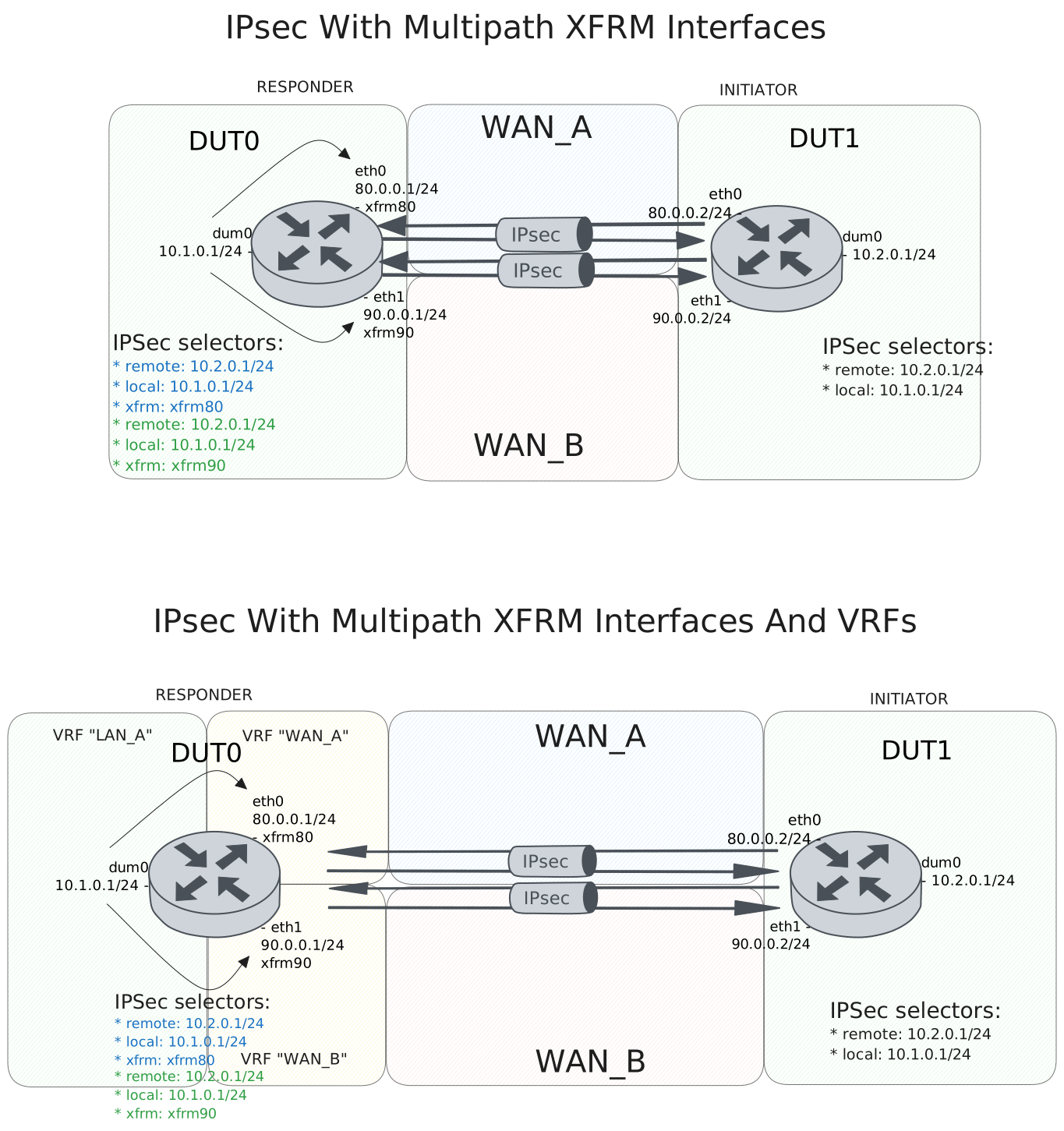
Test IPsec With Multipath XFRM Interfaces
Description
DUT0 and DUT1 are connected to each other through multiple IPsec tunnels with same local and remote prefixes.
In this test case, we will check the IPsec tunnels are installing the multipath routes correctly and the traffic is being balanced between the two tunnels.
Scenario
Step 1: Set the following configuration in DUT0 :
set interfaces dummy dum0 address 10.1.0.1/24
set interfaces ethernet eth0 address 80.0.0.1/24
set interfaces ethernet eth1 address 90.0.0.1/24
set interfaces xfrm xfrm80 mtu 1400
set interfaces xfrm xfrm90 mtu 1400
set service ssh
set system login user admin authentication encrypted-password '$6$GSjsCj8gHLv$/VcqU6FLi6CT2Oxn0MJQ2C2tqnRDrYKNF8HIYWJp68nvXvPdFccDsT04.WtigUONbKYrgKg8d6rEs8PjljMkH0'
set system vrf main
set traffic policy POL rule 1 selector SEL
set traffic policy POL rule 2 action drop
set traffic selector SEL rule 1 protocol esp
set traffic selector SEL rule 2 protocol icmp
set traffic selector SEL rule 3 protocol udp
set vpn ipsec auth-profile AUTH-SA local auth encrypted-pre-shared-secret U2FsdGVkX1+WQxVNTDIPPLNNuaufP1hnzrz/cLCLj78=
set vpn ipsec esp-group CHILD-SA mode tunnel
set vpn ipsec esp-group CHILD-SA proposal 1 encryption aes256gcm128
set vpn ipsec esp-group CHILD-SA proposal 1 pfs dh-group19
set vpn ipsec ike-group IKE-SA key-exchange ikev2
set vpn ipsec ike-group IKE-SA proposal 1 dh-group 19
set vpn ipsec ike-group IKE-SA proposal 1 encryption aes256gcm128
set vpn ipsec ike-group IKE-SA proposal 1 hash sha256
set vpn ipsec site-to-site peer PEER80 auth-profile AUTH-SA
set vpn ipsec site-to-site peer PEER80 connection-type respond
set vpn ipsec site-to-site peer PEER80 default-esp-group CHILD-SA
set vpn ipsec site-to-site peer PEER80 ike-group IKE-SA
set vpn ipsec site-to-site peer PEER80 local-address 80.0.0.1
set vpn ipsec site-to-site peer PEER80 remote-address 80.0.0.2
set vpn ipsec site-to-site peer PEER80 tunnel 1 install-routes main
set vpn ipsec site-to-site peer PEER80 tunnel 1 local prefix 10.1.0.0/24
set vpn ipsec site-to-site peer PEER80 tunnel 1 remote prefix 10.2.0.0/24
set vpn ipsec site-to-site peer PEER80 tunnel 1 xfrm-interface-out xfrm80
set vpn ipsec site-to-site peer PEER90 auth-profile AUTH-SA
set vpn ipsec site-to-site peer PEER90 connection-type respond
set vpn ipsec site-to-site peer PEER90 default-esp-group CHILD-SA
set vpn ipsec site-to-site peer PEER90 ike-group IKE-SA
set vpn ipsec site-to-site peer PEER90 local-address 90.0.0.1
set vpn ipsec site-to-site peer PEER90 remote-address 90.0.0.2
set vpn ipsec site-to-site peer PEER90 tunnel 1 install-routes main
set vpn ipsec site-to-site peer PEER90 tunnel 1 local prefix 10.1.0.0/24
set vpn ipsec site-to-site peer PEER90 tunnel 1 remote prefix 10.2.0.0/24
set vpn ipsec site-to-site peer PEER90 tunnel 1 xfrm-interface-out xfrm90
Step 2: Set the following configuration in DUT1 :
set interfaces dummy dum0 address 10.2.0.1/24
set interfaces ethernet eth0 address 80.0.0.2/24
set interfaces ethernet eth1 address 90.0.0.2/24
set service ssh
set system login user admin authentication encrypted-password '$6$GSjsCj8gHLv$/VcqU6FLi6CT2Oxn0MJQ2C2tqnRDrYKNF8HIYWJp68nvXvPdFccDsT04.WtigUONbKYrgKg8d6rEs8PjljMkH0'
set system vrf main
set vpn ipsec auth-profile AUTH-SA local auth encrypted-pre-shared-secret U2FsdGVkX1/EQO96OGd7Pj6oPPPKIRSHKDcBDg3dlB8=
set vpn ipsec esp-group CHILD-SA mode tunnel
set vpn ipsec esp-group CHILD-SA proposal 1 encryption aes256gcm128
set vpn ipsec esp-group CHILD-SA proposal 1 pfs dh-group19
set vpn ipsec ike-group IKE-SA key-exchange ikev2
set vpn ipsec ike-group IKE-SA proposal 1 dh-group 19
set vpn ipsec ike-group IKE-SA proposal 1 encryption aes256gcm128
set vpn ipsec ike-group IKE-SA proposal 1 hash sha256
set vpn ipsec site-to-site peer PEER80 auth-profile AUTH-SA
set vpn ipsec site-to-site peer PEER80 connection-type initiate
set vpn ipsec site-to-site peer PEER80 default-esp-group CHILD-SA
set vpn ipsec site-to-site peer PEER80 ike-group IKE-SA
set vpn ipsec site-to-site peer PEER80 local-address 80.0.0.2
set vpn ipsec site-to-site peer PEER80 remote-address 80.0.0.1
set vpn ipsec site-to-site peer PEER80 tunnel 1 local prefix 10.2.0.0/24
set vpn ipsec site-to-site peer PEER80 tunnel 1 remote prefix 10.1.0.0/24
set vpn ipsec site-to-site peer PEER90 auth-profile AUTH-SA
set vpn ipsec site-to-site peer PEER90 connection-type initiate
set vpn ipsec site-to-site peer PEER90 default-esp-group CHILD-SA
set vpn ipsec site-to-site peer PEER90 ike-group IKE-SA
set vpn ipsec site-to-site peer PEER90 local-address 90.0.0.2
set vpn ipsec site-to-site peer PEER90 remote-address 90.0.0.1
set vpn ipsec site-to-site peer PEER90 tunnel 1 local prefix 10.2.0.0/24
set vpn ipsec site-to-site peer PEER90 tunnel 1 remote prefix 10.1.0.0/24
In order to test the multipath routes that the traffic is being balanced between the two tunnels, we will use ssh connections to verify that it can reach another host through either of the tunnels.
Warning
The traffic steering is not done in the both sides yet, so from responder side we will force the traffic to go through one of the tunnels by adding drop policy to the xfrm interface of the other tunnel, and also in the initiator DUT we will set the default route to the negotiated tunnel instead.
Step 3: Modify the following configuration lines in DUT0 :
set interfaces xfrm xfrm90 traffic policy in POL
Step 4: Modify the following configuration lines in DUT1 :
set vpn ipsec site-to-site peer PEER80 tunnel 1 install-routes main
Step 5: Run command vpn ipsec clear sa at DUT0 and expect this output:
Show output
Deleting IPSec SAs... 100.0%
Closed tunnels: 2
Step 6: Run command vpn ipsec clear peer PEER80 at DUT1 and expect this output:
Show output
[IKE] deleting IKE_SA vpn-peer-PEER80[6] between 80.0.0.2[80.0.0.2]...80.0.0.1[80.0.0.1]
[IKE] sending DELETE for IKE_SA vpn-peer-PEER80[6]
[ENC] generating INFORMATIONAL request 2 [ D ]
[NET] sending packet: from 80.0.0.2[500](0) to 80.0.0.1[500](0) (65 bytes)
[NET] received packet: from 80.0.0.1[500](0) to 80.0.0.2[500](2) (57 bytes)
[ENC] parsed INFORMATIONAL response 2 [ ]
[IKE] IKE_SA deleted
terminate completed successfully
[IKE] initiating IKE_SA vpn-peer-PEER80[7] to 80.0.0.1
[ENC] generating IKE_SA_INIT request 0 [ SA KE No N(NATD_S_IP) N(NATD_D_IP) N(FRAG_SUP) N(HASH_ALG) N(REDIR_SUP) ]
[NET] sending packet: from 80.0.0.2[500](0) to 80.0.0.1[500](0) (264 bytes)
[NET] received packet: from 80.0.0.1[500](0) to 80.0.0.2[500](2) (272 bytes)
[ENC] parsed IKE_SA_INIT response 0 [ SA KE No N(NATD_S_IP) N(NATD_D_IP) N(FRAG_SUP) N(HASH_ALG) N(CHDLESS_SUP) N(MULT_AUTH) ]
[CFG] selected proposal: IKE:AES_GCM_16_256/PRF_HMAC_SHA2_256/ECP_256
[CFG] no IDi configured, fall back on IP address
[IKE] authentication of '80.0.0.2' (myself) with pre-shared key
[IKE] establishing CHILD_SA peer-PEER80-tunnel-1{7}
[ENC] generating IKE_AUTH request 1 [ IDi AUTH SA TSi TSr N(MULT_AUTH) N(EAP_ONLY) N(MSG_ID_SYN_SUP) ]
[NET] sending packet: from 80.0.0.2[500](0) to 80.0.0.1[500](0) (217 bytes)
[NET] received packet: from 80.0.0.1[500](0) to 80.0.0.2[500](2) (193 bytes)
[ENC] parsed IKE_AUTH response 1 [ IDr AUTH SA TSi TSr ]
[IKE] authentication of '80.0.0.1' with pre-shared key successful
[IKE] IKE_SA vpn-peer-PEER80[7] established between 80.0.0.2[80.0.0.2]...80.0.0.1[80.0.0.1]
[IKE] scheduling rekeying in 28079s
[IKE] maximum IKE_SA lifetime 30959s
[CFG] selected proposal: ESP:AES_GCM_16_256/NO_EXT_SEQ
[KNL] about to flush conntrack entries due to change on route/link
[KNL] installing route on table 254: 10.1.0.0/24 via 80.0.0.1 src 10.2.0.1 dev eth0 metric 0
[KNL] about to flush conntrack entries due to change on route/link
[IKE] CHILD_SA peer-PEER80-tunnel-1{7} established with SPIs cc7817d5_i c90bc20c_o and TS 10.2.0.0/24 === 10.1.0.0/24
initiate completed successfully
Step 7: Run command protocols ip show route at DUT0 and check if output matches the following regular expressions:
K>\* 10\.2\.0\.0/24 \[0\/0\] is directly connected.*xfrm\d+.*\n.*xfrm\d+Show output
Codes: K - kernel route, C - connected, L - local, S - static,
       R - RIP, O - OSPF, I - IS-IS, B - BGP, E - EIGRP, N - NHRP,
       T - Table, v - VNC, V - VNC-Direct, A - Babel, F - PBR,
       f - OpenFabric, t - Table-Direct,
       > - selected route, * - FIB route, q - queued, r - rejected, b - backup
       t - trapped, o - offload failure

C>* 10.1.0.0/24 is directly connected, dum0, weight 1, 00:00:06
L>* 10.1.0.1/32 is directly connected, dum0, weight 1, 00:00:06
K>* 10.2.0.0/24 [0/0] is directly connected, xfrm90, weight 1, 00:00:00
  *                   is directly connected, xfrm80, weight 1, 00:00:00
C>* 80.0.0.0/24 is directly connected, eth0, weight 1, 00:00:06
L>* 80.0.0.1/32 is directly connected, eth0, weight 1, 00:00:06
C>* 90.0.0.0/24 is directly connected, eth1, weight 1, 00:00:06
L>* 90.0.0.1/32 is directly connected, eth1, weight 1, 00:00:06
Note
We have installed a multipath route in the kernel and we also have a drop policy in one of the xfrm interfaces, so the below ssh connection only works when kernel decides to establish the connection through the tunnel that is not dropped by the traffic policy.
Step 8: Init an SSH connection from DUT0 to IP address 10.2.0.1 with the user admin:
admin@DUT0$ ssh admin@10.2.0.1 option StrictHostKeyChecking=no option UserKnownHostsFile=/dev/null local-address 10.1.0.1Show output
Warning: Permanently added '10.2.0.1' (ECDSA) to the list of known hosts.
admin@10.2.0.1's password:
Welcome to Teldat OSDx v4.2.5.3

This system includes free software.
Contact Teldat for licenses information and source code.

Last login: Mon Oct 20 12:43:32 2025
admin@osdx$
Step 9: Run command vpn ipsec show sa at DUT0 and check if output matches the following regular expressions:
vpn-peer-PEER80:\s*#\d+,\s*ESTABLISHED.*(?=\n\s*local\s*'80\.0\.0\.1')
\s*in\s*\w+\s*\(-\|0x00000051\),\s*\d+\s*bytes,\s*\d+\s*packets.*(?=\n\s*out\s*\w+\s*\(-|0x00000051\),\s*\d+\s*bytes,\s*\d+\s*packets)
Show output
vpn-peer-PEER80: #7, ESTABLISHED, IKEv2, 6eea250d7fdaba5c_i 1b27b5dcbd86404e_r*
  local  '80.0.0.1' @ 80.0.0.1[500]
  remote '80.0.0.2' @ 80.0.0.2[500]
  AES_GCM_16-256/PRF_HMAC_SHA2_256/ECP_256
  established 21s ago, rekeying in 24497s
  peer-PEER80-tunnel-1: #7, reqid 1, INSTALLED, TUNNEL, ESP:AES_GCM_16-256
    installed 21s ago, rekeying in 3292s, expires in 3939s
    in  c90bc20c (-|0x00000051),   4980 bytes,    23 packets,     0s ago
    out cc7817d5 (-|0x00000051),   5136 bytes,    26 packets,     0s ago
    local  10.1.0.0/24
    remote 10.2.0.0/24
vpn-peer-PEER90: #5, ESTABLISHED, IKEv2, db6b346bf790bd60_i 355e12c42eb13b79_r*
  local  '90.0.0.1' @ 90.0.0.1[500]
  remote '90.0.0.2' @ 90.0.0.2[500]
  AES_GCM_16-256/PRF_HMAC_SHA2_256/ECP_256
  established 21s ago, rekeying in 22001s
  peer-PEER90-tunnel-1: #5, reqid 2, INSTALLED, TUNNEL, ESP:AES_GCM_16-256
    installed 21s ago, rekeying in 3335s, expires in 3939s
    in  c9681014 (-|0x0000005b),      0 bytes,     0 packets
    out c033caa0 (-|0x0000005b),    360 bytes,     6 packets,     7s ago
    local  10.1.0.0/24
    remote 10.2.0.0/24
Note
Same as above, but now we will check the other tunnel.
Step 10: Modify the following configuration lines in DUT0 :
delete interfaces xfrm xfrm90 traffic
set interfaces xfrm xfrm80 traffic policy in POL
Step 11: Modify the following configuration lines in DUT1 :
delete vpn ipsec site-to-site peer PEER80 tunnel 1 install-routes
set vpn ipsec site-to-site peer PEER90 tunnel 1 install-routes main
Step 12: Run command vpn ipsec clear sa at DUT0 and expect this output:
Show output
Deleting IPSec SAs... 100.0%
Closed tunnels: 2
Step 13: Run command vpn ipsec clear peer PEER90 at DUT1 and expect this output:
Show output
[IKE] deleting IKE_SA vpn-peer-PEER90[10] between 90.0.0.2[90.0.0.2]...90.0.0.1[90.0.0.1]
[IKE] sending DELETE for IKE_SA vpn-peer-PEER90[10]
[ENC] generating INFORMATIONAL request 2 [ D ]
[NET] sending packet: from 90.0.0.2[500](0) to 90.0.0.1[500](0) (65 bytes)
[NET] received packet: from 90.0.0.1[500](0) to 90.0.0.2[500](3) (57 bytes)
[ENC] parsed INFORMATIONAL response 2 [ ]
[IKE] IKE_SA deleted
terminate completed successfully
[IKE] initiating IKE_SA vpn-peer-PEER90[12] to 90.0.0.1
[ENC] generating IKE_SA_INIT request 0 [ SA KE No N(NATD_S_IP) N(NATD_D_IP) N(FRAG_SUP) N(HASH_ALG) N(REDIR_SUP) ]
[NET] sending packet: from 90.0.0.2[500](0) to 90.0.0.1[500](0) (264 bytes)
[NET] received packet: from 90.0.0.1[500](0) to 90.0.0.2[500](3) (272 bytes)
[ENC] parsed IKE_SA_INIT response 0 [ SA KE No N(NATD_S_IP) N(NATD_D_IP) N(FRAG_SUP) N(HASH_ALG) N(CHDLESS_SUP) N(MULT_AUTH) ]
[CFG] selected proposal: IKE:AES_GCM_16_256/PRF_HMAC_SHA2_256/ECP_256
[CFG] no IDi configured, fall back on IP address
[IKE] authentication of '90.0.0.2' (myself) with pre-shared key
[IKE] establishing CHILD_SA peer-PEER90-tunnel-1{12}
[ENC] generating IKE_AUTH request 1 [ IDi AUTH SA TSi TSr N(MULT_AUTH) N(EAP_ONLY) N(MSG_ID_SYN_SUP) ]
[NET] sending packet: from 90.0.0.2[500](0) to 90.0.0.1[500](0) (217 bytes)
[NET] received packet: from 90.0.0.1[500](0) to 90.0.0.2[500](3) (193 bytes)
[ENC] parsed IKE_AUTH response 1 [ IDr AUTH SA TSi TSr ]
[IKE] authentication of '90.0.0.1' with pre-shared key successful
[IKE] IKE_SA vpn-peer-PEER90[12] established between 90.0.0.2[90.0.0.2]...90.0.0.1[90.0.0.1]
[IKE] scheduling rekeying in 25225s
[IKE] maximum IKE_SA lifetime 28105s
[CFG] selected proposal: ESP:AES_GCM_16_256/NO_EXT_SEQ
[IKE] CHILD_SA peer-PEER90-tunnel-1{12} established with SPIs cc635698_i c18eab8b_o and TS 10.2.0.0/24 === 10.1.0.0/24
initiate completed successfully
Step 14: Run command protocols ip show route at DUT0 and check if output matches the following regular expressions:
K>\* 10\.2\.0\.0/24 \[0\/0\] is directly connected.*xfrm\d+.*\n.*xfrm\d+Show output
Codes: K - kernel route, C - connected, L - local, S - static,
       R - RIP, O - OSPF, I - IS-IS, B - BGP, E - EIGRP, N - NHRP,
       T - Table, v - VNC, V - VNC-Direct, A - Babel, F - PBR,
       f - OpenFabric, t - Table-Direct,
       > - selected route, * - FIB route, q - queued, r - rejected, b - backup
       t - trapped, o - offload failure

C>* 10.1.0.0/24 is directly connected, dum0, weight 1, 00:00:29
L>* 10.1.0.1/32 is directly connected, dum0, weight 1, 00:00:29
K>* 10.2.0.0/24 [0/0] is directly connected, xfrm90, weight 1, 00:00:01
  *                   is directly connected, xfrm80, weight 1, 00:00:01
C>* 80.0.0.0/24 is directly connected, eth0, weight 1, 00:00:29
L>* 80.0.0.1/32 is directly connected, eth0, weight 1, 00:00:29
C>* 90.0.0.0/24 is directly connected, eth1, weight 1, 00:00:29
L>* 90.0.0.1/32 is directly connected, eth1, weight 1, 00:00:29
Step 15: Init an SSH connection from DUT0 to IP address 10.2.0.1 with the user admin:
admin@DUT0$ ssh admin@10.2.0.1 option StrictHostKeyChecking=no option UserKnownHostsFile=/dev/null local-address 10.1.0.1Show output
Warning: Permanently added '10.2.0.1' (ECDSA) to the list of known hosts.
admin@10.2.0.1's password:
Welcome to Teldat OSDx v4.2.5.3

This system includes free software.
Contact Teldat for licenses information and source code.

Last login: Mon Oct 20 13:05:21 2025 from 10.1.0.1
admin@osdx$
Step 16: Run command vpn ipsec show sa at DUT0 and check if output matches the following regular expressions:
vpn-peer-PEER90:\s*#\d+,\s*ESTABLISHED.*(?=\n\s*local\s*'90\.0\.0\.1')
\s*in\s*\w+\s*\(-\|0x0000005b\),\s*\d+\s*bytes,\s*\d+\s*packets.*(?=\n\s*out\s*\w+\s*\(-|0x0000005b\),\s*\d+\s*bytes,\s*\d+\s*packets)
Show output
vpn-peer-PEER90: #12, ESTABLISHED, IKEv2, 0916de1e55977548_i 4f9d15bb0375f08d_r*
  local  '90.0.0.1' @ 90.0.0.1[500]
  remote '90.0.0.2' @ 90.0.0.2[500]
  AES_GCM_16-256/PRF_HMAC_SHA2_256/ECP_256
  established 1s ago, rekeying in 20144s
  peer-PEER90-tunnel-1: #12, reqid 2, INSTALLED, TUNNEL, ESP:AES_GCM_16-256
    installed 1s ago, rekeying in 3267s, expires in 3959s
    in  c18eab8b (-|0x0000005b),   5084 bytes,    24 packets,     1s ago
    out cc635698 (-|0x0000005b),   5032 bytes,    24 packets,     1s ago
    local  10.1.0.0/24
    remote 10.2.0.0/24
vpn-peer-PEER80: #11, ESTABLISHED, IKEv2, 7888318765f86bbb_i 69a8735b55155448_r*
  local  '80.0.0.1' @ 80.0.0.1[500]
  remote '80.0.0.2' @ 80.0.0.2[500]
  AES_GCM_16-256/PRF_HMAC_SHA2_256/ECP_256
  established 1s ago, rekeying in 25196s
  peer-PEER80-tunnel-1: #11, reqid 1, INSTALLED, TUNNEL, ESP:AES_GCM_16-256
    installed 1s ago, rekeying in 3331s, expires in 3959s
    in  c55ac336 (-|0x00000051),      0 bytes,     0 packets
    out cda34a45 (-|0x00000051),      0 bytes,     0 packets
    local  10.1.0.0/24
    remote 10.2.0.0/24
Test IPsec With Multipath XFRM Interfaces And VRFs
Description
Scenario
Step 1: Set the following configuration in DUT0 :
set interfaces dummy dum0 address 10.1.0.1/24
set interfaces dummy dum0 vrf LAN
set interfaces ethernet eth0 address 80.0.0.1/24
set interfaces ethernet eth0 vrf WAN_A
set interfaces ethernet eth1 address 90.0.0.1/24
set interfaces ethernet eth1 vrf WAN_B
set interfaces xfrm xfrm80 local-interface eth0
set interfaces xfrm xfrm80 mtu 1400
set interfaces xfrm xfrm80 vrf WAN_A
set interfaces xfrm xfrm90 local-interface eth1
set interfaces xfrm xfrm90 mtu 1400
set interfaces xfrm xfrm90 vrf WAN_B
set protocols vrf WAN_A static route 10.1.0.0/24 next-hop-vrf LAN
set protocols vrf WAN_B static route 10.1.0.0/24 next-hop-vrf LAN
set service ssh
set system login user admin authentication encrypted-password '$6$GSjsCj8gHLv$/VcqU6FLi6CT2Oxn0MJQ2C2tqnRDrYKNF8HIYWJp68nvXvPdFccDsT04.WtigUONbKYrgKg8d6rEs8PjljMkH0'
set system vrf LAN
set system vrf WAN_A
set system vrf WAN_B
set system vrf main
set traffic policy POL rule 1 selector SEL
set traffic policy POL rule 2 action drop
set traffic selector SEL rule 1 protocol esp
set traffic selector SEL rule 2 protocol icmp
set traffic selector SEL rule 3 protocol udp
set vpn ipsec auth-profile AUTH-SA local auth encrypted-pre-shared-secret U2FsdGVkX1+3HlMkDpLCPsGfrLJzVSM0sBi355z1MGA=
set vpn ipsec esp-group CHILD-SA mode tunnel
set vpn ipsec esp-group CHILD-SA proposal 1 encryption aes256gcm128
set vpn ipsec esp-group CHILD-SA proposal 1 pfs dh-group19
set vpn ipsec ike-group IKE-SA key-exchange ikev2
set vpn ipsec ike-group IKE-SA proposal 1 dh-group 19
set vpn ipsec ike-group IKE-SA proposal 1 encryption aes256gcm128
set vpn ipsec ike-group IKE-SA proposal 1 hash sha256
set vpn ipsec site-to-site peer PEER80 auth-profile AUTH-SA
set vpn ipsec site-to-site peer PEER80 connection-type respond
set vpn ipsec site-to-site peer PEER80 default-esp-group CHILD-SA
set vpn ipsec site-to-site peer PEER80 ike-group IKE-SA
set vpn ipsec site-to-site peer PEER80 local-address 80.0.0.1
set vpn ipsec site-to-site peer PEER80 remote-address 80.0.0.2
set vpn ipsec site-to-site peer PEER80 tunnel 1 install-routes LAN
set vpn ipsec site-to-site peer PEER80 tunnel 1 local prefix 10.1.0.0/24
set vpn ipsec site-to-site peer PEER80 tunnel 1 remote prefix 10.2.0.0/24
set vpn ipsec site-to-site peer PEER80 tunnel 1 xfrm-interface-out xfrm80
set vpn ipsec site-to-site peer PEER90 auth-profile AUTH-SA
set vpn ipsec site-to-site peer PEER90 connection-type respond
set vpn ipsec site-to-site peer PEER90 default-esp-group CHILD-SA
set vpn ipsec site-to-site peer PEER90 ike-group IKE-SA
set vpn ipsec site-to-site peer PEER90 local-address 90.0.0.1
set vpn ipsec site-to-site peer PEER90 remote-address 90.0.0.2
set vpn ipsec site-to-site peer PEER90 tunnel 1 install-routes LAN
set vpn ipsec site-to-site peer PEER90 tunnel 1 local prefix 10.1.0.0/24
set vpn ipsec site-to-site peer PEER90 tunnel 1 remote prefix 10.2.0.0/24
set vpn ipsec site-to-site peer PEER90 tunnel 1 xfrm-interface-out xfrm90
Step 2: Set the following configuration in DUT1 :
set interfaces dummy dum0 address 10.2.0.1/24
set interfaces ethernet eth0 address 80.0.0.2/24
set interfaces ethernet eth1 address 90.0.0.2/24
set service ssh
set system login user admin authentication encrypted-password '$6$GSjsCj8gHLv$/VcqU6FLi6CT2Oxn0MJQ2C2tqnRDrYKNF8HIYWJp68nvXvPdFccDsT04.WtigUONbKYrgKg8d6rEs8PjljMkH0'
set system vrf main
set vpn ipsec auth-profile AUTH-SA local auth encrypted-pre-shared-secret U2FsdGVkX1/pfa9mTOOojvY02IxZeGR8W6fgKz1ZJK4=
set vpn ipsec esp-group CHILD-SA mode tunnel
set vpn ipsec esp-group CHILD-SA proposal 1 encryption aes256gcm128
set vpn ipsec esp-group CHILD-SA proposal 1 pfs dh-group19
set vpn ipsec ike-group IKE-SA key-exchange ikev2
set vpn ipsec ike-group IKE-SA proposal 1 dh-group 19
set vpn ipsec ike-group IKE-SA proposal 1 encryption aes256gcm128
set vpn ipsec ike-group IKE-SA proposal 1 hash sha256
set vpn ipsec site-to-site peer PEER80 auth-profile AUTH-SA
set vpn ipsec site-to-site peer PEER80 connection-type initiate
set vpn ipsec site-to-site peer PEER80 default-esp-group CHILD-SA
set vpn ipsec site-to-site peer PEER80 ike-group IKE-SA
set vpn ipsec site-to-site peer PEER80 local-address 80.0.0.2
set vpn ipsec site-to-site peer PEER80 remote-address 80.0.0.1
set vpn ipsec site-to-site peer PEER80 tunnel 1 local prefix 10.2.0.0/24
set vpn ipsec site-to-site peer PEER80 tunnel 1 remote prefix 10.1.0.0/24
set vpn ipsec site-to-site peer PEER90 auth-profile AUTH-SA
set vpn ipsec site-to-site peer PEER90 connection-type initiate
set vpn ipsec site-to-site peer PEER90 default-esp-group CHILD-SA
set vpn ipsec site-to-site peer PEER90 ike-group IKE-SA
set vpn ipsec site-to-site peer PEER90 local-address 90.0.0.2
set vpn ipsec site-to-site peer PEER90 remote-address 90.0.0.1
set vpn ipsec site-to-site peer PEER90 tunnel 1 local prefix 10.2.0.0/24
set vpn ipsec site-to-site peer PEER90 tunnel 1 remote prefix 10.1.0.0/24
Same as above test case, but now we will check with the VRFs.
Step 3: Modify the following configuration lines in DUT0 :
set interfaces xfrm xfrm90 traffic policy in POL
Step 4: Modify the following configuration lines in DUT1 :
set vpn ipsec site-to-site peer PEER80 tunnel 1 install-routes main
Step 5: Run command vpn ipsec clear sa at DUT0 and expect this output:
Show output
Deleting IPSec SAs... 100.0%
Closed tunnels: 2
Step 6: Run command vpn ipsec clear peer PEER80 at DUT1 and expect this output:
Show output
[IKE] deleting IKE_SA vpn-peer-PEER80[6] between 80.0.0.2[80.0.0.2]...80.0.0.1[80.0.0.1]
[IKE] sending DELETE for IKE_SA vpn-peer-PEER80[6]
[ENC] generating INFORMATIONAL request 2 [ D ]
[NET] sending packet: from 80.0.0.2[500](0) to 80.0.0.1[500](0) (65 bytes)
[NET] received packet: from 80.0.0.1[500](0) to 80.0.0.2[500](2) (57 bytes)
[ENC] parsed INFORMATIONAL response 2 [ ]
[IKE] IKE_SA deleted
terminate completed successfully
[IKE] initiating IKE_SA vpn-peer-PEER80[7] to 80.0.0.1
[ENC] generating IKE_SA_INIT request 0 [ SA KE No N(NATD_S_IP) N(NATD_D_IP) N(FRAG_SUP) N(HASH_ALG) N(REDIR_SUP) ]
[NET] sending packet: from 80.0.0.2[500](0) to 80.0.0.1[500](0) (264 bytes)
[NET] received packet: from 80.0.0.1[500](0) to 80.0.0.2[500](2) (272 bytes)
[ENC] parsed IKE_SA_INIT response 0 [ SA KE No N(NATD_S_IP) N(NATD_D_IP) N(FRAG_SUP) N(HASH_ALG) N(CHDLESS_SUP) N(MULT_AUTH) ]
[CFG] selected proposal: IKE:AES_GCM_16_256/PRF_HMAC_SHA2_256/ECP_256
[CFG] no IDi configured, fall back on IP address
[IKE] authentication of '80.0.0.2' (myself) with pre-shared key
[IKE] establishing CHILD_SA peer-PEER80-tunnel-1{7}
[ENC] generating IKE_AUTH request 1 [ IDi AUTH SA TSi TSr N(MULT_AUTH) N(EAP_ONLY) N(MSG_ID_SYN_SUP) ]
[NET] sending packet: from 80.0.0.2[500](0) to 80.0.0.1[500](0) (217 bytes)
[NET] received packet: from 80.0.0.1[500](0) to 80.0.0.2[500](2) (193 bytes)
[ENC] parsed IKE_AUTH response 1 [ IDr AUTH SA TSi TSr ]
[IKE] authentication of '80.0.0.1' with pre-shared key successful
[IKE] IKE_SA vpn-peer-PEER80[7] established between 80.0.0.2[80.0.0.2]...80.0.0.1[80.0.0.1]
[IKE] scheduling rekeying in 16716s
[IKE] maximum IKE_SA lifetime 19596s
[CFG] selected proposal: ESP:AES_GCM_16_256/NO_EXT_SEQ
[KNL] about to flush conntrack entries due to change on route/link
[KNL] installing route on table 254: 10.1.0.0/24 via 80.0.0.1 src 10.2.0.1 dev eth0 metric 0
[KNL] about to flush conntrack entries due to change on route/link
[IKE] CHILD_SA peer-PEER80-tunnel-1{7} established with SPIs c8d19774_i c40f207e_o and TS 10.2.0.0/24 === 10.1.0.0/24
initiate completed successfully
Step 7: Run command protocols vrf LAN ip show route at DUT0 and check if output matches the following regular expressions:
K>\* 10\.2\.0\.0/24 \[0\/0\] is directly connected.*xfrm\d+.*\n.*xfrm\d+Show output
Codes: K - kernel route, C - connected, L - local, S - static,
       R - RIP, O - OSPF, I - IS-IS, B - BGP, E - EIGRP, N - NHRP,
       T - Table, v - VNC, V - VNC-Direct, A - Babel, F - PBR,
       f - OpenFabric, t - Table-Direct,
       > - selected route, * - FIB route, q - queued, r - rejected, b - backup
       t - trapped, o - offload failure

VRF LAN:
K>* 0.0.0.0/0 [255/8192] unreachable (ICMP unreachable), weight 1, 00:00:06
C>* 10.1.0.0/24 is directly connected, dum0, weight 1, 00:00:06
L>* 10.1.0.1/32 is directly connected, dum0, weight 1, 00:00:06
K>* 10.2.0.0/24 [0/0] is directly connected, xfrm90 (vrf WAN_B), weight 1, 00:00:00
  *                   is directly connected, xfrm80 (vrf WAN_A), weight 1, 00:00:00
Note
We have installed a multipath route in the kernel and we also have a drop policy in one of the xfrm interfaces, so the below ssh connection only works when kernel decides to establish the connection through the tunnel that is not dropped by the traffic policy.
Step 8: Init an SSH connection from DUT0 to IP address 10.2.0.1 with the user admin:
admin@DUT0$ ssh admin@10.2.0.1 option StrictHostKeyChecking=no option UserKnownHostsFile=/dev/null local-address 10.1.0.1 vrf LANShow output
Warning: Permanently added '10.2.0.1' (ECDSA) to the list of known hosts.
admin@10.2.0.1's password:
Welcome to Teldat OSDx v4.2.5.3

This system includes free software.
Contact Teldat for licenses information and source code.

Last login: Mon Oct 20 13:05:23 2025 from 10.1.0.1
admin@osdx$
Step 9: Run command vpn ipsec show sa at DUT0 and check if output matches the following regular expressions:
vpn-peer-PEER80:\s*#\d+,\s*ESTABLISHED.*(?=\n\s*local\s*'80\.0\.0\.1')
\s*in\s*\w+\s*\(-\|0x00000051\),\s*\d+\s*bytes,\s*\d+\s*packets.*(?=\n\s*out\s*\w+\s*\(-|0x00000051\),\s*\d+\s*bytes,\s*\d+\s*packets)
Show output
vpn-peer-PEER80: #7, ESTABLISHED, IKEv2, 5e416f96dd5b8d2a_i 5af418c96e106ddd_r*
  local  '80.0.0.1' @ 80.0.0.1[500]
  remote '80.0.0.2' @ 80.0.0.2[500]
  AES_GCM_16-256/PRF_HMAC_SHA2_256/ECP_256
  established 1s ago, rekeying in 26748s
  peer-PEER80-tunnel-1: #7, reqid 1, INSTALLED, TUNNEL, ESP:AES_GCM_16-256
    installed 1s ago, rekeying in 3371s, expires in 3959s
    in  c40f207e (-|0x00000051),   4908 bytes,    22 packets,     0s ago
    out c8d19774 (-|0x00000051),   5032 bytes,    24 packets,     0s ago
    local  10.1.0.0/24
    remote 10.2.0.0/24
vpn-peer-PEER90: #5, ESTABLISHED, IKEv2, 7cb658c5b60532e9_i 9f44f5e4225b5fd5_r*
  local  '90.0.0.1' @ 90.0.0.1[500]
  remote '90.0.0.2' @ 90.0.0.2[500]
  AES_GCM_16-256/PRF_HMAC_SHA2_256/ECP_256
  established 1s ago, rekeying in 22453s
  peer-PEER90-tunnel-1: #5, reqid 2, INSTALLED, TUNNEL, ESP:AES_GCM_16-256
    installed 1s ago, rekeying in 3286s, expires in 3959s
    in  c420303a (-|0x0000005b),      0 bytes,     0 packets
    out caa8f156 (-|0x0000005b),      0 bytes,     0 packets
    local  10.1.0.0/24
    remote 10.2.0.0/24
Note
Same as above, but now we will check the other tunnel.
Step 10: Modify the following configuration lines in DUT0 :
delete interfaces xfrm xfrm90 traffic
set interfaces xfrm xfrm80 traffic policy in POL
Step 11: Modify the following configuration lines in DUT1 :
delete vpn ipsec site-to-site peer PEER80 tunnel 1 install-routes
set vpn ipsec site-to-site peer PEER90 tunnel 1 install-routes main
Step 12: Run command vpn ipsec clear sa at DUT0 and expect this output:
Show output
Deleting IPSec SAs... 100.0%
Closed tunnels: 2
Step 13: Run command vpn ipsec clear peer PEER90 at DUT1 and expect this output:
Show output
[IKE] deleting IKE_SA vpn-peer-PEER90[10] between 90.0.0.2[90.0.0.2]...90.0.0.1[90.0.0.1]
[IKE] sending DELETE for IKE_SA vpn-peer-PEER90[10]
[ENC] generating INFORMATIONAL request 2 [ D ]
[NET] sending packet: from 90.0.0.2[500](0) to 90.0.0.1[500](0) (65 bytes)
[NET] received packet: from 90.0.0.1[500](0) to 90.0.0.2[500](3) (57 bytes)
[ENC] parsed INFORMATIONAL response 2 [ ]
[IKE] IKE_SA deleted
terminate completed successfully
[IKE] initiating IKE_SA vpn-peer-PEER90[12] to 90.0.0.1
[ENC] generating IKE_SA_INIT request 0 [ SA KE No N(NATD_S_IP) N(NATD_D_IP) N(FRAG_SUP) N(HASH_ALG) N(REDIR_SUP) ]
[NET] sending packet: from 90.0.0.2[500](0) to 90.0.0.1[500](0) (264 bytes)
[NET] received packet: from 90.0.0.1[500](0) to 90.0.0.2[500](3) (272 bytes)
[ENC] parsed IKE_SA_INIT response 0 [ SA KE No N(NATD_S_IP) N(NATD_D_IP) N(FRAG_SUP) N(HASH_ALG) N(CHDLESS_SUP) N(MULT_AUTH) ]
[CFG] selected proposal: IKE:AES_GCM_16_256/PRF_HMAC_SHA2_256/ECP_256
[CFG] no IDi configured, fall back on IP address
[IKE] authentication of '90.0.0.2' (myself) with pre-shared key
[IKE] establishing CHILD_SA peer-PEER90-tunnel-1{12}
[ENC] generating IKE_AUTH request 1 [ IDi AUTH SA TSi TSr N(MULT_AUTH) N(EAP_ONLY) N(MSG_ID_SYN_SUP) ]
[NET] sending packet: from 90.0.0.2[500](0) to 90.0.0.1[500](0) (217 bytes)
[NET] received packet: from 90.0.0.1[500](0) to 90.0.0.2[500](3) (193 bytes)
[ENC] parsed IKE_AUTH response 1 [ IDr AUTH SA TSi TSr ]
[IKE] authentication of '90.0.0.1' with pre-shared key successful
[IKE] IKE_SA vpn-peer-PEER90[12] established between 90.0.0.2[90.0.0.2]...90.0.0.1[90.0.0.1]
[IKE] scheduling rekeying in 27678s
[IKE] maximum IKE_SA lifetime 30558s
[CFG] selected proposal: ESP:AES_GCM_16_256/NO_EXT_SEQ
[IKE] CHILD_SA peer-PEER90-tunnel-1{12} established with SPIs c4ab6f22_i c53e19c8_o and TS 10.2.0.0/24 === 10.1.0.0/24
initiate completed successfully
Step 14: Run command protocols vrf LAN ip show route at DUT0 and check if output matches the following regular expressions:
K>\* 10\.2\.0\.0/24 \[0\/0\] is directly connected.*xfrm\d+.*\n.*xfrm\d+Show output
Codes: K - kernel route, C - connected, L - local, S - static,
       R - RIP, O - OSPF, I - IS-IS, B - BGP, E - EIGRP, N - NHRP,
       T - Table, v - VNC, V - VNC-Direct, A - Babel, F - PBR,
       f - OpenFabric, t - Table-Direct,
       > - selected route, * - FIB route, q - queued, r - rejected, b - backup
       t - trapped, o - offload failure

VRF LAN:
K>* 0.0.0.0/0 [255/8192] unreachable (ICMP unreachable), weight 1, 00:00:09
C>* 10.1.0.0/24 is directly connected, dum0, weight 1, 00:00:09
L>* 10.1.0.1/32 is directly connected, dum0, weight 1, 00:00:09
K>* 10.2.0.0/24 [0/0] is directly connected, xfrm90 (vrf WAN_B), weight 1, 00:00:00
  *                   is directly connected, xfrm80 (vrf WAN_A), weight 1, 00:00:00
Step 15: Init an SSH connection from DUT0 to IP address 10.2.0.1 with the user admin:
admin@DUT0$ ssh admin@10.2.0.1 option StrictHostKeyChecking=no option UserKnownHostsFile=/dev/null local-address 10.1.0.1 vrf LANShow output
Warning: Permanently added '10.2.0.1' (ECDSA) to the list of known hosts.
admin@10.2.0.1's password:
Welcome to Teldat OSDx v4.2.5.3

This system includes free software.
Contact Teldat for licenses information and source code.

Last login: Mon Oct 20 13:05:40 2025 from 10.1.0.1
admin@osdx$
Step 16: Run command vpn ipsec show sa at DUT0 and check if output matches the following regular expressions:
vpn-peer-PEER90:\s*#\d+,\s*ESTABLISHED.*(?=\n\s*local\s*'90\.0\.0\.1')
\s*in\s*\w+\s*\(-\|0x0000005b\),\s*\d+\s*bytes,\s*\d+\s*packets.*(?=\n\s*out\s*\w+\s*\(-|0x0000005b\),\s*\d+\s*bytes,\s*\d+\s*packets)
Show output
vpn-peer-PEER90: #12, ESTABLISHED, IKEv2, 784dcc233460dede_i 08f82c3b46c3d530_r*
  local  '90.0.0.1' @ 90.0.0.1[500]
  remote '90.0.0.2' @ 90.0.0.2[500]
  AES_GCM_16-256/PRF_HMAC_SHA2_256/ECP_256
  established 3s ago, rekeying in 21704s
  peer-PEER90-tunnel-1: #12, reqid 2, INSTALLED, TUNNEL, ESP:AES_GCM_16-256
    installed 3s ago, rekeying in 3431s, expires in 3957s
    in  c53e19c8 (-|0x0000005b),   4892 bytes,    21 packets,     0s ago
    out c4ab6f22 (-|0x0000005b),   5084 bytes,    25 packets,     0s ago
    local  10.1.0.0/24
    remote 10.2.0.0/24
vpn-peer-PEER80: #11, ESTABLISHED, IKEv2, 08f291d75b844f96_i e545afb16c6000d8_r*
  local  '80.0.0.1' @ 80.0.0.1[500]
  remote '80.0.0.2' @ 80.0.0.2[500]
  AES_GCM_16-256/PRF_HMAC_SHA2_256/ECP_256
  established 3s ago, rekeying in 28038s
  peer-PEER80-tunnel-1: #11, reqid 1, INSTALLED, TUNNEL, ESP:AES_GCM_16-256
    installed 3s ago, rekeying in 3354s, expires in 3957s
    in  c27ca870 (-|0x00000051),      0 bytes,     0 packets
    out c6d49be0 (-|0x00000051),    120 bytes,     2 packets,     2s ago
    local  10.1.0.0/24
    remote 10.2.0.0/24