Bypass Tests
The following scenario shows different configuration alternatives to improve the OSDx firewall performance.
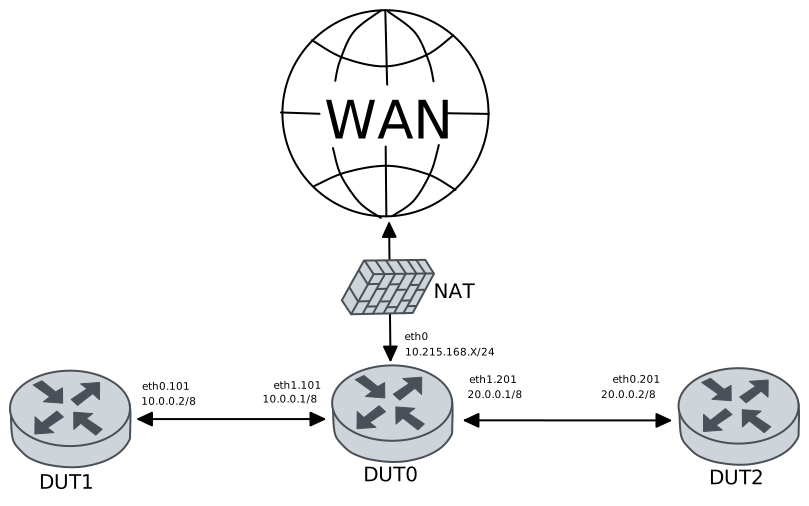
Test Local Bypass
Description
Builds a scenario with three DUTs in which a performance test is carried out between DUT1 and DUT2, and DUT0 is the router running the firewall. “Local bypass” is set to allow the firewall to internally skips packets belonging to a flow that must be bypassed. The performance test may produce better results than the general tests.
Scenario
Step 1: Run command file copy http://10.215.168.1/~robot/test-performance.rules running:// force at DUT0 and expect this output:
Show output
  % Total    % Received % Xferd  Average Speed   Time    Time     Time  Current
                                 Dload  Upload   Total   Spent    Left  Speed
100   129  100   129    0     0   1875      0 --:--:-- --:--:-- --:--:--  1897
Step 2: Run command file show running://test-performance.rules at DUT0 and expect this output:
Show output
alert tcp any any -> any 5001 (msg: "Skipping test network performance traffic"; bypass; flow: established, to_server; sid: 40;)
Step 3: Set the following configuration in DUT0 :
set interfaces ethernet eth0 address 10.215.168.64/24
set interfaces ethernet eth0 traffic nat source rule 1 address masquerade
set interfaces ethernet eth1 vif 101 address 40.0.0.1/8
set interfaces ethernet eth1 vif 101 traffic policy in FW_PLAN
set interfaces ethernet eth1 vif 201 address 20.0.0.1/8
set interfaces ethernet eth1 vif 201 traffic policy in FW_PLAN
set protocols static route 0.0.0.0/0 next-hop 10.215.168.1
set service dns static host-name WAN inet 10.215.168.1
set service firewall FW logging level config
set service firewall FW logging outputs fast
set service firewall FW mode inline queue FW_Q
set service firewall FW ruleset file 'running://test-performance.rules'
set service firewall FW stream bypass
set service firewall FW validator-timeout 20
set system login user admin authentication encrypted-password '$6$GSjsCj8gHLv$/VcqU6FLi6CT2Oxn0MJQ2C2tqnRDrYKNF8HIYWJp68nvXvPdFccDsT04.WtigUONbKYrgKg8d6rEs8PjljMkH0'
set traffic policy FW_PLAN rule 1 action enqueue FW_Q
set traffic queue FW_Q elements 1
Step 4: Ping IP address 20.0.0.2 from DUT1:
admin@DUT1$ ping 20.0.0.2 count 1 size 56 timeout 1Show output
PING 20.0.0.2 (20.0.0.2) 56(84) bytes of data.
64 bytes from 20.0.0.2: icmp_seq=1 ttl=63 time=0.525 ms

--- 20.0.0.2 ping statistics ---
1 packets transmitted, 1 received, 0% packet loss, time 0ms
rtt min/avg/max/mdev = 0.525/0.525/0.525/0.000 ms
Step 5: Ping IP address 40.0.0.2 from DUT2:
admin@DUT2$ ping 40.0.0.2 count 1 size 56 timeout 1Show output
PING 40.0.0.2 (40.0.0.2) 56(84) bytes of data.
64 bytes from 40.0.0.2: icmp_seq=1 ttl=63 time=0.468 ms

--- 40.0.0.2 ping statistics ---
1 packets transmitted, 1 received, 0% packet loss, time 0ms
rtt min/avg/max/mdev = 0.468/0.468/0.468/0.000 ms
Step 6: Initiate a bandwidth test from DUT2 to DUT1
admin@DUT1$ monitor test performance server port 5001
admin@DUT2$ monitor test performance client 40.0.0.2 duration 10 port 5001 parallel 1
Expect this output in
DUT2:Connecting to host 40.0.0.2, port 5001 [ 5] local 20.0.0.2 port 36968 connected to 40.0.0.2 port 5001 [ ID] Interval Transfer Bitrate Retr Cwnd [ 5] 0.00-1.00 sec 145 MBytes 1.21 Gbits/sec 41 1.85 MBytes [ 5] 1.00-2.00 sec 150 MBytes 1.26 Gbits/sec 0 2.01 MBytes [ 5] 2.00-3.00 sec 146 MBytes 1.23 Gbits/sec 0 2.14 MBytes [ 5] 3.00-4.00 sec 154 MBytes 1.29 Gbits/sec 113 1.13 MBytes [ 5] 4.00-5.00 sec 154 MBytes 1.29 Gbits/sec 0 1.22 MBytes [ 5] 5.00-6.00 sec 150 MBytes 1.26 Gbits/sec 0 1.31 MBytes [ 5] 6.00-7.00 sec 151 MBytes 1.27 Gbits/sec 0 1.39 MBytes [ 5] 7.00-8.00 sec 145 MBytes 1.22 Gbits/sec 0 1.47 MBytes [ 5] 8.00-9.00 sec 142 MBytes 1.20 Gbits/sec 0 1.54 MBytes [ 5] 9.00-10.00 sec 144 MBytes 1.21 Gbits/sec 0 1.60 MBytes - - - - - - - - - - - - - - - - - - - - - - - - - [ ID] Interval Transfer Bitrate Retr [ 5] 0.00-10.00 sec 1.45 GBytes 1.24 Gbits/sec 154 sender [ 5] 0.00-10.01 sec 1.44 GBytes 1.24 Gbits/sec receiver iperf Done.
Step 7: Run command service firewall FW show logging fast | tail at DUT0 and check if output matches the following regular expressions:
(?m)^.+(Skipping test network performance traffic).+$Show output
11/12/2025-15:13:52.812656  [**] [1:40:0] Skipping test network performance traffic [**] [Classification: (null)] [Priority: 3] {TCP} 20.0.0.2:36960 -> 40.0.0.2:5001
11/12/2025-15:13:52.813744  [**] [1:40:0] Skipping test network performance traffic [**] [Classification: (null)] [Priority: 3] {TCP} 20.0.0.2:36968 -> 40.0.0.2:5001
Test Capture Bypass Using Packet Mark
Description
Builds a scenario with three DUTs in which a performance test is conducted between DUT1 and DUT2, and DUT0 is the router running the firewall. “Capture bypass” is set to allow the firewall to mark packets. An external tool can then decide what to do with the flow when the mark is seen. For this example, when packet marks are detected, the traffic is assigned a label, thereby allowing the possibility of classifying traffic. In particular, labeling avoids traffic from entering the firewall.
Performance must improve considerably compared to the Local Bypass test.
The test is extended by using other packet marks that we have customized for the firewall.
Scenario
Step 1: Run command file copy http://10.215.168.1/~robot/test-performance.rules running:// force at DUT0 and expect this output:
Show output
  % Total    % Received % Xferd  Average Speed   Time    Time     Time  Current
                                 Dload  Upload   Total   Spent    Left  Speed
100   129  100   129    0     0    154      0 --:--:-- --:--:-- --:--:--   154
Step 2: Run command file show running://test-performance.rules at DUT0 and expect this output:
Show output
alert tcp any any -> any 5001 (msg: "Skipping test network performance traffic"; bypass; flow: established, to_server; sid: 40;)
Step 3: Set the following configuration in DUT0 :
set interfaces ethernet eth0 address 10.215.168.64/24
set interfaces ethernet eth0 traffic nat source rule 1 address masquerade
set interfaces ethernet eth1 vif 101 address 40.0.0.1/8
set interfaces ethernet eth1 vif 101 traffic policy in FW_PLAN
set interfaces ethernet eth1 vif 101 traffic policy out FW-SKIP
set interfaces ethernet eth1 vif 201 address 20.0.0.1/8
set interfaces ethernet eth1 vif 201 traffic policy in FW_PLAN
set interfaces ethernet eth1 vif 201 traffic policy out FW-SKIP
set protocols static route 0.0.0.0/0 next-hop 10.215.168.1
set service dns static host-name WAN inet 10.215.168.1
set service firewall FW logging level config
set service firewall FW logging outputs fast
set service firewall FW mode inline queue FW_Q
set service firewall FW ruleset file 'running://test-performance.rules'
set service firewall FW stream bypass mark 129834765
set service firewall FW stream bypass mask 129834765
set service firewall FW validator-timeout 20
set system login user admin authentication encrypted-password '$6$GSjsCj8gHLv$/VcqU6FLi6CT2Oxn0MJQ2C2tqnRDrYKNF8HIYWJp68nvXvPdFccDsT04.WtigUONbKYrgKg8d6rEs8PjljMkH0'
set traffic label BYPASS
set traffic policy FW-SKIP rule 1 log prefix SKIP
set traffic policy FW-SKIP rule 1 selector MARKED-PACKETS
set traffic policy FW-SKIP rule 1 set label BYPASS
set traffic policy FW_PLAN rule 1 action enqueue FW_Q
set traffic policy FW_PLAN rule 1 selector FW_SEL_ENQUEUE
set traffic queue FW_Q elements 1
set traffic selector FW_SEL_ENQUEUE rule 1 not label BYPASS
set traffic selector MARKED-PACKETS rule 1 mark 129834765
Step 4: Ping IP address 20.0.0.2 from DUT1:
admin@DUT1$ ping 20.0.0.2 count 1 size 56 timeout 1Show output
PING 20.0.0.2 (20.0.0.2) 56(84) bytes of data.
64 bytes from 20.0.0.2: icmp_seq=1 ttl=63 time=0.528 ms

--- 20.0.0.2 ping statistics ---
1 packets transmitted, 1 received, 0% packet loss, time 0ms
rtt min/avg/max/mdev = 0.528/0.528/0.528/0.000 ms
Step 5: Ping IP address 40.0.0.2 from DUT2:
admin@DUT2$ ping 40.0.0.2 count 1 size 56 timeout 1Show output
PING 40.0.0.2 (40.0.0.2) 56(84) bytes of data.
64 bytes from 40.0.0.2: icmp_seq=1 ttl=63 time=0.508 ms

--- 40.0.0.2 ping statistics ---
1 packets transmitted, 1 received, 0% packet loss, time 0ms
rtt min/avg/max/mdev = 0.508/0.508/0.508/0.000 ms
Step 6: Initiate a bandwidth test from DUT2 to DUT1
admin@DUT1$ monitor test performance server port 5001
admin@DUT2$ monitor test performance client 40.0.0.2 duration 10 port 5001 parallel 1
Expect this output in
DUT2:Connecting to host 40.0.0.2, port 5001 [ 5] local 20.0.0.2 port 51764 connected to 40.0.0.2 port 5001 [ ID] Interval Transfer Bitrate Retr Cwnd [ 5] 0.00-1.00 sec 257 MBytes 2.16 Gbits/sec 59 1.92 MBytes [ 5] 1.00-2.00 sec 326 MBytes 2.74 Gbits/sec 0 2.07 MBytes [ 5] 2.00-3.00 sec 315 MBytes 2.64 Gbits/sec 0 2.20 MBytes [ 5] 3.00-4.00 sec 314 MBytes 2.63 Gbits/sec 6 1.65 MBytes [ 5] 4.00-5.00 sec 310 MBytes 2.60 Gbits/sec 0 1.78 MBytes [ 5] 5.00-6.00 sec 291 MBytes 2.44 Gbits/sec 0 1.89 MBytes [ 5] 6.00-7.00 sec 305 MBytes 2.56 Gbits/sec 164 1.44 MBytes [ 5] 7.00-8.00 sec 320 MBytes 2.68 Gbits/sec 0 1.59 MBytes [ 5] 8.00-9.00 sec 315 MBytes 2.64 Gbits/sec 0 1.73 MBytes [ 5] 9.00-10.00 sec 321 MBytes 2.69 Gbits/sec 0 1.86 MBytes - - - - - - - - - - - - - - - - - - - - - - - - - [ ID] Interval Transfer Bitrate Retr [ 5] 0.00-10.00 sec 3.00 GBytes 2.58 Gbits/sec 229 sender [ 5] 0.00-10.00 sec 3.00 GBytes 2.58 Gbits/sec receiver iperf Done.
Step 7: Run command service firewall FW show logging fast | tail at DUT0 and check if output matches the following regular expressions:
(?m)^.+(Skipping test network performance traffic).+$Show output
11/12/2025-15:14:27.660224  [**] [1:40:0] Skipping test network performance traffic [**] [Classification: (null)] [Priority: 3] {TCP} 20.0.0.2:51752 -> 40.0.0.2:5001
11/12/2025-15:14:27.661108  [**] [1:40:0] Skipping test network performance traffic [**] [Classification: (null)] [Priority: 3] {TCP} 20.0.0.2:51764 -> 40.0.0.2:5001
Step 8: Run command system journal show | cat at DUT0 and check if output matches the following regular expressions:
(?m)^.*\[SKIP\-1\].*$Show output
Nov 12 15:14:17.677439 osdx systemd-journald[1872]: Runtime Journal (/run/log/journal/04bdf7f70d714c0fb0ef3d9377529e99) is 1.7M, max 13.8M, 12.0M free.
Nov 12 15:14:17.678973 osdx systemd-journald[1872]: Received client request to rotate journal, rotating.
Nov 12 15:14:17.679021 osdx systemd-journald[1872]: Vacuuming done, freed 0B of archived journals from /run/log/journal/04bdf7f70d714c0fb0ef3d9377529e99.
Nov 12 15:14:17.688561 osdx OSDxCLI[62410]: User 'admin' executed a new command: 'system journal clear'.
Nov 12 15:14:17.926932 osdx OSDxCLI[62410]: User 'admin' executed a new command: 'system coredump delete all'.
Nov 12 15:14:18.141794 osdx OSDxCLI[62410]: User 'admin' entered the configuration menu.
Nov 12 15:14:18.218691 osdx OSDxCLI[62410]: User 'admin' added a new cfg line: 'set interfaces ethernet eth0 address 10.215.168.64/24'.
Nov 12 15:14:18.301122 osdx OSDxCLI[62410]: User 'admin' added a new cfg line: 'set interfaces ethernet eth0 traffic nat source rule 1 address masquerade'.
Nov 12 15:14:18.363038 osdx OSDxCLI[62410]: User 'admin' added a new cfg line: 'set protocols static route 0.0.0.0/0 next-hop 10.215.168.1'.
Nov 12 15:14:18.459192 osdx OSDxCLI[62410]: User 'admin' added a new cfg line: 'set service dns static host-name WAN inet 10.215.168.1'.
Nov 12 15:14:18.520660 osdx OSDxCLI[62410]: User 'admin' added a new cfg line: 'set interfaces ethernet eth1 vif 101 address 40.0.0.1/8'.
Nov 12 15:14:18.649957 osdx OSDxCLI[62410]: User 'admin' added a new cfg line: 'set interfaces ethernet eth1 vif 201 address 20.0.0.1/8'.
Nov 12 15:14:18.728409 osdx OSDxCLI[62410]: User 'admin' added a new cfg line: 'show working'.
Nov 12 15:14:18.884809 osdx ubnt-cfgd[62870]: inactive
Nov 12 15:14:18.914492 osdx INFO[62876]: FRR daemons did not change
Nov 12 15:14:18.934980 osdx kernel: 8021q: adding VLAN 0 to HW filter on device eth1
Nov 12 15:14:18.955107 osdx WARNING[62915]: No supported link modes on interface eth1
Nov 12 15:14:18.956439 osdx modulelauncher[62915]: osdx.utils.xos cmd error: /sbin/ethtool -A eth1 autoneg on
Nov 12 15:14:18.956451 osdx modulelauncher[62915]: Command '/sbin/ethtool -A eth1 autoneg on' returned non-zero exit status 76.
Nov 12 15:14:18.957846 osdx modulelauncher[62915]: osdx.utils.xos cmd error: /sbin/ethtool -s eth1 autoneg on advertise Pause off Asym_Pause off --
Nov 12 15:14:18.957855 osdx modulelauncher[62915]: Command '/sbin/ethtool -s eth1 autoneg on advertise Pause off Asym_Pause off --' returned non-zero exit status 75.
Nov 12 15:14:18.986985 osdx kernel: 8021q: adding VLAN 0 to HW filter on device eth0
Nov 12 15:14:19.030191 osdx WARNING[62994]: No supported link modes on interface eth0
Nov 12 15:14:19.031496 osdx modulelauncher[62994]: osdx.utils.xos cmd error: /sbin/ethtool -A eth0 autoneg on
Nov 12 15:14:19.031508 osdx modulelauncher[62994]: Command '/sbin/ethtool -A eth0 autoneg on' returned non-zero exit status 76.
Nov 12 15:14:19.032675 osdx modulelauncher[62994]: osdx.utils.xos cmd error: /sbin/ethtool -s eth0 autoneg on advertise Pause off Asym_Pause off --
Nov 12 15:14:19.032684 osdx modulelauncher[62994]: Command '/sbin/ethtool -s eth0 autoneg on advertise Pause off Asym_Pause off --' returned non-zero exit status 75.
Nov 12 15:14:19.044416 osdx (udev-worker)[63010]: Network interface NamePolicy= disabled on kernel command line.
Nov 12 15:14:19.087374 osdx (udev-worker)[63016]: Network interface NamePolicy= disabled on kernel command line.
Nov 12 15:14:19.193674 osdx cfgd[1666]: [62410]Completed change to active configuration
Nov 12 15:14:19.344799 osdx OSDxCLI[62410]: User 'admin' committed the configuration.
Nov 12 15:14:19.365390 osdx OSDxCLI[62410]: User 'admin' left the configuration menu.
Nov 12 15:14:22.065936 osdx OSDxCLI[62410]: User 'admin' executed a new command: 'ping 10.215.168.1 count 1 size 56 timeout 1'.
Nov 12 15:14:22.140387 osdx OSDxCLI[62410]: User 'admin' executed a new command: 'ping 40.0.0.2 count 1 size 56 timeout 1'.
Nov 12 15:14:22.246492 osdx OSDxCLI[62410]: User 'admin' executed a new command: 'ping 20.0.0.2 count 1 size 56 timeout 1'.
Nov 12 15:14:22.760477 osdx file_operation[63173]: using src url: http://10.215.168.1/~robot/test-performance.rules dst url: running://
Nov 12 15:14:23.615985 osdx OSDxCLI[62410]: User 'admin' executed a new command: 'file copy http://10.215.168.1/~robot/test-performance.rules running:// force'.
Nov 12 15:14:23.771133 osdx OSDxCLI[62410]: User 'admin' executed a new command: 'file show running://test-performance.rules'.
Nov 12 15:14:23.950604 osdx OSDxCLI[62410]: User 'admin' entered the configuration menu.
Nov 12 15:14:24.007180 osdx OSDxCLI[62410]: User 'admin' added a new cfg line: 'set service firewall FW ruleset file running://test-performance.rules'.
Nov 12 15:14:24.104672 osdx OSDxCLI[62410]: User 'admin' added a new cfg line: 'set service firewall FW mode inline queue FW_Q'.
Nov 12 15:14:24.155040 osdx OSDxCLI[62410]: User 'admin' added a new cfg line: 'set service firewall FW logging outputs fast'.
Nov 12 15:14:24.251274 osdx OSDxCLI[62410]: User 'admin' added a new cfg line: 'set service firewall FW logging level config'.
Nov 12 15:14:24.305382 osdx OSDxCLI[62410]: User 'admin' added a new cfg line: 'set service firewall FW validator-timeout 20'.
Nov 12 15:14:24.413099 osdx OSDxCLI[62410]: User 'admin' added a new cfg line: 'set traffic queue FW_Q elements 1'.
Nov 12 15:14:24.495447 osdx OSDxCLI[62410]: User 'admin' added a new cfg line: 'set interfaces ethernet eth1 vif 101 traffic policy in FW_PLAN'.
Nov 12 15:14:24.568371 osdx OSDxCLI[62410]: User 'admin' added a new cfg line: 'set interfaces ethernet eth1 vif 201 traffic policy in FW_PLAN'.
Nov 12 15:14:24.657002 osdx OSDxCLI[62410]: User 'admin' added a new cfg line: 'set service firewall FW stream bypass mark 129834765'.
Nov 12 15:14:24.707275 osdx OSDxCLI[62410]: User 'admin' added a new cfg line: 'set service firewall FW stream bypass mask 129834765'.
Nov 12 15:14:24.802456 osdx OSDxCLI[62410]: User 'admin' added a new cfg line: 'set traffic label BYPASS'.
Nov 12 15:14:24.865986 osdx OSDxCLI[62410]: User 'admin' added a new cfg line: 'set traffic policy FW-SKIP rule 1 log prefix SKIP'.
Nov 12 15:14:25.112601 osdx OSDxCLI[62410]: User 'admin' added a new cfg line: 'set traffic policy FW-SKIP rule 1 selector MARKED-PACKETS'.
Nov 12 15:14:25.384564 osdx OSDxCLI[62410]: User 'admin' added a new cfg line: 'set traffic policy FW-SKIP rule 1 set label BYPASS'.
Nov 12 15:14:25.438685 osdx OSDxCLI[62410]: User 'admin' added a new cfg line: 'set traffic selector MARKED-PACKETS rule 1 mark 129834765'.
Nov 12 15:14:25.542420 osdx OSDxCLI[62410]: User 'admin' added a new cfg line: 'set traffic selector FW_SEL_ENQUEUE rule 1 not label BYPASS'.
Nov 12 15:14:25.597970 osdx OSDxCLI[62410]: User 'admin' added a new cfg line: 'set traffic policy FW_PLAN rule 1 selector FW_SEL_ENQUEUE'.
Nov 12 15:14:25.712993 osdx OSDxCLI[62410]: User 'admin' added a new cfg line: 'set interfaces ethernet eth1 vif 101 traffic policy out FW-SKIP'.
Nov 12 15:14:25.767723 osdx OSDxCLI[62410]: User 'admin' added a new cfg line: 'set interfaces ethernet eth1 vif 201 traffic policy out FW-SKIP'.
Nov 12 15:14:25.862090 osdx OSDxCLI[62410]: User 'admin' added a new cfg line: 'set traffic policy FW_PLAN rule 1 action enqueue FW_Q'.
Nov 12 15:14:25.941848 osdx OSDxCLI[62410]: User 'admin' added a new cfg line: 'show working'.
Nov 12 15:14:26.043329 osdx ubnt-cfgd[63226]: inactive
Nov 12 15:14:26.119057 osdx INFO[63271]: FRR daemons did not change
Nov 12 15:14:26.344881 osdx systemd[1]: Reloading.
Nov 12 15:14:26.382986 osdx systemd-sysv-generator[63327]: stat() failed on /etc/init.d/README, ignoring: No such file or directory
Nov 12 15:14:26.491360 osdx systemd[1]: Starting suricata@FW.service - Suricata client "FW" service...
Nov 12 15:14:26.513785 osdx systemd[1]: Started suricata@FW.service - Suricata client "FW" service.
Nov 12 15:14:26.700193 osdx INFO[63308]: Rules successfully loaded
Nov 12 15:14:26.700856 osdx cfgd[1666]: [62410]Completed change to active configuration
Nov 12 15:14:27.170539 osdx OSDxCLI[62410]: User 'admin' committed the configuration.
Nov 12 15:14:27.254834 osdx OSDxCLI[62410]: User 'admin' left the configuration menu.
Nov 12 15:14:27.663753 osdx kernel: [SKIP-1] ACCEPT IN=eth1.201 OUT=eth1.101 MAC=de:ad:be:ef:6c:01:de:ad:be:ef:6c:20:08:00:45:00:00:59 SRC=20.0.0.2 DST=40.0.0.2 LEN=89 TOS=0x00 PREC=0x00 TTL=63 ID=8061 DF PROTO=TCP SPT=51752 DPT=5001 WINDOW=502 RES=0x00 ACK PSH URGP=0 MARK=0x7bd1f0d
Nov 12 15:14:27.663976 osdx kernel: [SKIP-1] ACCEPT IN=eth1.201 OUT=eth1.101 MAC=de:ad:be:ef:6c:01:de:ad:be:ef:6c:20:08:00:45:00:00:59 SRC=20.0.0.2 DST=40.0.0.2 LEN=89 TOS=0x00 PREC=0x00 TTL=63 ID=180 DF PROTO=TCP SPT=51764 DPT=5001 WINDOW=502 RES=0x00 ACK PSH URGP=0 MARK=0x7bd1f0d
Nov 12 15:14:37.855425 osdx OSDxCLI[62410]: User 'admin' executed a new command: 'service firewall FW show logging fast | tail'.
Note
The following steps are just a reiteration of the previous test, but with the difference that the packet mark is an extra mark.
Step 9: Modify the following configuration lines in DUT0 :
set service firewall FW stream bypass extra-mark 1 mask 3294967295
set service firewall FW stream bypass extra-mark 1 value 3294967295
set traffic policy FW-SKIP rule 1 selector FW_SEL_EXTRA_MARK
set traffic selector FW_SEL_EXTRA_MARK rule 1 extra-mark 1 value 3294967295
Step 10: Initiate a bandwidth test from DUT2 to DUT1
admin@DUT1$ monitor test performance server port 5001
admin@DUT2$ monitor test performance client 40.0.0.2 duration 10 port 5001 parallel 1
Expect this output in
DUT2:Connecting to host 40.0.0.2, port 5001 [ 5] local 20.0.0.2 port 48308 connected to 40.0.0.2 port 5001 [ ID] Interval Transfer Bitrate Retr Cwnd [ 5] 0.00-1.00 sec 288 MBytes 2.42 Gbits/sec 55 1.36 MBytes [ 5] 1.00-2.00 sec 324 MBytes 2.72 Gbits/sec 0 1.52 MBytes [ 5] 2.00-3.00 sec 329 MBytes 2.76 Gbits/sec 0 1.68 MBytes [ 5] 3.00-4.00 sec 340 MBytes 2.85 Gbits/sec 0 1.82 MBytes [ 5] 4.00-5.00 sec 348 MBytes 2.92 Gbits/sec 0 1.95 MBytes [ 5] 5.00-6.00 sec 334 MBytes 2.80 Gbits/sec 3 1.47 MBytes [ 5] 6.00-7.00 sec 339 MBytes 2.84 Gbits/sec 0 1.62 MBytes [ 5] 7.00-8.00 sec 334 MBytes 2.80 Gbits/sec 0 1.76 MBytes [ 5] 8.00-9.00 sec 348 MBytes 2.92 Gbits/sec 0 1.90 MBytes [ 5] 9.00-10.00 sec 338 MBytes 2.83 Gbits/sec 0 2.03 MBytes - - - - - - - - - - - - - - - - - - - - - - - - - [ ID] Interval Transfer Bitrate Retr [ 5] 0.00-10.00 sec 3.24 GBytes 2.78 Gbits/sec 58 sender [ 5] 0.00-10.01 sec 3.24 GBytes 2.78 Gbits/sec receiver iperf Done.
Step 11: Run command service firewall FW show logging fast | tail at DUT0 and check if output matches the following regular expressions:
(?m)^.+(Skipping test network performance traffic).+$Show output
11/12/2025-15:14:27.660224  [**] [1:40:0] Skipping test network performance traffic [**] [Classification: (null)] [Priority: 3] {TCP} 20.0.0.2:51752 -> 40.0.0.2:5001
11/12/2025-15:14:27.661108  [**] [1:40:0] Skipping test network performance traffic [**] [Classification: (null)] [Priority: 3] {TCP} 20.0.0.2:51764 -> 40.0.0.2:5001
11/12/2025-15:14:43.175925  [**] [1:40:0] Skipping test network performance traffic [**] [Classification: (null)] [Priority: 3] {TCP} 20.0.0.2:48304 -> 40.0.0.2:5001
11/12/2025-15:14:43.176947  [**] [1:40:0] Skipping test network performance traffic [**] [Classification: (null)] [Priority: 3] {TCP} 20.0.0.2:48308 -> 40.0.0.2:5001
Step 12: Run command system journal show | cat at DUT0 and check if output matches the following regular expressions:
(?m)^.*\[SKIP\-1\].*$Show output
Nov 12 15:14:17.677439 osdx systemd-journald[1872]: Runtime Journal (/run/log/journal/04bdf7f70d714c0fb0ef3d9377529e99) is 1.7M, max 13.8M, 12.0M free.
Nov 12 15:14:17.678973 osdx systemd-journald[1872]: Received client request to rotate journal, rotating.
Nov 12 15:14:17.679021 osdx systemd-journald[1872]: Vacuuming done, freed 0B of archived journals from /run/log/journal/04bdf7f70d714c0fb0ef3d9377529e99.
Nov 12 15:14:17.688561 osdx OSDxCLI[62410]: User 'admin' executed a new command: 'system journal clear'.
Nov 12 15:14:17.926932 osdx OSDxCLI[62410]: User 'admin' executed a new command: 'system coredump delete all'.
Nov 12 15:14:18.141794 osdx OSDxCLI[62410]: User 'admin' entered the configuration menu.
Nov 12 15:14:18.218691 osdx OSDxCLI[62410]: User 'admin' added a new cfg line: 'set interfaces ethernet eth0 address 10.215.168.64/24'.
Nov 12 15:14:18.301122 osdx OSDxCLI[62410]: User 'admin' added a new cfg line: 'set interfaces ethernet eth0 traffic nat source rule 1 address masquerade'.
Nov 12 15:14:18.363038 osdx OSDxCLI[62410]: User 'admin' added a new cfg line: 'set protocols static route 0.0.0.0/0 next-hop 10.215.168.1'.
Nov 12 15:14:18.459192 osdx OSDxCLI[62410]: User 'admin' added a new cfg line: 'set service dns static host-name WAN inet 10.215.168.1'.
Nov 12 15:14:18.520660 osdx OSDxCLI[62410]: User 'admin' added a new cfg line: 'set interfaces ethernet eth1 vif 101 address 40.0.0.1/8'.
Nov 12 15:14:18.649957 osdx OSDxCLI[62410]: User 'admin' added a new cfg line: 'set interfaces ethernet eth1 vif 201 address 20.0.0.1/8'.
Nov 12 15:14:18.728409 osdx OSDxCLI[62410]: User 'admin' added a new cfg line: 'show working'.
Nov 12 15:14:18.884809 osdx ubnt-cfgd[62870]: inactive
Nov 12 15:14:18.914492 osdx INFO[62876]: FRR daemons did not change
Nov 12 15:14:18.934980 osdx kernel: 8021q: adding VLAN 0 to HW filter on device eth1
Nov 12 15:14:18.955107 osdx WARNING[62915]: No supported link modes on interface eth1
Nov 12 15:14:18.956439 osdx modulelauncher[62915]: osdx.utils.xos cmd error: /sbin/ethtool -A eth1 autoneg on
Nov 12 15:14:18.956451 osdx modulelauncher[62915]: Command '/sbin/ethtool -A eth1 autoneg on' returned non-zero exit status 76.
Nov 12 15:14:18.957846 osdx modulelauncher[62915]: osdx.utils.xos cmd error: /sbin/ethtool -s eth1 autoneg on advertise Pause off Asym_Pause off --
Nov 12 15:14:18.957855 osdx modulelauncher[62915]: Command '/sbin/ethtool -s eth1 autoneg on advertise Pause off Asym_Pause off --' returned non-zero exit status 75.
Nov 12 15:14:18.986985 osdx kernel: 8021q: adding VLAN 0 to HW filter on device eth0
Nov 12 15:14:19.030191 osdx WARNING[62994]: No supported link modes on interface eth0
Nov 12 15:14:19.031496 osdx modulelauncher[62994]: osdx.utils.xos cmd error: /sbin/ethtool -A eth0 autoneg on
Nov 12 15:14:19.031508 osdx modulelauncher[62994]: Command '/sbin/ethtool -A eth0 autoneg on' returned non-zero exit status 76.
Nov 12 15:14:19.032675 osdx modulelauncher[62994]: osdx.utils.xos cmd error: /sbin/ethtool -s eth0 autoneg on advertise Pause off Asym_Pause off --
Nov 12 15:14:19.032684 osdx modulelauncher[62994]: Command '/sbin/ethtool -s eth0 autoneg on advertise Pause off Asym_Pause off --' returned non-zero exit status 75.
Nov 12 15:14:19.044416 osdx (udev-worker)[63010]: Network interface NamePolicy= disabled on kernel command line.
Nov 12 15:14:19.087374 osdx (udev-worker)[63016]: Network interface NamePolicy= disabled on kernel command line.
Nov 12 15:14:19.193674 osdx cfgd[1666]: [62410]Completed change to active configuration
Nov 12 15:14:19.344799 osdx OSDxCLI[62410]: User 'admin' committed the configuration.
Nov 12 15:14:19.365390 osdx OSDxCLI[62410]: User 'admin' left the configuration menu.
Nov 12 15:14:22.065936 osdx OSDxCLI[62410]: User 'admin' executed a new command: 'ping 10.215.168.1 count 1 size 56 timeout 1'.
Nov 12 15:14:22.140387 osdx OSDxCLI[62410]: User 'admin' executed a new command: 'ping 40.0.0.2 count 1 size 56 timeout 1'.
Nov 12 15:14:22.246492 osdx OSDxCLI[62410]: User 'admin' executed a new command: 'ping 20.0.0.2 count 1 size 56 timeout 1'.
Nov 12 15:14:22.760477 osdx file_operation[63173]: using src url: http://10.215.168.1/~robot/test-performance.rules dst url: running://
Nov 12 15:14:23.615985 osdx OSDxCLI[62410]: User 'admin' executed a new command: 'file copy http://10.215.168.1/~robot/test-performance.rules running:// force'.
Nov 12 15:14:23.771133 osdx OSDxCLI[62410]: User 'admin' executed a new command: 'file show running://test-performance.rules'.
Nov 12 15:14:23.950604 osdx OSDxCLI[62410]: User 'admin' entered the configuration menu.
Nov 12 15:14:24.007180 osdx OSDxCLI[62410]: User 'admin' added a new cfg line: 'set service firewall FW ruleset file running://test-performance.rules'.
Nov 12 15:14:24.104672 osdx OSDxCLI[62410]: User 'admin' added a new cfg line: 'set service firewall FW mode inline queue FW_Q'.
Nov 12 15:14:24.155040 osdx OSDxCLI[62410]: User 'admin' added a new cfg line: 'set service firewall FW logging outputs fast'.
Nov 12 15:14:24.251274 osdx OSDxCLI[62410]: User 'admin' added a new cfg line: 'set service firewall FW logging level config'.
Nov 12 15:14:24.305382 osdx OSDxCLI[62410]: User 'admin' added a new cfg line: 'set service firewall FW validator-timeout 20'.
Nov 12 15:14:24.413099 osdx OSDxCLI[62410]: User 'admin' added a new cfg line: 'set traffic queue FW_Q elements 1'.
Nov 12 15:14:24.495447 osdx OSDxCLI[62410]: User 'admin' added a new cfg line: 'set interfaces ethernet eth1 vif 101 traffic policy in FW_PLAN'.
Nov 12 15:14:24.568371 osdx OSDxCLI[62410]: User 'admin' added a new cfg line: 'set interfaces ethernet eth1 vif 201 traffic policy in FW_PLAN'.
Nov 12 15:14:24.657002 osdx OSDxCLI[62410]: User 'admin' added a new cfg line: 'set service firewall FW stream bypass mark 129834765'.
Nov 12 15:14:24.707275 osdx OSDxCLI[62410]: User 'admin' added a new cfg line: 'set service firewall FW stream bypass mask 129834765'.
Nov 12 15:14:24.802456 osdx OSDxCLI[62410]: User 'admin' added a new cfg line: 'set traffic label BYPASS'.
Nov 12 15:14:24.865986 osdx OSDxCLI[62410]: User 'admin' added a new cfg line: 'set traffic policy FW-SKIP rule 1 log prefix SKIP'.
Nov 12 15:14:25.112601 osdx OSDxCLI[62410]: User 'admin' added a new cfg line: 'set traffic policy FW-SKIP rule 1 selector MARKED-PACKETS'.
Nov 12 15:14:25.384564 osdx OSDxCLI[62410]: User 'admin' added a new cfg line: 'set traffic policy FW-SKIP rule 1 set label BYPASS'.
Nov 12 15:14:25.438685 osdx OSDxCLI[62410]: User 'admin' added a new cfg line: 'set traffic selector MARKED-PACKETS rule 1 mark 129834765'.
Nov 12 15:14:25.542420 osdx OSDxCLI[62410]: User 'admin' added a new cfg line: 'set traffic selector FW_SEL_ENQUEUE rule 1 not label BYPASS'.
Nov 12 15:14:25.597970 osdx OSDxCLI[62410]: User 'admin' added a new cfg line: 'set traffic policy FW_PLAN rule 1 selector FW_SEL_ENQUEUE'.
Nov 12 15:14:25.712993 osdx OSDxCLI[62410]: User 'admin' added a new cfg line: 'set interfaces ethernet eth1 vif 101 traffic policy out FW-SKIP'.
Nov 12 15:14:25.767723 osdx OSDxCLI[62410]: User 'admin' added a new cfg line: 'set interfaces ethernet eth1 vif 201 traffic policy out FW-SKIP'.
Nov 12 15:14:25.862090 osdx OSDxCLI[62410]: User 'admin' added a new cfg line: 'set traffic policy FW_PLAN rule 1 action enqueue FW_Q'.
Nov 12 15:14:25.941848 osdx OSDxCLI[62410]: User 'admin' added a new cfg line: 'show working'.
Nov 12 15:14:26.043329 osdx ubnt-cfgd[63226]: inactive
Nov 12 15:14:26.119057 osdx INFO[63271]: FRR daemons did not change
Nov 12 15:14:26.344881 osdx systemd[1]: Reloading.
Nov 12 15:14:26.382986 osdx systemd-sysv-generator[63327]: stat() failed on /etc/init.d/README, ignoring: No such file or directory
Nov 12 15:14:26.491360 osdx systemd[1]: Starting suricata@FW.service - Suricata client "FW" service...
Nov 12 15:14:26.513785 osdx systemd[1]: Started suricata@FW.service - Suricata client "FW" service.
Nov 12 15:14:26.700193 osdx INFO[63308]: Rules successfully loaded
Nov 12 15:14:26.700856 osdx cfgd[1666]: [62410]Completed change to active configuration
Nov 12 15:14:27.170539 osdx OSDxCLI[62410]: User 'admin' committed the configuration.
Nov 12 15:14:27.254834 osdx OSDxCLI[62410]: User 'admin' left the configuration menu.
Nov 12 15:14:27.663753 osdx kernel: [SKIP-1] ACCEPT IN=eth1.201 OUT=eth1.101 MAC=de:ad:be:ef:6c:01:de:ad:be:ef:6c:20:08:00:45:00:00:59 SRC=20.0.0.2 DST=40.0.0.2 LEN=89 TOS=0x00 PREC=0x00 TTL=63 ID=8061 DF PROTO=TCP SPT=51752 DPT=5001 WINDOW=502 RES=0x00 ACK PSH URGP=0 MARK=0x7bd1f0d
Nov 12 15:14:27.663976 osdx kernel: [SKIP-1] ACCEPT IN=eth1.201 OUT=eth1.101 MAC=de:ad:be:ef:6c:01:de:ad:be:ef:6c:20:08:00:45:00:00:59 SRC=20.0.0.2 DST=40.0.0.2 LEN=89 TOS=0x00 PREC=0x00 TTL=63 ID=180 DF PROTO=TCP SPT=51764 DPT=5001 WINDOW=502 RES=0x00 ACK PSH URGP=0 MARK=0x7bd1f0d
Nov 12 15:14:37.855425 osdx OSDxCLI[62410]: User 'admin' executed a new command: 'service firewall FW show logging fast | tail'.
Nov 12 15:14:37.954212 osdx OSDxCLI[62410]: User 'admin' executed a new command: 'system journal show | cat'.
Nov 12 15:14:38.108923 osdx OSDxCLI[62410]: User 'admin' entered the configuration menu.
Nov 12 15:14:38.260183 osdx OSDxCLI[62410]: User 'admin' added a new cfg line: 'set service firewall FW ruleset file running://test-performance.rules'.
Nov 12 15:14:38.311058 osdx OSDxCLI[62410]: User 'admin' added a new cfg line: 'set service firewall FW mode inline queue FW_Q'.
Nov 12 15:14:38.400614 osdx OSDxCLI[62410]: User 'admin' added a new cfg line: 'set service firewall FW logging outputs fast'.
Nov 12 15:14:38.452771 osdx OSDxCLI[62410]: User 'admin' added a new cfg line: 'set service firewall FW logging level config'.
Nov 12 15:14:38.544570 osdx OSDxCLI[62410]: User 'admin' added a new cfg line: 'set service firewall FW validator-timeout 20'.
Nov 12 15:14:38.595867 osdx OSDxCLI[62410]: User 'admin' added a new cfg line: 'set traffic queue FW_Q elements 1'.
Nov 12 15:14:38.728600 osdx OSDxCLI[62410]: User 'admin' added a new cfg line: 'set interfaces ethernet eth1 vif 101 traffic policy in FW_PLAN'.
Nov 12 15:14:39.117727 osdx OSDxCLI[62410]: User 'admin' added a new cfg line: 'set interfaces ethernet eth1 vif 201 traffic policy in FW_PLAN'.
Nov 12 15:14:39.174816 osdx OSDxCLI[62410]: User 'admin' added a new cfg line: 'set service firewall FW stream bypass mark 129834765'.
Nov 12 15:14:39.268395 osdx OSDxCLI[62410]: User 'admin' added a new cfg line: 'set service firewall FW stream bypass mask 129834765'.
Nov 12 15:14:39.318263 osdx OSDxCLI[62410]: User 'admin' added a new cfg line: 'set traffic label BYPASS'.
Nov 12 15:14:39.426709 osdx OSDxCLI[62410]: User 'admin' added a new cfg line: 'set traffic policy FW-SKIP rule 1 log prefix SKIP'.
Nov 12 15:14:39.488980 osdx OSDxCLI[62410]: User 'admin' added a new cfg line: 'set traffic policy FW-SKIP rule 1 selector MARKED-PACKETS'.
Nov 12 15:14:39.600522 osdx OSDxCLI[62410]: User 'admin' added a new cfg line: 'set traffic policy FW-SKIP rule 1 set label BYPASS'.
Nov 12 15:14:39.652914 osdx OSDxCLI[62410]: User 'admin' added a new cfg line: 'set traffic selector MARKED-PACKETS rule 1 mark 129834765'.
Nov 12 15:14:39.762169 osdx OSDxCLI[62410]: User 'admin' added a new cfg line: 'set traffic selector FW_SEL_ENQUEUE rule 1 not label BYPASS'.
Nov 12 15:14:39.815686 osdx OSDxCLI[62410]: User 'admin' added a new cfg line: 'set traffic policy FW_PLAN rule 1 selector FW_SEL_ENQUEUE'.
Nov 12 15:14:39.936543 osdx OSDxCLI[62410]: User 'admin' added a new cfg line: 'set interfaces ethernet eth1 vif 101 traffic policy out FW-SKIP'.
Nov 12 15:14:39.990234 osdx OSDxCLI[62410]: User 'admin' added a new cfg line: 'set interfaces ethernet eth1 vif 201 traffic policy out FW-SKIP'.
Nov 12 15:14:40.087126 osdx OSDxCLI[62410]: User 'admin' added a new cfg line: 'set traffic policy FW_PLAN rule 1 action enqueue FW_Q'.
Nov 12 15:14:40.152754 osdx OSDxCLI[62410]: User 'admin' added a new cfg line: 'set service firewall FW stream bypass extra-mark 1 value 3294967295'.
Nov 12 15:14:40.257880 osdx OSDxCLI[62410]: User 'admin' added a new cfg line: 'set service firewall FW stream bypass extra-mark 1 mask 3294967295'.
Nov 12 15:14:40.322033 osdx OSDxCLI[62410]: User 'admin' added a new cfg line: 'set traffic policy FW-SKIP rule 1 selector FW_SEL_EXTRA_MARK'.
Nov 12 15:14:40.419084 osdx OSDxCLI[62410]: User 'admin' added a new cfg line: 'set traffic selector FW_SEL_EXTRA_MARK rule 1 extra-mark 1 value 3294967295'.
Nov 12 15:14:40.634868 osdx OSDxCLI[62410]: User 'admin' added a new cfg line: 'show changes'.
Nov 12 15:14:40.731256 osdx ubnt-cfgd[63452]: inactive
Nov 12 15:14:40.783453 osdx INFO[63472]: FRR daemons did not change
Nov 12 15:14:40.983220 osdx systemd[1]: Stopping suricata@FW.service - Suricata client "FW" service...
Nov 12 15:14:42.487005 osdx systemd[1]: suricata@FW.service: Deactivated successfully.
Nov 12 15:14:42.487110 osdx systemd[1]: Stopped suricata@FW.service - Suricata client "FW" service.
Nov 12 15:14:42.487142 osdx systemd[1]: suricata@FW.service: Consumed 1.476s CPU time.
Nov 12 15:14:42.503411 osdx systemd[1]: Starting suricata@FW.service - Suricata client "FW" service...
Nov 12 15:14:42.519377 osdx systemd[1]: Started suricata@FW.service - Suricata client "FW" service.
Nov 12 15:14:42.707477 osdx INFO[63499]: Rules successfully loaded
Nov 12 15:14:42.708119 osdx cfgd[1666]: [62410]Completed change to active configuration
Nov 12 15:14:42.710288 osdx OSDxCLI[62410]: User 'admin' committed the configuration.
Nov 12 15:14:43.049488 osdx OSDxCLI[62410]: User 'admin' left the configuration menu.
Nov 12 15:14:43.179531 osdx kernel: [SKIP-1] ACCEPT IN=eth1.201 OUT=eth1.101 MAC=de:ad:be:ef:6c:01:de:ad:be:ef:6c:20:08:00:45:00:00:59 SRC=20.0.0.2 DST=40.0.0.2 LEN=89 TOS=0x00 PREC=0x00 TTL=63 ID=58654 DF PROTO=TCP SPT=48304 DPT=5001 WINDOW=502 RES=0x00 ACK PSH URGP=0 MARK=0x7bd1f0d EMARK1=0xc46535ff
Nov 12 15:14:43.179592 osdx kernel: [SKIP-1] ACCEPT IN=eth1.201 OUT=eth1.101 MAC=de:ad:be:ef:6c:01:de:ad:be:ef:6c:20:08:00:45:00:00:59 SRC=20.0.0.2 DST=40.0.0.2 LEN=89 TOS=0x00 PREC=0x00 TTL=63 ID=315 DF PROTO=TCP SPT=48308 DPT=5001 WINDOW=502 RES=0x00 ACK PSH URGP=0 MARK=0x7bd1f0d EMARK1=0xc46535ff
Nov 12 15:14:47.031002 osdx systemd[1]: systemd-timedated.service: Deactivated successfully.
Nov 12 15:14:53.340117 osdx OSDxCLI[62410]: User 'admin' executed a new command: 'service firewall FW show logging fast | tail'.
Test Capture Bypass Using Conntrack Mark
Description
Builds a scenario with three DUTs in which a performance test is conducted between DUT1 and DUT2, and DUT0 is the router running the firewall. This test sets the conntrack mark directly, thus skipping all the steps required to set it later.
Performance must improve considerably compared to the Local Bypass test.
Then this test is broadened by using other conntrack marks that we have customized for the firewall.
Scenario
Step 1: Run command file copy http://10.215.168.1/~robot/test-performance.rules running:// force at DUT0 and expect this output:
Show output
  % Total    % Received % Xferd  Average Speed   Time    Time     Time  Current
                                 Dload  Upload   Total   Spent    Left  Speed
100   129  100   129    0     0   7321      0 --:--:-- --:--:-- --:--:--  7588
Step 2: Run command file show running://test-performance.rules at DUT0 and expect this output:
Show output
alert tcp any any -> any 5001 (msg: "Skipping test network performance traffic"; bypass; flow: established, to_server; sid: 40;)
Step 3: Set the following configuration in DUT0 :
set interfaces ethernet eth0 address 10.215.168.64/24
set interfaces ethernet eth0 traffic nat source rule 1 address masquerade
set interfaces ethernet eth1 vif 101 address 40.0.0.1/8
set interfaces ethernet eth1 vif 101 traffic policy in FW_PLAN
set interfaces ethernet eth1 vif 201 address 20.0.0.1/8
set interfaces ethernet eth1 vif 201 traffic policy in FW_PLAN
set protocols static route 0.0.0.0/0 next-hop 10.215.168.1
set service dns static host-name WAN inet 10.215.168.1
set service firewall FW logging level config
set service firewall FW logging outputs fast
set service firewall FW mode inline queue FW_Q
set service firewall FW ruleset file 'running://test-performance.rules'
set service firewall FW stream bypass mark 129834765
set service firewall FW stream bypass mask 129834765
set service firewall FW stream bypass set-connmark
set service firewall FW validator-timeout 20
set system login user admin authentication encrypted-password '$6$GSjsCj8gHLv$/VcqU6FLi6CT2Oxn0MJQ2C2tqnRDrYKNF8HIYWJp68nvXvPdFccDsT04.WtigUONbKYrgKg8d6rEs8PjljMkH0'
set traffic policy FW_PLAN rule 2 action enqueue FW_Q
set traffic policy FW_PLAN rule 2 selector FW_SEL_ENQUEUE
set traffic queue FW_Q elements 1
set traffic selector FW_SEL_ENQUEUE rule 1 not connmark 129834765
Step 4: Ping IP address 20.0.0.2 from DUT1:
admin@DUT1$ ping 20.0.0.2 count 1 size 56 timeout 1Show output
PING 20.0.0.2 (20.0.0.2) 56(84) bytes of data.
64 bytes from 20.0.0.2: icmp_seq=1 ttl=63 time=0.576 ms

--- 20.0.0.2 ping statistics ---
1 packets transmitted, 1 received, 0% packet loss, time 0ms
rtt min/avg/max/mdev = 0.576/0.576/0.576/0.000 ms
Step 5: Ping IP address 40.0.0.2 from DUT2:
admin@DUT2$ ping 40.0.0.2 count 1 size 56 timeout 1Show output
PING 40.0.0.2 (40.0.0.2) 56(84) bytes of data.
64 bytes from 40.0.0.2: icmp_seq=1 ttl=63 time=0.499 ms

--- 40.0.0.2 ping statistics ---
1 packets transmitted, 1 received, 0% packet loss, time 0ms
rtt min/avg/max/mdev = 0.499/0.499/0.499/0.000 ms
Step 6: Initiate a bandwidth test from DUT2 to DUT1
admin@DUT1$ monitor test performance server port 5001
admin@DUT2$ monitor test performance client 40.0.0.2 duration 10 port 5001 parallel 1
Expect this output in
DUT2:Connecting to host 40.0.0.2, port 5001 [ 5] local 20.0.0.2 port 32946 connected to 40.0.0.2 port 5001 [ ID] Interval Transfer Bitrate Retr Cwnd [ 5] 0.00-1.00 sec 138 MBytes 1.16 Gbits/sec 280 1.82 MBytes [ 5] 1.00-2.00 sec 201 MBytes 1.69 Gbits/sec 33 1.39 MBytes [ 5] 2.00-3.00 sec 321 MBytes 2.69 Gbits/sec 0 1.55 MBytes [ 5] 3.00-4.00 sec 348 MBytes 2.92 Gbits/sec 0 1.70 MBytes [ 5] 4.00-5.00 sec 336 MBytes 2.82 Gbits/sec 0 1.84 MBytes [ 5] 5.00-6.00 sec 326 MBytes 2.74 Gbits/sec 0 1.97 MBytes [ 5] 6.00-7.00 sec 332 MBytes 2.79 Gbits/sec 0 2.09 MBytes [ 5] 7.00-8.00 sec 339 MBytes 2.84 Gbits/sec 0 2.20 MBytes [ 5] 8.00-9.00 sec 312 MBytes 2.62 Gbits/sec 34 1.24 MBytes [ 5] 9.00-10.00 sec 305 MBytes 2.56 Gbits/sec 0 1.40 MBytes - - - - - - - - - - - - - - - - - - - - - - - - - [ ID] Interval Transfer Bitrate Retr [ 5] 0.00-10.00 sec 2.89 GBytes 2.48 Gbits/sec 347 sender [ 5] 0.00-10.00 sec 2.89 GBytes 2.48 Gbits/sec receiver iperf Done.
Step 7: Run command service firewall FW show logging fast | tail at DUT0 and check if output matches the following regular expressions:
(?m)^.+(Skipping test network performance traffic).+$Show output
11/12/2025-15:15:16.883384  [**] [1:40:0] Skipping test network performance traffic [**] [Classification: (null)] [Priority: 3] {TCP} 20.0.0.2:32940 -> 40.0.0.2:5001
11/12/2025-15:15:16.884304  [**] [1:40:0] Skipping test network performance traffic [**] [Classification: (null)] [Priority: 3] {TCP} 20.0.0.2:32946 -> 40.0.0.2:5001
Step 8: Run command system conntrack show at DUT0 and check if output matches the following regular expressions:
(?m)^tcp\s+.*src=20.0.0.2 dst=40.0.0.2.+dport=5001.*mark=129834765.*$Show output
nfct_labelmap_new: No such file or directory
icmp     1 19 src=20.0.0.2 dst=40.0.0.2 type=8 code=0 id=99 packets=1 bytes=84 src=40.0.0.2 dst=20.0.0.2 type=0 code=0 id=99 packets=1 bytes=84 (Sc: not-bypass) mark=0 use=1
tcp      6 19 TIME_WAIT src=20.0.0.2 dst=40.0.0.2 sport=32940 dport=5001 packets=16 bytes=1302 src=40.0.0.2 dst=20.0.0.2 sport=5001 dport=32940 packets=13 bytes=1018 [ASSURED] (Sc: not-bypass) mark=129834765 use=1
icmp     1 19 src=40.0.0.2 dst=20.0.0.2 type=8 code=0 id=538 packets=1 bytes=84 src=20.0.0.2 dst=40.0.0.2 type=0 code=0 id=538 packets=1 bytes=84 (Sc: not-bypass) mark=0 use=1
tcp      6 9 CLOSE src=20.0.0.2 dst=40.0.0.2 sport=32946 dport=5001 packets=2142184 bytes=3213263485 src=40.0.0.2 dst=20.0.0.2 sport=5001 dport=32946 packets=340442 bytes=17698812 [ASSURED] (Sc: not-bypass) mark=129834765 use=1
conntrack v1.4.7 (conntrack-tools): 4 flow entries have been shown.
Note
The following steps are just a reiteration of the previous test, but with the difference that the conntrack mark used is an extra connmark.
Step 9: Modify the following configuration lines in DUT0 :
set service firewall FW stream bypass extra-mark 2 mask 3294967295
set service firewall FW stream bypass extra-mark 2 set-extra-connmark
set service firewall FW stream bypass extra-mark 2 value 3294967295
set traffic policy FW_PLAN rule 2 selector FW_SEL_EXTRA_MARK
set traffic selector FW_SEL_EXTRA_MARK rule 1 not extra-connmark 2 value 3294967295
Step 10: Initiate a bandwidth test from DUT2 to DUT1
admin@DUT1$ monitor test performance server port 5001
admin@DUT2$ monitor test performance client 40.0.0.2 duration 10 port 5001 parallel 1
Expect this output in
DUT2:Connecting to host 40.0.0.2, port 5001 [ 5] local 20.0.0.2 port 41558 connected to 40.0.0.2 port 5001 [ ID] Interval Transfer Bitrate Retr Cwnd [ 5] 0.00-1.00 sec 267 MBytes 2.24 Gbits/sec 59 1.33 MBytes [ 5] 1.00-2.00 sec 336 MBytes 2.82 Gbits/sec 0 1.51 MBytes [ 5] 2.00-3.00 sec 356 MBytes 2.99 Gbits/sec 0 1.67 MBytes [ 5] 3.00-4.00 sec 359 MBytes 3.01 Gbits/sec 0 1.82 MBytes [ 5] 4.00-5.00 sec 345 MBytes 2.89 Gbits/sec 0 1.96 MBytes [ 5] 5.00-6.00 sec 344 MBytes 2.88 Gbits/sec 267 1.48 MBytes [ 5] 6.00-7.00 sec 319 MBytes 2.67 Gbits/sec 140 1.16 MBytes [ 5] 7.00-8.00 sec 348 MBytes 2.91 Gbits/sec 0 1.36 MBytes [ 5] 8.00-9.00 sec 335 MBytes 2.81 Gbits/sec 0 1.53 MBytes [ 5] 9.00-10.00 sec 334 MBytes 2.80 Gbits/sec 0 1.68 MBytes - - - - - - - - - - - - - - - - - - - - - - - - - [ ID] Interval Transfer Bitrate Retr [ 5] 0.00-10.00 sec 3.26 GBytes 2.80 Gbits/sec 466 sender [ 5] 0.00-10.01 sec 3.26 GBytes 2.80 Gbits/sec receiver iperf Done.
Step 11: Run command service firewall FW show logging fast | tail at DUT0 and check if output matches the following regular expressions:
(?m)^.+(Skipping test network performance traffic).+$Show output
11/12/2025-15:15:16.883384  [**] [1:40:0] Skipping test network performance traffic [**] [Classification: (null)] [Priority: 3] {TCP} 20.0.0.2:32940 -> 40.0.0.2:5001
11/12/2025-15:15:16.884304  [**] [1:40:0] Skipping test network performance traffic [**] [Classification: (null)] [Priority: 3] {TCP} 20.0.0.2:32946 -> 40.0.0.2:5001
11/12/2025-15:15:31.745457  [**] [1:40:0] Skipping test network performance traffic [**] [Classification: (null)] [Priority: 3] {TCP} 20.0.0.2:41554 -> 40.0.0.2:5001
11/12/2025-15:15:31.746260  [**] [1:40:0] Skipping test network performance traffic [**] [Classification: (null)] [Priority: 3] {TCP} 20.0.0.2:41558 -> 40.0.0.2:5001
Step 12: Run command system conntrack show at DUT0 and check if output matches the following regular expressions:
(?m)^tcp\s+.*src=20.0.0.2 dst=40.0.0.2.+dport=5001.*emark2=3294967295.*$Show output
nfct_labelmap_new: No such file or directory
tcp      6 9 CLOSE src=20.0.0.2 dst=40.0.0.2 sport=41558 dport=5001 packets=2420684 bytes=3631015261 src=40.0.0.2 dst=20.0.0.2 sport=5001 dport=41558 packets=404782 bytes=21053184 [ASSURED] (Sc: not-bypass) mark=129834765 emark2=3294967295 use=1
tcp      6 19 TIME_WAIT src=20.0.0.2 dst=40.0.0.2 sport=41554 dport=5001 packets=16 bytes=1300 src=40.0.0.2 dst=20.0.0.2 sport=5001 dport=41554 packets=13 bytes=1020 [ASSURED] (Sc: not-bypass) mark=129834765 emark2=3294967295 use=1
conntrack v1.4.7 (conntrack-tools): 2 flow entries have been shown.
Test Bypass-Drop Using Conntrack Marks
Description
Builds a scenario with three DUTs in which a performance test is conducted between DUT1 and DUT2, and DUT0 is the router running the firewall. This test is aimed at configuring “Capture bypass drop” to avoid dropped packets from entering the firewall.
Scenario
Step 1: Run command file copy http://10.215.168.1/~robot/drop-performance.rules running:// force at DUT0 and expect this output:
Show output
  % Total    % Received % Xferd  Average Speed   Time    Time     Time  Current
                                 Dload  Upload   Total   Spent    Left  Speed
100   200  100   200    0     0    536      0 --:--:-- --:--:-- --:--:--   536
Step 2: Run command file show running://drop-performance.rules at DUT0 and expect this output:
Show output
drop tcp any any -> any 5000 (msg: "Dropping TCP performance test traffic"; sid: 1; flow: established, to_server;)
drop udp any any -> any 5001 (msg: "Dropping UDP performance test traffic"; sid: 2;)
Step 3: Set the following configuration in DUT0 :
set interfaces ethernet eth0 address 10.215.168.64/24
set interfaces ethernet eth0 traffic nat source rule 1 address masquerade
set interfaces ethernet eth1 vif 101 address 40.0.0.1/8
set interfaces ethernet eth1 vif 101 traffic policy in FW_PLAN
set interfaces ethernet eth1 vif 201 address 20.0.0.1/8
set interfaces ethernet eth1 vif 201 traffic policy in FW_PLAN
set protocols static route 0.0.0.0/0 next-hop 10.215.168.1
set service dns static host-name WAN inet 10.215.168.1
set service firewall FW bypass action drop set connmark mark 147652983
set service firewall FW logging level config
set service firewall FW logging outputs fast
set service firewall FW mode inline queue FW_Q
set service firewall FW ruleset file 'running://drop-performance.rules'
set service firewall FW validator-timeout 20
set system login user admin authentication encrypted-password '$6$GSjsCj8gHLv$/VcqU6FLi6CT2Oxn0MJQ2C2tqnRDrYKNF8HIYWJp68nvXvPdFccDsT04.WtigUONbKYrgKg8d6rEs8PjljMkH0'
set traffic policy FW_PLAN rule 1 action drop
set traffic policy FW_PLAN rule 1 selector FW_SEL_DROP
set traffic policy FW_PLAN rule 2 action enqueue FW_Q
set traffic queue FW_Q elements 1
set traffic selector FW_SEL_DROP rule 1 connmark 147652983
Step 4: Ping IP address 20.0.0.2 from DUT1:
admin@DUT1$ ping 20.0.0.2 count 1 size 56 timeout 1Show output
PING 20.0.0.2 (20.0.0.2) 56(84) bytes of data.
64 bytes from 20.0.0.2: icmp_seq=1 ttl=63 time=0.522 ms

--- 20.0.0.2 ping statistics ---
1 packets transmitted, 1 received, 0% packet loss, time 0ms
rtt min/avg/max/mdev = 0.522/0.522/0.522/0.000 ms
Step 5: Ping IP address 40.0.0.2 from DUT2:
admin@DUT2$ ping 40.0.0.2 count 1 size 56 timeout 1Show output
PING 40.0.0.2 (40.0.0.2) 56(84) bytes of data.
64 bytes from 40.0.0.2: icmp_seq=1 ttl=63 time=0.419 ms

--- 40.0.0.2 ping statistics ---
1 packets transmitted, 1 received, 0% packet loss, time 0ms
rtt min/avg/max/mdev = 0.419/0.419/0.419/0.000 ms
Step 6: Initiate a bandwidth test from DUT2 to DUT1
admin@DUT1$ monitor test performance server port 5000
admin@DUT2$ monitor test performance client 40.0.0.2 duration 10 port 5000 parallel 1
Expect this output in
DUT2:^C- - - - - - - - - - - - - - - - - - - - - - - - - [ ID] Interval Transfer Bitrate Retr iperf3: interrupt - the client has terminated admin@osdx$
Step 7: Run command service firewall FW show logging fast | tail at DUT0 and check if output matches the following regular expressions:
(?m)^.+(Dropping TCP performance test traffic).+$Show output
11/12/2025-15:16:07.588247 [Drop] [**] [1:1:0] Dropping TCP performance test traffic [**] [Classification: (null)] [Priority: 3] {TCP} 20.0.0.2:45190 -> 40.0.0.2:5000
Step 8: Run command system conntrack show at DUT0 and check if output matches the following regular expressions:
(?m)^tcp\s+.*src=20.0.0.2 dst=40.0.0.2.+dport=5000.*mark=147652983.*$Show output
nfct_labelmap_new: No such file or directory
tcp      6 29 LAST_ACK src=20.0.0.2 dst=40.0.0.2 sport=45190 dport=5000 packets=8 bytes=610 src=40.0.0.2 dst=20.0.0.2 sport=5000 dport=45190 packets=4 bytes=217 [ASSURED] (Sc: not-bypass) mark=147652983 use=1
icmp     1 26 src=20.0.0.2 dst=40.0.0.2 type=8 code=0 id=102 packets=1 bytes=84 src=40.0.0.2 dst=20.0.0.2 type=0 code=0 id=102 packets=1 bytes=84 (Sc: not-bypass) mark=0 use=1
icmp     1 26 src=40.0.0.2 dst=20.0.0.2 type=8 code=0 id=541 packets=1 bytes=84 src=20.0.0.2 dst=40.0.0.2 type=0 code=0 id=541 packets=1 bytes=84 (Sc: not-bypass) mark=0 use=1
conntrack v1.4.7 (conntrack-tools): 3 flow entries have been shown.
Step 9: Run command traffic policy FW_PLAN show at DUT0 and check if output matches the following regular expressions:
(?m)^1\s+FW_SEL_DROP\s+[1-9].*$Show output
Policy FW_PLAN -- ifc eth1.101 -- hook in prio very-high

------------------------------------------------------------------
rule    selector    pkts match  pkts eval  bytes match  bytes eval
------------------------------------------------------------------
1      FW_SEL_DROP           4          7          210         438
2      -                     3          3          228         228
------------------------------------------------------------------
Total                        7          7          438         438

Policy FW_PLAN -- ifc eth1.201 -- hook in prio very-high

------------------------------------------------------------------
rule    selector    pkts match  pkts eval  bytes match  bytes eval
------------------------------------------------------------------
1      FW_SEL_DROP           5         10          409         778
2      -                     5          5          369         369
------------------------------------------------------------------
Total                       10         10          778         778
Note
Testing with another conntrack mark.
Step 10: Modify the following configuration lines in DUT0 :
delete service firewall FW bypass action drop set connmark mark
set service firewall FW bypass action drop set connmark extra-mark 2 value 3967295294
set traffic policy FW_PLAN rule 1 selector FW_SEL_DROP_EM
set traffic selector FW_SEL_DROP_EM rule 1 extra-connmark 2 value 3967295294
Step 11: Initiate a bandwidth test from DUT2 to DUT1
admin@DUT1$ monitor test performance server port 5000
admin@DUT2$ monitor test performance client 40.0.0.2 duration 10 port 5000 parallel 1
Expect this output in
DUT2:^C- - - - - - - - - - - - - - - - - - - - - - - - - [ ID] Interval Transfer Bitrate Retr iperf3: interrupt - the client has terminated admin@osdx$
Step 12: Run command service firewall FW show logging fast | tail at DUT0 and check if output matches the following regular expressions:
(?m)^.+(Dropping TCP performance test traffic).+$Show output
11/12/2025-15:16:07.588247  [Drop] [**] [1:1:0] Dropping TCP performance test traffic [**] [Classification: (null)] [Priority: 3] {TCP} 20.0.0.2:45190 -> 40.0.0.2:5000
11/12/2025-15:16:13.716641  [Drop] [**] [1:1:0] Dropping TCP performance test traffic [**] [Classification: (null)] [Priority: 3] {TCP} 20.0.0.2:45190 -> 40.0.0.2:5000
11/12/2025-15:16:15.196543  [Drop] [**] [1:1:0] Dropping TCP performance test traffic [**] [Classification: (null)] [Priority: 3] {TCP} 20.0.0.2:58944 -> 40.0.0.2:5000
Step 13: Run command system conntrack show at DUT0 and check if output matches the following regular expressions:
(?m)^tcp\s+.*src=20.0.0.2 dst=40.0.0.2.+dport=5000.*emark2=3967295294.*$Show output
nfct_labelmap_new: No such file or directory
tcp      6 29 LAST_ACK src=20.0.0.2 dst=40.0.0.2 sport=58944 dport=5000 packets=8 bytes=610 src=40.0.0.2 dst=20.0.0.2 sport=5000 dport=58944 packets=5 bytes=270 [ASSURED] (Sc: not-bypass) mark=0 emark2=3967295294 use=1
conntrack v1.4.7 (conntrack-tools): 1 flow entries have been shown.
Step 14: Run command traffic policy FW_PLAN show at DUT0 and check if output matches the following regular expressions:
(?m)^1\s+FW_SEL_DROP_EM\s+[1-9].*$Show output
Policy FW_PLAN -- ifc eth1.101 -- hook in prio very-high

---------------------------------------------------------------------
rule      selector     pkts match  pkts eval  bytes match  bytes eval
---------------------------------------------------------------------
1      FW_SEL_DROP_EM           4          7          210         376
2      -                        3          3          166         166
---------------------------------------------------------------------
Total                           7          7          376         376

Policy FW_PLAN -- ifc eth1.201 -- hook in prio very-high

---------------------------------------------------------------------
rule      selector     pkts match  pkts eval  bytes match  bytes eval
---------------------------------------------------------------------
1      FW_SEL_DROP_EM           6         11          499         830
2      -                        5          5          331         331
---------------------------------------------------------------------
Total                          11         11          830         830
Test Capture And Offload
Description
Builds a scenario with three DUTs in which a performance test is conducted between DUT1 and DUT2, and DUT0 is the router running the firewall. This test sets the conntrack mark directly, thus skipping all the steps required to set it later. In addition, OSDx is instructed to accelerate the flow using internal accelerators.
Performance must improve considerably compared to the previous test, to reach its top value.
Scenario
Step 1: Run command file copy http://10.215.168.1/~robot/test-performance.rules running:// force at DUT0 and expect this output:
Show output
  % Total    % Received % Xferd  Average Speed   Time    Time     Time  Current
                                 Dload  Upload   Total   Spent    Left  Speed
100   129  100   129    0     0    610      0 --:--:-- --:--:-- --:--:--   611
Step 2: Run command file show running://test-performance.rules at DUT0 and expect this output:
Show output
alert tcp any any -> any 5001 (msg: "Skipping test network performance traffic"; bypass; flow: established, to_server; sid: 40;)
Step 3: Set the following configuration in DUT0 :
set interfaces ethernet eth0 address 10.215.168.64/24
set interfaces ethernet eth0 traffic nat source rule 1 address masquerade
set interfaces ethernet eth1 vif 101 address 40.0.0.1/8
set interfaces ethernet eth1 vif 101 traffic policy in FW_PLAN
set interfaces ethernet eth1 vif 201 address 20.0.0.1/8
set interfaces ethernet eth1 vif 201 traffic policy in FW_PLAN
set protocols static route 0.0.0.0/0 next-hop 10.215.168.1
set service dns static host-name WAN inet 10.215.168.1
set service firewall FW logging level config
set service firewall FW logging outputs fast
set service firewall FW mode inline queue FW_Q
set service firewall FW ruleset file 'running://test-performance.rules'
set service firewall FW stream bypass action accept set conntrack offload-flag
set service firewall FW stream bypass mark 129834765
set service firewall FW stream bypass mask 129834765
set service firewall FW stream bypass set-connmark
set service firewall FW validator-timeout 20
set system login user admin authentication encrypted-password '$6$GSjsCj8gHLv$/VcqU6FLi6CT2Oxn0MJQ2C2tqnRDrYKNF8HIYWJp68nvXvPdFccDsT04.WtigUONbKYrgKg8d6rEs8PjljMkH0'
set traffic policy FW_PLAN rule 1 action enqueue FW_Q
set traffic policy FW_PLAN rule 2 action enqueue FW_Q
set traffic policy FW_PLAN rule 2 selector FW_SEL_ENQUEUE
set traffic queue FW_Q elements 1
set traffic selector FW_SEL_ENQUEUE rule 1 not connmark 129834765
Step 4: Ping IP address 20.0.0.2 from DUT1:
admin@DUT1$ ping 20.0.0.2 count 1 size 56 timeout 1Show output
PING 20.0.0.2 (20.0.0.2) 56(84) bytes of data.
64 bytes from 20.0.0.2: icmp_seq=1 ttl=63 time=0.451 ms

--- 20.0.0.2 ping statistics ---
1 packets transmitted, 1 received, 0% packet loss, time 0ms
rtt min/avg/max/mdev = 0.451/0.451/0.451/0.000 ms
Step 5: Ping IP address 40.0.0.2 from DUT2:
admin@DUT2$ ping 40.0.0.2 count 1 size 56 timeout 1Show output
PING 40.0.0.2 (40.0.0.2) 56(84) bytes of data.
64 bytes from 40.0.0.2: icmp_seq=1 ttl=63 time=0.468 ms

--- 40.0.0.2 ping statistics ---
1 packets transmitted, 1 received, 0% packet loss, time 0ms
rtt min/avg/max/mdev = 0.468/0.468/0.468/0.000 ms
Step 6: Initiate a background bandwidth test from DUT2 to DUT1. The control is returned back allowing to perform another tasks while test is running
admin@DUT1$ monitor test performance server port 5001
admin@DUT2$ monitor test performance client 40.0.0.2 duration 10 port 5001 parallel 1
Step 7: Run command service firewall FW show logging fast | tail at DUT0 and check if output matches the following regular expressions:
(?m)^.+(Skipping test network performance traffic).+$Show output
11/12/2025-15:16:45.976341  [**] [1:40:0] Skipping test network performance traffic [**] [Classification: (null)] [Priority: 3] {TCP} 20.0.0.2:51280 -> 40.0.0.2:5001
11/12/2025-15:16:45.977391  [**] [1:40:0] Skipping test network performance traffic [**] [Classification: (null)] [Priority: 3] {TCP} 20.0.0.2:51288 -> 40.0.0.2:5001
Step 8: Run command system conntrack show at DUT0 and check if output matches the following regular expressions:
(?m)^tcp\s+.*src=20.0.0.2 dst=40.0.0.2.+dport=5001.+OFFLOAD.+mark=129834765.*$Show output
nfct_labelmap_new: No such file or directory
icmp     1 29 src=20.0.0.2 dst=40.0.0.2 type=8 code=0 id=105 packets=1 bytes=84 src=40.0.0.2 dst=20.0.0.2 type=0 code=0 id=105 packets=1 bytes=84 (Sc: not-bypass) mark=0 use=1
icmp     1 29 src=40.0.0.2 dst=20.0.0.2 type=8 code=0 id=544 packets=1 bytes=84 src=20.0.0.2 dst=40.0.0.2 type=0 code=0 id=544 packets=1 bytes=84 (Sc: not-bypass) mark=0 use=1
tcp      6 src=20.0.0.2 dst=40.0.0.2 sport=51288 dport=5001 packets=48309 bytes=72456305 src=40.0.0.2 dst=20.0.0.2 sport=5001 dport=51288 packets=5976 bytes=310760 [ASSURED] [OFFLOAD, packets=48296 bytes=72441104 packets=5974 bytes=310648] mark=129834765 use=2
tcp      6 src=20.0.0.2 dst=40.0.0.2 sport=51280 dport=5001 packets=8 bytes=589 src=40.0.0.2 dst=20.0.0.2 sport=5001 dport=51280 packets=7 bytes=376 [ASSURED] [OFFLOAD, packets=2 bytes=104 packets=4 bytes=211] mark=129834765 use=3
conntrack v1.4.7 (conntrack-tools): 4 flow entries have been shown.
Step 9: Stop the current bandwidth test between DUT2 and DUT1
Step 10: Run command file copy http://10.215.168.1/~robot/test-performance-udp.rules running:// force at DUT0 and expect this output:
Show output
  % Total    % Received % Xferd  Average Speed   Time    Time     Time  Current
                                 Dload  Upload   Total   Spent    Left  Speed
100   133  100   133    0     0    703      0 --:--:-- --:--:-- --:--:--   703
Step 11: Run command file show running://test-performance-udp.rules at DUT0 and expect this output:
Show output
alert udp any any -> any 5001 (msg: "Skipping test network performance UDP traffic"; bypass; flow: established, to_server; sid: 41;)
Step 12: Modify the following configuration lines in DUT0 :
set service firewall FW ruleset file 'running://test-performance-udp.rules'
Step 13: Initiate a background bandwidth test from DUT2 to DUT1. The control is returned back allowing to perform another tasks while test is running
admin@DUT1$ monitor test performance server port 5001
admin@DUT2$ monitor test performance client 40.0.0.2 duration 10 udp port 5001 parallel 1
Step 14: Run command service firewall FW show logging fast | tail at DUT0 and check if output matches the following regular expressions:
(?m)^.+(Skipping test network performance UDP traffic).+$Show output
11/12/2025-15:16:45.976341  [**] [1:40:0] Skipping test network performance traffic [**] [Classification: (null)] [Priority: 3] {TCP} 20.0.0.2:51280 -> 40.0.0.2:5001
11/12/2025-15:16:45.977391  [**] [1:40:0] Skipping test network performance traffic [**] [Classification: (null)] [Priority: 3] {TCP} 20.0.0.2:51288 -> 40.0.0.2:5001
11/12/2025-15:16:49.203114  [**] [1:40:0] Skipping test network performance traffic [**] [Classification: (null)] [Priority: 3] {TCP} 20.0.0.2:51296 -> 40.0.0.2:5001
11/12/2025-15:16:49.204603  [**] [1:41:0] Skipping test network performance UDP traffic [**] [Classification: (null)] [Priority: 3] {UDP} 20.0.0.2:32930 -> 40.0.0.2:5001
11/12/2025-15:16:49.215236  [**] [1:41:0] Skipping test network performance UDP traffic [**] [Classification: (null)] [Priority: 3] {UDP} 20.0.0.2:32930 -> 40.0.0.2:5001
Step 15: Run command system conntrack show at DUT0 and check if output matches the following regular expressions:
(?m)^udp\s+.*src=20.0.0.2 dst=40.0.0.2.+dport=5001.+OFFLOAD.+mark=129834765.*$Show output
nfct_labelmap_new: No such file or directory
tcp      6 src=20.0.0.2 dst=40.0.0.2 sport=51296 dport=5001 packets=8 bytes=607 src=40.0.0.2 dst=20.0.0.2 sport=5001 dport=51296 packets=7 bytes=376 [ASSURED] [OFFLOAD, packets=2 bytes=104 packets=4 bytes=211] mark=129834765 use=3
udp      17 src=20.0.0.2 dst=40.0.0.2 sport=32930 dport=5001 packets=9 bytes=11840 src=40.0.0.2 dst=20.0.0.2 sport=5001 dport=32930 packets=1 bytes=32 [OFFLOAD, packets=5 bytes=7380 packets=0 bytes=0] mark=129834765 use=2
conntrack v1.4.7 (conntrack-tools): 2 flow entries have been shown.
Step 16: Stop the current bandwidth test between DUT2 and DUT1
Test Traffic Early Dropping
Description
Builds a scenario with three DUTs and a simple ruleset to drop TCP traffic between DUT1 and DUT2. Such traffic must pass through port 5000 for the rule to match. Later, XDP is queried to check if packets are being dropped at the specified interface.
The contents of the rule file are:
drop tcp any any -> any 5000 (msg: "Dropping TCP performance test traffic"; sid: 1; flow: established, to_server;)
This rule allows the connection to be established and traffic to be dropped later.
Scenario
Step 1: Run command file copy http://10.215.168.1/~robot/drop-performance.rules running://drop-performance.rules force at DUT0 and expect this output:
Show output
  % Total    % Received % Xferd  Average Speed   Time    Time     Time  Current
                                 Dload  Upload   Total   Spent    Left  Speed
100   200  100   200    0     0  48971      0 --:--:-- --:--:-- --:--:-- 50000
Step 2: Run command file show running://drop-performance.rules at DUT0 and expect this output:
Show output
drop tcp any any -> any 5000 (msg: "Dropping TCP performance test traffic"; sid: 1; flow: established, to_server;)
drop udp any any -> any 5001 (msg: "Dropping UDP performance test traffic"; sid: 2;)
Step 3: Set the following configuration in DUT0 :
set interfaces ethernet eth0 address 10.215.168.64/24
set interfaces ethernet eth0 traffic nat source rule 1 address masquerade
set interfaces ethernet eth1 vif 101 address 40.0.0.1/8
set interfaces ethernet eth1 vif 101 traffic policy in FW_PLAN
set interfaces ethernet eth1 vif 201 address 20.0.0.1/8
set interfaces ethernet eth1 vif 201 traffic policy in FW_PLAN
set protocols static route 0.0.0.0/0 next-hop 10.215.168.1
set service dns static host-name WAN inet 10.215.168.1
set service firewall FW logging level config
set service firewall FW logging outputs fast
set service firewall FW mode inline queue FW_Q
set service firewall FW ruleset file 'running://drop-performance.rules'
set service firewall FW stream bypass action drop set xdp-early-drop eth1
set service firewall FW validator-timeout 20
set system login user admin authentication encrypted-password '$6$GSjsCj8gHLv$/VcqU6FLi6CT2Oxn0MJQ2C2tqnRDrYKNF8HIYWJp68nvXvPdFccDsT04.WtigUONbKYrgKg8d6rEs8PjljMkH0'
set traffic policy FW_PLAN rule 1 action enqueue FW_Q
set traffic queue FW_Q elements 1
Step 4: Ping IP address 20.0.0.2 from DUT1:
admin@DUT1$ ping 20.0.0.2 count 1 size 56 timeout 1Show output
PING 20.0.0.2 (20.0.0.2) 56(84) bytes of data.
64 bytes from 20.0.0.2: icmp_seq=1 ttl=63 time=0.489 ms

--- 20.0.0.2 ping statistics ---
1 packets transmitted, 1 received, 0% packet loss, time 0ms
rtt min/avg/max/mdev = 0.489/0.489/0.489/0.000 ms
Step 5: Ping IP address 40.0.0.2 from DUT2:
admin@DUT2$ ping 40.0.0.2 count 1 size 56 timeout 1Show output
PING 40.0.0.2 (40.0.0.2) 56(84) bytes of data.
64 bytes from 40.0.0.2: icmp_seq=1 ttl=63 time=0.513 ms

--- 40.0.0.2 ping statistics ---
1 packets transmitted, 1 received, 0% packet loss, time 0ms
rtt min/avg/max/mdev = 0.513/0.513/0.513/0.000 ms
Step 6: Initiate a bandwidth test from DUT2 to DUT1
admin@DUT1$ monitor test performance server port 5000
admin@DUT2$ monitor test performance client 40.0.0.2 duration 10 port 5000 parallel 1
Expect this output in
DUT2:^C- - - - - - - - - - - - - - - - - - - - - - - - - [ ID] Interval Transfer Bitrate Retr iperf3: interrupt - the client has terminated admin@osdx$
Step 7: Run command service firewall FW show logging fast | tail at DUT0 and check if output matches the following regular expressions:
(?m)^.+(Dropping TCP performance test traffic).+$Show output
11/12/2025-15:17:17.043168 [Drop] [**] [1:1:0] Dropping TCP performance test traffic [**] [Classification: (null)] [Priority: 3] {TCP} 20.0.0.2:43564 -> 40.0.0.2:5000
Step 8: Run command service firewall FW show early-drop-stats eth1 at DUT0 and check if output matches the following regular expressions:
yes\s+201\s+\d+\s+[1-9]\d*\s+[1-9]\d*Show output
------------------------------------------------------------------------
  src       dst     src port  dst port  tcp  vlan_0  vlan_1  pkts  bytes
------------------------------------------------------------------------
20.0.0.2  40.0.0.2     43564      5000  yes     201       0     8    673
40.0.0.2  20.0.0.2      5000     43564  yes     201       0     0      0
Step 9: Run command interfaces ethernet eth1 monitor xdp-stats times 1 at DUT0 and expect this output:
Show output
Pin path: /sys/fs/bpf/eth1
Period of 0.250295s ending at 1762960640.650107
XDP_DROP               9 pkts (         0 pps)           0 KiB (     0 Mbits/s)
XDP_PASS        24119694 pkts (         0 pps)    30861375 KiB (     0 Mbits/s)
XDP_TX                 0 pkts (         0 pps)           0 KiB (     0 Mbits/s)
XDP_REDIRECT           0 pkts (         0 pps)           0 KiB (     0 Mbits/s)
Step 10: Initiate a bandwidth test from DUT2 to DUT1
admin@DUT1$ monitor test performance server port 5001
admin@DUT2$ monitor test performance client 40.0.0.2 duration 30 udp port 5001 parallel 1
Expect this output in
DUT2:^C- - - - - - - - - - - - - - - - - - - - - - - - - [ ID] Interval Transfer Bitrate Jitter Lost/Total Datagrams iperf3: interrupt - the client has terminated admin@osdx$
Step 11: Run command service firewall FW show logging fast | tail at DUT0 and check if output matches the following regular expressions:
(?m)^.+(Dropping UDP performance test traffic).+$Show output
11/12/2025-15:17:17.043168  [Drop] [**] [1:1:0] Dropping TCP performance test traffic [**] [Classification: (null)] [Priority: 3] {TCP} 20.0.0.2:43564 -> 40.0.0.2:5000
11/12/2025-15:17:20.784980  [Drop] [**] [1:2:0] Dropping UDP performance test traffic [**] [Classification: (null)] [Priority: 3] {UDP} 20.0.0.2:54986 -> 40.0.0.2:5001
Step 12: Run command service firewall FW show early-drop-stats eth1 at DUT0 and check if output matches the following regular expressions:
yes\s+201\s+\d+\s+[1-9]\d*\s+[1-9]\d*Show output
------------------------------------------------------------------------
  src       dst     src port  dst port  tcp  vlan_0  vlan_1  pkts  bytes
------------------------------------------------------------------------
20.0.0.2  40.0.0.2     43564      5000  yes     201       0    12    905
20.0.0.2  40.0.0.2     54986      5001  no      201       0     0      0
40.0.0.2  20.0.0.2      5001     54986  no      201       0     0      0
40.0.0.2  20.0.0.2      5000     43564  yes     201       0     0      0
Step 13: Run command interfaces ethernet eth1 monitor xdp-stats times 1 at DUT0 and expect this output:
Show output
Pin path: /sys/fs/bpf/eth1
Period of 0.250131s ending at 1762960644.375247
XDP_DROP              12 pkts (         0 pps)           0 KiB (     0 Mbits/s)
XDP_PASS        24119754 pkts (         0 pps)    30861380 KiB (     0 Mbits/s)
XDP_TX                 0 pkts (         0 pps)           0 KiB (     0 Mbits/s)
XDP_REDIRECT           0 pkts (         0 pps)           0 KiB (     0 Mbits/s)