Traffic Group Sync
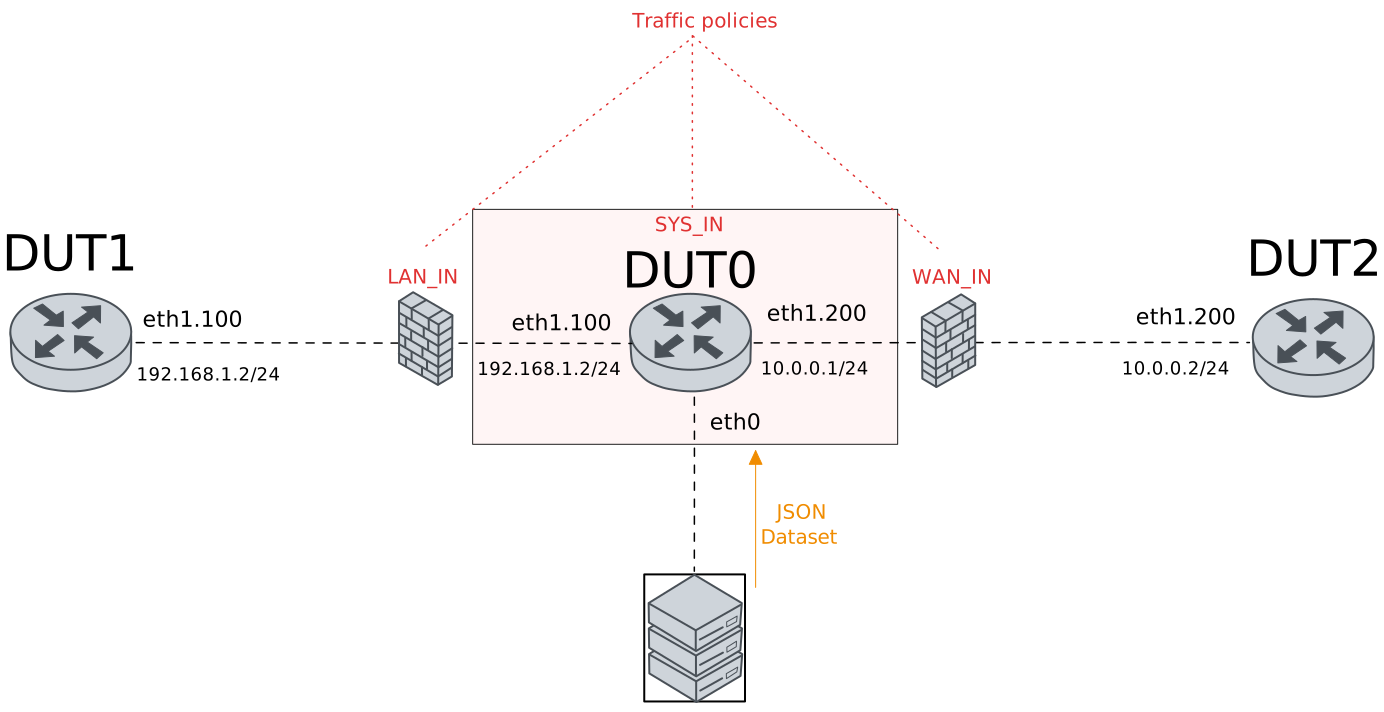
This scenario shows how to configure
service traffic-group-sync to periodically download a JSON
dataset file containing information about traffic groups.
This file is used to dynamically update configured traffic
groups.
Test Traffic-Group-Sync
Description
This example shows how to configure some
traffic policies, traffic selectors and
traffic groups to control incoming/outgoing
network packets. traffic groups are dynamically
updated using an external JSON file that is
periodically downloaded from a remote end-point.
Scenario
Step 1: Set the following configuration in DUT0 :
set interfaces ethernet eth0 address 10.215.168.64/24
set interfaces ethernet eth0 vrf MNGMT
set interfaces ethernet eth1 vif 100 address 192.168.1.1/24
set interfaces ethernet eth1 vif 100 traffic policy in LAN_IN
set interfaces ethernet eth1 vif 100 vrf LAN
set interfaces ethernet eth1 vif 200 address 10.0.0.1/24
set interfaces ethernet eth1 vif 200 traffic nat source rule 1 address masquerade
set interfaces ethernet eth1 vif 200 traffic policy in WAN_IN
set interfaces ethernet eth1 vif 200 vrf WAN
set protocols vrf LAN static route 10.0.0.0/24 next-hop-vrf WAN
set protocols vrf WAN static route 192.168.1.0/24 next-hop-vrf LAN
set service traffic-group-sync ACL_FETCHER local-vrf MNGMT
set service traffic-group-sync ACL_FETCHER poll-interval 1
set service traffic-group-sync ACL_FETCHER url 'http://10.215.168.1/~robot/dataset.json'
set system login user admin authentication encrypted-password '$6$GSjsCj8gHLv$/VcqU6FLi6CT2Oxn0MJQ2C2tqnRDrYKNF8HIYWJp68nvXvPdFccDsT04.WtigUONbKYrgKg8d6rEs8PjljMkH0'
set system traffic policy in SYS_IN
set system vrf LAN
set system vrf MNGMT
set system vrf WAN
set traffic group address LAN_ADDR element 192.168.1.2
set traffic group address WAN_ADDR element 10.0.0.2
set traffic group port SYS_PORT
set traffic policy LAN_IN rule 1 action accept
set traffic policy LAN_IN rule 1 selector LAN_SEL
set traffic policy LAN_IN rule 2 action drop
set traffic policy SYS_IN rule 1 action accept
set traffic policy SYS_IN rule 1 selector SYS_SEL
set traffic policy SYS_IN rule 2 action drop
set traffic policy WAN_IN rule 1 action accept
set traffic policy WAN_IN rule 1 selector WAN_SEL
set traffic policy WAN_IN rule 2 action drop
set traffic selector LAN_SEL rule 1 source address-group LAN_ADDR
set traffic selector SYS_SEL rule 1 protocol icmp
set traffic selector SYS_SEL rule 2 protocol tcp
set traffic selector SYS_SEL rule 2 source port 80
set traffic selector SYS_SEL rule 3 destination port-group SYS_PORT
set traffic selector SYS_SEL rule 3 protocol tcp
set traffic selector SYS_SEL rule 4 protocol tcp
set traffic selector SYS_SEL rule 4 source port-group SYS_PORT
set traffic selector WAN_SEL rule 1 source address-group WAN_ADDR
Step 2: Set the following configuration in DUT1 :
set interfaces ethernet eth1 vif 100 address 192.168.1.2/24
set protocols static route 0.0.0.0/0 next-hop 192.168.1.1
set system login user admin authentication encrypted-password '$6$GSjsCj8gHLv$/VcqU6FLi6CT2Oxn0MJQ2C2tqnRDrYKNF8HIYWJp68nvXvPdFccDsT04.WtigUONbKYrgKg8d6rEs8PjljMkH0'
Step 3: Set the following configuration in DUT2 :
set interfaces ethernet eth1 vif 200 address 10.0.0.2/24
set protocols static route 0.0.0.0/0 next-hop 10.0.0.1
set system login user admin authentication encrypted-password '$6$GSjsCj8gHLv$/VcqU6FLi6CT2Oxn0MJQ2C2tqnRDrYKNF8HIYWJp68nvXvPdFccDsT04.WtigUONbKYrgKg8d6rEs8PjljMkH0'
Step 4: Run command traffic group show at DUT0 and check if output matches the following regular expressions:
Name: LAN_ADDR
Source: configuration
.*192\.168\.1\.2.*
Name: WAN_ADDR
Source: configuration
.*10\.0\.0\.2.*
Name: SYS_PORT
Source: configuration
.*\(No elements\)
Show output
Elements for address traffic groups
===================================

Name: LAN_ADDR
Source: configuration

-------------------------------
index     value     description
-------------------------------
1      192.168.1.2  -


Elements for address traffic groups
===================================

Name: WAN_ADDR
Source: configuration

----------------------------
index   value    description
----------------------------
1      10.0.0.2  -


Elements for port traffic groups
================================

Name: SYS_PORT
Source: configuration

---------------------------------
index      value      description
---------------------------------
       (No elements)
Step 5: Ping IP address 192.168.1.1 from DUT1:
admin@DUT1$ ping 192.168.1.1 count 1 size 56 timeout 1Show output
PING 192.168.1.1 (192.168.1.1) 56(84) bytes of data.
64 bytes from 192.168.1.1: icmp_seq=1 ttl=64 time=0.362 ms

--- 192.168.1.1 ping statistics ---
1 packets transmitted, 1 received, 0% packet loss, time 0ms
rtt min/avg/max/mdev = 0.362/0.362/0.362/0.000 ms
Step 6: Ping IP address 10.0.0.1 from DUT2:
admin@DUT2$ ping 10.0.0.1 count 1 size 56 timeout 1Show output
PING 10.0.0.1 (10.0.0.1) 56(84) bytes of data.
64 bytes from 10.0.0.1: icmp_seq=1 ttl=64 time=0.343 ms

--- 10.0.0.1 ping statistics ---
1 packets transmitted, 1 received, 0% packet loss, time 0ms
rtt min/avg/max/mdev = 0.343/0.343/0.343/0.000 ms
Step 7: Ping IP address 10.0.0.2 from DUT1:
admin@DUT1$ ping 10.0.0.2 count 1 size 56 timeout 1Show output
PING 10.0.0.2 (10.0.0.2) 56(84) bytes of data.
64 bytes from 10.0.0.2: icmp_seq=1 ttl=63 time=0.447 ms

--- 10.0.0.2 ping statistics ---
1 packets transmitted, 1 received, 0% packet loss, time 0ms
rtt min/avg/max/mdev = 0.447/0.447/0.447/0.000 ms
Note
Put the following JSON dataset in the remote end-point:
Show output
{
    "address": {
              "LAN_ADDR": {
                      "description": "lan_desc",
                      "elements": [
                              {"description":"value_desc", "value": "192.168.1.0/24"}
                      ]
              },
              "WAN_ADDR": {
                      "description": "wan_desc",
                      "elements": []
              }

    },
      "port": {
              "SYS_PORT": {
                      "description": "port_desc",
                      "elements": [
                              {"description":"value_desc", "value": "1234"}
                      ]
              }

    }
}
Step 8: Run command service traffic-group-sync ACL_FETCHER show data at DUT0 and check if output matches the following regular expressions:
Address traffic groups
LAN_ADDR\s+\(lan_desc\):
Index.*Value.*Description
.*192\.168\.1\.0/24.*value_desc
WAN_ADDR\s+\(wan_desc\):
.*\(No elements\)
Port traffic groups
SYS_PORT\s+\(port_desc\):
Index.*Value.*Description
.*1234.*value_desc
Show output
Address traffic groups
======================

LAN_ADDR (lan_desc):

----------------------------------
Index      Value       Description
----------------------------------
  1    192.168.1.0/24  value_desc


WAN_ADDR (wan_desc):
  (No elements)

Port traffic groups
===================

SYS_PORT (port_desc):

-------------------------
Index  Value  Description
-------------------------
  1    1234   value_desc
Step 9: Run command service traffic-group-sync ACL_FETCHER show stats at DUT0 and check if output matches the following regular expressions:
[1-9]\d*\s+[1-9]\d*\s+\d+Show output
-----------------------------------------------
Requests  Updates  Download Errors  Last Update
-----------------------------------------------
       4        1                2     2s ago
Step 10: Run command traffic group show at DUT0 and check if output matches the following regular expressions:
Name: LAN_ADDR
Source: traffic-group-sync ACL_FETCHER
.*192\.168\.1\.0/24.*
Name: WAN_ADDR
Source: traffic-group-sync ACL_FETCHER
.*\(No elements\)
Name: SYS_PORT
Source: traffic-group-sync ACL_FETCHER
.*1234.*
Show output
Elements for address traffic groups
===================================

Name: LAN_ADDR
Source: traffic-group-sync ACL_FETCHER

----------------------------------
index      value       description
----------------------------------
1      192.168.1.0/24  value_desc


Elements for address traffic groups
===================================

Name: WAN_ADDR
Source: traffic-group-sync ACL_FETCHER

---------------------------------
index      value      description
---------------------------------
       (No elements)


Elements for port traffic groups
================================

Name: SYS_PORT
Source: traffic-group-sync ACL_FETCHER

-------------------------
index  value  description
-------------------------
1      1234   value_desc
Step 11: Initiate a tcp connection from DUT1 to DUT0 and try to send some messages between both endpoints
admin@DUT0$ monitor test connection server 1234 tcp
admin@DUT1$ monitor test connection client 192.168.1.1 1234 tcp
Step 12: Expect a failure in the following command:
Initiate a tcp connection from DUT1 to DUT0 and try to send some messages between both endpoints
admin@DUT0$ monitor test connection server 4321 tcp
admin@DUT1$ monitor test connection client 192.168.1.1 4321 tcp
Step 13: Expect a failure in the following command:
Initiate a tcp connection from DUT1 to DUT0 and try to send some messages between both endpoints
admin@DUT0$ monitor test connection server 1234 tcp
admin@DUT1$ monitor test connection client 10.0.0.2 1234 tcp
Note
Put the following JSON dataset in the remote end-point:
Show output
{
    "address": {
              "LAN_ADDR": {
                      "description": "lan_desc",
                      "elements": [
                              {"description":"value_desc", "value": "192.168.1.0/24"}
                      ]
              },
              "WAN_ADDR": {
                      "description": "wan_desc",
                      "elements": [
                              {"description":"value_desc", "value": "10.0.0.2"}
                      ]
              }

    },
      "port": {
              "SYS_PORT": {
                      "description": "port_desc",
                      "elements": [
                              {"description":"value_desc", "value": "1234"},
                              {"description":"value_desc", "value": "4321"}
                      ]
              }

    }
}
Step 14: Run command service traffic-group-sync ACL_FETCHER show data at DUT0 and check if output matches the following regular expressions:
Address traffic groups
LAN_ADDR\s+\(lan_desc\):
Index.*Value.*Description
.*192\.168\.1\.0/24.*value_desc
WAN_ADDR\s+\(wan_desc\):
Index.*Value.*Description
.*10\.0\.0\.2.*value_desc
Port traffic groups
SYS_PORT\s+\(port_desc\):
Index.*Value.*Description
.*1234.*value_desc
.*4321.*value_desc
Show output
Address traffic groups
======================

LAN_ADDR (lan_desc):

----------------------------------
Index      Value       Description
----------------------------------
  1    192.168.1.0/24  value_desc


WAN_ADDR (wan_desc):

----------------------------
Index   Value    Description
----------------------------
  1    10.0.0.2  value_desc


Port traffic groups
===================

SYS_PORT (port_desc):

-------------------------
Index  Value  Description
-------------------------
  1    1234   value_desc
  2    4321   value_desc
Step 15: Run command traffic group show at DUT0 and check if output matches the following regular expressions:
Name: LAN_ADDR
Source: traffic-group-sync ACL_FETCHER
.*192\.168\.1\.0/24.*
Name: WAN_ADDR
Source: traffic-group-sync ACL_FETCHER
.*10\.0\.0\.2.*
Name: SYS_PORT
Source: traffic-group-sync ACL_FETCHER
.*1234.*
.*4321.*
Show output
Elements for address traffic groups
===================================

Name: LAN_ADDR
Source: traffic-group-sync ACL_FETCHER

----------------------------------
index      value       description
----------------------------------
1      192.168.1.0/24  value_desc


Elements for address traffic groups
===================================

Name: WAN_ADDR
Source: traffic-group-sync ACL_FETCHER

----------------------------
index   value    description
----------------------------
1      10.0.0.2  value_desc


Elements for port traffic groups
================================

Name: SYS_PORT
Source: traffic-group-sync ACL_FETCHER

-------------------------
index  value  description
-------------------------
1      1234   value_desc
2      4321   value_desc
Step 16: Initiate a tcp connection from DUT1 to DUT0 and try to send some messages between both endpoints
admin@DUT0$ monitor test connection server 1234 tcp
admin@DUT1$ monitor test connection client 192.168.1.1 1234 tcp
Step 17: Initiate a tcp connection from DUT1 to DUT0 and try to send some messages between both endpoints
admin@DUT0$ monitor test connection server 4321 tcp
admin@DUT1$ monitor test connection client 192.168.1.1 4321 tcp
Step 18: Initiate a tcp connection from DUT1 to DUT2 and try to send some messages between both endpoints
admin@DUT2$ monitor test connection server 1234 tcp
admin@DUT1$ monitor test connection client 10.0.0.2 1234 tcp
Step 19: Initiate a tcp connection from DUT1 to DUT2 and try to send some messages between both endpoints
admin@DUT2$ monitor test connection server 4321 tcp
admin@DUT1$ monitor test connection client 10.0.0.2 4321 tcp
Step 20: Modify the following configuration lines in DUT0 :
set service traffic-group-sync EMPTY_FETCHER local-vrf MNGMT
set service traffic-group-sync EMPTY_FETCHER poll-interval 1
set service traffic-group-sync EMPTY_FETCHER url 'http://10.215.168.1/~robot/empty.json'
Note
Put an empty JSON dataset in the remote end-point:
Show output
{
    "address": {
              "LAN_ADDR": {
                      "description": "lan_desc",
                      "elements": []
              },
              "WAN_ADDR": {
                      "description": "wan_desc",
                      "elements": []
              }

    },
      "port": {
              "SYS_PORT": {
                      "description": "port_desc",
                      "elements": []
              }

    }
}
Step 21: Run command traffic group show at DUT0 and check if output matches the following regular expressions:
Name: LAN_ADDR
Source: traffic-group-sync EMPTY_FETCHER
.*\(No elements\)
Name: WAN_ADDR
Source: traffic-group-sync EMPTY_FETCHER
.*\(No elements\)
Name: SYS_PORT
Source: traffic-group-sync EMPTY_FETCHER
.*\(No elements\)
Show output
Elements for address traffic groups
===================================

Name: LAN_ADDR
Source: traffic-group-sync EMPTY_FETCHER

---------------------------------
index      value      description
---------------------------------
       (No elements)


Elements for address traffic groups
===================================

Name: WAN_ADDR
Source: traffic-group-sync EMPTY_FETCHER

---------------------------------
index      value      description
---------------------------------
       (No elements)


Elements for port traffic groups
================================

Name: SYS_PORT
Source: traffic-group-sync EMPTY_FETCHER

---------------------------------
index      value      description
---------------------------------
       (No elements)
Note
Reload instance ACL_FETCHER to restore traffic
elements.
Step 22: Run command service traffic-group-sync ACL_FETCHER reload at DUT0 and check if output contains the following tokens:
3 groups were updatedShow output
3 groups were updated!
Step 23: Run command traffic group show at DUT0 and check if output matches the following regular expressions:
Name: LAN_ADDR
Source: traffic-group-sync ACL_FETCHER
.*192\.168\.1\.0/24.*
Name: WAN_ADDR
Source: traffic-group-sync ACL_FETCHER
.*10\.0\.0\.2.*
Name: SYS_PORT
Source: traffic-group-sync ACL_FETCHER
.*1234.*
.*4321.*
Show output
Elements for address traffic groups
===================================

Name: LAN_ADDR
Source: traffic-group-sync ACL_FETCHER

----------------------------------
index      value       description
----------------------------------
1      192.168.1.0/24  value_desc


Elements for address traffic groups
===================================

Name: WAN_ADDR
Source: traffic-group-sync ACL_FETCHER

----------------------------
index   value    description
----------------------------
1      10.0.0.2  value_desc


Elements for port traffic groups
================================

Name: SYS_PORT
Source: traffic-group-sync ACL_FETCHER

-------------------------
index  value  description
-------------------------
1      1234   value_desc
2      4321   value_desc
Step 24: Modify the following configuration lines in DUT0 :
delete service
Step 25: Run command traffic group show at DUT0 and check if output matches the following regular expressions:
Name: LAN_ADDR
Source: configuration
.*192\.168\.1\.2.*
Name: WAN_ADDR
Source: configuration
.*10\.0\.0\.2.*
Name: SYS_PORT
Source: configuration
.*\(No elements\)
Show output
Elements for address traffic groups
===================================

Name: LAN_ADDR
Source: configuration

-------------------------------
index     value     description
-------------------------------
1      192.168.1.2  -


Elements for address traffic groups
===================================

Name: WAN_ADDR
Source: configuration

----------------------------
index   value    description
----------------------------
1      10.0.0.2  -


Elements for port traffic groups
================================

Name: SYS_PORT
Source: configuration

---------------------------------
index      value      description
---------------------------------
       (No elements)
Step 26: Ping IP address 192.168.1.1 from DUT1:
admin@DUT1$ ping 192.168.1.1 count 1 size 56 timeout 1Show output
PING 192.168.1.1 (192.168.1.1) 56(84) bytes of data.
64 bytes from 192.168.1.1: icmp_seq=1 ttl=64 time=0.353 ms

--- 192.168.1.1 ping statistics ---
1 packets transmitted, 1 received, 0% packet loss, time 0ms
rtt min/avg/max/mdev = 0.353/0.353/0.353/0.000 ms
Step 27: Ping IP address 10.0.0.1 from DUT2:
admin@DUT2$ ping 10.0.0.1 count 1 size 56 timeout 1Show output
PING 10.0.0.1 (10.0.0.1) 56(84) bytes of data.
64 bytes from 10.0.0.1: icmp_seq=1 ttl=64 time=0.231 ms

--- 10.0.0.1 ping statistics ---
1 packets transmitted, 1 received, 0% packet loss, time 0ms
rtt min/avg/max/mdev = 0.231/0.231/0.231/0.000 ms
Step 28: Ping IP address 10.0.0.2 from DUT1:
admin@DUT1$ ping 10.0.0.2 count 1 size 56 timeout 1Show output
PING 10.0.0.2 (10.0.0.2) 56(84) bytes of data.
64 bytes from 10.0.0.2: icmp_seq=1 ttl=63 time=0.548 ms

--- 10.0.0.2 ping statistics ---
1 packets transmitted, 1 received, 0% packet loss, time 0ms
rtt min/avg/max/mdev = 0.548/0.548/0.548/0.000 ms