Traffic Control
The following scenario shows how to configure a basic
traffic control discipline, which can be used on OSDx for traffic
shaping and scheduling purposes. The monitor test
performance operational command can be used to calculate
the throughput.
Test Traffic Control
Description
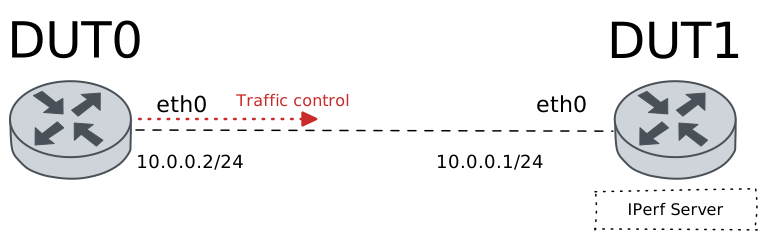
In this scenario, a simple HTB qdisc is configured in DUT0.
Scenario
Step 1: Set the following configuration in DUT0 :
set interfaces ethernet eth0 address 10.0.0.2/24
set interfaces ethernet eth0 traffic control out QDISC
set system login user admin authentication encrypted-password '$6$GSjsCj8gHLv$/VcqU6FLi6CT2Oxn0MJQ2C2tqnRDrYKNF8HIYWJp68nvXvPdFccDsT04.WtigUONbKYrgKg8d6rEs8PjljMkH0'
set traffic control QDISC type htb bandwidth 100
set traffic control QDISC type htb class 1 bandwidth percentage 34
set traffic control QDISC type htb class 2 bandwidth percentage 33
set traffic control QDISC type htb class 3 bandwidth percentage 33
set traffic control QDISC type htb default-class 3
set traffic control QDISC type htb match 1 class 1
set traffic control QDISC type htb match 1 ip protocol icmp
set traffic control QDISC type htb match 2 class 2
set traffic control QDISC type htb match 2 ip protocol tcp
Step 2: Set the following configuration in DUT1 :
set interfaces ethernet eth0 address 10.0.0.1/24
set system login user admin authentication encrypted-password '$6$GSjsCj8gHLv$/VcqU6FLi6CT2Oxn0MJQ2C2tqnRDrYKNF8HIYWJp68nvXvPdFccDsT04.WtigUONbKYrgKg8d6rEs8PjljMkH0'
Step 3: Ping IP address 10.0.0.1 from DUT0:
admin@DUT0$ ping 10.0.0.1 count 1 size 56 timeout 1Show output
PING 10.0.0.1 (10.0.0.1) 56(84) bytes of data.
64 bytes from 10.0.0.1: icmp_seq=1 ttl=64 time=0.321 ms

--- 10.0.0.1 ping statistics ---
1 packets transmitted, 1 received, 0% packet loss, time 0ms
rtt min/avg/max/mdev = 0.321/0.321/0.321/0.000 ms
Step 4: Run command traffic control show at DUT0 and check if output matches the following regular expressions:
class 1\s+1:0\s+[1-9]\d*Show output
Traffic control for interface 'eth0' - 'egress' mode

------------------------------------------------------------------------------------
ID   traffic control        type         parent  bytes sent  pkts sent  pkts dropped
------------------------------------------------------------------------------------
1:0  QDISC            htb                root           376          4             0
1:1  QDISC            class 1            1:0             98          1             0
1:2  QDISC            class 2            1:0              0          0             0
1:3  QDISC            class 3 (default)  1:0            278          3             0
2:0  -                fq_codel           1:1             98          1             0
3:0  -                fq_codel           1:2              0          0             0
4:0  -                fq_codel           1:3            278          3             0
Step 5: Run command traffic control show at DUT0 and check if output matches the following regular expressions:
class 2\s+1:0\s+0Show output
Traffic control for interface 'eth0' - 'egress' mode

------------------------------------------------------------------------------------
ID   traffic control        type         parent  bytes sent  pkts sent  pkts dropped
------------------------------------------------------------------------------------
1:0  QDISC            htb                root           376          4             0
1:1  QDISC            class 1            1:0             98          1             0
1:2  QDISC            class 2            1:0              0          0             0
1:3  QDISC            class 3 (default)  1:0            278          3             0
2:0  -                fq_codel           1:1             98          1             0
3:0  -                fq_codel           1:2              0          0             0
4:0  -                fq_codel           1:3            278          3             0
Step 6: Initiate a bandwidth test from DUT0 to DUT1
admin@DUT1$ monitor test performance server port 8080
admin@DUT0$ monitor test performance client 10.0.0.1 duration 5 port 8080 parallel 1
Expect this output in
DUT0:Connecting to host 10.0.0.1, port 8080 [ 5] local 10.0.0.2 port 55294 connected to 10.0.0.1 port 8080 [ ID] Interval Transfer Bitrate Retr Cwnd [ 5] 0.00-1.00 sec 4.68 MBytes 39.3 Mbits/sec 66 33.9 KBytes [ 5] 1.00-2.00 sec 3.73 MBytes 31.3 Mbits/sec 52 35.4 KBytes [ 5] 2.00-3.00 sec 3.98 MBytes 33.4 Mbits/sec 25 41.0 KBytes [ 5] 3.00-4.00 sec 3.73 MBytes 31.3 Mbits/sec 41 41.0 KBytes [ 5] 4.00-5.00 sec 3.73 MBytes 31.3 Mbits/sec 37 35.4 KBytes - - - - - - - - - - - - - - - - - - - - - - - - - [ ID] Interval Transfer Bitrate Retr [ 5] 0.00-5.00 sec 19.8 MBytes 33.3 Mbits/sec 221 sender [ 5] 0.00-5.00 sec 19.3 MBytes 32.3 Mbits/sec receiver iperf Done.
Step 7: Run command traffic control show at DUT0 and check if output matches the following regular expressions:
class 2\s+1:0\s+[1-9]\d*Show output
Traffic control for interface 'eth0' - 'egress' mode

------------------------------------------------------------------------------------
ID   traffic control        type         parent  bytes sent  pkts sent  pkts dropped
------------------------------------------------------------------------------------
1:0  QDISC            htb                root      21166809      14006            24
1:1  QDISC            class 1            1:0             98          1             0
1:2  QDISC            class 2            1:0       21165953      13998             0
1:3  QDISC            class 3 (default)  1:0            758          7             0
2:0  -                fq_codel           1:1             98          1             0
3:0  -                fq_codel           1:2       21165953      13998            24
4:0  -                fq_codel           1:3            758          7             0
Step 8: Run command traffic control show at DUT0 and check if output matches the following regular expressions:
class 2\s+1:0\s+[1-9]\d*Show output
Traffic control for interface 'eth0' - 'egress' mode

------------------------------------------------------------------------------------
ID   traffic control        type         parent  bytes sent  pkts sent  pkts dropped
------------------------------------------------------------------------------------
1:0  QDISC            htb                root      21166809      14006            24
1:1  QDISC            class 1            1:0             98          1             0
1:2  QDISC            class 2            1:0       21165953      13998             0
1:3  QDISC            class 3 (default)  1:0            758          7             0
2:0  -                fq_codel           1:1             98          1             0
3:0  -                fq_codel           1:2       21165953      13998            24
4:0  -                fq_codel           1:3            758          7             0
Step 9: Run command traffic control clear at DUT0 and expect this output:
Step 10: Run command traffic control show at DUT0 and check if output matches the following regular expressions:
class 1\s+1:0\s+0Show output
Traffic control for interface 'eth0' - 'egress' mode

------------------------------------------------------------------------------------
ID   traffic control        type         parent  bytes sent  pkts sent  pkts dropped
------------------------------------------------------------------------------------
1:0  QDISC            htb                root             0          0             0
1:1  QDISC            class 1            1:0              0          0             0
1:2  QDISC            class 2            1:0              0          0             0
1:3  QDISC            class 3 (default)  1:0              0          0             0
2:0  -                fq_codel           1:1              0          0             0
3:0  -                fq_codel           1:2              0          0             0
4:0  -                fq_codel           1:3              0          0             0
Step 11: Run command traffic control show at DUT0 and check if output matches the following regular expressions:
class 2\s+1:0\s+0Show output
Traffic control for interface 'eth0' - 'egress' mode

------------------------------------------------------------------------------------
ID   traffic control        type         parent  bytes sent  pkts sent  pkts dropped
------------------------------------------------------------------------------------
1:0  QDISC            htb                root             0          0             0
1:1  QDISC            class 1            1:0              0          0             0
1:2  QDISC            class 2            1:0              0          0             0
1:3  QDISC            class 3 (default)  1:0              0          0             0
2:0  -                fq_codel           1:1              0          0             0
3:0  -                fq_codel           1:2              0          0             0
4:0  -                fq_codel           1:3              0          0             0
Step 12: Initiate a bandwidth test from DUT0 to DUT1
admin@DUT1$ monitor test performance server port 8080
admin@DUT0$ monitor test performance client 10.0.0.1 duration 5 port 8080 parallel 1
Expect this output in
DUT0:Connecting to host 10.0.0.1, port 8080 [ 5] local 10.0.0.2 port 46652 connected to 10.0.0.1 port 8080 [ ID] Interval Transfer Bitrate Retr Cwnd [ 5] 0.00-1.00 sec 6.05 MBytes 50.7 Mbits/sec 176 43.8 KBytes [ 5] 1.00-2.00 sec 4.66 MBytes 39.1 Mbits/sec 60 45.2 KBytes [ 5] 2.00-3.00 sec 3.73 MBytes 31.3 Mbits/sec 41 53.7 KBytes [ 5] 3.00-4.00 sec 3.73 MBytes 31.3 Mbits/sec 62 39.6 KBytes [ 5] 4.00-5.00 sec 3.73 MBytes 31.3 Mbits/sec 48 35.4 KBytes - - - - - - - - - - - - - - - - - - - - - - - - - [ ID] Interval Transfer Bitrate Retr [ 5] 0.00-5.00 sec 21.9 MBytes 36.7 Mbits/sec 387 sender [ 5] 0.00-5.00 sec 19.3 MBytes 32.3 Mbits/sec receiver iperf Done.
Step 13: Run command traffic control show at DUT0 and check if output matches the following regular expressions:
class 1\s+1:0\s+0Show output
Traffic control for interface 'eth0' - 'egress' mode

------------------------------------------------------------------------------------
ID   traffic control        type         parent  bytes sent  pkts sent  pkts dropped
------------------------------------------------------------------------------------
1:0  QDISC            htb                root      21181161      14009            23
1:1  QDISC            class 1            1:0              0          0             0
1:2  QDISC            class 2            1:0       21181161      14009             0
1:3  QDISC            class 3 (default)  1:0              0          0             0
2:0  -                fq_codel           1:1              0          0             0
3:0  -                fq_codel           1:2       21181161      14009            23
4:0  -                fq_codel           1:3              0          0             0
Step 14: Run command traffic control show at DUT0 and check if output matches the following regular expressions:
class 2\s+1:0\s+[1-9]\d*Show output
Traffic control for interface 'eth0' - 'egress' mode

------------------------------------------------------------------------------------
ID   traffic control        type         parent  bytes sent  pkts sent  pkts dropped
------------------------------------------------------------------------------------
1:0  QDISC            htb                root      21181161      14009            23
1:1  QDISC            class 1            1:0              0          0             0
1:2  QDISC            class 2            1:0       21181161      14009             0
1:3  QDISC            class 3 (default)  1:0              0          0             0
2:0  -                fq_codel           1:1              0          0             0
3:0  -                fq_codel           1:2       21181161      14009            23
4:0  -                fq_codel           1:3              0          0             0