Check Multi Module Connection
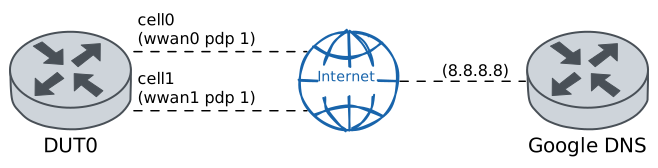
This scenario demonstrates how to configure multiple cellular interfaces associated with different cellular modules.
Test ICMP Connectivity
Description
In DUT0, two cellular interfaces are defined, each associated with different cellular modules. Once configured, the ‘Ping’ command is used to check the connectivity of the two data interfaces with Google’s public DNS server.
Scenario
Step 1: Set the following configuration in DUT0 :
set cellular profile CELPROFILE1 apn movistar.es
set cellular profile CELPROFILE2 apn movistar.es
set controllers cellular wwan0 sim select socket_1
set controllers cellular wwan0 sim socket socket_1 encrypted-pin U2FsdGVkX185eFzutOCBfuwCZv06zvd5ZxXVY5DciVo=
set controllers cellular wwan0 sim socket socket_1 pdp 1 profile CELPROFILE1
set controllers cellular wwan1 sim select socket_1
set controllers cellular wwan1 sim socket socket_1 encrypted-pin U2FsdGVkX19E0fQFppk7IAcnSab/bwP62BO1Xo+L8lw=
set controllers cellular wwan1 sim socket socket_1 pdp 1 profile CELPROFILE2
set interfaces cellular cell0 address dhcp
set interfaces cellular cell0 phy wwan0 pdp 1
set interfaces cellular cell1 address dhcp
set interfaces cellular cell1 phy wwan1 pdp 1
set system login user admin authentication encrypted-password '$6$GSjsCj8gHLv$/VcqU6FLi6CT2Oxn0MJQ2C2tqnRDrYKNF8HIYWJp68nvXvPdFccDsT04.WtigUONbKYrgKg8d6rEs8PjljMkH0'
Note
Once the two cellular modules are configured, the following operational commands can be used to check if the SIM and registration states are correct for both modules.
Step 2: Run command controllers cellular wwan0 show network-status at DUT0 and check if output matches the following regular expressions:
SIM status\s* = OK
Registration state\s* = registered
Show output
SIM status = OK
Registration state = registered
Public Land Mobile Network code = HOME[21407] ACT[21422]
Public Land Mobile Network name = Movistar
Network technology currently in use = lte(+5gnr)
Current Service Domain registered = cs-ps (capable cs-ps)
Current Roaming status = off
3GPP Cell ID = 72016415
Radio Band = eutran-20
Bandwidth = 10
Channel = 6400
LTE Tracking Area Code (TAC) = 28673
EN-DC Available = yes
DCNR Restriction = no
LTE Carrier Aggregation Info:
   Primary Cell Info:
      Band = E-UTRA Band 20
      Frequency = 6400
      Downlink Bandwidth = 10 MHz
      Physical Cell ID = 195
      Scell State = registered
      RSRP (dBm) = -66
      RSRQ (dB) = -14
      RSSI (dBm) = -35
      SINR (dB) = 16
      Uplink Bandwidth = 10 MHz
   Secondary Cell Info #0:
      Band = E-UTRA Band 3
      Frequency = 1301
      Downlink Bandwidth = 20 MHz
      Physical Cell ID = 216
      Scell State = inactive
      RSRP (dBm) = -102
      RSRQ (dB) = -11
      RSSI (dBm) = -79
      SINR (dB) = 15
      Uplink Frequency = 19301
      Uplink Bandwidth = 20 MHz
RX level (dBm) = -53 or greater
Coverage level = 5 (*****)
Step 3: Run command controllers cellular wwan1 show network-status at DUT0 and check if output matches the following regular expressions:
SIM status\s* = OK
Registration state\s* = registered
Show output
SIM status = OK
Registration state = registered
Public Land Mobile Network code = HOME[21407] ACT[21422]
Public Land Mobile Network name = Movistar
Network technology currently in use = lte(+5gnr)
Current Service Domain registered = cs-ps (capable cs-ps)
Current Roaming status = off
3GPP Cell ID = 72016415
Radio Band = eutran-20
Bandwidth = 10
Channel = 6400
LTE Tracking Area Code (TAC) = 28673
EN-DC Available = yes
DCNR Restriction = no
LTE Carrier Aggregation Info:
   Primary Cell Info:
      Band = E-UTRA Band 20
      Frequency = 6400
      Downlink Bandwidth = 10 MHz
      Physical Cell ID = 195
      Scell State = registered
      RSRP (dBm) = -66
      RSRQ (dB) = -6
      RSSI (dBm) = -42
      SINR (dB) = 14
      Uplink Bandwidth = 10 MHz
   Secondary Cell Info #0:
      Band = E-UTRA Band 3
      Frequency = 1301
      Downlink Bandwidth = 20 MHz
      Physical Cell ID = 216
      Scell State = inactive
      RSRP (dBm) = -108
      RSRQ (dB) = -9
      RSSI (dBm) = -92
      SINR (dB) = 14
      Uplink Frequency = 19301
      Uplink Bandwidth = 20 MHz
RX level (dBm) = -53 or greater
Coverage level = 5 (*****)
Note
On the other hand, with the following commands it can be checked if the PDP contexts have correctly established the connection to the network.
Step 4: Run command controllers cellular wwan0 pdp 1 show network-data-connection at DUT0 and check if output matches the following regular expressions:
Connection status\s* = connectedShow output
Connection status               = connected
Traffic channel status          = active
Max. TX channel rate (bps)      = 0
Max. RX channel rate (bps)      = 0
IPv4 address                    = 2.143.35.70
IPv4 mask                       = 255.255.255.252
IPv4 gateway                    = 2.143.35.69
IPv4 primary DNS                = 80.58.61.248
IPv4 secondary DNS              = 80.58.61.249
Step 5: Run command controllers cellular wwan1 pdp 1 show network-data-connection at DUT0 and check if output matches the following regular expressions:
Connection status\s* = connectedShow output
Connection status               = connected
Traffic channel status          = active
Max. TX channel rate (bps)      = 0
Max. RX channel rate (bps)      = 0
IPv4 address                    = 37.13.164.59
IPv4 mask                       = 255.255.255.248
IPv4 gateway                    = 37.13.164.60
IPv4 primary DNS                = 80.58.61.248
IPv4 secondary DNS              = 80.58.61.249
Note
Additionally, with the previous operational commands, the IP addresses that have been provided by the operator to be used by each cellular interface are displayed. So, with the following commands, it can be checked if the two cellular interfaces have been correctly configured by the DHCP client.
Step 6: Run command interfaces cellular cell0 show at DUT0 and check if output matches the following regular expressions:
cell0\s+\d+.\d+.\d+.\d+\/\d+\s+up\s+upShow output
------------------------------------------------------------------
Name            IP Address           Admin  Oper  Vrf  Description
------------------------------------------------------------------
cell0  2.143.35.70/30                up     up
       fe80::705d:c6ff:fee8:b1e8/64
Step 7: Run command interfaces cellular cell1 show at DUT0 and check if output matches the following regular expressions:
cell1\s+\d+.\d+.\d+.\d+\/\d+\s+up\s+upShow output
------------------------------------------------------------------
Name            IP Address           Admin  Oper  Vrf  Description
------------------------------------------------------------------
cell1  37.13.164.59/29               up     up
       fe80::80c8:ffff:fe9b:ddb9/64
Note
Once everything above has been verified, we can be sure that the two cellular interfaces have been configured correctly and that there must be connectivity with the network from each of them. The latter can be verified, for example, by pinging Google's DNS public server.
Step 8: Ping IP address 8.8.8.8 from DUT0:
admin@DUT0$ ping 8.8.8.8 local-address cell0 count 1 size 56 timeout 1Show output
PING 8.8.8.8 (8.8.8.8) from 2.143.35.70 cell0: 56(84) bytes of data.
64 bytes from 8.8.8.8: icmp_seq=1 ttl=116 time=114 ms

--- 8.8.8.8 ping statistics ---
1 packets transmitted, 1 received, 0% packet loss, time 0ms
rtt min/avg/max/mdev = 114.209/114.209/114.209/0.000 ms
Step 9: Ping IP address 8.8.8.8 from DUT0:
admin@DUT0$ ping 8.8.8.8 local-address cell1 count 1 size 56 timeout 1Show output
PING 8.8.8.8 (8.8.8.8) from 37.13.164.59 cell1: 56(84) bytes of data.
64 bytes from 8.8.8.8: icmp_seq=1 ttl=116 time=204 ms

--- 8.8.8.8 ping statistics ---
1 packets transmitted, 1 received, 0% packet loss, time 0ms
rtt min/avg/max/mdev = 203.664/203.664/203.664/0.000 ms