Check Network Mode Changes
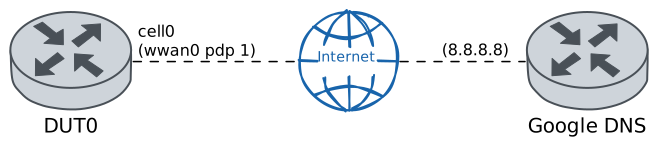
This scenario shows how to configure a cellular interface, selecting the type of technology used to connect to the network from those supported by the cellular module used.
Test ICMP Connectivity
Description
The network modes supported by the cellular module are obtained from DUT0. Next, a cellular interface is created in DUT0, adjusting the different supported network modes and verifying that the interface is indeed using the desired network technology and that there is connectivity with Google’s DNS public server.
Scenario
Step 1: Run command controllers cellular wwan0 show device-info at DUT0 and expect this output:
Show output
Module Manufacturer          = Quectel
Module Model                 = RM520N-GL
Module Firmware              = RM520NGLAAR03A01M4G
Hardware Revision            = 20000
Modem/App Firmware           = RM520NGLAAR03A01M4G_A0.300.A0.300
IMEI                         = 868371055763052
Radio Interfaces             = umts, lte, 5gnr
Data Service Capability      = non-simultaneous-cs-ps
Maximum TX/RX rate supported = 250000/3300000 Kbps
Note
With the previous command it is shown that the radio interfaces
supported by the cellular interface cell0 are:
umts, lte, 5gnr. This means that this interface only supports
network modes: wcdma, lte.
Note
Once this is known, the cellular interface cell0
will be configured to use the different supported
network modes. So first, it will be configured with the
network mode wcdma.
Step 2: Set the following configuration in DUT0 :
set cellular profile CELPROFILE apn movistar.es
set controllers cellular wwan0 sim select socket_1
set controllers cellular wwan0 sim socket socket_1 encrypted-pin U2FsdGVkX19d18eO1rsO6mGulxDVPBJ9iS4qjh1B6is=
set controllers cellular wwan0 sim socket socket_1 network mode wcdma
set controllers cellular wwan0 sim socket socket_1 pdp 1 profile CELPROFILE
set interfaces cellular cell0 address dhcp
set interfaces cellular cell0 phy wwan0 pdp 1
set system login user admin authentication encrypted-password '$6$GSjsCj8gHLv$/VcqU6FLi6CT2Oxn0MJQ2C2tqnRDrYKNF8HIYWJp68nvXvPdFccDsT04.WtigUONbKYrgKg8d6rEs8PjljMkH0'
Note
Once the changes have been applied, with the following operational command it can be checked if the SIM and registration states are correct, and also if the network technology currently in use is the expected.
Step 3: Run command controllers cellular wwan0 show network-status at DUT0 and check if output matches the following regular expressions:
SIM status\s* = OK
Registration state\s* = registered
Network technology currently in use\s* = umts
Show output
SIM status = OK
Registration state = registered
Public Land Mobile Network code = HOME[21407] ACT[21422]
Public Land Mobile Network name = Movistar
Network technology currently in use = umts
Current Service Domain registered = cs-ps (capable cs-ps)
Current Roaming status = off
3GPP Location Area Code = 2867
3GPP Cell ID = 224698047
Radio Band = wcdma-900
Channel = 3034
WCDMA Primary Scrambling Code (PSC) = 114
WCDMA High-Speed Service Indication = hsdpa-hsupa-unsupported
EcIo (dB) = 1.5
RX level (dBm) = -53 or greater
Coverage level = 5 (*****)
Note
On the other hand, with the following command it can be checked if the cellular interface has correctly established the connection to the network.
Step 4: Run command controllers cellular wwan0 pdp 1 show network-data-connection at DUT0 and check if output matches the following regular expressions:
Connection status\s* = connectedShow output
Connection status               = connected
Traffic channel status          = active
Max. TX channel rate (bps)      = 8640000
Max. RX channel rate (bps)      = 8640000
IPv4 address                    = 5.205.217.159
IPv4 mask                       = 255.255.255.192
IPv4 gateway                    = 5.205.217.160
IPv4 primary DNS                = 80.58.61.248
IPv4 secondary DNS              = 80.58.61.249
Note
And also, with the following command it can be checked if the cellular interface has been correctly configured by the DHCP client.
Step 5: Run command interfaces cellular cell0 show at DUT0 and check if output matches the following regular expressions:
cell0\s+\d+.\d+.\d+.\d+\/\d+\s+up\s+upShow output
------------------------------------------------------------------
Name            IP Address           Admin  Oper  Vrf  Description
------------------------------------------------------------------
cell0  5.205.217.159/26              up     up
       fe80::c002:8bff:fe6a:5b74/64
Note
Finally, it can be verified that there is connectivity with Google's DNS public server.
Step 6: Ping IP address 8.8.8.8 from DUT0:
admin@DUT0$ ping 8.8.8.8 count 1 size 56 timeout 1Show output
PING 8.8.8.8 (8.8.8.8) 56(84) bytes of data.
64 bytes from 8.8.8.8: icmp_seq=1 ttl=117 time=371 ms

--- 8.8.8.8 ping statistics ---
1 packets transmitted, 1 received, 0% packet loss, time 0ms
rtt min/avg/max/mdev = 371.159/371.159/371.159/0.000 ms
Note
Now, the network mode of the cellular interface
cell0 will be changed to lte.
Step 7: Modify the following configuration lines in DUT0 :
set controllers cellular wwan0 sim socket socket_1 network mode lte
Note
Once the changes have been applied, with the following operational command it can be checked if the SIM and registration states are correct, and also if the network technology currently in use is the expected.
Step 8: Run command controllers cellular wwan0 show network-status at DUT0 and check if output matches the following regular expressions:
SIM status\s* = OK
Registration state\s* = registered
Network technology currently in use\s* = lte
Show output
SIM status = OK
Registration state = registered
Public Land Mobile Network code = HOME[21407] ACT[21422]
Public Land Mobile Network name = Movistar
Network technology currently in use = lte
Current Service Domain registered = cs-ps (capable cs-ps)
Current Roaming status = off
3GPP Cell ID = 72016415
Radio Band = eutran-20
Bandwidth = 10
Channel = 6400
LTE Tracking Area Code (TAC) = 28673
EN-DC Available = no
DCNR Restriction = no
LTE Carrier Aggregation Info:
   Primary Cell Info:
      Band = E-UTRA Band 20
      Frequency = 6400
      Downlink Bandwidth = 10 MHz
      Physical Cell ID = 195
      Scell State = registered
      RSRP (dBm) = -66
      RSRQ (dB) = -14
      RSSI (dBm) = -35
      SINR (dB) = 16
      Uplink Bandwidth = 10 MHz
RX level (dBm) = -53 or greater
Coverage level = 5 (*****)
Note
On the other hand, with the following command it can be checked if the cellular interface has correctly established the connection to the network.
Step 9: Run command controllers cellular wwan0 pdp 1 show network-data-connection at DUT0 and check if output matches the following regular expressions:
Connection status\s* = connectedShow output
Connection status               = connected
Traffic channel status          = active
Max. TX channel rate (bps)      = 0
Max. RX channel rate (bps)      = 0
IPv4 address                    = 5.205.127.185
IPv4 mask                       = 255.255.255.252
IPv4 gateway                    = 5.205.127.186
IPv4 primary DNS                = 80.58.61.248
IPv4 secondary DNS              = 80.58.61.249
Note
And also, with the following command it can be checked if the cellular interface has been correctly configured by the DHCP client.
Step 10: Run command interfaces cellular cell0 show at DUT0 and check if output matches the following regular expressions:
cell0\s+\d+.\d+.\d+.\d+\/\d+\s+up\s+upShow output
------------------------------------------------------------------
Name            IP Address           Admin  Oper  Vrf  Description
------------------------------------------------------------------
cell0  5.205.127.185/30              up     up
       fe80::c002:8bff:fe6a:5b74/64
Note
Finally, it can be verified that there is connectivity with Google's DNS public server.
Step 11: Ping IP address 8.8.8.8 from DUT0:
admin@DUT0$ ping 8.8.8.8 count 1 size 56 timeout 1Show output
PING 8.8.8.8 (8.8.8.8) 56(84) bytes of data.
64 bytes from 8.8.8.8: icmp_seq=1 ttl=117 time=151 ms

--- 8.8.8.8 ping statistics ---
1 packets transmitted, 1 received, 0% packet loss, time 0ms
rtt min/avg/max/mdev = 151.206/151.206/151.206/0.000 ms