Check Dual Sim
This scenario verifies dual SIM connection functionality including SIM socket selection by configuration and manual switching between SIM sockets. Validates that the correct SIM is selected and that selection events are properly logged.
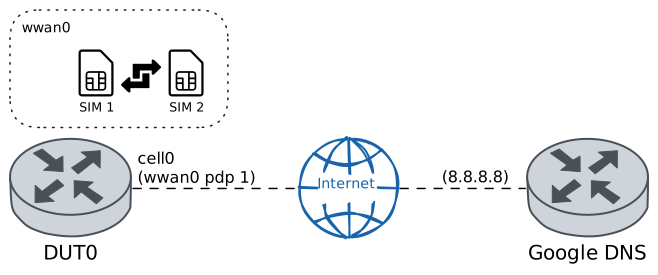
Test SIM Selection By Configuration
Description
Verifies that the SIM socket socket_2 can be selected through CLI configuration. Validates that the SIM selection information shows the correct current and previous SIM, and that the selection event is properly logged with the appropriate reason.
Scenario
Step 1: Set the following configuration in DUT0 :
set cellular profile CELPROF_SIM2 apn airtelnet.es
set controllers cellular wwan0 sim select socket_2
set controllers cellular wwan0 sim socket socket_2 encrypted-pin U2FsdGVkX19UYwFgG9qtrIBGlEDKURWFacdHbYCU1k0=
set controllers cellular wwan0 sim socket socket_2 pdp 1 profile CELPROF_SIM2
set interfaces cellular cell0 address dhcp
set interfaces cellular cell0 phy wwan0 pdp 1
set system login user admin authentication encrypted-password '$6$GSjsCj8gHLv$/VcqU6FLi6CT2Oxn0MJQ2C2tqnRDrYKNF8HIYWJp68nvXvPdFccDsT04.WtigUONbKYrgKg8d6rEs8PjljMkH0'
Note
Once the cellular module is configured, the following commands verify that the SIM socket has been selected correctly and the corresponding entry appears in the SIM socket selection log.
Step 2: Run command controllers cellular wwan0 sim select show at DUT0 and check if output matches the following regular expressions:
Current SIM:\s* socket_2
Last switch date:\s* \d{4}-\d{2}-\d{2} \d{2}:\d{2}:\d{2}\.\d{6}[+-]\d{2}:\d{2}
Last switch reason:\s* CLI configuration
SIM supervision:\s* disabled
Show output
Previous SIM:       socket_1
Current SIM:        socket_2
Last switch date:   2025-12-11 20:54:10.169732+00:00
Last switch reason: CLI configuration
SIM supervision:    disabled
Step 3: Run command controllers cellular wwan0 sim select show log at DUT0 and expect this output:
Show output
-------------------------------------------------------------
 Socket                 Date                     Reason
-------------------------------------------------------------
socket_1  2025-12-11 14:16:08.655706+00:00     Initial status
socket_2  2025-12-11 20:54:10.169732+00:00  CLI configuration
Test SIM Selection By Manual Switching
Description
Verifies that SIM sockets can be manually switched using the CLI command. Configures both socket_1 and socket_2, selects socket_1 initially, then performs a manual switch to socket_2. Validates that each selection is properly logged with the appropriate reason.
Scenario
Step 1: Set the following configuration in DUT0 :
set cellular profile CELPROF_SIM1 apn movistar.es
set cellular profile CELPROF_SIM2 apn airtelnet.es
set controllers cellular wwan0 sim select socket_1
set controllers cellular wwan0 sim socket socket_1 encrypted-pin U2FsdGVkX18Q6iiGz6nQ5hPHkmHJTaMjfPuNPx5mSzA=
set controllers cellular wwan0 sim socket socket_1 pdp 1 profile CELPROF_SIM1
set controllers cellular wwan0 sim socket socket_2 encrypted-pin U2FsdGVkX1/1qQNVsAELJ2QR3SEvbTLaE7lfG0sE2+E=
set controllers cellular wwan0 sim socket socket_2 pdp 1 profile CELPROF_SIM2
set interfaces cellular cell0 address dhcp
set interfaces cellular cell0 phy wwan0 pdp 1
set system login user admin authentication encrypted-password '$6$GSjsCj8gHLv$/VcqU6FLi6CT2Oxn0MJQ2C2tqnRDrYKNF8HIYWJp68nvXvPdFccDsT04.WtigUONbKYrgKg8d6rEs8PjljMkH0'
Note
Once the cellular module is configured, the following commands verify that the SIM socket has been selected correctly and the corresponding entry appears in the SIM socket selection log.
Step 2: Run command controllers cellular wwan0 sim select show at DUT0 and check if output matches the following regular expressions:
Current SIM:\s* socket_1
Last switch date:\s* \d{4}-\d{2}-\d{2} \d{2}:\d{2}:\d{2}\.\d{6}[+-]\d{2}:\d{2}
Last switch reason:\s* CLI configuration
SIM supervision:\s* disabled
Show output
Previous SIM:       socket_2
Current SIM:        socket_1
Last switch date:   2025-12-11 20:55:37.024866+00:00
Last switch reason: CLI configuration
SIM supervision:    disabled
Step 3: Run command controllers cellular wwan0 sim select show log at DUT0 and expect this output:
Show output
-------------------------------------------------------------
 Socket                 Date                     Reason
-------------------------------------------------------------
socket_1  2025-12-11 14:16:08.655706+00:00     Initial status
socket_2  2025-12-11 20:54:10.169732+00:00  CLI configuration
socket_1  2025-12-11 20:55:37.024866+00:00  CLI configuration
Note
The selected SIM socket can be manually switched using the following command.
Step 4: Run command controllers cellular wwan0 sim select switch socket_2 at DUT0.
Note
Finally, the following commands verify that the SIM socket has been switched correctly and the corresponding entry appears in the SIM socket selection log.
Step 5: Run command controllers cellular wwan0 sim select show at DUT0 and check if output matches the following regular expressions:
Current SIM:\s* socket_2
Last switch date:\s* \d{4}-\d{2}-\d{2} \d{2}:\d{2}:\d{2}\.\d{6}[+-]\d{2}:\d{2}
Last switch reason:\s* CLI manual switch
SIM supervision:\s* disabled
Previous SIM:\s* socket_1
Show output
Previous SIM:       socket_1
Current SIM:        socket_2
Last switch date:   2025-12-11 20:56:25.859010+00:00
Last switch reason: CLI manual switch
SIM supervision:    disabled
Step 6: Run command controllers cellular wwan0 sim select show log at DUT0 and expect this output:
Show output
-------------------------------------------------------------
 Socket                 Date                     Reason
-------------------------------------------------------------
socket_1  2025-12-11 14:16:08.655706+00:00     Initial status
socket_2  2025-12-11 20:54:10.169732+00:00  CLI configuration
socket_1  2025-12-11 20:55:37.024866+00:00  CLI configuration
socket_2  2025-12-11 20:56:25.859010+00:00  CLI manual switch
Test SIM Selection By Supervision Criteria
Description
Verifies that SIM sockets can be switched using supervision criteria. Configures both socket_1 and socket_2, selects socket_1 initially, and establishes an advisor criteria for switching from socket_1 to socket_2, as well as a usage time criteria for switching back from socket_2 to socket_1. Validates that each selection is properly logged with the appropriate reason.
Scenario
Step 1: Set the following configuration in DUT0 :
set cellular profile CELPROF_SIM1 apn movistar.es
set cellular profile CELPROF_SIM2 apn airtelnet.es
set controllers cellular wwan0 sim select socket_1
set controllers cellular wwan0 sim socket socket_1 encrypted-pin U2FsdGVkX19szzccuMG9H5H5fSY4wzj8f+7yH2oPg3M=
set controllers cellular wwan0 sim socket socket_1 pdp 1 profile CELPROF_SIM1
set controllers cellular wwan0 sim socket socket_1 supervision criteria advisor advisor-id TEST_ADVISOR
set controllers cellular wwan0 sim socket socket_1 supervision criteria advisor connection-timeout 10
set controllers cellular wwan0 sim socket socket_1 supervision sim-switch socket_2
set controllers cellular wwan0 sim socket socket_2 encrypted-pin U2FsdGVkX18MkgP49jr+yYDe8ZqjTOV9mFbU6j+INh4=
set controllers cellular wwan0 sim socket socket_2 pdp 1 profile CELPROF_SIM2
set controllers cellular wwan0 sim socket socket_2 supervision criteria usage-time over 1
set controllers cellular wwan0 sim socket socket_2 supervision sim-switch socket_1
set interfaces cellular cell0 address dhcp
set interfaces cellular cell0 phy wwan0 pdp 1
set system advisor TEST_ADVISOR test false
set system login user admin authentication encrypted-password '$6$GSjsCj8gHLv$/VcqU6FLi6CT2Oxn0MJQ2C2tqnRDrYKNF8HIYWJp68nvXvPdFccDsT04.WtigUONbKYrgKg8d6rEs8PjljMkH0'
Note
Once the cellular module is configured, the following commands verify that the SIM socket has been selected correctly and the corresponding entry appears in the SIM socket selection log.
Step 2: Run command controllers cellular wwan0 sim select show at DUT0 and check if output matches the following regular expressions:
Current SIM:\s* socket_1
Last switch date:\s* \d{4}-\d{2}-\d{2} \d{2}:\d{2}:\d{2}\.\d{6}[+-]\d{2}:\d{2}
Last switch reason:\s* CLI configuration
SIM supervision:\s* enabled
Show output
Previous SIM:       socket_2
Current SIM:        socket_1
Last switch date:   2025-12-11 20:57:46.703911+00:00
Last switch reason: CLI configuration
SIM supervision:    enabled
Step 3: Run command controllers cellular wwan0 sim select show log at DUT0 and expect this output:
Show output
-------------------------------------------------------------
 Socket                 Date                     Reason
-------------------------------------------------------------
socket_1  2025-12-11 14:16:08.655706+00:00     Initial status
socket_2  2025-12-11 20:54:10.169732+00:00  CLI configuration
socket_1  2025-12-11 20:55:37.024866+00:00  CLI configuration
socket_2  2025-12-11 20:56:25.859010+00:00  CLI manual switch
socket_1  2025-12-11 20:57:46.703911+00:00  CLI configuration
Note
The advisor can be activated manually using the following command.
Step 4: Modify the following configuration lines in DUT0 :
set system advisor TEST_ADVISOR test true
Note
The following commands verify that the SIM socket has been switched correctly and the corresponding entry appears in the SIM socket selection log.
Step 5: Run command controllers cellular wwan0 sim select show at DUT0 and check if output matches the following regular expressions:
Current SIM:\s* socket_2
Last switch date:\s* \d{4}-\d{2}-\d{2} \d{2}:\d{2}:\d{2}\.\d{6}[+-]\d{2}:\d{2}
Last switch reason:\s* Supervision advisor TEST_ADVISOR status criteria
SIM supervision:\s* enabled
Previous SIM:\s* socket_1
Show output
Previous SIM:       socket_1
Current SIM:        socket_2
Last switch date:   2025-12-11 20:58:35.141536+00:00
Last switch reason: Supervision advisor TEST_ADVISOR status criteria
SIM supervision:    enabled
Step 6: Run command controllers cellular wwan0 sim select show log at DUT0 and expect this output:
Show output
--------------------------------------------------------------------------------------------
 Socket                 Date                                     Reason
--------------------------------------------------------------------------------------------
socket_1  2025-12-11 14:16:08.655706+00:00                                    Initial status
socket_2  2025-12-11 20:54:10.169732+00:00                                 CLI configuration
socket_1  2025-12-11 20:55:37.024866+00:00                                 CLI configuration
socket_2  2025-12-11 20:56:25.859010+00:00                                 CLI manual switch
socket_1  2025-12-11 20:57:46.703911+00:00                                 CLI configuration
socket_2  2025-12-11 20:58:35.141536+00:00  Supervision advisor TEST_ADVISOR status criteria
Note
Next, wait the defined usage time and manually deactivate the advisor to prevent the system from switching back to socket_2 when returning to socket_1.
Step 7: Modify the following configuration lines in DUT0 :
set system advisor TEST_ADVISOR test false
Note
Finally, the following commands verify that the SIM socket has been switched correctly and the corresponding entry appears in the SIM socket selection log.
Step 8: Run command controllers cellular wwan0 sim select show at DUT0 and check if output matches the following regular expressions:
Current SIM:\s* socket_1
Last switch date:\s* \d{4}-\d{2}-\d{2} \d{2}:\d{2}:\d{2}\.\d{6}[+-]\d{2}:\d{2}
Last switch reason:\s* Supervision maximum usage time criteria
SIM supervision:\s* enabled
Previous SIM:\s* socket_2
Show output
Previous SIM:       socket_2
Current SIM:        socket_1
Last switch date:   2025-12-11 21:00:10.396067+00:00
Last switch reason: Supervision maximum usage time criteria
SIM supervision:    enabled
Step 9: Run command controllers cellular wwan0 sim select show log at DUT0 and expect this output:
Show output
--------------------------------------------------------------------------------------------
 Socket                 Date                                     Reason
--------------------------------------------------------------------------------------------
socket_1  2025-12-11 14:16:08.655706+00:00                                    Initial status
socket_2  2025-12-11 20:54:10.169732+00:00                                 CLI configuration
socket_1  2025-12-11 20:55:37.024866+00:00                                 CLI configuration
socket_2  2025-12-11 20:56:25.859010+00:00                                 CLI manual switch
socket_1  2025-12-11 20:57:46.703911+00:00                                 CLI configuration
socket_2  2025-12-11 20:58:35.141536+00:00  Supervision advisor TEST_ADVISOR status criteria
socket_1  2025-12-11 21:00:10.396067+00:00           Supervision maximum usage time criteria