Check Esim
This scenario shows how to configure the eSIM of a cellular module
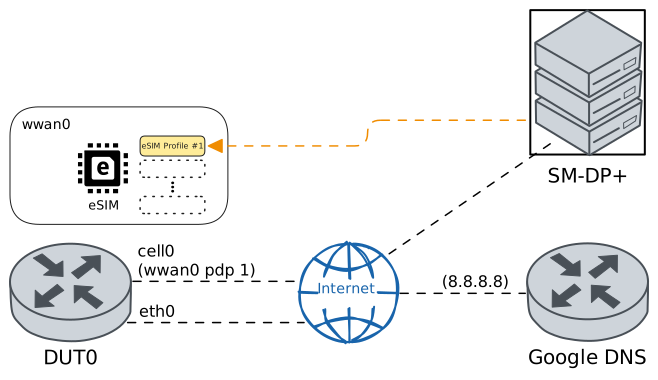
Test eSIM Operations
Description
In DUT0, the cellular module wwan0 is configured to use the eSIM slot. Then, the eSIM’s functionalities are verified by installing a profile, enabling it, disabling it, and finally removing it from the eSIM. It is also verified that there is network connectivity using the installed and enabled profile.
Scenario
Step 1: Set the following configuration in DUT0 :
set cellular profile CELPROF_ESIM apn movistar.es
set controllers cellular wwan0 sim select esim
set controllers cellular wwan0 sim socket esim encrypted-pin U2FsdGVkX19UJ+AwtluBst/E2mnJkkLrJLOrlAtDI0o=
set controllers cellular wwan0 sim socket esim pdp 1 profile CELPROF_ESIM
set interfaces cellular cell0 address dhcp
set interfaces cellular cell0 phy wwan0 pdp 1
set interfaces ethernet eth0 address 10.215.168.96/24
set protocols static route 0.0.0.0/0 next-hop 10.215.168.1
set service dns resolver name-server 10.215.168.1
set system login user admin authentication encrypted-password '$6$GSjsCj8gHLv$/VcqU6FLi6CT2Oxn0MJQ2C2tqnRDrYKNF8HIYWJp68nvXvPdFccDsT04.WtigUONbKYrgKg8d6rEs8PjljMkH0'
Note
Once the cellular module is configured, the following commands verify that the SIM socket has been selected correctly and the corresponding entry appears in the SIM socket selection log.
Step 2: Run command controllers cellular wwan0 sim select show at DUT0 and check if output matches the following regular expressions:
Current SIM:\s* esim
Last switch date:\s* \d{4}-\d{2}-\d{2} \d{2}:\d{2}:\d{2}\.\d{6}[+-]\d{2}:\d{2}
Last switch reason:\s* CLI configuration
SIM supervision:\s* disabled
Show output
Previous SIM:       socket_1
Current SIM:        esim
Last switch date:   2025-12-11 21:01:28.359796+00:00
Last switch reason: CLI configuration
SIM supervision:    disabled
Step 3: Run command controllers cellular wwan0 sim select show log at DUT0 and expect this output:
Show output
--------------------------------------------------------------------------------------------
 Socket                 Date                                     Reason
--------------------------------------------------------------------------------------------
socket_1  2025-12-11 14:16:08.655706+00:00                                    Initial status
socket_2  2025-12-11 20:54:10.169732+00:00                                 CLI configuration
socket_1  2025-12-11 20:55:37.024866+00:00                                 CLI configuration
socket_2  2025-12-11 20:56:25.859010+00:00                                 CLI manual switch
socket_1  2025-12-11 20:57:46.703911+00:00                                 CLI configuration
socket_2  2025-12-11 20:58:35.141536+00:00  Supervision advisor TEST_ADVISOR status criteria
socket_1  2025-12-11 21:00:10.396067+00:00           Supervision maximum usage time criteria
    esim  2025-12-11 21:01:28.359796+00:00                                 CLI configuration
Note
eSIM operations require an active internet connection and a working DNS resolution, as the router needs to contact the operator's SM-DP+ server.
Step 4: Ping IP address 8.8.8.8 from DUT0:
admin@DUT0$ ping 8.8.8.8 count 1 size 56 timeout 1Show output
PING 8.8.8.8 (8.8.8.8) 56(84) bytes of data.
64 bytes from 8.8.8.8: icmp_seq=1 ttl=111 time=4.22 ms

--- 8.8.8.8 ping statistics ---
1 packets transmitted, 1 received, 0% packet loss, time 0ms
rtt min/avg/max/mdev = 4.221/4.221/4.221/0.000 ms
Note
The following command retrieves the identifier of the selected eSIM
Step 5: Run command controllers cellular wwan0 sim socket esim show identifier at DUT0 and check if output matches the following regular expressions:
eSIM Identifier: \d+Show output
eSIM Identifier: 89033023426200000000025130543330
Note
The following command verifies that there is no profile installed for the selected eSIM
Step 6: Run command controllers cellular wwan0 sim socket esim show profile at DUT0 and check if output matches the following regular expressions:
No items to showShow output
(No items to show)
Note
The following command installs an eSIM profile using the activation code
Step 7: Run command controllers cellular wwan0 sim socket esim install 1$tsm.prod.ondemandconnectivity.com$042DABB329FED3E85467A0CF192CC07A0AF6A0071ECFA20CFC33E31ECB8FBA74 at DUT0 and expect this output:
Show output
This command may take a while to complete. Please, be patient.
Command executed successfully!
Note
The following command verifies that profile with index 1 has been installed but is not enabled yet
Step 8: Run command controllers cellular wwan0 sim socket esim show profile at DUT0 and check if output matches the following regular expressions:
(?s)\|\s+1\s+\|.*\|\s+disabled\s+\|Show output
+-------+----------------------+----------+----------+----------+-------------+
| Index | ICCID                | State    | SPN      | Name     | Class       |
+-------+----------------------+----------+----------+----------+-------------+
| 1     | 8934071010008119757F | disabled | Movistar | Movistar | Operational |
+-------+----------------------+----------+----------+----------+-------------+
Note
The following command enables the eSIM profile with index 1
Step 9: Run command controllers cellular wwan0 sim socket esim enable 1 at DUT0 and expect this output:
Show output
This command may take a while to complete. Please, be patient.
Command executed successfully!
Note
The following command verifies that profile with index 1 is now enabled
Step 10: Run command controllers cellular wwan0 sim socket esim show profile at DUT0 and check if output matches the following regular expressions:
(?s)\|\s+1\s+\|.*\|\s+enabled\s+\|Show output
+-------+----------------------+---------+----------+----------+-------------+
| Index | ICCID                | State   | SPN      | Name     | Class       |
+-------+----------------------+---------+----------+----------+-------------+
| 1     | 8934071010008119757F | enabled | Movistar | Movistar | Operational |
+-------+----------------------+---------+----------+----------+-------------+
Note
With an eSIM profile enabled, the cellular interface is correctly configured and there is network connectivity
Step 11: Run command controllers cellular wwan0 pdp 1 show network-data-connection at DUT0 and check if output matches the following regular expressions:
Connection status\s* = connectedShow output
Connection status               = connected
Traffic channel status          = active
Max. TX channel rate (bps)      = 0
Max. RX channel rate (bps)      = 0
IPv4 address                    = 88.31.50.39
IPv4 mask                       = 255.255.255.240
IPv4 gateway                    = 88.31.50.40
IPv4 primary DNS                = 80.58.61.248
IPv4 secondary DNS              = 80.58.61.249
Step 12: Ping IP address 8.8.8.8 from DUT0:
admin@DUT0$ ping 8.8.8.8 count 1 size 56 timeout 1Show output
PING 8.8.8.8 (8.8.8.8) 56(84) bytes of data.
64 bytes from 8.8.8.8: icmp_seq=1 ttl=116 time=47.7 ms

--- 8.8.8.8 ping statistics ---
1 packets transmitted, 1 received, 0% packet loss, time 0ms
rtt min/avg/max/mdev = 47.664/47.664/47.664/0.000 ms
Note
The following command disables the eSIM profile with index 1
Step 13: Run command controllers cellular wwan0 sim socket esim disable 1 at DUT0 and expect this output:
Show output
This command may take a while to complete. Please, be patient.
Command executed successfully!
Note
The following command verifies that profile with index 1 is now disabled
Step 14: Run command controllers cellular wwan0 sim socket esim show profile at DUT0 and check if output matches the following regular expressions:
(?s)\|\s+1\s+\|.*\|\s+disabled\s+\|Show output
+-------+----------------------+----------+----------+----------+-------------+
| Index | ICCID                | State    | SPN      | Name     | Class       |
+-------+----------------------+----------+----------+----------+-------------+
| 1     | 8934071010008119757F | disabled | Movistar | Movistar | Operational |
+-------+----------------------+----------+----------+----------+-------------+
Note
The following command removes the eSIM profile with index 1
Step 15: Run command controllers cellular wwan0 sim socket esim remove 1 at DUT0 and expect this output:
Show output
This command may take a while to complete. Please, be patient.
Command executed successfully!
Note
The following command verifies that there are no profiles installed anymore
Step 16: Run command controllers cellular wwan0 sim socket esim show profile at DUT0 and check if output matches the following regular expressions:
No items to showShow output
(No items to show)