Check Link Hook
This scenario shows how to attach a traffic policy to the link hook in a Cellular interface. This hook is triggered at a very early stage of the network packet stack (level 2 layer).
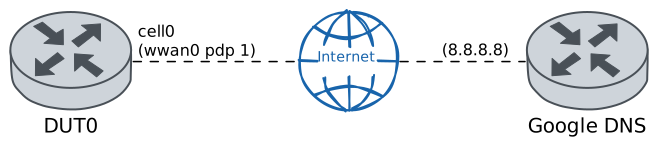
Test Early Packet Drop
Description
In DUT0, the cellular interface is configured with a traffic policy to drop all incoming traffic at the link stage and only allow ARP and UDP packets.
Scenario
Step 1: Set the following configuration in DUT0 :
set cellular profile CELPROFILE apn movistar.es
set controllers cellular wwan0 sim select socket_1
set controllers cellular wwan0 sim socket socket_1 encrypted-pin U2FsdGVkX1/gh4g293fkmPexhlj6+VIC30dmbtsZZWs=
set controllers cellular wwan0 sim socket socket_1 pdp 1 profile CELPROFILE
set interfaces cellular cell0 address dhcp
set interfaces cellular cell0 phy wwan0 pdp 1
set service dns forwarding dhcp interface cell0
set system login user admin authentication encrypted-password '$6$GSjsCj8gHLv$/VcqU6FLi6CT2Oxn0MJQ2C2tqnRDrYKNF8HIYWJp68nvXvPdFccDsT04.WtigUONbKYrgKg8d6rEs8PjljMkH0'
Step 2: Run command controllers cellular wwan0 pdp 1 show network-data-connection at DUT0 and check if output matches the following regular expressions:
Connection status\s* = connectedShow output
Connection status               = connected
Traffic channel status          = active
Max. TX channel rate (bps)      = 0
Max. RX channel rate (bps)      = 0
IPv4 address                    = 2.143.73.177
IPv4 mask                       = 255.255.255.252
IPv4 gateway                    = 2.143.73.178
IPv4 primary DNS                = 80.58.61.248
IPv4 secondary DNS              = 80.58.61.249
Step 3: Ping IP address 8.8.8.8 from DUT0:
admin@DUT0$ ping 8.8.8.8 count 1 size 56 timeout 1Show output
PING 8.8.8.8 (8.8.8.8) 56(84) bytes of data.
64 bytes from 8.8.8.8: icmp_seq=1 ttl=116 time=43.0 ms

--- 8.8.8.8 ping statistics ---
1 packets transmitted, 1 received, 0% packet loss, time 0ms
rtt min/avg/max/mdev = 43.030/43.030/43.030/0.000 ms
Note
In the previous command it is observed that the ICMP packets
corresponding to the ping command are received without
problems. This is because the traffic policy responsible for
dropping these packets has not yet been applied to the cellular
interface.
Note
However, when the traffic policy is applied, it can be verified
that the ping command fails since ICMP packets are now being
dropped.
Step 4: Modify the following configuration lines in DUT0 :
set interfaces cellular cell0 traffic policy link-in EDROP_POLICY
set traffic policy EDROP_POLICY rule 1 action accept
set traffic policy EDROP_POLICY rule 1 selector ACCEPT_SEL
set traffic policy EDROP_POLICY rule 2 action drop
set traffic selector ACCEPT_SEL rule 1 protocol udp
set traffic selector ACCEPT_SEL rule 2 ether-type arp
Step 5: Expect a failure in the following command:
Ping IP address 8.8.8.8 from DUT0:
admin@DUT0$ ping 8.8.8.8 count 1 size 56 timeout 1Show output
PING 8.8.8.8 (8.8.8.8) 56(84) bytes of data.

--- 8.8.8.8 ping statistics ---
1 packets transmitted, 0 received, 100% packet loss, time 0ms
Note
On the other hand, the applied traffic policy allows receiving
UDP packets, so the nslookup command works without problems.
Step 6: Run command nslookup www.google.es at DUT0 and check if output matches the following regular expressions:
Server:\s+(\d+\.){3}\d+Show output
Server:         127.0.0.1
Address:        127.0.0.1#53

Non-authoritative answer:
www.google.es   canonical name = forcesafesearch.google.com.
Name:   forcesafesearch.google.com
Address: 216.239.38.120
Name:   forcesafesearch.google.com
Address: 2001:4860:4802:32::78
Note
Finally, with the following operational command the statistics of the traffic policy are displayed.
Step 7: Run command traffic policy show at DUT0 and check if output matches the following regular expressions:
1\s+ACCEPT_SEL\s+\b[^0]\d*Show output
Policy EDROP_POLICY -- ifc cell0 -- hook link-in prio very-high

-----------------------------------------------------------------
rule    selector   pkts match  pkts eval  bytes match  bytes eval
-----------------------------------------------------------------
1      ACCEPT_SEL           2          7          215         507
2      -                    5          5          292         292
-----------------------------------------------------------------
Total                       7          7          507         507