Network Access Server
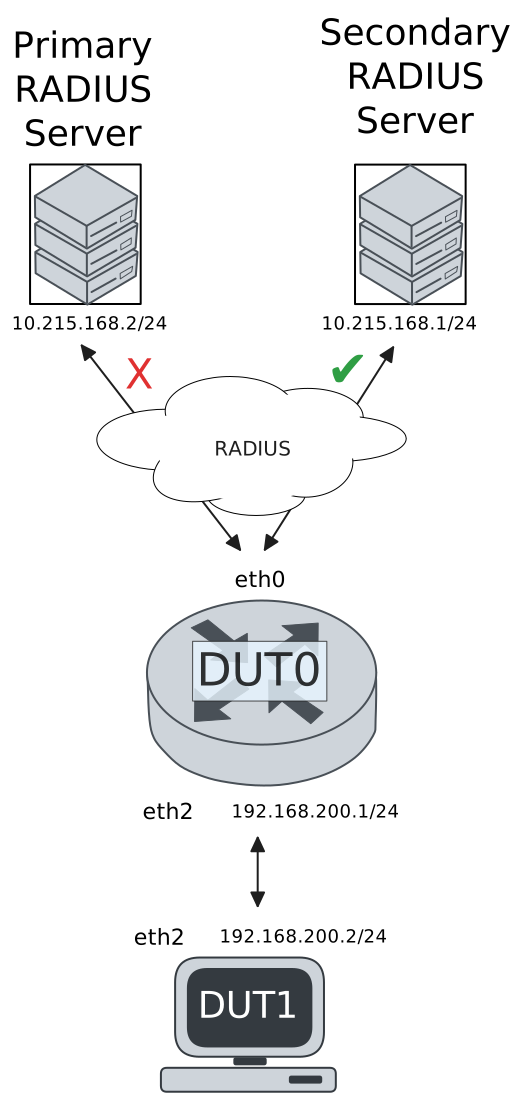
This scenario shows different Network Access Server (NAS) configurations: server failover and VRF-aware communication.
Test 802.1X Authentication Against NAS Through a VRF-Aware Interface
Description
This scenario shows how to configure 802.1X authentication. Authenticator-NAS communication if performed through a VRF-aware Ethernet interface.
Scenario
Step 1: Set the following configuration in DUT0 :
set interfaces ethernet eth0 address 10.215.168.64/24
set interfaces ethernet eth0 vrf WAN
set interfaces ethernet eth2 address 192.168.100.1/24
set interfaces ethernet eth2 authenticator 802.1x max-retransmissions 2
set interfaces ethernet eth2 authenticator aaa authentication list1
set interfaces ethernet eth2 authenticator log-level debug
set interfaces ethernet eth2 authenticator mode only-802.1x
set interfaces ethernet eth2 authenticator quiet-period 60
set interfaces ethernet eth2 authenticator reauth-period 0
set system aaa group radius radgroup1 local-vrf WAN
set system aaa group radius radgroup1 server serv1
set system aaa list list1 method 1 group radius radgroup1
set system aaa server radius serv1 address 10.215.168.1
set system aaa server radius serv1 encrypted-key U2FsdGVkX1+eaDf4nECUYEFx2z1ubUQmFbNrTL42uA7lzkXZyhAIBsdYvnOdEp434FItrur4Rm/EExkejGUREw==
set system login user admin authentication encrypted-password '$6$GSjsCj8gHLv$/VcqU6FLi6CT2Oxn0MJQ2C2tqnRDrYKNF8HIYWJp68nvXvPdFccDsT04.WtigUONbKYrgKg8d6rEs8PjljMkH0'
set system vrf WAN
Step 2: Ping IP address 10.215.168.1 from DUT0:
admin@DUT0$ ping 10.215.168.1 vrf WAN count 1 size 56 timeout 1Show output
ping: Warning: source address might be selected on device other than: WAN
PING 10.215.168.1 (10.215.168.1) from 10.215.168.64 WAN: 56(84) bytes of data.
64 bytes from 10.215.168.1: icmp_seq=1 ttl=64 time=0.239 ms

--- 10.215.168.1 ping statistics ---
1 packets transmitted, 1 received, 0% packet loss, time 0ms
rtt min/avg/max/mdev = 0.239/0.239/0.239/0.000 ms
Step 3: Set the following configuration in DUT1 :
set interfaces ethernet eth2 address 192.168.100.2/24
set interfaces ethernet eth2 supplicant encrypted-password U2FsdGVkX1+hk3Wj9AzCKFBwbeZQqOH87o30kUUifHg=
set interfaces ethernet eth2 supplicant username testing
set system login user admin authentication encrypted-password '$6$GSjsCj8gHLv$/VcqU6FLi6CT2Oxn0MJQ2C2tqnRDrYKNF8HIYWJp68nvXvPdFccDsT04.WtigUONbKYrgKg8d6rEs8PjljMkH0'
Step 4: Run command interfaces ethernet eth2 supplicant show status at DUT1 and check if output contains the following tokens:
AuthorizedShow output
---------------------------------------------------
        Field                      Value
---------------------------------------------------
EAP State                                   SUCCESS
EAP TLS Cipher          ECDHE-RSA-AES256-GCM-SHA384
EAP TLS Version                             TLSv1.2
PAE State                             AUTHENTICATED
Supplicant Port Status                   Authorized
WPA State                                 COMPLETED
Step 5: Run command interfaces ethernet eth2 supplicant show stats at DUT1 and check if output matches the following regular expressions:
Port Status\s+AuthorizedShow output
-------------------------------
       Field           Value
-------------------------------
EAPoL Frames (Rx)            11
EAPoL Frames (Tx)            11
Invalid Frames (Rx)           0
Logoff Frames (Tx)            0
Port Status          Authorized
Req Frames (Rx)               9
Req ID Frames (Rx)            1
Resp Frames (Tx)             10
Start Frames (Tx)             1
Step 6: Run command interfaces ethernet eth2 authenticator show stats at DUT0 and check if output matches the following regular expressions:
Authentication Successes\s+1
Authentication Mode\s+802\.1X
Show output
---------------------------------------------
         Field                   Value
---------------------------------------------
Access Challenges                           9
Authentication Backend                 RADIUS
Authentication Failures                     0
Authentication Mode                    802.1X
Authentication Status     Authorized (802.1X)
Authentication Successes                    1
EAPoL frames (Rx)                          11
EAPoL frames (Tx)                          11
Quiet Period                               60
Reauthenticate                          FALSE
Reauthenticate Period                       0
Session Time                                0
Session User MAC            de:ad:be:ef:6c:12
Session User Name                     testing
Step 7: Ping IP address 192.168.100.1 from DUT1:
admin@DUT1$ ping 192.168.100.1 count 1 size 56 timeout 1Show output
PING 192.168.100.1 (192.168.100.1) 56(84) bytes of data.
64 bytes from 192.168.100.1: icmp_seq=1 ttl=64 time=0.368 ms

--- 192.168.100.1 ping statistics ---
1 packets transmitted, 1 received, 0% packet loss, time 0ms
rtt min/avg/max/mdev = 0.368/0.368/0.368/0.000 ms
Test MAB Authentication Against NAS Through a VRF-Aware Interface
Description
This scenario shows how to configure MAB authentication. Authenticator-NAS communication if performed through a VRF-aware Ethernet interface.
Scenario
Step 1: Set the following configuration in DUT0 :
set interfaces ethernet eth0 address 10.215.168.64/24
set interfaces ethernet eth0 vrf WAN
set interfaces ethernet eth2 address 192.168.100.1/24
set interfaces ethernet eth2 authenticator aaa authentication list1
set interfaces ethernet eth2 authenticator log-level debug
set interfaces ethernet eth2 authenticator mode only-MAB
set interfaces ethernet eth2 authenticator quiet-period 60
set interfaces ethernet eth2 authenticator reauth-period 0
set system aaa group radius radgroup1 local-vrf WAN
set system aaa group radius radgroup1 server serv1
set system aaa list list1 method 1 group radius radgroup1
set system aaa server radius serv1 address 10.215.168.1
set system aaa server radius serv1 encrypted-key U2FsdGVkX18MdavGRVSXWAXQ5zz+WidE5AygpPKTLMcYCN5iYHQ+hQVG7F2z11ZW/VMKGOltgMmIj8fTxkIZbQ==
set system login user admin authentication encrypted-password '$6$GSjsCj8gHLv$/VcqU6FLi6CT2Oxn0MJQ2C2tqnRDrYKNF8HIYWJp68nvXvPdFccDsT04.WtigUONbKYrgKg8d6rEs8PjljMkH0'
set system vrf WAN
Step 2: Ping IP address 10.215.168.1 from DUT0:
admin@DUT0$ ping 10.215.168.1 vrf WAN count 1 size 56 timeout 1Show output
ping: Warning: source address might be selected on device other than: WAN
PING 10.215.168.1 (10.215.168.1) from 10.215.168.64 WAN: 56(84) bytes of data.
64 bytes from 10.215.168.1: icmp_seq=1 ttl=64 time=0.233 ms

--- 10.215.168.1 ping statistics ---
1 packets transmitted, 1 received, 0% packet loss, time 0ms
rtt min/avg/max/mdev = 0.233/0.233/0.233/0.000 ms
Step 3: Set the following configuration in DUT1 :
set interfaces ethernet eth2 address 192.168.100.2/24
set system login user admin authentication encrypted-password '$6$GSjsCj8gHLv$/VcqU6FLi6CT2Oxn0MJQ2C2tqnRDrYKNF8HIYWJp68nvXvPdFccDsT04.WtigUONbKYrgKg8d6rEs8PjljMkH0'
Step 4: Ping IP address 192.168.100.1 from DUT1:
admin@DUT1$ ping 192.168.100.1 count 1 size 56 timeout 1Show output
PING 192.168.100.1 (192.168.100.1) 56(84) bytes of data.
64 bytes from 192.168.100.1: icmp_seq=1 ttl=64 time=0.349 ms

--- 192.168.100.1 ping statistics ---
1 packets transmitted, 1 received, 0% packet loss, time 0ms
rtt min/avg/max/mdev = 0.349/0.349/0.349/0.000 ms
Step 5: Run command interfaces ethernet eth2 authenticator show stats at DUT0 and check if output matches the following regular expressions:
Authentication Successes\s+1
Authentication Mode\s+MAB
Show output
-------------------------------------------
         Field                  Value
-------------------------------------------
Access Challenges                         0
Authentication Backend               RADIUS
Authentication Failures                   0
Authentication Mode                     MAB
Authentication Status      Authorized (MAB)
Authentication Successes                  1
EAPoL frames (Rx)                         0
EAPoL frames (Tx)                         0
Quiet Period                             60
Reauthenticate                        FALSE
Reauthenticate Period                     0
Session Time                              0
Session User MAC          de:ad:be:ef:6c:12
Session User Name                       N/A
Step 6: Ping IP address 192.168.100.1 from DUT1:
admin@DUT1$ ping 192.168.100.1 count 1 size 56 timeout 1Show output
PING 192.168.100.1 (192.168.100.1) 56(84) bytes of data.
64 bytes from 192.168.100.1: icmp_seq=1 ttl=64 time=0.632 ms

--- 192.168.100.1 ping statistics ---
1 packets transmitted, 1 received, 0% packet loss, time 0ms
rtt min/avg/max/mdev = 0.632/0.632/0.632/0.000 ms
Test 802.1X Authentication With Server Failover
Description
This scenario shows how to configure 802.1X authentication. The primary Nework Access Server is not reachable, so the secondary is used instead.
Scenario
Step 1: Set the following configuration in DUT0 :
set interfaces ethernet eth0 address 10.215.168.64/24
set interfaces ethernet eth0 vrf WAN
set interfaces ethernet eth2 address 192.168.100.1/24
set interfaces ethernet eth2 authenticator 802.1x max-retransmissions 2
set interfaces ethernet eth2 authenticator aaa authentication list1
set interfaces ethernet eth2 authenticator log-level debug
set interfaces ethernet eth2 authenticator mode only-802.1x
set interfaces ethernet eth2 authenticator quiet-period 60
set interfaces ethernet eth2 authenticator reauth-period 0
set system aaa group radius radgroup0 local-vrf WAN
set system aaa group radius radgroup0 server MAIN
set system aaa group radius radgroup1 local-vrf WAN
set system aaa group radius radgroup1 server serv1
set system aaa list list1 method 0 group radius radgroup0
set system aaa list list1 method 1 group radius radgroup1
set system aaa server radius MAIN address 10.215.168.2
set system aaa server radius MAIN encrypted-key U2FsdGVkX19IMS4L8QXp4Iv19eNZyGab0z9EE/LJK/1hFqv3D6YsUOkoxzOFiT2jP17ASIQFtIiJMaHiwvVEBw==
set system aaa server radius serv1 address 10.215.168.1
set system aaa server radius serv1 encrypted-key U2FsdGVkX1/ZoxCXfWOiqbaV54iFWcwbCNnebmHal9ZRN4XBYNcv0zmrKIb0GPQOcg84ruDNcrvFrTN+0QHmOw==
set system login user admin authentication encrypted-password '$6$GSjsCj8gHLv$/VcqU6FLi6CT2Oxn0MJQ2C2tqnRDrYKNF8HIYWJp68nvXvPdFccDsT04.WtigUONbKYrgKg8d6rEs8PjljMkH0'
set system vrf WAN
Step 2: Ping IP address 10.215.168.1 from DUT0:
admin@DUT0$ ping 10.215.168.1 vrf WAN count 1 size 56 timeout 1Show output
ping: Warning: source address might be selected on device other than: WAN
PING 10.215.168.1 (10.215.168.1) from 10.215.168.64 WAN: 56(84) bytes of data.
64 bytes from 10.215.168.1: icmp_seq=1 ttl=64 time=0.211 ms

--- 10.215.168.1 ping statistics ---
1 packets transmitted, 1 received, 0% packet loss, time 0ms
rtt min/avg/max/mdev = 0.211/0.211/0.211/0.000 ms
Step 3: Set the following configuration in DUT1 :
set interfaces ethernet eth2 address 192.168.100.2/24
set interfaces ethernet eth2 supplicant encrypted-password U2FsdGVkX18VUbtWLWnxoZRWKVyRLsR38YTaXXwrPpQ=
set interfaces ethernet eth2 supplicant username testing
set system login user admin authentication encrypted-password '$6$GSjsCj8gHLv$/VcqU6FLi6CT2Oxn0MJQ2C2tqnRDrYKNF8HIYWJp68nvXvPdFccDsT04.WtigUONbKYrgKg8d6rEs8PjljMkH0'
Step 4: Run command interfaces ethernet eth2 supplicant show status at DUT1 and check if output contains the following tokens:
AuthorizedShow output
---------------------------------------------------
        Field                      Value
---------------------------------------------------
EAP State                                   SUCCESS
EAP TLS Cipher          ECDHE-RSA-AES256-GCM-SHA384
EAP TLS Version                             TLSv1.2
PAE State                             AUTHENTICATED
Supplicant Port Status                   Authorized
WPA State                                 COMPLETED
Step 5: Run command interfaces ethernet eth2 supplicant show stats at DUT1 and check if output matches the following regular expressions:
Port Status\s+AuthorizedShow output
-------------------------------
       Field           Value
-------------------------------
EAPoL Frames (Rx)            11
EAPoL Frames (Tx)            11
Invalid Frames (Rx)           0
Logoff Frames (Tx)            0
Port Status          Authorized
Req Frames (Rx)               9
Req ID Frames (Rx)            1
Resp Frames (Tx)             10
Start Frames (Tx)             1
Step 6: Run command interfaces ethernet eth2 authenticator show stats at DUT0 and check if output matches the following regular expressions:
Authentication Successes\s+1
Authentication Mode\s+802\.1X
Show output
---------------------------------------------
         Field                   Value
---------------------------------------------
Access Challenges                           9
Authentication Backend                 RADIUS
Authentication Failures                     0
Authentication Mode                    802.1X
Authentication Status     Authorized (802.1X)
Authentication Successes                    1
EAPoL frames (Rx)                          11
EAPoL frames (Tx)                          11
Quiet Period                               60
Reauthenticate                          FALSE
Reauthenticate Period                       0
Session Time                                0
Session User MAC            de:ad:be:ef:6c:12
Session User Name                     testing
Step 7: Ping IP address 192.168.100.1 from DUT1:
admin@DUT1$ ping 192.168.100.1 count 1 size 56 timeout 1Show output
PING 192.168.100.1 (192.168.100.1) 56(84) bytes of data.
64 bytes from 192.168.100.1: icmp_seq=1 ttl=64 time=0.388 ms

--- 192.168.100.1 ping statistics ---
1 packets transmitted, 1 received, 0% packet loss, time 0ms
rtt min/avg/max/mdev = 0.388/0.388/0.388/0.000 ms
Step 8: Run command system journal show | grep "osdx hostapd" at DUT0 and check if output contains the following tokens:
No response from Authentication server 10.215.168.2Show output
Dec 11 13:54:54.925429 osdx hostapd[55530]: eth2: IEEE 802.11 Fetching hardware channel/rate support not supported.
Dec 11 13:54:54.925441 osdx hostapd[55530]: eth2: RADIUS Authentication server 10.215.168.2:1812
Dec 11 13:54:54.925683 osdx hostapd[55530]: connect[radius]: No route to host
Dec 11 13:54:54.925478 osdx hostapd[55530]: eth2: IEEE 802.1X Initializing IEEE 802.1X: mode=802.1X, eap_server=0, eap_quiet_period=60, eap_max_retrans=2
Dec 11 13:54:54.925481 osdx hostapd[55530]: eth2: IEEE 802.1X IEEE 802.1X: Enabling packet capture discovery mode
Dec 11 13:54:54.949265 osdx hostapd[55530]: Discovery mode enabled on eth2
Dec 11 13:54:54.949371 osdx hostapd[55530]: eth2: interface state UNINITIALIZED->ENABLED
Dec 11 13:54:54.949371 osdx hostapd[55530]: eth2: AP-ENABLED
Dec 11 13:54:58.212691 osdx hostapd[55531]: eth2: STA de:ad:be:ef:6c:12 IEEE 802.1X: New STA de:ad:be:ef:6c:12 added
Dec 11 13:54:58.212710 osdx hostapd[55531]: eth2: IEEE 802.1X IEEE 802.1X: Disabling packet capture discovery mode
Dec 11 13:54:58.225316 osdx hostapd[55531]: eth2: STA de:ad:be:ef:6c:12 IEEE 802.1X: start authentication
Dec 11 13:54:58.225346 osdx hostapd[55531]: eth2: STA 01:80:c2:00:00:03 IEEE 802.1X: disabling transmission of periodic EAP-Request frames
Dec 11 13:54:58.225367 osdx hostapd[55531]: eth2: STA de:ad:be:ef:6c:12 IEEE 802.1X: received EAPOL-Start from STA
Dec 11 13:54:58.225376 osdx hostapd[55531]: eth2: STA de:ad:be:ef:6c:12 IEEE 802.1X: unauthorizing port
Dec 11 13:54:58.225384 osdx hostapd[55531]: eth2: STA 01:80:c2:00:00:03 IEEE 802.1X: Trying RADIUS authentication
Dec 11 13:54:58.225407 osdx hostapd[55531]: eth2: STA de:ad:be:ef:6c:12 IEEE 802.1X: Sending EAP Packet (identifier 105)
Dec 11 13:54:58.225719 osdx hostapd[55531]: eth2: STA de:ad:be:ef:6c:12 IEEE 802.1X: received EAP packet (code=2 id=105 len=12) from STA: EAP Response-Identity (1)
Dec 11 13:54:58.225736 osdx hostapd[55531]: eth2: STA de:ad:be:ef:6c:12 IEEE 802.1X: STA identity 'testing'
Dec 11 13:54:58.225769 osdx hostapd[55531]: eth2: RADIUS Authentication server 10.215.168.2:1812
Dec 11 13:54:58.228696 osdx hostapd[55531]: eth2: RADIUS Sending RADIUS message to authentication server
Dec 11 13:54:58.228737 osdx hostapd[55531]: eth2: RADIUS Next RADIUS client retransmit in 1 seconds
Dec 11 13:54:59.228813 osdx hostapd[55531]: eth2: STA de:ad:be:ef:6c:12 RADIUS: Resending RADIUS message (id=0)
Dec 11 13:54:59.228849 osdx hostapd[55531]: eth2: RADIUS Next RADIUS client retransmit in 2 seconds
Dec 11 13:55:01.228943 osdx hostapd[55531]: eth2: STA de:ad:be:ef:6c:12 RADIUS: Resending RADIUS message (id=0)
Dec 11 13:55:01.228979 osdx hostapd[55531]: eth2: RADIUS Next RADIUS client retransmit in 4 seconds
Dec 11 13:55:05.229029 osdx hostapd[55531]: eth2: RADIUS No response from Authentication server 10.215.168.2:1812 - failover (1º round)
Dec 11 13:55:05.229039 osdx hostapd[55531]: eth2: RADIUS Authentication server 10.215.168.1:1812
Dec 11 13:55:05.229090 osdx hostapd[55531]: eth2: STA de:ad:be:ef:6c:12 RADIUS: Resending RADIUS message (id=0)
Dec 11 13:55:05.229118 osdx hostapd[55531]: eth2: RADIUS Next RADIUS client retransmit in 2 seconds
Dec 11 13:55:05.229397 osdx hostapd[55531]: eth2: RADIUS Received 80 bytes from RADIUS server
Dec 11 13:55:05.229400 osdx hostapd[55531]: eth2: RADIUS Received RADIUS message
Dec 11 13:55:05.229404 osdx hostapd[55531]: eth2: STA de:ad:be:ef:6c:12 RADIUS: Received RADIUS packet matched with a pending request, round trip time 0.00 sec
Dec 11 13:55:05.229452 osdx hostapd[55531]: eth2: STA de:ad:be:ef:6c:12 IEEE 802.1X: decapsulated EAP packet (code=1 id=106 len=22) from RADIUS server: EAP-Request-MD5 (4)
Dec 11 13:55:05.229461 osdx hostapd[55531]: eth2: STA de:ad:be:ef:6c:12 IEEE 802.1X: Sending EAP Packet (identifier 106)
Dec 11 13:55:05.229745 osdx hostapd[55531]: eth2: STA de:ad:be:ef:6c:12 IEEE 802.1X: received EAP packet (code=2 id=106 len=6) from STA: EAP Response-unknown (3)
Dec 11 13:55:05.229795 osdx hostapd[55531]: eth2: RADIUS Sending RADIUS message to authentication server
Dec 11 13:55:05.229807 osdx hostapd[55531]: eth2: RADIUS Next RADIUS client retransmit in 1 seconds
Dec 11 13:55:05.230020 osdx hostapd[55531]: eth2: RADIUS Received 64 bytes from RADIUS server
Dec 11 13:55:05.230024 osdx hostapd[55531]: eth2: RADIUS Received RADIUS message
Dec 11 13:55:05.230028 osdx hostapd[55531]: eth2: STA de:ad:be:ef:6c:12 RADIUS: Received RADIUS packet matched with a pending request, round trip time 0.00 sec
Dec 11 13:55:05.230042 osdx hostapd[55531]: eth2: STA de:ad:be:ef:6c:12 IEEE 802.1X: decapsulated EAP packet (code=1 id=107 len=6) from RADIUS server: EAP-Request-PEAP (25)
Dec 11 13:55:05.230047 osdx hostapd[55531]: eth2: STA de:ad:be:ef:6c:12 IEEE 802.1X: Sending EAP Packet (identifier 107)
Dec 11 13:55:05.230424 osdx hostapd[55531]: eth2: STA de:ad:be:ef:6c:12 IEEE 802.1X: received EAP packet (code=2 id=107 len=194) from STA: EAP Response-PEAP (25)
Dec 11 13:55:05.230473 osdx hostapd[55531]: eth2: RADIUS Sending RADIUS message to authentication server
Dec 11 13:55:05.230487 osdx hostapd[55531]: eth2: RADIUS Next RADIUS client retransmit in 1 seconds
Dec 11 13:55:05.231521 osdx hostapd[55531]: eth2: RADIUS Received 1068 bytes from RADIUS server
Dec 11 13:55:05.231526 osdx hostapd[55531]: eth2: RADIUS Received RADIUS message
Dec 11 13:55:05.231530 osdx hostapd[55531]: eth2: STA de:ad:be:ef:6c:12 RADIUS: Received RADIUS packet matched with a pending request, round trip time 0.00 sec
Dec 11 13:55:05.231549 osdx hostapd[55531]: eth2: STA de:ad:be:ef:6c:12 IEEE 802.1X: decapsulated EAP packet (code=1 id=108 len=1004) from RADIUS server: EAP-Request-PEAP (25)
Dec 11 13:55:05.231556 osdx hostapd[55531]: eth2: STA de:ad:be:ef:6c:12 IEEE 802.1X: Sending EAP Packet (identifier 108)
Dec 11 13:55:05.231731 osdx hostapd[55531]: eth2: STA de:ad:be:ef:6c:12 IEEE 802.1X: received EAP packet (code=2 id=108 len=6) from STA: EAP Response-PEAP (25)
Dec 11 13:55:05.231773 osdx hostapd[55531]: eth2: RADIUS Sending RADIUS message to authentication server
Dec 11 13:55:05.231785 osdx hostapd[55531]: eth2: RADIUS Next RADIUS client retransmit in 1 seconds
Dec 11 13:55:05.231913 osdx hostapd[55531]: eth2: RADIUS Received 229 bytes from RADIUS server
Dec 11 13:55:05.231918 osdx hostapd[55531]: eth2: RADIUS Received RADIUS message
Dec 11 13:55:05.231921 osdx hostapd[55531]: eth2: STA de:ad:be:ef:6c:12 RADIUS: Received RADIUS packet matched with a pending request, round trip time 0.00 sec
Dec 11 13:55:05.231935 osdx hostapd[55531]: eth2: STA de:ad:be:ef:6c:12 IEEE 802.1X: decapsulated EAP packet (code=1 id=109 len=171) from RADIUS server: EAP-Request-PEAP (25)
Dec 11 13:55:05.231941 osdx hostapd[55531]: eth2: STA de:ad:be:ef:6c:12 IEEE 802.1X: Sending EAP Packet (identifier 109)
Dec 11 13:55:05.233734 osdx hostapd[55531]: eth2: STA de:ad:be:ef:6c:12 IEEE 802.1X: received EAP packet (code=2 id=109 len=103) from STA: EAP Response-PEAP (25)
Dec 11 13:55:05.233768 osdx hostapd[55531]: eth2: RADIUS Sending RADIUS message to authentication server
Dec 11 13:55:05.233776 osdx hostapd[55531]: eth2: RADIUS Next RADIUS client retransmit in 1 seconds
Dec 11 13:55:05.234167 osdx hostapd[55531]: eth2: RADIUS Received 115 bytes from RADIUS server
Dec 11 13:55:05.234172 osdx hostapd[55531]: eth2: RADIUS Received RADIUS message
Dec 11 13:55:05.234175 osdx hostapd[55531]: eth2: STA de:ad:be:ef:6c:12 RADIUS: Received RADIUS packet matched with a pending request, round trip time 0.00 sec
Dec 11 13:55:05.234190 osdx hostapd[55531]: eth2: STA de:ad:be:ef:6c:12 IEEE 802.1X: decapsulated EAP packet (code=1 id=110 len=57) from RADIUS server: EAP-Request-PEAP (25)
Dec 11 13:55:05.234200 osdx hostapd[55531]: eth2: STA de:ad:be:ef:6c:12 IEEE 802.1X: Sending EAP Packet (identifier 110)
Dec 11 13:55:05.234442 osdx hostapd[55531]: eth2: STA de:ad:be:ef:6c:12 IEEE 802.1X: received EAP packet (code=2 id=110 len=6) from STA: EAP Response-PEAP (25)
Dec 11 13:55:05.234476 osdx hostapd[55531]: eth2: RADIUS Sending RADIUS message to authentication server
Dec 11 13:55:05.234486 osdx hostapd[55531]: eth2: RADIUS Next RADIUS client retransmit in 1 seconds
Dec 11 13:55:05.234620 osdx hostapd[55531]: eth2: RADIUS Received 98 bytes from RADIUS server
Dec 11 13:55:05.234624 osdx hostapd[55531]: eth2: RADIUS Received RADIUS message
Dec 11 13:55:05.234628 osdx hostapd[55531]: eth2: STA de:ad:be:ef:6c:12 RADIUS: Received RADIUS packet matched with a pending request, round trip time 0.00 sec
Dec 11 13:55:05.234640 osdx hostapd[55531]: eth2: STA de:ad:be:ef:6c:12 IEEE 802.1X: decapsulated EAP packet (code=1 id=111 len=40) from RADIUS server: EAP-Request-PEAP (25)
Dec 11 13:55:05.234647 osdx hostapd[55531]: eth2: STA de:ad:be:ef:6c:12 IEEE 802.1X: Sending EAP Packet (identifier 111)
Dec 11 13:55:05.234776 osdx hostapd[55531]: eth2: STA de:ad:be:ef:6c:12 IEEE 802.1X: received EAP packet (code=2 id=111 len=43) from STA: EAP Response-PEAP (25)
Dec 11 13:55:05.234806 osdx hostapd[55531]: eth2: RADIUS Sending RADIUS message to authentication server
Dec 11 13:55:05.234816 osdx hostapd[55531]: eth2: RADIUS Next RADIUS client retransmit in 1 seconds
Dec 11 13:55:05.234953 osdx hostapd[55531]: eth2: RADIUS Received 131 bytes from RADIUS server
Dec 11 13:55:05.234962 osdx hostapd[55531]: eth2: RADIUS Received RADIUS message
Dec 11 13:55:05.234965 osdx hostapd[55531]: eth2: STA de:ad:be:ef:6c:12 RADIUS: Received RADIUS packet matched with a pending request, round trip time 0.00 sec
Dec 11 13:55:05.234978 osdx hostapd[55531]: eth2: STA de:ad:be:ef:6c:12 IEEE 802.1X: decapsulated EAP packet (code=1 id=112 len=73) from RADIUS server: EAP-Request-PEAP (25)
Dec 11 13:55:05.234989 osdx hostapd[55531]: eth2: STA de:ad:be:ef:6c:12 IEEE 802.1X: Sending EAP Packet (identifier 112)
Dec 11 13:55:05.235261 osdx hostapd[55531]: eth2: STA de:ad:be:ef:6c:12 IEEE 802.1X: received EAP packet (code=2 id=112 len=97) from STA: EAP Response-PEAP (25)
Dec 11 13:55:05.235295 osdx hostapd[55531]: eth2: RADIUS Sending RADIUS message to authentication server
Dec 11 13:55:05.235312 osdx hostapd[55531]: eth2: RADIUS Next RADIUS client retransmit in 1 seconds
Dec 11 13:55:05.235506 osdx hostapd[55531]: eth2: RADIUS Received 140 bytes from RADIUS server
Dec 11 13:55:05.235511 osdx hostapd[55531]: eth2: RADIUS Received RADIUS message
Dec 11 13:55:05.235515 osdx hostapd[55531]: eth2: STA de:ad:be:ef:6c:12 RADIUS: Received RADIUS packet matched with a pending request, round trip time 0.00 sec
Dec 11 13:55:05.235530 osdx hostapd[55531]: eth2: STA de:ad:be:ef:6c:12 IEEE 802.1X: decapsulated EAP packet (code=1 id=113 len=82) from RADIUS server: EAP-Request-PEAP (25)
Dec 11 13:55:05.235536 osdx hostapd[55531]: eth2: STA de:ad:be:ef:6c:12 IEEE 802.1X: Sending EAP Packet (identifier 113)
Dec 11 13:55:05.235687 osdx hostapd[55531]: eth2: STA de:ad:be:ef:6c:12 IEEE 802.1X: received EAP packet (code=2 id=113 len=37) from STA: EAP Response-PEAP (25)
Dec 11 13:55:05.235717 osdx hostapd[55531]: eth2: RADIUS Sending RADIUS message to authentication server
Dec 11 13:55:05.235727 osdx hostapd[55531]: eth2: RADIUS Next RADIUS client retransmit in 1 seconds
Dec 11 13:55:05.235851 osdx hostapd[55531]: eth2: RADIUS Received 104 bytes from RADIUS server
Dec 11 13:55:05.235856 osdx hostapd[55531]: eth2: RADIUS Received RADIUS message
Dec 11 13:55:05.235859 osdx hostapd[55531]: eth2: STA de:ad:be:ef:6c:12 RADIUS: Received RADIUS packet matched with a pending request, round trip time 0.00 sec
Dec 11 13:55:05.235871 osdx hostapd[55531]: eth2: STA de:ad:be:ef:6c:12 IEEE 802.1X: decapsulated EAP packet (code=1 id=114 len=46) from RADIUS server: EAP-Request-PEAP (25)
Dec 11 13:55:05.235877 osdx hostapd[55531]: eth2: STA de:ad:be:ef:6c:12 IEEE 802.1X: Sending EAP Packet (identifier 114)
Dec 11 13:55:05.236023 osdx hostapd[55531]: eth2: STA de:ad:be:ef:6c:12 IEEE 802.1X: received EAP packet (code=2 id=114 len=46) from STA: EAP Response-PEAP (25)
Dec 11 13:55:05.236052 osdx hostapd[55531]: eth2: RADIUS Sending RADIUS message to authentication server
Dec 11 13:55:05.236061 osdx hostapd[55531]: eth2: RADIUS Next RADIUS client retransmit in 1 seconds
Dec 11 13:55:05.236253 osdx hostapd[55531]: eth2: RADIUS Received 175 bytes from RADIUS server
Dec 11 13:55:05.236258 osdx hostapd[55531]: eth2: RADIUS Received RADIUS message
Dec 11 13:55:05.236262 osdx hostapd[55531]: eth2: STA de:ad:be:ef:6c:12 RADIUS: Received RADIUS packet matched with a pending request, round trip time 0.00 sec
Dec 11 13:55:05.236285 osdx hostapd[55531]: eth2: STA de:ad:be:ef:6c:12 IEEE 802.1X: old identity 'testing' updated with User-Name from Access-Accept 'testing'
Dec 11 13:55:05.236289 osdx hostapd[55531]: eth2: STA de:ad:be:ef:6c:12 IEEE 802.1X: decapsulated EAP packet (code=3 id=114 len=4) from RADIUS server: EAP Success
Dec 11 13:55:05.236303 osdx hostapd[55531]: eth2: STA de:ad:be:ef:6c:12 IEEE 802.1X: Sending EAP Packet (identifier 114)
Dec 11 13:55:05.236317 osdx hostapd[55531]: eth2: STA de:ad:be:ef:6c:12 IEEE 802.1X: authorizing port
Dec 11 13:55:05.236321 osdx hostapd[55531]: eth2: STA de:ad:be:ef:6c:12 RADIUS: starting accounting session 54798638A093F0CA
Dec 11 13:55:05.236325 osdx hostapd[55531]: eth2: STA de:ad:be:ef:6c:12 IEEE 802.1X: authenticated - EAP type: 25 (PEAP)
Test MAB Authentication With Server Failover
Description
This scenario shows how to configure MAB authentication. The primary Nework Access Server is not reachable, so the secondary is used instead.
Scenario
Step 1: Set the following configuration in DUT0 :
set interfaces ethernet eth0 address 10.215.168.64/24
set interfaces ethernet eth0 vrf WAN
set interfaces ethernet eth2 address 192.168.100.1/24
set interfaces ethernet eth2 authenticator aaa authentication list1
set interfaces ethernet eth2 authenticator log-level debug
set interfaces ethernet eth2 authenticator mode only-MAB
set interfaces ethernet eth2 authenticator quiet-period 60
set interfaces ethernet eth2 authenticator reauth-period 0
set system aaa group radius radgroup0 local-vrf WAN
set system aaa group radius radgroup0 server MAIN
set system aaa group radius radgroup1 local-vrf WAN
set system aaa group radius radgroup1 server serv1
set system aaa list list1 method 0 group radius radgroup0
set system aaa list list1 method 1 group radius radgroup1
set system aaa server radius MAIN address 10.215.168.2
set system aaa server radius MAIN encrypted-key U2FsdGVkX1/jp/O9ITo2tuZZJbqkOiSKkV+jl1t3CWFLDiT3F0aoYGhcZfF2A4YScE+P8NVyWoHbRNsGcdLGzA==
set system aaa server radius serv1 address 10.215.168.1
set system aaa server radius serv1 encrypted-key U2FsdGVkX185bFjUpOpa5JqirE29wwt7dj7M+McitLjt2jAjWg0yDz05VlzE8nigdObPYu2oQl26kyo/a5SCuQ==
set system login user admin authentication encrypted-password '$6$GSjsCj8gHLv$/VcqU6FLi6CT2Oxn0MJQ2C2tqnRDrYKNF8HIYWJp68nvXvPdFccDsT04.WtigUONbKYrgKg8d6rEs8PjljMkH0'
set system vrf WAN
Step 2: Ping IP address 10.215.168.1 from DUT0:
admin@DUT0$ ping 10.215.168.1 vrf WAN count 1 size 56 timeout 1Show output
ping: Warning: source address might be selected on device other than: WAN
PING 10.215.168.1 (10.215.168.1) from 10.215.168.64 WAN: 56(84) bytes of data.
64 bytes from 10.215.168.1: icmp_seq=1 ttl=64 time=0.201 ms

--- 10.215.168.1 ping statistics ---
1 packets transmitted, 1 received, 0% packet loss, time 0ms
rtt min/avg/max/mdev = 0.201/0.201/0.201/0.000 ms
Step 3: Set the following configuration in DUT1 :
set interfaces ethernet eth2 address 192.168.100.2/24
set system login user admin authentication encrypted-password '$6$GSjsCj8gHLv$/VcqU6FLi6CT2Oxn0MJQ2C2tqnRDrYKNF8HIYWJp68nvXvPdFccDsT04.WtigUONbKYrgKg8d6rEs8PjljMkH0'
Step 4: Run command interfaces ethernet eth2 authenticator show stats at DUT0 and check if output matches the following regular expressions:
Authentication Successes\s+1
Authentication Mode\s+MAB
Show output
-------------------------------------------
         Field                  Value
-------------------------------------------
Access Challenges                         0
Authentication Backend               RADIUS
Authentication Failures                   0
Authentication Mode                     MAB
Authentication Status      Authorized (MAB)
Authentication Successes                  1
EAPoL frames (Rx)                         0
EAPoL frames (Tx)                         0
Quiet Period                             60
Reauthenticate                        FALSE
Reauthenticate Period                     0
Session Time                              0
Session User MAC          de:ad:be:ef:6c:12
Session User Name                       N/A
Step 5: Ping IP address 192.168.100.1 from DUT1:
admin@DUT1$ ping 192.168.100.1 count 1 size 56 timeout 1Show output
PING 192.168.100.1 (192.168.100.1) 56(84) bytes of data.
64 bytes from 192.168.100.1: icmp_seq=1 ttl=64 time=0.236 ms

--- 192.168.100.1 ping statistics ---
1 packets transmitted, 1 received, 0% packet loss, time 0ms
rtt min/avg/max/mdev = 0.236/0.236/0.236/0.000 ms
Step 6: Run command system journal show | grep "osdx hostapd" at DUT0 and check if output contains the following tokens:
No response from Authentication server 10.215.168.2Show output
Dec 11 13:55:13.977951 osdx hostapd[56162]: eth2: IEEE 802.11 Fetching hardware channel/rate support not supported.
Dec 11 13:55:13.977970 osdx hostapd[56162]: eth2: RADIUS Authentication server 10.215.168.2:1812
Dec 11 13:55:13.978242 osdx hostapd[56162]: connect[radius]: No route to host
Dec 11 13:55:13.978018 osdx hostapd[56162]: eth2: IEEE 802.1X Initializing IEEE 802.1X: mode=MAB-only, eap_server=0, eap_quiet_period=60, eap_max_retrans=5
Dec 11 13:55:13.978021 osdx hostapd[56162]: eth2: IEEE 802.1X IEEE 802.1X: Enabling packet capture discovery mode
Dec 11 13:55:13.997734 osdx hostapd[56162]: Discovery mode enabled on eth2
Dec 11 13:55:13.997818 osdx hostapd[56162]: eth2: interface state UNINITIALIZED->ENABLED
Dec 11 13:55:13.997818 osdx hostapd[56162]: eth2: AP-ENABLED
Dec 11 13:55:18.998538 osdx hostapd[56163]: eth2: STA de:ad:be:ef:6c:12 DRIVER: Device discovered, triggering MAB authentication
Dec 11 13:55:18.998570 osdx hostapd[56163]: eth2: STA de:ad:be:ef:6c:12 IEEE 802.1X: New STA de:ad:be:ef:6c:12 added
Dec 11 13:55:18.998576 osdx hostapd[56163]: eth2: IEEE 802.1X IEEE 802.1X: Disabling packet capture discovery mode
Dec 11 13:55:19.021738 osdx hostapd[56163]: eth2: STA de:ad:be:ef:6c:12 IEEE 802.1X: MAB-only mode: Starting MAB authentication
Dec 11 13:55:19.021760 osdx hostapd[56163]: eth2: STA de:ad:be:ef:6c:12 IEEE 802.1X: MAB: Starting RADIUS query
Dec 11 13:55:19.021781 osdx hostapd[56163]: eth2: STA de:ad:be:ef:6c:12 IEEE 802.1X: MAB: User-Name = de:ad:be:ef:6c:12
Dec 11 13:55:19.023409 osdx hostapd[56163]: eth2: STA de:ad:be:ef:6c:12 IEEE 802.1X: MAB: User-Password = de:ad:be:ef:6c:12
Dec 11 13:55:19.023420 osdx hostapd[56163]: eth2: RADIUS Authentication server 10.215.168.2:1812
Dec 11 13:55:19.023492 osdx hostapd[56163]: eth2: RADIUS Sending RADIUS message to authentication server
Dec 11 13:55:19.023524 osdx hostapd[56163]: eth2: RADIUS Next RADIUS client retransmit in 1 seconds
Dec 11 13:55:20.023628 osdx hostapd[56163]: eth2: STA de:ad:be:ef:6c:12 RADIUS: Resending RADIUS message (id=128)
Dec 11 13:55:20.023659 osdx hostapd[56163]: eth2: RADIUS Next RADIUS client retransmit in 2 seconds
Dec 11 13:55:22.024507 osdx hostapd[56163]: eth2: STA de:ad:be:ef:6c:12 RADIUS: Resending RADIUS message (id=128)
Dec 11 13:55:22.024538 osdx hostapd[56163]: eth2: RADIUS Next RADIUS client retransmit in 4 seconds
Dec 11 13:55:26.025579 osdx hostapd[56163]: eth2: RADIUS No response from Authentication server 10.215.168.2:1812 - failover (1º round)
Dec 11 13:55:26.025607 osdx hostapd[56163]: eth2: RADIUS Authentication server 10.215.168.1:1812
Dec 11 13:55:26.025741 osdx hostapd[56163]: eth2: STA de:ad:be:ef:6c:12 RADIUS: Resending RADIUS message (id=128)
Dec 11 13:55:26.025814 osdx hostapd[56163]: eth2: RADIUS Next RADIUS client retransmit in 2 seconds
Dec 11 13:55:26.026368 osdx hostapd[56163]: eth2: RADIUS Received 20 bytes from RADIUS server
Dec 11 13:55:26.026385 osdx hostapd[56163]: eth2: RADIUS Received RADIUS message
Dec 11 13:55:26.026394 osdx hostapd[56163]: eth2: STA de:ad:be:ef:6c:12 RADIUS: Received RADIUS packet matched with a pending request, round trip time 0.00 sec
Dec 11 13:55:26.026402 osdx hostapd[56163]: eth2: STA de:ad:be:ef:6c:12 IEEE 802.1X: MAB: Processing RADIUS response
Dec 11 13:55:26.026507 osdx hostapd[56163]: eth2: STA de:ad:be:ef:6c:12 IEEE 802.1X: MAB: Identity set to 'de:ad:be:ef:6c:12'
Dec 11 13:55:26.026515 osdx hostapd[56163]: eth2: STA de:ad:be:ef:6c:12 IEEE 802.1X: MAB: station successfully authenticated
Dec 11 13:55:26.026523 osdx hostapd[56163]: eth2: IEEE 802.1X IEEE 802.1X: Discovery already disabled
Dec 11 13:55:26.026553 osdx hostapd[56163]: eth2: STA de:ad:be:ef:6c:12 IEEE 802.1X: authorizing port
Dec 11 13:55:26.026562 osdx hostapd[56163]: eth2: STA de:ad:be:ef:6c:12 RADIUS: starting accounting session F4958F9C9C4D12AC