Ssid
The following scenario shows how to configure several WLAN networks to announce multiple virtual access points over the same radio.
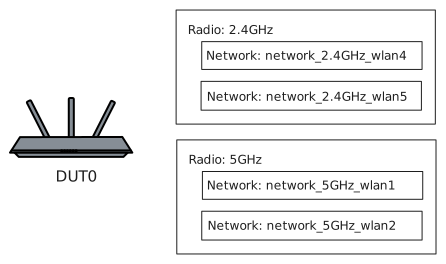
Multi-network Configuration
Description
In this example, two WLAN interfaces will be created on top of the 2.4 GHz
or 5 GHz radio module in access-point mode. WLAN interfaces are identified
by means of a name with syntax wlan<index> and the SSID, announced in the
wlan beacons, is configured by means of the ssid param. The ssid
of both networks will be then modified so the _renamed suffix will be added at the
end. Finally, both networks will be deleted using the delete command.
Scenario
Step 1: Get the supported Bands from wifi0 capabilities list:
admin@DUT0$ controllers wlan radios wifi0 show capabilitiesShow output
Radio: wifi0
                  Type: physical
                   Phy: mwiphy0
                 Bands: 5GHz
            Bandwidths: 20MHz,40MHz,80MHz
                 Modes: 802.11a,802.11n,802.11ac,802.11ax
    Supported channels: 36,40,44,48,52,56,60,64,100,104,108,112,116,120,124,128,132,136,140,144,149,153,157,161,165
       Spatial streams: 2
         Max. TX power: 20dBm (100.0mW)
         Max. stations: 64
       Max. interfaces: 2
       HT capabilities: LDPC,TX-STBC,RX-STBC1
      VHT capabilities: MAX-MPDU-3895,RXLDPC,TX-STBC-2BY1,RX-STBC-1,SU-BEAMFORMER,SU-BEAMFORMEE,BF-ANTENNA-4,SOUNDING-DIMENSION-2,HTC-VHT,MAX-A-MPDU-LEN-EXP7,RX-ANTENNA-PATTERN,TX-ANTENNA-PATTERN
Step 2: Set the following configuration in DUT0 :
set controllers wlan installation indoor
set controllers wlan radios wifi0 band 5GHz
set controllers wlan radios wifi0 channel 36
set controllers wlan radios wifi1 band 2.4GHz
set controllers wlan radios wifi1 channel 1
set interfaces bridge br0
set interfaces wlan wlan1 phy wifi0
set interfaces wlan wlan1 type access-point security akm none
set interfaces wlan wlan1 type access-point ssid network_5GHz_wlan1
set interfaces wlan wlan2 phy wifi0
set interfaces wlan wlan2 type access-point security akm none
set interfaces wlan wlan2 type access-point ssid network_5GHz_wlan2
set system login user admin authentication encrypted-password '$6$GSjsCj8gHLv$/VcqU6FLi6CT2Oxn0MJQ2C2tqnRDrYKNF8HIYWJp68nvXvPdFccDsT04.WtigUONbKYrgKg8d6rEs8PjljMkH0'
Step 3: Modify the following configuration lines in DUT0 :
set interfaces wlan wlan1 type access-point ssid network_5GHz_wlan1_renamed
set interfaces wlan wlan2 type access-point ssid network_5GHz_wlan2_renamed
Note
Renaming the SSID will disconnect all stations associated to the access point.
Step 4: Modify the following configuration lines in DUT0 :
delete interfaces wlan
Note
WLAN interfaces are deleted just by removing the parent node.