Neighbor
Test to verify RIP neighbor configuration for unicast updates.
RIP sends routing updates via multicast (224.0.0.9) or broadcast, reaching
all routers on the network segment by default. The set protocols rip neighbor <IP>
command changes this behavior to send updates via unicast to a specific neighbor only.
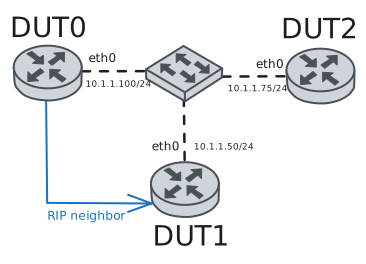
This test uses three routers on the same network to verify that unicast updates
reach only the configured neighbor, while other routers on the same segment do
not receive updates, proving multicast/broadcast is disabled.
Both DUT0 and DUT1 are configured with the neighbor command to establish
bidirectional unicast communication and prevent any multicast/broadcast propagation to DUT2.
Test RIP Neighbor Unicast Updates
Description
Test RIP neighbor configuration sends unicast updates to specified neighbor only.
DUT0 (10.1.1.100) has a dummy interface with network 10.10.10.0/24 that is
redistributed into RIP. It is configured with set protocols rip neighbor 10.1.1.50
to send unicast updates only to DUT1. DUT1 is also configured with
set protocols rip neighbor 10.1.1.100 to establish bidirectional unicast
communication and prevent propagation of learned routes to DUT2 via multicast.
Scenario
Step 1: Set the following configuration in DUT0 :
set interfaces dummy dum0 address 10.10.10.1/24
set interfaces ethernet eth0 address 10.1.1.100/24
set protocols rip neighbor 10.1.1.50
set protocols rip network 10.1.1.0/24
set protocols rip passive interface eth0
set protocols rip redistribute connected
set protocols rip timers update 5
set system login user admin authentication encrypted-password '$6$GSjsCj8gHLv$/VcqU6FLi6CT2Oxn0MJQ2C2tqnRDrYKNF8HIYWJp68nvXvPdFccDsT04.WtigUONbKYrgKg8d6rEs8PjljMkH0'
Step 2: Set the following configuration in DUT1 :
set interfaces ethernet eth0 address 10.1.1.50/24
set protocols rip neighbor 10.1.1.100
set protocols rip network 10.1.1.0/24
set protocols rip passive interface eth0
set protocols rip timers update 5
set system login user admin authentication encrypted-password '$6$GSjsCj8gHLv$/VcqU6FLi6CT2Oxn0MJQ2C2tqnRDrYKNF8HIYWJp68nvXvPdFccDsT04.WtigUONbKYrgKg8d6rEs8PjljMkH0'
Step 3: Set the following configuration in DUT2 :
set interfaces ethernet eth0 address 10.1.1.75/24
set protocols rip network 10.1.1.0/24
set protocols rip passive interface eth0
set protocols rip timers update 5
set system login user admin authentication encrypted-password '$6$GSjsCj8gHLv$/VcqU6FLi6CT2Oxn0MJQ2C2tqnRDrYKNF8HIYWJp68nvXvPdFccDsT04.WtigUONbKYrgKg8d6rEs8PjljMkH0'
Attention
DUT1 (10.1.1.50) is the configured neighbor. It should learn the route 10.10.10.0/24
via unicast RIP updates from DUT0.
Step 4: Run command protocols rip show at DUT1 and check if output matches the following regular expressions:
10.10.10.0/24Show output
Codes: K - kernel route, C - connected, L - local, S - static,
       R - RIP, O - OSPF, I - IS-IS, B - BGP, E - EIGRP, N - NHRP,
       T - Table, v - VNC, V - VNC-Direct, A - Babel, F - PBR,
       f - OpenFabric, t - Table-Direct
Sub-codes:
      (n) - normal, (s) - static, (d) - default, (r) - redistribute,
      (i) - interface

     Network            Next Hop         Metric From            Tag Time
C(i) 10.1.1.0/24        0.0.0.0               1 self              0
R(n) 10.10.10.0/24      10.1.1.100            2 10.1.1.100        0 02:58
Step 5: Ping IP address 10.10.10.1 from DUT1:
admin@DUT1$ ping 10.10.10.1 count 1 size 56 timeout 1Show output
PING 10.10.10.1 (10.10.10.1) 56(84) bytes of data.
64 bytes from 10.10.10.1: icmp_seq=1 ttl=64 time=0.362 ms

--- 10.10.10.1 ping statistics ---
1 packets transmitted, 1 received, 0% packet loss, time 0ms
rtt min/avg/max/mdev = 0.362/0.362/0.362/0.000 ms
Attention
DUT2 (10.1.1.75) is on the same network segment but is not configured as a neighbor.
It should not learn the route 10.10.10.0/24 because it does not receive unicast updates.
Step 6: Run command protocols rip show at DUT2 and expect this output:
Show output
Codes: K - kernel route, C - connected, L - local, S - static,
       R - RIP, O - OSPF, I - IS-IS, B - BGP, E - EIGRP, N - NHRP,
       T - Table, v - VNC, V - VNC-Direct, A - Babel, F - PBR,
       f - OpenFabric, t - Table-Direct
Sub-codes:
      (n) - normal, (s) - static, (d) - default, (r) - redistribute,
      (i) - interface

     Network            Next Hop         Metric From            Tag Time
C(i) 10.1.1.0/24        0.0.0.0               1 self              0
Step 7: Expect a failure in the following command:
Ping IP address 10.10.10.1 from DUT2:
admin@DUT2$ ping 10.10.10.1 count 1 size 56 timeout 1Show output
ping: connect: Network is unreachable