Bfd Static Route
Tests to check BFD protocol in static routes.
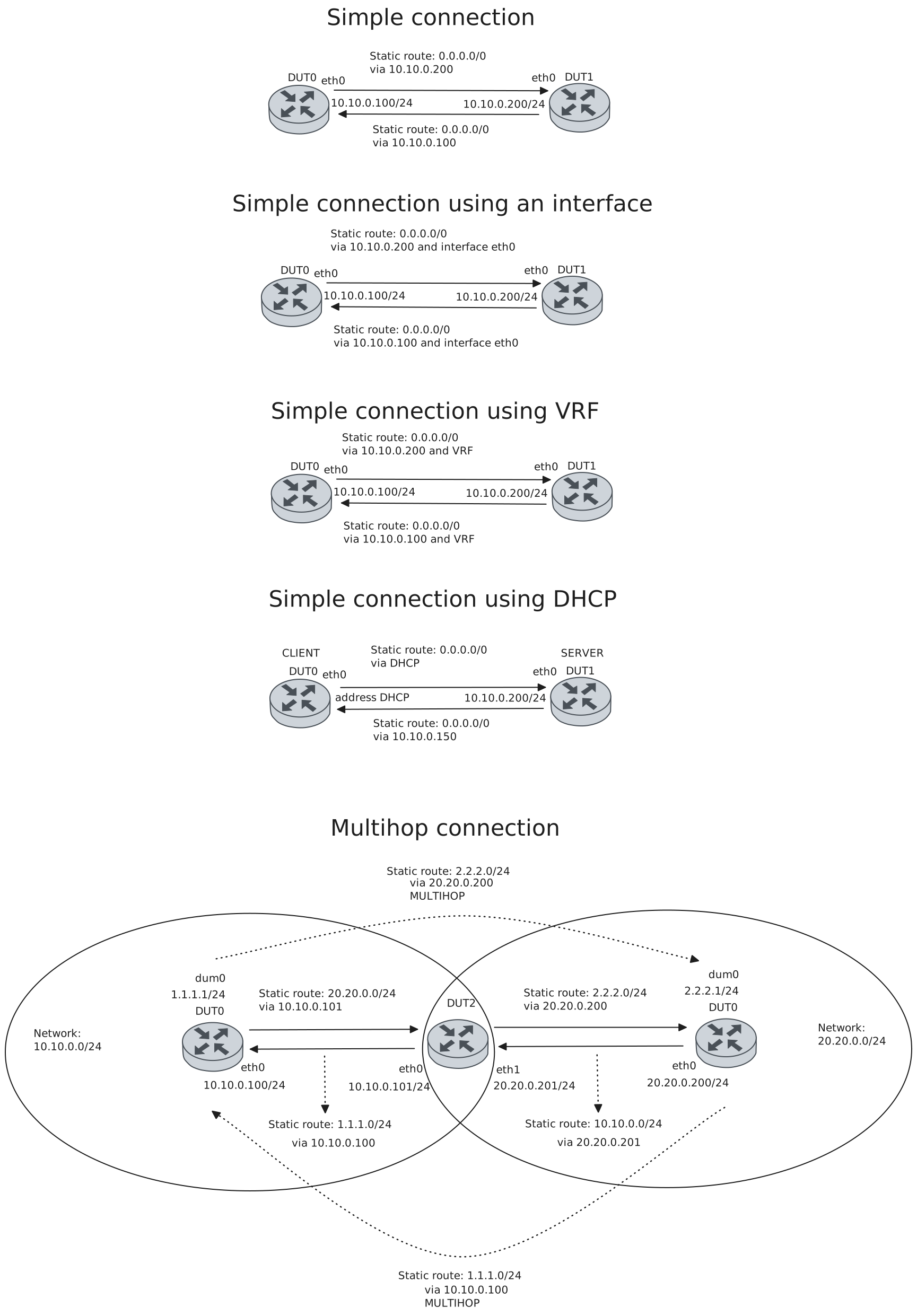
Test Connection With Next Hop IPv4
Description
Tests connection between two devices with BFD in static routes using the gateway as the BFD peer, checking if they are each others peers and their status is up and installed.
Scenario
Step 1: Set the following configuration in DUT0 :
set interfaces ethernet eth0 address 10.10.0.100/24
set protocols static route 0.0.0.0/0 next-hop 10.10.0.200 bfd
set system login user admin authentication encrypted-password '$6$GSjsCj8gHLv$/VcqU6FLi6CT2Oxn0MJQ2C2tqnRDrYKNF8HIYWJp68nvXvPdFccDsT04.WtigUONbKYrgKg8d6rEs8PjljMkH0'
Step 2: Set the following configuration in DUT1 :
set interfaces ethernet eth0 address 10.10.0.200/24
set protocols static route 0.0.0.0/0 next-hop 10.10.0.100 bfd
set system login user admin authentication encrypted-password '$6$GSjsCj8gHLv$/VcqU6FLi6CT2Oxn0MJQ2C2tqnRDrYKNF8HIYWJp68nvXvPdFccDsT04.WtigUONbKYrgKg8d6rEs8PjljMkH0'
Note
Check connectivity
Step 3: Ping IP address 10.10.0.200 from DUT0:
admin@DUT0$ ping 10.10.0.200 count 1 size 56 timeout 1Show output
PING 10.10.0.200 (10.10.0.200) 56(84) bytes of data.
64 bytes from 10.10.0.200: icmp_seq=1 ttl=64 time=0.314 ms

--- 10.10.0.200 ping statistics ---
1 packets transmitted, 1 received, 0% packet loss, time 0ms
rtt min/avg/max/mdev = 0.314/0.314/0.314/0.000 ms
Step 4: Ping IP address 10.10.0.100 from DUT1:
admin@DUT1$ ping 10.10.0.100 count 1 size 56 timeout 1Show output
PING 10.10.0.100 (10.10.0.100) 56(84) bytes of data.
64 bytes from 10.10.0.100: icmp_seq=1 ttl=64 time=0.234 ms

--- 10.10.0.100 ping statistics ---
1 packets transmitted, 1 received, 0% packet loss, time 0ms
rtt min/avg/max/mdev = 0.234/0.234/0.234/0.000 ms
Note
Check that the operational command ‘protocols bfd show static route’ works, and shows that they are each other’s peers and that their status is installed, indicating that the next-hop router is reachable
Step 5: Run command protocols bfd show static route at DUT0 and check if output matches the following regular expressions:
10.10.0.200
status: installed
Show output
Showing BFD monitored static routes:

  Next hops:
    VRF default IPv4 Unicast:
        0.0.0.0/0 peer 10.10.0.200 (status: installed)

    VRF default IPv4 Multicast:

    VRF default IPv6 Unicast:
Step 6: Run command protocols bfd show static route at DUT1 and check if output matches the following regular expressions:
10.10.0.100
status: installed
Show output
Showing BFD monitored static routes:

  Next hops:
    VRF BFD IPv4 Unicast:

    VRF BFD IPv4 Multicast:

    VRF BFD IPv6 Unicast:
    VRF BGP IPv4 Unicast:

    VRF BGP IPv4 Multicast:

    VRF BGP IPv6 Unicast:
    VRF VRF1 IPv4 Unicast:

    VRF VRF1 IPv4 Multicast:

    VRF VRF1 IPv6 Unicast:
    VRF WAN1 IPv4 Unicast:

    VRF WAN1 IPv4 Multicast:

    VRF WAN1 IPv6 Unicast:
    VRF WAN2 IPv4 Unicast:

    VRF WAN2 IPv4 Multicast:

    VRF WAN2 IPv6 Unicast:
    VRF default IPv4 Unicast:
        0.0.0.0/0 peer 10.10.0.100 (status: installed)

    VRF default IPv4 Multicast:

    VRF default IPv6 Unicast:
    VRF tenant1 IPv4 Unicast:

    VRF tenant1 IPv4 Multicast:

    VRF tenant1 IPv6 Unicast:
    VRF tenant2 IPv4 Unicast:

    VRF tenant2 IPv4 Multicast:

    VRF tenant2 IPv6 Unicast:
    VRF tenant3 IPv4 Unicast:

    VRF tenant3 IPv4 Multicast:

    VRF tenant3 IPv6 Unicast:
    VRF vrf-responder IPv4 Unicast:

    VRF vrf-responder IPv4 Multicast:

    VRF vrf-responder IPv6 Unicast:
Note
Check that they are each other’s peers and that their status is up (the BFD session has beedn successfully established)
Step 7: Run command protocols bfd show peers at DUT0 and check if output matches the following regular expressions:
10.10.0.200
Status: up
Show output
BFD Peers:
        peer 10.10.0.200 vrf default
                ID: 1004134724
                Remote ID: 2092593648
                Active mode
                Status: up
                Uptime: 2 second(s)
                Diagnostics: ok
                Remote diagnostics: ok
                Peer Type: dynamic
                RTT min/avg/max: 0/0/0 usec
                Local timers:
                        Detect-multiplier: 3
                        Receive interval: 300ms
                        Transmission interval: 300ms
                        Echo receive interval: 50ms
                        Echo transmission interval: disabled
                Remote timers:
                        Detect-multiplier: 3
                        Receive interval: 300ms
                        Transmission interval: 300ms
                        Echo receive interval: 50ms
Step 8: Run command protocols bfd show peers at DUT1 and check if output matches the following regular expressions:
10.10.0.100
Status: up
Show output
BFD Peers:
        peer 10.10.0.100 vrf default
                ID: 2092593648
                Remote ID: 1004134724
                Active mode
                Status: up
                Uptime: 1 second(s)
                Diagnostics: ok
                Remote diagnostics: ok
                Peer Type: dynamic
                RTT min/avg/max: 0/0/0 usec
                Local timers:
                        Detect-multiplier: 3
                        Receive interval: 300ms
                        Transmission interval: 300ms
                        Echo receive interval: 50ms
                        Echo transmission interval: disabled
                Remote timers:
                        Detect-multiplier: 3
                        Receive interval: 300ms
                        Transmission interval: 300ms
                        Echo receive interval: 50ms
Test Connection With Next Hop And Interface IPv4
Description
Tests connection between two devices with BFD in static routes using the gateway as the BFD peer and an interface, checking if they are each others peers and their status is up and installed.
Scenario
Step 1: Set the following configuration in DUT0 :
set interfaces ethernet eth0 address 10.10.0.100/24
set protocols static route 0.0.0.0/0 next-hop 10.10.0.200 interface eth0 bfd
set system login user admin authentication encrypted-password '$6$GSjsCj8gHLv$/VcqU6FLi6CT2Oxn0MJQ2C2tqnRDrYKNF8HIYWJp68nvXvPdFccDsT04.WtigUONbKYrgKg8d6rEs8PjljMkH0'
Step 2: Set the following configuration in DUT1 :
set interfaces ethernet eth0 address 10.10.0.200/24
set protocols static route 0.0.0.0/0 next-hop 10.10.0.100 interface eth0 bfd
set system login user admin authentication encrypted-password '$6$GSjsCj8gHLv$/VcqU6FLi6CT2Oxn0MJQ2C2tqnRDrYKNF8HIYWJp68nvXvPdFccDsT04.WtigUONbKYrgKg8d6rEs8PjljMkH0'
Note
Check connectivity
Step 3: Ping IP address 10.10.0.200 from DUT0:
admin@DUT0$ ping 10.10.0.200 count 1 size 56 timeout 1Show output
PING 10.10.0.200 (10.10.0.200) 56(84) bytes of data.
64 bytes from 10.10.0.200: icmp_seq=1 ttl=64 time=684 ms

--- 10.10.0.200 ping statistics ---
1 packets transmitted, 1 received, 0% packet loss, time 0ms
rtt min/avg/max/mdev = 683.798/683.798/683.798/0.000 ms
Step 4: Ping IP address 10.10.0.100 from DUT1:
admin@DUT1$ ping 10.10.0.100 count 1 size 56 timeout 1Show output
PING 10.10.0.100 (10.10.0.100) 56(84) bytes of data.
64 bytes from 10.10.0.100: icmp_seq=1 ttl=64 time=0.210 ms

--- 10.10.0.100 ping statistics ---
1 packets transmitted, 1 received, 0% packet loss, time 0ms
rtt min/avg/max/mdev = 0.210/0.210/0.210/0.000 ms
Note
Check that the operational command ‘protocols bfd show static route’ works, and shows that they are each other’s peers and that their status is installed, indicating that the next-hop router is reachable
Step 5: Run command protocols bfd show static route at DUT0 and check if output matches the following regular expressions:
10.10.0.200
status: installed
Show output
Showing BFD monitored static routes:

  Next hops:
    VRF default IPv4 Unicast:
        0.0.0.0/0 peer 10.10.0.200 (status: installed)

    VRF default IPv4 Multicast:

    VRF default IPv6 Unicast:
Step 6: Run command protocols bfd show static route at DUT1 and check if output matches the following regular expressions:
10.10.0.100
status: installed
Show output
Showing BFD monitored static routes:

  Next hops:
    VRF BFD IPv4 Unicast:

    VRF BFD IPv4 Multicast:

    VRF BFD IPv6 Unicast:
    VRF BGP IPv4 Unicast:

    VRF BGP IPv4 Multicast:

    VRF BGP IPv6 Unicast:
    VRF VRF1 IPv4 Unicast:

    VRF VRF1 IPv4 Multicast:

    VRF VRF1 IPv6 Unicast:
    VRF WAN1 IPv4 Unicast:

    VRF WAN1 IPv4 Multicast:

    VRF WAN1 IPv6 Unicast:
    VRF WAN2 IPv4 Unicast:

    VRF WAN2 IPv4 Multicast:

    VRF WAN2 IPv6 Unicast:
    VRF default IPv4 Unicast:
        0.0.0.0/0 peer 10.10.0.100 (status: installed)

    VRF default IPv4 Multicast:

    VRF default IPv6 Unicast:
    VRF tenant1 IPv4 Unicast:

    VRF tenant1 IPv4 Multicast:

    VRF tenant1 IPv6 Unicast:
    VRF tenant2 IPv4 Unicast:

    VRF tenant2 IPv4 Multicast:

    VRF tenant2 IPv6 Unicast:
    VRF tenant3 IPv4 Unicast:

    VRF tenant3 IPv4 Multicast:

    VRF tenant3 IPv6 Unicast:
    VRF vrf-responder IPv4 Unicast:

    VRF vrf-responder IPv4 Multicast:

    VRF vrf-responder IPv6 Unicast:
Note
Check that they are each other’s peers and that their status is up (the BFD session has beedn successfully established)
Step 7: Run command protocols bfd show peers at DUT0 and check if output matches the following regular expressions:
10.10.0.200
Status: up
Show output
BFD Peers:
        peer 10.10.0.200 vrf default interface eth0
                ID: 2170071055
                Remote ID: 757850335
                Active mode
                Status: up
                Uptime: 0 second(s)
                Diagnostics: ok
                Remote diagnostics: ok
                Peer Type: dynamic
                RTT min/avg/max: 0/0/0 usec
                Local timers:
                        Detect-multiplier: 3
                        Receive interval: 300ms
                        Transmission interval: 300ms
                        Echo receive interval: 50ms
                        Echo transmission interval: disabled
                Remote timers:
                        Detect-multiplier: 3
                        Receive interval: 300ms
                        Transmission interval: 300ms
                        Echo receive interval: 50ms
Step 8: Run command protocols bfd show peers at DUT1 and check if output matches the following regular expressions:
10.10.0.100
Status: up
Show output
BFD Peers:
        peer 10.10.0.100 vrf default interface eth0
                ID: 757850335
                Remote ID: 2170071055
                Active mode
                Status: up
                Uptime: 1 second(s)
                Diagnostics: ok
                Remote diagnostics: ok
                Peer Type: dynamic
                RTT min/avg/max: 0/0/0 usec
                Local timers:
                        Detect-multiplier: 3
                        Receive interval: 300ms
                        Transmission interval: 300ms
                        Echo receive interval: 50ms
                        Echo transmission interval: disabled
                Remote timers:
                        Detect-multiplier: 3
                        Receive interval: 300ms
                        Transmission interval: 300ms
                        Echo receive interval: 50ms
Test Connection With Next Hop And Next Hop VRF IPv4
Description
Tests connection between two devices with BFD in static routes using the gateway as the BFD peer and a leaked route with a nexthop in the specified VRF ID, checking if they are each others peers and their status is up and installed.
Scenario
Step 1: Set the following configuration in DUT0 :
set interfaces ethernet eth0 address 10.10.0.100/24
set interfaces ethernet eth0 vrf VRF
set protocols static route 0.0.0.0/0 next-hop 10.10.0.200 next-hop-vrf VRF bfd
set system login user admin authentication encrypted-password '$6$GSjsCj8gHLv$/VcqU6FLi6CT2Oxn0MJQ2C2tqnRDrYKNF8HIYWJp68nvXvPdFccDsT04.WtigUONbKYrgKg8d6rEs8PjljMkH0'
set system vrf VRF
Step 2: Set the following configuration in DUT1 :
set interfaces ethernet eth0 address 10.10.0.200/24
set interfaces ethernet eth0 vrf VRF
set protocols static route 0.0.0.0/0 next-hop 10.10.0.100 next-hop-vrf VRF bfd
set system login user admin authentication encrypted-password '$6$GSjsCj8gHLv$/VcqU6FLi6CT2Oxn0MJQ2C2tqnRDrYKNF8HIYWJp68nvXvPdFccDsT04.WtigUONbKYrgKg8d6rEs8PjljMkH0'
set system vrf VRF
Note
Check connectivity
Step 3: Ping IP address 10.10.0.200 from DUT0:
admin@DUT0$ ping 10.10.0.200 count 1 size 56 timeout 1Show output
PING 10.10.0.200 (10.10.0.200) 56(84) bytes of data.
64 bytes from 10.10.0.200: icmp_seq=1 ttl=64 time=0.315 ms

--- 10.10.0.200 ping statistics ---
1 packets transmitted, 1 received, 0% packet loss, time 0ms
rtt min/avg/max/mdev = 0.315/0.315/0.315/0.000 ms
Step 4: Ping IP address 10.10.0.100 from DUT1:
admin@DUT1$ ping 10.10.0.100 count 1 size 56 timeout 1Show output
PING 10.10.0.100 (10.10.0.100) 56(84) bytes of data.
64 bytes from 10.10.0.100: icmp_seq=1 ttl=64 time=0.273 ms

--- 10.10.0.100 ping statistics ---
1 packets transmitted, 1 received, 0% packet loss, time 0ms
rtt min/avg/max/mdev = 0.273/0.273/0.273/0.000 ms
Note
Check that the operational command ‘protocols bfd show static route’ works, and shows that they are each other’s peers and that their status is installed, indicating that the next-hop router is reachable
Step 5: Run command protocols bfd show static route at DUT0 and check if output matches the following regular expressions:
10.10.0.200
status: installed
Show output
Showing BFD monitored static routes:

  Next hops:
    VRF default IPv4 Unicast:
        0.0.0.0/0 peer 10.10.0.200 (status: installed)

    VRF default IPv4 Multicast:

    VRF default IPv6 Unicast:
Step 6: Run command protocols bfd show static route at DUT1 and check if output matches the following regular expressions:
10.10.0.100
status: installed
Show output
Showing BFD monitored static routes:

  Next hops:
    VRF BFD IPv4 Unicast:

    VRF BFD IPv4 Multicast:

    VRF BFD IPv6 Unicast:
    VRF BGP IPv4 Unicast:

    VRF BGP IPv4 Multicast:

    VRF BGP IPv6 Unicast:
    VRF VRF1 IPv4 Unicast:

    VRF VRF1 IPv4 Multicast:

    VRF VRF1 IPv6 Unicast:
    VRF WAN1 IPv4 Unicast:

    VRF WAN1 IPv4 Multicast:

    VRF WAN1 IPv6 Unicast:
    VRF WAN2 IPv4 Unicast:

    VRF WAN2 IPv4 Multicast:

    VRF WAN2 IPv6 Unicast:
    VRF default IPv4 Unicast:
        0.0.0.0/0 peer 10.10.0.100 (status: installed)

    VRF default IPv4 Multicast:

    VRF default IPv6 Unicast:
    VRF tenant1 IPv4 Unicast:

    VRF tenant1 IPv4 Multicast:

    VRF tenant1 IPv6 Unicast:
    VRF tenant2 IPv4 Unicast:

    VRF tenant2 IPv4 Multicast:

    VRF tenant2 IPv6 Unicast:
    VRF tenant3 IPv4 Unicast:

    VRF tenant3 IPv4 Multicast:

    VRF tenant3 IPv6 Unicast:
    VRF vrf-responder IPv4 Unicast:

    VRF vrf-responder IPv4 Multicast:

    VRF vrf-responder IPv6 Unicast:
Note
Check that they are each other’s peers and that their status is up (the BFD session has beedn successfully established)
Step 7: Run command protocols bfd show peers at DUT0 and check if output matches the following regular expressions:
10.10.0.200
Status: up
Show output
BFD Peers:
        peer 10.10.0.200 vrf VRF
                ID: 509115711
                Remote ID: 2831334021
                Active mode
                Status: up
                Uptime: 1 second(s)
                Diagnostics: ok
                Remote diagnostics: ok
                Peer Type: dynamic
                RTT min/avg/max: 0/0/0 usec
                Local timers:
                        Detect-multiplier: 3
                        Receive interval: 300ms
                        Transmission interval: 300ms
                        Echo receive interval: 50ms
                        Echo transmission interval: disabled
                Remote timers:
                        Detect-multiplier: 3
                        Receive interval: 300ms
                        Transmission interval: 300ms
                        Echo receive interval: 50ms
Step 8: Run command protocols bfd show peers at DUT1 and check if output matches the following regular expressions:
10.10.0.100
Status: up
Show output
BFD Peers:
        peer 10.10.0.100 vrf VRF
                ID: 2831334021
                Remote ID: 509115711
                Active mode
                Status: up
                Uptime: 1 second(s)
                Diagnostics: ok
                Remote diagnostics: ok
                Peer Type: dynamic
                RTT min/avg/max: 0/0/0 usec
                Local timers:
                        Detect-multiplier: 3
                        Receive interval: 300ms
                        Transmission interval: 300ms
                        Echo receive interval: 50ms
                        Echo transmission interval: disabled
                Remote timers:
                        Detect-multiplier: 3
                        Receive interval: 300ms
                        Transmission interval: 300ms
                        Echo receive interval: 50ms
Test Connection With DHCP Interface IPv4
Description
Tests connection between two devices with BFD in static routes using a DHCP interface that supplies the next-hop IP address, checking if they are each others peers and their status is up and installed.
Scenario
Step 1: Set the following configuration in DUT0 :
set interfaces ethernet eth0 address dhcp
set protocols static route 0.0.0.0/0 dhcp-interface eth0 bfd
set system login user admin authentication encrypted-password '$6$GSjsCj8gHLv$/VcqU6FLi6CT2Oxn0MJQ2C2tqnRDrYKNF8HIYWJp68nvXvPdFccDsT04.WtigUONbKYrgKg8d6rEs8PjljMkH0'
Step 2: Set the following configuration in DUT1 :
set interfaces ethernet eth0 address 10.10.0.200/24
set protocols static route 0.0.0.0/0 next-hop 10.10.0.150 bfd
set service dhcp-server shared-network dhcpserver subnet 10.10.0.0/24 options default-router 10.10.0.200
set service dhcp-server shared-network dhcpserver subnet 10.10.0.0/24 start 10.10.0.150 stop 10.10.0.150
set system login user admin authentication encrypted-password '$6$GSjsCj8gHLv$/VcqU6FLi6CT2Oxn0MJQ2C2tqnRDrYKNF8HIYWJp68nvXvPdFccDsT04.WtigUONbKYrgKg8d6rEs8PjljMkH0'
Note
Check connectivity
Step 3: Ping IP address 10.10.0.200 from DUT0:
admin@DUT0$ ping 10.10.0.200 count 1 size 56 timeout 1Show output
PING 10.10.0.200 (10.10.0.200) 56(84) bytes of data.
64 bytes from 10.10.0.200: icmp_seq=1 ttl=64 time=0.292 ms

--- 10.10.0.200 ping statistics ---
1 packets transmitted, 1 received, 0% packet loss, time 0ms
rtt min/avg/max/mdev = 0.292/0.292/0.292/0.000 ms
Step 4: Ping IP address 10.10.0.150 from DUT1:
admin@DUT1$ ping 10.10.0.150 count 1 size 56 timeout 1Show output
PING 10.10.0.150 (10.10.0.150) 56(84) bytes of data.
64 bytes from 10.10.0.150: icmp_seq=1 ttl=64 time=0.261 ms

--- 10.10.0.150 ping statistics ---
1 packets transmitted, 1 received, 0% packet loss, time 0ms
rtt min/avg/max/mdev = 0.261/0.261/0.261/0.000 ms
Note
Check that the operational command ‘protocols bfd show static route’ works, and shows that they are each other’s peers and that their status is installed, indicating that the next-hop router is reachable
Step 5: Run command protocols bfd show static route at DUT0 and check if output matches the following regular expressions:
10.10.0.200
status: installed
Show output
Showing BFD monitored static routes:

  Next hops:
    VRF default IPv4 Unicast:
        0.0.0.0/0 peer 10.10.0.200 (status: installed)

    VRF default IPv4 Multicast:

    VRF default IPv6 Unicast:
Step 6: Run command protocols bfd show static route at DUT1 and check if output matches the following regular expressions:
10.10.0.150
status: installed
Show output
Showing BFD monitored static routes:

  Next hops:
    VRF BFD IPv4 Unicast:

    VRF BFD IPv4 Multicast:

    VRF BFD IPv6 Unicast:
    VRF BGP IPv4 Unicast:

    VRF BGP IPv4 Multicast:

    VRF BGP IPv6 Unicast:
    VRF VRF1 IPv4 Unicast:

    VRF VRF1 IPv4 Multicast:

    VRF VRF1 IPv6 Unicast:
    VRF WAN1 IPv4 Unicast:

    VRF WAN1 IPv4 Multicast:

    VRF WAN1 IPv6 Unicast:
    VRF WAN2 IPv4 Unicast:

    VRF WAN2 IPv4 Multicast:

    VRF WAN2 IPv6 Unicast:
    VRF default IPv4 Unicast:
        0.0.0.0/0 peer 10.10.0.150 (status: installed)

    VRF default IPv4 Multicast:

    VRF default IPv6 Unicast:
    VRF tenant1 IPv4 Unicast:

    VRF tenant1 IPv4 Multicast:

    VRF tenant1 IPv6 Unicast:
    VRF tenant2 IPv4 Unicast:

    VRF tenant2 IPv4 Multicast:

    VRF tenant2 IPv6 Unicast:
    VRF tenant3 IPv4 Unicast:

    VRF tenant3 IPv4 Multicast:

    VRF tenant3 IPv6 Unicast:
    VRF vrf-responder IPv4 Unicast:

    VRF vrf-responder IPv4 Multicast:

    VRF vrf-responder IPv6 Unicast:
Note
Check that they are each other’s peers and that their status is up (the BFD session has beedn successfully established)
Step 7: Run command protocols bfd show peers at DUT0 and check if output matches the following regular expressions:
10.10.0.200
Status: up
Show output
BFD Peers:
        peer 10.10.0.200 vrf default interface eth0
                ID: 3014170381
                Remote ID: 255951363
                Active mode
                Status: up
                Uptime: 2 second(s)
                Diagnostics: ok
                Remote diagnostics: ok
                Peer Type: dynamic
                RTT min/avg/max: 0/0/0 usec
                Local timers:
                        Detect-multiplier: 3
                        Receive interval: 300ms
                        Transmission interval: 300ms
                        Echo receive interval: 50ms
                        Echo transmission interval: disabled
                Remote timers:
                        Detect-multiplier: 3
                        Receive interval: 300ms
                        Transmission interval: 300ms
                        Echo receive interval: 50ms
Step 8: Run command protocols bfd show peers at DUT1 and check if output matches the following regular expressions:
10.10.0.150
Status: up
Show output
BFD Peers:
        peer 10.10.0.150 vrf default
                ID: 255951363
                Remote ID: 3014170381
                Active mode
                Status: up
                Uptime: 2 second(s)
                Diagnostics: ok
                Remote diagnostics: ok
                Peer Type: dynamic
                RTT min/avg/max: 0/0/0 usec
                Local timers:
                        Detect-multiplier: 3
                        Receive interval: 300ms
                        Transmission interval: 300ms
                        Echo receive interval: 50ms
                        Echo transmission interval: disabled
                Remote timers:
                        Detect-multiplier: 3
                        Receive interval: 300ms
                        Transmission interval: 300ms
                        Echo receive interval: 50ms
Test Multihop Connection IPv4
Description
Tests multihop connection between two devices in different networks using a third device connected to both networks, checking if they are each others peers and their status is up and installed.
Scenario
Step 1: Set the following configuration in DUT0 :
set interfaces dummy dum0 address 1.1.1.1/24
set interfaces ethernet eth0 address 10.10.0.100/24
set protocols static route 2.2.2.0/24 next-hop 20.20.0.200 bfd multihop
set protocols static route 20.20.0.0/24 next-hop 10.10.0.101
set system login user admin authentication encrypted-password '$6$GSjsCj8gHLv$/VcqU6FLi6CT2Oxn0MJQ2C2tqnRDrYKNF8HIYWJp68nvXvPdFccDsT04.WtigUONbKYrgKg8d6rEs8PjljMkH0'
Step 2: Set the following configuration in DUT1 :
set interfaces dummy dum0 address 2.2.2.1/24
set interfaces ethernet eth0 address 20.20.0.200/24
set protocols static route 1.1.1.0/24 next-hop 10.10.0.100 bfd multihop
set protocols static route 10.10.0.0/24 next-hop 20.20.0.201
set system login user admin authentication encrypted-password '$6$GSjsCj8gHLv$/VcqU6FLi6CT2Oxn0MJQ2C2tqnRDrYKNF8HIYWJp68nvXvPdFccDsT04.WtigUONbKYrgKg8d6rEs8PjljMkH0'
Step 3: Set the following configuration in DUT2 :
set interfaces ethernet eth0 address 10.10.0.101/24
set interfaces ethernet eth1 address 20.20.0.201/24
set protocols static route 1.1.1.0/24 next-hop 10.10.0.100
set protocols static route 2.2.2.0/24 next-hop 20.20.0.200
set system login user admin authentication encrypted-password '$6$GSjsCj8gHLv$/VcqU6FLi6CT2Oxn0MJQ2C2tqnRDrYKNF8HIYWJp68nvXvPdFccDsT04.WtigUONbKYrgKg8d6rEs8PjljMkH0'
Note
Check connectivity
Step 4: Ping IP address 20.20.0.200 from DUT0:
admin@DUT0$ ping 20.20.0.200 count 1 size 56 timeout 1Show output
PING 20.20.0.200 (20.20.0.200) 56(84) bytes of data.
64 bytes from 20.20.0.200: icmp_seq=1 ttl=63 time=0.419 ms

--- 20.20.0.200 ping statistics ---
1 packets transmitted, 1 received, 0% packet loss, time 0ms
rtt min/avg/max/mdev = 0.419/0.419/0.419/0.000 ms
Step 5: Ping IP address 10.10.0.100 from DUT1:
admin@DUT1$ ping 10.10.0.100 count 1 size 56 timeout 1Show output
PING 10.10.0.100 (10.10.0.100) 56(84) bytes of data.
64 bytes from 10.10.0.100: icmp_seq=1 ttl=63 time=0.381 ms

--- 10.10.0.100 ping statistics ---
1 packets transmitted, 1 received, 0% packet loss, time 0ms
rtt min/avg/max/mdev = 0.381/0.381/0.381/0.000 ms
Note
Check that the operational command ‘protocols bfd show static route’ works, and shows that they are each other’s peers and that their status is installed, indicating that the next-hop router is reachable
Step 6: Run command protocols bfd show static route at DUT0 and check if output matches the following regular expressions:
20.20.0.200
status: installed
Show output
Showing BFD monitored static routes:

  Next hops:
    VRF default IPv4 Unicast:
        2.2.2.0/24 peer 20.20.0.200 (status: installed)

    VRF default IPv4 Multicast:

    VRF default IPv6 Unicast:
Step 7: Run command protocols bfd show static route at DUT1 and check if output matches the following regular expressions:
10.10.0.100
status: installed
Show output
Showing BFD monitored static routes:

  Next hops:
    VRF BFD IPv4 Unicast:

    VRF BFD IPv4 Multicast:

    VRF BFD IPv6 Unicast:
    VRF BGP IPv4 Unicast:

    VRF BGP IPv4 Multicast:

    VRF BGP IPv6 Unicast:
    VRF VRF1 IPv4 Unicast:

    VRF VRF1 IPv4 Multicast:

    VRF VRF1 IPv6 Unicast:
    VRF WAN1 IPv4 Unicast:

    VRF WAN1 IPv4 Multicast:

    VRF WAN1 IPv6 Unicast:
    VRF WAN2 IPv4 Unicast:

    VRF WAN2 IPv4 Multicast:

    VRF WAN2 IPv6 Unicast:
    VRF default IPv4 Unicast:
        1.1.1.0/24 peer 10.10.0.100 (status: installed)

    VRF default IPv4 Multicast:

    VRF default IPv6 Unicast:
    VRF tenant1 IPv4 Unicast:

    VRF tenant1 IPv4 Multicast:

    VRF tenant1 IPv6 Unicast:
    VRF tenant2 IPv4 Unicast:

    VRF tenant2 IPv4 Multicast:

    VRF tenant2 IPv6 Unicast:
    VRF tenant3 IPv4 Unicast:

    VRF tenant3 IPv4 Multicast:

    VRF tenant3 IPv6 Unicast:
    VRF vrf-responder IPv4 Unicast:

    VRF vrf-responder IPv4 Multicast:

    VRF vrf-responder IPv6 Unicast:
Note
Check that they are each other’s peers and that their status is up (the BFD session has beedn successfully established)
Step 8: Run command protocols bfd show peers at DUT0 and check if output matches the following regular expressions:
20.20.0.200
Status: up
Show output
BFD Peers:
        peer 20.20.0.200 multihop local-address 10.10.0.100 vrf default
                ID: 252001774
                Remote ID: 839354770
                Active mode
                Minimum TTL: 2
                Status: up
                Uptime: 2 second(s)
                Diagnostics: ok
                Remote diagnostics: ok
                Peer Type: dynamic
                RTT min/avg/max: 0/0/0 usec
                Local timers:
                        Detect-multiplier: 3
                        Receive interval: 300ms
                        Transmission interval: 300ms
                        Echo receive interval: 50ms
                        Echo transmission interval: disabled
                Remote timers:
                        Detect-multiplier: 3
                        Receive interval: 300ms
                        Transmission interval: 300ms
                        Echo receive interval: 50ms
Step 9: Run command protocols bfd show peers at DUT1 and check if output matches the following regular expressions:
10.10.0.100
Status: up
Show output
BFD Peers:
        peer 10.10.0.100 multihop local-address 20.20.0.200 vrf default
                ID: 839354770
                Remote ID: 252001774
                Active mode
                Minimum TTL: 2
                Status: up
                Uptime: 2 second(s)
                Diagnostics: ok
                Remote diagnostics: ok
                Peer Type: dynamic
                RTT min/avg/max: 0/0/0 usec
                Local timers:
                        Detect-multiplier: 3
                        Receive interval: 300ms
                        Transmission interval: 300ms
                        Echo receive interval: 50ms
                        Echo transmission interval: disabled
                Remote timers:
                        Detect-multiplier: 3
                        Receive interval: 300ms
                        Transmission interval: 300ms
                        Echo receive interval: 50ms
Test DUT0 Source IP IPv4
Description
Captures BFD packets and verifies the source address is correct when packets are sent from DUT0.
Scenario
Step 1: Set the following configuration in DUT0 :
set interfaces ethernet eth0 address 10.10.0.100/24
set protocols static route 0.0.0.0/0 next-hop 10.10.0.200 bfd
set system login user admin authentication encrypted-password '$6$GSjsCj8gHLv$/VcqU6FLi6CT2Oxn0MJQ2C2tqnRDrYKNF8HIYWJp68nvXvPdFccDsT04.WtigUONbKYrgKg8d6rEs8PjljMkH0'
Step 2: Set the following configuration in DUT1 :
set interfaces ethernet eth0 address 10.10.0.200/24
set protocols static route 0.0.0.0/0 next-hop 10.10.0.100 bfd source-ip 10.10.0.100
set system login user admin authentication encrypted-password '$6$GSjsCj8gHLv$/VcqU6FLi6CT2Oxn0MJQ2C2tqnRDrYKNF8HIYWJp68nvXvPdFccDsT04.WtigUONbKYrgKg8d6rEs8PjljMkH0'
Note
Capture packets and show one to verify that the source address is 10.10.0.100:
Note
Source line:
Show output
12 2025-12-11 20:42:16.105579249 10.10.0.100 → 10.10.0.200 BFD Control 66 Diag: No Diagnostic, State: Down, Flags: 0x00
Test DUT1 Source IP IPv4
Description
Captures BFD packets and verifies the source address is correct when packets are sent from DUT1.
Scenario
Step 1: Set the following configuration in DUT0 :
set interfaces ethernet eth0 address 10.10.0.100/24
set protocols static route 0.0.0.0/0 next-hop 10.10.0.200 bfd source-ip 10.10.0.200
set system login user admin authentication encrypted-password '$6$GSjsCj8gHLv$/VcqU6FLi6CT2Oxn0MJQ2C2tqnRDrYKNF8HIYWJp68nvXvPdFccDsT04.WtigUONbKYrgKg8d6rEs8PjljMkH0'
Step 2: Set the following configuration in DUT1 :
set interfaces ethernet eth0 address 10.10.0.200/24
set protocols static route 0.0.0.0/0 next-hop 10.10.0.100 bfd
set system login user admin authentication encrypted-password '$6$GSjsCj8gHLv$/VcqU6FLi6CT2Oxn0MJQ2C2tqnRDrYKNF8HIYWJp68nvXvPdFccDsT04.WtigUONbKYrgKg8d6rEs8PjljMkH0'
Note
Capture packets and show one to verify that the source address is 10.10.0.200:
Note
Source line:
Show output
13 2025-12-11 20:42:29.608133241 10.10.0.200 → 10.10.0.100 BFD Control 66 Diag: No Diagnostic, State: Down, Flags: 0x00
Test Profile IPv4
Description
Checks that all BFD profile configured parameters are shown.
Scenario
Step 1: Set the following configuration in DUT0 :
set interfaces ethernet eth0 address 10.10.0.100/24
set protocols bfd profile PFL detect-multiplier 5
set protocols bfd profile PFL echo-interval 60
set protocols bfd profile PFL echo-mode
set protocols bfd profile PFL passive-mode
set protocols bfd profile PFL receive-interval 400
set protocols bfd profile PFL transmit-interval 400
set protocols static route 0.0.0.0/0 next-hop 10.10.0.200 bfd profile PFL
set system login user admin authentication encrypted-password '$6$GSjsCj8gHLv$/VcqU6FLi6CT2Oxn0MJQ2C2tqnRDrYKNF8HIYWJp68nvXvPdFccDsT04.WtigUONbKYrgKg8d6rEs8PjljMkH0'
Step 2: Set the following configuration in DUT1 :
set interfaces ethernet eth0 address 10.10.0.200/24
set protocols static route 0.0.0.0/0 next-hop 10.10.0.100 bfd
set system login user admin authentication encrypted-password '$6$GSjsCj8gHLv$/VcqU6FLi6CT2Oxn0MJQ2C2tqnRDrYKNF8HIYWJp68nvXvPdFccDsT04.WtigUONbKYrgKg8d6rEs8PjljMkH0'
Note
Check connectivity
Step 3: Ping IP address 10.10.0.200 from DUT0:
admin@DUT0$ ping 10.10.0.200 count 1 size 56 timeout 1Show output
PING 10.10.0.200 (10.10.0.200) 56(84) bytes of data.
64 bytes from 10.10.0.200: icmp_seq=1 ttl=64 time=0.300 ms

--- 10.10.0.200 ping statistics ---
1 packets transmitted, 1 received, 0% packet loss, time 0ms
rtt min/avg/max/mdev = 0.300/0.300/0.300/0.000 ms
Step 4: Ping IP address 10.10.0.100 from DUT1:
admin@DUT1$ ping 10.10.0.100 count 1 size 56 timeout 1Show output
PING 10.10.0.100 (10.10.0.100) 56(84) bytes of data.
64 bytes from 10.10.0.100: icmp_seq=1 ttl=64 time=0.544 ms

--- 10.10.0.100 ping statistics ---
1 packets transmitted, 1 received, 0% packet loss, time 0ms
rtt min/avg/max/mdev = 0.544/0.544/0.544/0.000 ms
Note
Check that they are each other’s peers and that their status is up (the BFD session has beedn successfully established). Check that all configured profile parameters are shown in DUT0
Step 5: Run command protocols bfd show peers at DUT0 and check if output matches the following regular expressions:
10.10.0.200
Status: up
Detect-multiplier: 5
Echo receive interval: 60ms
Echo transmission interval: 60ms
Passive mode
Receive interval: 400ms
Transmission interval: 400ms
Show output
BFD Peers:
        peer 10.10.0.200 vrf default
                ID: 3773334570
                Remote ID: 2202328004
                Passive mode
                Status: up
                Uptime: 2 second(s)
                Diagnostics: ok
                Remote diagnostics: ok
                Peer Type: dynamic
                RTT min/avg/max: 162/215/300 usec
                Local timers:
                        Detect-multiplier: 5
                        Receive interval: 400ms
                        Transmission interval: 400ms
                        Echo receive interval: 60ms
                        Echo transmission interval: 60ms
                Remote timers:
                        Detect-multiplier: 3
                        Receive interval: 300ms
                        Transmission interval: 300ms
                        Echo receive interval: 50ms
Step 6: Run command protocols bfd show peers at DUT1 and check if output matches the following regular expressions:
10.10.0.100
Status: up
Show output
BFD Peers:
        peer 10.10.0.100 vrf default
                ID: 2202328004
                Remote ID: 3773334570
                Active mode
                Status: up
                Uptime: 1 second(s)
                Diagnostics: ok
                Remote diagnostics: ok
                Peer Type: dynamic
                RTT min/avg/max: 0/0/0 usec
                Local timers:
                        Detect-multiplier: 3
                        Receive interval: 300ms
                        Transmission interval: 300ms
                        Echo receive interval: 50ms
                        Echo transmission interval: disabled
                Remote timers:
                        Detect-multiplier: 5
                        Receive interval: 400ms
                        Transmission interval: 400ms
                        Echo receive interval: 60ms