Relay
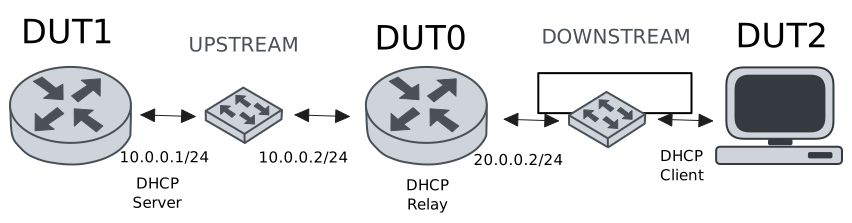
This scenario shows how to configure service dhcp-relay. The
relay agent must be used when the DHCP server and the DHCP
clients are not connected to the same layer 2 domain.
Test DHCP Relay
Description
This example demonstrates how to configure a DHCP relay instance in DUT0 to forward DHCP requests from DUT2 to DUT1.
Scenario
Step 1: Set the following configuration in DUT0 :
set interfaces ethernet eth0 vif 100 address 10.0.0.2/24
set interfaces ethernet eth1 vif 200 address 20.0.0.2/24
set service dhcp-relay INS downstream-interface eth1.200
set service dhcp-relay INS server 10.0.0.1
set service dhcp-relay INS upstream-interface eth0.100
set system login user admin authentication encrypted-password '$6$GSjsCj8gHLv$/VcqU6FLi6CT2Oxn0MJQ2C2tqnRDrYKNF8HIYWJp68nvXvPdFccDsT04.WtigUONbKYrgKg8d6rEs8PjljMkH0'
Step 2: Set the following configuration in DUT1 :
set interfaces ethernet eth0 vif 100 address 10.0.0.1/24
set protocols static route 0.0.0.0/0 next-hop 10.0.0.2
set service dhcp-server shared-network dummy subnet 10.0.0.1/32
set service dhcp-server shared-network remote subnet 20.0.0.0/24 start 20.0.0.50 stop 20.0.0.50
set system login user admin authentication encrypted-password '$6$GSjsCj8gHLv$/VcqU6FLi6CT2Oxn0MJQ2C2tqnRDrYKNF8HIYWJp68nvXvPdFccDsT04.WtigUONbKYrgKg8d6rEs8PjljMkH0'
Step 3: Set the following configuration in DUT2 :
set interfaces ethernet eth0 vif 200 address dhcp
set system login user admin authentication encrypted-password '$6$GSjsCj8gHLv$/VcqU6FLi6CT2Oxn0MJQ2C2tqnRDrYKNF8HIYWJp68nvXvPdFccDsT04.WtigUONbKYrgKg8d6rEs8PjljMkH0'
Step 4: Ping IP address 10.0.0.1 from DUT0:
admin@DUT0$ ping 10.0.0.1 count 1 size 56 timeout 1Show output
PING 10.0.0.1 (10.0.0.1) 56(84) bytes of data.
64 bytes from 10.0.0.1: icmp_seq=1 ttl=64 time=0.304 ms

--- 10.0.0.1 ping statistics ---
1 packets transmitted, 1 received, 0% packet loss, time 0ms
rtt min/avg/max/mdev = 0.304/0.304/0.304/0.000 ms
Step 5: Run command interfaces ethernet show at DUT2 and check if output contains the following tokens:
20.0.0.50Show output
---------------------------------------------------------------------
  Name             IP Address           Admin  Oper  Vrf  Description
---------------------------------------------------------------------
    eth0  fe80::dcad:beff:feef:6c20/64  up     up
eth0.200  20.0.0.50/24                  up     up
          fe80::dcad:beff:feef:6c20/64
    eth1                                down   down
    eth2                                down   down
    eth3                                down   down
Test DHCP Relay With Giaddr
Description
This example demonstrates how to set the gateway IP address (giaddr) in the IP address. This value must be set in an IP address that the DHCP server can reach.
Scenario
Step 1: Set the following configuration in DUT0 :
set interfaces ethernet eth0 vif 100 address 10.0.0.2/24
set interfaces ethernet eth1 vif 200 address 20.0.0.2/24
set interfaces ethernet eth1 vif 200 address 20.0.0.3/24
set service dhcp-relay INS downstream-interface eth1.200
set service dhcp-relay INS server 10.0.0.1 giaddr 20.0.0.3
set service dhcp-relay INS upstream-interface eth0.100
set system login user admin authentication encrypted-password '$6$GSjsCj8gHLv$/VcqU6FLi6CT2Oxn0MJQ2C2tqnRDrYKNF8HIYWJp68nvXvPdFccDsT04.WtigUONbKYrgKg8d6rEs8PjljMkH0'
Step 2: Set the following configuration in DUT1 :
set interfaces ethernet eth0 vif 100 address 10.0.0.1/24
set protocols static route 0.0.0.0/0 next-hop 10.0.0.2
set service dhcp-server shared-network dummy subnet 10.0.0.1/32
set service dhcp-server shared-network remote subnet 20.0.0.0/24 start 20.0.0.50 stop 20.0.0.50
set system login user admin authentication encrypted-password '$6$GSjsCj8gHLv$/VcqU6FLi6CT2Oxn0MJQ2C2tqnRDrYKNF8HIYWJp68nvXvPdFccDsT04.WtigUONbKYrgKg8d6rEs8PjljMkH0'
Step 3: Set the following configuration in DUT2 :
set interfaces ethernet eth0 vif 200 address dhcp
set system login user admin authentication encrypted-password '$6$GSjsCj8gHLv$/VcqU6FLi6CT2Oxn0MJQ2C2tqnRDrYKNF8HIYWJp68nvXvPdFccDsT04.WtigUONbKYrgKg8d6rEs8PjljMkH0'
Step 4: Ping IP address 10.0.0.1 from DUT0:
admin@DUT0$ ping 10.0.0.1 count 1 size 56 timeout 1Show output
PING 10.0.0.1 (10.0.0.1) 56(84) bytes of data.
64 bytes from 10.0.0.1: icmp_seq=1 ttl=64 time=0.244 ms

--- 10.0.0.1 ping statistics ---
1 packets transmitted, 1 received, 0% packet loss, time 0ms
rtt min/avg/max/mdev = 0.244/0.244/0.244/0.000 ms
Step 5: Run command interfaces ethernet show at DUT2 and check if output contains the following tokens:
20.0.0.50Show output
---------------------------------------------------------------------
  Name             IP Address           Admin  Oper  Vrf  Description
---------------------------------------------------------------------
    eth0  fe80::dcad:beff:feef:6c20/64  up     up
eth0.200  20.0.0.50/24                  up     up
          fe80::dcad:beff:feef:6c20/64
    eth1                                down   down
    eth2                                down   down
    eth3                                down   down
Step 6: Run command system journal show | cat at DUT1 and check if output matches the following regular expressions:
DHCPACK on 20.0.0.50 to [^\)]+\) via 20.0.0.3Show output
Dec 11 17:13:22.294646 osdx systemd-journald[1751]: Runtime Journal (/run/log/journal/a9242cd896344ca481d18f29a6e09395) is 932.0K, max 6.5M, 5.6M free.
Dec 11 17:13:22.297199 osdx systemd-journald[1751]: Received client request to rotate journal, rotating.
Dec 11 17:13:22.297257 osdx systemd-journald[1751]: Vacuuming done, freed 0B of archived journals from /run/log/journal/a9242cd896344ca481d18f29a6e09395.
Dec 11 17:13:22.308564 osdx OSDxCLI[220726]: User 'admin' executed a new command: 'system journal clear'.
Dec 11 17:13:22.505349 osdx OSDxCLI[220726]: User 'admin' executed a new command: 'system coredump delete all'.
Dec 11 17:13:23.963511 osdx OSDxCLI[220726]: User 'admin' entered the configuration menu.
Dec 11 17:13:24.046749 osdx OSDxCLI[220726]: User 'admin' added a new cfg line: 'set interfaces eth0.100 address 10.0.0.1/24'.
Dec 11 17:13:24.129969 osdx OSDxCLI[220726]: User 'admin' added a new cfg line: 'set service dhcp-server shared-network dummy subnet 10.0.0.1/32'.
Dec 11 17:13:24.259586 osdx OSDxCLI[220726]: User 'admin' added a new cfg line: 'set service dhcp-server shared-network remote subnet 20.0.0.0/24 start 20.0.0.50 stop 20.0.0.50'.
Dec 11 17:13:24.315286 osdx OSDxCLI[220726]: User 'admin' added a new cfg line: 'set protocols static route 0.0.0.0/0 next-hop 10.0.0.2'.
Dec 11 17:13:24.418116 osdx OSDxCLI[220726]: User 'admin' added a new cfg line: 'show working'.
Dec 11 17:13:24.485252 osdx ubnt-cfgd[239185]: inactive
Dec 11 17:13:24.510490 osdx INFO[239195]: FRR daemons did not change
Dec 11 17:13:24.541201 osdx kernel: 8021q: adding VLAN 0 to HW filter on device eth0
Dec 11 17:13:24.560179 osdx (udev-worker)[239245]: Network interface NamePolicy= disabled on kernel command line.
Dec 11 17:13:24.709448 osdx systemd[1]: Started dhcpd@main.service - "DHCP Server Service instance main".
Dec 11 17:13:24.711356 osdx cfgd[1430]: [220726]Completed change to active configuration
Dec 11 17:13:24.713199 osdx dhcpd[239322]: Wrote 0 leases to leases file.
Dec 11 17:13:24.723066 osdx OSDxCLI[220726]: User 'admin' committed the configuration.
Dec 11 17:13:24.738993 osdx dhcpd[239322]:
Dec 11 17:13:24.739000 osdx dhcpd[239322]: No subnet declaration for eth0 (no IPv4 addresses).
Dec 11 17:13:24.739003 osdx dhcpd[239322]: ** Ignoring requests on eth0.  If this is not what
Dec 11 17:13:24.739005 osdx dhcpd[239322]:    you want, please write a subnet declaration
Dec 11 17:13:24.739008 osdx dhcpd[239322]:    in your dhcpd.conf file for the network segment
Dec 11 17:13:24.739011 osdx dhcpd[239322]:    to which interface eth0 is attached. **
Dec 11 17:13:24.739013 osdx dhcpd[239322]:
Dec 11 17:13:24.742907 osdx OSDxCLI[220726]: User 'admin' left the configuration menu.
Dec 11 17:13:24.749305 osdx dhcpd[239322]: Server starting service.
Dec 11 17:13:25.414819 osdx dhcpd[239322]: DHCPDISCOVER from de:ad:be:ef:6c:20 via 20.0.0.3
Dec 11 17:13:26.415750 osdx dhcpd[239322]: DHCPOFFER on 20.0.0.50 to de:ad:be:ef:6c:20 (osdx) via 20.0.0.3
Dec 11 17:13:26.416472 osdx dhcpd[239322]: DHCPREQUEST for 20.0.0.50 (10.0.0.1) from de:ad:be:ef:6c:20 (osdx) via 20.0.0.3
Dec 11 17:13:26.464430 osdx dhcpd[239322]: DHCPACK on 20.0.0.50 to de:ad:be:ef:6c:20 (osdx) via 20.0.0.3
Test DHCP Relay With GRE Tunnel
Description
This example demonstrates how to configure a DHCP relay that forwards DHCP requests to the DHCP server through a GRE tunnel (upstream).
Scenario
Step 1: Set the following configuration in DUT0 :
set interfaces ethernet eth0 vif 100 address 10.0.0.2/24
set interfaces ethernet eth1 vif 200 address 20.0.0.2/24
set interfaces tunnel tun1 address 1.0.0.2/32
set interfaces tunnel tun1 encapsulation gre
set interfaces tunnel tun1 local-address 10.0.0.2
set interfaces tunnel tun1 local-interface eth0.100
set interfaces tunnel tun1 nhrp holdtime 5
set interfaces tunnel tun1 nhrp nhs 1.0.0.1 nbma 10.0.0.1
set service dhcp-relay INS downstream-interface eth1.200
set service dhcp-relay INS server 1.0.0.1
set service dhcp-relay INS upstream-interface eth0.100
set service dhcp-relay INS upstream-interface tun1
set system login user admin authentication encrypted-password '$6$GSjsCj8gHLv$/VcqU6FLi6CT2Oxn0MJQ2C2tqnRDrYKNF8HIYWJp68nvXvPdFccDsT04.WtigUONbKYrgKg8d6rEs8PjljMkH0'
Step 2: Set the following configuration in DUT1 :
set interfaces ethernet eth0 vif 100 address 10.0.0.1/24
set interfaces tunnel tun1 address 1.0.0.1/32
set interfaces tunnel tun1 encapsulation gre
set interfaces tunnel tun1 local-address 10.0.0.1
set interfaces tunnel tun1 local-interface eth0.100
set interfaces tunnel tun1 nhrp
set protocols static route 0.0.0.0/0 next-hop 10.0.0.2
set protocols static route 20.0.0.0/24 next-hop 1.0.0.2
set service dhcp-server shared-network dummy subnet 1.0.0.1/32
set service dhcp-server shared-network remote subnet 20.0.0.0/24 start 20.0.0.50 stop 20.0.0.50
set system login user admin authentication encrypted-password '$6$GSjsCj8gHLv$/VcqU6FLi6CT2Oxn0MJQ2C2tqnRDrYKNF8HIYWJp68nvXvPdFccDsT04.WtigUONbKYrgKg8d6rEs8PjljMkH0'
Step 3: Set the following configuration in DUT2 :
set interfaces ethernet eth0 vif 200 address dhcp
set system login user admin authentication encrypted-password '$6$GSjsCj8gHLv$/VcqU6FLi6CT2Oxn0MJQ2C2tqnRDrYKNF8HIYWJp68nvXvPdFccDsT04.WtigUONbKYrgKg8d6rEs8PjljMkH0'
Step 4: Ping IP address 10.0.0.1 from DUT0:
admin@DUT0$ ping 10.0.0.1 count 1 size 56 timeout 1Show output
PING 10.0.0.1 (10.0.0.1) 56(84) bytes of data.
64 bytes from 10.0.0.1: icmp_seq=1 ttl=64 time=0.229 ms

--- 10.0.0.1 ping statistics ---
1 packets transmitted, 1 received, 0% packet loss, time 0ms
rtt min/avg/max/mdev = 0.229/0.229/0.229/0.000 ms
Step 5: Ping IP address 1.0.0.1 from DUT0:
admin@DUT0$ ping 1.0.0.1 count 1 size 56 timeout 1Show output
PING 1.0.0.1 (1.0.0.1) 56(84) bytes of data.
64 bytes from 1.0.0.1: icmp_seq=1 ttl=64 time=0.256 ms

--- 1.0.0.1 ping statistics ---
1 packets transmitted, 1 received, 0% packet loss, time 0ms
rtt min/avg/max/mdev = 0.256/0.256/0.256/0.000 ms
Step 6: Run command interfaces ethernet show at DUT2 and check if output contains the following tokens:
20.0.0.50Show output
---------------------------------------------------------------------
  Name             IP Address           Admin  Oper  Vrf  Description
---------------------------------------------------------------------
    eth0  fe80::dcad:beff:feef:6c20/64  up     up
eth0.200  20.0.0.50/24                  up     up
          fe80::dcad:beff:feef:6c20/64
    eth1                                down   down
    eth2                                down   down
    eth3                                down   down
Test DHCP Relay With Multiple Instances
Description
This example demonstrates how to configure multiple DHCP relay instances.
Scenario
Step 1: Set the following configuration in DUT0 :
set interfaces ethernet eth0 vif 100 address 10.0.0.2/24
set interfaces ethernet eth1 vif 200 address 20.0.0.2/24
set interfaces ethernet eth1 vif 300 address 30.0.0.2/24
set service dhcp-relay INS downstream-interface eth1.200
set service dhcp-relay INS server 10.0.0.1
set service dhcp-relay INS upstream-interface eth0.100
set service dhcp-relay INS2 downstream-interface eth1.300
set service dhcp-relay INS2 server 10.0.0.1
set service dhcp-relay INS2 upstream-interface eth0.100
set system login user admin authentication encrypted-password '$6$GSjsCj8gHLv$/VcqU6FLi6CT2Oxn0MJQ2C2tqnRDrYKNF8HIYWJp68nvXvPdFccDsT04.WtigUONbKYrgKg8d6rEs8PjljMkH0'
Step 2: Set the following configuration in DUT1 :
set interfaces ethernet eth0 vif 100 address 10.0.0.1/24
set protocols static route 0.0.0.0/0 next-hop 10.0.0.2
set service dhcp-server shared-network dummy subnet 10.0.0.1/32
set service dhcp-server shared-network remote subnet 20.0.0.0/24 start 20.0.0.50 stop 20.0.0.50
set service dhcp-server shared-network remote2 subnet 30.0.0.0/24 start 30.0.0.50 stop 30.0.0.50
set system login user admin authentication encrypted-password '$6$GSjsCj8gHLv$/VcqU6FLi6CT2Oxn0MJQ2C2tqnRDrYKNF8HIYWJp68nvXvPdFccDsT04.WtigUONbKYrgKg8d6rEs8PjljMkH0'
Step 3: Set the following configuration in DUT2 :
set interfaces ethernet eth0 vif 200 address dhcp
set interfaces ethernet eth0 vif 300 address dhcp
set system login user admin authentication encrypted-password '$6$GSjsCj8gHLv$/VcqU6FLi6CT2Oxn0MJQ2C2tqnRDrYKNF8HIYWJp68nvXvPdFccDsT04.WtigUONbKYrgKg8d6rEs8PjljMkH0'
Step 4: Ping IP address 10.0.0.1 from DUT0:
admin@DUT0$ ping 10.0.0.1 count 1 size 56 timeout 1Show output
PING 10.0.0.1 (10.0.0.1) 56(84) bytes of data.
64 bytes from 10.0.0.1: icmp_seq=1 ttl=64 time=0.225 ms

--- 10.0.0.1 ping statistics ---
1 packets transmitted, 1 received, 0% packet loss, time 0ms
rtt min/avg/max/mdev = 0.225/0.225/0.225/0.000 ms
Step 5: Run command interfaces ethernet show at DUT2 and check if output contains the following tokens:
20.0.0.50Show output
---------------------------------------------------------------------
  Name             IP Address           Admin  Oper  Vrf  Description
---------------------------------------------------------------------
    eth0  fe80::dcad:beff:feef:6c20/64  up     up
eth0.200  20.0.0.50/24                  up     up
          fe80::dcad:beff:feef:6c20/64
eth0.300  30.0.0.50/24                  up     up
          fe80::dcad:beff:feef:6c20/64
    eth1                                down   down
    eth2                                down   down
    eth3                                down   down
Step 6: Run command interfaces ethernet show at DUT2 and check if output contains the following tokens:
30.0.0.50Show output
---------------------------------------------------------------------
  Name             IP Address           Admin  Oper  Vrf  Description
---------------------------------------------------------------------
    eth0  fe80::dcad:beff:feef:6c20/64  up     up
eth0.200  20.0.0.50/24                  up     up
          fe80::dcad:beff:feef:6c20/64
eth0.300  30.0.0.50/24                  up     up
          fe80::dcad:beff:feef:6c20/64
    eth1                                down   down
    eth2                                down   down
    eth3                                down   down
Step 7: Run command system journal show | cat at DUT1 and check if output matches the following regular expressions:
DHCPACK on 20.0.0.50 to [^\)]+\) via 20.0.0.2
DHCPACK on 30.0.0.50 to [^\)]+\) via 30.0.0.2
Show output
Dec 11 17:13:47.334069 osdx systemd-journald[1751]: Runtime Journal (/run/log/journal/a9242cd896344ca481d18f29a6e09395) is 932.0K, max 6.5M, 5.6M free.
Dec 11 17:13:47.336081 osdx systemd-journald[1751]: Received client request to rotate journal, rotating.
Dec 11 17:13:47.336143 osdx systemd-journald[1751]: Vacuuming done, freed 0B of archived journals from /run/log/journal/a9242cd896344ca481d18f29a6e09395.
Dec 11 17:13:47.347096 osdx OSDxCLI[220726]: User 'admin' executed a new command: 'system journal clear'.
Dec 11 17:13:47.605090 osdx OSDxCLI[220726]: User 'admin' executed a new command: 'system coredump delete all'.
Dec 11 17:13:49.422002 osdx OSDxCLI[220726]: User 'admin' entered the configuration menu.
Dec 11 17:13:49.567990 osdx OSDxCLI[220726]: User 'admin' added a new cfg line: 'set interfaces eth0.100 address 10.0.0.1/24'.
Dec 11 17:13:49.647318 osdx OSDxCLI[220726]: User 'admin' added a new cfg line: 'set service dhcp-server shared-network dummy subnet 10.0.0.1/32'.
Dec 11 17:13:49.724398 osdx OSDxCLI[220726]: User 'admin' added a new cfg line: 'set service dhcp-server shared-network remote subnet 20.0.0.0/24 start 20.0.0.50 stop 20.0.0.50'.
Dec 11 17:13:49.858952 osdx OSDxCLI[220726]: User 'admin' added a new cfg line: 'set protocols static route 0.0.0.0/0 next-hop 10.0.0.2'.
Dec 11 17:13:49.950256 osdx OSDxCLI[220726]: User 'admin' added a new cfg line: 'set service dhcp-server shared-network remote2 subnet 30.0.0.0/24 start 30.0.0.50 stop 30.0.0.50'.
Dec 11 17:13:50.088808 osdx OSDxCLI[220726]: User 'admin' added a new cfg line: 'show working'.
Dec 11 17:13:50.147781 osdx ubnt-cfgd[240181]: inactive
Dec 11 17:13:50.182799 osdx INFO[240193]: FRR daemons did not change
Dec 11 17:13:50.220330 osdx kernel: 8021q: adding VLAN 0 to HW filter on device eth0
Dec 11 17:13:50.252931 osdx (udev-worker)[240243]: Network interface NamePolicy= disabled on kernel command line.
Dec 11 17:13:50.400550 osdx systemd[1]: Started dhcpd@main.service - "DHCP Server Service instance main".
Dec 11 17:13:50.402515 osdx cfgd[1430]: [220726]Completed change to active configuration
Dec 11 17:13:50.406716 osdx dhcpd[240320]: Wrote 0 leases to leases file.
Dec 11 17:13:50.414841 osdx OSDxCLI[220726]: User 'admin' committed the configuration.
Dec 11 17:13:50.432929 osdx OSDxCLI[220726]: User 'admin' left the configuration menu.
Dec 11 17:13:50.438547 osdx dhcpd[240320]:
Dec 11 17:13:50.438555 osdx dhcpd[240320]: No subnet declaration for eth0 (no IPv4 addresses).
Dec 11 17:13:50.438557 osdx dhcpd[240320]: ** Ignoring requests on eth0.  If this is not what
Dec 11 17:13:50.438559 osdx dhcpd[240320]:    you want, please write a subnet declaration
Dec 11 17:13:50.438562 osdx dhcpd[240320]:    in your dhcpd.conf file for the network segment
Dec 11 17:13:50.438569 osdx dhcpd[240320]:    to which interface eth0 is attached. **
Dec 11 17:13:50.438572 osdx dhcpd[240320]:
Dec 11 17:13:50.456221 osdx dhcpd[240320]: Server starting service.
Dec 11 17:13:51.173509 osdx dhcpd[240320]: DHCPDISCOVER from de:ad:be:ef:6c:20 via 20.0.0.2
Dec 11 17:13:51.330606 osdx dhcpd[240320]: DHCPDISCOVER from de:ad:be:ef:6c:20 via 30.0.0.2
Dec 11 17:13:52.173649 osdx dhcpd[240320]: DHCPOFFER on 20.0.0.50 to de:ad:be:ef:6c:20 (osdx) via 20.0.0.2
Dec 11 17:13:52.174850 osdx dhcpd[240320]: DHCPREQUEST for 20.0.0.50 (10.0.0.1) from de:ad:be:ef:6c:20 (osdx) via 20.0.0.2
Dec 11 17:13:52.207609 osdx dhcpd[240320]: DHCPACK on 20.0.0.50 to de:ad:be:ef:6c:20 (osdx) via 20.0.0.2
Dec 11 17:13:52.330916 osdx dhcpd[240320]: DHCPOFFER on 30.0.0.50 to de:ad:be:ef:6c:20 (osdx) via 30.0.0.2
Dec 11 17:13:52.331855 osdx dhcpd[240320]: DHCPREQUEST for 30.0.0.50 (10.0.0.1) from de:ad:be:ef:6c:20 (osdx) via 30.0.0.2
Dec 11 17:13:52.375371 osdx dhcpd[240320]: DHCPACK on 30.0.0.50 to de:ad:be:ef:6c:20 (osdx) via 30.0.0.2