Check-Mac-Address
These scenarios show how the
check-mac-address feature works for the DHCP server
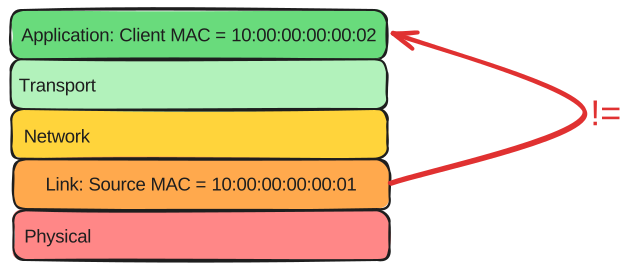
Test Check MAC Address
Description
The check-mac-address option filters packets if there are differences between the MAC address found at the ethernet header and the MAC address found in the DHCP packet.
To check this option, you should send packets with these differences and enable this option to see if warnings appear in your logs.
Also, this test checks how the server behaves under normal conditions.
Scenario
Step 1: Set the following configuration in DUT0 :
set interfaces ethernet eth0 address 10.0.0.1/24
set service dhcp-server shared-network dhcp subnet 10.0.0.0/24 start 10.0.0.5 stop 10.0.0.5
set system login user admin authentication encrypted-password '$6$GSjsCj8gHLv$/VcqU6FLi6CT2Oxn0MJQ2C2tqnRDrYKNF8HIYWJp68nvXvPdFccDsT04.WtigUONbKYrgKg8d6rEs8PjljMkH0'
Step 2: Run command system journal show | tail at DUT0 and check if output contains the following tokens:
DHCPDISCOVER from 10:00:00:00:00:02 via eth0Show output
Dec 11 19:06:13.324907 osdx modulelauncher[502986]: Command '/sbin/ethtool -A eth0 autoneg on' returned non-zero exit status 76.
Dec 11 19:06:13.326387 osdx modulelauncher[502986]: osdx.utils.xos cmd error: /sbin/ethtool -s eth0 autoneg on advertise Asym_Pause off Pause off --
Dec 11 19:06:13.326402 osdx modulelauncher[502986]: Command '/sbin/ethtool -s eth0 autoneg on advertise Asym_Pause off Pause off --' returned non-zero exit status 75.
Dec 11 19:06:13.392503 osdx systemd[1]: Started dhcpd@main.service - "DHCP Server Service instance main".
Dec 11 19:06:13.394469 osdx cfgd[1647]: [493592]Completed change to active configuration
Dec 11 19:06:13.394778 osdx dhcpd[503012]: Wrote 0 leases to leases file.
Dec 11 19:06:13.409878 osdx OSDxCLI[493592]: User 'admin' committed the configuration.
Dec 11 19:06:13.412127 osdx dhcpd[503012]: Server starting service.
Dec 11 19:06:13.434518 osdx OSDxCLI[493592]: User 'admin' left the configuration menu.
Dec 11 19:06:13.509476 osdx dhcpd[503012]: DHCPDISCOVER from 10:00:00:00:00:02 via eth0
Step 3: Modify the following configuration lines in DUT0 :
set service dhcp-server check-mac-address
Step 4: Run command system journal clear at DUT0.
Step 5: Run command system journal show | tail at DUT0 and check if output does not contain the following tokens:
DHCPDISCOVER from 10:00:00:00:00:02 via eth0Show output
Dec 11 19:06:14.242604 osdx systemd-journald[265387]: Runtime Journal (/run/log/journal/ff8de1b7feed4cd0a923a6e53f75b1b9) is 1.9M, max 13.8M, 11.8M free.
Dec 11 19:06:14.243946 osdx systemd-journald[265387]: Received client request to rotate journal, rotating.
Dec 11 19:06:14.244017 osdx systemd-journald[265387]: Vacuuming done, freed 0B of archived journals from /run/log/journal/ff8de1b7feed4cd0a923a6e53f75b1b9.
Dec 11 19:06:14.256316 osdx OSDxCLI[493592]: User 'admin' executed a new command: 'system journal clear'.
Step 6: Run command system journal show | tail at DUT0 and check if output contains the following tokens:
MAC received in DHCP packet (10:00:00:00:00:02) is different than source MAC in ethernet header (10:00:00:00:00:01)Show output
Dec 11 19:06:14.242604 osdx systemd-journald[265387]: Runtime Journal (/run/log/journal/ff8de1b7feed4cd0a923a6e53f75b1b9) is 1.9M, max 13.8M, 11.8M free.
Dec 11 19:06:14.243946 osdx systemd-journald[265387]: Received client request to rotate journal, rotating.
Dec 11 19:06:14.244017 osdx systemd-journald[265387]: Vacuuming done, freed 0B of archived journals from /run/log/journal/ff8de1b7feed4cd0a923a6e53f75b1b9.
Dec 11 19:06:14.256316 osdx OSDxCLI[493592]: User 'admin' executed a new command: 'system journal clear'.
Dec 11 19:06:14.373948 osdx OSDxCLI[493592]: User 'admin' executed a new command: 'system journal show | tail'.
Dec 11 19:06:14.540415 osdx OSDxCLI[493592]: User 'admin' executed a new command: 'system journal show | tail'.
Dec 11 19:06:14.585488 osdx dhcpd[503063]: MAC received in DHCP packet (10:00:00:00:00:02) is different than source MAC in ethernet header (10:00:00:00:00:01)
Dec 11 19:06:15.637388 osdx dhcpd[503063]: MAC received in DHCP packet (10:00:00:00:00:02) is different than source MAC in ethernet header (10:00:00:00:00:01)
Step 7: Set the following configuration in DUT1 :
set interfaces ethernet eth0 mac '10:00:00:00:00:05'
set system login user admin authentication encrypted-password '$6$GSjsCj8gHLv$/VcqU6FLi6CT2Oxn0MJQ2C2tqnRDrYKNF8HIYWJp68nvXvPdFccDsT04.WtigUONbKYrgKg8d6rEs8PjljMkH0'
Step 8: Modify the following configuration lines in DUT1 :
set interfaces ethernet eth0 address dhcp
Step 9: Run command interfaces ethernet eth0 show at DUT1 and check if output contains the following tokens:
10.0.0.5Show output
-----------------------------------------------------------------
Name           IP Address           Admin  Oper  Vrf  Description
-----------------------------------------------------------------
eth0  10.0.0.5/24                   up     up
      fe80::dcad:beff:feef:6c10/64
Step 10: Run command service dhcp-server show leases main | grep 10.0.0.5 at DUT0 and check if output contains the following tokens:
10:00:00:00:00:05Show output
10.0.0.5 10:00:00:00:00:05 2025/12/11 19:06:18 2025/12/12 07:06:18 2025/12/11 19:06:18
Test Check MAC Address VRF
Description
This scenario configures a DHCP server with VRF instead of regular interfaces and checks the check-mac-address option.
To check this option, you will need to send packets with differences in the Source MAC for the link layer and the client MAC from the application layer.
Scenario
Step 1: Set the following configuration in DUT0 :
set interfaces ethernet eth0 address 10.0.0.1/24
set interfaces ethernet eth0 vrf VRF0
set service dhcp-server shared-network dhcp local-vrf VRF0
set service dhcp-server shared-network dhcp subnet 10.0.0.0/24 start 10.0.0.5 stop 10.0.0.6
set system login user admin authentication encrypted-password '$6$GSjsCj8gHLv$/VcqU6FLi6CT2Oxn0MJQ2C2tqnRDrYKNF8HIYWJp68nvXvPdFccDsT04.WtigUONbKYrgKg8d6rEs8PjljMkH0'
set system vrf VRF0
Step 2: Run command system journal show | tail at DUT0 and check if output contains the following tokens:
DHCPDISCOVER from 10:00:00:00:00:02 via eth0Show output
Dec 11 19:06:27.061583 osdx cfgd[1647]: [493592]Completed change to active configuration
Dec 11 19:06:27.062475 osdx dhcpd[503435]: Wrote 0 leases to leases file.
Dec 11 19:06:27.076994 osdx OSDxCLI[493592]: User 'admin' committed the configuration.
Dec 11 19:06:27.091557 osdx dhcpd[503435]: Server starting service.
Dec 11 19:06:27.106599 osdx OSDxCLI[493592]: User 'admin' left the configuration menu.
Dec 11 19:06:27.265209 osdx OSDxCLI[493592]: User 'admin' executed a new command: 'system journal show | tail'.
Dec 11 19:06:27.420316 osdx dhcpd[503435]: DHCPDISCOVER from 10:00:00:00:00:02 via eth0
Dec 11 19:06:28.421114 osdx dhcpd[503435]: DHCPOFFER on 10.0.0.5 to 10:00:00:00:00:02 via eth0
Dec 11 19:06:28.492249 osdx dhcpd[503435]: DHCPDISCOVER from 10:00:00:00:00:02 via eth0
Dec 11 19:06:28.492293 osdx dhcpd[503435]: DHCPOFFER on 10.0.0.5 to 10:00:00:00:00:02 via eth0
Step 3: Modify the following configuration lines in DUT0 :
set service dhcp-server check-mac-address
Step 4: Run command system journal clear at DUT0.
Step 5: Run command system journal show | tail at DUT0 and check if output does not contain the following tokens:
DHCPDISCOVER from 10:00:00:00:00:02 via eth0Show output
Dec 11 19:06:30.103206 osdx systemd-journald[265387]: Runtime Journal (/run/log/journal/ff8de1b7feed4cd0a923a6e53f75b1b9) is 1.8M, max 13.8M, 11.9M free.
Dec 11 19:06:30.103845 osdx systemd-journald[265387]: Received client request to rotate journal, rotating.
Dec 11 19:06:30.103889 osdx systemd-journald[265387]: Vacuuming done, freed 0B of archived journals from /run/log/journal/ff8de1b7feed4cd0a923a6e53f75b1b9.
Dec 11 19:06:30.114468 osdx OSDxCLI[493592]: User 'admin' executed a new command: 'system journal clear'.
Step 6: Run command system journal show | tail at DUT0 and check if output contains the following tokens:
MAC received in DHCP packet (10:00:00:00:00:02) is different than source MAC in ethernet header (10:00:00:00:00:01)Show output
Dec 11 19:06:30.103206 osdx systemd-journald[265387]: Runtime Journal (/run/log/journal/ff8de1b7feed4cd0a923a6e53f75b1b9) is 1.8M, max 13.8M, 11.9M free.
Dec 11 19:06:30.103845 osdx systemd-journald[265387]: Received client request to rotate journal, rotating.
Dec 11 19:06:30.103889 osdx systemd-journald[265387]: Vacuuming done, freed 0B of archived journals from /run/log/journal/ff8de1b7feed4cd0a923a6e53f75b1b9.
Dec 11 19:06:30.114468 osdx OSDxCLI[493592]: User 'admin' executed a new command: 'system journal clear'.
Dec 11 19:06:30.183802 osdx OSDxCLI[493592]: User 'admin' executed a new command: 'system journal show | tail'.
Dec 11 19:06:30.331590 osdx OSDxCLI[493592]: User 'admin' executed a new command: 'system journal show | tail'.
Dec 11 19:06:30.611933 osdx dhcpd[503491]: MAC received in DHCP packet (10:00:00:00:00:02) is different than source MAC in ethernet header (10:00:00:00:00:01)
Dec 11 19:06:31.672063 osdx dhcpd[503491]: MAC received in DHCP packet (10:00:00:00:00:02) is different than source MAC in ethernet header (10:00:00:00:00:01)
Step 7: Set the following configuration in DUT1 :
set interfaces ethernet eth0 mac '10:00:00:00:00:05'
set system login user admin authentication encrypted-password '$6$GSjsCj8gHLv$/VcqU6FLi6CT2Oxn0MJQ2C2tqnRDrYKNF8HIYWJp68nvXvPdFccDsT04.WtigUONbKYrgKg8d6rEs8PjljMkH0'
Step 8: Modify the following configuration lines in DUT1 :
set interfaces ethernet eth0 address dhcp
Step 9: Run command interfaces ethernet eth0 show at DUT1 and check if output contains the following tokens:
10.0.0.5Show output
-----------------------------------------------------------------
Name           IP Address           Admin  Oper  Vrf  Description
-----------------------------------------------------------------
eth0  10.0.0.5/24                   up     up
      fe80::dcad:beff:feef:6c10/64
Step 10: Run command service dhcp-server show leases VRF0 | grep 10.0.0.5 at DUT0 and check if output contains the following tokens:
10:00:00:00:00:05Show output
10.0.0.5 10:00:00:00:00:05 2025/12/11 19:06:35 2025/12/12 07:06:35 2025/12/11 19:06:35