Check Http Operation
This scenario shows how to configure Network Service Monitor (NSM) operations to measure network quality using active traffic probes and the HTTP/HTTPS protocol.
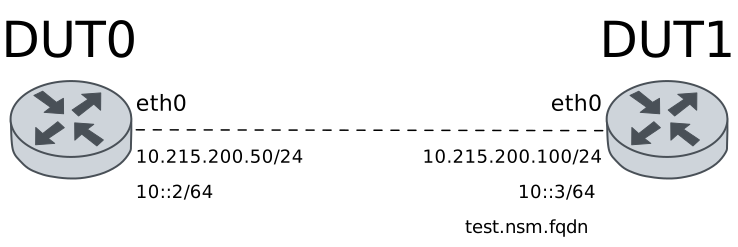
Test IPv4 HTTP URL
Description
In this scenario, HTTP NSM operations are configured in DUT0 (using an IPv4 HTTP URL).
Scenario
Step 1: Set the following configuration in DUT0 :
set interfaces ethernet eth0 address 10.215.168.64/24
set service nsm operation A alarm al_loss activate loss 5
set service nsm operation A destination-url 'http://10.215.168.1/~robot/index.html'
set service nsm operation A interval 0.05
set service nsm operation A local-interface eth0
set service nsm operation A timeout 2
set service nsm operation A type http
set service nsm operation A window 50
set system alarm al_loss
set system login user admin authentication encrypted-password '$6$GSjsCj8gHLv$/VcqU6FLi6CT2Oxn0MJQ2C2tqnRDrYKNF8HIYWJp68nvXvPdFccDsT04.WtigUONbKYrgKg8d6rEs8PjljMkH0'
Step 2: Ping IP address 10.215.168.1 from DUT0:
admin@DUT0$ ping 10.215.168.1 count 1 size 56 timeout 1Show output
PING 10.215.168.1 (10.215.168.1) 56(84) bytes of data.
64 bytes from 10.215.168.1: icmp_seq=1 ttl=64 time=0.190 ms

--- 10.215.168.1 ping statistics ---
1 packets transmitted, 1 received, 0% packet loss, time 0ms
rtt min/avg/max/mdev = 0.190/0.190/0.190/0.000 ms
Step 3: Run command system alarm show at DUT0 and check if output matches the following regular expressions:
(al_loss)\s+(false)Show output
-----------------------------------------------------------------
 Alarm   Status  Toggled  Prev-toggled  Toggle-count  Time up (%)
-----------------------------------------------------------------
al_loss  false                                     0         0.00
Step 4: Run command service nsm operation show at DUT0 and check if output matches the following regular expressions:
(al_loss)\s+(false)Show output
-------------------------------------------------------------------------------------------
Operation   Alarm   Status    RTT(s)    Jitter(s)   Loss(%)   Window  Toggled  Prev-toggled
-------------------------------------------------------------------------------------------
A          al_loss  false   0.459251    0.086009    0.000000  50/50   ---      ---
Note
HTTP operations measure RTT including DNS resolution, TCP connection establishment, and HTTP response time, making RTT values higher and more variable than ICMP or UDP probes, so we only check loss alarm here.
Note
If a packet loss rate of 80% is emulated in the network and we wait a reasonable amount of time, NSM operation will detect this packet loss in the network and trigger the ‘al_loss’ alarm.
Step 5: Modify the following configuration lines in DUT0 :
set interfaces ethernet eth0 traffic control out PLOSS
set traffic control PLOSS type network-emulator packet-loss 80
Step 6: Run command system alarm show at DUT0 and check if output matches the following regular expressions:
(al_loss)\s+(true)Show output
------------------------------------------------------------------------------------------
 Alarm   Status              Toggled               Prev-toggled  Toggle-count  Time up (%)
------------------------------------------------------------------------------------------
al_loss  true    2025-12-11 18:44:16.458735+00:00                           1        32.47
Step 7: Run command service nsm operation show at DUT0 and check if output matches the following regular expressions:
(al_loss)\s+(true)Show output
---------------------------------------------------------------------------------------------------------------------
Operation   Alarm   Status    RTT(s)    Jitter(s)    Loss(%)   Window              Toggled               Prev-toggled
---------------------------------------------------------------------------------------------------------------------
A          al_loss  true    1.457706    0.699237    54.000000  50/50   2025-12-11 18:44:16.458735+00:00  ---
Note
The previous command output should show that the ‘al_loss’ alarm is activated, since packet losses on the network are greater than the configured threshold.
Note
If the packet loss emulated in the network is removed and we wait a reasonable amount of time, NSM operation will detect packets are no longer being lost and will deactivate the ‘al_loss’ alarm.
Step 8: Modify the following configuration lines in DUT0 :
delete interfaces ethernet eth0 traffic
Step 9: Run command system alarm show at DUT0 and check if output matches the following regular expressions:
(al_loss)\s+(false)Show output
--------------------------------------------------------------------------------------------------------------
 Alarm   Status              Toggled                         Prev-toggled            Toggle-count  Time up (%)
--------------------------------------------------------------------------------------------------------------
al_loss  false   2025-12-11 18:44:21.820624+00:00  2025-12-11 18:44:16.458735+00:00             2        31.66
Step 10: Run command service nsm operation show at DUT0 and check if output matches the following regular expressions:
(al_loss)\s+(false)Show output
----------------------------------------------------------------------------------------------------------------------------------------
Operation   Alarm   Status    RTT(s)    Jitter(s)   Loss(%)   Window              Toggled                         Prev-toggled
----------------------------------------------------------------------------------------------------------------------------------------
A          al_loss  false   0.411523    0.089237    0.000000  50/50   2025-12-11 18:44:21.820624+00:00  2025-12-11 18:44:16.458735+00:00
Note
The previous command output should show that alarms are deactivated (since the network quality is good).
Test IPv4 HTTP FQDN URL
Description
In this scenario, HTTP NSM operations are configured in DUT0 (using a Fully Qualified Domain Name as the HTTP URL destination).
Scenario
Step 1: Set the following configuration in DUT0 :
set interfaces ethernet eth0 address 10.215.168.64/24
set service dns static host-name testnsm alias test.nsm.fqdn
set service dns static host-name testnsm inet 10.215.168.1
set service nsm operation A alarm al_loss activate loss 5
set service nsm operation A destination-url 'http://test.nsm.fqdn/~robot/index.html'
set service nsm operation A interval 0.05
set service nsm operation A local-interface eth0
set service nsm operation A timeout 2
set service nsm operation A type http
set service nsm operation A window 50
set system alarm al_loss
set system login user admin authentication encrypted-password '$6$GSjsCj8gHLv$/VcqU6FLi6CT2Oxn0MJQ2C2tqnRDrYKNF8HIYWJp68nvXvPdFccDsT04.WtigUONbKYrgKg8d6rEs8PjljMkH0'
Step 2: Ping IP address test.nsm.fqdn from DUT0:
admin@DUT0$ ping test.nsm.fqdn count 1 size 56 timeout 1Show output
PING testnsm (10.215.168.1) 56(84) bytes of data.
64 bytes from testnsm (10.215.168.1): icmp_seq=1 ttl=64 time=0.193 ms

--- testnsm ping statistics ---
1 packets transmitted, 1 received, 0% packet loss, time 0ms
rtt min/avg/max/mdev = 0.193/0.193/0.193/0.000 ms
Step 3: Run command system alarm show at DUT0 and check if output matches the following regular expressions:
(al_loss)\s+(false)Show output
-----------------------------------------------------------------
 Alarm   Status  Toggled  Prev-toggled  Toggle-count  Time up (%)
-----------------------------------------------------------------
al_loss  false                                     0         0.00
Step 4: Run command service nsm operation show at DUT0 and check if output matches the following regular expressions:
(al_loss)\s+(false)Show output
-------------------------------------------------------------------------------------------
Operation   Alarm   Status    RTT(s)    Jitter(s)   Loss(%)   Window  Toggled  Prev-toggled
-------------------------------------------------------------------------------------------
A          al_loss  false   0.468628    0.086150    0.000000  50/50   ---      ---
Note
HTTP operations measure RTT including DNS resolution, TCP connection establishment, and HTTP response time, making RTT values higher and more variable than ICMP or UDP probes, so we only check loss alarm here.
Note
If a packet loss rate of 80% is emulated in the network and we wait a reasonable amount of time, NSM operation will detect this packet loss in the network and trigger the ‘al_loss’ alarm.
Step 5: Modify the following configuration lines in DUT0 :
set interfaces ethernet eth0 traffic control out PLOSS
set traffic control PLOSS type network-emulator packet-loss 80
Step 6: Run command system alarm show at DUT0 and check if output matches the following regular expressions:
(al_loss)\s+(true)Show output
------------------------------------------------------------------------------------------
 Alarm   Status              Toggled               Prev-toggled  Toggle-count  Time up (%)
------------------------------------------------------------------------------------------
al_loss  true    2025-12-11 18:44:39.324450+00:00                           1        33.98
Step 7: Run command service nsm operation show at DUT0 and check if output matches the following regular expressions:
(al_loss)\s+(true)Show output
---------------------------------------------------------------------------------------------------------------------
Operation   Alarm   Status    RTT(s)    Jitter(s)    Loss(%)   Window              Toggled               Prev-toggled
---------------------------------------------------------------------------------------------------------------------
A          al_loss  true    1.269385    0.838136    44.000000  50/50   2025-12-11 18:44:39.324450+00:00  ---
Note
The previous command output should show that the ‘al_loss’ alarm is activated, since packet losses on the network are greater than the configured threshold.
Note
If the packet loss emulated in the network is removed and we wait a reasonable amount of time, NSM operation will detect packets are no longer being lost and will deactivate the ‘al_loss’ alarm.
Step 8: Modify the following configuration lines in DUT0 :
delete interfaces ethernet eth0 traffic
Step 9: Run command system alarm show at DUT0 and check if output matches the following regular expressions:
(al_loss)\s+(false)Show output
--------------------------------------------------------------------------------------------------------------
 Alarm   Status              Toggled                         Prev-toggled            Toggle-count  Time up (%)
--------------------------------------------------------------------------------------------------------------
al_loss  false   2025-12-11 18:44:44.748420+00:00  2025-12-11 18:44:39.324450+00:00             2        32.51
Step 10: Run command service nsm operation show at DUT0 and check if output matches the following regular expressions:
(al_loss)\s+(false)Show output
----------------------------------------------------------------------------------------------------------------------------------------
Operation   Alarm   Status    RTT(s)    Jitter(s)   Loss(%)   Window              Toggled                         Prev-toggled
----------------------------------------------------------------------------------------------------------------------------------------
A          al_loss  false   0.445245    0.094420    0.000000  50/50   2025-12-11 18:44:44.748420+00:00  2025-12-11 18:44:39.324450+00:00
Note
The previous command output should show that alarms are deactivated (since the network quality is good).
Test IPv6 HTTP URL
Description
In this scenario, HTTP NSM operations are configured in DUT0 (using an IPv6 HTTP URL). A simple HTTP server is configured on DUT1 to respond to requests.
Scenario
Step 1: Set the following configuration in DUT1 :
set interfaces ethernet eth0 address '10::3/64'
set interfaces ethernet eth1 address 10.215.168.128/24
set system login user admin authentication encrypted-password '$6$GSjsCj8gHLv$/VcqU6FLi6CT2Oxn0MJQ2C2tqnRDrYKNF8HIYWJp68nvXvPdFccDsT04.WtigUONbKYrgKg8d6rEs8PjljMkH0'
Step 2: Set the following configuration in DUT0 :
set interfaces ethernet eth0 address '10::2/64'
set service nsm operation A alarm al_loss activate loss 5
set service nsm operation A destination-url 'http://[10::3]:8080/index.html'
set service nsm operation A interval 0.05
set service nsm operation A local-interface eth0
set service nsm operation A timeout 2
set service nsm operation A type http
set service nsm operation A window 50
set system alarm al_loss
set system login user admin authentication encrypted-password '$6$GSjsCj8gHLv$/VcqU6FLi6CT2Oxn0MJQ2C2tqnRDrYKNF8HIYWJp68nvXvPdFccDsT04.WtigUONbKYrgKg8d6rEs8PjljMkH0'
Step 3: Ping IP address 10::3 from DUT0:
admin@DUT0$ ping 10::3 count 1 size 56 timeout 1Show output
PING 10::3(10::3) 56 data bytes
64 bytes from 10::3: icmp_seq=1 ttl=64 time=0.195 ms

--- 10::3 ping statistics ---
1 packets transmitted, 1 received, 0% packet loss, time 0ms
rtt min/avg/max/mdev = 0.195/0.195/0.195/0.000 ms
Step 4: Run command system alarm show at DUT0 and check if output matches the following regular expressions:
(al_loss)\s+(false)Show output
-----------------------------------------------------------------
 Alarm   Status  Toggled  Prev-toggled  Toggle-count  Time up (%)
-----------------------------------------------------------------
al_loss  false                                     0         0.00
Step 5: Run command service nsm operation show at DUT0 and check if output matches the following regular expressions:
(al_loss)\s+(false)Show output
-------------------------------------------------------------------------------------------
Operation   Alarm   Status    RTT(s)    Jitter(s)   Loss(%)   Window  Toggled  Prev-toggled
-------------------------------------------------------------------------------------------
A          al_loss  false   0.933198    0.214391    0.000000  50/50   ---      ---
Note
HTTP operations measure RTT including DNS resolution, TCP connection establishment, and HTTP response time, making RTT values higher and more variable than ICMP or UDP probes, so we only check loss alarm here.
Note
If a packet loss rate of 80% is emulated in the network and we wait a reasonable amount of time, NSM operation will detect this packet loss in the network and trigger the ‘al_loss’ alarm.
Step 6: Modify the following configuration lines in DUT0 :
set interfaces ethernet eth0 traffic control out PLOSS
set traffic control PLOSS type network-emulator packet-loss 80
Step 7: Run command system alarm show at DUT0 and check if output matches the following regular expressions:
(al_loss)\s+(true)Show output
------------------------------------------------------------------------------------------
 Alarm   Status              Toggled               Prev-toggled  Toggle-count  Time up (%)
------------------------------------------------------------------------------------------
al_loss  true    2025-12-11 18:45:12.470903+00:00                           1        31.13
Step 8: Run command service nsm operation show at DUT0 and check if output matches the following regular expressions:
(al_loss)\s+(true)Show output
---------------------------------------------------------------------------------------------------------------------
Operation   Alarm   Status    RTT(s)    Jitter(s)    Loss(%)   Window              Toggled               Prev-toggled
---------------------------------------------------------------------------------------------------------------------
A          al_loss  true    1.929929    0.140142    90.000000  50/50   2025-12-11 18:45:12.470903+00:00  ---
Note
The previous command output should show that the ‘al_loss’ alarm is activated, since packet losses on the network are greater than the configured threshold.
Note
If the packet loss emulated in the network is removed and we wait a reasonable amount of time, NSM operation will detect packets are no longer being lost and will deactivate the ‘al_loss’ alarm.
Step 9: Modify the following configuration lines in DUT0 :
delete interfaces ethernet eth0 traffic
Step 10: Run command system alarm show at DUT0 and check if output matches the following regular expressions:
(al_loss)\s+(false)Show output
--------------------------------------------------------------------------------------------------------------
 Alarm   Status              Toggled                         Prev-toggled            Toggle-count  Time up (%)
--------------------------------------------------------------------------------------------------------------
al_loss  false   2025-12-11 18:45:26.359997+00:00  2025-12-11 18:45:12.470903+00:00             2        61.19
Step 11: Run command service nsm operation show at DUT0 and check if output matches the following regular expressions:
(al_loss)\s+(false)Show output
----------------------------------------------------------------------------------------------------------------------------------------
Operation   Alarm   Status    RTT(s)    Jitter(s)   Loss(%)   Window              Toggled                         Prev-toggled
----------------------------------------------------------------------------------------------------------------------------------------
A          al_loss  false   0.427165    0.058556    0.000000  50/50   2025-12-11 18:45:26.359997+00:00  2025-12-11 18:45:12.470903+00:00
Note
The previous command output should show that alarms are deactivated (since the network quality is good).
Test IPv6 HTTP FQDN URL
Description
In this scenario, HTTP NSM operations are configured in DUT0 (using a Fully Qualified Domain Name as the IPv6 HTTP URL destination).
Scenario
Step 1: Set the following configuration in DUT1 :
set interfaces ethernet eth0 address '10::3/64'
set interfaces ethernet eth1 address 10.215.168.128/24
set system login user admin authentication encrypted-password '$6$GSjsCj8gHLv$/VcqU6FLi6CT2Oxn0MJQ2C2tqnRDrYKNF8HIYWJp68nvXvPdFccDsT04.WtigUONbKYrgKg8d6rEs8PjljMkH0'
Step 2: Set the following configuration in DUT0 :
set interfaces ethernet eth0 address '10::2/64'
set service dns static host-name testnsm alias test.nsm.fqdn
set service dns static host-name testnsm inet '10::3'
set service nsm operation A alarm al_loss activate loss 5
set service nsm operation A destination-url 'http://test.nsm.fqdn:8080/index.html'
set service nsm operation A interval 0.05
set service nsm operation A local-interface eth0
set service nsm operation A timeout 2
set service nsm operation A type http
set service nsm operation A window 50
set system alarm al_loss
set system login user admin authentication encrypted-password '$6$GSjsCj8gHLv$/VcqU6FLi6CT2Oxn0MJQ2C2tqnRDrYKNF8HIYWJp68nvXvPdFccDsT04.WtigUONbKYrgKg8d6rEs8PjljMkH0'
Step 3: Ping IP address test.nsm.fqdn from DUT0:
admin@DUT0$ ping test.nsm.fqdn count 1 size 56 timeout 1Show output
PING test.nsm.fqdn(testnsm (10::3)) 56 data bytes
64 bytes from testnsm (10::3): icmp_seq=1 ttl=64 time=0.226 ms

--- test.nsm.fqdn ping statistics ---
1 packets transmitted, 1 received, 0% packet loss, time 0ms
rtt min/avg/max/mdev = 0.226/0.226/0.226/0.000 ms
Step 4: Run command system alarm show at DUT0 and check if output matches the following regular expressions:
(al_loss)\s+(false)Show output
-----------------------------------------------------------------
 Alarm   Status  Toggled  Prev-toggled  Toggle-count  Time up (%)
-----------------------------------------------------------------
al_loss  false                                     0         0.00
Step 5: Run command service nsm operation show at DUT0 and check if output matches the following regular expressions:
(al_loss)\s+(false)Show output
-------------------------------------------------------------------------------------------
Operation   Alarm   Status    RTT(s)    Jitter(s)   Loss(%)   Window  Toggled  Prev-toggled
-------------------------------------------------------------------------------------------
A          al_loss  false   0.791200    0.179431    0.000000  50/50   ---      ---
Note
HTTP operations measure RTT including DNS resolution, TCP connection establishment, and HTTP response time, making RTT values higher and more variable than ICMP or UDP probes, so we only check loss alarm here.
Note
If a packet loss rate of 80% is emulated in the network and we wait a reasonable amount of time, NSM operation will detect this packet loss in the network and trigger the ‘al_loss’ alarm.
Step 6: Modify the following configuration lines in DUT0 :
set interfaces ethernet eth0 traffic control out PLOSS
set traffic control PLOSS type network-emulator packet-loss 80
Step 7: Run command system alarm show at DUT0 and check if output matches the following regular expressions:
(al_loss)\s+(true)Show output
------------------------------------------------------------------------------------------
 Alarm   Status              Toggled               Prev-toggled  Toggle-count  Time up (%)
------------------------------------------------------------------------------------------
al_loss  true    2025-12-11 18:45:54.127731+00:00                           1        32.45
Step 8: Run command service nsm operation show at DUT0 and check if output matches the following regular expressions:
(al_loss)\s+(true)Show output
----------------------------------------------------------------------------------------------------------------------
Operation   Alarm   Status    RTT(s)    Jitter(s)    Loss(%)    Window              Toggled               Prev-toggled
----------------------------------------------------------------------------------------------------------------------
A          al_loss  true    2.000000    0.000000    100.000000  50/50   2025-12-11 18:45:54.127731+00:00  ---
Note
The previous command output should show that the ‘al_loss’ alarm is activated, since packet losses on the network are greater than the configured threshold.
Note
If the packet loss emulated in the network is removed and we wait a reasonable amount of time, NSM operation will detect packets are no longer being lost and will deactivate the ‘al_loss’ alarm.
Step 9: Modify the following configuration lines in DUT0 :
delete interfaces ethernet eth0 traffic
Step 10: Run command system alarm show at DUT0 and check if output matches the following regular expressions:
(al_loss)\s+(false)Show output
--------------------------------------------------------------------------------------------------------------
 Alarm   Status              Toggled                         Prev-toggled            Toggle-count  Time up (%)
--------------------------------------------------------------------------------------------------------------
al_loss  false   2025-12-11 18:46:08.480051+00:00  2025-12-11 18:45:54.127731+00:00             2        57.99
Step 11: Run command service nsm operation show at DUT0 and check if output matches the following regular expressions:
(al_loss)\s+(false)Show output
----------------------------------------------------------------------------------------------------------------------------------------
Operation   Alarm   Status    RTT(s)    Jitter(s)   Loss(%)   Window              Toggled                         Prev-toggled
----------------------------------------------------------------------------------------------------------------------------------------
A          al_loss  false   0.235396    0.091680    0.000000  50/50   2025-12-11 18:46:08.480051+00:00  2025-12-11 18:45:54.127731+00:00
Note
The previous command output should show that alarms are deactivated (since the network quality is good).