Hash-Policy
These scenarios cover some aspects related to link-aggregation. This particular one covers the hash-policy configuration needed to setup the desired load balancing. In OSDx, this can be achieved using bonding interfaces in either xor-hash or 802.3ad modes, or transmit-load-balance and adaptive-load-balance in static mode.
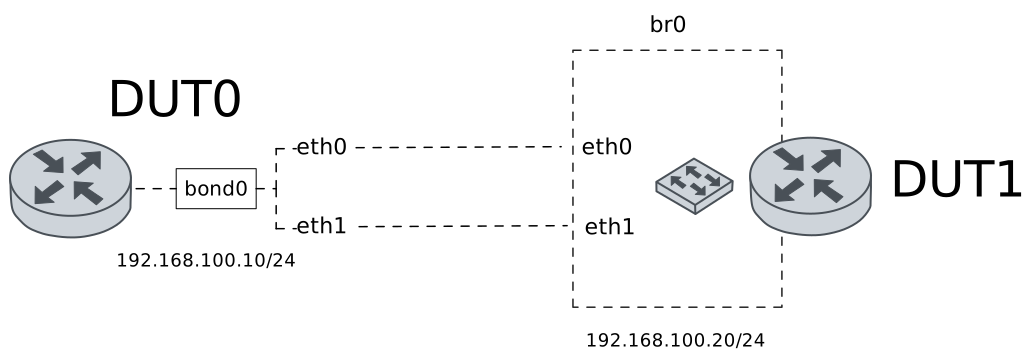
Test hash-policy
Description
A bonding interface is configured in DUT0 using xor-hash mode. This scenario shows how to set the hash-policy option to manage load balancing.
Scenario
Step 1: Set the following configuration in DUT0 :
set interfaces bonding bond0 address 192.168.100.10/24
set interfaces bonding bond0 miimon 100
set interfaces bonding bond0 mode xor-hash
set interfaces ethernet eth0 bond-group bond0
set interfaces ethernet eth1 bond-group bond0
set system login user admin authentication encrypted-password '$6$GSjsCj8gHLv$/VcqU6FLi6CT2Oxn0MJQ2C2tqnRDrYKNF8HIYWJp68nvXvPdFccDsT04.WtigUONbKYrgKg8d6rEs8PjljMkH0'
Step 2: Set the following configuration in DUT1 :
set interfaces bridge br0 address 192.168.100.20/24
set interfaces bridge br0 stp version rstp
set interfaces ethernet eth0 bridge-group bridge br0
set interfaces ethernet eth1 bridge-group bridge br0
set system login user admin authentication encrypted-password '$6$GSjsCj8gHLv$/VcqU6FLi6CT2Oxn0MJQ2C2tqnRDrYKNF8HIYWJp68nvXvPdFccDsT04.WtigUONbKYrgKg8d6rEs8PjljMkH0'
Step 3: Run command interfaces bonding show at DUT0 and check if output matches the following regular expressions:
bond0\s+192.168.100\.10\/24\s+up\s+upShow output
------------------------------------------------------------------
Name            IP Address           Admin  Oper  Vrf  Description
------------------------------------------------------------------
bond0  192.168.100.10/24             up     up
       fe80::dcad:beff:feef:6c01/64
Step 4: Run command interfaces bonding bond0 show ports at DUT0 and check if output contains the following tokens:
Bonding Mode: load balancing (xor)Show output
Ethernet Channel Bonding Driver: v6.1.158

Bonding Mode: load balancing (xor)
Transmit Hash Policy: layer2 (0)
MII Status: up
MII Polling Interval (ms): 100
Up Delay (ms): 0
Down Delay (ms): 0
Peer Notification Delay (ms): 0

Slave Interface: eth1
MII Status: up
Speed: Unknown
Duplex: Unknown
Link Failure Count: 0
Permanent HW addr: de:ad:be:ef:6c:01
Slave queue ID: 0

Slave Interface: eth0
MII Status: up
Speed: Unknown
Duplex: Unknown
Link Failure Count: 0
Permanent HW addr: de:ad:be:ef:6c:00
Slave queue ID: 0
Step 5: Ping IP address 192.168.100.20 from DUT0:
admin@DUT0$ ping 192.168.100.20 count 1 size 56 timeout 1Show output
PING 192.168.100.20 (192.168.100.20) 56(84) bytes of data.
64 bytes from 192.168.100.20: icmp_seq=1 ttl=64 time=453 ms

--- 192.168.100.20 ping statistics ---
1 packets transmitted, 1 received, 0% packet loss, time 0ms
rtt min/avg/max/mdev = 453.305/453.305/453.305/0.000 ms
Step 6: Run command interfaces bonding bond0 show ports at DUT0 and check if output contains the following tokens:
Transmit Hash Policy: layer2 (0)Show output
Ethernet Channel Bonding Driver: v6.1.158

Bonding Mode: load balancing (xor)
Transmit Hash Policy: layer2 (0)
MII Status: up
MII Polling Interval (ms): 100
Up Delay (ms): 0
Down Delay (ms): 0
Peer Notification Delay (ms): 0

Slave Interface: eth1
MII Status: up
Speed: Unknown
Duplex: Unknown
Link Failure Count: 0
Permanent HW addr: de:ad:be:ef:6c:01
Slave queue ID: 0

Slave Interface: eth0
MII Status: up
Speed: Unknown
Duplex: Unknown
Link Failure Count: 0
Permanent HW addr: de:ad:be:ef:6c:00
Slave queue ID: 0
Step 7: Run command interfaces ethernet clear at DUT0.
Step 8: Initiate a bandwidth test from DUT0 to DUT1
admin@DUT1$ monitor test performance server port 5001
admin@DUT0$ monitor test performance client 192.168.100.20 duration 5 port 5001 parallel 10
Expect this output in
DUT0:Connecting to host 192.168.100.20, port 5001 [ 5] local 192.168.100.10 port 38722 connected to 192.168.100.20 port 5001 [ 7] local 192.168.100.10 port 38736 connected to 192.168.100.20 port 5001 [ 9] local 192.168.100.10 port 38748 connected to 192.168.100.20 port 5001 [ 11] local 192.168.100.10 port 38762 connected to 192.168.100.20 port 5001 [ 13] local 192.168.100.10 port 38766 connected to 192.168.100.20 port 5001 [ 15] local 192.168.100.10 port 38770 connected to 192.168.100.20 port 5001 [ 17] local 192.168.100.10 port 38778 connected to 192.168.100.20 port 5001 [ 19] local 192.168.100.10 port 38782 connected to 192.168.100.20 port 5001 [ 21] local 192.168.100.10 port 38786 connected to 192.168.100.20 port 5001 [ 23] local 192.168.100.10 port 38796 connected to 192.168.100.20 port 5001 [ ID] Interval Transfer Bitrate Retr Cwnd [ 5] 0.00-1.00 sec 11.3 MBytes 94.9 Mbits/sec 45 201 KBytes [ 7] 0.00-1.00 sec 11.4 MBytes 95.7 Mbits/sec 76 150 KBytes [ 9] 0.00-1.00 sec 10.9 MBytes 91.8 Mbits/sec 45 201 KBytes [ 11] 0.00-1.00 sec 9.80 MBytes 82.2 Mbits/sec 45 209 KBytes [ 13] 0.00-1.00 sec 11.1 MBytes 93.0 Mbits/sec 45 212 KBytes [ 15] 0.00-1.00 sec 10.0 MBytes 84.3 Mbits/sec 45 195 KBytes [ 17] 0.00-1.00 sec 10.4 MBytes 86.8 Mbits/sec 45 209 KBytes [ 19] 0.00-1.00 sec 9.61 MBytes 80.6 Mbits/sec 45 189 KBytes [ 21] 0.00-1.00 sec 10.1 MBytes 84.8 Mbits/sec 45 206 KBytes [ 23] 0.00-1.00 sec 10.5 MBytes 87.9 Mbits/sec 90 137 KBytes [SUM] 0.00-1.00 sec 105 MBytes 882 Mbits/sec 526 - - - - - - - - - - - - - - - - - - - - - - - - - [ 5] 1.00-2.00 sec 13.1 MBytes 110 Mbits/sec 17 137 KBytes [ 7] 1.00-2.00 sec 13.2 MBytes 111 Mbits/sec 35 140 KBytes [ 9] 1.00-2.00 sec 13.6 MBytes 114 Mbits/sec 13 195 KBytes [ 11] 1.00-2.00 sec 13.2 MBytes 111 Mbits/sec 45 197 KBytes [ 13] 1.00-2.00 sec 14.4 MBytes 120 Mbits/sec 13 171 KBytes [ 15] 1.00-2.00 sec 12.9 MBytes 108 Mbits/sec 45 185 KBytes [ 17] 1.00-2.00 sec 13.4 MBytes 112 Mbits/sec 19 191 KBytes [ 19] 1.00-2.00 sec 12.6 MBytes 105 Mbits/sec 47 126 KBytes [ 21] 1.00-2.00 sec 13.3 MBytes 112 Mbits/sec 45 197 KBytes [ 23] 1.00-2.00 sec 12.9 MBytes 108 Mbits/sec 0 191 KBytes [SUM] 1.00-2.00 sec 133 MBytes 1.11 Gbits/sec 279 - - - - - - - - - - - - - - - - - - - - - - - - - [ 5] 2.00-3.00 sec 32.4 MBytes 272 Mbits/sec 0 253 KBytes [ 7] 2.00-3.00 sec 32.3 MBytes 271 Mbits/sec 0 253 KBytes [ 9] 2.00-3.00 sec 32.7 MBytes 275 Mbits/sec 0 260 KBytes [ 11] 2.00-3.00 sec 33.1 MBytes 278 Mbits/sec 0 262 KBytes [ 13] 2.00-3.00 sec 32.9 MBytes 276 Mbits/sec 0 256 KBytes [ 15] 2.00-3.00 sec 32.9 MBytes 276 Mbits/sec 0 259 KBytes [ 17] 2.00-3.00 sec 32.6 MBytes 273 Mbits/sec 0 262 KBytes [ 19] 2.00-3.00 sec 32.2 MBytes 270 Mbits/sec 0 249 KBytes [ 21] 2.00-3.00 sec 32.9 MBytes 276 Mbits/sec 0 260 KBytes [ 23] 2.00-3.00 sec 32.7 MBytes 275 Mbits/sec 0 262 KBytes [SUM] 2.00-3.00 sec 327 MBytes 2.74 Gbits/sec 0 - - - - - - - - - - - - - - - - - - - - - - - - - [ 5] 3.00-4.00 sec 31.9 MBytes 268 Mbits/sec 0 266 KBytes [ 7] 3.00-4.00 sec 32.5 MBytes 273 Mbits/sec 0 266 KBytes [ 9] 3.00-4.00 sec 32.1 MBytes 270 Mbits/sec 0 272 KBytes [ 11] 3.00-4.00 sec 32.4 MBytes 272 Mbits/sec 0 272 KBytes [ 13] 3.00-4.00 sec 32.1 MBytes 270 Mbits/sec 0 266 KBytes [ 15] 3.00-4.00 sec 32.3 MBytes 271 Mbits/sec 0 270 KBytes [ 17] 3.00-4.00 sec 32.6 MBytes 274 Mbits/sec 0 272 KBytes [ 19] 3.00-4.00 sec 32.5 MBytes 273 Mbits/sec 0 262 KBytes [ 21] 3.00-4.00 sec 32.5 MBytes 273 Mbits/sec 0 272 KBytes [ 23] 3.00-4.00 sec 32.1 MBytes 269 Mbits/sec 0 273 KBytes [SUM] 3.00-4.00 sec 323 MBytes 2.71 Gbits/sec 0 - - - - - - - - - - - - - - - - - - - - - - - - - [ 5] 4.00-5.00 sec 35.5 MBytes 298 Mbits/sec 0 277 KBytes [ 7] 4.00-5.00 sec 35.4 MBytes 297 Mbits/sec 0 279 KBytes [ 9] 4.00-5.00 sec 36.0 MBytes 302 Mbits/sec 0 280 KBytes [ 11] 4.00-5.00 sec 35.5 MBytes 298 Mbits/sec 0 284 KBytes [ 13] 4.00-5.00 sec 35.8 MBytes 300 Mbits/sec 0 279 KBytes [ 15] 4.00-5.00 sec 35.6 MBytes 299 Mbits/sec 0 284 KBytes [ 17] 4.00-5.00 sec 35.4 MBytes 297 Mbits/sec 0 284 KBytes [ 19] 4.00-5.00 sec 35.5 MBytes 298 Mbits/sec 0 274 KBytes [ 21] 4.00-5.00 sec 35.5 MBytes 298 Mbits/sec 0 284 KBytes [ 23] 4.00-5.00 sec 35.5 MBytes 298 Mbits/sec 0 287 KBytes [SUM] 4.00-5.00 sec 356 MBytes 2.98 Gbits/sec 0 - - - - - - - - - - - - - - - - - - - - - - - - - [ ID] Interval Transfer Bitrate Retr [ 5] 0.00-5.00 sec 124 MBytes 208 Mbits/sec 62 sender [ 5] 0.00-5.01 sec 123 MBytes 206 Mbits/sec receiver [ 7] 0.00-5.00 sec 125 MBytes 209 Mbits/sec 111 sender [ 7] 0.00-5.01 sec 123 MBytes 207 Mbits/sec receiver [ 9] 0.00-5.00 sec 125 MBytes 210 Mbits/sec 58 sender [ 9] 0.00-5.01 sec 124 MBytes 208 Mbits/sec receiver [ 11] 0.00-5.00 sec 124 MBytes 208 Mbits/sec 90 sender [ 11] 0.00-5.01 sec 123 MBytes 205 Mbits/sec receiver [ 13] 0.00-5.00 sec 126 MBytes 212 Mbits/sec 58 sender [ 13] 0.00-5.01 sec 125 MBytes 209 Mbits/sec receiver [ 15] 0.00-5.00 sec 124 MBytes 208 Mbits/sec 90 sender [ 15] 0.00-5.01 sec 122 MBytes 205 Mbits/sec receiver [ 17] 0.00-5.00 sec 124 MBytes 209 Mbits/sec 64 sender [ 17] 0.00-5.01 sec 123 MBytes 206 Mbits/sec receiver [ 19] 0.00-5.00 sec 122 MBytes 205 Mbits/sec 92 sender [ 19] 0.00-5.01 sec 121 MBytes 203 Mbits/sec receiver [ 21] 0.00-5.00 sec 124 MBytes 209 Mbits/sec 90 sender [ 21] 0.00-5.01 sec 123 MBytes 206 Mbits/sec receiver [ 23] 0.00-5.00 sec 124 MBytes 208 Mbits/sec 90 sender [ 23] 0.00-5.01 sec 123 MBytes 205 Mbits/sec receiver [SUM] 0.00-5.00 sec 1.21 GBytes 2.09 Gbits/sec 805 sender [SUM] 0.00-5.01 sec 1.20 GBytes 2.06 Gbits/sec receiver iperf Done.
Step 9: Run command interfaces ethernet show counters at DUT0 and check if output matches the following regular expressions:
\s+up\s+(?:[1-9]?\d)\s+\d+\s+\d+\s+(?:[1-9]?\d)
\s+up\s+\d{4,}\s+\d+\s+\d+\s+\d{4,}
Show output
------------------------------------------------------------------------------
Name  Oper  Rx Packets  Rx Bytes  Rx Errors  Tx Packets   Tx Bytes   Tx Errors
------------------------------------------------------------------------------
eth0  up        210698  13902269          0      892501  1351177355          0
eth1  up             0         0          0           0           0          0
eth2  down           0         0          0           0           0          0
eth3  down           0         0          0           0           0          0
Note
As you can see, traffic is going out through only one of the bonded interfaces.
Step 10: Modify the following configuration lines in DUT0 :
set interfaces bonding bond0 hash-policy layer3+4
Step 11: Run command interfaces bonding show at DUT0 and check if output matches the following regular expressions:
bond0\s+192.168.100\.10\/24\s+up\s+upShow output
------------------------------------------------------------------
Name            IP Address           Admin  Oper  Vrf  Description
------------------------------------------------------------------
bond0  192.168.100.10/24             up     up
       fe80::dcad:beff:feef:6c01/64
Step 12: Run command interfaces bonding bond0 show ports at DUT0 and check if output contains the following tokens:
Bonding Mode: load balancing (xor)Show output
Ethernet Channel Bonding Driver: v6.1.158

Bonding Mode: load balancing (xor)
Transmit Hash Policy: layer3+4 (1)
MII Status: up
MII Polling Interval (ms): 100
Up Delay (ms): 0
Down Delay (ms): 0
Peer Notification Delay (ms): 0

Slave Interface: eth1
MII Status: up
Speed: Unknown
Duplex: Unknown
Link Failure Count: 0
Permanent HW addr: de:ad:be:ef:6c:01
Slave queue ID: 0

Slave Interface: eth0
MII Status: up
Speed: Unknown
Duplex: Unknown
Link Failure Count: 0
Permanent HW addr: de:ad:be:ef:6c:00
Slave queue ID: 0
Step 13: Ping IP address 192.168.100.20 from DUT0:
admin@DUT0$ ping 192.168.100.20 count 1 size 56 timeout 1Show output
PING 192.168.100.20 (192.168.100.20) 56(84) bytes of data.
64 bytes from 192.168.100.20: icmp_seq=1 ttl=64 time=0.251 ms

--- 192.168.100.20 ping statistics ---
1 packets transmitted, 1 received, 0% packet loss, time 0ms
rtt min/avg/max/mdev = 0.251/0.251/0.251/0.000 ms
Step 14: Run command interfaces bonding bond0 show ports at DUT0 and check if output contains the following tokens:
Transmit Hash Policy: layer3+4 (1)Show output
Ethernet Channel Bonding Driver: v6.1.158

Bonding Mode: load balancing (xor)
Transmit Hash Policy: layer3+4 (1)
MII Status: up
MII Polling Interval (ms): 100
Up Delay (ms): 0
Down Delay (ms): 0
Peer Notification Delay (ms): 0

Slave Interface: eth1
MII Status: up
Speed: Unknown
Duplex: Unknown
Link Failure Count: 0
Permanent HW addr: de:ad:be:ef:6c:01
Slave queue ID: 0

Slave Interface: eth0
MII Status: up
Speed: Unknown
Duplex: Unknown
Link Failure Count: 0
Permanent HW addr: de:ad:be:ef:6c:00
Slave queue ID: 0
Step 15: Run command interfaces ethernet clear at DUT0.
Step 16: Initiate a bandwidth test from DUT0 to DUT1
admin@DUT1$ monitor test performance server port 5001
admin@DUT0$ monitor test performance client 192.168.100.20 duration 5 port 5001 parallel 10
Expect this output in
DUT0:Connecting to host 192.168.100.20, port 5001 [ 5] local 192.168.100.10 port 41700 connected to 192.168.100.20 port 5001 [ 7] local 192.168.100.10 port 41704 connected to 192.168.100.20 port 5001 [ 9] local 192.168.100.10 port 41714 connected to 192.168.100.20 port 5001 [ 11] local 192.168.100.10 port 41720 connected to 192.168.100.20 port 5001 [ 13] local 192.168.100.10 port 41728 connected to 192.168.100.20 port 5001 [ 15] local 192.168.100.10 port 41732 connected to 192.168.100.20 port 5001 [ 17] local 192.168.100.10 port 41738 connected to 192.168.100.20 port 5001 [ 19] local 192.168.100.10 port 41740 connected to 192.168.100.20 port 5001 [ 21] local 192.168.100.10 port 41746 connected to 192.168.100.20 port 5001 [ 23] local 192.168.100.10 port 41762 connected to 192.168.100.20 port 5001 [ ID] Interval Transfer Bitrate Retr Cwnd [ 5] 0.00-1.00 sec 34.6 MBytes 290 Mbits/sec 0 738 KBytes [ 7] 0.00-1.00 sec 32.7 MBytes 275 Mbits/sec 0 520 KBytes [ 9] 0.00-1.00 sec 48.5 MBytes 407 Mbits/sec 0 1.03 MBytes [ 11] 0.00-1.00 sec 26.5 MBytes 222 Mbits/sec 0 397 KBytes [ 13] 0.00-1.00 sec 26.0 MBytes 218 Mbits/sec 0 395 KBytes [ 15] 0.00-1.00 sec 24.2 MBytes 203 Mbits/sec 0 387 KBytes [ 17] 0.00-1.00 sec 52.0 MBytes 436 Mbits/sec 0 1.24 MBytes [ 19] 0.00-1.00 sec 33.8 MBytes 284 Mbits/sec 0 525 KBytes [ 21] 0.00-1.00 sec 32.9 MBytes 276 Mbits/sec 0 510 KBytes [ 23] 0.00-1.00 sec 31.6 MBytes 265 Mbits/sec 0 482 KBytes [SUM] 0.00-1.00 sec 343 MBytes 2.88 Gbits/sec 0 - - - - - - - - - - - - - - - - - - - - - - - - - [ 5] 1.00-2.00 sec 30.0 MBytes 252 Mbits/sec 252 219 KBytes [ 7] 1.00-2.00 sec 27.8 MBytes 233 Mbits/sec 222 175 KBytes [ 9] 1.00-2.00 sec 45.0 MBytes 377 Mbits/sec 439 387 KBytes [ 11] 1.00-2.00 sec 24.1 MBytes 202 Mbits/sec 173 158 KBytes [ 13] 1.00-2.00 sec 24.7 MBytes 207 Mbits/sec 272 157 KBytes [ 15] 1.00-2.00 sec 23.9 MBytes 200 Mbits/sec 246 153 KBytes [ 17] 1.00-2.00 sec 43.8 MBytes 367 Mbits/sec 336 455 KBytes [ 19] 1.00-2.00 sec 25.7 MBytes 215 Mbits/sec 260 175 KBytes [ 21] 1.00-2.00 sec 28.4 MBytes 238 Mbits/sec 196 177 KBytes [ 23] 1.00-2.00 sec 28.4 MBytes 238 Mbits/sec 220 230 KBytes [SUM] 1.00-2.00 sec 302 MBytes 2.53 Gbits/sec 2616 - - - - - - - - - - - - - - - - - - - - - - - - - [ 5] 2.00-3.00 sec 28.8 MBytes 241 Mbits/sec 0 281 KBytes [ 7] 2.00-3.00 sec 25.7 MBytes 216 Mbits/sec 0 256 KBytes [ 9] 2.00-3.00 sec 41.2 MBytes 346 Mbits/sec 0 419 KBytes [ 11] 2.00-3.00 sec 25.0 MBytes 210 Mbits/sec 0 236 KBytes [ 13] 2.00-3.00 sec 25.4 MBytes 213 Mbits/sec 0 245 KBytes [ 15] 2.00-3.00 sec 23.6 MBytes 198 Mbits/sec 0 236 KBytes [ 17] 2.00-3.00 sec 42.5 MBytes 357 Mbits/sec 0 492 KBytes [ 19] 2.00-3.00 sec 26.9 MBytes 226 Mbits/sec 0 253 KBytes [ 21] 2.00-3.00 sec 31.4 MBytes 264 Mbits/sec 0 274 KBytes [ 23] 2.00-3.00 sec 34.1 MBytes 286 Mbits/sec 0 313 KBytes [SUM] 2.00-3.00 sec 305 MBytes 2.56 Gbits/sec 0 - - - - - - - - - - - - - - - - - - - - - - - - - [ 5] 3.00-4.00 sec 28.8 MBytes 241 Mbits/sec 136 259 KBytes [ 7] 3.00-4.00 sec 27.8 MBytes 233 Mbits/sec 125 243 KBytes [ 9] 3.00-4.00 sec 42.5 MBytes 356 Mbits/sec 22 352 KBytes [ 11] 3.00-4.00 sec 26.7 MBytes 223 Mbits/sec 77 243 KBytes [ 13] 3.00-4.00 sec 26.5 MBytes 222 Mbits/sec 135 246 KBytes [ 15] 3.00-4.00 sec 27.2 MBytes 228 Mbits/sec 45 236 KBytes [ 17] 3.00-4.00 sec 45.0 MBytes 377 Mbits/sec 33 382 KBytes [ 19] 3.00-4.00 sec 26.8 MBytes 224 Mbits/sec 135 245 KBytes [ 21] 3.00-4.00 sec 35.9 MBytes 300 Mbits/sec 1 293 KBytes [ 23] 3.00-4.00 sec 38.3 MBytes 321 Mbits/sec 19 297 KBytes [SUM] 3.00-4.00 sec 325 MBytes 2.73 Gbits/sec 728 - - - - - - - - - - - - - - - - - - - - - - - - - [ 5] 4.00-5.00 sec 26.2 MBytes 220 Mbits/sec 90 257 KBytes [ 7] 4.00-5.00 sec 25.5 MBytes 214 Mbits/sec 45 245 KBytes [ 9] 4.00-5.00 sec 36.2 MBytes 304 Mbits/sec 69 325 KBytes [ 11] 4.00-5.00 sec 27.0 MBytes 227 Mbits/sec 33 250 KBytes [ 13] 4.00-5.00 sec 26.4 MBytes 222 Mbits/sec 29 246 KBytes [ 15] 4.00-5.00 sec 22.4 MBytes 188 Mbits/sec 13 201 KBytes [ 17] 4.00-5.00 sec 38.8 MBytes 325 Mbits/sec 90 339 KBytes [ 19] 4.00-5.00 sec 22.1 MBytes 186 Mbits/sec 75 199 KBytes [ 21] 4.00-5.00 sec 33.5 MBytes 281 Mbits/sec 45 291 KBytes [ 23] 4.00-5.00 sec 33.2 MBytes 279 Mbits/sec 18 297 KBytes [SUM] 4.00-5.00 sec 291 MBytes 2.45 Gbits/sec 507 - - - - - - - - - - - - - - - - - - - - - - - - - [ ID] Interval Transfer Bitrate Retr [ 5] 0.00-5.00 sec 148 MBytes 249 Mbits/sec 478 sender [ 5] 0.00-5.01 sec 146 MBytes 244 Mbits/sec receiver [ 7] 0.00-5.00 sec 140 MBytes 234 Mbits/sec 392 sender [ 7] 0.00-5.01 sec 137 MBytes 229 Mbits/sec receiver [ 9] 0.00-5.00 sec 214 MBytes 358 Mbits/sec 530 sender [ 9] 0.00-5.01 sec 211 MBytes 353 Mbits/sec receiver [ 11] 0.00-5.00 sec 129 MBytes 217 Mbits/sec 283 sender [ 11] 0.00-5.01 sec 127 MBytes 213 Mbits/sec receiver [ 13] 0.00-5.00 sec 129 MBytes 216 Mbits/sec 436 sender [ 13] 0.00-5.01 sec 127 MBytes 212 Mbits/sec receiver [ 15] 0.00-5.00 sec 121 MBytes 203 Mbits/sec 304 sender [ 15] 0.00-5.01 sec 119 MBytes 199 Mbits/sec receiver [ 17] 0.00-5.00 sec 222 MBytes 372 Mbits/sec 459 sender [ 17] 0.00-5.01 sec 219 MBytes 367 Mbits/sec receiver [ 19] 0.00-5.00 sec 135 MBytes 227 Mbits/sec 470 sender [ 19] 0.00-5.01 sec 133 MBytes 223 Mbits/sec receiver [ 21] 0.00-5.00 sec 162 MBytes 272 Mbits/sec 242 sender [ 21] 0.00-5.01 sec 160 MBytes 267 Mbits/sec receiver [ 23] 0.00-5.00 sec 166 MBytes 278 Mbits/sec 257 sender [ 23] 0.00-5.01 sec 163 MBytes 273 Mbits/sec receiver [SUM] 0.00-5.00 sec 1.53 GBytes 2.63 Gbits/sec 3851 sender [SUM] 0.00-5.01 sec 1.51 GBytes 2.58 Gbits/sec receiver iperf Done.
Step 17: Run command interfaces ethernet show counters at DUT0 and check if output matches the following regular expressions:
eth0\s+up\s+\d{4,}\s+\d+\s+\d+\s+\d{4,}
eth1\s+up\s+\d{4,}\s+\d+\s+\d+\s+\d{4,}
Show output
-----------------------------------------------------------------------------
Name  Oper  Rx Packets  Rx Bytes  Rx Errors  Tx Packets  Tx Bytes   Tx Errors
-----------------------------------------------------------------------------
eth0  up        129163   8545939          0      574724  870036670          0
eth1  up        133813   8855467          0      547850  829353966          0
eth2  down           0         0          0           0          0          0
eth3  down           0         0          0           0          0          0
Note
As you can see, this time traffic is going out through both bonded interfaces.