Static
These scenarios cover some aspects related to link-aggregation (combining multiple network connections simultaneously to increase throughput, provide redundancy, or both). On OSDx, this can be achieved using bonding interfaces.
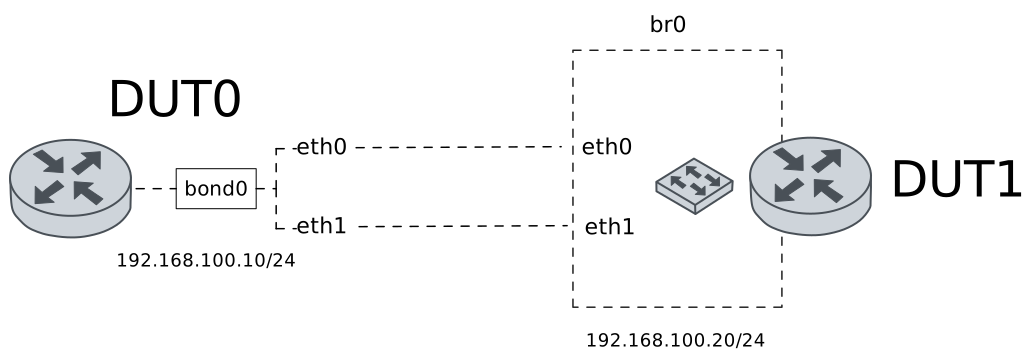
Test Static Transmit Load Balance
Description
A bonding interface is configured in DUT0 using the transmit load balance in static mode. This mode can be used to achieve load-balancing in transmission. In this scenario, transmission load balancing is performed via a hash policy.
Scenario
Example 1
Step 1: Set the following configuration in DUT0 :
set interfaces bonding bond0 address 192.168.100.10/24
set interfaces bonding bond0 disable-dynamic-lb
set interfaces bonding bond0 hash-policy layer3+4
set interfaces bonding bond0 miimon 100
set interfaces bonding bond0 mode transmit-load-balance
set interfaces ethernet eth0p0 bond-group bond0
set interfaces ethernet eth1 bond-group bond0
set system login user admin authentication encrypted-password '$6$GSjsCj8gHLv$/VcqU6FLi6CT2Oxn0MJQ2C2tqnRDrYKNF8HIYWJp68nvXvPdFccDsT04.WtigUONbKYrgKg8d6rEs8PjljMkH0'
Step 2: Set the following configuration in DUT1 :
set interfaces bridge br0 address 192.168.100.20/24
set interfaces bridge br0 stp version rstp
set interfaces ethernet eth0 bridge-group bridge br0
set interfaces ethernet eth2 bridge-group bridge br0
set system login user admin authentication encrypted-password '$6$GSjsCj8gHLv$/VcqU6FLi6CT2Oxn0MJQ2C2tqnRDrYKNF8HIYWJp68nvXvPdFccDsT04.WtigUONbKYrgKg8d6rEs8PjljMkH0'
Step 3: Run command interfaces bonding show at DUT0 and check if output matches the following regular expressions:
bond0\s+192.168.100\.10\/24\s+up\s+upShow output
---------------------------------------------------------------
Name          IP Address          Admin  Oper  Vrf  Description
---------------------------------------------------------------
bond0  192.168.100.10/24          up     up
       fe80::2a0:26ff:fe16:15/64
Step 4: Run command interfaces bonding bond0 show ports at DUT0 and check if output contains the following tokens:
Bonding Mode: transmit load balancingShow output
Ethernet Channel Bonding Driver: v6.12.20

Bonding Mode: transmit load balancing
Transmit Hash Policy: layer3+4 (1)
Primary Slave: None
Currently Active Slave: eth0p0
MII Status: up
MII Polling Interval (ms): 100
Up Delay (ms): 0
Down Delay (ms): 0
Peer Notification Delay (ms): 0

Slave Interface: eth0p0
MII Status: up
Speed: 1000 Mbps
Duplex: full
Link Failure Count: 0
Permanent HW addr: 00:a0:26:16:00:15
Slave queue ID: 0

Slave Interface: eth1
MII Status: up
Speed: 1000 Mbps
Duplex: full
Link Failure Count: 0
Permanent HW addr: 00:a0:26:16:00:16
Slave queue ID: 0
Step 5: Ping IP address 192.168.100.20 from DUT0:
admin@DUT0$ ping 192.168.100.20 count 1 size 56 timeout 1Show output
PING 192.168.100.20 (192.168.100.20) 56(84) bytes of data.
64 bytes from 192.168.100.20: icmp_seq=1 ttl=64 time=0.434 ms

--- 192.168.100.20 ping statistics ---
1 packets transmitted, 1 received, 0% packet loss, time 0ms
rtt min/avg/max/mdev = 0.434/0.434/0.434/0.000 ms
Step 6: Run command interfaces bonding bond0 show ports at DUT0 and check if output contains the following tokens:
Transmit Hash Policy: layer3+4 (1)Show output
Ethernet Channel Bonding Driver: v6.12.20

Bonding Mode: transmit load balancing
Transmit Hash Policy: layer3+4 (1)
Primary Slave: None
Currently Active Slave: eth0p0
MII Status: up
MII Polling Interval (ms): 100
Up Delay (ms): 0
Down Delay (ms): 0
Peer Notification Delay (ms): 0

Slave Interface: eth0p0
MII Status: up
Speed: 1000 Mbps
Duplex: full
Link Failure Count: 0
Permanent HW addr: 00:a0:26:16:00:15
Slave queue ID: 0

Slave Interface: eth1
MII Status: up
Speed: 1000 Mbps
Duplex: full
Link Failure Count: 0
Permanent HW addr: 00:a0:26:16:00:16
Slave queue ID: 0
Step 7: Run command interfaces ethernet clear at DUT0.
Step 8: Initiate a bandwidth test from DUT0 to DUT1
admin@DUT1$ monitor test performance server port 5001
admin@DUT0$ monitor test performance client 192.168.100.20 duration 5 port 5001 parallel 10
Expect this output in
DUT0:Connecting to host 192.168.100.20, port 5001 [ 5] local 192.168.100.10 port 42934 connected to 192.168.100.20 port 5001 [ 7] local 192.168.100.10 port 42936 connected to 192.168.100.20 port 5001 [ 9] local 192.168.100.10 port 42944 connected to 192.168.100.20 port 5001 [ 11] local 192.168.100.10 port 42958 connected to 192.168.100.20 port 5001 [ 13] local 192.168.100.10 port 42968 connected to 192.168.100.20 port 5001 [ 15] local 192.168.100.10 port 42984 connected to 192.168.100.20 port 5001 [ 17] local 192.168.100.10 port 42988 connected to 192.168.100.20 port 5001 [ 19] local 192.168.100.10 port 42996 connected to 192.168.100.20 port 5001 [ 21] local 192.168.100.10 port 43004 connected to 192.168.100.20 port 5001 [ 23] local 192.168.100.10 port 43010 connected to 192.168.100.20 port 5001 [ ID] Interval Transfer Bitrate Retr Cwnd [ 5] 0.00-1.00 sec 16.3 MBytes 137 Mbits/sec 5 116 KBytes [ 7] 0.00-1.00 sec 11.6 MBytes 97.0 Mbits/sec 15 70.7 KBytes [ 9] 0.00-1.00 sec 9.24 MBytes 77.5 Mbits/sec 14 48.1 KBytes [ 11] 0.00-1.00 sec 9.32 MBytes 78.2 Mbits/sec 37 36.8 KBytes [ 13] 0.00-1.00 sec 11.5 MBytes 96.3 Mbits/sec 3 124 KBytes [ 15] 0.00-1.00 sec 11.3 MBytes 94.9 Mbits/sec 9 86.3 KBytes [ 17] 0.00-1.00 sec 22.6 MBytes 190 Mbits/sec 7 147 KBytes [ 19] 0.00-1.00 sec 8.52 MBytes 71.5 Mbits/sec 14 50.9 KBytes [ 21] 0.00-1.00 sec 7.83 MBytes 65.6 Mbits/sec 7 74.9 KBytes [ 23] 0.00-1.00 sec 10.1 MBytes 85.0 Mbits/sec 8 89.1 KBytes [SUM] 0.00-1.00 sec 118 MBytes 992 Mbits/sec 119 - - - - - - - - - - - - - - - - - - - - - - - - - [ 5] 1.00-2.00 sec 13.2 MBytes 111 Mbits/sec 56 76.4 KBytes [ 7] 1.00-2.00 sec 12.3 MBytes 103 Mbits/sec 25 137 KBytes [ 9] 1.00-2.00 sec 7.46 MBytes 62.6 Mbits/sec 11 84.8 KBytes [ 11] 1.00-2.00 sec 5.59 MBytes 46.9 Mbits/sec 47 33.9 KBytes [ 13] 1.00-2.00 sec 13.4 MBytes 112 Mbits/sec 58 126 KBytes [ 15] 1.00-2.00 sec 11.9 MBytes 100 Mbits/sec 42 72.1 KBytes [ 17] 1.00-2.00 sec 18.1 MBytes 152 Mbits/sec 37 182 KBytes [ 19] 1.00-2.00 sec 8.26 MBytes 69.3 Mbits/sec 39 72.1 KBytes [ 21] 1.00-2.00 sec 10.4 MBytes 87.1 Mbits/sec 55 73.5 KBytes [ 23] 1.00-2.00 sec 11.1 MBytes 93.3 Mbits/sec 57 80.6 KBytes [SUM] 1.00-2.00 sec 112 MBytes 937 Mbits/sec 427 - - - - - - - - - - - - - - - - - - - - - - - - - [ 5] 2.00-3.00 sec 9.38 MBytes 78.7 Mbits/sec 19 62.2 KBytes [ 7] 2.00-3.00 sec 16.4 MBytes 138 Mbits/sec 5 126 KBytes [ 9] 2.00-3.00 sec 12.6 MBytes 106 Mbits/sec 2 148 KBytes [ 11] 2.00-3.00 sec 5.28 MBytes 44.3 Mbits/sec 36 43.8 KBytes [ 13] 2.00-3.00 sec 10.6 MBytes 88.6 Mbits/sec 13 76.4 KBytes [ 15] 2.00-3.00 sec 10.4 MBytes 87.6 Mbits/sec 2 99.0 KBytes [ 17] 2.00-3.00 sec 17.9 MBytes 150 Mbits/sec 16 112 KBytes [ 19] 2.00-3.00 sec 13.6 MBytes 114 Mbits/sec 2 119 KBytes [ 21] 2.00-3.00 sec 7.02 MBytes 58.9 Mbits/sec 7 74.9 KBytes [ 23] 2.00-3.00 sec 9.88 MBytes 82.9 Mbits/sec 3 84.8 KBytes [SUM] 2.00-3.00 sec 113 MBytes 949 Mbits/sec 105 - - - - - - - - - - - - - - - - - - - - - - - - - [ 5] 3.00-4.00 sec 7.83 MBytes 65.7 Mbits/sec 21 62.2 KBytes [ 7] 3.00-4.00 sec 12.3 MBytes 103 Mbits/sec 8 102 KBytes [ 9] 3.00-4.00 sec 15.0 MBytes 126 Mbits/sec 11 147 KBytes [ 11] 3.00-4.00 sec 8.70 MBytes 73.0 Mbits/sec 16 86.3 KBytes [ 13] 3.00-4.00 sec 8.08 MBytes 67.8 Mbits/sec 8 84.8 KBytes [ 15] 3.00-4.00 sec 9.32 MBytes 78.2 Mbits/sec 20 67.9 KBytes [ 17] 3.00-4.00 sec 13.8 MBytes 116 Mbits/sec 11 83.4 KBytes [ 19] 3.00-4.00 sec 11.9 MBytes 100 Mbits/sec 13 94.7 KBytes [ 21] 3.00-4.00 sec 11.7 MBytes 98.5 Mbits/sec 4 97.6 KBytes [ 23] 3.00-4.00 sec 12.6 MBytes 105 Mbits/sec 5 99.0 KBytes [SUM] 3.00-4.00 sec 111 MBytes 934 Mbits/sec 117 - - - - - - - - - - - - - - - - - - - - - - - - - [ 5] 4.00-5.00 sec 7.83 MBytes 65.7 Mbits/sec 13 62.2 KBytes [ 7] 4.00-5.00 sec 14.2 MBytes 119 Mbits/sec 4 106 KBytes [ 9] 4.00-5.00 sec 12.5 MBytes 105 Mbits/sec 14 77.8 KBytes [ 11] 4.00-5.00 sec 8.70 MBytes 73.0 Mbits/sec 21 67.9 KBytes [ 13] 4.00-5.00 sec 9.38 MBytes 78.7 Mbits/sec 7 91.9 KBytes [ 15] 4.00-5.00 sec 13.9 MBytes 117 Mbits/sec 7 79.2 KBytes [ 17] 4.00-5.00 sec 10.4 MBytes 87.1 Mbits/sec 3 120 KBytes [ 19] 4.00-5.00 sec 15.1 MBytes 127 Mbits/sec 13 96.2 KBytes [ 21] 4.00-5.00 sec 10.6 MBytes 89.1 Mbits/sec 11 93.3 KBytes [ 23] 4.00-5.00 sec 10.3 MBytes 86.5 Mbits/sec 9 63.6 KBytes [SUM] 4.00-5.00 sec 113 MBytes 947 Mbits/sec 102 - - - - - - - - - - - - - - - - - - - - - - - - - [ ID] Interval Transfer Bitrate Retr [ 5] 0.00-5.00 sec 54.5 MBytes 91.4 Mbits/sec 114 sender [ 5] 0.00-5.01 sec 53.6 MBytes 89.8 Mbits/sec receiver [ 7] 0.00-5.00 sec 66.7 MBytes 112 Mbits/sec 57 sender [ 7] 0.00-5.01 sec 65.9 MBytes 110 Mbits/sec receiver [ 9] 0.00-5.00 sec 56.8 MBytes 95.4 Mbits/sec 52 sender [ 9] 0.00-5.01 sec 56.1 MBytes 94.0 Mbits/sec receiver [ 11] 0.00-5.00 sec 37.6 MBytes 63.1 Mbits/sec 157 sender [ 11] 0.00-5.01 sec 37.1 MBytes 62.2 Mbits/sec receiver [ 13] 0.00-5.00 sec 52.9 MBytes 88.7 Mbits/sec 89 sender [ 13] 0.00-5.01 sec 52.1 MBytes 87.3 Mbits/sec receiver [ 15] 0.00-5.00 sec 56.9 MBytes 95.5 Mbits/sec 80 sender [ 15] 0.00-5.01 sec 56.1 MBytes 94.1 Mbits/sec receiver [ 17] 0.00-5.00 sec 82.8 MBytes 139 Mbits/sec 74 sender [ 17] 0.00-5.01 sec 81.3 MBytes 136 Mbits/sec receiver [ 19] 0.00-5.00 sec 57.4 MBytes 96.3 Mbits/sec 81 sender [ 19] 0.00-5.01 sec 56.8 MBytes 95.2 Mbits/sec receiver [ 21] 0.00-5.00 sec 47.6 MBytes 79.9 Mbits/sec 84 sender [ 21] 0.00-5.01 sec 47.0 MBytes 78.8 Mbits/sec receiver [ 23] 0.00-5.00 sec 54.0 MBytes 90.6 Mbits/sec 82 sender [ 23] 0.00-5.01 sec 53.4 MBytes 89.4 Mbits/sec receiver [SUM] 0.00-5.00 sec 567 MBytes 952 Mbits/sec 870 sender [SUM] 0.00-5.01 sec 559 MBytes 937 Mbits/sec receiver iperf Done.
Step 9: Run command interfaces ethernet show counters at DUT0 and check if output matches the following regular expressions:
eth1 \s+up\s+\d+\s+\d+\s+0\s+\d{4,}
eth0p0 \s+up\s+\d+\s+\d+\s+0\s+\d{4,}
Show output
-------------------------------------------------------------------------------
 Name   Oper  Rx Packets  Rx Bytes  Rx Errors  Tx Packets  Tx Bytes   Tx Errors
-------------------------------------------------------------------------------
eth0p0  up        135358   8970978          0       66084  100023621          0
eth0p1  down           0         0          0           0          0          0
eth0p2  down           0         0          0           0          0          0
eth0p3  down           0         0          0           0          0          0
eth0p4  down           0         0          0           0          0          0
eth0p5  down           0         0          0           0          0          0
eth0p6  down           0         0          0           0          0          0
eth0p7  down           0         0          0           0          0          0
  eth1  up             0         0          0      340546  515543564          0
  eth2  down           0         0          0           0          0          0
Example 2
Step 1: Set the following configuration in DUT0 :
set interfaces bonding bond0 address 192.168.100.10/24
set interfaces bonding bond0 disable-dynamic-lb
set interfaces bonding bond0 hash-policy layer3+4
set interfaces bonding bond0 miimon 100
set interfaces bonding bond0 mode transmit-load-balance
set interfaces ethernet eth0p0 bond-group bond0
set interfaces ethernet eth0p1 bond-group bond0
set system login user admin authentication encrypted-password '$6$GSjsCj8gHLv$/VcqU6FLi6CT2Oxn0MJQ2C2tqnRDrYKNF8HIYWJp68nvXvPdFccDsT04.WtigUONbKYrgKg8d6rEs8PjljMkH0'
Step 2: Set the following configuration in DUT1 :
set interfaces bridge br0 address 192.168.100.20/24
set interfaces bridge br0 stp version rstp
set interfaces ethernet eth2 bridge-group bridge br0
set interfaces ethernet eth3 bridge-group bridge br0
set system login user admin authentication encrypted-password '$6$GSjsCj8gHLv$/VcqU6FLi6CT2Oxn0MJQ2C2tqnRDrYKNF8HIYWJp68nvXvPdFccDsT04.WtigUONbKYrgKg8d6rEs8PjljMkH0'
Step 3: Run command interfaces bonding show at DUT0 and check if output matches the following regular expressions:
bond0\s+192.168.100\.10\/24\s+up\s+upShow output
---------------------------------------------------------------
Name          IP Address          Admin  Oper  Vrf  Description
---------------------------------------------------------------
bond0  192.168.100.10/24          up     up
       fe80::2a0:26ff:fe16:15/64
Step 4: Run command interfaces bonding bond0 show ports at DUT0 and check if output contains the following tokens:
Bonding Mode: transmit load balancingShow output
Ethernet Channel Bonding Driver: v6.12.20

Bonding Mode: transmit load balancing
Transmit Hash Policy: layer3+4 (1)
Primary Slave: None
Currently Active Slave: eth0p1
MII Status: up
MII Polling Interval (ms): 100
Up Delay (ms): 0
Down Delay (ms): 0
Peer Notification Delay (ms): 0

Slave Interface: eth0p0
MII Status: up
Speed: 1000 Mbps
Duplex: full
Link Failure Count: 0
Permanent HW addr: 00:a0:26:16:00:15
Slave queue ID: 0

Slave Interface: eth0p1
MII Status: up
Speed: 1000 Mbps
Duplex: full
Link Failure Count: 0
Permanent HW addr: 02:a0:26:16:00:15
Slave queue ID: 0
Step 5: Ping IP address 192.168.100.20 from DUT0:
admin@DUT0$ ping 192.168.100.20 count 1 size 56 timeout 1Show output
PING 192.168.100.20 (192.168.100.20) 56(84) bytes of data.
64 bytes from 192.168.100.20: icmp_seq=1 ttl=64 time=0.382 ms

--- 192.168.100.20 ping statistics ---
1 packets transmitted, 1 received, 0% packet loss, time 0ms
rtt min/avg/max/mdev = 0.382/0.382/0.382/0.000 ms
Step 6: Run command interfaces bonding bond0 show ports at DUT0 and check if output contains the following tokens:
Transmit Hash Policy: layer3+4 (1)Show output
Ethernet Channel Bonding Driver: v6.12.20

Bonding Mode: transmit load balancing
Transmit Hash Policy: layer3+4 (1)
Primary Slave: None
Currently Active Slave: eth0p1
MII Status: up
MII Polling Interval (ms): 100
Up Delay (ms): 0
Down Delay (ms): 0
Peer Notification Delay (ms): 0

Slave Interface: eth0p0
MII Status: up
Speed: 1000 Mbps
Duplex: full
Link Failure Count: 0
Permanent HW addr: 00:a0:26:16:00:15
Slave queue ID: 0

Slave Interface: eth0p1
MII Status: up
Speed: 1000 Mbps
Duplex: full
Link Failure Count: 0
Permanent HW addr: 02:a0:26:16:00:15
Slave queue ID: 0
Step 7: Run command interfaces ethernet clear at DUT0.
Step 8: Initiate a bandwidth test from DUT0 to DUT1
admin@DUT1$ monitor test performance server port 5001
admin@DUT0$ monitor test performance client 192.168.100.20 duration 5 port 5001 parallel 10
Expect this output in
DUT0:Connecting to host 192.168.100.20, port 5001 [ 5] local 192.168.100.10 port 49134 connected to 192.168.100.20 port 5001 [ 7] local 192.168.100.10 port 49142 connected to 192.168.100.20 port 5001 [ 9] local 192.168.100.10 port 49154 connected to 192.168.100.20 port 5001 [ 11] local 192.168.100.10 port 49166 connected to 192.168.100.20 port 5001 [ 13] local 192.168.100.10 port 49182 connected to 192.168.100.20 port 5001 [ 15] local 192.168.100.10 port 49188 connected to 192.168.100.20 port 5001 [ 17] local 192.168.100.10 port 49198 connected to 192.168.100.20 port 5001 [ 19] local 192.168.100.10 port 49208 connected to 192.168.100.20 port 5001 [ 21] local 192.168.100.10 port 49216 connected to 192.168.100.20 port 5001 [ 23] local 192.168.100.10 port 49218 connected to 192.168.100.20 port 5001 [ ID] Interval Transfer Bitrate Retr Cwnd [ 5] 0.00-1.00 sec 9.17 MBytes 76.9 Mbits/sec 37 63.6 KBytes [ 7] 0.00-1.00 sec 8.37 MBytes 70.2 Mbits/sec 18 56.6 KBytes [ 9] 0.00-1.00 sec 20.9 MBytes 176 Mbits/sec 28 100 KBytes [ 11] 0.00-1.00 sec 10.0 MBytes 84.0 Mbits/sec 3 76.4 KBytes [ 13] 0.00-1.00 sec 7.34 MBytes 61.6 Mbits/sec 19 60.8 KBytes [ 15] 0.00-1.00 sec 12.4 MBytes 104 Mbits/sec 28 58.0 KBytes [ 17] 0.00-1.00 sec 14.8 MBytes 124 Mbits/sec 4 146 KBytes [ 19] 0.00-1.00 sec 5.98 MBytes 50.1 Mbits/sec 18 39.6 KBytes [ 21] 0.00-1.00 sec 19.0 MBytes 159 Mbits/sec 15 134 KBytes [ 23] 0.00-1.00 sec 10.7 MBytes 89.7 Mbits/sec 9 63.6 KBytes [SUM] 0.00-1.00 sec 119 MBytes 996 Mbits/sec 179 - - - - - - - - - - - - - - - - - - - - - - - - - [ 5] 1.00-2.00 sec 10.9 MBytes 91.7 Mbits/sec 8 90.5 KBytes [ 7] 1.00-2.00 sec 11.2 MBytes 93.8 Mbits/sec 9 76.4 KBytes [ 9] 1.00-2.00 sec 11.2 MBytes 93.8 Mbits/sec 16 87.7 KBytes [ 11] 1.00-2.00 sec 10.2 MBytes 85.5 Mbits/sec 16 110 KBytes [ 13] 1.00-2.00 sec 12.6 MBytes 106 Mbits/sec 2 115 KBytes [ 15] 1.00-2.00 sec 9.32 MBytes 78.2 Mbits/sec 12 62.2 KBytes [ 17] 1.00-2.00 sec 12.5 MBytes 105 Mbits/sec 32 59.4 KBytes [ 19] 1.00-2.00 sec 11.4 MBytes 95.9 Mbits/sec 0 134 KBytes [ 21] 1.00-2.00 sec 10.9 MBytes 91.2 Mbits/sec 29 28.3 KBytes [ 23] 1.00-2.00 sec 12.2 MBytes 102 Mbits/sec 1 116 KBytes [SUM] 1.00-2.00 sec 112 MBytes 943 Mbits/sec 125 - - - - - - - - - - - - - - - - - - - - - - - - - [ 5] 2.00-3.00 sec 7.46 MBytes 62.6 Mbits/sec 16 66.5 KBytes [ 7] 2.00-3.00 sec 11.7 MBytes 98.0 Mbits/sec 19 97.6 KBytes [ 9] 2.00-3.00 sec 12.4 MBytes 104 Mbits/sec 7 67.9 KBytes [ 11] 2.00-3.00 sec 14.7 MBytes 123 Mbits/sec 10 163 KBytes [ 13] 2.00-3.00 sec 11.8 MBytes 99.0 Mbits/sec 18 90.5 KBytes [ 15] 2.00-3.00 sec 11.6 MBytes 97.0 Mbits/sec 11 77.8 KBytes [ 17] 2.00-3.00 sec 10.4 MBytes 87.6 Mbits/sec 7 117 KBytes [ 19] 2.00-3.00 sec 11.2 MBytes 93.8 Mbits/sec 36 55.1 KBytes [ 21] 2.00-3.00 sec 6.09 MBytes 51.1 Mbits/sec 5 83.4 KBytes [ 23] 2.00-3.00 sec 15.2 MBytes 127 Mbits/sec 3 116 KBytes [SUM] 2.00-3.00 sec 112 MBytes 943 Mbits/sec 132 - - - - - - - - - - - - - - - - - - - - - - - - - [ 5] 3.00-4.00 sec 14.3 MBytes 120 Mbits/sec 3 112 KBytes [ 7] 3.00-4.00 sec 10.3 MBytes 86.5 Mbits/sec 8 89.1 KBytes [ 9] 3.00-4.00 sec 13.4 MBytes 113 Mbits/sec 4 116 KBytes [ 11] 3.00-4.00 sec 13.7 MBytes 115 Mbits/sec 23 63.6 KBytes [ 13] 3.00-4.00 sec 7.27 MBytes 61.0 Mbits/sec 28 59.4 KBytes [ 15] 3.00-4.00 sec 11.6 MBytes 97.0 Mbits/sec 6 97.6 KBytes [ 17] 3.00-4.00 sec 8.95 MBytes 75.1 Mbits/sec 15 97.6 KBytes [ 19] 3.00-4.00 sec 11.2 MBytes 93.8 Mbits/sec 7 76.4 KBytes [ 21] 3.00-4.00 sec 9.20 MBytes 77.1 Mbits/sec 23 60.8 KBytes [ 23] 3.00-4.00 sec 12.4 MBytes 104 Mbits/sec 21 65.0 KBytes [SUM] 3.00-4.00 sec 112 MBytes 942 Mbits/sec 138 - - - - - - - - - - - - - - - - - - - - - - - - - [ 5] 4.00-5.00 sec 14.3 MBytes 120 Mbits/sec 11 80.6 KBytes [ 7] 4.00-5.00 sec 10.3 MBytes 86.0 Mbits/sec 19 60.8 KBytes [ 9] 4.00-5.00 sec 14.5 MBytes 122 Mbits/sec 3 116 KBytes [ 11] 4.00-5.00 sec 10.0 MBytes 83.9 Mbits/sec 7 96.2 KBytes [ 13] 4.00-5.00 sec 7.77 MBytes 65.2 Mbits/sec 14 79.2 KBytes [ 15] 4.00-5.00 sec 13.9 MBytes 117 Mbits/sec 11 107 KBytes [ 17] 4.00-5.00 sec 12.0 MBytes 101 Mbits/sec 7 82.0 KBytes [ 19] 4.00-5.00 sec 10.3 MBytes 86.0 Mbits/sec 3 106 KBytes [ 21] 4.00-5.00 sec 10.9 MBytes 91.2 Mbits/sec 3 126 KBytes [ 23] 4.00-5.00 sec 7.89 MBytes 66.2 Mbits/sec 8 89.1 KBytes [SUM] 4.00-5.00 sec 112 MBytes 938 Mbits/sec 86 - - - - - - - - - - - - - - - - - - - - - - - - - [ ID] Interval Transfer Bitrate Retr [ 5] 0.00-5.00 sec 56.1 MBytes 94.2 Mbits/sec 75 sender [ 5] 0.00-5.01 sec 55.4 MBytes 92.8 Mbits/sec receiver [ 7] 0.00-5.00 sec 51.8 MBytes 86.9 Mbits/sec 73 sender [ 7] 0.00-5.01 sec 51.3 MBytes 85.9 Mbits/sec receiver [ 9] 0.00-5.00 sec 72.5 MBytes 122 Mbits/sec 58 sender [ 9] 0.00-5.01 sec 71.5 MBytes 120 Mbits/sec receiver [ 11] 0.00-5.00 sec 58.6 MBytes 98.3 Mbits/sec 59 sender [ 11] 0.00-5.01 sec 57.7 MBytes 96.7 Mbits/sec receiver [ 13] 0.00-5.00 sec 46.8 MBytes 78.5 Mbits/sec 81 sender [ 13] 0.00-5.01 sec 46.2 MBytes 77.4 Mbits/sec receiver [ 15] 0.00-5.00 sec 58.8 MBytes 98.6 Mbits/sec 68 sender [ 15] 0.00-5.01 sec 58.1 MBytes 97.3 Mbits/sec receiver [ 17] 0.00-5.00 sec 58.7 MBytes 98.5 Mbits/sec 65 sender [ 17] 0.00-5.01 sec 57.9 MBytes 96.9 Mbits/sec receiver [ 19] 0.00-5.00 sec 50.0 MBytes 83.9 Mbits/sec 64 sender [ 19] 0.00-5.01 sec 49.5 MBytes 83.0 Mbits/sec receiver [ 21] 0.00-5.00 sec 56.0 MBytes 93.9 Mbits/sec 75 sender [ 21] 0.00-5.01 sec 55.1 MBytes 92.3 Mbits/sec receiver [ 23] 0.00-5.00 sec 58.4 MBytes 97.9 Mbits/sec 42 sender [ 23] 0.00-5.01 sec 57.5 MBytes 96.3 Mbits/sec receiver [SUM] 0.00-5.00 sec 568 MBytes 952 Mbits/sec 660 sender [SUM] 0.00-5.01 sec 560 MBytes 938 Mbits/sec receiver iperf Done.
Step 9: Run command interfaces ethernet show counters at DUT0 and check if output matches the following regular expressions:
eth0p0 \s+up\s+\d+\s+\d+\s+0\s+\d{4,}
eth0p1 \s+up\s+\d+\s+\d+\s+0\s+\d{4,}
Show output
-------------------------------------------------------------------------------
 Name   Oper  Rx Packets  Rx Bytes  Rx Errors  Tx Packets  Tx Bytes   Tx Errors
-------------------------------------------------------------------------------
eth0p0  up             0         0          0      195803  296424247          0
eth0p1  up        129835   8594235          0      211260  319800422          0
eth0p2  down           0         0          0           0          0          0
eth0p3  down           0         0          0           0          0          0
eth0p4  down           0         0          0           0          0          0
eth0p5  down           0         0          0           0          0          0
eth0p6  down           0         0          0           0          0          0
eth0p7  down           0         0          0           0          0          0
  eth1  down           0         0          0           0          0          0
  eth2  down           0         0          0           0          0          0