Only Mab
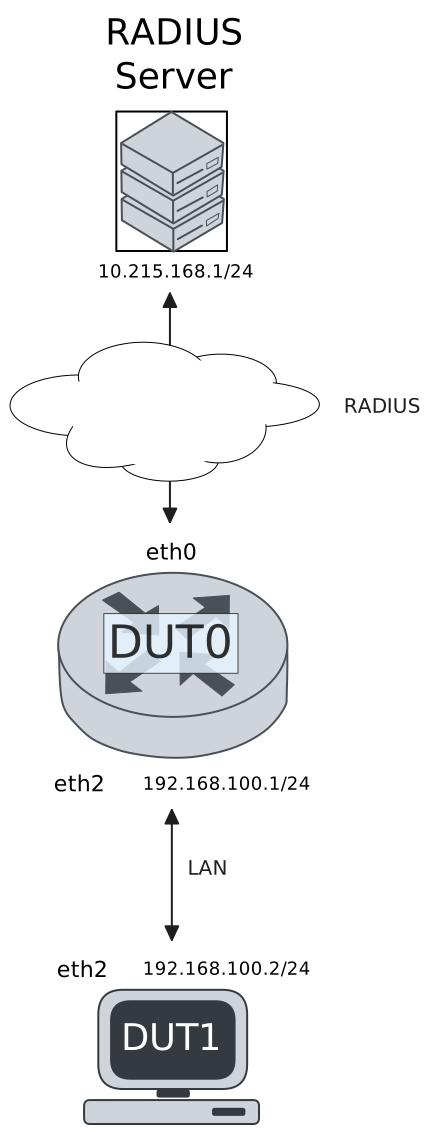
This scenario shows how to configure the only-MAB
authentication mode.
Test Successful MAB Authentication
Description
This scenario shows how to configure MAB-only authentication. DUT1 uses a correct MAC address.
Scenario
Step 1: Set the following configuration in DUT0 :
set interfaces ethernet eth0 address 10.215.168.64/24
set interfaces ethernet eth2 address 192.168.100.1/24
set interfaces ethernet eth2 authenticator aaa authentication list1
set interfaces ethernet eth2 authenticator log-level debug
set interfaces ethernet eth2 authenticator mode only-MAB
set interfaces ethernet eth2 authenticator quiet-period 60
set interfaces ethernet eth2 authenticator reauth-period 0
set system aaa group radius radgroup1 server serv1
set system aaa list list1 method 1 group radius radgroup1
set system aaa server radius serv1 address 10.215.168.1
set system aaa server radius serv1 encrypted-key U2FsdGVkX18sWBtX/dxEkYUAImrPCBRIvvzvEY5C6IQ6GFkwlLYBEmzqfG6xtrwycuNoCRyd2PeW6s0Q+SLLOw==
set system login user admin authentication encrypted-password '$6$GSjsCj8gHLv$/VcqU6FLi6CT2Oxn0MJQ2C2tqnRDrYKNF8HIYWJp68nvXvPdFccDsT04.WtigUONbKYrgKg8d6rEs8PjljMkH0'
Step 2: Ping IP address 10.215.168.1 from DUT0:
admin@DUT0$ ping 10.215.168.1 count 1 size 56 timeout 1Show output
PING 10.215.168.1 (10.215.168.1) 56(84) bytes of data.
64 bytes from 10.215.168.1: icmp_seq=1 ttl=64 time=0.174 ms

--- 10.215.168.1 ping statistics ---
1 packets transmitted, 1 received, 0% packet loss, time 0ms
rtt min/avg/max/mdev = 0.174/0.174/0.174/0.000 ms
Step 3: Set the following configuration in DUT1 :
set interfaces ethernet eth2 address 192.168.100.2/24
set system login user admin authentication encrypted-password '$6$GSjsCj8gHLv$/VcqU6FLi6CT2Oxn0MJQ2C2tqnRDrYKNF8HIYWJp68nvXvPdFccDsT04.WtigUONbKYrgKg8d6rEs8PjljMkH0'
Step 4: Ping IP address 192.168.100.1 from DUT1:
admin@DUT1$ ping 192.168.100.1 count 1 size 56 timeout 1Show output
PING 192.168.100.1 (192.168.100.1) 56(84) bytes of data.
64 bytes from 192.168.100.1: icmp_seq=1 ttl=64 time=0.344 ms

--- 192.168.100.1 ping statistics ---
1 packets transmitted, 1 received, 0% packet loss, time 0ms
rtt min/avg/max/mdev = 0.344/0.344/0.344/0.000 ms
Step 5: Run command interfaces ethernet eth2 authenticator show stats at DUT0 and check if output matches the following regular expressions:
Authentication Successes\s+1
Authentication Mode\s+MAB
Show output
-------------------------------------------
         Field                  Value
-------------------------------------------
Access Challenges                         0
Authentication Backend               RADIUS
Authentication Failures                   0
Authentication Mode                     MAB
Authentication Status      Authorized (MAB)
Authentication Successes                  1
EAPoL frames (Rx)                         0
EAPoL frames (Tx)                         0
Quiet Period                             60
Reauthenticate                        FALSE
Reauthenticate Period                     0
Session Time                              0
Session User MAC          de:ad:be:ef:6c:12
Session User Name                       N/A
Step 6: Ping IP address 192.168.100.1 from DUT1:
admin@DUT1$ ping 192.168.100.1 count 1 size 56 timeout 1Show output
PING 192.168.100.1 (192.168.100.1) 56(84) bytes of data.
64 bytes from 192.168.100.1: icmp_seq=1 ttl=64 time=0.238 ms

--- 192.168.100.1 ping statistics ---
1 packets transmitted, 1 received, 0% packet loss, time 0ms
rtt min/avg/max/mdev = 0.238/0.238/0.238/0.000 ms
Step 7: Run command system journal show | grep "osdx hostapd" at DUT0 and check if output contains the following tokens:
802.1X: MAB: station successfully authenticatedShow output
Jan 27 15:03:42.440502 osdx hostapd[595462]: eth2: IEEE 802.11 Fetching hardware channel/rate support not supported.
Jan 27 15:03:42.440517 osdx hostapd[595462]: eth2: RADIUS Authentication server 10.215.168.1:1812
Jan 27 15:03:42.440835 osdx hostapd[595462]: connect[radius]: Network is unreachable
Jan 27 15:03:42.440553 osdx hostapd[595462]: eth2: IEEE 802.1X Initializing IEEE 802.1X: mode=MAB-only, eap_server=0, eap_quiet_period=60, eap_max_retrans=5
Jan 27 15:03:42.440556 osdx hostapd[595462]: eth2: IEEE 802.1X IEEE 802.1X: Enabling packet capture discovery mode
Jan 27 15:03:42.460361 osdx hostapd[595462]: Discovery mode enabled on eth2
Jan 27 15:03:42.460426 osdx hostapd[595462]: eth2: interface state UNINITIALIZED->ENABLED
Jan 27 15:03:42.460426 osdx hostapd[595462]: eth2: AP-ENABLED
Jan 27 15:03:47.461298 osdx hostapd[595463]: eth2: STA de:ad:be:ef:6c:12 DRIVER: Device discovered, triggering MAB authentication
Jan 27 15:03:47.461340 osdx hostapd[595463]: eth2: STA de:ad:be:ef:6c:12 IEEE 802.1X: New STA de:ad:be:ef:6c:12 added
Jan 27 15:03:47.461347 osdx hostapd[595463]: eth2: IEEE 802.1X IEEE 802.1X: Disabling packet capture discovery mode
Jan 27 15:03:47.476378 osdx hostapd[595463]: eth2: STA de:ad:be:ef:6c:12 IEEE 802.1X: MAB-only mode: Starting MAB authentication
Jan 27 15:03:47.476405 osdx hostapd[595463]: eth2: STA de:ad:be:ef:6c:12 IEEE 802.1X: MAB: Starting RADIUS query
Jan 27 15:03:47.476423 osdx hostapd[595463]: eth2: STA de:ad:be:ef:6c:12 IEEE 802.1X: MAB: User-Name = de:ad:be:ef:6c:12
Jan 27 15:03:47.478069 osdx hostapd[595463]: eth2: STA de:ad:be:ef:6c:12 IEEE 802.1X: MAB: User-Password = de:ad:be:ef:6c:12
Jan 27 15:03:47.478083 osdx hostapd[595463]: eth2: RADIUS Authentication server 10.215.168.1:1812
Jan 27 15:03:47.478147 osdx hostapd[595463]: eth2: RADIUS Sending RADIUS message to authentication server
Jan 27 15:03:47.478173 osdx hostapd[595463]: eth2: RADIUS Next RADIUS client retransmit in 1 seconds
Jan 27 15:03:47.478448 osdx hostapd[595463]: eth2: RADIUS Received 20 bytes from RADIUS server
Jan 27 15:03:47.478453 osdx hostapd[595463]: eth2: RADIUS Received RADIUS message
Jan 27 15:03:47.478456 osdx hostapd[595463]: eth2: STA de:ad:be:ef:6c:12 RADIUS: Received RADIUS packet matched with a pending request, round trip time 0.00 sec
Jan 27 15:03:47.478459 osdx hostapd[595463]: eth2: STA de:ad:be:ef:6c:12 IEEE 802.1X: MAB: Processing RADIUS response
Jan 27 15:03:47.478477 osdx hostapd[595463]: eth2: STA de:ad:be:ef:6c:12 IEEE 802.1X: MAB: Identity set to 'de:ad:be:ef:6c:12'
Jan 27 15:03:47.478480 osdx hostapd[595463]: eth2: STA de:ad:be:ef:6c:12 IEEE 802.1X: MAB: station successfully authenticated
Jan 27 15:03:47.478482 osdx hostapd[595463]: eth2: IEEE 802.1X IEEE 802.1X: Discovery already disabled
Jan 27 15:03:47.478494 osdx hostapd[595463]: eth2: STA de:ad:be:ef:6c:12 IEEE 802.1X: authorizing port
Jan 27 15:03:47.478497 osdx hostapd[595463]: eth2: STA de:ad:be:ef:6c:12 RADIUS: starting accounting session F1D54CCE022EAD92
Test Unsuccessful MAB Authentication
Description
This scenario shows how to configure MAB-only authentication. DUT1 uses an incorrect MAC address.
Scenario
Step 1: Set the following configuration in DUT0 :
set interfaces ethernet eth0 address 10.215.168.64/24
set interfaces ethernet eth2 address 192.168.100.1/24
set interfaces ethernet eth2 authenticator aaa authentication list1
set interfaces ethernet eth2 authenticator log-level debug
set interfaces ethernet eth2 authenticator mode only-MAB
set interfaces ethernet eth2 authenticator quiet-period 60
set interfaces ethernet eth2 authenticator reauth-period 0
set system aaa group radius radgroup1 server serv1
set system aaa list list1 method 1 group radius radgroup1
set system aaa server radius serv1 address 10.215.168.1
set system aaa server radius serv1 encrypted-key U2FsdGVkX19wpleS6PqTKZLFh1Gdbk3qgIbe7bauW/krbjbcUBGpowjREf2ZlTVL5RCC7Lrrywc6st3vN+/arg==
set system login user admin authentication encrypted-password '$6$GSjsCj8gHLv$/VcqU6FLi6CT2Oxn0MJQ2C2tqnRDrYKNF8HIYWJp68nvXvPdFccDsT04.WtigUONbKYrgKg8d6rEs8PjljMkH0'
Step 2: Ping IP address 10.215.168.1 from DUT0:
admin@DUT0$ ping 10.215.168.1 count 1 size 56 timeout 1Show output
PING 10.215.168.1 (10.215.168.1) 56(84) bytes of data.
64 bytes from 10.215.168.1: icmp_seq=1 ttl=64 time=0.217 ms

--- 10.215.168.1 ping statistics ---
1 packets transmitted, 1 received, 0% packet loss, time 0ms
rtt min/avg/max/mdev = 0.217/0.217/0.217/0.000 ms
Step 3: Set the following configuration in DUT1 :
set interfaces ethernet eth2 address 192.168.100.2/24
set interfaces ethernet eth2 mac '00:11:22:33:44:55'
set system login user admin authentication encrypted-password '$6$GSjsCj8gHLv$/VcqU6FLi6CT2Oxn0MJQ2C2tqnRDrYKNF8HIYWJp68nvXvPdFccDsT04.WtigUONbKYrgKg8d6rEs8PjljMkH0'
Step 4: Run command interfaces ethernet eth2 authenticator show stats at DUT0 and check if output matches the following regular expressions:
Authentication Failures\s+[1-9]\d?Show output
-------------------------------------------
         Field                  Value
-------------------------------------------
Access Challenges                         0
Authentication Backend               RADIUS
Authentication Failures                   2
Authentication Mode                     N/A
Authentication Status          Unauthorized
Authentication Successes                  0
EAPoL frames (Rx)                         0
EAPoL frames (Tx)                         0
Quiet Period                             60
Reauthenticate                        FALSE
Reauthenticate Period                     0
Session Time                              0
Session User MAC          00:11:22:33:44:55
Session User Name                       N/A
Step 5: Expect a failure in the following command:
Ping IP address 192.168.100.1 from DUT1:
admin@DUT1$ ping 192.168.100.1 count 1 size 56 timeout 1Show output
PING 192.168.100.1 (192.168.100.1) 56(84) bytes of data.

--- 192.168.100.1 ping statistics ---
1 packets transmitted, 0 received, 100% packet loss, time 0ms
Step 6: Run command system journal show | grep "osdx hostapd" at DUT0 and check if output contains the following tokens:
802.1X: MAB: Authentication failedShow output
Jan 27 15:03:57.316262 osdx hostapd[595974]: eth2: IEEE 802.11 Fetching hardware channel/rate support not supported.
Jan 27 15:03:57.316522 osdx hostapd[595974]: connect[radius]: Network is unreachable
Jan 27 15:03:57.316274 osdx hostapd[595974]: eth2: RADIUS Authentication server 10.215.168.1:1812
Jan 27 15:03:57.316309 osdx hostapd[595974]: eth2: IEEE 802.1X Initializing IEEE 802.1X: mode=MAB-only, eap_server=0, eap_quiet_period=60, eap_max_retrans=5
Jan 27 15:03:57.316312 osdx hostapd[595974]: eth2: IEEE 802.1X IEEE 802.1X: Enabling packet capture discovery mode
Jan 27 15:03:57.340148 osdx hostapd[595974]: Discovery mode enabled on eth2
Jan 27 15:03:57.340208 osdx hostapd[595974]: eth2: interface state UNINITIALIZED->ENABLED
Jan 27 15:03:57.340208 osdx hostapd[595974]: eth2: AP-ENABLED
Jan 27 15:04:02.340767 osdx hostapd[595975]: eth2: STA 00:11:22:33:44:55 DRIVER: Device discovered, triggering MAB authentication
Jan 27 15:04:02.340801 osdx hostapd[595975]: eth2: STA 00:11:22:33:44:55 IEEE 802.1X: New STA 00:11:22:33:44:55 added
Jan 27 15:04:02.340809 osdx hostapd[595975]: eth2: IEEE 802.1X IEEE 802.1X: Disabling packet capture discovery mode
Jan 27 15:04:02.356197 osdx hostapd[595975]: eth2: STA 00:11:22:33:44:55 IEEE 802.1X: MAB-only mode: Starting MAB authentication
Jan 27 15:04:02.356237 osdx hostapd[595975]: eth2: STA 00:11:22:33:44:55 IEEE 802.1X: MAB: Starting RADIUS query
Jan 27 15:04:02.356255 osdx hostapd[595975]: eth2: STA 00:11:22:33:44:55 IEEE 802.1X: MAB: User-Name = 00:11:22:33:44:55
Jan 27 15:04:02.358041 osdx hostapd[595975]: eth2: STA 00:11:22:33:44:55 IEEE 802.1X: MAB: User-Password = 00:11:22:33:44:55
Jan 27 15:04:02.358054 osdx hostapd[595975]: eth2: RADIUS Authentication server 10.215.168.1:1812
Jan 27 15:04:02.358149 osdx hostapd[595975]: eth2: RADIUS Sending RADIUS message to authentication server
Jan 27 15:04:02.358180 osdx hostapd[595975]: eth2: RADIUS Next RADIUS client retransmit in 1 seconds
Jan 27 15:04:03.358265 osdx hostapd[595975]: eth2: STA 00:11:22:33:44:55 RADIUS: Resending RADIUS message (id=128)
Jan 27 15:04:03.358295 osdx hostapd[595975]: eth2: RADIUS Next RADIUS client retransmit in 2 seconds
Jan 27 15:04:03.358455 osdx hostapd[595975]: eth2: RADIUS Received 20 bytes from RADIUS server
Jan 27 15:04:03.358458 osdx hostapd[595975]: eth2: RADIUS Received RADIUS message
Jan 27 15:04:03.358462 osdx hostapd[595975]: eth2: STA 00:11:22:33:44:55 RADIUS: Received RADIUS packet matched with a pending request, round trip time 0.00 sec
Jan 27 15:04:03.358467 osdx hostapd[595975]: eth2: STA 00:11:22:33:44:55 IEEE 802.1X: MAB: Processing RADIUS response
Jan 27 15:04:03.358513 osdx hostapd[595975]: eth2: IEEE 802.1X IEEE 802.1X: Discovery already disabled
Jan 27 15:04:03.358516 osdx hostapd[595975]: eth2: IEEE 802.1X IEEE 802.1X: Discovery already disabled
Jan 27 15:04:03.358518 osdx hostapd[595975]: eth2: STA 00:11:22:33:44:55 IEEE 802.1X: MAB: Authentication failed, entering held state (quiet period 60 sec)
Jan 27 15:04:03.358521 osdx hostapd[595975]: eth2: STA 00:11:22:33:44:55 IEEE 802.1X: MAB: Retry timeout registered for 60 seconds
Jan 27 15:04:03.358527 osdx hostapd[595975]: eth2: RADIUS Received 20 bytes from RADIUS server
Jan 27 15:04:03.358529 osdx hostapd[595975]: eth2: RADIUS Received RADIUS message
Jan 27 15:04:03.358532 osdx hostapd[595975]: eth2: RADIUS No matching RADIUS request found (type=0 id=128) - dropping packet