Relay
This scenario shows how to configure service dhcp-relay. The
relay agent must be used when the DHCP server and the DHCP
clients are not connected to the same layer 2 domain.
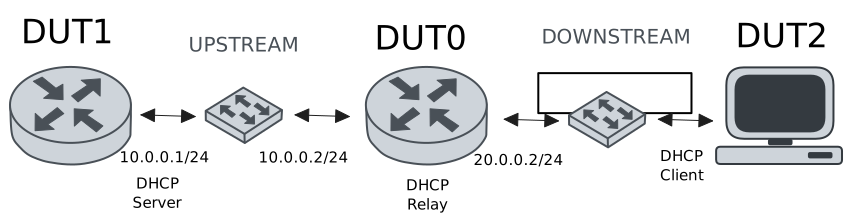
Test DHCP Relay
Description
This example demonstrates how to configure a DHCP relay instance in DUT0 to forward DHCP requests from DUT2 to DUT1.
Scenario
Step 1: Set the following configuration in DUT0 :
set interfaces ethernet eth0 vif 100 address 10.0.0.2/24
set interfaces ethernet eth1 vif 200 address 20.0.0.2/24
set service dhcp-relay INS downstream-interface eth1.200
set service dhcp-relay INS server 10.0.0.1
set service dhcp-relay INS upstream-interface eth0.100
set system login user admin authentication encrypted-password '$6$GSjsCj8gHLv$/VcqU6FLi6CT2Oxn0MJQ2C2tqnRDrYKNF8HIYWJp68nvXvPdFccDsT04.WtigUONbKYrgKg8d6rEs8PjljMkH0'
Step 2: Set the following configuration in DUT1 :
set interfaces ethernet eth0 vif 100 address 10.0.0.1/24
set protocols static route 0.0.0.0/0 next-hop 10.0.0.2
set service dhcp-server shared-network dummy subnet 10.0.0.1/32
set service dhcp-server shared-network remote subnet 20.0.0.0/24 start 20.0.0.50 stop 20.0.0.50
set system login user admin authentication encrypted-password '$6$GSjsCj8gHLv$/VcqU6FLi6CT2Oxn0MJQ2C2tqnRDrYKNF8HIYWJp68nvXvPdFccDsT04.WtigUONbKYrgKg8d6rEs8PjljMkH0'
Step 3: Set the following configuration in DUT2 :
set interfaces ethernet eth0 vif 200 address dhcp
set system login user admin authentication encrypted-password '$6$GSjsCj8gHLv$/VcqU6FLi6CT2Oxn0MJQ2C2tqnRDrYKNF8HIYWJp68nvXvPdFccDsT04.WtigUONbKYrgKg8d6rEs8PjljMkH0'
Step 4: Ping IP address 10.0.0.1 from DUT0:
admin@DUT0$ ping 10.0.0.1 count 1 size 56 timeout 1Show output
PING 10.0.0.1 (10.0.0.1) 56(84) bytes of data.
64 bytes from 10.0.0.1: icmp_seq=1 ttl=64 time=0.259 ms

--- 10.0.0.1 ping statistics ---
1 packets transmitted, 1 received, 0% packet loss, time 0ms
rtt min/avg/max/mdev = 0.259/0.259/0.259/0.000 ms
Step 5: Run command interfaces ethernet show at DUT2 and check if output contains the following tokens:
20.0.0.50Show output
---------------------------------------------------------------------
  Name             IP Address           Admin  Oper  Vrf  Description
---------------------------------------------------------------------
    eth0  fe80::dcad:beff:feef:6c20/64  up     up
eth0.200  20.0.0.50/24                  up     up
          fe80::dcad:beff:feef:6c20/64
    eth1                                down   down
    eth2                                down   down
    eth3                                down   down
Test DHCP Relay With Giaddr
Description
This example demonstrates how to set the gateway IP address (giaddr) in the IP address. This value must be set in an IP address that the DHCP server can reach.
Scenario
Step 1: Set the following configuration in DUT0 :
set interfaces ethernet eth0 vif 100 address 10.0.0.2/24
set interfaces ethernet eth1 vif 200 address 20.0.0.2/24
set interfaces ethernet eth1 vif 200 address 20.0.0.3/24
set service dhcp-relay INS downstream-interface eth1.200
set service dhcp-relay INS server 10.0.0.1 giaddr 20.0.0.3
set service dhcp-relay INS upstream-interface eth0.100
set system login user admin authentication encrypted-password '$6$GSjsCj8gHLv$/VcqU6FLi6CT2Oxn0MJQ2C2tqnRDrYKNF8HIYWJp68nvXvPdFccDsT04.WtigUONbKYrgKg8d6rEs8PjljMkH0'
Step 2: Set the following configuration in DUT1 :
set interfaces ethernet eth0 vif 100 address 10.0.0.1/24
set protocols static route 0.0.0.0/0 next-hop 10.0.0.2
set service dhcp-server shared-network dummy subnet 10.0.0.1/32
set service dhcp-server shared-network remote subnet 20.0.0.0/24 start 20.0.0.50 stop 20.0.0.50
set system login user admin authentication encrypted-password '$6$GSjsCj8gHLv$/VcqU6FLi6CT2Oxn0MJQ2C2tqnRDrYKNF8HIYWJp68nvXvPdFccDsT04.WtigUONbKYrgKg8d6rEs8PjljMkH0'
Step 3: Set the following configuration in DUT2 :
set interfaces ethernet eth0 vif 200 address dhcp
set system login user admin authentication encrypted-password '$6$GSjsCj8gHLv$/VcqU6FLi6CT2Oxn0MJQ2C2tqnRDrYKNF8HIYWJp68nvXvPdFccDsT04.WtigUONbKYrgKg8d6rEs8PjljMkH0'
Step 4: Ping IP address 10.0.0.1 from DUT0:
admin@DUT0$ ping 10.0.0.1 count 1 size 56 timeout 1Show output
PING 10.0.0.1 (10.0.0.1) 56(84) bytes of data.
64 bytes from 10.0.0.1: icmp_seq=1 ttl=64 time=0.226 ms

--- 10.0.0.1 ping statistics ---
1 packets transmitted, 1 received, 0% packet loss, time 0ms
rtt min/avg/max/mdev = 0.226/0.226/0.226/0.000 ms
Step 5: Run command interfaces ethernet show at DUT2 and check if output contains the following tokens:
20.0.0.50Show output
---------------------------------------------------------------------
  Name             IP Address           Admin  Oper  Vrf  Description
---------------------------------------------------------------------
    eth0  fe80::dcad:beff:feef:6c20/64  up     up
eth0.200  20.0.0.50/24                  up     up
          fe80::dcad:beff:feef:6c20/64
    eth1                                down   down
    eth2                                down   down
    eth3                                down   down
Step 6: Run command system journal show | cat at DUT1 and check if output matches the following regular expressions:
DHCPACK on 20.0.0.50 to [^\)]+\) via 20.0.0.3Show output
Jan 27 12:22:44.299441 osdx systemd-journald[1740]: Runtime Journal (/run/log/journal/37b75af121414321bf655c1ef6ebb727) is 936.0K, max 6.5M, 5.6M free.
Jan 27 12:22:44.302784 osdx systemd-journald[1740]: Received client request to rotate journal, rotating.
Jan 27 12:22:44.302874 osdx systemd-journald[1740]: Vacuuming done, freed 0B of archived journals from /run/log/journal/37b75af121414321bf655c1ef6ebb727.
Jan 27 12:22:44.311464 osdx OSDxCLI[152046]: User 'admin' executed a new command: 'system journal clear'.
Jan 27 12:22:44.559873 osdx OSDxCLI[152046]: User 'admin' executed a new command: 'system coredump delete all'.
Jan 27 12:22:46.169227 osdx OSDxCLI[152046]: User 'admin' entered the configuration menu.
Jan 27 12:22:46.305142 osdx OSDxCLI[152046]: User 'admin' added a new cfg line: 'set interfaces eth0.100 address 10.0.0.1/24'.
Jan 27 12:22:46.374895 osdx OSDxCLI[152046]: User 'admin' added a new cfg line: 'set service dhcp-server shared-network dummy subnet 10.0.0.1/32'.
Jan 27 12:22:46.479950 osdx OSDxCLI[152046]: User 'admin' added a new cfg line: 'set service dhcp-server shared-network remote subnet 20.0.0.0/24 start 20.0.0.50 stop 20.0.0.50'.
Jan 27 12:22:46.544280 osdx OSDxCLI[152046]: User 'admin' added a new cfg line: 'set protocols static route 0.0.0.0/0 next-hop 10.0.0.2'.
Jan 27 12:22:46.644434 osdx OSDxCLI[152046]: User 'admin' added a new cfg line: 'show working'.
Jan 27 12:22:46.709667 osdx ubnt-cfgd[159765]: inactive
Jan 27 12:22:46.743432 osdx INFO[159775]: FRR daemons did not change
Jan 27 12:22:46.774813 osdx kernel: 8021q: adding VLAN 0 to HW filter on device eth0
Jan 27 12:22:46.801651 osdx (udev-worker)[159823]: Network interface NamePolicy= disabled on kernel command line.
Jan 27 12:22:47.515386 osdx systemd[1]: Started dhcpd@main.service - "DHCP Server Service instance main".
Jan 27 12:22:47.517861 osdx dhcpd[159902]: Wrote 0 leases to leases file.
Jan 27 12:22:47.518592 osdx cfgd[1417]: [152046]Completed change to active configuration
Jan 27 12:22:47.532491 osdx OSDxCLI[152046]: User 'admin' committed the configuration.
Jan 27 12:22:47.710251 osdx dhcpd[159902]:
Jan 27 12:22:47.710259 osdx dhcpd[159902]: No subnet declaration for eth0 (no IPv4 addresses).
Jan 27 12:22:47.710263 osdx dhcpd[159902]: ** Ignoring requests on eth0.  If this is not what
Jan 27 12:22:47.710266 osdx dhcpd[159902]:    you want, please write a subnet declaration
Jan 27 12:22:47.710269 osdx dhcpd[159902]:    in your dhcpd.conf file for the network segment
Jan 27 12:22:47.710272 osdx dhcpd[159902]:    to which interface eth0 is attached. **
Jan 27 12:22:47.710275 osdx dhcpd[159902]:
Jan 27 12:22:47.710942 osdx OSDxCLI[152046]: User 'admin' left the configuration menu.
Jan 27 12:22:47.723000 osdx dhcpd[159902]: Server starting service.
Jan 27 12:22:48.900525 osdx dhcpd[159902]: DHCPDISCOVER from de:ad:be:ef:6c:20 via 20.0.0.3
Jan 27 12:22:49.901044 osdx dhcpd[159902]: DHCPOFFER on 20.0.0.50 to de:ad:be:ef:6c:20 (osdx) via 20.0.0.3
Jan 27 12:22:49.901848 osdx dhcpd[159902]: DHCPREQUEST for 20.0.0.50 (10.0.0.1) from de:ad:be:ef:6c:20 (osdx) via 20.0.0.3
Jan 27 12:22:50.341671 osdx dhcpd[159902]: DHCPACK on 20.0.0.50 to de:ad:be:ef:6c:20 (osdx) via 20.0.0.3
Test DHCP Relay With GRE Tunnel
Description
This example demonstrates how to configure a DHCP relay that forwards DHCP requests to the DHCP server through a GRE tunnel (upstream).
Scenario
Step 1: Set the following configuration in DUT0 :
set interfaces ethernet eth0 vif 100 address 10.0.0.2/24
set interfaces ethernet eth1 vif 200 address 20.0.0.2/24
set interfaces tunnel tun1 address 1.0.0.2/32
set interfaces tunnel tun1 encapsulation gre
set interfaces tunnel tun1 local-address 10.0.0.2
set interfaces tunnel tun1 local-interface eth0.100
set interfaces tunnel tun1 nhrp holdtime 5
set interfaces tunnel tun1 nhrp nhs 1.0.0.1 nbma 10.0.0.1
set service dhcp-relay INS downstream-interface eth1.200
set service dhcp-relay INS server 1.0.0.1
set service dhcp-relay INS upstream-interface eth0.100
set service dhcp-relay INS upstream-interface tun1
set system login user admin authentication encrypted-password '$6$GSjsCj8gHLv$/VcqU6FLi6CT2Oxn0MJQ2C2tqnRDrYKNF8HIYWJp68nvXvPdFccDsT04.WtigUONbKYrgKg8d6rEs8PjljMkH0'
Step 2: Set the following configuration in DUT1 :
set interfaces ethernet eth0 vif 100 address 10.0.0.1/24
set interfaces tunnel tun1 address 1.0.0.1/32
set interfaces tunnel tun1 encapsulation gre
set interfaces tunnel tun1 local-address 10.0.0.1
set interfaces tunnel tun1 local-interface eth0.100
set interfaces tunnel tun1 nhrp
set protocols static route 0.0.0.0/0 next-hop 10.0.0.2
set protocols static route 20.0.0.0/24 next-hop 1.0.0.2
set service dhcp-server shared-network dummy subnet 1.0.0.1/32
set service dhcp-server shared-network remote subnet 20.0.0.0/24 start 20.0.0.50 stop 20.0.0.50
set system login user admin authentication encrypted-password '$6$GSjsCj8gHLv$/VcqU6FLi6CT2Oxn0MJQ2C2tqnRDrYKNF8HIYWJp68nvXvPdFccDsT04.WtigUONbKYrgKg8d6rEs8PjljMkH0'
Step 3: Set the following configuration in DUT2 :
set interfaces ethernet eth0 vif 200 address dhcp
set system login user admin authentication encrypted-password '$6$GSjsCj8gHLv$/VcqU6FLi6CT2Oxn0MJQ2C2tqnRDrYKNF8HIYWJp68nvXvPdFccDsT04.WtigUONbKYrgKg8d6rEs8PjljMkH0'
Step 4: Ping IP address 10.0.0.1 from DUT0:
admin@DUT0$ ping 10.0.0.1 count 1 size 56 timeout 1Show output
PING 10.0.0.1 (10.0.0.1) 56(84) bytes of data.
64 bytes from 10.0.0.1: icmp_seq=1 ttl=64 time=0.240 ms

--- 10.0.0.1 ping statistics ---
1 packets transmitted, 1 received, 0% packet loss, time 0ms
rtt min/avg/max/mdev = 0.240/0.240/0.240/0.000 ms
Step 5: Ping IP address 1.0.0.1 from DUT0:
admin@DUT0$ ping 1.0.0.1 count 1 size 56 timeout 1Show output
PING 1.0.0.1 (1.0.0.1) 56(84) bytes of data.
64 bytes from 1.0.0.1: icmp_seq=1 ttl=64 time=4.53 ms

--- 1.0.0.1 ping statistics ---
1 packets transmitted, 1 received, 0% packet loss, time 0ms
rtt min/avg/max/mdev = 4.533/4.533/4.533/0.000 ms
Step 6: Run command interfaces ethernet show at DUT2 and check if output contains the following tokens:
20.0.0.50Show output
---------------------------------------------------------------------
  Name             IP Address           Admin  Oper  Vrf  Description
---------------------------------------------------------------------
    eth0  fe80::dcad:beff:feef:6c20/64  up     up
eth0.200  20.0.0.50/24                  up     up
          fe80::dcad:beff:feef:6c20/64
    eth1                                down   down
    eth2                                down   down
    eth3                                down   down
Test DHCP Relay With Multiple Instances
Description
This example demonstrates how to configure multiple DHCP relay instances.
Scenario
Step 1: Set the following configuration in DUT0 :
set interfaces ethernet eth0 vif 100 address 10.0.0.2/24
set interfaces ethernet eth1 vif 200 address 20.0.0.2/24
set interfaces ethernet eth1 vif 300 address 30.0.0.2/24
set service dhcp-relay INS downstream-interface eth1.200
set service dhcp-relay INS server 10.0.0.1
set service dhcp-relay INS upstream-interface eth0.100
set service dhcp-relay INS2 downstream-interface eth1.300
set service dhcp-relay INS2 server 10.0.0.1
set service dhcp-relay INS2 upstream-interface eth0.100
set system login user admin authentication encrypted-password '$6$GSjsCj8gHLv$/VcqU6FLi6CT2Oxn0MJQ2C2tqnRDrYKNF8HIYWJp68nvXvPdFccDsT04.WtigUONbKYrgKg8d6rEs8PjljMkH0'
Step 2: Set the following configuration in DUT1 :
set interfaces ethernet eth0 vif 100 address 10.0.0.1/24
set protocols static route 0.0.0.0/0 next-hop 10.0.0.2
set service dhcp-server shared-network dummy subnet 10.0.0.1/32
set service dhcp-server shared-network remote subnet 20.0.0.0/24 start 20.0.0.50 stop 20.0.0.50
set service dhcp-server shared-network remote2 subnet 30.0.0.0/24 start 30.0.0.50 stop 30.0.0.50
set system login user admin authentication encrypted-password '$6$GSjsCj8gHLv$/VcqU6FLi6CT2Oxn0MJQ2C2tqnRDrYKNF8HIYWJp68nvXvPdFccDsT04.WtigUONbKYrgKg8d6rEs8PjljMkH0'
Step 3: Set the following configuration in DUT2 :
set interfaces ethernet eth0 vif 200 address dhcp
set interfaces ethernet eth0 vif 300 address dhcp
set system login user admin authentication encrypted-password '$6$GSjsCj8gHLv$/VcqU6FLi6CT2Oxn0MJQ2C2tqnRDrYKNF8HIYWJp68nvXvPdFccDsT04.WtigUONbKYrgKg8d6rEs8PjljMkH0'
Step 4: Ping IP address 10.0.0.1 from DUT0:
admin@DUT0$ ping 10.0.0.1 count 1 size 56 timeout 1Show output
PING 10.0.0.1 (10.0.0.1) 56(84) bytes of data.
64 bytes from 10.0.0.1: icmp_seq=1 ttl=64 time=0.238 ms

--- 10.0.0.1 ping statistics ---
1 packets transmitted, 1 received, 0% packet loss, time 0ms
rtt min/avg/max/mdev = 0.238/0.238/0.238/0.000 ms
Step 5: Run command interfaces ethernet show at DUT2 and check if output contains the following tokens:
20.0.0.50Show output
---------------------------------------------------------------------
  Name             IP Address           Admin  Oper  Vrf  Description
---------------------------------------------------------------------
    eth0  fe80::dcad:beff:feef:6c20/64  up     up
eth0.200  20.0.0.50/24                  up     up
          fe80::dcad:beff:feef:6c20/64
eth0.300  30.0.0.50/24                  up     up
          fe80::dcad:beff:feef:6c20/64
    eth1                                down   down
    eth2                                down   down
    eth3                                down   down
Step 6: Run command interfaces ethernet show at DUT2 and check if output contains the following tokens:
30.0.0.50Show output
---------------------------------------------------------------------
  Name             IP Address           Admin  Oper  Vrf  Description
---------------------------------------------------------------------
    eth0  fe80::dcad:beff:feef:6c20/64  up     up
eth0.200  20.0.0.50/24                  up     up
          fe80::dcad:beff:feef:6c20/64
eth0.300  30.0.0.50/24                  up     up
          fe80::dcad:beff:feef:6c20/64
    eth1                                down   down
    eth2                                down   down
    eth3                                down   down
Step 7: Run command system journal show | cat at DUT1 and check if output matches the following regular expressions:
DHCPACK on 20.0.0.50 to [^\)]+\) via 20.0.0.2
DHCPACK on 30.0.0.50 to [^\)]+\) via 30.0.0.2
Show output
Jan 27 12:23:21.298016 osdx systemd-journald[1740]: Runtime Journal (/run/log/journal/37b75af121414321bf655c1ef6ebb727) is 932.0K, max 6.5M, 5.6M free.
Jan 27 12:23:21.300467 osdx systemd-journald[1740]: Received client request to rotate journal, rotating.
Jan 27 12:23:21.300537 osdx systemd-journald[1740]: Vacuuming done, freed 0B of archived journals from /run/log/journal/37b75af121414321bf655c1ef6ebb727.
Jan 27 12:23:21.310071 osdx OSDxCLI[152046]: User 'admin' executed a new command: 'system journal clear'.
Jan 27 12:23:21.551674 osdx OSDxCLI[152046]: User 'admin' executed a new command: 'system coredump delete all'.
Jan 27 12:23:23.186599 osdx OSDxCLI[152046]: User 'admin' entered the configuration menu.
Jan 27 12:23:23.268242 osdx OSDxCLI[152046]: User 'admin' added a new cfg line: 'set interfaces eth0.100 address 10.0.0.1/24'.
Jan 27 12:23:23.343702 osdx OSDxCLI[152046]: User 'admin' added a new cfg line: 'set service dhcp-server shared-network dummy subnet 10.0.0.1/32'.
Jan 27 12:23:23.442261 osdx OSDxCLI[152046]: User 'admin' added a new cfg line: 'set service dhcp-server shared-network remote subnet 20.0.0.0/24 start 20.0.0.50 stop 20.0.0.50'.
Jan 27 12:23:23.493989 osdx OSDxCLI[152046]: User 'admin' added a new cfg line: 'set protocols static route 0.0.0.0/0 next-hop 10.0.0.2'.
Jan 27 12:23:23.591010 osdx OSDxCLI[152046]: User 'admin' added a new cfg line: 'set service dhcp-server shared-network remote2 subnet 30.0.0.0/24 start 30.0.0.50 stop 30.0.0.50'.
Jan 27 12:23:23.658385 osdx OSDxCLI[152046]: User 'admin' added a new cfg line: 'show working'.
Jan 27 12:23:23.745817 osdx ubnt-cfgd[160764]: inactive
Jan 27 12:23:23.782400 osdx INFO[160776]: FRR daemons did not change
Jan 27 12:23:23.872244 osdx kernel: 8021q: adding VLAN 0 to HW filter on device eth0
Jan 27 12:23:23.893925 osdx (udev-worker)[160826]: Network interface NamePolicy= disabled on kernel command line.
Jan 27 12:23:24.036678 osdx systemd[1]: Started dhcpd@main.service - "DHCP Server Service instance main".
Jan 27 12:23:24.038987 osdx cfgd[1417]: [152046]Completed change to active configuration
Jan 27 12:23:24.050715 osdx OSDxCLI[152046]: User 'admin' committed the configuration.
Jan 27 12:23:24.067896 osdx OSDxCLI[152046]: User 'admin' left the configuration menu.
Jan 27 12:23:24.082606 osdx dhcpd[160903]: Wrote 0 leases to leases file.
Jan 27 12:23:24.140103 osdx dhcpd[160903]:
Jan 27 12:23:24.140111 osdx dhcpd[160903]: No subnet declaration for eth0 (no IPv4 addresses).
Jan 27 12:23:24.140113 osdx dhcpd[160903]: ** Ignoring requests on eth0.  If this is not what
Jan 27 12:23:24.140115 osdx dhcpd[160903]:    you want, please write a subnet declaration
Jan 27 12:23:24.140118 osdx dhcpd[160903]:    in your dhcpd.conf file for the network segment
Jan 27 12:23:24.140121 osdx dhcpd[160903]:    to which interface eth0 is attached. **
Jan 27 12:23:24.140123 osdx dhcpd[160903]:
Jan 27 12:23:24.152334 osdx dhcpd[160903]: Server starting service.
Jan 27 12:23:24.849506 osdx dhcpd[160903]: DHCPDISCOVER from de:ad:be:ef:6c:20 via 20.0.0.2
Jan 27 12:23:25.009473 osdx dhcpd[160903]: DHCPDISCOVER from de:ad:be:ef:6c:20 via 30.0.0.2
Jan 27 12:23:25.850234 osdx dhcpd[160903]: DHCPOFFER on 20.0.0.50 to de:ad:be:ef:6c:20 (osdx) via 20.0.0.2
Jan 27 12:23:25.851059 osdx dhcpd[160903]: DHCPREQUEST for 20.0.0.50 (10.0.0.1) from de:ad:be:ef:6c:20 (osdx) via 20.0.0.2
Jan 27 12:23:25.876979 osdx dhcpd[160903]: DHCPACK on 20.0.0.50 to de:ad:be:ef:6c:20 (osdx) via 20.0.0.2
Jan 27 12:23:26.009731 osdx dhcpd[160903]: DHCPOFFER on 30.0.0.50 to de:ad:be:ef:6c:20 (osdx) via 30.0.0.2
Jan 27 12:23:26.010414 osdx dhcpd[160903]: DHCPREQUEST for 30.0.0.50 (10.0.0.1) from de:ad:be:ef:6c:20 (osdx) via 30.0.0.2
Jan 27 12:23:26.025504 osdx dhcpd[160903]: DHCPACK on 30.0.0.50 to de:ad:be:ef:6c:20 (osdx) via 30.0.0.2