Ntp Auth
This scenario shows how to configure NTP client/server authentication.
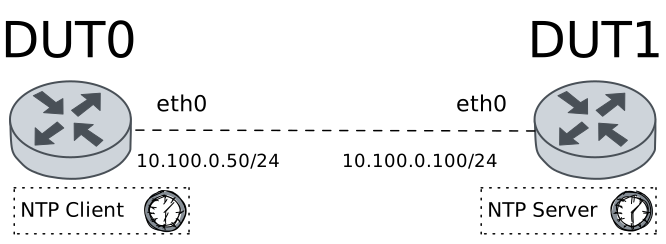
Test NTP Service With Client Authentication Only
Description
DUT0 is configured to use NTP authentication. An NTP server is configured without auth. Optaining the time should fail due to crypto failure.
Scenario
Step 1: Set the following configuration in DUT0 :
set interfaces ethernet eth0 address 10.100.0.50/24
set system login user admin authentication encrypted-password '$6$GSjsCj8gHLv$/VcqU6FLi6CT2Oxn0MJQ2C2tqnRDrYKNF8HIYWJp68nvXvPdFccDsT04.WtigUONbKYrgKg8d6rEs8PjljMkH0'
set system ntp authentication-key 1 encrypted-key U2FsdGVkX19DyeVwmpebyYIsg5HOVGE1q7grCTKH39c=
Step 2: Set the following configuration in DUT1 :
set interfaces ethernet eth0 address 10.100.0.100/24
set protocols static route 0.0.0.0/0 next-hop 10.100.0.50
set system login user admin authentication encrypted-password '$6$GSjsCj8gHLv$/VcqU6FLi6CT2Oxn0MJQ2C2tqnRDrYKNF8HIYWJp68nvXvPdFccDsT04.WtigUONbKYrgKg8d6rEs8PjljMkH0'
set system ntp master prefer
set system ntp master stratum 3
Step 3: Run command set date 2026-01-26 12:00:00 at DUT0 and expect this output:
Step 4: Run command set date ntp 10.100.0.100 key 1 at DUT0 and check if output contains the following tokens:
no eligible serversShow output
no responses were received
no eligible servers
program finished with error
  CLI Error: Command error
Test NTP Service With Client And Server Authentication
Description
NTP client and NTP server are configured to use the same authentication key. Optaining time information should succeed.
Scenario
Step 1: Set the following configuration in DUT0 :
set interfaces ethernet eth0 address 10.100.0.50/24
set system login user admin authentication encrypted-password '$6$GSjsCj8gHLv$/VcqU6FLi6CT2Oxn0MJQ2C2tqnRDrYKNF8HIYWJp68nvXvPdFccDsT04.WtigUONbKYrgKg8d6rEs8PjljMkH0'
set system ntp authentication-key 1 encrypted-key U2FsdGVkX18W5m/cs9gaLSW/VMgHAasQ5chqESb0dmE=
Step 2: Set the following configuration in DUT1 :
set interfaces ethernet eth0 address 10.100.0.100/24
set protocols static route 0.0.0.0/0 next-hop 10.100.0.50
set system login user admin authentication encrypted-password '$6$GSjsCj8gHLv$/VcqU6FLi6CT2Oxn0MJQ2C2tqnRDrYKNF8HIYWJp68nvXvPdFccDsT04.WtigUONbKYrgKg8d6rEs8PjljMkH0'
set system ntp authentication-key 1 encrypted-key U2FsdGVkX1/hdV8G8tAJPwnk5cf7SSMHxYkXbtY775c=
set system ntp master prefer
set system ntp master stratum 3
set system ntp trusted-key 1
Step 3: Run command set date 2026-01-26 12:00:00 at DUT0 and expect this output:
Step 4: Run command set date ntp 10.100.0.100 key 1 at DUT0 and expect this output:
Show output
Date was successfully updated!
Step 5: Run command show date at DUT0 and check if output does not contain the following tokens:
MonShow output
Tue 27 Jan 2026 17:11:31 +00:00
Test NTP Service With Wrong Authentication
Description
NTP client and NTP server are configured to use different authentication key. Optaining time information should fail.
Scenario
Step 1: Set the following configuration in DUT0 :
set interfaces ethernet eth0 address 10.100.0.50/24
set system login user admin authentication encrypted-password '$6$GSjsCj8gHLv$/VcqU6FLi6CT2Oxn0MJQ2C2tqnRDrYKNF8HIYWJp68nvXvPdFccDsT04.WtigUONbKYrgKg8d6rEs8PjljMkH0'
set system ntp authentication-key 1 encrypted-key U2FsdGVkX18J4psq20WhsmcBHdGJugio9FLtAhNr1as=
Step 2: Set the following configuration in DUT1 :
set interfaces ethernet eth0 address 10.100.0.100/24
set protocols static route 0.0.0.0/0 next-hop 10.100.0.50
set system login user admin authentication encrypted-password '$6$GSjsCj8gHLv$/VcqU6FLi6CT2Oxn0MJQ2C2tqnRDrYKNF8HIYWJp68nvXvPdFccDsT04.WtigUONbKYrgKg8d6rEs8PjljMkH0'
set system ntp authentication-key 1 encrypted-key U2FsdGVkX184d0BUDgWW1eUsUv91U36CAFYjmO6+paA=
set system ntp master prefer
set system ntp master stratum 3
set system ntp trusted-key 1
Step 3: Run command set date 2026-01-26 12:00:00 at DUT0 and expect this output:
Step 4: Run command set date ntp 10.100.0.100 key 1 at DUT0 and check if output contains the following tokens:
no eligible serversShow output
no responses were received
no eligible servers
program finished with error
  CLI Error: Command error