Check Accessibility Control
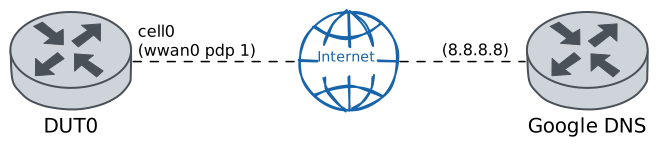
This scenario shows how to configure a cellular interface, enabling the accessibility control mechanism that triggers reconnections when network connectivity is lost.
Test Reconnection By Accessibility Control
Description
In DUT0, the cell0 cellular interface is
configured with a cellular profile for which
accessibility control is enabled. Once connectivity
with Google’s DNS public server has been verified, a
situation where 100% of the packets received by the
network are lost is emulated to verify that the
accessibility control mechanism triggers a reconnection.
Scenario
Step 1: Set the following configuration in DUT0 :
set cellular logging level info
set cellular profile CELPROFILE accessibility-control ping address 8.8.8.8
set cellular profile CELPROFILE accessibility-control ping interval 10
set cellular profile CELPROFILE apn movistar.es
set controllers cellular wwan0 encrypted-pin U2FsdGVkX18keDCAQHyI9mU4Bg3pvAHzEaPwBfIAQrM=
set controllers cellular wwan0 pdp 1 profile CELPROFILE
set interfaces cellular cell0 address dhcp
set interfaces cellular cell0 phy wwan0 pdp 1
set system login user admin authentication encrypted-password '$6$GSjsCj8gHLv$/VcqU6FLi6CT2Oxn0MJQ2C2tqnRDrYKNF8HIYWJp68nvXvPdFccDsT04.WtigUONbKYrgKg8d6rEs8PjljMkH0'
Step 2: Run command controllers cellular wwan0 pdp 1 show network-data-connection at DUT0 and check if output matches the following regular expressions:
Connection status\s* = connectedShow output
Connection status               = connected
Traffic channel status          = active
Max. TX channel rate (bps)      = 50000000
Max. RX channel rate (bps)      = 300000000
IPv4 address                    = 37.12.76.36
IPv4 mask                       = 255.255.255.248
IPv4 gateway                    = 37.12.76.37
IPv4 primary DNS                = 80.58.61.248
IPv4 secondary DNS              = 80.58.61.249
Note
Once the cellular interface is configured, it can be verified that there is network connectivity by pinging Google's DNS public server.
Step 3: Ping IP address 8.8.8.8 from DUT0:
admin@DUT0$ ping 8.8.8.8 count 1 size 56 timeout 1Show output
PING 8.8.8.8 (8.8.8.8) 56(84) bytes of data.
64 bytes from 8.8.8.8: icmp_seq=1 ttl=117 time=36.1 ms

--- 8.8.8.8 ping statistics ---
1 packets transmitted, 1 received, 0% packet loss, time 0ms
rtt min/avg/max/mdev = 36.104/36.104/36.104/0.000 ms
Note
The accessibility control is a mechanism where pings are sent at an interval, and to the IP address, configured by the user. The mechanism then waits for a response within this interval. If no response is received before it times out, a second ping is sent and a response is expected within 10 seconds. If there is still no response, two more pings are sent at 5-second intervals. Finally, if there is still no response, the device reconnects to the network.
Note
As a result, you can verify that no reconnection has been recorded in the system logs if you wait long enough.
Step 4: Run command system journal clear at DUT0.
Step 5: Run command system journal show | cat at DUT0 and check if output does not contain the following tokens:
[Device/wwan0] Warning: [PDP#1] Requesting reconnection...
[Device/wwan0] Info: WDS[0]: Stopping network connection...
[Device/wwan0] Info: [PDP#1] Establishing network connection...
Show output
Feb 13 03:35:04.533892 osdx systemd-journald[627628]: Runtime Journal (/run/log/journal/45f85f6c6fef424a8deb79d3ba309af0) is 4.4M, max 35.3M, 30.9M free.
Feb 13 03:35:04.538356 osdx systemd-journald[627628]: Received client request to rotate journal, rotating.
Feb 13 03:35:04.538537 osdx systemd-journald[627628]: Vacuuming done, freed 0B of archived journals from /run/log/journal/45f85f6c6fef424a8deb79d3ba309af0.
Feb 13 03:35:04.622944 osdx OSDxCLI[681990]: User 'admin' executed a new command: 'system journal clear'.
Feb 13 03:35:13.774604 osdx wwan-accessibility-control[691794]: [Core/wwan0/1] Warning: Previous packet pending - ID: 36434, Sequence: 0
Feb 13 03:35:13.774624 osdx wwan-accessibility-control[691794]: [Core/wwan0/1] Warning: Connection in failure - consecutive failures: 1 - interval reduced to 10 seconds
Note
However, when traffic control is applied, it is possible to prove the 'ping' command is failing because ICMP packets are being dropped.
Step 6: Run command system journal clear at DUT0.
Step 7: Modify the following configuration lines in DUT0 :
set interfaces cellular cell0 traffic control in PLOSS
set traffic control PLOSS type network-emulator packet-loss 100
Step 8: Expect a failure in the following command:
Ping IP address 8.8.8.8 from DUT0:
admin@DUT0$ ping 8.8.8.8 count 1 size 56 timeout 1Show output
PING 8.8.8.8 (8.8.8.8) 56(84) bytes of data.

--- 8.8.8.8 ping statistics ---
1 packets transmitted, 0 received, 100% packet loss, time 0ms
Note
You can verify that a reconnection has been recorded in the system logs if you wait long enough.
Step 9: Run command system journal show | cat at DUT0 and check if output contains the following tokens:
[Device/wwan0] Warning: [PDP#1] Requesting reconnection...
[Device/wwan0] Info: WDS[0]: Stopping network connection...
[Device/wwan0] Info: [PDP#1] Establishing network connection...
Show output
Feb 13 03:35:46.932844 osdx systemd-journald[627628]: Runtime Journal (/run/log/journal/45f85f6c6fef424a8deb79d3ba309af0) is 4.4M, max 35.3M, 30.9M free.
Feb 13 03:35:46.937288 osdx systemd-journald[627628]: Received client request to rotate journal, rotating.
Feb 13 03:35:46.937468 osdx systemd-journald[627628]: Vacuuming done, freed 0B of archived journals from /run/log/journal/45f85f6c6fef424a8deb79d3ba309af0.
Feb 13 03:35:47.019056 osdx OSDxCLI[681990]: User 'admin' executed a new command: 'system journal clear'.
Feb 13 03:35:47.150672 osdx OSDxCLI[681990]: User 'admin' entered the configuration menu.
Feb 13 03:35:47.249232 osdx OSDxCLI[681990]: User 'admin' added a new cfg line: 'set interfaces cellular cell0 traffic control in PLOSS'.
Feb 13 03:35:47.344328 osdx OSDxCLI[681990]: User 'admin' added a new cfg line: 'set traffic control PLOSS type network-emulator packet-loss 100'.
Feb 13 03:35:47.477591 osdx OSDxCLI[681990]: User 'admin' added a new cfg line: 'show changes'.
Feb 13 03:35:47.635783 osdx ubnt-cfgd[691876]: inactive
Feb 13 03:35:47.758706 osdx INFO[691886]: FRR daemons did not change
Feb 13 03:35:47.885350 osdx (udev-worker)[691905]: ifb.cell0: Could not set Alias=, MACAddress=/MACAddressPolicy=, TransmitQueues=, ReceiveQueues=, TransmitQueueLength=, MTUBytes=, GenericSegmentOffloadMaxBytes= or GenericSegmentOffloadMaxSegments=, ignoring: Operation not supported
Feb 13 03:35:47.885434 osdx (udev-worker)[691905]: Network interface NamePolicy= disabled on kernel command line.
Feb 13 03:35:47.945871 osdx cfgd[1778]: [681990]Completed change to active configuration
Feb 13 03:35:47.974678 osdx systemd[1]: osdx-ledsd.service: Sent signal SIGUSR2 to main process 2444 (osdx-ledsd) on client request.
Feb 13 03:35:47.974709 osdx osdx-ledsd[2444]: Config changed, checking config paths
Feb 13 03:35:47.978684 osdx OSDxCLI[681990]: User 'admin' committed the configuration.
Feb 13 03:35:48.009358 osdx OSDxCLI[681990]: User 'admin' left the configuration menu.
Feb 13 03:35:49.223814 osdx OSDxCLI[681990]: User 'admin' executed a new command: 'ping 8.8.8.8 count 1 size 56 timeout 1'.
Feb 13 03:36:03.775687 osdx wwan-accessibility-control[691794]: [Core/wwan0/1] Warning: Previous packet pending - ID: 36434, Sequence: 5
Feb 13 03:36:03.775705 osdx wwan-accessibility-control[691794]: [Core/wwan0/1] Warning: Connection in failure - consecutive failures: 1 - interval reduced to 10 seconds
Feb 13 03:36:09.584927 osdx OSDxCLI[681990]: User 'admin' executed a new command: 'system journal show | cat'.
Feb 13 03:36:10.932904 osdx OSDxCLI[681990]: User 'admin' executed a new command: 'system journal show | cat'.
Feb 13 03:36:12.276888 osdx OSDxCLI[681990]: User 'admin' executed a new command: 'system journal show | cat'.
Feb 13 03:36:13.656871 osdx OSDxCLI[681990]: User 'admin' executed a new command: 'system journal show | cat'.
Feb 13 03:36:13.775949 osdx wwan-accessibility-control[691794]: [Core/wwan0/1] Warning: Previous packet pending - ID: 36434, Sequence: 6
Feb 13 03:36:13.775965 osdx wwan-accessibility-control[691794]: [Core/wwan0/1] Warning: Connection in failure - consecutive failures: 2 - interval reduced to 5 seconds
Feb 13 03:36:15.064904 osdx OSDxCLI[681990]: User 'admin' executed a new command: 'system journal show | cat'.
Feb 13 03:36:16.488902 osdx OSDxCLI[681990]: User 'admin' executed a new command: 'system journal show | cat'.
Feb 13 03:36:17.900894 osdx OSDxCLI[681990]: User 'admin' executed a new command: 'system journal show | cat'.
Feb 13 03:36:18.776211 osdx wwan-accessibility-control[691794]: [Core/wwan0/1] Warning: Previous packet pending - ID: 36434, Sequence: 7
Feb 13 03:36:18.776230 osdx wwan-accessibility-control[691794]: [Core/wwan0/1] Warning: Connection in failure - consecutive failures: 3 - interval reduced to 5 seconds
Feb 13 03:36:19.356925 osdx OSDxCLI[681990]: User 'admin' executed a new command: 'system journal show | cat'.
Feb 13 03:36:20.816926 osdx OSDxCLI[681990]: User 'admin' executed a new command: 'system journal show | cat'.
Feb 13 03:36:22.308890 osdx OSDxCLI[681990]: User 'admin' executed a new command: 'system journal show | cat'.
Feb 13 03:36:23.776479 osdx wwan-accessibility-control[691794]: [Core/wwan0/1] Warning: Previous packet pending - ID: 36434, Sequence: 8
Feb 13 03:36:23.776498 osdx wwan-accessibility-control[691794]: [Core/wwan0/1] Warning: Connection in failure - consecutive failures: 4 - interval reduced to 5 seconds
Feb 13 03:36:23.785218 osdx OSDxCLI[681990]: User 'admin' executed a new command: 'system journal show | cat'.
Feb 13 03:36:23.788975 osdx WARNING[692018]: [wwan0/1] Requesting reconnection...
Feb 13 03:36:23.798291 osdx wwan-cli-socket[692020]: [Device/wwan0] Info: wwan-cli-socket reconnect 60000 wwan0
Feb 13 03:36:23.798843 osdx wwan-module[681975]: [Device/wwan0] Info: Reconnecting device...
Feb 13 03:36:23.798862 osdx wwan-module[681975]: [Device/wwan0] Warning: [PDP#1] Requesting reconnection...
Feb 13 03:36:23.798965 osdx wwan-module[681975]: [Device/wwan0] Info: WDS[0]: Stopping network connection...
Feb 13 03:36:23.907873 osdx wwan-module[681975]: [Device/wwan0] Info: WDS[0]: Network connection was stopped!
Feb 13 03:36:23.911598 osdx kernel: net _wwan0: link_state 0x1 -> 0x0
Feb 13 03:36:23.915391 osdx wwan-module[681975]: [Device/wwan0] Info: Checking registration state...
Feb 13 03:36:23.946587 osdx wwan-accessibility-control[691794]: [Core/wwan0/1] Info: Execution stopped
Feb 13 03:36:23.946976 osdx systemd[1]: Stopping wwan-accessibility-control@wwan0pdp1.service - WWAN Accessibility Control...
Feb 13 03:36:23.949978 osdx systemd[1]: wwan-accessibility-control@wwan0pdp1.service: Deactivated successfully.
Feb 13 03:36:23.950489 osdx systemd[1]: Stopped wwan-accessibility-control@wwan0pdp1.service - WWAN Accessibility Control.
Feb 13 03:36:23.966803 osdx INFO[692026]: Stop DHCP client for cell0
Feb 13 03:36:23.976644 osdx dhclient[692031]: Killed old client process
Feb 13 03:36:24.036030 osdx wwan-module[681975]: [Device/wwan0] Info: Device registered and PS attached successfully
Feb 13 03:36:24.036049 osdx wwan-module[681975]: [Device/wwan0] Info: [PDP#1] Establishing network connection...
Feb 13 03:36:24.099826 osdx dhclient[692031]: DHCPRELEASE of 37.12.76.36 on cell0 to 37.12.76.37 port 67
Feb 13 03:36:24.294812 osdx wwan-module[681975]: [Device/wwan0] Info: [PDP#1] Network connection was successfully started: PDH=[4126359136]
Feb 13 03:36:24.423607 osdx kernel: net _wwan0: link_state 0x0 -> 0x1
Feb 13 03:36:24.627580 osdx kernel: cell0: (slave _wwan0_1): Releasing backup interface
Feb 13 03:36:24.699609 osdx kernel: cell0: (slave _wwan0_1): The slave device specified does not support setting the MAC address
Feb 13 03:36:24.699832 osdx kernel: cell0: (slave _wwan0_1): making interface the new active one
Feb 13 03:36:24.703589 osdx kernel: cell0: (slave _wwan0_1): Enslaving as an active interface with an up link
Feb 13 03:36:24.719592 osdx kernel: 8021q: adding VLAN 0 to HW filter on device cell0
Feb 13 03:36:24.721899 osdx INFO[692077]: Start DHCP client for cell0
Step 1: Set the following configuration in DUT0 :
set cellular logging level info
set cellular profile CELPROFILE accessibility-control ping address 8.8.8.8
set cellular profile CELPROFILE accessibility-control ping interval 10
set cellular profile CELPROFILE apn movistar.es
set controllers cellular wwan0 sim select socket_1
set controllers cellular wwan0 sim socket socket_1 encrypted-pin U2FsdGVkX19qEZJKVrhGXf/qaHtmxJTSrTsIV2QCXq8=
set controllers cellular wwan0 sim socket socket_1 pdp 1 profile CELPROFILE
set interfaces cellular cell0 address dhcp
set interfaces cellular cell0 phy wwan0 pdp 1
set system login user admin authentication encrypted-password '$6$GSjsCj8gHLv$/VcqU6FLi6CT2Oxn0MJQ2C2tqnRDrYKNF8HIYWJp68nvXvPdFccDsT04.WtigUONbKYrgKg8d6rEs8PjljMkH0'
Step 2: Run command controllers cellular wwan0 pdp 1 show network-data-connection at DUT0 and check if output matches the following regular expressions:
Connection status\s* = connectedShow output
Connection status               = connected
Traffic channel status          = active
Max. TX channel rate (bps)      = 0
Max. RX channel rate (bps)      = 0
IPv4 address                    = 37.12.89.144
IPv4 mask                       = 255.255.255.224
IPv4 gateway                    = 37.12.89.145
IPv4 primary DNS                = 80.58.61.248
IPv4 secondary DNS              = 80.58.61.249
Note
Once the cellular interface is configured, it can be verified that there is network connectivity by pinging Google's DNS public server.
Step 3: Ping IP address 8.8.8.8 from DUT0:
admin@DUT0$ ping 8.8.8.8 count 1 size 56 timeout 1Show output
PING 8.8.8.8 (8.8.8.8) 56(84) bytes of data.
64 bytes from 8.8.8.8: icmp_seq=1 ttl=116 time=36.4 ms

--- 8.8.8.8 ping statistics ---
1 packets transmitted, 1 received, 0% packet loss, time 0ms
rtt min/avg/max/mdev = 36.373/36.373/36.373/0.000 ms
Note
The accessibility control is a mechanism where pings are sent at an interval, and to the IP address, configured by the user. The mechanism then waits for a response within this interval. If no response is received before it times out, a second ping is sent and a response is expected within 10 seconds. If there is still no response, two more pings are sent at 5-second intervals. Finally, if there is still no response, the device reconnects to the network.
Note
As a result, you can verify that no reconnection has been recorded in the system logs if you wait long enough.
Step 4: Run command system journal clear at DUT0.
Step 5: Run command system journal show | cat at DUT0 and check if output does not contain the following tokens:
[Device/wwan0] Warning: [PDP#1] Requesting reconnection...
[Device/wwan0] Info: WDS[0]: Stopping network connection...
[Device/wwan0] Info: [PDP#1] Establishing network connection...
Show output
Feb 12 18:28:20.424622 osdx systemd-journald[159259]: Runtime Journal (/run/log/journal/deb780700aca403b8f2a78a05a421f47) is 8.0M, max 69.5M, 61.5M free.
Feb 12 18:28:20.426097 osdx systemd-journald[159259]: Received client request to rotate journal, rotating.
Feb 12 18:28:20.426157 osdx systemd-journald[159259]: Vacuuming done, freed 0B of archived journals from /run/log/journal/deb780700aca403b8f2a78a05a421f47.
Feb 12 18:28:20.490218 osdx OSDxCLI[267254]: User 'admin' executed a new command: 'system journal clear'.
Feb 12 18:28:25.532196 osdx wwan-accessibility-control[269258]: [Core/wwan0/1] Warning: Previous packet pending - ID: 7114, Sequence: 0
Feb 12 18:28:25.532203 osdx wwan-accessibility-control[269258]: [Core/wwan0/1] Warning: Connection in failure - consecutive failures: 1 - interval reduced to 10 seconds
Note
However, when traffic control is applied, it is possible to prove the 'ping' command is failing because ICMP packets are being dropped.
Step 6: Run command system journal clear at DUT0.
Step 7: Modify the following configuration lines in DUT0 :
set interfaces cellular cell0 traffic control in PLOSS
set traffic control PLOSS type network-emulator packet-loss 100
Step 8: Expect a failure in the following command:
Ping IP address 8.8.8.8 from DUT0:
admin@DUT0$ ping 8.8.8.8 count 1 size 56 timeout 1Show output
PING 8.8.8.8 (8.8.8.8) 56(84) bytes of data.

--- 8.8.8.8 ping statistics ---
1 packets transmitted, 0 received, 100% packet loss, time 0ms
Note
You can verify that a reconnection has been recorded in the system logs if you wait long enough.
Step 9: Run command system journal show | cat at DUT0 and check if output contains the following tokens:
[Device/wwan0] Warning: [PDP#1] Requesting reconnection...
[Device/wwan0] Info: WDS[0]: Stopping network connection...
[Device/wwan0] Info: [PDP#1] Establishing network connection...
Show output
Feb 12 18:29:02.808452 osdx systemd-journald[159259]: Runtime Journal (/run/log/journal/deb780700aca403b8f2a78a05a421f47) is 8.0M, max 69.5M, 61.5M free.
Feb 12 18:29:02.809817 osdx systemd-journald[159259]: Received client request to rotate journal, rotating.
Feb 12 18:29:02.809875 osdx systemd-journald[159259]: Vacuuming done, freed 0B of archived journals from /run/log/journal/deb780700aca403b8f2a78a05a421f47.
Feb 12 18:29:02.874167 osdx OSDxCLI[267254]: User 'admin' executed a new command: 'system journal clear'.
Feb 12 18:29:03.527998 osdx OSDxCLI[267254]: User 'admin' entered the configuration menu.
Feb 12 18:29:03.873114 osdx OSDxCLI[267254]: User 'admin' added a new cfg line: 'set interfaces cellular cell0 traffic control in PLOSS'.
Feb 12 18:29:03.947873 osdx OSDxCLI[267254]: User 'admin' added a new cfg line: 'set traffic control PLOSS type network-emulator packet-loss 100'.
Feb 12 18:29:04.160147 osdx OSDxCLI[267254]: User 'admin' added a new cfg line: 'show changes'.
Feb 12 18:29:04.264955 osdx ubnt-cfgd[269351]: inactive
Feb 12 18:29:04.296396 osdx INFO[269361]: FRR daemons did not change
Feb 12 18:29:04.322578 osdx (udev-worker)[269380]: ifb.cell0: Could not set Alias=, MACAddress=/MACAddressPolicy=, TransmitQueues=, ReceiveQueues=, TransmitQueueLength=, MTUBytes=, GenericSegmentOffloadMaxBytes= or GenericSegmentOffloadMaxSegments=, ignoring: Operation not supported
Feb 12 18:29:04.322608 osdx (udev-worker)[269380]: Network interface NamePolicy= disabled on kernel command line.
Feb 12 18:29:04.329189 osdx cfgd[1978]: [267254]Completed change to active configuration
Feb 12 18:29:04.332263 osdx OSDxCLI[267254]: User 'admin' committed the configuration.
Feb 12 18:29:04.370839 osdx OSDxCLI[267254]: User 'admin' left the configuration menu.
Feb 12 18:29:05.806401 osdx OSDxCLI[267254]: User 'admin' executed a new command: 'ping 8.8.8.8 count 1 size 56 timeout 1'.
Feb 12 18:29:15.532795 osdx wwan-accessibility-control[269258]: [Core/wwan0/1] Warning: Previous packet pending - ID: 7114, Sequence: 5
Feb 12 18:29:15.532802 osdx wwan-accessibility-control[269258]: [Core/wwan0/1] Warning: Connection in failure - consecutive failures: 1 - interval reduced to 10 seconds
Feb 12 18:29:25.533018 osdx wwan-accessibility-control[269258]: [Core/wwan0/1] Warning: Previous packet pending - ID: 7114, Sequence: 6
Feb 12 18:29:25.533025 osdx wwan-accessibility-control[269258]: [Core/wwan0/1] Warning: Connection in failure - consecutive failures: 2 - interval reduced to 5 seconds
Feb 12 18:29:26.149539 osdx OSDxCLI[267254]: User 'admin' executed a new command: 'system journal show | cat'.
Feb 12 18:29:27.497511 osdx OSDxCLI[267254]: User 'admin' executed a new command: 'system journal show | cat'.
Feb 12 18:29:28.845509 osdx OSDxCLI[267254]: User 'admin' executed a new command: 'system journal show | cat'.
Feb 12 18:29:30.193515 osdx OSDxCLI[267254]: User 'admin' executed a new command: 'system journal show | cat'.
Feb 12 18:29:30.533134 osdx wwan-accessibility-control[269258]: [Core/wwan0/1] Warning: Previous packet pending - ID: 7114, Sequence: 7
Feb 12 18:29:30.533139 osdx wwan-accessibility-control[269258]: [Core/wwan0/1] Warning: Connection in failure - consecutive failures: 3 - interval reduced to 5 seconds
Feb 12 18:29:31.573504 osdx OSDxCLI[267254]: User 'admin' executed a new command: 'system journal show | cat'.
Feb 12 18:29:32.989504 osdx OSDxCLI[267254]: User 'admin' executed a new command: 'system journal show | cat'.
Feb 12 18:29:34.401509 osdx OSDxCLI[267254]: User 'admin' executed a new command: 'system journal show | cat'.
Feb 12 18:29:35.533270 osdx wwan-accessibility-control[269258]: [Core/wwan0/1] Warning: Previous packet pending - ID: 7114, Sequence: 8
Feb 12 18:29:35.533277 osdx wwan-accessibility-control[269258]: [Core/wwan0/1] Warning: Connection in failure - consecutive failures: 4 - interval reduced to 5 seconds
Feb 12 18:29:35.536732 osdx WARNING[269469]: [wwan0/1] Requesting reconnection...
Feb 12 18:29:35.539433 osdx wwan-cli-socket[269471]: [Device/wwan0] Info: wwan-cli-socket reconnect 60000 wwan0
Feb 12 18:29:35.539685 osdx wwan-module[3755]: [Device/wwan0] Info: Reconnecting device...
Feb 12 18:29:35.539692 osdx wwan-module[3755]: [Device/wwan0] Warning: [PDP#1] Requesting reconnection...
Feb 12 18:29:35.539725 osdx wwan-module[3755]: [Device/wwan0] Info: WDS[0]: Stopping network connection...
Feb 12 18:29:35.635970 osdx wwan-module[3755]: [Device/wwan0] Info: WDS[0]: Network connection was stopped!
Feb 12 18:29:35.640990 osdx kernel: net _wwan0: link_state 0x1 -> 0x0
Feb 12 18:29:35.641928 osdx wwan-module[3755]: [Device/wwan0] Info: Checking registration state...
Feb 12 18:29:35.646799 osdx systemd[1]: Stopping wwan-accessibility-control@wwan0pdp1.service - WWAN Accessibility Control...
Feb 12 18:29:35.646800 osdx wwan-accessibility-control[269258]: [Core/wwan0/1] Info: Execution stopped
Feb 12 18:29:35.647462 osdx systemd[1]: wwan-accessibility-control@wwan0pdp1.service: Deactivated successfully.
Feb 12 18:29:35.647612 osdx systemd[1]: Stopped wwan-accessibility-control@wwan0pdp1.service - WWAN Accessibility Control.
Feb 12 18:29:35.651300 osdx INFO[269475]: Stop DHCP client for cell0
Feb 12 18:29:35.654341 osdx dhclient[269482]: Killed old client process
Feb 12 18:29:35.699912 osdx wwan-module[3755]: [Device/wwan0] Info: Device registered and PS attached successfully
Feb 12 18:29:35.699919 osdx wwan-module[3755]: [Device/wwan0] Info: [PDP#1] Establishing network connection...
Feb 12 18:29:35.797191 osdx dhclient[269482]: DHCPRELEASE of 37.12.89.144 on cell0 to 37.12.89.145 port 67
Feb 12 18:29:35.829518 osdx OSDxCLI[267254]: User 'admin' executed a new command: 'system journal show | cat'.
Feb 12 18:29:35.949055 osdx kernel: cell0: (slave _wwan0_1): Releasing backup interface
Feb 12 18:29:35.988310 osdx wwan-module[3755]: [Device/wwan0] Info: [PDP#1] Network connection was successfully started: PDH=[3798857680]
Feb 12 18:29:36.053044 osdx kernel: net _wwan0: link_state 0x0 -> 0x1
Feb 12 18:29:36.068986 osdx kernel: cell0: (slave _wwan0_1): The slave device specified does not support setting the MAC address
Feb 12 18:29:36.069058 osdx kernel: cell0: (slave _wwan0_1): making interface the new active one
Feb 12 18:29:36.069078 osdx kernel: cell0: (slave _wwan0_1): Enslaving as an active interface with an up link
Feb 12 18:29:36.072291 osdx INFO[269530]: Start DHCP client for cell0
Feb 12 18:29:36.073022 osdx kernel: 8021q: adding VLAN 0 to HW filter on device cell0
Feb 12 18:29:36.253282 osdx dhclient[269543]: DHCPDISCOVER on cell0 to 255.255.255.255 port 67 interval 8
Feb 12 18:29:36.255952 osdx dhclient[269543]: DHCPOFFER of 37.12.55.89 from 37.12.55.90
Feb 12 18:29:36.255973 osdx dhclient[269543]: DHCPREQUEST for 37.12.55.89 on cell0 to 255.255.255.255 port 67
Feb 12 18:29:36.258032 osdx dhclient[269543]: DHCPACK of 37.12.55.89 from 37.12.55.90
Feb 12 18:29:36.289499 osdx systemd[1]: Started wwan-accessibility-control@wwan0pdp1.service - WWAN Accessibility Control.
Feb 12 18:29:36.293419 osdx wwan-accessibility-control[269555]: [Core/wwan0/1] Info: Starting '/osdx/sbin/wwan-accessibility-control'...
Feb 12 18:29:36.366503 osdx dhclient[269543]: bound to 37.12.55.89 -- renewal in 2758 seconds.
Feb 12 18:29:36.665086 osdx kernel: IPv6: ADDRCONF(NETDEV_CHANGE): cell0: link becomes ready
Step 1: Set the following configuration in DUT0 :
set cellular logging level info
set cellular profile CELPROFILE accessibility-control ping address 8.8.8.8
set cellular profile CELPROFILE accessibility-control ping interval 10
set cellular profile CELPROFILE apn movistar.es
set controllers cellular wwan0 sim select socket_1
set controllers cellular wwan0 sim socket socket_1 encrypted-pin U2FsdGVkX1/WHfzRTt8iJju+Zctsx4vIbfR97aRHNd0=
set controllers cellular wwan0 sim socket socket_1 pdp 1 profile CELPROFILE
set interfaces cellular cell0 address dhcp
set interfaces cellular cell0 phy wwan0 pdp 1
set system login user admin authentication encrypted-password '$6$GSjsCj8gHLv$/VcqU6FLi6CT2Oxn0MJQ2C2tqnRDrYKNF8HIYWJp68nvXvPdFccDsT04.WtigUONbKYrgKg8d6rEs8PjljMkH0'
Step 2: Run command controllers cellular wwan0 pdp 1 show network-data-connection at DUT0 and check if output matches the following regular expressions:
Connection status\s* = connectedShow output
Connection status               = connected
Traffic channel status          = active
Max. TX channel rate (bps)      = 0
Max. RX channel rate (bps)      = 0
IPv4 address                    = 88.31.42.133
IPv4 mask                       = 255.255.255.252
IPv4 gateway                    = 88.31.42.134
IPv4 primary DNS                = 80.58.61.248
IPv4 secondary DNS              = 80.58.61.249
Note
Once the cellular interface is configured, it can be verified that there is network connectivity by pinging Google's DNS public server.
Step 3: Ping IP address 8.8.8.8 from DUT0:
admin@DUT0$ ping 8.8.8.8 count 1 size 56 timeout 1Show output
PING 8.8.8.8 (8.8.8.8) 56(84) bytes of data.
64 bytes from 8.8.8.8: icmp_seq=1 ttl=116 time=20.8 ms

--- 8.8.8.8 ping statistics ---
1 packets transmitted, 1 received, 0% packet loss, time 0ms
rtt min/avg/max/mdev = 20.810/20.810/20.810/0.000 ms
Note
The accessibility control is a mechanism where pings are sent at an interval, and to the IP address, configured by the user. The mechanism then waits for a response within this interval. If no response is received before it times out, a second ping is sent and a response is expected within 10 seconds. If there is still no response, two more pings are sent at 5-second intervals. Finally, if there is still no response, the device reconnects to the network.
Note
As a result, you can verify that no reconnection has been recorded in the system logs if you wait long enough.
Step 4: Run command system journal clear at DUT0.
Step 5: Run command system journal show | cat at DUT0 and check if output does not contain the following tokens:
[Device/wwan0] Warning: [PDP#1] Requesting reconnection...
[Device/wwan0] Info: WDS[0]: Stopping network connection...
[Device/wwan0] Info: [PDP#1] Establishing network connection...
Show output
Feb 12 20:14:50.595660 osdx systemd-journald[4213]: Runtime Journal (/run/log/journal/45f85f6c6fef424a8deb79d3ba309af0) is 8.2M, max 80.3M, 72.0M free.
Feb 12 20:14:50.600471 osdx systemd-journald[4213]: Received client request to rotate journal, rotating.
Feb 12 20:14:50.600583 osdx systemd-journald[4213]: Vacuuming done, freed 0B of archived journals from /run/log/journal/45f85f6c6fef424a8deb79d3ba309af0.
Feb 12 20:14:50.685814 osdx OSDxCLI[208232]: User 'admin' executed a new command: 'system journal clear'.
Feb 12 20:14:55.300779 osdx wwan-accessibility-control[224167]: [Core/wwan0/1] Warning: Previous packet pending - ID: 27559, Sequence: 0
Feb 12 20:14:55.300798 osdx wwan-accessibility-control[224167]: [Core/wwan0/1] Warning: Connection in failure - consecutive failures: 1 - interval reduced to 10 seconds
Note
However, when traffic control is applied, it is possible to prove the 'ping' command is failing because ICMP packets are being dropped.
Step 6: Run command system journal clear at DUT0.
Step 7: Modify the following configuration lines in DUT0 :
set interfaces cellular cell0 traffic control in PLOSS
set traffic control PLOSS type network-emulator packet-loss 100
Step 8: Expect a failure in the following command:
Ping IP address 8.8.8.8 from DUT0:
admin@DUT0$ ping 8.8.8.8 count 1 size 56 timeout 1Show output
PING 8.8.8.8 (8.8.8.8) 56(84) bytes of data.

--- 8.8.8.8 ping statistics ---
1 packets transmitted, 0 received, 100% packet loss, time 0ms
Note
You can verify that a reconnection has been recorded in the system logs if you wait long enough.
Step 9: Run command system journal show | cat at DUT0 and check if output contains the following tokens:
[Device/wwan0] Warning: [PDP#1] Requesting reconnection...
[Device/wwan0] Info: WDS[0]: Stopping network connection...
[Device/wwan0] Info: [PDP#1] Establishing network connection...
Show output
Feb 12 20:15:33.011490 osdx systemd-journald[4213]: Runtime Journal (/run/log/journal/45f85f6c6fef424a8deb79d3ba309af0) is 8.0M, max 80.3M, 72.3M free.
Feb 12 20:15:33.016329 osdx systemd-journald[4213]: Received client request to rotate journal, rotating.
Feb 12 20:15:33.016436 osdx systemd-journald[4213]: Vacuuming done, freed 0B of archived journals from /run/log/journal/45f85f6c6fef424a8deb79d3ba309af0.
Feb 12 20:15:33.089841 osdx OSDxCLI[208232]: User 'admin' executed a new command: 'system journal clear'.
Feb 12 20:15:33.251645 osdx OSDxCLI[208232]: User 'admin' entered the configuration menu.
Feb 12 20:15:33.367921 osdx OSDxCLI[208232]: User 'admin' added a new cfg line: 'set interfaces cellular cell0 traffic control in PLOSS'.
Feb 12 20:15:33.513999 osdx OSDxCLI[208232]: User 'admin' added a new cfg line: 'set traffic control PLOSS type network-emulator packet-loss 100'.
Feb 12 20:15:33.624565 osdx OSDxCLI[208232]: User 'admin' added a new cfg line: 'show changes'.
Feb 12 20:15:33.782418 osdx ubnt-cfgd[224260]: inactive
Feb 12 20:15:33.880826 osdx INFO[224270]: FRR daemons did not change
Feb 12 20:15:33.967146 osdx (udev-worker)[292]: ifb.cell0: Could not set Alias=, MACAddress=/MACAddressPolicy=, TransmitQueues=, ReceiveQueues=, TransmitQueueLength=, MTUBytes=, GenericSegmentOffloadMaxBytes= or GenericSegmentOffloadMaxSegments=, ignoring: Operation not supported
Feb 12 20:15:33.983467 osdx kernel: netem: version 1.3
Feb 12 20:15:34.004151 osdx cfgd[3781]: [208232]Completed change to active configuration
Feb 12 20:15:34.027076 osdx systemd[1]: osdx-ledsd.service: Sent signal SIGUSR2 to main process 4684 (osdx-ledsd) on client request.
Feb 12 20:15:34.027106 osdx osdx-ledsd[4684]: Config changed, checking config paths
Feb 12 20:15:34.031731 osdx OSDxCLI[208232]: User 'admin' committed the configuration.
Feb 12 20:15:34.063425 osdx OSDxCLI[208232]: User 'admin' left the configuration menu.
Feb 12 20:15:35.266374 osdx OSDxCLI[208232]: User 'admin' executed a new command: 'ping 8.8.8.8 count 1 size 56 timeout 1'.
Feb 12 20:15:45.301503 osdx wwan-accessibility-control[224167]: [Core/wwan0/1] Warning: Previous packet pending - ID: 27559, Sequence: 5
Feb 12 20:15:45.301518 osdx wwan-accessibility-control[224167]: [Core/wwan0/1] Warning: Connection in failure - consecutive failures: 1 - interval reduced to 10 seconds
Feb 12 20:15:55.301687 osdx wwan-accessibility-control[224167]: [Core/wwan0/1] Warning: Previous packet pending - ID: 27559, Sequence: 6
Feb 12 20:15:55.301702 osdx wwan-accessibility-control[224167]: [Core/wwan0/1] Warning: Connection in failure - consecutive failures: 2 - interval reduced to 5 seconds
Feb 12 20:15:55.636354 osdx OSDxCLI[208232]: User 'admin' executed a new command: 'system journal show | cat'.
Feb 12 20:15:57.032348 osdx OSDxCLI[208232]: User 'admin' executed a new command: 'system journal show | cat'.
Feb 12 20:15:58.464426 osdx OSDxCLI[208232]: User 'admin' executed a new command: 'system journal show | cat'.
Feb 12 20:15:59.860296 osdx OSDxCLI[208232]: User 'admin' executed a new command: 'system journal show | cat'.
Feb 12 20:16:00.301876 osdx wwan-accessibility-control[224167]: [Core/wwan0/1] Warning: Previous packet pending - ID: 27559, Sequence: 7
Feb 12 20:16:00.301892 osdx wwan-accessibility-control[224167]: [Core/wwan0/1] Warning: Connection in failure - consecutive failures: 3 - interval reduced to 5 seconds
Feb 12 20:16:01.300563 osdx OSDxCLI[208232]: User 'admin' executed a new command: 'system journal show | cat'.
Feb 12 20:16:02.732357 osdx OSDxCLI[208232]: User 'admin' executed a new command: 'system journal show | cat'.
Feb 12 20:16:04.176342 osdx OSDxCLI[208232]: User 'admin' executed a new command: 'system journal show | cat'.
Feb 12 20:16:05.302095 osdx wwan-accessibility-control[224167]: [Core/wwan0/1] Warning: Previous packet pending - ID: 27559, Sequence: 8
Feb 12 20:16:05.302114 osdx wwan-accessibility-control[224167]: [Core/wwan0/1] Warning: Connection in failure - consecutive failures: 4 - interval reduced to 5 seconds
Feb 12 20:16:05.312902 osdx WARNING[224381]: [wwan0/1] Requesting reconnection...
Feb 12 20:16:05.319734 osdx wwan-cli-socket[224383]: [Device/wwan0] Info: wwan-cli-socket reconnect 60000 wwan0
Feb 12 20:16:05.320123 osdx wwan-module[4714]: [Device/wwan0] Info: Reconnecting device...
Feb 12 20:16:05.320136 osdx wwan-module[4714]: [Device/wwan0] Warning: [PDP#1] Requesting reconnection...
Feb 12 20:16:05.320190 osdx wwan-module[4714]: [Device/wwan0] Info: WDS[0]: Stopping network connection...
Feb 12 20:16:05.408571 osdx wwan-module[4714]: [Device/wwan0] Info: WDS[0]: Network connection was stopped!
Feb 12 20:16:05.411419 osdx kernel: net _wwan0: link_state 0x1 -> 0x0
Feb 12 20:16:05.417322 osdx wwan-module[4714]: [Device/wwan0] Info: Checking registration state...
Feb 12 20:16:05.437294 osdx wwan-accessibility-control[224167]: [Core/wwan0/1] Info: Execution stopped
Feb 12 20:16:05.437412 osdx systemd[1]: Stopping wwan-accessibility-control@wwan0pdp1.service - WWAN Accessibility Control...
Feb 12 20:16:05.439590 osdx systemd[1]: wwan-accessibility-control@wwan0pdp1.service: Deactivated successfully.
Feb 12 20:16:05.439986 osdx systemd[1]: Stopped wwan-accessibility-control@wwan0pdp1.service - WWAN Accessibility Control.
Feb 12 20:16:05.449924 osdx INFO[224387]: Stop DHCP client for cell0
Feb 12 20:16:05.456644 osdx dhclient[224394]: Killed old client process
Feb 12 20:16:05.472895 osdx wwan-module[4714]: [Device/wwan0] Info: Device registered and PS attached successfully
Feb 12 20:16:05.472910 osdx wwan-module[4714]: [Device/wwan0] Info: [PDP#1] Establishing network connection...
Feb 12 20:16:05.571737 osdx dhclient[224394]: DHCPRELEASE of 88.31.42.133 on cell0 to 88.31.42.134 port 67
Feb 12 20:16:05.666667 osdx wwan-module[4714]: [Device/wwan0] Info: [PDP#1] Network connection was successfully started: PDH=[3799910416]
Feb 12 20:16:05.672421 osdx OSDxCLI[208232]: User 'admin' executed a new command: 'system journal show | cat'.
Feb 12 20:16:05.731370 osdx kernel: net _wwan0: link_state 0x0 -> 0x1
Feb 12 20:16:05.919398 osdx kernel: cell0: (slave _wwan0_1): Releasing backup interface
Feb 12 20:16:05.983382 osdx kernel: cell0: (slave _wwan0_1): The slave device specified does not support setting the MAC address
Feb 12 20:16:05.987470 osdx kernel: cell0: (slave _wwan0_1): making interface the new active one
Feb 12 20:16:05.987590 osdx kernel: cell0: (slave _wwan0_1): Enslaving as an active interface with an up link
Feb 12 20:16:05.999388 osdx kernel: 8021q: adding VLAN 0 to HW filter on device cell0
Feb 12 20:16:06.000685 osdx INFO[224441]: Start DHCP client for cell0
Feb 12 20:16:06.339678 osdx dhclient[224454]: DHCPDISCOVER on cell0 to 255.255.255.255 port 67 interval 3
Feb 12 20:16:06.342216 osdx dhclient[224454]: DHCPOFFER of 88.31.41.238 from 88.31.41.237
Feb 12 20:16:06.342264 osdx dhclient[224454]: DHCPREQUEST for 88.31.41.238 on cell0 to 255.255.255.255 port 67
Feb 12 20:16:06.344918 osdx dhclient[224454]: DHCPACK of 88.31.41.238 from 88.31.41.237
Feb 12 20:16:06.392629 osdx systemd[1]: Started wwan-accessibility-control@wwan0pdp1.service - WWAN Accessibility Control.
Feb 12 20:16:06.405780 osdx wwan-accessibility-control[224466]: [Core/wwan0/1] Info: Starting '/osdx/sbin/wwan-accessibility-control'...
Feb 12 20:16:06.641686 osdx dhclient[224454]: bound to 88.31.41.238 -- renewal in 2927 seconds.