Network Access Server
This scenario shows different Network Access Server (NAS) configurations: server failover and VRF-aware communication.
Test 802.1X Authentication Against NAS Through a VRF-Aware Interface
Description
This scenario shows how to configure 802.1X authentication. Authenticator-NAS communication if performed through a VRF-aware Ethernet interface.
Scenario
Step 1: Set the following configuration in DUT0 :
set interfaces ethernet eth0 address 10.215.168.64/24
set interfaces ethernet eth0 vrf WAN
set interfaces ethernet eth2 address 192.168.100.1/24
set interfaces ethernet eth2 authenticator 802.1x max-retransmissions 2
set interfaces ethernet eth2 authenticator aaa authentication list1
set interfaces ethernet eth2 authenticator log-level debug
set interfaces ethernet eth2 authenticator mode only-802.1x
set interfaces ethernet eth2 authenticator quiet-period 60
set interfaces ethernet eth2 authenticator reauth-period 0
set system aaa group radius radgroup1 local-vrf WAN
set system aaa group radius radgroup1 server serv1
set system aaa list list1 method 1 group radius radgroup1
set system aaa server radius serv1 address 10.215.168.1
set system aaa server radius serv1 encrypted-key U2FsdGVkX1/QIrwgVrZBYIArvLK5bGLr1zFfoFqYZXLfwfUfpKb+Er6yTZJwspATC6P0VFkOjtculkhKoKnELQ==
set system login user admin authentication encrypted-password '$6$GSjsCj8gHLv$/VcqU6FLi6CT2Oxn0MJQ2C2tqnRDrYKNF8HIYWJp68nvXvPdFccDsT04.WtigUONbKYrgKg8d6rEs8PjljMkH0'
set system vrf WAN
Step 2: Ping IP address 10.215.168.1 from DUT0:
admin@DUT0$ ping 10.215.168.1 vrf WAN count 1 size 56 timeout 1Show output
ping: Warning: source address might be selected on device other than: WAN
PING 10.215.168.1 (10.215.168.1) from 10.215.168.64 WAN: 56(84) bytes of data.
64 bytes from 10.215.168.1: icmp_seq=1 ttl=64 time=0.227 ms

--- 10.215.168.1 ping statistics ---
1 packets transmitted, 1 received, 0% packet loss, time 0ms
rtt min/avg/max/mdev = 0.227/0.227/0.227/0.000 ms
Step 3: Set the following configuration in DUT1 :
set interfaces ethernet eth2 address 192.168.100.2/24
set interfaces ethernet eth2 supplicant encrypted-password U2FsdGVkX19SV8KKC+AeY4/iLF1QpDpHmH6DrHyym2s=
set interfaces ethernet eth2 supplicant username testing
set system login user admin authentication encrypted-password '$6$GSjsCj8gHLv$/VcqU6FLi6CT2Oxn0MJQ2C2tqnRDrYKNF8HIYWJp68nvXvPdFccDsT04.WtigUONbKYrgKg8d6rEs8PjljMkH0'
Step 4: Run command interfaces ethernet eth2 supplicant show status at DUT1 and check if output contains the following tokens:
AuthorizedShow output
---------------------------------------------------
        Field                      Value
---------------------------------------------------
EAP State                                   SUCCESS
EAP TLS Cipher          ECDHE-RSA-AES256-GCM-SHA384
EAP TLS Version                             TLSv1.2
PAE State                             AUTHENTICATED
Supplicant Port Status                   Authorized
WPA State                                 COMPLETED
Step 5: Run command interfaces ethernet eth2 supplicant show stats at DUT1 and check if output matches the following regular expressions:
Port Status\s+AuthorizedShow output
-------------------------------
       Field           Value
-------------------------------
EAPoL Frames (Rx)            11
EAPoL Frames (Tx)            11
Invalid Frames (Rx)           0
Logoff Frames (Tx)            0
Port Status          Authorized
Req Frames (Rx)               9
Req ID Frames (Rx)            1
Resp Frames (Tx)             10
Start Frames (Tx)             1
Step 6: Run command interfaces ethernet eth2 authenticator show stats at DUT0 and check if output matches the following regular expressions:
Authentication Successes\s+1
Authentication Mode\s+802\.1X
Show output
---------------------------------------------
         Field                   Value
---------------------------------------------
Access Challenges                           9
Authentication Backend                 RADIUS
Authentication Failures                     0
Authentication Mode                    802.1X
Authentication Status     Authorized (802.1X)
Authentication Successes                    1
EAPoL frames (Rx)                          11
EAPoL frames (Tx)                          11
Quiet Period                               60
Reauthenticate                          FALSE
Reauthenticate Period                       0
Session Time                                0
Session User MAC            de:ad:be:ef:6c:12
Session User Name                     testing
Step 7: Ping IP address 192.168.100.1 from DUT1:
admin@DUT1$ ping 192.168.100.1 count 1 size 56 timeout 1Show output
PING 192.168.100.1 (192.168.100.1) 56(84) bytes of data.
64 bytes from 192.168.100.1: icmp_seq=1 ttl=64 time=2.37 ms

--- 192.168.100.1 ping statistics ---
1 packets transmitted, 1 received, 0% packet loss, time 0ms
rtt min/avg/max/mdev = 2.369/2.369/2.369/0.000 ms
Test MAB Authentication Against NAS Through a VRF-Aware Interface
Description
This scenario shows how to configure MAB authentication. Authenticator-NAS communication if performed through a VRF-aware Ethernet interface.
Scenario
Step 1: Set the following configuration in DUT0 :
set interfaces ethernet eth0 address 10.215.168.64/24
set interfaces ethernet eth0 vrf WAN
set interfaces ethernet eth2 address 192.168.100.1/24
set interfaces ethernet eth2 authenticator aaa authentication list1
set interfaces ethernet eth2 authenticator log-level debug
set interfaces ethernet eth2 authenticator mode only-MAB
set interfaces ethernet eth2 authenticator quiet-period 60
set interfaces ethernet eth2 authenticator reauth-period 0
set system aaa group radius radgroup1 local-vrf WAN
set system aaa group radius radgroup1 server serv1
set system aaa list list1 method 1 group radius radgroup1
set system aaa server radius serv1 address 10.215.168.1
set system aaa server radius serv1 encrypted-key U2FsdGVkX18QPCc6oKW+WyF2YadtlVruUGnuDKpWyyl6w8bwk1qUiS6VIl6D3WaSmiIyNBMi8RSUQuLU6woXFA==
set system login user admin authentication encrypted-password '$6$GSjsCj8gHLv$/VcqU6FLi6CT2Oxn0MJQ2C2tqnRDrYKNF8HIYWJp68nvXvPdFccDsT04.WtigUONbKYrgKg8d6rEs8PjljMkH0'
set system vrf WAN
Step 2: Ping IP address 10.215.168.1 from DUT0:
admin@DUT0$ ping 10.215.168.1 vrf WAN count 1 size 56 timeout 1Show output
ping: Warning: source address might be selected on device other than: WAN
PING 10.215.168.1 (10.215.168.1) from 10.215.168.64 WAN: 56(84) bytes of data.
64 bytes from 10.215.168.1: icmp_seq=1 ttl=64 time=0.238 ms

--- 10.215.168.1 ping statistics ---
1 packets transmitted, 1 received, 0% packet loss, time 0ms
rtt min/avg/max/mdev = 0.238/0.238/0.238/0.000 ms
Step 3: Set the following configuration in DUT1 :
set interfaces ethernet eth2 address 192.168.100.2/24
set system login user admin authentication encrypted-password '$6$GSjsCj8gHLv$/VcqU6FLi6CT2Oxn0MJQ2C2tqnRDrYKNF8HIYWJp68nvXvPdFccDsT04.WtigUONbKYrgKg8d6rEs8PjljMkH0'
Step 4: Ping IP address 192.168.100.1 from DUT1:
admin@DUT1$ ping 192.168.100.1 count 1 size 56 timeout 1Show output
PING 192.168.100.1 (192.168.100.1) 56(84) bytes of data.
64 bytes from 192.168.100.1: icmp_seq=1 ttl=64 time=0.328 ms

--- 192.168.100.1 ping statistics ---
1 packets transmitted, 1 received, 0% packet loss, time 0ms
rtt min/avg/max/mdev = 0.328/0.328/0.328/0.000 ms
Step 5: Run command interfaces ethernet eth2 authenticator show stats at DUT0 and check if output matches the following regular expressions:
Authentication Successes\s+1
Authentication Mode\s+MAB
Show output
-------------------------------------------
         Field                  Value
-------------------------------------------
Access Challenges                         0
Authentication Backend               RADIUS
Authentication Failures                   0
Authentication Mode                     MAB
Authentication Status      Authorized (MAB)
Authentication Successes                  1
EAPoL frames (Rx)                         0
EAPoL frames (Tx)                         0
Quiet Period                             60
Reauthenticate                        FALSE
Reauthenticate Period                     0
Session Time                              0
Session User MAC          de:ad:be:ef:6c:12
Session User Name                       N/A
Step 6: Ping IP address 192.168.100.1 from DUT1:
admin@DUT1$ ping 192.168.100.1 count 1 size 56 timeout 1Show output
PING 192.168.100.1 (192.168.100.1) 56(84) bytes of data.
64 bytes from 192.168.100.1: icmp_seq=1 ttl=64 time=0.241 ms

--- 192.168.100.1 ping statistics ---
1 packets transmitted, 1 received, 0% packet loss, time 0ms
rtt min/avg/max/mdev = 0.241/0.241/0.241/0.000 ms
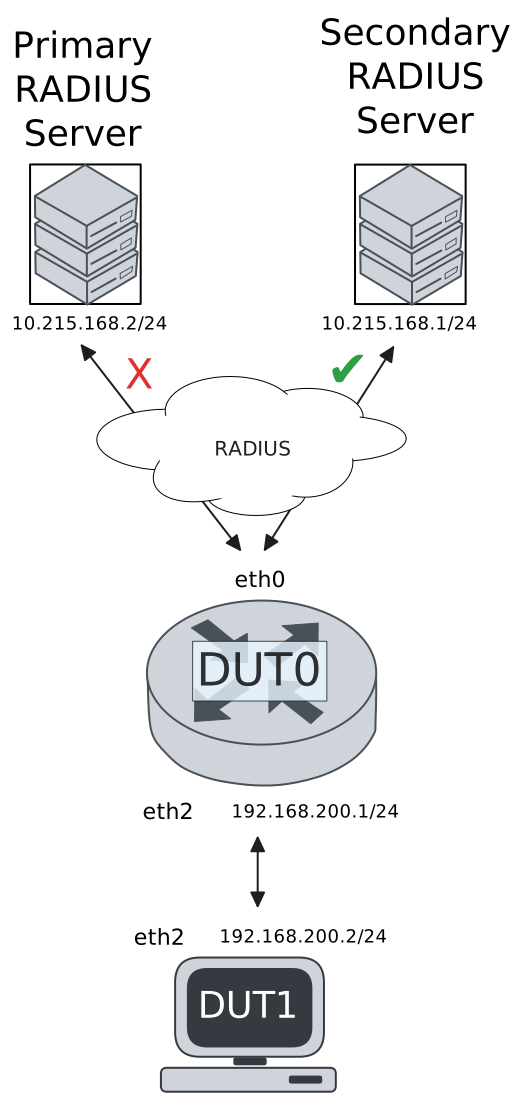
Test 802.1X Authentication With Server Failover
Description
This scenario shows how to configure 802.1X authentication. The primary Nework Access Server is not reachable, so the secondary is used instead.
Scenario
Step 1: Set the following configuration in DUT0 :
set interfaces ethernet eth0 address 10.215.168.64/24
set interfaces ethernet eth0 vrf WAN
set interfaces ethernet eth2 address 192.168.100.1/24
set interfaces ethernet eth2 authenticator 802.1x max-retransmissions 2
set interfaces ethernet eth2 authenticator aaa authentication list1
set interfaces ethernet eth2 authenticator log-level debug
set interfaces ethernet eth2 authenticator mode only-802.1x
set interfaces ethernet eth2 authenticator quiet-period 60
set interfaces ethernet eth2 authenticator reauth-period 0
set system aaa group radius radgroup0 local-vrf WAN
set system aaa group radius radgroup0 server MAIN
set system aaa group radius radgroup1 local-vrf WAN
set system aaa group radius radgroup1 server serv1
set system aaa list list1 method 0 group radius radgroup0
set system aaa list list1 method 1 group radius radgroup1
set system aaa server radius MAIN address 10.215.168.2
set system aaa server radius MAIN encrypted-key U2FsdGVkX1+KcAFcr8T6/lIqoCoadwrfVYiLLai+9izA1AMmwrPikDc8jqHWbhZVfoOiHD7Dkkd/xiHSRLLYCw==
set system aaa server radius serv1 address 10.215.168.1
set system aaa server radius serv1 encrypted-key U2FsdGVkX19d3ebi7JddbXKa0j9zyUbrlOwYnweyl6MxJ9PALVagK8uhGMq4ZnapJrNga67j94z7s4eY4Bq5QA==
set system login user admin authentication encrypted-password '$6$GSjsCj8gHLv$/VcqU6FLi6CT2Oxn0MJQ2C2tqnRDrYKNF8HIYWJp68nvXvPdFccDsT04.WtigUONbKYrgKg8d6rEs8PjljMkH0'
set system vrf WAN
Step 2: Ping IP address 10.215.168.1 from DUT0:
admin@DUT0$ ping 10.215.168.1 vrf WAN count 1 size 56 timeout 1Show output
ping: Warning: source address might be selected on device other than: WAN
PING 10.215.168.1 (10.215.168.1) from 10.215.168.64 WAN: 56(84) bytes of data.
64 bytes from 10.215.168.1: icmp_seq=1 ttl=64 time=0.210 ms

--- 10.215.168.1 ping statistics ---
1 packets transmitted, 1 received, 0% packet loss, time 0ms
rtt min/avg/max/mdev = 0.210/0.210/0.210/0.000 ms
Step 3: Set the following configuration in DUT1 :
set interfaces ethernet eth2 address 192.168.100.2/24
set interfaces ethernet eth2 supplicant encrypted-password U2FsdGVkX1+5Xy1V55Jefi7NlsGSNp/OFLyNEDW6Xeo=
set interfaces ethernet eth2 supplicant username testing
set system login user admin authentication encrypted-password '$6$GSjsCj8gHLv$/VcqU6FLi6CT2Oxn0MJQ2C2tqnRDrYKNF8HIYWJp68nvXvPdFccDsT04.WtigUONbKYrgKg8d6rEs8PjljMkH0'
Step 4: Run command interfaces ethernet eth2 supplicant show status at DUT1 and check if output contains the following tokens:
AuthorizedShow output
---------------------------------------------------
        Field                      Value
---------------------------------------------------
EAP State                                   SUCCESS
EAP TLS Cipher          ECDHE-RSA-AES256-GCM-SHA384
EAP TLS Version                             TLSv1.2
PAE State                             AUTHENTICATED
Supplicant Port Status                   Authorized
WPA State                                 COMPLETED
Step 5: Run command interfaces ethernet eth2 supplicant show stats at DUT1 and check if output matches the following regular expressions:
Port Status\s+AuthorizedShow output
-------------------------------
       Field           Value
-------------------------------
EAPoL Frames (Rx)            11
EAPoL Frames (Tx)            11
Invalid Frames (Rx)           0
Logoff Frames (Tx)            0
Port Status          Authorized
Req Frames (Rx)               9
Req ID Frames (Rx)            1
Resp Frames (Tx)             10
Start Frames (Tx)             1
Step 6: Run command interfaces ethernet eth2 authenticator show stats at DUT0 and check if output matches the following regular expressions:
Authentication Successes\s+1
Authentication Mode\s+802\.1X
Show output
---------------------------------------------
         Field                   Value
---------------------------------------------
Access Challenges                           9
Authentication Backend                 RADIUS
Authentication Failures                     0
Authentication Mode                    802.1X
Authentication Status     Authorized (802.1X)
Authentication Successes                    1
EAPoL frames (Rx)                          11
EAPoL frames (Tx)                          11
Quiet Period                               60
Reauthenticate                          FALSE
Reauthenticate Period                       0
Session Time                                0
Session User MAC            de:ad:be:ef:6c:12
Session User Name                     testing
Step 7: Ping IP address 192.168.100.1 from DUT1:
admin@DUT1$ ping 192.168.100.1 count 1 size 56 timeout 1Show output
PING 192.168.100.1 (192.168.100.1) 56(84) bytes of data.
64 bytes from 192.168.100.1: icmp_seq=1 ttl=64 time=3.36 ms

--- 192.168.100.1 ping statistics ---
1 packets transmitted, 1 received, 0% packet loss, time 0ms
rtt min/avg/max/mdev = 3.355/3.355/3.355/0.000 ms
Step 8: Run command system journal show | grep "osdx hostapd" at DUT0 and check if output contains the following tokens:
No response from Authentication server 10.215.168.2Show output
Feb 12 20:02:33.981529 osdx hostapd[457464]: eth2: IEEE 802.11 Fetching hardware channel/rate support not supported.
Feb 12 20:02:33.981552 osdx hostapd[457464]: eth2: RADIUS Authentication server 10.215.168.2:1812
Feb 12 20:02:33.981843 osdx hostapd[457464]: connect[radius]: No route to host
Feb 12 20:02:33.981609 osdx hostapd[457464]: eth2: IEEE 802.1X Initializing IEEE 802.1X: mode=802.1X, eap_server=0, eap_quiet_period=60, eap_max_retrans=2
Feb 12 20:02:33.981616 osdx hostapd[457464]: eth2: IEEE 802.1X IEEE 802.1X: Enabling packet capture discovery mode
Feb 12 20:02:34.001358 osdx hostapd[457464]: Discovery mode enabled on eth2
Feb 12 20:02:34.001453 osdx hostapd[457464]: eth2: interface state UNINITIALIZED->ENABLED
Feb 12 20:02:34.001453 osdx hostapd[457464]: eth2: AP-ENABLED
Feb 12 20:02:37.249178 osdx hostapd[457465]: eth2: STA de:ad:be:ef:6c:12 IEEE 802.1X: New STA de:ad:be:ef:6c:12 added
Feb 12 20:02:37.249198 osdx hostapd[457465]: eth2: IEEE 802.1X IEEE 802.1X: Disabling packet capture discovery mode
Feb 12 20:02:37.265396 osdx hostapd[457465]: eth2: STA de:ad:be:ef:6c:12 IEEE 802.1X: start authentication
Feb 12 20:02:37.265428 osdx hostapd[457465]: eth2: STA 01:80:c2:00:00:03 IEEE 802.1X: disabling transmission of periodic EAP-Request frames
Feb 12 20:02:37.265446 osdx hostapd[457465]: eth2: STA de:ad:be:ef:6c:12 IEEE 802.1X: received EAPOL-Start from STA
Feb 12 20:02:37.265456 osdx hostapd[457465]: eth2: STA de:ad:be:ef:6c:12 IEEE 802.1X: unauthorizing port
Feb 12 20:02:37.265467 osdx hostapd[457465]: eth2: STA 01:80:c2:00:00:03 IEEE 802.1X: Trying RADIUS authentication
Feb 12 20:02:37.265485 osdx hostapd[457465]: eth2: STA de:ad:be:ef:6c:12 IEEE 802.1X: Sending EAP Packet (identifier 186)
Feb 12 20:02:37.265987 osdx hostapd[457465]: eth2: STA de:ad:be:ef:6c:12 IEEE 802.1X: received EAP packet (code=2 id=186 len=12) from STA: EAP Response-Identity (1)
Feb 12 20:02:37.266000 osdx hostapd[457465]: eth2: STA de:ad:be:ef:6c:12 IEEE 802.1X: STA identity 'testing'
Feb 12 20:02:37.266032 osdx hostapd[457465]: eth2: RADIUS Authentication server 10.215.168.2:1812
Feb 12 20:02:37.267761 osdx hostapd[457465]: eth2: RADIUS Sending RADIUS message to authentication server
Feb 12 20:02:37.267795 osdx hostapd[457465]: eth2: RADIUS Next RADIUS client retransmit in 1 seconds
Feb 12 20:02:38.267884 osdx hostapd[457465]: eth2: STA de:ad:be:ef:6c:12 RADIUS: Resending RADIUS message (id=0)
Feb 12 20:02:38.267915 osdx hostapd[457465]: eth2: RADIUS Next RADIUS client retransmit in 2 seconds
Feb 12 20:02:40.268020 osdx hostapd[457465]: eth2: STA de:ad:be:ef:6c:12 RADIUS: Resending RADIUS message (id=0)
Feb 12 20:02:40.268053 osdx hostapd[457465]: eth2: RADIUS Next RADIUS client retransmit in 4 seconds
Feb 12 20:02:44.268428 osdx hostapd[457465]: eth2: RADIUS No response from Authentication server 10.215.168.2:1812 - failover (1º round)
Feb 12 20:02:44.268440 osdx hostapd[457465]: eth2: RADIUS Authentication server 10.215.168.1:1812
Feb 12 20:02:44.268482 osdx hostapd[457465]: eth2: STA de:ad:be:ef:6c:12 RADIUS: Resending RADIUS message (id=0)
Feb 12 20:02:44.268508 osdx hostapd[457465]: eth2: RADIUS Next RADIUS client retransmit in 2 seconds
Feb 12 20:02:44.268826 osdx hostapd[457465]: eth2: RADIUS Received 80 bytes from RADIUS server
Feb 12 20:02:44.268832 osdx hostapd[457465]: eth2: RADIUS Received RADIUS message
Feb 12 20:02:44.268835 osdx hostapd[457465]: eth2: STA de:ad:be:ef:6c:12 RADIUS: Received RADIUS packet matched with a pending request, round trip time 0.00 sec
Feb 12 20:02:44.268884 osdx hostapd[457465]: eth2: STA de:ad:be:ef:6c:12 IEEE 802.1X: decapsulated EAP packet (code=1 id=187 len=22) from RADIUS server: EAP-Request-MD5 (4)
Feb 12 20:02:44.268893 osdx hostapd[457465]: eth2: STA de:ad:be:ef:6c:12 IEEE 802.1X: Sending EAP Packet (identifier 187)
Feb 12 20:02:44.269230 osdx hostapd[457465]: eth2: STA de:ad:be:ef:6c:12 IEEE 802.1X: received EAP packet (code=2 id=187 len=6) from STA: EAP Response-unknown (3)
Feb 12 20:02:44.269306 osdx hostapd[457465]: eth2: RADIUS Sending RADIUS message to authentication server
Feb 12 20:02:44.269321 osdx hostapd[457465]: eth2: RADIUS Next RADIUS client retransmit in 1 seconds
Feb 12 20:02:44.269533 osdx hostapd[457465]: eth2: RADIUS Received 64 bytes from RADIUS server
Feb 12 20:02:44.269538 osdx hostapd[457465]: eth2: RADIUS Received RADIUS message
Feb 12 20:02:44.269542 osdx hostapd[457465]: eth2: STA de:ad:be:ef:6c:12 RADIUS: Received RADIUS packet matched with a pending request, round trip time 0.00 sec
Feb 12 20:02:44.269569 osdx hostapd[457465]: eth2: STA de:ad:be:ef:6c:12 IEEE 802.1X: decapsulated EAP packet (code=1 id=188 len=6) from RADIUS server: EAP-Request-PEAP (25)
Feb 12 20:02:44.269575 osdx hostapd[457465]: eth2: STA de:ad:be:ef:6c:12 IEEE 802.1X: Sending EAP Packet (identifier 188)
Feb 12 20:02:44.269939 osdx hostapd[457465]: eth2: STA de:ad:be:ef:6c:12 IEEE 802.1X: received EAP packet (code=2 id=188 len=194) from STA: EAP Response-PEAP (25)
Feb 12 20:02:44.269990 osdx hostapd[457465]: eth2: RADIUS Sending RADIUS message to authentication server
Feb 12 20:02:44.270010 osdx hostapd[457465]: eth2: RADIUS Next RADIUS client retransmit in 1 seconds
Feb 12 20:02:44.271163 osdx hostapd[457465]: eth2: RADIUS Received 1068 bytes from RADIUS server
Feb 12 20:02:44.271171 osdx hostapd[457465]: eth2: RADIUS Received RADIUS message
Feb 12 20:02:44.271174 osdx hostapd[457465]: eth2: STA de:ad:be:ef:6c:12 RADIUS: Received RADIUS packet matched with a pending request, round trip time 0.00 sec
Feb 12 20:02:44.271203 osdx hostapd[457465]: eth2: STA de:ad:be:ef:6c:12 IEEE 802.1X: decapsulated EAP packet (code=1 id=189 len=1004) from RADIUS server: EAP-Request-PEAP (25)
Feb 12 20:02:44.271210 osdx hostapd[457465]: eth2: STA de:ad:be:ef:6c:12 IEEE 802.1X: Sending EAP Packet (identifier 189)
Feb 12 20:02:44.271411 osdx hostapd[457465]: eth2: STA de:ad:be:ef:6c:12 IEEE 802.1X: received EAP packet (code=2 id=189 len=6) from STA: EAP Response-PEAP (25)
Feb 12 20:02:44.271453 osdx hostapd[457465]: eth2: RADIUS Sending RADIUS message to authentication server
Feb 12 20:02:44.271467 osdx hostapd[457465]: eth2: RADIUS Next RADIUS client retransmit in 1 seconds
Feb 12 20:02:44.271606 osdx hostapd[457465]: eth2: RADIUS Received 229 bytes from RADIUS server
Feb 12 20:02:44.271611 osdx hostapd[457465]: eth2: RADIUS Received RADIUS message
Feb 12 20:02:44.271615 osdx hostapd[457465]: eth2: STA de:ad:be:ef:6c:12 RADIUS: Received RADIUS packet matched with a pending request, round trip time 0.00 sec
Feb 12 20:02:44.271633 osdx hostapd[457465]: eth2: STA de:ad:be:ef:6c:12 IEEE 802.1X: decapsulated EAP packet (code=1 id=190 len=171) from RADIUS server: EAP-Request-PEAP (25)
Feb 12 20:02:44.271638 osdx hostapd[457465]: eth2: STA de:ad:be:ef:6c:12 IEEE 802.1X: Sending EAP Packet (identifier 190)
Feb 12 20:02:44.273032 osdx hostapd[457465]: eth2: STA de:ad:be:ef:6c:12 IEEE 802.1X: received EAP packet (code=2 id=190 len=103) from STA: EAP Response-PEAP (25)
Feb 12 20:02:44.273077 osdx hostapd[457465]: eth2: RADIUS Sending RADIUS message to authentication server
Feb 12 20:02:44.273093 osdx hostapd[457465]: eth2: RADIUS Next RADIUS client retransmit in 1 seconds
Feb 12 20:02:44.273373 osdx hostapd[457465]: eth2: RADIUS Received 115 bytes from RADIUS server
Feb 12 20:02:44.273380 osdx hostapd[457465]: eth2: RADIUS Received RADIUS message
Feb 12 20:02:44.273384 osdx hostapd[457465]: eth2: STA de:ad:be:ef:6c:12 RADIUS: Received RADIUS packet matched with a pending request, round trip time 0.00 sec
Feb 12 20:02:44.273407 osdx hostapd[457465]: eth2: STA de:ad:be:ef:6c:12 IEEE 802.1X: decapsulated EAP packet (code=1 id=191 len=57) from RADIUS server: EAP-Request-PEAP (25)
Feb 12 20:02:44.273415 osdx hostapd[457465]: eth2: STA de:ad:be:ef:6c:12 IEEE 802.1X: Sending EAP Packet (identifier 191)
Feb 12 20:02:44.273691 osdx hostapd[457465]: eth2: STA de:ad:be:ef:6c:12 IEEE 802.1X: received EAP packet (code=2 id=191 len=6) from STA: EAP Response-PEAP (25)
Feb 12 20:02:44.273732 osdx hostapd[457465]: eth2: RADIUS Sending RADIUS message to authentication server
Feb 12 20:02:44.273747 osdx hostapd[457465]: eth2: RADIUS Next RADIUS client retransmit in 1 seconds
Feb 12 20:02:44.273898 osdx hostapd[457465]: eth2: RADIUS Received 98 bytes from RADIUS server
Feb 12 20:02:44.273903 osdx hostapd[457465]: eth2: RADIUS Received RADIUS message
Feb 12 20:02:44.273907 osdx hostapd[457465]: eth2: STA de:ad:be:ef:6c:12 RADIUS: Received RADIUS packet matched with a pending request, round trip time 0.00 sec
Feb 12 20:02:44.273923 osdx hostapd[457465]: eth2: STA de:ad:be:ef:6c:12 IEEE 802.1X: decapsulated EAP packet (code=1 id=192 len=40) from RADIUS server: EAP-Request-PEAP (25)
Feb 12 20:02:44.273930 osdx hostapd[457465]: eth2: STA de:ad:be:ef:6c:12 IEEE 802.1X: Sending EAP Packet (identifier 192)
Feb 12 20:02:44.274100 osdx hostapd[457465]: eth2: STA de:ad:be:ef:6c:12 IEEE 802.1X: received EAP packet (code=2 id=192 len=43) from STA: EAP Response-PEAP (25)
Feb 12 20:02:44.274138 osdx hostapd[457465]: eth2: RADIUS Sending RADIUS message to authentication server
Feb 12 20:02:44.274185 osdx hostapd[457465]: eth2: RADIUS Next RADIUS client retransmit in 1 seconds
Feb 12 20:02:44.274299 osdx hostapd[457465]: eth2: RADIUS Received 131 bytes from RADIUS server
Feb 12 20:02:44.274305 osdx hostapd[457465]: eth2: RADIUS Received RADIUS message
Feb 12 20:02:44.274309 osdx hostapd[457465]: eth2: STA de:ad:be:ef:6c:12 RADIUS: Received RADIUS packet matched with a pending request, round trip time 0.00 sec
Feb 12 20:02:44.274325 osdx hostapd[457465]: eth2: STA de:ad:be:ef:6c:12 IEEE 802.1X: decapsulated EAP packet (code=1 id=193 len=73) from RADIUS server: EAP-Request-PEAP (25)
Feb 12 20:02:44.274331 osdx hostapd[457465]: eth2: STA de:ad:be:ef:6c:12 IEEE 802.1X: Sending EAP Packet (identifier 193)
Feb 12 20:02:44.274565 osdx hostapd[457465]: eth2: STA de:ad:be:ef:6c:12 IEEE 802.1X: received EAP packet (code=2 id=193 len=97) from STA: EAP Response-PEAP (25)
Feb 12 20:02:44.274604 osdx hostapd[457465]: eth2: RADIUS Sending RADIUS message to authentication server
Feb 12 20:02:44.274615 osdx hostapd[457465]: eth2: RADIUS Next RADIUS client retransmit in 1 seconds
Feb 12 20:02:44.274813 osdx hostapd[457465]: eth2: RADIUS Received 140 bytes from RADIUS server
Feb 12 20:02:44.274818 osdx hostapd[457465]: eth2: RADIUS Received RADIUS message
Feb 12 20:02:44.274821 osdx hostapd[457465]: eth2: STA de:ad:be:ef:6c:12 RADIUS: Received RADIUS packet matched with a pending request, round trip time 0.00 sec
Feb 12 20:02:44.274835 osdx hostapd[457465]: eth2: STA de:ad:be:ef:6c:12 IEEE 802.1X: decapsulated EAP packet (code=1 id=194 len=82) from RADIUS server: EAP-Request-PEAP (25)
Feb 12 20:02:44.274841 osdx hostapd[457465]: eth2: STA de:ad:be:ef:6c:12 IEEE 802.1X: Sending EAP Packet (identifier 194)
Feb 12 20:02:44.274996 osdx hostapd[457465]: eth2: STA de:ad:be:ef:6c:12 IEEE 802.1X: received EAP packet (code=2 id=194 len=37) from STA: EAP Response-PEAP (25)
Feb 12 20:02:44.275028 osdx hostapd[457465]: eth2: RADIUS Sending RADIUS message to authentication server
Feb 12 20:02:44.275039 osdx hostapd[457465]: eth2: RADIUS Next RADIUS client retransmit in 1 seconds
Feb 12 20:02:44.275194 osdx hostapd[457465]: eth2: RADIUS Received 104 bytes from RADIUS server
Feb 12 20:02:44.275199 osdx hostapd[457465]: eth2: RADIUS Received RADIUS message
Feb 12 20:02:44.275203 osdx hostapd[457465]: eth2: STA de:ad:be:ef:6c:12 RADIUS: Received RADIUS packet matched with a pending request, round trip time 0.00 sec
Feb 12 20:02:44.275222 osdx hostapd[457465]: eth2: STA de:ad:be:ef:6c:12 IEEE 802.1X: decapsulated EAP packet (code=1 id=195 len=46) from RADIUS server: EAP-Request-PEAP (25)
Feb 12 20:02:44.275229 osdx hostapd[457465]: eth2: STA de:ad:be:ef:6c:12 IEEE 802.1X: Sending EAP Packet (identifier 195)
Feb 12 20:02:44.275412 osdx hostapd[457465]: eth2: STA de:ad:be:ef:6c:12 IEEE 802.1X: received EAP packet (code=2 id=195 len=46) from STA: EAP Response-PEAP (25)
Feb 12 20:02:44.275445 osdx hostapd[457465]: eth2: RADIUS Sending RADIUS message to authentication server
Feb 12 20:02:44.275455 osdx hostapd[457465]: eth2: RADIUS Next RADIUS client retransmit in 1 seconds
Feb 12 20:02:44.275607 osdx hostapd[457465]: eth2: RADIUS Received 175 bytes from RADIUS server
Feb 12 20:02:44.275612 osdx hostapd[457465]: eth2: RADIUS Received RADIUS message
Feb 12 20:02:44.275615 osdx hostapd[457465]: eth2: STA de:ad:be:ef:6c:12 RADIUS: Received RADIUS packet matched with a pending request, round trip time 0.00 sec
Feb 12 20:02:44.275636 osdx hostapd[457465]: eth2: STA de:ad:be:ef:6c:12 IEEE 802.1X: old identity 'testing' updated with User-Name from Access-Accept 'testing'
Feb 12 20:02:44.275641 osdx hostapd[457465]: eth2: STA de:ad:be:ef:6c:12 IEEE 802.1X: decapsulated EAP packet (code=3 id=195 len=4) from RADIUS server: EAP Success
Feb 12 20:02:44.275656 osdx hostapd[457465]: eth2: STA de:ad:be:ef:6c:12 IEEE 802.1X: Sending EAP Packet (identifier 195)
Feb 12 20:02:44.275671 osdx hostapd[457465]: eth2: STA de:ad:be:ef:6c:12 IEEE 802.1X: authorizing port
Feb 12 20:02:44.275674 osdx hostapd[457465]: eth2: STA de:ad:be:ef:6c:12 RADIUS: starting accounting session 19C08EB2863B499A
Feb 12 20:02:44.275691 osdx hostapd[457465]: eth2: STA de:ad:be:ef:6c:12 IEEE 802.1X: authenticated - EAP type: 25 (PEAP)
Test MAB Authentication With Server Failover
Description
This scenario shows how to configure MAB authentication. The primary Nework Access Server is not reachable, so the secondary is used instead.
Scenario
Step 1: Set the following configuration in DUT0 :
set interfaces ethernet eth0 address 10.215.168.64/24
set interfaces ethernet eth0 vrf WAN
set interfaces ethernet eth2 address 192.168.100.1/24
set interfaces ethernet eth2 authenticator aaa authentication list1
set interfaces ethernet eth2 authenticator log-level debug
set interfaces ethernet eth2 authenticator mode only-MAB
set interfaces ethernet eth2 authenticator quiet-period 60
set interfaces ethernet eth2 authenticator reauth-period 0
set system aaa group radius radgroup0 local-vrf WAN
set system aaa group radius radgroup0 server MAIN
set system aaa group radius radgroup1 local-vrf WAN
set system aaa group radius radgroup1 server serv1
set system aaa list list1 method 0 group radius radgroup0
set system aaa list list1 method 1 group radius radgroup1
set system aaa server radius MAIN address 10.215.168.2
set system aaa server radius MAIN encrypted-key U2FsdGVkX1/eCBPOkdBQyQi/NuzVAxQH9HLU1OCucXzKXtB6NTgQD8W/P9/l3inWjjFN32YkyVEtUbTDC/K6tA==
set system aaa server radius serv1 address 10.215.168.1
set system aaa server radius serv1 encrypted-key U2FsdGVkX1+TTP/TQARXI43SI/LYemEYc3Bx/38heve8iVopRIuFpZNHahmh9KqL1fQjXPCpIu28+mwAAlcUTA==
set system login user admin authentication encrypted-password '$6$GSjsCj8gHLv$/VcqU6FLi6CT2Oxn0MJQ2C2tqnRDrYKNF8HIYWJp68nvXvPdFccDsT04.WtigUONbKYrgKg8d6rEs8PjljMkH0'
set system vrf WAN
Step 2: Ping IP address 10.215.168.1 from DUT0:
admin@DUT0$ ping 10.215.168.1 vrf WAN count 1 size 56 timeout 1Show output
ping: Warning: source address might be selected on device other than: WAN
PING 10.215.168.1 (10.215.168.1) from 10.215.168.64 WAN: 56(84) bytes of data.
64 bytes from 10.215.168.1: icmp_seq=1 ttl=64 time=0.194 ms

--- 10.215.168.1 ping statistics ---
1 packets transmitted, 1 received, 0% packet loss, time 0ms
rtt min/avg/max/mdev = 0.194/0.194/0.194/0.000 ms
Step 3: Set the following configuration in DUT1 :
set interfaces ethernet eth2 address 192.168.100.2/24
set system login user admin authentication encrypted-password '$6$GSjsCj8gHLv$/VcqU6FLi6CT2Oxn0MJQ2C2tqnRDrYKNF8HIYWJp68nvXvPdFccDsT04.WtigUONbKYrgKg8d6rEs8PjljMkH0'
Step 4: Run command interfaces ethernet eth2 authenticator show stats at DUT0 and check if output matches the following regular expressions:
Authentication Successes\s+1
Authentication Mode\s+MAB
Show output
-------------------------------------------
         Field                  Value
-------------------------------------------
Access Challenges                         0
Authentication Backend               RADIUS
Authentication Failures                   0
Authentication Mode                     MAB
Authentication Status      Authorized (MAB)
Authentication Successes                  1
EAPoL frames (Rx)                         0
EAPoL frames (Tx)                         0
Quiet Period                             60
Reauthenticate                        FALSE
Reauthenticate Period                     0
Session Time                              0
Session User MAC          de:ad:be:ef:6c:12
Session User Name                       N/A
Step 5: Ping IP address 192.168.100.1 from DUT1:
admin@DUT1$ ping 192.168.100.1 count 1 size 56 timeout 1Show output
PING 192.168.100.1 (192.168.100.1) 56(84) bytes of data.
64 bytes from 192.168.100.1: icmp_seq=1 ttl=64 time=0.252 ms

--- 192.168.100.1 ping statistics ---
1 packets transmitted, 1 received, 0% packet loss, time 0ms
rtt min/avg/max/mdev = 0.252/0.252/0.252/0.000 ms
Step 6: Run command system journal show | grep "osdx hostapd" at DUT0 and check if output contains the following tokens:
No response from Authentication server 10.215.168.2Show output
Feb 12 20:02:55.268683 osdx hostapd[458112]: eth2: IEEE 802.11 Fetching hardware channel/rate support not supported.
Feb 12 20:02:55.268698 osdx hostapd[458112]: eth2: RADIUS Authentication server 10.215.168.2:1812
Feb 12 20:02:55.268933 osdx hostapd[458112]: connect[radius]: No route to host
Feb 12 20:02:55.268744 osdx hostapd[458112]: eth2: IEEE 802.1X Initializing IEEE 802.1X: mode=MAB-only, eap_server=0, eap_quiet_period=60, eap_max_retrans=5
Feb 12 20:02:55.268748 osdx hostapd[458112]: eth2: IEEE 802.1X IEEE 802.1X: Enabling packet capture discovery mode
Feb 12 20:02:55.288517 osdx hostapd[458112]: Discovery mode enabled on eth2
Feb 12 20:02:55.288595 osdx hostapd[458112]: eth2: interface state UNINITIALIZED->ENABLED
Feb 12 20:02:55.288595 osdx hostapd[458112]: eth2: AP-ENABLED
Feb 12 20:03:00.288862 osdx hostapd[458113]: eth2: STA de:ad:be:ef:6c:12 DRIVER: Device discovered, triggering MAB authentication
Feb 12 20:03:00.288899 osdx hostapd[458113]: eth2: STA de:ad:be:ef:6c:12 IEEE 802.1X: New STA de:ad:be:ef:6c:12 added
Feb 12 20:03:00.288907 osdx hostapd[458113]: eth2: IEEE 802.1X IEEE 802.1X: Disabling packet capture discovery mode
Feb 12 20:03:00.304541 osdx hostapd[458113]: eth2: STA de:ad:be:ef:6c:12 IEEE 802.1X: MAB-only mode: Starting MAB authentication
Feb 12 20:03:00.304568 osdx hostapd[458113]: eth2: STA de:ad:be:ef:6c:12 IEEE 802.1X: MAB: Starting RADIUS query
Feb 12 20:03:00.304587 osdx hostapd[458113]: eth2: STA de:ad:be:ef:6c:12 IEEE 802.1X: MAB: User-Name = de:ad:be:ef:6c:12
Feb 12 20:03:00.306455 osdx hostapd[458113]: eth2: STA de:ad:be:ef:6c:12 IEEE 802.1X: MAB: User-Password = de:ad:be:ef:6c:12
Feb 12 20:03:00.306471 osdx hostapd[458113]: eth2: RADIUS Authentication server 10.215.168.2:1812
Feb 12 20:03:00.306550 osdx hostapd[458113]: eth2: RADIUS Sending RADIUS message to authentication server
Feb 12 20:03:00.306587 osdx hostapd[458113]: eth2: RADIUS Next RADIUS client retransmit in 1 seconds
Feb 12 20:03:01.306671 osdx hostapd[458113]: eth2: STA de:ad:be:ef:6c:12 RADIUS: Resending RADIUS message (id=128)
Feb 12 20:03:01.306703 osdx hostapd[458113]: eth2: RADIUS Next RADIUS client retransmit in 2 seconds
Feb 12 20:03:03.306845 osdx hostapd[458113]: eth2: STA de:ad:be:ef:6c:12 RADIUS: Resending RADIUS message (id=128)
Feb 12 20:03:03.306877 osdx hostapd[458113]: eth2: RADIUS Next RADIUS client retransmit in 4 seconds
Feb 12 20:03:07.307829 osdx hostapd[458113]: eth2: RADIUS No response from Authentication server 10.215.168.2:1812 - failover (1º round)
Feb 12 20:03:07.307843 osdx hostapd[458113]: eth2: RADIUS Authentication server 10.215.168.1:1812
Feb 12 20:03:07.307891 osdx hostapd[458113]: eth2: STA de:ad:be:ef:6c:12 RADIUS: Resending RADIUS message (id=128)
Feb 12 20:03:07.307924 osdx hostapd[458113]: eth2: RADIUS Next RADIUS client retransmit in 2 seconds
Feb 12 20:03:07.308223 osdx hostapd[458113]: eth2: RADIUS Received 20 bytes from RADIUS server
Feb 12 20:03:07.308231 osdx hostapd[458113]: eth2: RADIUS Received RADIUS message
Feb 12 20:03:07.308235 osdx hostapd[458113]: eth2: STA de:ad:be:ef:6c:12 RADIUS: Received RADIUS packet matched with a pending request, round trip time 0.00 sec
Feb 12 20:03:07.308240 osdx hostapd[458113]: eth2: STA de:ad:be:ef:6c:12 IEEE 802.1X: MAB: Processing RADIUS response
Feb 12 20:03:07.308288 osdx hostapd[458113]: eth2: STA de:ad:be:ef:6c:12 IEEE 802.1X: MAB: Identity set to 'de:ad:be:ef:6c:12'
Feb 12 20:03:07.308291 osdx hostapd[458113]: eth2: STA de:ad:be:ef:6c:12 IEEE 802.1X: MAB: station successfully authenticated
Feb 12 20:03:07.308295 osdx hostapd[458113]: eth2: IEEE 802.1X IEEE 802.1X: Discovery already disabled
Feb 12 20:03:07.308304 osdx hostapd[458113]: eth2: STA de:ad:be:ef:6c:12 IEEE 802.1X: authorizing port
Feb 12 20:03:07.308308 osdx hostapd[458113]: eth2: STA de:ad:be:ef:6c:12 RADIUS: starting accounting session 4C9F8E553CAC1583