Check Link Hook
This example demonstrates how to process outgoing NHRP traffic in a scenario using one Tunnel with GRE encapsulation.
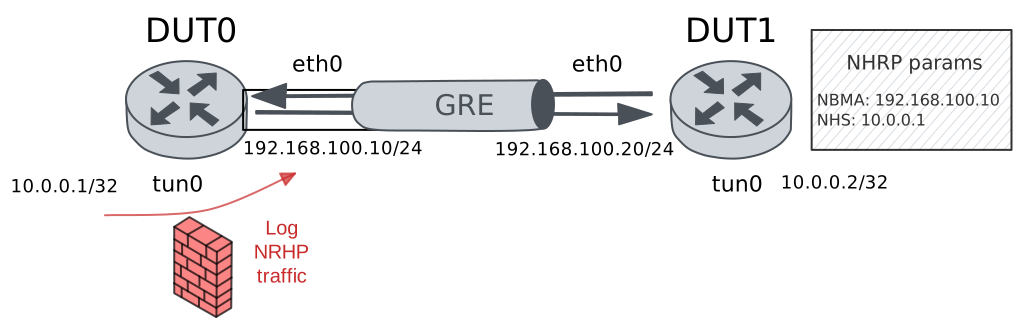
Test Marks In NHRP Traffic
Description
In this scenario, a traffic policy was configured
to log outgoing NHRP traffic, which is non-IP Layer
3 protocol. The special hook link-out can be
used to process these outgoing frames.
Scenario
Step 1: Set the following configuration in DUT0 :
set interfaces ethernet eth0 address 192.168.100.10/24
set interfaces tunnel tun0 address 10.0.0.1/32
set interfaces tunnel tun0 encapsulation gre
set interfaces tunnel tun0 local-address 192.168.100.10
set interfaces tunnel tun0 nhrp
set interfaces tunnel tun0 traffic policy link-in LOG_NHRP
set interfaces tunnel tun0 traffic policy link-out LOG_NHRP
set system login user admin authentication encrypted-password '$6$GSjsCj8gHLv$/VcqU6FLi6CT2Oxn0MJQ2C2tqnRDrYKNF8HIYWJp68nvXvPdFccDsT04.WtigUONbKYrgKg8d6rEs8PjljMkH0'
set traffic policy LOG_NHRP rule 1 log prefix NHRP__
set traffic policy LOG_NHRP rule 1 selector NHRP_SEL
set traffic selector NHRP_SEL rule 1 ether-type 8193
Note
NHRP packets use ethertype 8193 (0x2001).
Step 2: Set the following configuration in DUT1 :
set interfaces ethernet eth0 address 192.168.100.20/24
set interfaces tunnel tun0 address 10.0.0.2/32
set interfaces tunnel tun0 encapsulation gre
set interfaces tunnel tun0 local-address 192.168.100.20
set interfaces tunnel tun0 nhrp holdtime 5
set interfaces tunnel tun0 nhrp nhs 10.0.0.1 nbma 192.168.100.10
set system login user admin authentication encrypted-password '$6$GSjsCj8gHLv$/VcqU6FLi6CT2Oxn0MJQ2C2tqnRDrYKNF8HIYWJp68nvXvPdFccDsT04.WtigUONbKYrgKg8d6rEs8PjljMkH0'
Step 3: Run command protocols ip show nhrp at DUT0 and check if output matches the following regular expressions:
tun0\s+dynamic\s+10\.0\.0\.2Show output
Iface      Type     Protocol         NBMA             Claimed NBMA     Expires(s)   Flags  Identity
tun0       local    10.0.0.1         192.168.100.10   192.168.100.10   -                   -
tun0       dynamic  10.0.0.2         192.168.100.20   192.168.100.20   4            UT
Step 4: Run command system journal show | cat at DUT0 and check if output matches the following regular expressions:
\[NHRP__-1\] ACCEPT IN=tun0 OUT=\w+
\[NHRP__-1\] ACCEPT IN= OUT=tun0
Show output
Feb 12 21:24:47.423288 osdx systemd-journald[1959]: Runtime Journal (/run/log/journal/fef7273cfed74888920ec39438478308) is 2.1M, max 17.2M, 15.1M free.
Feb 12 21:24:47.424467 osdx systemd-journald[1959]: Received client request to rotate journal, rotating.
Feb 12 21:24:47.424511 osdx systemd-journald[1959]: Vacuuming done, freed 0B of archived journals from /run/log/journal/fef7273cfed74888920ec39438478308.
Feb 12 21:24:47.435596 osdx OSDxCLI[453798]: User 'admin' executed a new command: 'system journal clear'.
Feb 12 21:24:47.763488 osdx OSDxCLI[453798]: User 'admin' executed a new command: 'system coredump delete all'.
Feb 12 21:24:48.040109 osdx OSDxCLI[453798]: User 'admin' entered the configuration menu.
Feb 12 21:24:48.185624 osdx OSDxCLI[453798]: User 'admin' added a new cfg line: 'set interfaces ethernet eth0 address 192.168.100.10/24'.
Feb 12 21:24:48.278313 osdx OSDxCLI[453798]: User 'admin' added a new cfg line: 'set interfaces tunnel tun0 traffic policy link-out LOG_NHRP'.
Feb 12 21:24:48.346231 osdx OSDxCLI[453798]: User 'admin' added a new cfg line: 'set interfaces tunnel tun0 traffic policy link-in LOG_NHRP'.
Feb 12 21:24:48.472597 osdx OSDxCLI[453798]: User 'admin' added a new cfg line: 'set interfaces tunnel tun0 address 10.0.0.1/32'.
Feb 12 21:24:48.614546 osdx OSDxCLI[453798]: User 'admin' added a new cfg line: 'set interfaces tunnel tun0 encapsulation gre'.
Feb 12 21:24:48.727494 osdx OSDxCLI[453798]: User 'admin' added a new cfg line: 'set interfaces tunnel tun0 local-address 192.168.100.10'.
Feb 12 21:24:48.785184 osdx OSDxCLI[453798]: User 'admin' added a new cfg line: 'set interfaces tunnel tun0 nhrp'.
Feb 12 21:24:48.884451 osdx OSDxCLI[453798]: User 'admin' added a new cfg line: 'set traffic policy LOG_NHRP rule 1 log prefix NHRP__'.
Feb 12 21:24:48.950381 osdx OSDxCLI[453798]: User 'admin' added a new cfg line: 'set traffic policy LOG_NHRP rule 1 selector NHRP_SEL'.
Feb 12 21:24:49.104771 osdx OSDxCLI[453798]: User 'admin' added a new cfg line: 'set traffic selector NHRP_SEL rule 1 ether-type 8193'.
Feb 12 21:24:49.180356 osdx OSDxCLI[453798]: User 'admin' added a new cfg line: 'show working'.
Feb 12 21:24:49.309817 osdx ubnt-cfgd[546170]: inactive
Feb 12 21:24:49.427825 osdx systemd[1]: Reloading frr.service - FRRouting...
Feb 12 21:24:49.461452 osdx watchfrr[545975]: [NG1AJ-FP2TQ] Terminating on signal
Feb 12 21:24:49.565865 osdx frrinit.sh[546200]: Stopped watchfrr.
Feb 12 21:24:49.567237 osdx frrinit.sh[546200]: Starting watchfrr with command: '  /usr/lib/frr/watchfrr  -d  --min-restart-interval 1 --max-restart-interval 600 --timeout 600 --restart-timeout 600 zebra mgmtd nhrpd staticd'.
Feb 12 21:24:49.577553 osdx watchfrr[546218]: [T83RR-8SM5G] watchfrr 10.4.1 starting: vty@0
Feb 12 21:24:49.577609 osdx watchfrr[546218]: [QDG3Y-BY5TN] zebra state -> up : connect succeeded
Feb 12 21:24:49.577641 osdx watchfrr[546218]: [QDG3Y-BY5TN] mgmtd state -> up : connect succeeded
Feb 12 21:24:49.577716 osdx watchfrr[546218]: [ZCJ3S-SPH5S] nhrpd state -> down : initial connection attempt failed
Feb 12 21:24:49.577719 osdx watchfrr[546218]: [QDG3Y-BY5TN] staticd state -> up : connect succeeded
Feb 12 21:24:49.578173 osdx watchfrr[546218]: [YFT0P-5Q5YX] Forked background command [pid 546219]: /usr/lib/frr/watchfrr.sh restart nhrpd
Feb 12 21:24:49.584631 osdx frrinit.sh[546219]: Cannot stop nhrpd: pid file not found
Feb 12 21:24:49.586293 osdx watchfrr.sh[546224]: Cannot stop nhrpd: pid file not found
Feb 12 21:24:49.601722 osdx zebra[376196]: [V98V0-MTWPF] client 36 says hello and bids fair to announce only nhrp routes vrf=0
Feb 12 21:24:49.610537 osdx frrinit.sh[546229]: sh: line 1: ipsec: command not found
Feb 12 21:24:49.614227 osdx watchfrr[546218]: [QDG3Y-BY5TN] nhrpd state -> up : connect succeeded
Feb 12 21:24:49.614238 osdx watchfrr[546218]: [KWE5Q-QNGFC] all daemons up, doing startup-complete notify
Feb 12 21:24:49.614800 osdx frrinit.sh[546200]: Started watchfrr.
Feb 12 21:24:49.772125 osdx systemd[1]: Reloaded frr.service - FRRouting.
Feb 12 21:24:49.813649 osdx kernel: 8021q: adding VLAN 0 to HW filter on device eth0
Feb 12 21:24:49.897710 osdx WARNING[546322]: No supported link modes on interface eth0
Feb 12 21:24:49.900993 osdx modulelauncher[546322]: osdx.utils.xos cmd error: /sbin/ethtool -A eth0 autoneg on
Feb 12 21:24:49.901009 osdx modulelauncher[546322]: Command '/sbin/ethtool -A eth0 autoneg on' returned non-zero exit status 76.
Feb 12 21:24:49.903400 osdx modulelauncher[546322]: osdx.utils.xos cmd error: /sbin/ethtool -s eth0 autoneg on advertise Asym_Pause off Pause off --
Feb 12 21:24:49.903413 osdx modulelauncher[546322]: Command '/sbin/ethtool -s eth0 autoneg on advertise Asym_Pause off Pause off --' returned non-zero exit status 75.
Feb 12 21:24:49.936748 osdx (udev-worker)[546350]: Network interface NamePolicy= disabled on kernel command line.
Feb 12 21:24:50.193306 osdx cfgd[1631]: [453798]Completed change to active configuration
Feb 12 21:24:50.209571 osdx OSDxCLI[453798]: User 'admin' committed the configuration.
Feb 12 21:24:50.252226 osdx OSDxCLI[453798]: User 'admin' left the configuration menu.
Feb 12 21:24:52.147779 osdx OSDxCLI[453798]: User 'admin' executed a new command: 'protocols ip show nhrp'.
Feb 12 21:24:53.003373 osdx kernel: [NHRP__-1] ACCEPT IN=tun0 OUT= MAC=45:00:00:74:18:b0:40:00:40:2f:d8:3b:c0:a8:64:14:c0:a8:64:0a:00:00:20:01
Feb 12 21:24:53.003465 osdx kernel: [NHRP__-1] ACCEPT IN= OUT=tun0 MAC=45:01:00:00:00:00:40:00:40:2f:00:00:c0:a8:64:0a:c0:a8:64:14:00:00:20:01
Feb 12 21:24:53.003479 osdx kernel: [NHRP__-1] ACCEPT IN=tun0 OUT=eth0 MAC=00:01:08:00:00:00:00:00:00:40:00:70:2b:43:00:34:01:04:04:00:04:04:00:02
Feb 12 21:24:54.001962 osdx kernel: [NHRP__-1] ACCEPT IN=tun0 OUT= MAC=45:00:00:74:19:61:40:00:40:2f:d7:8a:c0:a8:64:14:c0:a8:64:0a:00:00:20:01
Feb 12 21:24:54.002054 osdx kernel: [NHRP__-1] ACCEPT IN= OUT=tun0 MAC=45:01:00:00:00:00:40:00:40:2f:00:00:c0:a8:64:0a:c0:a8:64:14:00:00:20:01
Feb 12 21:24:54.002069 osdx kernel: [NHRP__-1] ACCEPT IN=tun0 OUT=eth0 MAC=00:01:08:00:00:00:00:00:00:40:00:70:2b:42:00:34:01:04:04:00:04:04:00:02
Feb 12 21:24:54.229610 osdx OSDxCLI[453798]: User 'admin' executed a new command: 'protocols ip show nhrp'.
Step 5: Run command traffic policy show at DUT0 and check if output matches the following regular expressions:
1\s+NHRP_SEL\s+\b[^0]\d*Show output
Policy LOG_NHRP -- ifc tun0 -- hook link-in prio very-high

---------------------------------------------------------------
rule   selector  pkts match  pkts eval  bytes match  bytes eval
---------------------------------------------------------------
1      NHRP_SEL           4          4          456         456
---------------------------------------------------------------
Total                     4          4          456         456

Policy LOG_NHRP -- ifc tun0 -- hook link-out prio very-high

---------------------------------------------------------------
rule   selector  pkts match  pkts eval  bytes match  bytes eval
---------------------------------------------------------------
1      NHRP_SEL           2          2          272         272
---------------------------------------------------------------
Total                     2          2          272         272