Bfd Ospf
Test to check BFD protocol in OSPF.
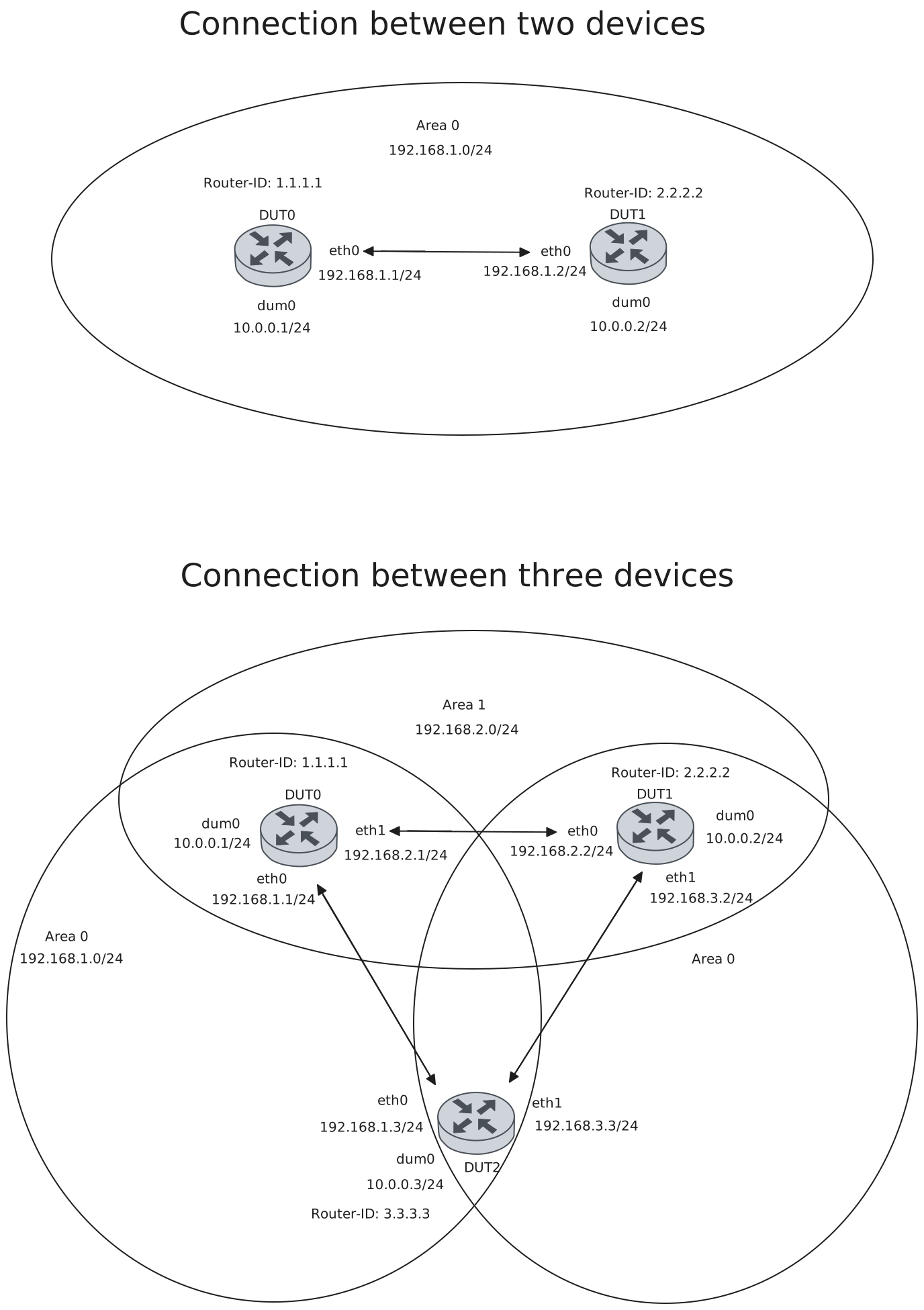
Test Connection
Description
Tests connection between two devices with BFD in OSPF by checking if they are each others peers and their status is up.
Scenario
Step 1: Set the following configuration in DUT0 :
set interfaces dummy dum0 address 10.0.0.1/24
set interfaces ethernet eth0 address 192.168.1.1/24
set interfaces ethernet eth0 ip ospf bfd
set interfaces ethernet eth0 ip ospf network point-to-point
set protocols ospf area 0 network 10.0.0.0/24
set protocols ospf area 0 network 192.168.1.0/24
set protocols ospf parameters router-id 1.1.1.1
set system login user admin authentication encrypted-password '$6$GSjsCj8gHLv$/VcqU6FLi6CT2Oxn0MJQ2C2tqnRDrYKNF8HIYWJp68nvXvPdFccDsT04.WtigUONbKYrgKg8d6rEs8PjljMkH0'
Step 2: Set the following configuration in DUT1 :
set interfaces dummy dum0 address 10.0.0.2/24
set interfaces ethernet eth0 address 192.168.1.2/24
set interfaces ethernet eth0 ip ospf bfd
set interfaces ethernet eth0 ip ospf network point-to-point
set protocols ospf area 0 network 10.0.0.0/24
set protocols ospf area 0 network 192.168.1.0/24
set protocols ospf parameters router-id 2.2.2.2
set system login user admin authentication encrypted-password '$6$GSjsCj8gHLv$/VcqU6FLi6CT2Oxn0MJQ2C2tqnRDrYKNF8HIYWJp68nvXvPdFccDsT04.WtigUONbKYrgKg8d6rEs8PjljMkH0'
Note
Check connectivity
Step 3: Ping IP address 192.168.1.2 from DUT0:
admin@DUT0$ ping 192.168.1.2 count 1 size 56 timeout 1Show output
PING 192.168.1.2 (192.168.1.2) 56(84) bytes of data.
64 bytes from 192.168.1.2: icmp_seq=1 ttl=64 time=0.272 ms

--- 192.168.1.2 ping statistics ---
1 packets transmitted, 1 received, 0% packet loss, time 0ms
rtt min/avg/max/mdev = 0.272/0.272/0.272/0.000 ms
Step 4: Ping IP address 192.168.1.1 from DUT1:
admin@DUT1$ ping 192.168.1.1 count 1 size 56 timeout 1Show output
PING 192.168.1.1 (192.168.1.1) 56(84) bytes of data.
64 bytes from 192.168.1.1: icmp_seq=1 ttl=64 time=0.247 ms

--- 192.168.1.1 ping statistics ---
1 packets transmitted, 1 received, 0% packet loss, time 0ms
rtt min/avg/max/mdev = 0.247/0.247/0.247/0.000 ms
Note
Check that they are each other’s neighbors
Step 5: Run command protocols ospf show neighbor at DUT0 and check if output matches the following regular expressions:
2.2.2.2Show output
Neighbor ID     Pri State           Up Time         Dead Time Address         Interface                        RXmtL RqstL DBsmL
2.2.2.2           1 Init/-          0.392s            39.607s 192.168.1.2     eth0:192.168.1.1                     0     0     0
Step 6: Run command protocols ospf show neighbor at DUT1 and check if output matches the following regular expressions:
1.1.1.1Show output
Neighbor ID     Pri State           Up Time         Dead Time Address         Interface                        RXmtL RqstL DBsmL
1.1.1.1           1 Full/-          0.573s            39.425s 192.168.1.1     eth0:192.168.1.2                     1     0     0
Note
Check that they are each other’s peers and that their status is up (the BFD session has beedn successfully established)
Step 7: Run command protocols bfd show peers at DUT0 and check if output matches the following regular expressions:
192.168.1.2
Status: up
Show output
BFD Peers:
        peer 192.168.1.2 vrf default interface eth0
                ID: 395564864
                Remote ID: 3423470254
                Active mode
                Status: up
                Uptime: 0 second(s)
                Diagnostics: ok
                Remote diagnostics: ok
                Peer Type: dynamic
                RTT min/avg/max: 0/0/0 usec
                Local timers:
                        Detect-multiplier: 3
                        Receive interval: 300ms
                        Transmission interval: 300ms
                        Echo receive interval: 50ms
                        Echo transmission interval: disabled
                Remote timers:
                        Detect-multiplier: 3
                        Receive interval: 300ms
                        Transmission interval: 300ms
                        Echo receive interval: 50ms
Step 8: Run command protocols bfd show peers at DUT1 and check if output matches the following regular expressions:
192.168.1.1
Status: up
Show output
BFD Peers:
        peer 192.168.1.1 vrf default interface eth0
                ID: 3423470254
                Remote ID: 395564864
                Active mode
                Status: up
                Uptime: 1 second(s)
                Diagnostics: ok
                Remote diagnostics: ok
                Peer Type: dynamic
                RTT min/avg/max: 0/0/0 usec
                Local timers:
                        Detect-multiplier: 3
                        Receive interval: 300ms
                        Transmission interval: 300ms
                        Echo receive interval: 50ms
                        Echo transmission interval: disabled
                Remote timers:
                        Detect-multiplier: 3
                        Receive interval: 300ms
                        Transmission interval: 300ms
                        Echo receive interval: 50ms
Test Connection With Three Devices
Description
Tests connection between three devices with BFD in OSPF by checking if they are each others peers and their status is up.
Scenario
Step 1: Set the following configuration in DUT0 :
set interfaces dummy dum0 address 10.0.0.1/24
set interfaces ethernet eth0 address 192.168.1.1/24
set interfaces ethernet eth0 ip ospf bfd
set interfaces ethernet eth0 ip ospf network point-to-point
set interfaces ethernet eth1 address 192.168.2.1/24
set interfaces ethernet eth1 ip ospf bfd
set interfaces ethernet eth1 ip ospf network point-to-point
set protocols ospf area 0 network 10.0.0.0/24
set protocols ospf area 0 network 192.168.1.0/24
set protocols ospf area 1 network 192.168.2.0/24
set protocols ospf parameters router-id 1.1.1.1
set system login user admin authentication encrypted-password '$6$GSjsCj8gHLv$/VcqU6FLi6CT2Oxn0MJQ2C2tqnRDrYKNF8HIYWJp68nvXvPdFccDsT04.WtigUONbKYrgKg8d6rEs8PjljMkH0'
Step 2: Set the following configuration in DUT1 :
set interfaces dummy dum0 address 10.0.0.2/24
set interfaces ethernet eth0 address 192.168.2.2/24
set interfaces ethernet eth0 ip ospf bfd
set interfaces ethernet eth0 ip ospf network point-to-point
set interfaces ethernet eth1 address 192.168.3.2/24
set interfaces ethernet eth1 ip ospf bfd
set interfaces ethernet eth1 ip ospf network point-to-point
set protocols ospf area 0 network 10.0.0.0/24
set protocols ospf area 1 network 192.168.2.0/24
set protocols ospf area 2 network 192.168.3.0/24
set protocols ospf parameters router-id 2.2.2.2
set system login user admin authentication encrypted-password '$6$GSjsCj8gHLv$/VcqU6FLi6CT2Oxn0MJQ2C2tqnRDrYKNF8HIYWJp68nvXvPdFccDsT04.WtigUONbKYrgKg8d6rEs8PjljMkH0'
Step 3: Set the following configuration in DUT2 :
set interfaces dummy dum0 address 10.0.0.3/24
set interfaces ethernet eth0 address 192.168.1.3/24
set interfaces ethernet eth0 ip ospf bfd
set interfaces ethernet eth0 ip ospf network point-to-point
set interfaces ethernet eth1 address 192.168.3.3/24
set interfaces ethernet eth1 ip ospf bfd
set interfaces ethernet eth1 ip ospf network point-to-point
set protocols ospf area 0 network 10.0.0.0/24
set protocols ospf area 0 network 192.168.1.0/24
set protocols ospf area 2 network 192.168.3.0/24
set protocols ospf parameters router-id 3.3.3.3
set system login user admin authentication encrypted-password '$6$GSjsCj8gHLv$/VcqU6FLi6CT2Oxn0MJQ2C2tqnRDrYKNF8HIYWJp68nvXvPdFccDsT04.WtigUONbKYrgKg8d6rEs8PjljMkH0'
Note
Check connectivity
Step 4: Ping IP address 192.168.1.3 from DUT0:
admin@DUT0$ ping 192.168.1.3 count 1 size 56 timeout 1Show output
PING 192.168.1.3 (192.168.1.3) 56(84) bytes of data.
64 bytes from 192.168.1.3: icmp_seq=1 ttl=64 time=0.447 ms

--- 192.168.1.3 ping statistics ---
1 packets transmitted, 1 received, 0% packet loss, time 0ms
rtt min/avg/max/mdev = 0.447/0.447/0.447/0.000 ms
Step 5: Ping IP address 192.168.2.2 from DUT0:
admin@DUT0$ ping 192.168.2.2 count 1 size 56 timeout 1Show output
PING 192.168.2.2 (192.168.2.2) 56(84) bytes of data.
64 bytes from 192.168.2.2: icmp_seq=1 ttl=64 time=0.481 ms

--- 192.168.2.2 ping statistics ---
1 packets transmitted, 1 received, 0% packet loss, time 0ms
rtt min/avg/max/mdev = 0.481/0.481/0.481/0.000 ms
Step 6: Ping IP address 192.168.2.1 from DUT1:
admin@DUT1$ ping 192.168.2.1 count 1 size 56 timeout 1Show output
PING 192.168.2.1 (192.168.2.1) 56(84) bytes of data.
64 bytes from 192.168.2.1: icmp_seq=1 ttl=64 time=0.182 ms

--- 192.168.2.1 ping statistics ---
1 packets transmitted, 1 received, 0% packet loss, time 0ms
rtt min/avg/max/mdev = 0.182/0.182/0.182/0.000 ms
Step 7: Ping IP address 192.168.3.3 from DUT1:
admin@DUT1$ ping 192.168.3.3 count 1 size 56 timeout 1Show output
PING 192.168.3.3 (192.168.3.3) 56(84) bytes of data.
64 bytes from 192.168.3.3: icmp_seq=1 ttl=64 time=0.500 ms

--- 192.168.3.3 ping statistics ---
1 packets transmitted, 1 received, 0% packet loss, time 0ms
rtt min/avg/max/mdev = 0.500/0.500/0.500/0.000 ms
Step 8: Ping IP address 192.168.1.1 from DUT2:
admin@DUT2$ ping 192.168.1.1 count 1 size 56 timeout 1Show output
PING 192.168.1.1 (192.168.1.1) 56(84) bytes of data.
64 bytes from 192.168.1.1: icmp_seq=1 ttl=64 time=0.435 ms

--- 192.168.1.1 ping statistics ---
1 packets transmitted, 1 received, 0% packet loss, time 1ms
rtt min/avg/max/mdev = 0.435/0.435/0.435/0.000 ms
Step 9: Ping IP address 192.168.3.2 from DUT2:
admin@DUT2$ ping 192.168.3.2 count 1 size 56 timeout 1Show output
PING 192.168.3.2 (192.168.3.2) 56(84) bytes of data.
64 bytes from 192.168.3.2: icmp_seq=1 ttl=64 time=7.58 ms

--- 192.168.3.2 ping statistics ---
1 packets transmitted, 1 received, 0% packet loss, time 0ms
rtt min/avg/max/mdev = 7.580/7.580/7.580/0.000 ms
Note
Check that they are each other’s neighbors
Step 10: Run command protocols ospf show neighbor at DUT0 and check if output matches the following regular expressions:
2.2.2.2
3.3.3.3
Show output
Neighbor ID     Pri State           Up Time         Dead Time Address         Interface                        RXmtL RqstL DBsmL
3.3.3.3           1 Full/-          2.052s            37.946s 192.168.1.3     eth0:192.168.1.1                     1     0     0
2.2.2.2           1 Full/-          4.358s            35.640s 192.168.2.2     eth1:192.168.2.1                     1     0     0
Step 11: Run command protocols ospf show neighbor at DUT1 and check if output matches the following regular expressions:
1.1.1.1
3.3.3.3
Show output
Neighbor ID     Pri State           Up Time         Dead Time Address         Interface                        RXmtL RqstL DBsmL
1.1.1.1           1 Full/-          4.476s            33.074s 192.168.2.1     eth0:192.168.2.2                     1     0     0
3.3.3.3           1 Full/-          12.169s           37.829s 192.168.3.3     eth1:192.168.3.2                     0     0     0
Step 12: Run command protocols ospf show neighbor at DUT2 and check if output matches the following regular expressions:
1.1.1.1
2.2.2.2
Show output
Neighbor ID     Pri State           Up Time         Dead Time Address         Interface                        RXmtL RqstL DBsmL
1.1.1.1           1 Full/-          2.269s            32.975s 192.168.1.1     eth0:192.168.1.3                     1     0     0
2.2.2.2           1 Full/-          12.268s           35.424s 192.168.3.2     eth1:192.168.3.3                     0     0     0
Note
Check that they are each other’s peers and that their status is up (the BFD session has beedn successfully established)
Step 13: Run command protocols bfd show peers at DUT0 and check if output matches the following regular expressions:
192.168.1.3
Status: up
192.168.2.2
Status: up
Show output
BFD Peers:
        peer 192.168.1.3 vrf default interface eth0
                ID: 639855912
                Remote ID: 339812331
                Active mode
                Status: up
                Uptime: 1 second(s)
                Diagnostics: ok
                Remote diagnostics: ok
                Peer Type: dynamic
                RTT min/avg/max: 0/0/0 usec
                Local timers:
                        Detect-multiplier: 3
                        Receive interval: 300ms
                        Transmission interval: 300ms
                        Echo receive interval: 50ms
                        Echo transmission interval: disabled
                Remote timers:
                        Detect-multiplier: 3
                        Receive interval: 300ms
                        Transmission interval: 300ms
                        Echo receive interval: 50ms

        peer 192.168.2.2 vrf default interface eth1
                ID: 4227564348
                Remote ID: 2223772357
                Active mode
                Status: up
                Uptime: 3 second(s)
                Diagnostics: ok
                Remote diagnostics: ok
                Peer Type: dynamic
                RTT min/avg/max: 0/0/0 usec
                Local timers:
                        Detect-multiplier: 3
                        Receive interval: 300ms
                        Transmission interval: 300ms
                        Echo receive interval: 50ms
                        Echo transmission interval: disabled
                Remote timers:
                        Detect-multiplier: 3
                        Receive interval: 300ms
                        Transmission interval: 300ms
                        Echo receive interval: 50ms
Step 14: Run command protocols bfd show peers at DUT1 and check if output matches the following regular expressions:
192.168.2.1
Status: up
192.168.3.3
Status: up
Show output
BFD Peers:
        peer 192.168.3.3 vrf default interface eth1
                ID: 1140682899
                Remote ID: 3282315177
                Active mode
                Status: up
                Uptime: 11 second(s)
                Diagnostics: ok
                Remote diagnostics: ok
                Peer Type: dynamic
                RTT min/avg/max: 0/0/0 usec
                Local timers:
                        Detect-multiplier: 3
                        Receive interval: 300ms
                        Transmission interval: 300ms
                        Echo receive interval: 50ms
                        Echo transmission interval: disabled
                Remote timers:
                        Detect-multiplier: 3
                        Receive interval: 300ms
                        Transmission interval: 300ms
                        Echo receive interval: 50ms

        peer 192.168.2.1 vrf default interface eth0
                ID: 2223772357
                Remote ID: 4227564348
                Active mode
                Status: up
                Uptime: 2 second(s)
                Diagnostics: ok
                Remote diagnostics: ok
                Peer Type: dynamic
                RTT min/avg/max: 0/0/0 usec
                Local timers:
                        Detect-multiplier: 3
                        Receive interval: 300ms
                        Transmission interval: 300ms
                        Echo receive interval: 50ms
                        Echo transmission interval: disabled
                Remote timers:
                        Detect-multiplier: 3
                        Receive interval: 300ms
                        Transmission interval: 300ms
                        Echo receive interval: 50ms
Step 15: Run command protocols bfd show peers at DUT2 and check if output matches the following regular expressions:
192.168.1.1
Status: up
192.168.3.2
Status: up
Show output
BFD Peers:
        peer 192.168.3.2 vrf default interface eth1
                ID: 3282315177
                Remote ID: 1140682899
                Active mode
                Status: up
                Uptime: 12 second(s)
                Diagnostics: ok
                Remote diagnostics: ok
                Peer Type: dynamic
                RTT min/avg/max: 0/0/0 usec
                Local timers:
                        Detect-multiplier: 3
                        Receive interval: 300ms
                        Transmission interval: 300ms
                        Echo receive interval: 50ms
                        Echo transmission interval: disabled
                Remote timers:
                        Detect-multiplier: 3
                        Receive interval: 300ms
                        Transmission interval: 300ms
                        Echo receive interval: 50ms

        peer 192.168.1.1 vrf default interface eth0
                ID: 339812331
                Remote ID: 639855912
                Active mode
                Status: up
                Uptime: 1 second(s)
                Diagnostics: ok
                Remote diagnostics: ok
                Peer Type: dynamic
                RTT min/avg/max: 0/0/0 usec
                Local timers:
                        Detect-multiplier: 3
                        Receive interval: 300ms
                        Transmission interval: 300ms
                        Echo receive interval: 50ms
                        Echo transmission interval: disabled
                Remote timers:
                        Detect-multiplier: 3
                        Receive interval: 300ms
                        Transmission interval: 300ms
                        Echo receive interval: 50ms
Test Profile
Description
Checks that all BFD profile configured parameters are shown.
Scenario
Step 1: Set the following configuration in DUT0 :
set interfaces dummy dum0 address 10.0.0.1/24
set interfaces ethernet eth0 address 192.168.1.1/24
set interfaces ethernet eth0 ip ospf bfd
set interfaces ethernet eth0 ip ospf network point-to-point
set protocols bfd profile PFL detect-multiplier 5
set protocols bfd profile PFL echo-interval 60
set protocols bfd profile PFL echo-mode
set protocols bfd profile PFL passive-mode
set protocols bfd profile PFL receive-interval 400
set protocols bfd profile PFL transmit-interval 400
set protocols ospf area 0 network 10.0.0.0/24
set protocols ospf area 0 network 192.168.1.0/24
set protocols ospf parameters router-id 1.1.1.1
set system login user admin authentication encrypted-password '$6$GSjsCj8gHLv$/VcqU6FLi6CT2Oxn0MJQ2C2tqnRDrYKNF8HIYWJp68nvXvPdFccDsT04.WtigUONbKYrgKg8d6rEs8PjljMkH0'
Step 2: Modify the following configuration lines in DUT0 :
set interfaces ethernet eth0 ip ospf bfd profile PFL
Step 3: Set the following configuration in DUT1 :
set interfaces dummy dum0 address 10.0.0.2/24
set interfaces ethernet eth0 address 192.168.1.2/24
set interfaces ethernet eth0 ip ospf bfd
set interfaces ethernet eth0 ip ospf network point-to-point
set protocols ospf area 0 network 10.0.0.0/24
set protocols ospf area 0 network 192.168.1.0/24
set protocols ospf parameters router-id 2.2.2.2
set system login user admin authentication encrypted-password '$6$GSjsCj8gHLv$/VcqU6FLi6CT2Oxn0MJQ2C2tqnRDrYKNF8HIYWJp68nvXvPdFccDsT04.WtigUONbKYrgKg8d6rEs8PjljMkH0'
Note
Check connectivity
Step 4: Ping IP address 192.168.1.2 from DUT0:
admin@DUT0$ ping 192.168.1.2 count 1 size 56 timeout 1Show output
PING 192.168.1.2 (192.168.1.2) 56(84) bytes of data.
64 bytes from 192.168.1.2: icmp_seq=1 ttl=64 time=0.224 ms

--- 192.168.1.2 ping statistics ---
1 packets transmitted, 1 received, 0% packet loss, time 0ms
rtt min/avg/max/mdev = 0.224/0.224/0.224/0.000 ms
Step 5: Ping IP address 192.168.1.1 from DUT1:
admin@DUT1$ ping 192.168.1.1 count 1 size 56 timeout 1Show output
PING 192.168.1.1 (192.168.1.1) 56(84) bytes of data.
64 bytes from 192.168.1.1: icmp_seq=1 ttl=64 time=0.258 ms

--- 192.168.1.1 ping statistics ---
1 packets transmitted, 1 received, 0% packet loss, time 0ms
rtt min/avg/max/mdev = 0.258/0.258/0.258/0.000 ms
Note
Check that they are each other’s neighbors
Step 6: Run command protocols ospf show neighbor at DUT0 and check if output matches the following regular expressions:
192.168.1.2Show output
Neighbor ID     Pri State           Up Time         Dead Time Address         Interface                        RXmtL RqstL DBsmL
2.2.2.2           1 Init/-          0.353s            39.646s 192.168.1.2     eth0:192.168.1.1                     0     0     0
Step 7: Run command protocols ospf show neighbor at DUT1 and check if output matches the following regular expressions:
192.168.1.1Show output
Neighbor ID     Pri State           Up Time         Dead Time Address         Interface                        RXmtL RqstL DBsmL
1.1.1.1           1 Full/-          1.450s            38.548s 192.168.1.1     eth0:192.168.1.2                     1     0     0
Note
Check that they are each other’s peers and that their status is up (the BFD session has beedn successfully established). Check that all configureed profile parameters are shown in DUT0
Step 8: Run command protocols bfd show peers at DUT0 and check if output matches the following regular expressions:
192.168.1.2
Status: up
Detect-multiplier: 5
Echo receive interval: 60ms
Echo transmission interval: 60ms
Passive mode
Receive interval: 400ms
Transmission interval: 400ms
Show output
BFD Peers:
        peer 192.168.1.2 vrf default interface eth0
                ID: 3498115081
                Remote ID: 1337429373
                Passive mode
                Status: up
                Uptime: 1 second(s)
                Diagnostics: ok
                Remote diagnostics: ok
                Peer Type: dynamic
                RTT min/avg/max: 240/348/637 usec
                Local timers:
                        Detect-multiplier: 5
                        Receive interval: 400ms
                        Transmission interval: 400ms
                        Echo receive interval: 60ms
                        Echo transmission interval: 60ms
                Remote timers:
                        Detect-multiplier: 3
                        Receive interval: 300ms
                        Transmission interval: 300ms
                        Echo receive interval: 50ms
Step 9: Run command protocols bfd show peers at DUT1 and check if output matches the following regular expressions:
192.168.1.1
Status: up
Show output
BFD Peers:
        peer 192.168.1.1 vrf default interface eth0
                ID: 1337429373
                Remote ID: 3498115081
                Active mode
                Status: up
                Uptime: 0 second(s)
                Diagnostics: ok
                Remote diagnostics: ok
                Peer Type: dynamic
                RTT min/avg/max: 0/0/0 usec
                Local timers:
                        Detect-multiplier: 3
                        Receive interval: 300ms
                        Transmission interval: 300ms
                        Echo receive interval: 50ms
                        Echo transmission interval: disabled
                Remote timers:
                        Detect-multiplier: 5
                        Receive interval: 400ms
                        Transmission interval: 400ms
                        Echo receive interval: 60ms