Relay
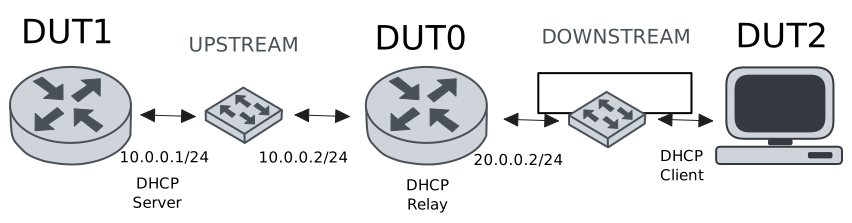
This scenario shows how to configure service dhcp-relay. The
relay agent must be used when the DHCP server and the DHCP
clients are not connected to the same layer 2 domain.
Test DHCP Relay
Description
This example demonstrates how to configure a DHCP relay instance in DUT0 to forward DHCP requests from DUT2 to DUT1.
Scenario
Step 1: Set the following configuration in DUT0 :
set interfaces ethernet eth0 vif 100 address 10.0.0.2/24
set interfaces ethernet eth1 vif 200 address 20.0.0.2/24
set service dhcp-relay INS downstream-interface eth1.200
set service dhcp-relay INS server 10.0.0.1
set service dhcp-relay INS upstream-interface eth0.100
set system login user admin authentication encrypted-password '$6$GSjsCj8gHLv$/VcqU6FLi6CT2Oxn0MJQ2C2tqnRDrYKNF8HIYWJp68nvXvPdFccDsT04.WtigUONbKYrgKg8d6rEs8PjljMkH0'
Step 2: Set the following configuration in DUT1 :
set interfaces ethernet eth0 vif 100 address 10.0.0.1/24
set protocols static route 0.0.0.0/0 next-hop 10.0.0.2
set service dhcp-server shared-network dummy subnet 10.0.0.1/32
set service dhcp-server shared-network remote subnet 20.0.0.0/24 start 20.0.0.50 stop 20.0.0.50
set system login user admin authentication encrypted-password '$6$GSjsCj8gHLv$/VcqU6FLi6CT2Oxn0MJQ2C2tqnRDrYKNF8HIYWJp68nvXvPdFccDsT04.WtigUONbKYrgKg8d6rEs8PjljMkH0'
Step 3: Set the following configuration in DUT2 :
set interfaces ethernet eth0 vif 200 address dhcp
set system login user admin authentication encrypted-password '$6$GSjsCj8gHLv$/VcqU6FLi6CT2Oxn0MJQ2C2tqnRDrYKNF8HIYWJp68nvXvPdFccDsT04.WtigUONbKYrgKg8d6rEs8PjljMkH0'
Step 4: Ping IP address 10.0.0.1 from DUT0:
admin@DUT0$ ping 10.0.0.1 count 1 size 56 timeout 1Show output
PING 10.0.0.1 (10.0.0.1) 56(84) bytes of data.
64 bytes from 10.0.0.1: icmp_seq=1 ttl=64 time=0.602 ms

--- 10.0.0.1 ping statistics ---
1 packets transmitted, 1 received, 0% packet loss, time 0ms
rtt min/avg/max/mdev = 0.602/0.602/0.602/0.000 ms
Step 5: Run command interfaces ethernet show at DUT2 and check if output contains the following tokens:
20.0.0.50Show output
---------------------------------------------------------------------
  Name             IP Address           Admin  Oper  Vrf  Description
---------------------------------------------------------------------
    eth0  fe80::dcad:beff:feef:6c20/64  up     up
eth0.200  20.0.0.50/24                  up     up
          fe80::dcad:beff:feef:6c20/64
    eth1                                down   down
    eth2                                down   down
    eth3                                down   down
Test DHCP Relay With Giaddr
Description
This example demonstrates how to set the gateway IP address (giaddr) in the IP address. This value must be set in an IP address that the DHCP server can reach.
Scenario
Step 1: Set the following configuration in DUT0 :
set interfaces ethernet eth0 vif 100 address 10.0.0.2/24
set interfaces ethernet eth1 vif 200 address 20.0.0.2/24
set interfaces ethernet eth1 vif 200 address 20.0.0.3/24
set service dhcp-relay INS downstream-interface eth1.200
set service dhcp-relay INS server 10.0.0.1 giaddr 20.0.0.3
set service dhcp-relay INS upstream-interface eth0.100
set system login user admin authentication encrypted-password '$6$GSjsCj8gHLv$/VcqU6FLi6CT2Oxn0MJQ2C2tqnRDrYKNF8HIYWJp68nvXvPdFccDsT04.WtigUONbKYrgKg8d6rEs8PjljMkH0'
Step 2: Set the following configuration in DUT1 :
set interfaces ethernet eth0 vif 100 address 10.0.0.1/24
set protocols static route 0.0.0.0/0 next-hop 10.0.0.2
set service dhcp-server shared-network dummy subnet 10.0.0.1/32
set service dhcp-server shared-network remote subnet 20.0.0.0/24 start 20.0.0.50 stop 20.0.0.50
set system login user admin authentication encrypted-password '$6$GSjsCj8gHLv$/VcqU6FLi6CT2Oxn0MJQ2C2tqnRDrYKNF8HIYWJp68nvXvPdFccDsT04.WtigUONbKYrgKg8d6rEs8PjljMkH0'
Step 3: Set the following configuration in DUT2 :
set interfaces ethernet eth0 vif 200 address dhcp
set system login user admin authentication encrypted-password '$6$GSjsCj8gHLv$/VcqU6FLi6CT2Oxn0MJQ2C2tqnRDrYKNF8HIYWJp68nvXvPdFccDsT04.WtigUONbKYrgKg8d6rEs8PjljMkH0'
Step 4: Ping IP address 10.0.0.1 from DUT0:
admin@DUT0$ ping 10.0.0.1 count 1 size 56 timeout 1Show output
PING 10.0.0.1 (10.0.0.1) 56(84) bytes of data.
64 bytes from 10.0.0.1: icmp_seq=1 ttl=64 time=0.246 ms

--- 10.0.0.1 ping statistics ---
1 packets transmitted, 1 received, 0% packet loss, time 0ms
rtt min/avg/max/mdev = 0.246/0.246/0.246/0.000 ms
Step 5: Run command interfaces ethernet show at DUT2 and check if output contains the following tokens:
20.0.0.50Show output
---------------------------------------------------------------------
  Name             IP Address           Admin  Oper  Vrf  Description
---------------------------------------------------------------------
    eth0  fe80::dcad:beff:feef:6c20/64  up     up
eth0.200  20.0.0.50/24                  up     up
          fe80::dcad:beff:feef:6c20/64
    eth1                                down   down
    eth2                                down   down
    eth3                                down   down
Step 6: Run command system journal show | cat at DUT1 and check if output matches the following regular expressions:
DHCPACK on 20.0.0.50 to [^\)]+\) via 20.0.0.3Show output
Feb 12 18:04:11.357779 osdx systemd-journald[1751]: Runtime Journal (/run/log/journal/4b9b84bfb27047f880a6339fcfe21077) is 936.0K, max 6.5M, 5.6M free.
Feb 12 18:04:11.359387 osdx systemd-journald[1751]: Received client request to rotate journal, rotating.
Feb 12 18:04:11.359439 osdx systemd-journald[1751]: Vacuuming done, freed 0B of archived journals from /run/log/journal/4b9b84bfb27047f880a6339fcfe21077.
Feb 12 18:04:11.367643 osdx OSDxCLI[37265]: User 'admin' executed a new command: 'system journal clear'.
Feb 12 18:04:11.658109 osdx OSDxCLI[37265]: User 'admin' executed a new command: 'system coredump delete all'.
Feb 12 18:04:13.416856 osdx OSDxCLI[37265]: User 'admin' entered the configuration menu.
Feb 12 18:04:13.563692 osdx OSDxCLI[37265]: User 'admin' added a new cfg line: 'set interfaces eth0.100 address 10.0.0.1/24'.
Feb 12 18:04:13.676934 osdx OSDxCLI[37265]: User 'admin' added a new cfg line: 'set service dhcp-server shared-network dummy subnet 10.0.0.1/32'.
Feb 12 18:04:13.880384 osdx OSDxCLI[37265]: User 'admin' added a new cfg line: 'set service dhcp-server shared-network remote subnet 20.0.0.0/24 start 20.0.0.50 stop 20.0.0.50'.
Feb 12 18:04:14.043154 osdx OSDxCLI[37265]: User 'admin' added a new cfg line: 'set protocols static route 0.0.0.0/0 next-hop 10.0.0.2'.
Feb 12 18:04:14.119193 osdx OSDxCLI[37265]: User 'admin' added a new cfg line: 'show working'.
Feb 12 18:04:14.246510 osdx ubnt-cfgd[119267]: inactive
Feb 12 18:04:14.273275 osdx INFO[119277]: FRR daemons did not change
Feb 12 18:04:14.307382 osdx kernel: 8021q: adding VLAN 0 to HW filter on device eth0
Feb 12 18:04:14.331723 osdx (udev-worker)[119327]: Network interface NamePolicy= disabled on kernel command line.
Feb 12 18:04:15.415883 osdx systemd[1]: Started dhcpd@main.service - "DHCP Server Service instance main".
Feb 12 18:04:15.418231 osdx cfgd[1426]: [37265]Completed change to active configuration
Feb 12 18:04:15.420622 osdx dhcpd[119404]: Wrote 0 leases to leases file.
Feb 12 18:04:15.445584 osdx OSDxCLI[37265]: User 'admin' committed the configuration.
Feb 12 18:04:15.466769 osdx OSDxCLI[37265]: User 'admin' left the configuration menu.
Feb 12 18:04:15.501549 osdx dhcpd[119404]:
Feb 12 18:04:15.501556 osdx dhcpd[119404]: No subnet declaration for eth0 (no IPv4 addresses).
Feb 12 18:04:15.501559 osdx dhcpd[119404]: ** Ignoring requests on eth0.  If this is not what
Feb 12 18:04:15.501562 osdx dhcpd[119404]:    you want, please write a subnet declaration
Feb 12 18:04:15.501570 osdx dhcpd[119404]:    in your dhcpd.conf file for the network segment
Feb 12 18:04:15.501574 osdx dhcpd[119404]:    to which interface eth0 is attached. **
Feb 12 18:04:15.501577 osdx dhcpd[119404]:
Feb 12 18:04:15.515598 osdx dhcpd[119404]: Server starting service.
Feb 12 18:04:16.232586 osdx dhcpd[119404]: DHCPDISCOVER from de:ad:be:ef:6c:20 via 20.0.0.3
Feb 12 18:04:17.233402 osdx dhcpd[119404]: DHCPOFFER on 20.0.0.50 to de:ad:be:ef:6c:20 (osdx) via 20.0.0.3
Feb 12 18:04:17.234154 osdx dhcpd[119404]: DHCPREQUEST for 20.0.0.50 (10.0.0.1) from de:ad:be:ef:6c:20 (osdx) via 20.0.0.3
Feb 12 18:04:17.263651 osdx dhcpd[119404]: DHCPACK on 20.0.0.50 to de:ad:be:ef:6c:20 (osdx) via 20.0.0.3
Test DHCP Relay With GRE Tunnel
Description
This example demonstrates how to configure a DHCP relay that forwards DHCP requests to the DHCP server through a GRE tunnel (upstream).
Scenario
Step 1: Set the following configuration in DUT0 :
set interfaces ethernet eth0 vif 100 address 10.0.0.2/24
set interfaces ethernet eth1 vif 200 address 20.0.0.2/24
set interfaces tunnel tun1 address 1.0.0.2/32
set interfaces tunnel tun1 encapsulation gre
set interfaces tunnel tun1 local-address 10.0.0.2
set interfaces tunnel tun1 local-interface eth0.100
set interfaces tunnel tun1 nhrp holdtime 5
set interfaces tunnel tun1 nhrp nhs 1.0.0.1 nbma 10.0.0.1
set service dhcp-relay INS downstream-interface eth1.200
set service dhcp-relay INS server 1.0.0.1
set service dhcp-relay INS upstream-interface eth0.100
set service dhcp-relay INS upstream-interface tun1
set system login user admin authentication encrypted-password '$6$GSjsCj8gHLv$/VcqU6FLi6CT2Oxn0MJQ2C2tqnRDrYKNF8HIYWJp68nvXvPdFccDsT04.WtigUONbKYrgKg8d6rEs8PjljMkH0'
Step 2: Set the following configuration in DUT1 :
set interfaces ethernet eth0 vif 100 address 10.0.0.1/24
set interfaces tunnel tun1 address 1.0.0.1/32
set interfaces tunnel tun1 encapsulation gre
set interfaces tunnel tun1 local-address 10.0.0.1
set interfaces tunnel tun1 local-interface eth0.100
set interfaces tunnel tun1 nhrp
set protocols static route 0.0.0.0/0 next-hop 10.0.0.2
set protocols static route 20.0.0.0/24 next-hop 1.0.0.2
set service dhcp-server shared-network dummy subnet 1.0.0.1/32
set service dhcp-server shared-network remote subnet 20.0.0.0/24 start 20.0.0.50 stop 20.0.0.50
set system login user admin authentication encrypted-password '$6$GSjsCj8gHLv$/VcqU6FLi6CT2Oxn0MJQ2C2tqnRDrYKNF8HIYWJp68nvXvPdFccDsT04.WtigUONbKYrgKg8d6rEs8PjljMkH0'
Step 3: Set the following configuration in DUT2 :
set interfaces ethernet eth0 vif 200 address dhcp
set system login user admin authentication encrypted-password '$6$GSjsCj8gHLv$/VcqU6FLi6CT2Oxn0MJQ2C2tqnRDrYKNF8HIYWJp68nvXvPdFccDsT04.WtigUONbKYrgKg8d6rEs8PjljMkH0'
Step 4: Ping IP address 10.0.0.1 from DUT0:
admin@DUT0$ ping 10.0.0.1 count 1 size 56 timeout 1Show output
PING 10.0.0.1 (10.0.0.1) 56(84) bytes of data.
64 bytes from 10.0.0.1: icmp_seq=1 ttl=64 time=0.263 ms

--- 10.0.0.1 ping statistics ---
1 packets transmitted, 1 received, 0% packet loss, time 0ms
rtt min/avg/max/mdev = 0.263/0.263/0.263/0.000 ms
Step 5: Ping IP address 1.0.0.1 from DUT0:
admin@DUT0$ ping 1.0.0.1 count 1 size 56 timeout 1Show output
PING 1.0.0.1 (1.0.0.1) 56(84) bytes of data.
64 bytes from 1.0.0.1: icmp_seq=1 ttl=64 time=0.371 ms

--- 1.0.0.1 ping statistics ---
1 packets transmitted, 1 received, 0% packet loss, time 0ms
rtt min/avg/max/mdev = 0.371/0.371/0.371/0.000 ms
Step 6: Run command interfaces ethernet show at DUT2 and check if output contains the following tokens:
20.0.0.50Show output
---------------------------------------------------------------------
  Name             IP Address           Admin  Oper  Vrf  Description
---------------------------------------------------------------------
    eth0  fe80::dcad:beff:feef:6c20/64  up     up
eth0.200  20.0.0.50/24                  up     up
          fe80::dcad:beff:feef:6c20/64
    eth1                                down   down
    eth2                                down   down
    eth3                                down   down
Test DHCP Relay With Multiple Instances
Description
This example demonstrates how to configure multiple DHCP relay instances.
Scenario
Step 1: Set the following configuration in DUT0 :
set interfaces ethernet eth0 vif 100 address 10.0.0.2/24
set interfaces ethernet eth1 vif 200 address 20.0.0.2/24
set interfaces ethernet eth1 vif 300 address 30.0.0.2/24
set service dhcp-relay INS downstream-interface eth1.200
set service dhcp-relay INS server 10.0.0.1
set service dhcp-relay INS upstream-interface eth0.100
set service dhcp-relay INS2 downstream-interface eth1.300
set service dhcp-relay INS2 server 10.0.0.1
set service dhcp-relay INS2 upstream-interface eth0.100
set system login user admin authentication encrypted-password '$6$GSjsCj8gHLv$/VcqU6FLi6CT2Oxn0MJQ2C2tqnRDrYKNF8HIYWJp68nvXvPdFccDsT04.WtigUONbKYrgKg8d6rEs8PjljMkH0'
Step 2: Set the following configuration in DUT1 :
set interfaces ethernet eth0 vif 100 address 10.0.0.1/24
set protocols static route 0.0.0.0/0 next-hop 10.0.0.2
set service dhcp-server shared-network dummy subnet 10.0.0.1/32
set service dhcp-server shared-network remote subnet 20.0.0.0/24 start 20.0.0.50 stop 20.0.0.50
set service dhcp-server shared-network remote2 subnet 30.0.0.0/24 start 30.0.0.50 stop 30.0.0.50
set system login user admin authentication encrypted-password '$6$GSjsCj8gHLv$/VcqU6FLi6CT2Oxn0MJQ2C2tqnRDrYKNF8HIYWJp68nvXvPdFccDsT04.WtigUONbKYrgKg8d6rEs8PjljMkH0'
Step 3: Set the following configuration in DUT2 :
set interfaces ethernet eth0 vif 200 address dhcp
set interfaces ethernet eth0 vif 300 address dhcp
set system login user admin authentication encrypted-password '$6$GSjsCj8gHLv$/VcqU6FLi6CT2Oxn0MJQ2C2tqnRDrYKNF8HIYWJp68nvXvPdFccDsT04.WtigUONbKYrgKg8d6rEs8PjljMkH0'
Step 4: Ping IP address 10.0.0.1 from DUT0:
admin@DUT0$ ping 10.0.0.1 count 1 size 56 timeout 1Show output
PING 10.0.0.1 (10.0.0.1) 56(84) bytes of data.
64 bytes from 10.0.0.1: icmp_seq=1 ttl=64 time=0.314 ms

--- 10.0.0.1 ping statistics ---
1 packets transmitted, 1 received, 0% packet loss, time 0ms
rtt min/avg/max/mdev = 0.314/0.314/0.314/0.000 ms
Step 5: Run command interfaces ethernet show at DUT2 and check if output contains the following tokens:
20.0.0.50Show output
---------------------------------------------------------------------
  Name             IP Address           Admin  Oper  Vrf  Description
---------------------------------------------------------------------
    eth0  fe80::dcad:beff:feef:6c20/64  up     up
eth0.200  20.0.0.50/24                  up     up
          fe80::dcad:beff:feef:6c20/64
eth0.300  30.0.0.50/24                  up     up
          fe80::dcad:beff:feef:6c20/64
    eth1                                down   down
    eth2                                down   down
    eth3                                down   down
Step 6: Run command interfaces ethernet show at DUT2 and check if output contains the following tokens:
30.0.0.50Show output
---------------------------------------------------------------------
  Name             IP Address           Admin  Oper  Vrf  Description
---------------------------------------------------------------------
    eth0  fe80::dcad:beff:feef:6c20/64  up     up
eth0.200  20.0.0.50/24                  up     up
          fe80::dcad:beff:feef:6c20/64
eth0.300  30.0.0.50/24                  up     up
          fe80::dcad:beff:feef:6c20/64
    eth1                                down   down
    eth2                                down   down
    eth3                                down   down
Step 7: Run command system journal show | cat at DUT1 and check if output matches the following regular expressions:
DHCPACK on 20.0.0.50 to [^\)]+\) via 20.0.0.2
DHCPACK on 30.0.0.50 to [^\)]+\) via 30.0.0.2
Show output
Feb 12 18:04:39.277533 osdx systemd-journald[1751]: Runtime Journal (/run/log/journal/4b9b84bfb27047f880a6339fcfe21077) is 932.0K, max 6.5M, 5.6M free.
Feb 12 18:04:39.279522 osdx systemd-journald[1751]: Received client request to rotate journal, rotating.
Feb 12 18:04:39.279577 osdx systemd-journald[1751]: Vacuuming done, freed 0B of archived journals from /run/log/journal/4b9b84bfb27047f880a6339fcfe21077.
Feb 12 18:04:39.290763 osdx OSDxCLI[37265]: User 'admin' executed a new command: 'system journal clear'.
Feb 12 18:04:39.530330 osdx OSDxCLI[37265]: User 'admin' executed a new command: 'system coredump delete all'.
Feb 12 18:04:41.460996 osdx OSDxCLI[37265]: User 'admin' entered the configuration menu.
Feb 12 18:04:41.555664 osdx OSDxCLI[37265]: User 'admin' added a new cfg line: 'set interfaces eth0.100 address 10.0.0.1/24'.
Feb 12 18:04:41.637292 osdx OSDxCLI[37265]: User 'admin' added a new cfg line: 'set service dhcp-server shared-network dummy subnet 10.0.0.1/32'.
Feb 12 18:04:41.741167 osdx OSDxCLI[37265]: User 'admin' added a new cfg line: 'set service dhcp-server shared-network remote subnet 20.0.0.0/24 start 20.0.0.50 stop 20.0.0.50'.
Feb 12 18:04:41.825278 osdx OSDxCLI[37265]: User 'admin' added a new cfg line: 'set protocols static route 0.0.0.0/0 next-hop 10.0.0.2'.
Feb 12 18:04:41.983802 osdx OSDxCLI[37265]: User 'admin' added a new cfg line: 'set service dhcp-server shared-network remote2 subnet 30.0.0.0/24 start 30.0.0.50 stop 30.0.0.50'.
Feb 12 18:04:42.053254 osdx OSDxCLI[37265]: User 'admin' added a new cfg line: 'show working'.
Feb 12 18:04:42.132751 osdx ubnt-cfgd[120288]: inactive
Feb 12 18:04:42.165873 osdx INFO[120300]: FRR daemons did not change
Feb 12 18:04:42.195540 osdx kernel: 8021q: adding VLAN 0 to HW filter on device eth0
Feb 12 18:04:42.217758 osdx (udev-worker)[120348]: Network interface NamePolicy= disabled on kernel command line.
Feb 12 18:04:42.368113 osdx systemd[1]: Started dhcpd@main.service - "DHCP Server Service instance main".
Feb 12 18:04:42.371025 osdx cfgd[1426]: [37265]Completed change to active configuration
Feb 12 18:04:42.371779 osdx dhcpd[120427]: Wrote 0 leases to leases file.
Feb 12 18:04:42.383864 osdx OSDxCLI[37265]: User 'admin' committed the configuration.
Feb 12 18:04:42.398948 osdx OSDxCLI[37265]: User 'admin' left the configuration menu.
Feb 12 18:04:42.407118 osdx dhcpd[120427]:
Feb 12 18:04:42.407124 osdx dhcpd[120427]: No subnet declaration for eth0 (no IPv4 addresses).
Feb 12 18:04:42.407127 osdx dhcpd[120427]: ** Ignoring requests on eth0.  If this is not what
Feb 12 18:04:42.407131 osdx dhcpd[120427]:    you want, please write a subnet declaration
Feb 12 18:04:42.407134 osdx dhcpd[120427]:    in your dhcpd.conf file for the network segment
Feb 12 18:04:42.407137 osdx dhcpd[120427]:    to which interface eth0 is attached. **
Feb 12 18:04:42.407140 osdx dhcpd[120427]:
Feb 12 18:04:42.423677 osdx dhcpd[120427]: Server starting service.
Feb 12 18:04:43.104772 osdx dhcpd[120427]: DHCPDISCOVER from de:ad:be:ef:6c:20 via 20.0.0.2
Feb 12 18:04:43.312523 osdx dhcpd[120427]: DHCPDISCOVER from de:ad:be:ef:6c:20 via 30.0.0.2
Feb 12 18:04:44.105422 osdx dhcpd[120427]: DHCPOFFER on 20.0.0.50 to de:ad:be:ef:6c:20 (osdx) via 20.0.0.2
Feb 12 18:04:44.106226 osdx dhcpd[120427]: DHCPREQUEST for 20.0.0.50 (10.0.0.1) from de:ad:be:ef:6c:20 (osdx) via 20.0.0.2
Feb 12 18:04:44.173084 osdx dhcpd[120427]: DHCPACK on 20.0.0.50 to de:ad:be:ef:6c:20 (osdx) via 20.0.0.2
Feb 12 18:04:44.312774 osdx dhcpd[120427]: DHCPOFFER on 30.0.0.50 to de:ad:be:ef:6c:20 (osdx) via 30.0.0.2
Feb 12 18:04:44.313411 osdx dhcpd[120427]: DHCPREQUEST for 30.0.0.50 (10.0.0.1) from de:ad:be:ef:6c:20 (osdx) via 30.0.0.2
Feb 12 18:04:44.326534 osdx dhcpd[120427]: DHCPACK on 30.0.0.50 to de:ad:be:ef:6c:20 (osdx) via 30.0.0.2