Xauth
This scenario shows how to configure and connect two subnets with each other through a VPN tunnel using different xauth methods
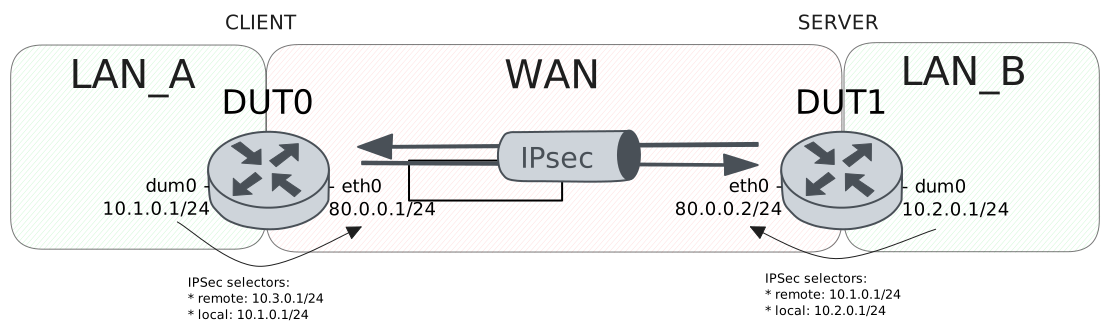
Test XAuth PSK Configuration
Description
VPN site-to-site configuration with XAuth-PSK for DUT0 (client) and pre shared secret for DUT1 (server), this last one delegates the authentication to a radius server.
Scenario
Step 1: Set the following configuration in DUT0 :
set interfaces dummy dum0 address 10.1.0.1/24
set interfaces ethernet eth0 address 80.0.0.1/24
set interfaces ethernet eth1 address 10.215.168.2/24
set protocols static route 10.2.0.0/24 interface dum0
set protocols static route 10.3.0.0/24 interface dum0
set system aaa group radius radgroup1 server serv1
set system aaa list list1 method 1 group radius radgroup1
set system aaa server radius serv1 address 10.215.168.1
set system aaa server radius serv1 encrypted-key U2FsdGVkX19QT51gp8FTXr2BI68+iM70AErjHy4b7u7G9e4tANehpk69MKhqDe4EusY91sA0KnPxYTwxzDeS0w==
set system login user admin authentication encrypted-password '$6$GSjsCj8gHLv$/VcqU6FLi6CT2Oxn0MJQ2C2tqnRDrYKNF8HIYWJp68nvXvPdFccDsT04.WtigUONbKYrgKg8d6rEs8PjljMkH0'
set vpn ipsec auth-profile AUTH-SA global-secrets ike-psk test encrypted-secret U2FsdGVkX1/vsi5JW9WwNFYVhANcjF9sOCb+RqH/mX3jPu8F+knbVjeELlbcHhqv+Q/Uhx6Uzh9HpGScroTvMQ==
set vpn ipsec auth-profile AUTH-SA local auth ike-psk id test
set vpn ipsec auth-profile AUTH-SA mirror-config false
set vpn ipsec auth-profile AUTH-SA remote auth ike-psk id %any
set vpn ipsec auth-profile AUTH-SA remote xauth radius
set vpn ipsec esp-group CHILD-SA mode tunnel
set vpn ipsec esp-group CHILD-SA proposal 1 encryption aes256gcm128
set vpn ipsec esp-group CHILD-SA proposal 1 pfs dh-group19
set vpn ipsec ike-group IKE-SA key-exchange ikev1
set vpn ipsec ike-group IKE-SA proposal 1 dh-group 19
set vpn ipsec ike-group IKE-SA proposal 1 encryption aes256
set vpn ipsec ike-group IKE-SA proposal 1 hash sha256
set vpn ipsec logging log-types any log-level 1
set vpn ipsec radius authentication-list list1
set vpn ipsec site-to-site peer PEER auth-profile AUTH-SA
set vpn ipsec site-to-site peer PEER connection-type respond
set vpn ipsec site-to-site peer PEER default-esp-group CHILD-SA
set vpn ipsec site-to-site peer PEER ike-group IKE-SA
set vpn ipsec site-to-site peer PEER local-address 80.0.0.1
set vpn ipsec site-to-site peer PEER tunnel 1 local prefix 10.1.0.0/24
set vpn ipsec site-to-site peer PEER tunnel 1 local-interface dum0
Step 2: Set the following configuration in DUT1 :
set interfaces dummy dum0 address 10.2.0.1/24
set interfaces ethernet eth0 address 80.0.0.2/24
set interfaces ethernet eth1 address 10.215.168.2/24
set protocols static route 10.1.0.0/24 interface dum0
set system login user admin authentication encrypted-password '$6$GSjsCj8gHLv$/VcqU6FLi6CT2Oxn0MJQ2C2tqnRDrYKNF8HIYWJp68nvXvPdFccDsT04.WtigUONbKYrgKg8d6rEs8PjljMkH0'
set vpn ipsec auth-profile AUTH-SA global-secrets ike-psk test encrypted-secret U2FsdGVkX1+sEWv3loki9dX3MuMavt2s1vsc8Dcu2Xqz51hGHpg9PLXnbiT6xX78oO/N5GvWBHi5orbQywAh5A==
set vpn ipsec auth-profile AUTH-SA global-secrets xauth testing encrypted-secret U2FsdGVkX19XBSyBneZhT63FvqZocG+4gMuInTmKUG0=
set vpn ipsec auth-profile AUTH-SA local auth ike-psk id test
set vpn ipsec auth-profile AUTH-SA local xauth id testing
set vpn ipsec auth-profile AUTH-SA mirror-config false
set vpn ipsec auth-profile AUTH-SA remote auth ike-psk id %any
set vpn ipsec esp-group CHILD-SA mode tunnel
set vpn ipsec esp-group CHILD-SA proposal 1 encryption aes256gcm128
set vpn ipsec esp-group CHILD-SA proposal 1 pfs dh-group19
set vpn ipsec ike-group IKE-SA key-exchange ikev1
set vpn ipsec ike-group IKE-SA proposal 1 dh-group 19
set vpn ipsec ike-group IKE-SA proposal 1 encryption aes256
set vpn ipsec ike-group IKE-SA proposal 1 hash sha256
set vpn ipsec logging log-types any log-level 1
set vpn ipsec site-to-site peer PEER auth-profile AUTH-SA
set vpn ipsec site-to-site peer PEER connection-type initiate
set vpn ipsec site-to-site peer PEER default-esp-group CHILD-SA
set vpn ipsec site-to-site peer PEER ike-group IKE-SA
set vpn ipsec site-to-site peer PEER local-address 80.0.0.2
set vpn ipsec site-to-site peer PEER remote-address 80.0.0.1
set vpn ipsec site-to-site peer PEER tunnel 1 local prefix 10.2.0.0/24
set vpn ipsec site-to-site peer PEER tunnel 1 local-interface dum0
set vpn ipsec site-to-site peer PEER tunnel 1 remote prefix 10.1.0.0/24
Step 3: Ping IP address 80.0.0.2 from DUT1:
admin@DUT1$ ping 80.0.0.2 count 1 size 56 timeout 1Show output
PING 80.0.0.2 (80.0.0.2) 56(84) bytes of data.
64 bytes from 80.0.0.2: icmp_seq=1 ttl=64 time=0.026 ms

--- 80.0.0.2 ping statistics ---
1 packets transmitted, 1 received, 0% packet loss, time 0ms
rtt min/avg/max/mdev = 0.026/0.026/0.026/0.000 ms
Step 4: Ping IP address 80.0.0.1 from DUT0:
admin@DUT0$ ping 80.0.0.1 count 1 size 56 timeout 1Show output
PING 80.0.0.1 (80.0.0.1) 56(84) bytes of data.
64 bytes from 80.0.0.1: icmp_seq=1 ttl=64 time=0.029 ms

--- 80.0.0.1 ping statistics ---
1 packets transmitted, 1 received, 0% packet loss, time 0ms
rtt min/avg/max/mdev = 0.029/0.029/0.029/0.000 ms
Step 5: Run command vpn ipsec show sa at DUT0 and check if output matches the following regular expressions:
peer-PEER-tunnel-\d+.+INSTALLEDShow output
vpn-peer-PEER: #1, ESTABLISHED, IKEv1, 927b1bcc4205d0cb_i bcaa52589f6ef78d_r*
  local  'test' @ 80.0.0.1[500]
  remote 'test' @ 80.0.0.2[500] XAuth: 'testing'
  AES_CBC-256/HMAC_SHA2_256_128/PRF_HMAC_SHA2_256/ECP_256
  established 0s ago, rekeying in 20610s
  peer-PEER-tunnel-1: #1, reqid 1, INSTALLED, TUNNEL, ESP:AES_GCM_16-256/ECP_256
    installed 0s ago, rekeying in 3342s, expires in 3960s
    in  c73ad67c,      0 bytes,     0 packets
    out c6379ad9,      0 bytes,     0 packets
    local  10.1.0.0/24
    remote 10.2.0.0/24
Step 6: Ping IP address 10.2.0.1 from DUT0:
admin@DUT0$ ping 10.2.0.1 local-address 10.1.0.1 count 1 size 56 timeout 1Show output
PING 10.2.0.1 (10.2.0.1) from 10.1.0.1 : 56(84) bytes of data.
64 bytes from 10.2.0.1: icmp_seq=1 ttl=64 time=0.311 ms

--- 10.2.0.1 ping statistics ---
1 packets transmitted, 1 received, 0% packet loss, time 0ms
rtt min/avg/max/mdev = 0.311/0.311/0.311/0.000 ms
Step 7: Ping IP address 10.1.0.1 from DUT1:
admin@DUT1$ ping 10.1.0.1 local-address 10.2.0.1 count 1 size 56 timeout 1Show output
PING 10.1.0.1 (10.1.0.1) from 10.2.0.1 : 56(84) bytes of data.
64 bytes from 10.1.0.1: icmp_seq=1 ttl=64 time=0.495 ms

--- 10.1.0.1 ping statistics ---
1 packets transmitted, 1 received, 0% packet loss, time 0ms
rtt min/avg/max/mdev = 0.495/0.495/0.495/0.000 ms
Step 8: Run command vpn ipsec show sa at DUT0 and check if output matches the following regular expressions:
[1-9]\d? packetsShow output
vpn-peer-PEER: #1, ESTABLISHED, IKEv1, 927b1bcc4205d0cb_i bcaa52589f6ef78d_r*
  local  'test' @ 80.0.0.1[500]
  remote 'test' @ 80.0.0.2[500] XAuth: 'testing'
  AES_CBC-256/HMAC_SHA2_256_128/PRF_HMAC_SHA2_256/ECP_256
  established 0s ago, rekeying in 20610s
  peer-PEER-tunnel-1: #1, reqid 1, INSTALLED, TUNNEL, ESP:AES_GCM_16-256/ECP_256
    installed 0s ago, rekeying in 3342s, expires in 3960s
    in  c73ad67c,    168 bytes,     2 packets,     0s ago
    out c6379ad9,    168 bytes,     2 packets,     0s ago
    local  10.1.0.0/24
    remote 10.2.0.0/24
Test XAuth RSA Configuration
Description
Simple VPN site-to-site configuration with an authentication based on RSA signatures followed by extended authentication (XAUTH).
Scenario
Step 1: Set the following configuration in DUT0 :
set interfaces dummy dum0 address 10.1.0.1/24
set interfaces ethernet eth0 address 80.0.0.1/24
set interfaces ethernet eth1 address 10.215.168.2/24
set protocols static route 10.2.0.0/24 interface dum0
set protocols static route 10.3.0.0/24 interface dum0
set system login user admin authentication encrypted-password '$6$GSjsCj8gHLv$/VcqU6FLi6CT2Oxn0MJQ2C2tqnRDrYKNF8HIYWJp68nvXvPdFccDsT04.WtigUONbKYrgKg8d6rEs8PjljMkH0'
set vpn ipsec auth-profile AUTH-SA global-secrets xauth teldat-carol encrypted-secret U2FsdGVkX182DSeoQsuEGxCr8xQLPHMj9NGQaSDh3gA=
set vpn ipsec auth-profile AUTH-SA local cert-file 'running://server.crt'
set vpn ipsec auth-profile AUTH-SA local id CN=moon.teldat.org
set vpn ipsec auth-profile AUTH-SA local key file 'running://server.priv.pem'
set vpn ipsec auth-profile AUTH-SA mirror-config false
set vpn ipsec auth-profile AUTH-SA remote ca-cert-file 'running://ca.crt'
set vpn ipsec auth-profile AUTH-SA remote xauth id teldat-carol
set vpn ipsec esp-group CHILD-SA mode tunnel
set vpn ipsec esp-group CHILD-SA proposal 1 encryption aes256gcm128
set vpn ipsec esp-group CHILD-SA proposal 1 pfs dh-group19
set vpn ipsec ike-group IKE-SA key-exchange ikev1
set vpn ipsec ike-group IKE-SA proposal 1 dh-group 19
set vpn ipsec ike-group IKE-SA proposal 1 encryption aes256
set vpn ipsec ike-group IKE-SA proposal 1 hash sha256
set vpn ipsec logging log-types any log-level 1
set vpn ipsec site-to-site peer PEER auth-profile AUTH-SA
set vpn ipsec site-to-site peer PEER connection-type respond
set vpn ipsec site-to-site peer PEER default-esp-group CHILD-SA
set vpn ipsec site-to-site peer PEER ike-group IKE-SA
set vpn ipsec site-to-site peer PEER local-address 80.0.0.1
set vpn ipsec site-to-site peer PEER tunnel 1 local prefix 10.1.0.0/24
set vpn ipsec site-to-site peer PEER tunnel 1 local-interface dum0
Step 2: Set the following configuration in DUT1 :
set interfaces dummy dum0 address 10.2.0.1/24
set interfaces ethernet eth0 address 80.0.0.2/24
set interfaces ethernet eth1 address 10.215.168.3/24
set protocols static route 10.1.0.0/24 interface dum0
set system login user admin authentication encrypted-password '$6$GSjsCj8gHLv$/VcqU6FLi6CT2Oxn0MJQ2C2tqnRDrYKNF8HIYWJp68nvXvPdFccDsT04.WtigUONbKYrgKg8d6rEs8PjljMkH0'
set vpn ipsec auth-profile AUTH-SA global-secrets xauth teldat-carol encrypted-secret U2FsdGVkX188SYoHpZK3XLelN+z45PHBn5CWcS2AjE0=
set vpn ipsec auth-profile AUTH-SA local cert-file 'running://client.crt'
set vpn ipsec auth-profile AUTH-SA local id CN=carol.teldat.org
set vpn ipsec auth-profile AUTH-SA local key file 'running://client.priv.pem'
set vpn ipsec auth-profile AUTH-SA local xauth id teldat-carol
set vpn ipsec auth-profile AUTH-SA mirror-config false
set vpn ipsec auth-profile AUTH-SA remote ca-cert-file 'running://ca.crt'
set vpn ipsec auth-profile AUTH-SA remote id CN=moon.teldat.org
set vpn ipsec esp-group CHILD-SA mode tunnel
set vpn ipsec esp-group CHILD-SA proposal 1 encryption aes256gcm128
set vpn ipsec esp-group CHILD-SA proposal 1 pfs dh-group19
set vpn ipsec ike-group IKE-SA key-exchange ikev1
set vpn ipsec ike-group IKE-SA proposal 1 dh-group 19
set vpn ipsec ike-group IKE-SA proposal 1 encryption aes256
set vpn ipsec ike-group IKE-SA proposal 1 hash sha256
set vpn ipsec logging log-types any log-level 1
set vpn ipsec site-to-site peer PEER auth-profile AUTH-SA
set vpn ipsec site-to-site peer PEER connection-type initiate
set vpn ipsec site-to-site peer PEER default-esp-group CHILD-SA
set vpn ipsec site-to-site peer PEER ike-group IKE-SA
set vpn ipsec site-to-site peer PEER local-address 80.0.0.2
set vpn ipsec site-to-site peer PEER remote-address 80.0.0.1
set vpn ipsec site-to-site peer PEER tunnel 1 local prefix 10.2.0.0/24
set vpn ipsec site-to-site peer PEER tunnel 1 local-interface dum0
set vpn ipsec site-to-site peer PEER tunnel 1 remote prefix 10.1.0.0/24
Step 3: Ping IP address 80.0.0.2 from DUT1:
admin@DUT1$ ping 80.0.0.2 count 1 size 56 timeout 1Show output
PING 80.0.0.2 (80.0.0.2) 56(84) bytes of data.
64 bytes from 80.0.0.2: icmp_seq=1 ttl=64 time=0.025 ms

--- 80.0.0.2 ping statistics ---
1 packets transmitted, 1 received, 0% packet loss, time 0ms
rtt min/avg/max/mdev = 0.025/0.025/0.025/0.000 ms
Step 4: Ping IP address 80.0.0.1 from DUT0:
admin@DUT0$ ping 80.0.0.1 count 1 size 56 timeout 1Show output
PING 80.0.0.1 (80.0.0.1) 56(84) bytes of data.
64 bytes from 80.0.0.1: icmp_seq=1 ttl=64 time=0.059 ms

--- 80.0.0.1 ping statistics ---
1 packets transmitted, 1 received, 0% packet loss, time 0ms
rtt min/avg/max/mdev = 0.059/0.059/0.059/0.000 ms
Step 5: Run command vpn ipsec show sa at DUT0 and check if output matches the following regular expressions:
peer-PEER-tunnel-\d+.+INSTALLEDShow output
vpn-peer-PEER: #1, ESTABLISHED, IKEv1, 78fa6f29adfcea28_i 8976f702af932448_r*
  local  'CN=moon.teldat.org' @ 80.0.0.1[500]
  remote 'CN=carol.teldat.org' @ 80.0.0.2[500] XAuth: 'teldat-carol'
  AES_CBC-256/HMAC_SHA2_256_128/PRF_HMAC_SHA2_256/ECP_256
  established 1s ago, rekeying in 22159s
  peer-PEER-tunnel-1: #1, reqid 1, INSTALLED, TUNNEL, ESP:AES_GCM_16-256/ECP_256
    installed 1s ago, rekeying in 3407s, expires in 3959s
    in  c881f2b7,      0 bytes,     0 packets
    out c5d76fde,      0 bytes,     0 packets
    local  10.1.0.0/24
    remote 10.2.0.0/24
Step 6: Ping IP address 10.2.0.1 from DUT0:
admin@DUT0$ ping 10.2.0.1 local-address 10.1.0.1 count 1 size 56 timeout 1Show output
PING 10.2.0.1 (10.2.0.1) from 10.1.0.1 : 56(84) bytes of data.
64 bytes from 10.2.0.1: icmp_seq=1 ttl=64 time=0.514 ms

--- 10.2.0.1 ping statistics ---
1 packets transmitted, 1 received, 0% packet loss, time 0ms
rtt min/avg/max/mdev = 0.514/0.514/0.514/0.000 ms
Step 7: Ping IP address 10.1.0.1 from DUT1:
admin@DUT1$ ping 10.1.0.1 local-address 10.2.0.1 count 1 size 56 timeout 1Show output
PING 10.1.0.1 (10.1.0.1) from 10.2.0.1 : 56(84) bytes of data.
64 bytes from 10.1.0.1: icmp_seq=1 ttl=64 time=0.501 ms

--- 10.1.0.1 ping statistics ---
1 packets transmitted, 1 received, 0% packet loss, time 0ms
rtt min/avg/max/mdev = 0.501/0.501/0.501/0.000 ms
Step 8: Run command vpn ipsec show sa at DUT0 and check if output matches the following regular expressions:
[1-9]\d? packetsShow output
vpn-peer-PEER: #1, ESTABLISHED, IKEv1, 78fa6f29adfcea28_i 8976f702af932448_r*
  local  'CN=moon.teldat.org' @ 80.0.0.1[500]
  remote 'CN=carol.teldat.org' @ 80.0.0.2[500] XAuth: 'teldat-carol'
  AES_CBC-256/HMAC_SHA2_256_128/PRF_HMAC_SHA2_256/ECP_256
  established 1s ago, rekeying in 22159s
  peer-PEER-tunnel-1: #1, reqid 1, INSTALLED, TUNNEL, ESP:AES_GCM_16-256/ECP_256
    installed 1s ago, rekeying in 3407s, expires in 3959s
    in  c881f2b7,    168 bytes,     2 packets,     0s ago
    out c5d76fde,    168 bytes,     2 packets,     0s ago
    local  10.1.0.0/24
    remote 10.2.0.0/24
Test XAuth With Multiple Remotes
Description
Test with multiple remotes using the same XAuth method and different secrets.
Scenario
Step 1: Set the following configuration in DUT0 :
set interfaces dummy dum0 address 10.1.0.1/24
set interfaces ethernet eth0 address 80.0.0.1/24
set interfaces ethernet eth1 address 10.215.168.2/24
set protocols static route 10.2.0.0/24 interface dum0
set protocols static route 10.3.0.0/24 interface dum0
set system login user admin authentication encrypted-password '$6$GSjsCj8gHLv$/VcqU6FLi6CT2Oxn0MJQ2C2tqnRDrYKNF8HIYWJp68nvXvPdFccDsT04.WtigUONbKYrgKg8d6rEs8PjljMkH0'
set vpn ipsec auth-profile AUTH-SA global-secrets xauth teldat-carol encrypted-secret U2FsdGVkX1/qToWTjUqvdEaBEYYbhVt7QfbyxlQaZ4k=
set vpn ipsec auth-profile AUTH-SA global-secrets xauth teldat-dave encrypted-secret U2FsdGVkX19XX+lqKXYWC3sZXoTK2gXDEPRRnHvMFdU=
set vpn ipsec auth-profile AUTH-SA local cert-file 'running://server.crt'
set vpn ipsec auth-profile AUTH-SA local id CN=moon.teldat.org
set vpn ipsec auth-profile AUTH-SA local key file 'running://server.priv.pem'
set vpn ipsec auth-profile AUTH-SA mirror-config false
set vpn ipsec auth-profile AUTH-SA remote ca-cert-file 'running://ca.crt'
set vpn ipsec auth-profile AUTH-SA remote xauth id 'keyid:^teldat-.*$'
set vpn ipsec esp-group CHILD-SA mode tunnel
set vpn ipsec esp-group CHILD-SA proposal 1 encryption aes256gcm128
set vpn ipsec esp-group CHILD-SA proposal 1 pfs dh-group19
set vpn ipsec ike-group IKE-SA key-exchange ikev1
set vpn ipsec ike-group IKE-SA proposal 1 dh-group 19
set vpn ipsec ike-group IKE-SA proposal 1 encryption aes256
set vpn ipsec ike-group IKE-SA proposal 1 hash sha256
set vpn ipsec logging log-types any log-level 1
set vpn ipsec site-to-site peer PEER auth-profile AUTH-SA
set vpn ipsec site-to-site peer PEER connection-type respond
set vpn ipsec site-to-site peer PEER default-esp-group CHILD-SA
set vpn ipsec site-to-site peer PEER ike-group IKE-SA
set vpn ipsec site-to-site peer PEER local-address 80.0.0.1
set vpn ipsec site-to-site peer PEER tunnel 1 local prefix 10.1.0.0/24
set vpn ipsec site-to-site peer PEER tunnel 1 local-interface dum0
Step 2: Set the following configuration in DUT1 :
set interfaces dummy dum0 address 10.2.0.1/24
set interfaces ethernet eth0 address 80.0.0.2/24
set interfaces ethernet eth1 address 10.215.168.3/24
set protocols static route 10.1.0.0/24 interface dum0
set system login user admin authentication encrypted-password '$6$GSjsCj8gHLv$/VcqU6FLi6CT2Oxn0MJQ2C2tqnRDrYKNF8HIYWJp68nvXvPdFccDsT04.WtigUONbKYrgKg8d6rEs8PjljMkH0'
set vpn ipsec auth-profile AUTH-SA global-secrets xauth teldat-carol encrypted-secret U2FsdGVkX18Xjz0YVDM5NBmmHALBFcqTrKMoSIjgJxU=
set vpn ipsec auth-profile AUTH-SA local cert-file 'running://client.crt'
set vpn ipsec auth-profile AUTH-SA local id CN=carol.teldat.org
set vpn ipsec auth-profile AUTH-SA local key file 'running://client.priv.pem'
set vpn ipsec auth-profile AUTH-SA local xauth id teldat-carol
set vpn ipsec auth-profile AUTH-SA mirror-config false
set vpn ipsec auth-profile AUTH-SA remote ca-cert-file 'running://ca.crt'
set vpn ipsec auth-profile AUTH-SA remote id CN=moon.teldat.org
set vpn ipsec esp-group CHILD-SA mode tunnel
set vpn ipsec esp-group CHILD-SA proposal 1 encryption aes256gcm128
set vpn ipsec esp-group CHILD-SA proposal 1 pfs dh-group19
set vpn ipsec ike-group IKE-SA key-exchange ikev1
set vpn ipsec ike-group IKE-SA proposal 1 dh-group 19
set vpn ipsec ike-group IKE-SA proposal 1 encryption aes256
set vpn ipsec ike-group IKE-SA proposal 1 hash sha256
set vpn ipsec logging log-types any log-level 1
set vpn ipsec site-to-site peer PEER auth-profile AUTH-SA
set vpn ipsec site-to-site peer PEER connection-type initiate
set vpn ipsec site-to-site peer PEER default-esp-group CHILD-SA
set vpn ipsec site-to-site peer PEER ike-group IKE-SA
set vpn ipsec site-to-site peer PEER local-address 80.0.0.2
set vpn ipsec site-to-site peer PEER remote-address 80.0.0.1
set vpn ipsec site-to-site peer PEER tunnel 1 local prefix 10.2.0.0/24
set vpn ipsec site-to-site peer PEER tunnel 1 local-interface dum0
set vpn ipsec site-to-site peer PEER tunnel 1 remote prefix 10.1.0.0/24
Step 3: Ping IP address 80.0.0.2 from DUT1:
admin@DUT1$ ping 80.0.0.2 count 1 size 56 timeout 1Show output
PING 80.0.0.2 (80.0.0.2) 56(84) bytes of data.
64 bytes from 80.0.0.2: icmp_seq=1 ttl=64 time=0.034 ms

--- 80.0.0.2 ping statistics ---
1 packets transmitted, 1 received, 0% packet loss, time 0ms
rtt min/avg/max/mdev = 0.034/0.034/0.034/0.000 ms
Step 4: Ping IP address 80.0.0.1 from DUT0:
admin@DUT0$ ping 80.0.0.1 count 1 size 56 timeout 1Show output
PING 80.0.0.1 (80.0.0.1) 56(84) bytes of data.
64 bytes from 80.0.0.1: icmp_seq=1 ttl=64 time=0.026 ms

--- 80.0.0.1 ping statistics ---
1 packets transmitted, 1 received, 0% packet loss, time 0ms
rtt min/avg/max/mdev = 0.026/0.026/0.026/0.000 ms
Step 5: Run command vpn ipsec show sa at DUT0 and check if output matches the following regular expressions:
peer-PEER-tunnel-\d+.+INSTALLEDShow output
vpn-peer-PEER: #1, ESTABLISHED, IKEv1, 4154a79997ef98e8_i d00c8890bc8c7607_r*
  local  'CN=moon.teldat.org' @ 80.0.0.1[500]
  remote 'CN=carol.teldat.org' @ 80.0.0.2[500] XAuth: 'teldat-carol'
  AES_CBC-256/HMAC_SHA2_256_128/PRF_HMAC_SHA2_256/ECP_256
  established 1s ago, rekeying in 16322s
  peer-PEER-tunnel-1: #1, reqid 1, INSTALLED, TUNNEL, ESP:AES_GCM_16-256/ECP_256
    installed 1s ago, rekeying in 3388s, expires in 3959s
    in  cd5847a1,      0 bytes,     0 packets
    out cc8f8bad,      0 bytes,     0 packets
    local  10.1.0.0/24
    remote 10.2.0.0/24
Step 6: Ping IP address 10.2.0.1 from DUT0:
admin@DUT0$ ping 10.2.0.1 local-address 10.1.0.1 count 1 size 56 timeout 1Show output
PING 10.2.0.1 (10.2.0.1) from 10.1.0.1 : 56(84) bytes of data.
64 bytes from 10.2.0.1: icmp_seq=1 ttl=64 time=0.339 ms

--- 10.2.0.1 ping statistics ---
1 packets transmitted, 1 received, 0% packet loss, time 0ms
rtt min/avg/max/mdev = 0.339/0.339/0.339/0.000 ms
Step 7: Ping IP address 10.1.0.1 from DUT1:
admin@DUT1$ ping 10.1.0.1 local-address 10.2.0.1 count 1 size 56 timeout 1Show output
PING 10.1.0.1 (10.1.0.1) from 10.2.0.1 : 56(84) bytes of data.
64 bytes from 10.1.0.1: icmp_seq=1 ttl=64 time=0.418 ms

--- 10.1.0.1 ping statistics ---
1 packets transmitted, 1 received, 0% packet loss, time 0ms
rtt min/avg/max/mdev = 0.418/0.418/0.418/0.000 ms
Step 8: Run command vpn ipsec show sa at DUT0 and check if output matches the following regular expressions:
[1-9]\d? packetsShow output
vpn-peer-PEER: #1, ESTABLISHED, IKEv1, 4154a79997ef98e8_i d00c8890bc8c7607_r*
  local  'CN=moon.teldat.org' @ 80.0.0.1[500]
  remote 'CN=carol.teldat.org' @ 80.0.0.2[500] XAuth: 'teldat-carol'
  AES_CBC-256/HMAC_SHA2_256_128/PRF_HMAC_SHA2_256/ECP_256
  established 1s ago, rekeying in 16322s
  peer-PEER-tunnel-1: #1, reqid 1, INSTALLED, TUNNEL, ESP:AES_GCM_16-256/ECP_256
    installed 1s ago, rekeying in 3388s, expires in 3959s
    in  cd5847a1,    168 bytes,     2 packets,     0s ago
    out cc8f8bad,    168 bytes,     2 packets,     0s ago
    local  10.1.0.0/24
    remote 10.2.0.0/24
Step 9: Modify the following configuration lines in DUT1 :
delete vpn ipsec auth-profile AUTH-SA global-secrets xauth teldat-carol
set vpn ipsec auth-profile AUTH-SA global-secrets xauth teldat-dave encrypted-secret U2FsdGVkX19C1tNuRlv7zSZmgDtC04OZr0BxdLJdL+w=
set vpn ipsec auth-profile AUTH-SA local xauth id teldat-dave
Step 10: Run command vpn ipsec clear sa at DUT1 and expect this output:
Show output
Deleting IPSec SAs... 100.00%
Closed tunnels: 1
Step 11: Run command vpn ipsec initiate peer PEER at DUT1 and expect this output:
Show output
Initiating IPSec SAs... 100.00%
Initiated tunnels: 1
Step 12: Run command vpn ipsec show sa at DUT0 and check if output matches the following regular expressions:
peer-PEER-tunnel-\d+.+INSTALLEDShow output
vpn-peer-PEER: #3, ESTABLISHED, IKEv1, b900c8e36dc94c51_i 3c52e399236204ac_r*
  local  'CN=moon.teldat.org' @ 80.0.0.1[500]
  remote 'CN=carol.teldat.org' @ 80.0.0.2[500] XAuth: 'teldat-dave'
  AES_CBC-256/HMAC_SHA2_256_128/PRF_HMAC_SHA2_256/ECP_256
  established 0s ago, rekeying in 16357s
  peer-PEER-tunnel-1: #3, reqid 1, INSTALLED, TUNNEL, ESP:AES_GCM_16-256/ECP_256
    installed 0s ago, rekeying in 3250s, expires in 3960s
    in  c413f97a,      0 bytes,     0 packets
    out c3587aef,      0 bytes,     0 packets
    local  10.1.0.0/24
    remote 10.2.0.0/24
Step 13: Ping IP address 10.2.0.1 from DUT0:
admin@DUT0$ ping 10.2.0.1 local-address 10.1.0.1 count 1 size 56 timeout 1Show output
PING 10.2.0.1 (10.2.0.1) from 10.1.0.1 : 56(84) bytes of data.
64 bytes from 10.2.0.1: icmp_seq=1 ttl=64 time=0.337 ms

--- 10.2.0.1 ping statistics ---
1 packets transmitted, 1 received, 0% packet loss, time 0ms
rtt min/avg/max/mdev = 0.337/0.337/0.337/0.000 ms
Step 14: Ping IP address 10.1.0.1 from DUT1:
admin@DUT1$ ping 10.1.0.1 local-address 10.2.0.1 count 1 size 56 timeout 1Show output
PING 10.1.0.1 (10.1.0.1) from 10.2.0.1 : 56(84) bytes of data.
64 bytes from 10.1.0.1: icmp_seq=1 ttl=64 time=0.571 ms

--- 10.1.0.1 ping statistics ---
1 packets transmitted, 1 received, 0% packet loss, time 0ms
rtt min/avg/max/mdev = 0.571/0.571/0.571/0.000 ms
Step 15: Run command vpn ipsec show sa at DUT0 and check if output matches the following regular expressions:
[1-9]\d? packetsShow output
vpn-peer-PEER: #3, ESTABLISHED, IKEv1, b900c8e36dc94c51_i 3c52e399236204ac_r*
  local  'CN=moon.teldat.org' @ 80.0.0.1[500]
  remote 'CN=carol.teldat.org' @ 80.0.0.2[500] XAuth: 'teldat-dave'
  AES_CBC-256/HMAC_SHA2_256_128/PRF_HMAC_SHA2_256/ECP_256
  established 1s ago, rekeying in 16356s
  peer-PEER-tunnel-1: #3, reqid 1, INSTALLED, TUNNEL, ESP:AES_GCM_16-256/ECP_256
    installed 1s ago, rekeying in 3249s, expires in 3959s
    in  c413f97a,    168 bytes,     2 packets,     0s ago
    out c3587aef,    168 bytes,     2 packets,     0s ago
    local  10.1.0.0/24
    remote 10.2.0.0/24