Xfrm-Interface
Test suite to check IPsec with xfrm interface
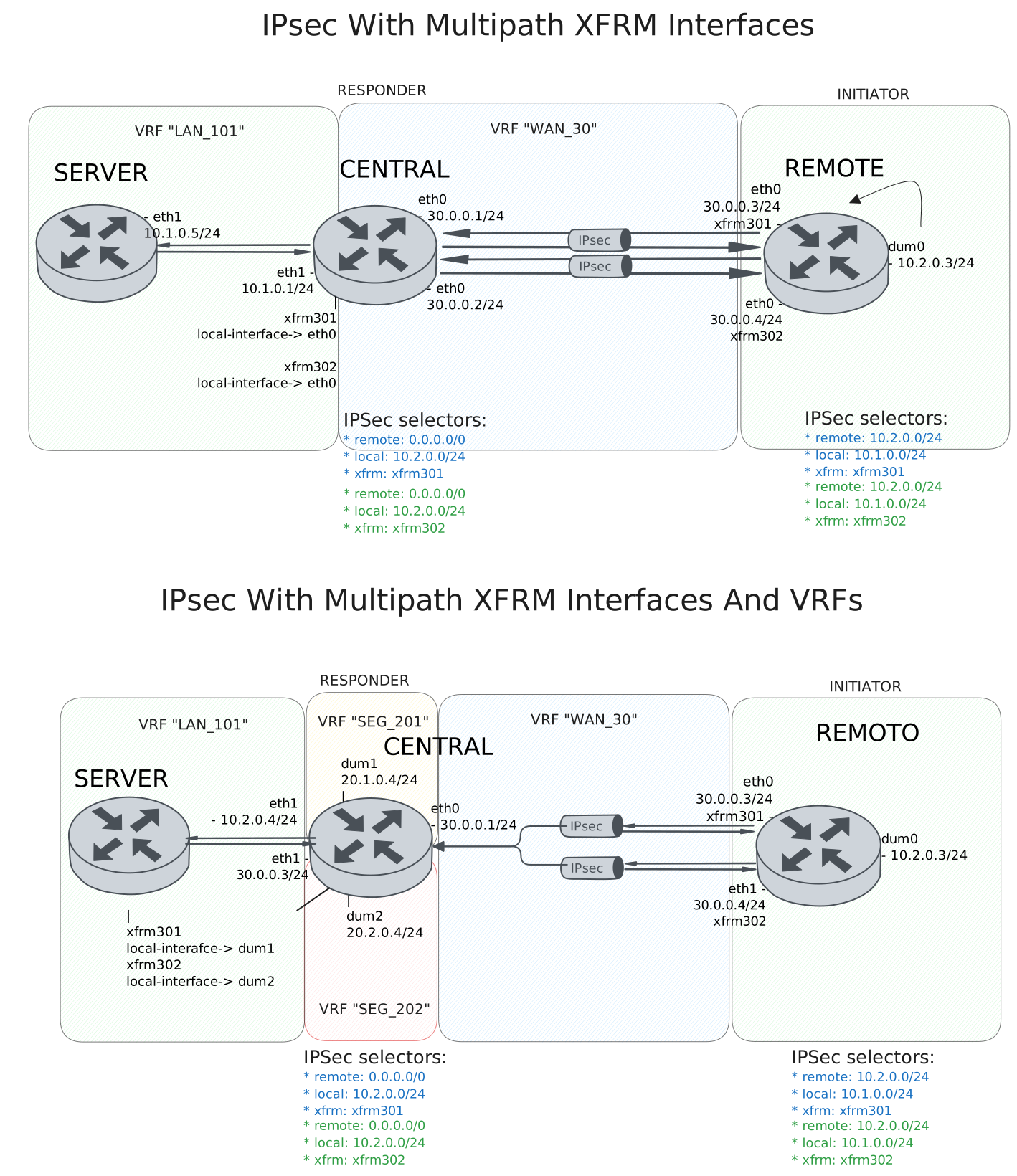
Test IPsec With Multipath XFRM Interfaces
Description
DUT0 and DUT1 are connected to each other through multiple IPsec tunnels with the same local and remote prefixes.
In this test case, we will check IPsec tunnels are correctly installing through two peers directly connected to the DUT0 and DUT1 devices.
Scenario
Step 1: Set the following configuration in DUT0 :
set interfaces ethernet eth0 address 30.0.0.1/24
set interfaces ethernet eth0 address 30.0.0.2/24
set interfaces ethernet eth0 vrf WAN_30
set interfaces ethernet eth1 address 10.1.0.1/24
set interfaces ethernet eth1 vrf LAN_101
set interfaces xfrm xfrm301 local-interface eth0
set interfaces xfrm xfrm301 mtu 1400
set interfaces xfrm xfrm301 multipath traffic-steering reverse
set interfaces xfrm xfrm301 vrf LAN_101
set interfaces xfrm xfrm302 local-interface eth0
set interfaces xfrm xfrm302 mtu 1400
set interfaces xfrm xfrm302 multipath traffic-steering reverse
set interfaces xfrm xfrm302 vrf LAN_101
set protocols vrf WAN_30 static route 10.1.0.0/24 next-hop-vrf LAN_101
set service ssh
set system login user admin authentication encrypted-password '$6$GSjsCj8gHLv$/VcqU6FLi6CT2Oxn0MJQ2C2tqnRDrYKNF8HIYWJp68nvXvPdFccDsT04.WtigUONbKYrgKg8d6rEs8PjljMkH0'
set system vrf LAN_101
set system vrf WAN_30
set system vrf main
set vpn ipsec auth-profile AUTH-SA global-secrets ike-psk test encrypted-secret U2FsdGVkX183wyDMMs+zy3leBiu2Z4w3EG2PtkCJqHA=
set vpn ipsec auth-profile AUTH-SA local auth ike-psk id test
set vpn ipsec auth-profile AUTH-SA remote auth ike-psk id %any
set vpn ipsec esp-group CHILD-SA mode tunnel
set vpn ipsec esp-group CHILD-SA proposal 1 encryption aes256gcm128
set vpn ipsec esp-group CHILD-SA proposal 1 pfs dh-group19
set vpn ipsec ike-group IKE-SA key-exchange ikev2
set vpn ipsec ike-group IKE-SA proposal 1 dh-group 19
set vpn ipsec ike-group IKE-SA proposal 1 encryption aes256gcm128
set vpn ipsec ike-group IKE-SA proposal 1 hash sha256
set vpn ipsec site-to-site peer PEER301 auth-profile AUTH-SA
set vpn ipsec site-to-site peer PEER301 connection-type respond
set vpn ipsec site-to-site peer PEER301 default-esp-group CHILD-SA
set vpn ipsec site-to-site peer PEER301 ike-group IKE-SA
set vpn ipsec site-to-site peer PEER301 local-address 30.0.0.1
set vpn ipsec site-to-site peer PEER301 remote-address %any
set vpn ipsec site-to-site peer PEER301 tunnel 1 install-routes LAN_101
set vpn ipsec site-to-site peer PEER301 tunnel 1 local prefix 10.1.0.0/24
set vpn ipsec site-to-site peer PEER301 tunnel 1 remote prefix 0.0.0.0/0
set vpn ipsec site-to-site peer PEER301 tunnel 1 xfrm-interface-out xfrm301
set vpn ipsec site-to-site peer PEER302 auth-profile AUTH-SA
set vpn ipsec site-to-site peer PEER302 connection-type respond
set vpn ipsec site-to-site peer PEER302 default-esp-group CHILD-SA
set vpn ipsec site-to-site peer PEER302 ike-group IKE-SA
set vpn ipsec site-to-site peer PEER302 local-address 30.0.0.2
set vpn ipsec site-to-site peer PEER302 remote-address %any
set vpn ipsec site-to-site peer PEER302 tunnel 1 install-routes LAN_101
set vpn ipsec site-to-site peer PEER302 tunnel 1 local prefix 10.1.0.0/24
set vpn ipsec site-to-site peer PEER302 tunnel 1 remote prefix 0.0.0.0/0
set vpn ipsec site-to-site peer PEER302 tunnel 1 xfrm-interface-out xfrm302
Step 2: Set the following configuration in DUT1 :
set interfaces dummy dum0 address 10.2.0.3/24
set interfaces ethernet eth0 address 30.0.0.3/24
set interfaces ethernet eth0 address 30.0.0.4/24
set interfaces xfrm xfrm301 mtu 1400
set interfaces xfrm xfrm302 mtu 1400
set service ssh
set system login user admin authentication encrypted-password '$6$GSjsCj8gHLv$/VcqU6FLi6CT2Oxn0MJQ2C2tqnRDrYKNF8HIYWJp68nvXvPdFccDsT04.WtigUONbKYrgKg8d6rEs8PjljMkH0'
set system vrf main
set vpn ipsec auth-profile AUTH-SA global-secrets ike-psk test encrypted-secret U2FsdGVkX185pln0yrcsw/bNRkJ+pGbPPASr/Ka9S2U=
set vpn ipsec auth-profile AUTH-SA local auth ike-psk id test
set vpn ipsec auth-profile AUTH-SA remote auth ike-psk id %any
set vpn ipsec esp-group CHILD-SA mode tunnel
set vpn ipsec esp-group CHILD-SA proposal 1 encryption aes256gcm128
set vpn ipsec esp-group CHILD-SA proposal 1 pfs dh-group19
set vpn ipsec ike-group IKE-SA key-exchange ikev2
set vpn ipsec ike-group IKE-SA proposal 1 dh-group 19
set vpn ipsec ike-group IKE-SA proposal 1 encryption aes256gcm128
set vpn ipsec ike-group IKE-SA proposal 1 hash sha256
set vpn ipsec site-to-site peer PEER301 auth-profile AUTH-SA
set vpn ipsec site-to-site peer PEER301 connection-type initiate
set vpn ipsec site-to-site peer PEER301 default-esp-group CHILD-SA
set vpn ipsec site-to-site peer PEER301 ike-group IKE-SA
set vpn ipsec site-to-site peer PEER301 local-address 30.0.0.3
set vpn ipsec site-to-site peer PEER301 remote-address 30.0.0.1
set vpn ipsec site-to-site peer PEER301 tunnel 1 install-routes main
set vpn ipsec site-to-site peer PEER301 tunnel 1 local prefix 10.2.0.0/24
set vpn ipsec site-to-site peer PEER301 tunnel 1 remote prefix 10.1.0.0/24
set vpn ipsec site-to-site peer PEER301 tunnel 1 xfrm-interface-out xfrm301
set vpn ipsec site-to-site peer PEER302 auth-profile AUTH-SA
set vpn ipsec site-to-site peer PEER302 connection-type initiate
set vpn ipsec site-to-site peer PEER302 default-esp-group CHILD-SA
set vpn ipsec site-to-site peer PEER302 ike-group IKE-SA
set vpn ipsec site-to-site peer PEER302 local-address 30.0.0.4
set vpn ipsec site-to-site peer PEER302 remote-address 30.0.0.2
set vpn ipsec site-to-site peer PEER302 tunnel 1 install-routes main
set vpn ipsec site-to-site peer PEER302 tunnel 1 local prefix 10.2.0.0/24
set vpn ipsec site-to-site peer PEER302 tunnel 1 remote prefix 10.1.0.0/24
set vpn ipsec site-to-site peer PEER302 tunnel 1 xfrm-interface-out xfrm302
Step 3: Set the following configuration in DUT2 :
set interfaces ethernet eth1 address 10.1.0.5/24
set protocols static route 10.2.0.0/24 next-hop 10.1.0.1
set service ssh
set system login user admin authentication encrypted-password '$6$GSjsCj8gHLv$/VcqU6FLi6CT2Oxn0MJQ2C2tqnRDrYKNF8HIYWJp68nvXvPdFccDsT04.WtigUONbKYrgKg8d6rEs8PjljMkH0'
Note
Check that the IPsec tunnels are established and the routes are installed. The routes should be installed in the VRF LAN_101.
Step 4: Run command protocols vrf LAN_101 ip show route at DUT0 and check if output matches the following regular expressions:
K>\* 10\.2\.0\.0/24 \[0\/0\] is directly connected.*xfrm\d+.*\n.*xfrm\d+Show output
Codes: K - kernel route, C - connected, L - local, S - static,
       R - RIP, O - OSPF, I - IS-IS, B - BGP, E - EIGRP, N - NHRP,
       T - Table, v - VNC, V - VNC-Direct, A - Babel, F - PBR,
       f - OpenFabric, t - Table-Direct,
       > - selected route, * - FIB route, q - queued, r - rejected, b - backup
       t - trapped, o - offload failure

IPv4 unicast VRF LAN_101:
K>* 0.0.0.0/0 [255/8192] unreachable (ICMP unreachable), weight 1, 00:00:08
C>* 10.1.0.0/24 is directly connected, eth1, weight 1, 00:00:08
L>* 10.1.0.1/32 is directly connected, eth1, weight 1, 00:00:08
K>* 10.2.0.0/24 [0/0] is directly connected, xfrm302, weight 1, 00:00:02
  *                   is directly connected, xfrm301, weight 1, 00:00:02
Note
Check that both IPsec tunnels are established and traffic steering is working as expected. Once the remote client is trying to connect randomly from either of the two tunnels, hub always responds with the same tunnel.
Step 5: Run command vpn ipsec clear sa at DUT0 and expect this output:
Show output
Deleting IPSec SAs... 100.00%
Closed tunnels: 2
Step 6: Init an SSH connection from DUT1 to IP address 10.1.0.5 with the user admin:
admin@DUT1$ ssh admin@10.1.0.5 option StrictHostKeyChecking=no option UserKnownHostsFile=/dev/null local-address 10.2.0.3Show output
Warning: Permanently added '10.1.0.5' (ECDSA) to the list of known hosts.
admin@10.1.0.5's password:
Welcome to Teldat OSDx v4.2.8.3

This system includes free software.
Contact Teldat for licenses information and source code.

Last login: Thu Feb 12 23:30:28 2026 from 10.215.168.64
admin@osdx$
Step 7: Run command vpn ipsec show sa at DUT0 and expect this output:
Show output
vpn-peer-PEER301: #4, ESTABLISHED, IKEv2, c9594292ce192dd3_i bef75794c67ddb81_r*
  local  'test' @ 30.0.0.1[500]
  remote 'test' @ 30.0.0.3[500]
  AES_GCM_16-256/PRF_HMAC_SHA2_256/ECP_256
  established 0s ago, rekeying in 20966s
  peer-PEER301-tunnel-1: #4, reqid 1, INSTALLED, TUNNEL, ESP:AES_GCM_16-256
    installed 0s ago, rekeying in 3288s, expires in 3960s
    in  cb7ee6c7 (-|0x0000012e),   5136 bytes,    26 packets,     1s ago
    out c8a89aa5 (-|0x0000012e),   5084 bytes,    24 packets,     1s ago
    local  10.1.0.0/24
    remote 10.2.0.0/24
vpn-peer-PEER302: #3, ESTABLISHED, IKEv2, 44b9d79745c66452_i e7a740b85e0652c0_r*
  local  'test' @ 30.0.0.2[500]
  remote 'test' @ 30.0.0.4[500]
  AES_GCM_16-256/PRF_HMAC_SHA2_256/ECP_256
  established 0s ago, rekeying in 14636s
  peer-PEER302-tunnel-1: #3, reqid 2, INSTALLED, TUNNEL, ESP:AES_GCM_16-256
    installed 0s ago, rekeying in 3322s, expires in 3960s
    in  cd389ee7 (-|0x0000012f),      0 bytes,     0 packets
    out c4bbc22d (-|0x0000012f),      0 bytes,     0 packets
    local  10.1.0.0/24
    remote 10.2.0.0/24
Step 8: Run command vpn ipsec clear sa at DUT0 and expect this output:
Show output
Deleting IPSec SAs... 100.00%
Closed tunnels: 2
Step 9: Init an SSH connection from DUT1 to IP address 10.1.0.5 with the user admin:
admin@DUT1$ ssh admin@10.1.0.5 option StrictHostKeyChecking=no option UserKnownHostsFile=/dev/null local-address 10.2.0.3Show output
Warning: Permanently added '10.1.0.5' (ECDSA) to the list of known hosts.
admin@10.1.0.5's password:
Welcome to Teldat OSDx v4.2.8.3

This system includes free software.
Contact Teldat for licenses information and source code.

Last login: Fri Feb 13 00:07:48 2026 from 10.2.0.3
admin@osdx$
Step 10: Run command vpn ipsec show sa at DUT0 and expect this output:
Show output
vpn-peer-PEER302: #6, ESTABLISHED, IKEv2, efba5f0a547519ed_i 0dcac8324c9ac749_r*
  local  'test' @ 30.0.0.2[500]
  remote 'test' @ 30.0.0.4[500]
  AES_GCM_16-256/PRF_HMAC_SHA2_256/ECP_256
  established 0s ago, rekeying in 19225s
  peer-PEER302-tunnel-1: #6, reqid 2, INSTALLED, TUNNEL, ESP:AES_GCM_16-256
    installed 0s ago, rekeying in 3539s, expires in 3960s
    in  c47b58b8 (-|0x0000012f),   5032 bytes,    24 packets,     0s ago
    out ceed361e (-|0x0000012f),   4864 bytes,    21 packets,     0s ago
    local  10.1.0.0/24
    remote 10.2.0.0/24
vpn-peer-PEER301: #5, ESTABLISHED, IKEv2, 9d595ace4cd3ee40_i e534389725a15c81_r*
  local  'test' @ 30.0.0.1[500]
  remote 'test' @ 30.0.0.3[500]
  AES_GCM_16-256/PRF_HMAC_SHA2_256/ECP_256
  established 0s ago, rekeying in 16466s
  peer-PEER301-tunnel-1: #5, reqid 1, INSTALLED, TUNNEL, ESP:AES_GCM_16-256
    installed 0s ago, rekeying in 3244s, expires in 3960s
    in  cd771424 (-|0x0000012e),      0 bytes,     0 packets
    out c91678d3 (-|0x0000012e),      0 bytes,     0 packets
    local  10.1.0.0/24
    remote 10.2.0.0/24
Note
Testing the traffic from the hub to the spoke. The difference is that the IPsec tunnel chosen by the hub not always the same as the one chosen by the spoke. So if the spoke responds to the hub through the another tunnel, the hub needs to change the tunnel to the one used by the spoke.
Step 11: Run command vpn ipsec clear sa at DUT0 and expect this output:
Show output
Deleting IPSec SAs... 100.00%
Closed tunnels: 2
Step 12: Init an SSH connection from DUT2 to IP address 10.2.0.3 with the user admin:
admin@DUT2$ ssh admin@10.2.0.3 option StrictHostKeyChecking=no option UserKnownHostsFile=/dev/null local-address 10.1.0.5Show output
Warning: Permanently added '10.2.0.3' (ECDSA) to the list of known hosts.
admin@10.2.0.3's password:
Welcome to Teldat OSDx v4.2.8.3

This system includes free software.
Contact Teldat for licenses information and source code.

Last login: Thu Feb 12 23:29:32 2026
admin@osdx$
Step 13: Run command vpn ipsec show sa at DUT0 and expect this output:
Show output
vpn-peer-PEER301: #8, ESTABLISHED, IKEv2, ff96f0c01fbd8124_i 58ec059e097d2a5a_r*
  local  'test' @ 30.0.0.1[500]
  remote 'test' @ 30.0.0.3[500]
  AES_GCM_16-256/PRF_HMAC_SHA2_256/ECP_256
  established 1s ago, rekeying in 24519s
  peer-PEER301-tunnel-1: #8, reqid 1, INSTALLED, TUNNEL, ESP:AES_GCM_16-256
    installed 1s ago, rekeying in 3270s, expires in 3959s
    in  cd4920ff (-|0x0000012e),      0 bytes,     0 packets
    out c19e234c (-|0x0000012e),      0 bytes,     0 packets
    local  10.1.0.0/24
    remote 10.2.0.0/24
vpn-peer-PEER302: #7, ESTABLISHED, IKEv2, c6af0651d2fc8cc1_i 562fa2c0fb19a7a4_r*
  local  'test' @ 30.0.0.2[500]
  remote 'test' @ 30.0.0.4[500]
  AES_GCM_16-256/PRF_HMAC_SHA2_256/ECP_256
  established 1s ago, rekeying in 25448s
  peer-PEER302-tunnel-1: #7, reqid 2, INSTALLED, TUNNEL, ESP:AES_GCM_16-256
    installed 1s ago, rekeying in 3357s, expires in 3959s
    in  ce4f0992 (-|0x0000012f),   4928 bytes,    22 packets,     0s ago
    out c08f9cf3 (-|0x0000012f),   5292 bytes,    29 packets,     0s ago
    local  10.1.0.0/24
    remote 10.2.0.0/24
Step 14: Run command vpn ipsec clear sa at DUT0 and expect this output:
Show output
Deleting IPSec SAs... 100.00%
Closed tunnels: 2
Step 15: Init an SSH connection from DUT2 to IP address 10.2.0.3 with the user admin:
admin@DUT2$ ssh admin@10.2.0.3 option StrictHostKeyChecking=no option UserKnownHostsFile=/dev/null local-address 10.1.0.5Show output
Warning: Permanently added '10.2.0.3' (ECDSA) to the list of known hosts.
admin@10.2.0.3's password:
Welcome to Teldat OSDx v4.2.8.3

This system includes free software.
Contact Teldat for licenses information and source code.

Last login: Fri Feb 13 00:07:50 2026 from 10.1.0.5
admin@osdx$
Step 16: Run command vpn ipsec show sa at DUT0 and expect this output:
Show output
vpn-peer-PEER302: #10, ESTABLISHED, IKEv2, 2f8b4de653ceccf4_i e6c0e8459b682c0d_r*
  local  'test' @ 30.0.0.2[500]
  remote 'test' @ 30.0.0.4[500]
  AES_GCM_16-256/PRF_HMAC_SHA2_256/ECP_256
  established 1s ago, rekeying in 22637s
  peer-PEER302-tunnel-1: #10, reqid 2, INSTALLED, TUNNEL, ESP:AES_GCM_16-256
    installed 1s ago, rekeying in 3254s, expires in 3959s
    in  cddb040a (-|0x0000012f),   4944 bytes,    22 packets,     0s ago
    out c631e824 (-|0x0000012f),   5084 bytes,    25 packets,     0s ago
    local  10.1.0.0/24
    remote 10.2.0.0/24
vpn-peer-PEER301: #9, ESTABLISHED, IKEv2, 087b03f298616c47_i 4df008b7ddf787d8_r*
  local  'test' @ 30.0.0.1[500]
  remote 'test' @ 30.0.0.3[500]
  AES_GCM_16-256/PRF_HMAC_SHA2_256/ECP_256
  established 1s ago, rekeying in 19375s
  peer-PEER301-tunnel-1: #9, reqid 1, INSTALLED, TUNNEL, ESP:AES_GCM_16-256
    installed 1s ago, rekeying in 3346s, expires in 3959s
    in  caa5e75b (-|0x0000012e),      0 bytes,     0 packets
    out cb1f52f8 (-|0x0000012e),      0 bytes,     0 packets
    local  10.1.0.0/24
    remote 10.2.0.0/24
Test IPsec With Multipath XFRM Interfaces And VRFs
Description
The difference here is that the hub peer has its addresses behind the VRFs, it is not directly connected like in the previous test case.
Scenario
Step 1: Set the following configuration in DUT0 :
set interfaces dummy dum1 address 20.1.0.1/24
set interfaces dummy dum1 vrf SEG_201
set interfaces dummy dum2 address 20.2.0.1/24
set interfaces dummy dum2 vrf SEG_202
set interfaces ethernet eth0 address 30.0.0.1/24
set interfaces ethernet eth0 vrf WAN_30
set interfaces ethernet eth1 address 10.1.0.1/24
set interfaces ethernet eth1 vrf LAN_101
set interfaces xfrm xfrm301 local-interface dum1
set interfaces xfrm xfrm301 mtu 1400
set interfaces xfrm xfrm301 multipath traffic-steering reverse
set interfaces xfrm xfrm301 vrf LAN_101
set interfaces xfrm xfrm302 local-interface dum2
set interfaces xfrm xfrm302 mtu 1400
set interfaces xfrm xfrm302 multipath traffic-steering reverse
set interfaces xfrm xfrm302 vrf LAN_101
set protocols vrf SEG_201 static route 0.0.0.0/0 next-hop-vrf WAN_30
set protocols vrf SEG_201 static route 10.1.0.0/24 next-hop-vrf LAN_101
set protocols vrf SEG_202 static route 0.0.0.0/0 next-hop-vrf WAN_30
set protocols vrf SEG_202 static route 10.1.0.0/24 next-hop-vrf LAN_101
set protocols vrf WAN_30 static route 20.1.0.0/24 next-hop-vrf SEG_201
set protocols vrf WAN_30 static route 20.2.0.0/24 next-hop-vrf SEG_202
set service ssh
set system login user admin authentication encrypted-password '$6$GSjsCj8gHLv$/VcqU6FLi6CT2Oxn0MJQ2C2tqnRDrYKNF8HIYWJp68nvXvPdFccDsT04.WtigUONbKYrgKg8d6rEs8PjljMkH0'
set system vrf LAN_101
set system vrf SEG_201
set system vrf SEG_202
set system vrf WAN_30
set system vrf main
set vpn ipsec auth-profile AUTH-SA global-secrets ike-psk test encrypted-secret U2FsdGVkX18C2mkcAoxQusEWFgrQq/u7Y24kdyfDlQ8=
set vpn ipsec auth-profile AUTH-SA local auth ike-psk id test
set vpn ipsec auth-profile AUTH-SA remote auth ike-psk id %any
set vpn ipsec esp-group CHILD-SA mode tunnel
set vpn ipsec esp-group CHILD-SA proposal 1 encryption aes256gcm128
set vpn ipsec esp-group CHILD-SA proposal 1 pfs dh-group19
set vpn ipsec ike-group IKE-SA key-exchange ikev2
set vpn ipsec ike-group IKE-SA proposal 1 dh-group 19
set vpn ipsec ike-group IKE-SA proposal 1 encryption aes256gcm128
set vpn ipsec ike-group IKE-SA proposal 1 hash sha256
set vpn ipsec site-to-site peer PEER301 auth-profile AUTH-SA
set vpn ipsec site-to-site peer PEER301 connection-type respond
set vpn ipsec site-to-site peer PEER301 default-esp-group CHILD-SA
set vpn ipsec site-to-site peer PEER301 ike-group IKE-SA
set vpn ipsec site-to-site peer PEER301 local-address 20.1.0.1
set vpn ipsec site-to-site peer PEER301 remote-address %any
set vpn ipsec site-to-site peer PEER301 tunnel 1 install-routes LAN_101
set vpn ipsec site-to-site peer PEER301 tunnel 1 local prefix 10.1.0.0/24
set vpn ipsec site-to-site peer PEER301 tunnel 1 remote prefix 0.0.0.0/0
set vpn ipsec site-to-site peer PEER301 tunnel 1 xfrm-interface-out xfrm301
set vpn ipsec site-to-site peer PEER302 auth-profile AUTH-SA
set vpn ipsec site-to-site peer PEER302 connection-type respond
set vpn ipsec site-to-site peer PEER302 default-esp-group CHILD-SA
set vpn ipsec site-to-site peer PEER302 ike-group IKE-SA
set vpn ipsec site-to-site peer PEER302 local-address 20.2.0.1
set vpn ipsec site-to-site peer PEER302 remote-address %any
set vpn ipsec site-to-site peer PEER302 tunnel 1 install-routes LAN_101
set vpn ipsec site-to-site peer PEER302 tunnel 1 local prefix 10.1.0.0/24
set vpn ipsec site-to-site peer PEER302 tunnel 1 remote prefix 0.0.0.0/0
set vpn ipsec site-to-site peer PEER302 tunnel 1 xfrm-interface-out xfrm302
Step 2: Set the following configuration in DUT1 :
set interfaces dummy dum0 address 10.2.0.3/24
set interfaces ethernet eth0 address 30.0.0.3/24
set interfaces ethernet eth0 address 30.0.0.4/24
set interfaces xfrm xfrm301 mtu 1400
set interfaces xfrm xfrm302 mtu 1400
set protocols static route 20.1.0.0/24 next-hop 30.0.0.1
set protocols static route 20.2.0.0/24 next-hop 30.0.0.1
set service ssh
set system login user admin authentication encrypted-password '$6$GSjsCj8gHLv$/VcqU6FLi6CT2Oxn0MJQ2C2tqnRDrYKNF8HIYWJp68nvXvPdFccDsT04.WtigUONbKYrgKg8d6rEs8PjljMkH0'
set system vrf main
set vpn ipsec auth-profile AUTH-SA global-secrets ike-psk test encrypted-secret U2FsdGVkX18voKNqz1B1WLddq+1B39sY86+fdJMq8A4=
set vpn ipsec auth-profile AUTH-SA local auth ike-psk id test
set vpn ipsec auth-profile AUTH-SA remote auth ike-psk id %any
set vpn ipsec esp-group CHILD-SA mode tunnel
set vpn ipsec esp-group CHILD-SA proposal 1 encryption aes256gcm128
set vpn ipsec esp-group CHILD-SA proposal 1 pfs dh-group19
set vpn ipsec ike-group IKE-SA key-exchange ikev2
set vpn ipsec ike-group IKE-SA proposal 1 dh-group 19
set vpn ipsec ike-group IKE-SA proposal 1 encryption aes256gcm128
set vpn ipsec ike-group IKE-SA proposal 1 hash sha256
set vpn ipsec site-to-site peer PEER301 auth-profile AUTH-SA
set vpn ipsec site-to-site peer PEER301 connection-type initiate
set vpn ipsec site-to-site peer PEER301 default-esp-group CHILD-SA
set vpn ipsec site-to-site peer PEER301 ike-group IKE-SA
set vpn ipsec site-to-site peer PEER301 local-address 30.0.0.3
set vpn ipsec site-to-site peer PEER301 remote-address 20.1.0.1
set vpn ipsec site-to-site peer PEER301 tunnel 1 install-routes main
set vpn ipsec site-to-site peer PEER301 tunnel 1 local prefix 10.2.0.0/24
set vpn ipsec site-to-site peer PEER301 tunnel 1 remote prefix 10.1.0.0/24
set vpn ipsec site-to-site peer PEER301 tunnel 1 xfrm-interface-out xfrm301
set vpn ipsec site-to-site peer PEER302 auth-profile AUTH-SA
set vpn ipsec site-to-site peer PEER302 connection-type initiate
set vpn ipsec site-to-site peer PEER302 default-esp-group CHILD-SA
set vpn ipsec site-to-site peer PEER302 ike-group IKE-SA
set vpn ipsec site-to-site peer PEER302 local-address 30.0.0.4
set vpn ipsec site-to-site peer PEER302 remote-address 20.2.0.1
set vpn ipsec site-to-site peer PEER302 tunnel 1 install-routes main
set vpn ipsec site-to-site peer PEER302 tunnel 1 local prefix 10.2.0.0/24
set vpn ipsec site-to-site peer PEER302 tunnel 1 remote prefix 10.1.0.0/24
set vpn ipsec site-to-site peer PEER302 tunnel 1 xfrm-interface-out xfrm302
Step 3: Set the following configuration in DUT2 :
set interfaces ethernet eth1 address 10.1.0.5/24
set protocols static route 10.2.0.0/24 next-hop 10.1.0.1
set service ssh
set system login user admin authentication encrypted-password '$6$GSjsCj8gHLv$/VcqU6FLi6CT2Oxn0MJQ2C2tqnRDrYKNF8HIYWJp68nvXvPdFccDsT04.WtigUONbKYrgKg8d6rEs8PjljMkH0'
Note
Check that the IPsec tunnels are established and the routes are installed. The routes should be installed in the VRF LAN_101.
Step 4: Run command protocols vrf LAN_101 ip show route at DUT0 and check if output matches the following regular expressions:
K>\* 10\.2\.0\.0/24 \[0\/0\] is directly connected.*xfrm\d+.*\n.*xfrm\d+Show output
Codes: K - kernel route, C - connected, L - local, S - static,
       R - RIP, O - OSPF, I - IS-IS, B - BGP, E - EIGRP, N - NHRP,
       T - Table, v - VNC, V - VNC-Direct, A - Babel, F - PBR,
       f - OpenFabric, t - Table-Direct,
       > - selected route, * - FIB route, q - queued, r - rejected, b - backup
       t - trapped, o - offload failure

IPv4 unicast VRF LAN_101:
K>* 0.0.0.0/0 [255/8192] unreachable (ICMP unreachable), weight 1, 00:00:08
C>* 10.1.0.0/24 is directly connected, eth1, weight 1, 00:00:08
L>* 10.1.0.1/32 is directly connected, eth1, weight 1, 00:00:08
K>* 10.2.0.0/24 [0/0] is directly connected, xfrm302, weight 1, 00:00:01
  *                   is directly connected, xfrm301, weight 1, 00:00:01
Note
Check that both IPsec tunnels are established and traffic steering is working as expected. Once the remote client is trying to connect randomly from either of the two tunnels, hub always responds with the same tunnel.
Step 5: Run command vpn ipsec clear sa at DUT0 and expect this output:
Show output
Deleting IPSec SAs... 100.00%
Closed tunnels: 2
Step 6: Init an SSH connection from DUT1 to IP address 10.1.0.5 with the user admin:
admin@DUT1$ ssh admin@10.1.0.5 option StrictHostKeyChecking=no option UserKnownHostsFile=/dev/null local-address 10.2.0.3Show output
Warning: Permanently added '10.1.0.5' (ECDSA) to the list of known hosts.
admin@10.1.0.5's password:
Welcome to Teldat OSDx v4.2.8.3

This system includes free software.
Contact Teldat for licenses information and source code.

Last login: Fri Feb 13 00:07:49 2026 from 10.2.0.3
admin@osdx$
Step 7: Run command vpn ipsec show sa at DUT0 and expect this output:
Show output
vpn-peer-PEER301: #4, ESTABLISHED, IKEv2, dee584ce5360b7ab_i 2ef9e2ad89b8feaf_r*
  local  'test' @ 20.1.0.1[500]
  remote 'test' @ 30.0.0.3[500]
  AES_GCM_16-256/PRF_HMAC_SHA2_256/ECP_256
  established 0s ago, rekeying in 25144s
  peer-PEER301-tunnel-1: #4, reqid 1, INSTALLED, TUNNEL, ESP:AES_GCM_16-256
    installed 0s ago, rekeying in 3298s, expires in 3960s
    in  cf001c10 (-|0x0000012e),   5240 bytes,    28 packets,     0s ago
    out c7ea6db4 (-|0x0000012e),   4944 bytes,    22 packets,     0s ago
    local  10.1.0.0/24
    remote 10.2.0.0/24
vpn-peer-PEER302: #3, ESTABLISHED, IKEv2, 24ad3fe3224df8ce_i 6546dfd451babe04_r*
  local  'test' @ 20.2.0.1[500]
  remote 'test' @ 30.0.0.4[500]
  AES_GCM_16-256/PRF_HMAC_SHA2_256/ECP_256
  established 0s ago, rekeying in 26729s
  peer-PEER302-tunnel-1: #3, reqid 2, INSTALLED, TUNNEL, ESP:AES_GCM_16-256
    installed 0s ago, rekeying in 3377s, expires in 3960s
    in  cb9381fa (-|0x0000012f),      0 bytes,     0 packets
    out cdcca767 (-|0x0000012f),      0 bytes,     0 packets
    local  10.1.0.0/24
    remote 10.2.0.0/24
Step 8: Run command vpn ipsec clear sa at DUT0 and expect this output:
Show output
Deleting IPSec SAs... 100.00%
Closed tunnels: 2
Step 9: Init an SSH connection from DUT1 to IP address 10.1.0.5 with the user admin:
admin@DUT1$ ssh admin@10.1.0.5 option StrictHostKeyChecking=no option UserKnownHostsFile=/dev/null local-address 10.2.0.3Show output
Warning: Permanently added '10.1.0.5' (ECDSA) to the list of known hosts.
admin@10.1.0.5's password:
Welcome to Teldat OSDx v4.2.8.3

This system includes free software.
Contact Teldat for licenses information and source code.

Last login: Fri Feb 13 00:08:16 2026 from 10.2.0.3
admin@osdx$
Step 10: Run command vpn ipsec show sa at DUT0 and expect this output:
Show output
vpn-peer-PEER302: #6, ESTABLISHED, IKEv2, 4e43de349618f83d_i dd2d086beb0e8940_r*
  local  'test' @ 20.2.0.1[500]
  remote 'test' @ 30.0.0.4[500]
  AES_GCM_16-256/PRF_HMAC_SHA2_256/ECP_256
  established 0s ago, rekeying in 27042s
  peer-PEER302-tunnel-1: #6, reqid 2, INSTALLED, TUNNEL, ESP:AES_GCM_16-256
    installed 0s ago, rekeying in 3359s, expires in 3960s
    in  c3861350 (-|0x0000012f),   5240 bytes,    28 packets,     0s ago
    out c8dc4fe2 (-|0x0000012f),   4952 bytes,    22 packets,     0s ago
    local  10.1.0.0/24
    remote 10.2.0.0/24
vpn-peer-PEER301: #5, ESTABLISHED, IKEv2, cd443a194d72a7dc_i 09db17e8e9e063e9_r*
  local  'test' @ 20.1.0.1[500]
  remote 'test' @ 30.0.0.3[500]
  AES_GCM_16-256/PRF_HMAC_SHA2_256/ECP_256
  established 0s ago, rekeying in 24124s
  peer-PEER301-tunnel-1: #5, reqid 1, INSTALLED, TUNNEL, ESP:AES_GCM_16-256
    installed 0s ago, rekeying in 3344s, expires in 3960s
    in  c543f918 (-|0x0000012e),      0 bytes,     0 packets
    out c78e9aa0 (-|0x0000012e),      0 bytes,     0 packets
    local  10.1.0.0/24
    remote 10.2.0.0/24
Note
Testing the traffic from the hub to the spoke. The difference is that the IPsec tunnel chosen by the hub not always the same as the one chosen by the spoke. So if the spoke responds to the hub through the another tunnel, the hub needs to change the tunnel to the one used by the spoke.
Step 11: Run command vpn ipsec clear sa at DUT0 and expect this output:
Show output
Deleting IPSec SAs... 100.00%
Closed tunnels: 2
Step 12: Init an SSH connection from DUT2 to IP address 10.2.0.3 with the user admin:
admin@DUT2$ ssh admin@10.2.0.3 option StrictHostKeyChecking=no option UserKnownHostsFile=/dev/null local-address 10.1.0.5Show output
Warning: Permanently added '10.2.0.3' (ECDSA) to the list of known hosts.
admin@10.2.0.3's password:
Welcome to Teldat OSDx v4.2.8.3

This system includes free software.
Contact Teldat for licenses information and source code.

Last login: Fri Feb 13 00:07:51 2026 from 10.1.0.5
admin@osdx$
Step 13: Run command vpn ipsec show sa at DUT0 and expect this output:
Show output
vpn-peer-PEER301: #8, ESTABLISHED, IKEv2, f3290249570cc47e_i c171e5f8310d7219_r*
  local  'test' @ 20.1.0.1[500]
  remote 'test' @ 30.0.0.3[500]
  AES_GCM_16-256/PRF_HMAC_SHA2_256/ECP_256
  established 1s ago, rekeying in 15592s
  peer-PEER301-tunnel-1: #8, reqid 1, INSTALLED, TUNNEL, ESP:AES_GCM_16-256
    installed 1s ago, rekeying in 3246s, expires in 3959s
    in  ce0a3a59 (-|0x0000012e),   4864 bytes,    21 packets,     0s ago
    out ca252eb8 (-|0x0000012e),   5084 bytes,    25 packets,     0s ago
    local  10.1.0.0/24
    remote 10.2.0.0/24
vpn-peer-PEER302: #7, ESTABLISHED, IKEv2, 13315eb0fb021e70_i 20df2e89cf13774e_r*
  local  'test' @ 20.2.0.1[500]
  remote 'test' @ 30.0.0.4[500]
  AES_GCM_16-256/PRF_HMAC_SHA2_256/ECP_256
  established 1s ago, rekeying in 26331s
  peer-PEER302-tunnel-1: #7, reqid 2, INSTALLED, TUNNEL, ESP:AES_GCM_16-256
    installed 1s ago, rekeying in 3299s, expires in 3959s
    in  c6b63110 (-|0x0000012f),      0 bytes,     0 packets
    out c56c284d (-|0x0000012f),      0 bytes,     0 packets
    local  10.1.0.0/24
    remote 10.2.0.0/24
Step 14: Run command vpn ipsec clear sa at DUT0 and expect this output:
Show output
Deleting IPSec SAs... 100.00%
Closed tunnels: 2
Step 15: Init an SSH connection from DUT2 to IP address 10.2.0.3 with the user admin:
admin@DUT2$ ssh admin@10.2.0.3 option StrictHostKeyChecking=no option UserKnownHostsFile=/dev/null local-address 10.1.0.5Show output
Warning: Permanently added '10.2.0.3' (ECDSA) to the list of known hosts.
admin@10.2.0.3's password:
Welcome to Teldat OSDx v4.2.8.3

This system includes free software.
Contact Teldat for licenses information and source code.

Last login: Fri Feb 13 00:08:18 2026 from 10.1.0.5
admin@osdx$
Step 16: Run command vpn ipsec show sa at DUT0 and expect this output:
Show output
vpn-peer-PEER302: #10, ESTABLISHED, IKEv2, 139101e40e6264cf_i 8d9a2e65ec4dbf5d_r*
  local  'test' @ 20.2.0.1[500]
  remote 'test' @ 30.0.0.4[500]
  AES_GCM_16-256/PRF_HMAC_SHA2_256/ECP_256
  established 1s ago, rekeying in 20499s
  peer-PEER302-tunnel-1: #10, reqid 2, INSTALLED, TUNNEL, ESP:AES_GCM_16-256
    installed 1s ago, rekeying in 3346s, expires in 3959s
    in  cc25873d (-|0x0000012f),   4768 bytes,    20 packets,     0s ago
    out ca228ab9 (-|0x0000012f),   5024 bytes,    24 packets,     0s ago
    local  10.1.0.0/24
    remote 10.2.0.0/24
vpn-peer-PEER301: #9, ESTABLISHED, IKEv2, 213c626957e50a3d_i 57fa68b85f94cb39_r*
  local  'test' @ 20.1.0.1[500]
  remote 'test' @ 30.0.0.3[500]
  AES_GCM_16-256/PRF_HMAC_SHA2_256/ECP_256
  established 1s ago, rekeying in 17009s
  peer-PEER301-tunnel-1: #9, reqid 1, INSTALLED, TUNNEL, ESP:AES_GCM_16-256
    installed 1s ago, rekeying in 3344s, expires in 3959s
    in  c69191d3 (-|0x0000012e),      0 bytes,     0 packets
    out c2a9b20f (-|0x0000012e),     60 bytes,     1 packets,     1s ago
    local  10.1.0.0/24
    remote 10.2.0.0/24