Network Access Server
This scenario shows different Network Access Server (NAS) configurations: server failover and VRF-aware communication.
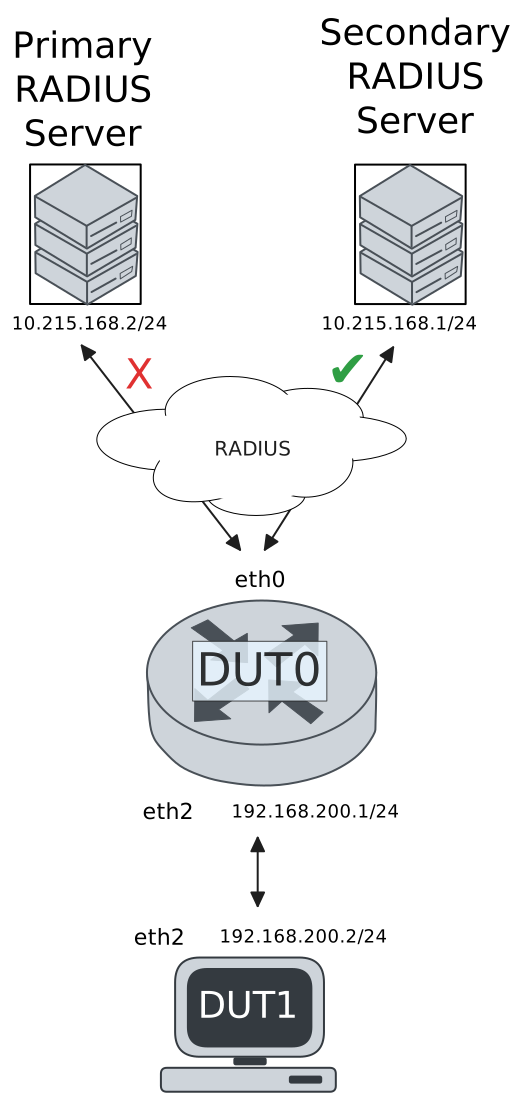
Test 802.1X Authentication Against NAS Through a VRF-Aware Interface
Description
This scenario shows how to configure 802.1X authentication. Authenticator-NAS communication if performed through a VRF-aware Ethernet interface.
Scenario
Step 1: Set the following configuration in DUT0 :
set interfaces ethernet eth0 address 10.215.168.64/24
set interfaces ethernet eth0 vrf WAN
set interfaces ethernet eth2 address 192.168.100.1/24
set interfaces ethernet eth2 authenticator 802.1x max-retransmissions 2
set interfaces ethernet eth2 authenticator aaa authentication list1
set interfaces ethernet eth2 authenticator log-level debug
set interfaces ethernet eth2 authenticator mode only-802.1x
set interfaces ethernet eth2 authenticator quiet-period 60
set interfaces ethernet eth2 authenticator reauth-period 0
set system aaa group radius radgroup1 local-vrf WAN
set system aaa group radius radgroup1 server serv1
set system aaa list list1 method 1 group radius radgroup1
set system aaa server radius serv1 address 10.215.168.1
set system aaa server radius serv1 encrypted-key U2FsdGVkX18hkQKDD1a8Krsy+QDk8lageXJ4Q27y6t6Vg0JrPRuRoJwglspVxHWEWZDbwAfM6FdIMYWFIbGYgQ==
set system login user admin authentication encrypted-password '$6$GSjsCj8gHLv$/VcqU6FLi6CT2Oxn0MJQ2C2tqnRDrYKNF8HIYWJp68nvXvPdFccDsT04.WtigUONbKYrgKg8d6rEs8PjljMkH0'
set system vrf WAN
Step 2: Ping IP address 10.215.168.1 from DUT0:
admin@DUT0$ ping 10.215.168.1 vrf WAN count 1 size 56 timeout 1Show output
ping: Warning: source address might be selected on device other than: WAN
PING 10.215.168.1 (10.215.168.1) from 10.215.168.64 WAN: 56(84) bytes of data.
64 bytes from 10.215.168.1: icmp_seq=1 ttl=64 time=3.89 ms

--- 10.215.168.1 ping statistics ---
1 packets transmitted, 1 received, 0% packet loss, time 0ms
rtt min/avg/max/mdev = 3.892/3.892/3.892/0.000 ms
Step 3: Set the following configuration in DUT1 :
set interfaces ethernet eth2 address 192.168.100.2/24
set interfaces ethernet eth2 supplicant encrypted-password U2FsdGVkX19f3uX5qZVXshksKUjPC6uC/Lu3mg41Wfg=
set interfaces ethernet eth2 supplicant username testing
set system login user admin authentication encrypted-password '$6$GSjsCj8gHLv$/VcqU6FLi6CT2Oxn0MJQ2C2tqnRDrYKNF8HIYWJp68nvXvPdFccDsT04.WtigUONbKYrgKg8d6rEs8PjljMkH0'
Step 4: Run command interfaces ethernet eth2 supplicant show status at DUT1 and check if output contains the following tokens:
AuthorizedShow output
---------------------------------------------------
        Field                      Value
---------------------------------------------------
EAP State                                   SUCCESS
EAP TLS Cipher          ECDHE-RSA-AES256-GCM-SHA384
EAP TLS Version                             TLSv1.2
PAE State                             AUTHENTICATED
Supplicant Port Status                   Authorized
WPA State                                 COMPLETED
Step 5: Run command interfaces ethernet eth2 supplicant show stats at DUT1 and check if output matches the following regular expressions:
Port Status\s+AuthorizedShow output
-------------------------------
       Field           Value
-------------------------------
EAPoL Frames (Rx)            11
EAPoL Frames (Tx)            11
Invalid Frames (Rx)           0
Logoff Frames (Tx)            0
Port Status          Authorized
Req Frames (Rx)               9
Req ID Frames (Rx)            1
Resp Frames (Tx)             10
Start Frames (Tx)             1
Step 6: Run command interfaces ethernet eth2 authenticator show stats at DUT0 and check if output matches the following regular expressions:
Authentication Successes\s+1
Authentication Mode\s+802\.1X
Show output
---------------------------------------------
         Field                   Value
---------------------------------------------
Access Challenges                           9
Authentication Backend                 RADIUS
Authentication Failures                     0
Authentication Mode                    802.1X
Authentication Status     Authorized (802.1X)
Authentication Successes                    1
EAPoL frames (Rx)                          11
EAPoL frames (Tx)                          11
Quiet Period                               60
Reauthenticate                          FALSE
Reauthenticate Period                       0
Session Time                                0
Session User MAC            de:ad:be:ef:6c:12
Session User Name                     testing
Step 7: Ping IP address 192.168.100.1 from DUT1:
admin@DUT1$ ping 192.168.100.1 count 1 size 56 timeout 1Show output
PING 192.168.100.1 (192.168.100.1) 56(84) bytes of data.
64 bytes from 192.168.100.1: icmp_seq=1 ttl=64 time=0.379 ms

--- 192.168.100.1 ping statistics ---
1 packets transmitted, 1 received, 0% packet loss, time 0ms
rtt min/avg/max/mdev = 0.379/0.379/0.379/0.000 ms
Test MAB Authentication Against NAS Through a VRF-Aware Interface
Description
This scenario shows how to configure MAB authentication. Authenticator-NAS communication if performed through a VRF-aware Ethernet interface.
Scenario
Step 1: Set the following configuration in DUT0 :
set interfaces ethernet eth0 address 10.215.168.64/24
set interfaces ethernet eth0 vrf WAN
set interfaces ethernet eth2 address 192.168.100.1/24
set interfaces ethernet eth2 authenticator aaa authentication list1
set interfaces ethernet eth2 authenticator log-level debug
set interfaces ethernet eth2 authenticator mode only-MAB
set interfaces ethernet eth2 authenticator quiet-period 60
set interfaces ethernet eth2 authenticator reauth-period 0
set system aaa group radius radgroup1 local-vrf WAN
set system aaa group radius radgroup1 server serv1
set system aaa list list1 method 1 group radius radgroup1
set system aaa server radius serv1 address 10.215.168.1
set system aaa server radius serv1 encrypted-key U2FsdGVkX18AWAQi2JduKHRTALdBrlDgNzqTEX64S2OCODPJQTGCx2JTbIRc5sv7TbQuDE5OjnUsQEvGKI+GqA==
set system login user admin authentication encrypted-password '$6$GSjsCj8gHLv$/VcqU6FLi6CT2Oxn0MJQ2C2tqnRDrYKNF8HIYWJp68nvXvPdFccDsT04.WtigUONbKYrgKg8d6rEs8PjljMkH0'
set system vrf WAN
Step 2: Ping IP address 10.215.168.1 from DUT0:
admin@DUT0$ ping 10.215.168.1 vrf WAN count 1 size 56 timeout 1Show output
ping: Warning: source address might be selected on device other than: WAN
PING 10.215.168.1 (10.215.168.1) from 10.215.168.64 WAN: 56(84) bytes of data.
64 bytes from 10.215.168.1: icmp_seq=1 ttl=64 time=0.194 ms

--- 10.215.168.1 ping statistics ---
1 packets transmitted, 1 received, 0% packet loss, time 0ms
rtt min/avg/max/mdev = 0.194/0.194/0.194/0.000 ms
Step 3: Set the following configuration in DUT1 :
set interfaces ethernet eth2 address 192.168.100.2/24
set system login user admin authentication encrypted-password '$6$GSjsCj8gHLv$/VcqU6FLi6CT2Oxn0MJQ2C2tqnRDrYKNF8HIYWJp68nvXvPdFccDsT04.WtigUONbKYrgKg8d6rEs8PjljMkH0'
Step 4: Ping IP address 192.168.100.1 from DUT1:
admin@DUT1$ ping 192.168.100.1 count 1 size 56 timeout 1Show output
PING 192.168.100.1 (192.168.100.1) 56(84) bytes of data.
64 bytes from 192.168.100.1: icmp_seq=1 ttl=64 time=0.312 ms

--- 192.168.100.1 ping statistics ---
1 packets transmitted, 1 received, 0% packet loss, time 0ms
rtt min/avg/max/mdev = 0.312/0.312/0.312/0.000 ms
Step 5: Run command interfaces ethernet eth2 authenticator show stats at DUT0 and check if output matches the following regular expressions:
Authentication Successes\s+1
Authentication Mode\s+MAB
Show output
-------------------------------------------
         Field                  Value
-------------------------------------------
Access Challenges                         0
Authentication Backend               RADIUS
Authentication Failures                   0
Authentication Mode                     MAB
Authentication Status      Authorized (MAB)
Authentication Successes                  1
EAPoL frames (Rx)                         0
EAPoL frames (Tx)                         0
Quiet Period                             60
Reauthenticate                        FALSE
Reauthenticate Period                     0
Session Time                              0
Session User MAC          de:ad:be:ef:6c:12
Session User Name                       N/A
Step 6: Ping IP address 192.168.100.1 from DUT1:
admin@DUT1$ ping 192.168.100.1 count 1 size 56 timeout 1Show output
PING 192.168.100.1 (192.168.100.1) 56(84) bytes of data.
64 bytes from 192.168.100.1: icmp_seq=1 ttl=64 time=0.262 ms

--- 192.168.100.1 ping statistics ---
1 packets transmitted, 1 received, 0% packet loss, time 0ms
rtt min/avg/max/mdev = 0.262/0.262/0.262/0.000 ms
Test 802.1X Authentication With Server Failover
Description
This scenario shows how to configure 802.1X authentication. The primary Nework Access Server is not reachable, so the secondary is used instead.
Scenario
Step 1: Set the following configuration in DUT0 :
set interfaces ethernet eth0 address 10.215.168.64/24
set interfaces ethernet eth0 vrf WAN
set interfaces ethernet eth2 address 192.168.100.1/24
set interfaces ethernet eth2 authenticator 802.1x max-retransmissions 2
set interfaces ethernet eth2 authenticator aaa authentication list1
set interfaces ethernet eth2 authenticator log-level debug
set interfaces ethernet eth2 authenticator mode only-802.1x
set interfaces ethernet eth2 authenticator quiet-period 60
set interfaces ethernet eth2 authenticator reauth-period 0
set system aaa group radius radgroup0 local-vrf WAN
set system aaa group radius radgroup0 server MAIN
set system aaa group radius radgroup1 local-vrf WAN
set system aaa group radius radgroup1 server serv1
set system aaa list list1 method 0 group radius radgroup0
set system aaa list list1 method 1 group radius radgroup1
set system aaa server radius MAIN address 10.215.168.2
set system aaa server radius MAIN encrypted-key U2FsdGVkX18PAZtF85+lLaz3OtN7PLi5azUevjSt52q0BBfqJJP6HKyHP3XkJnrHAojP7LiMtyn4dgTiIMyLgw==
set system aaa server radius serv1 address 10.215.168.1
set system aaa server radius serv1 encrypted-key U2FsdGVkX1+qomWJCgRbo2G6DYLcgKr9OiEgYBDnptXvfZRQGuY+D1ZypbL1xPEtYOvgn0Di+mGfj52BVWHowQ==
set system login user admin authentication encrypted-password '$6$GSjsCj8gHLv$/VcqU6FLi6CT2Oxn0MJQ2C2tqnRDrYKNF8HIYWJp68nvXvPdFccDsT04.WtigUONbKYrgKg8d6rEs8PjljMkH0'
set system vrf WAN
Step 2: Ping IP address 10.215.168.1 from DUT0:
admin@DUT0$ ping 10.215.168.1 vrf WAN count 1 size 56 timeout 1Show output
ping: Warning: source address might be selected on device other than: WAN
PING 10.215.168.1 (10.215.168.1) from 10.215.168.64 WAN: 56(84) bytes of data.
64 bytes from 10.215.168.1: icmp_seq=1 ttl=64 time=0.290 ms

--- 10.215.168.1 ping statistics ---
1 packets transmitted, 1 received, 0% packet loss, time 0ms
rtt min/avg/max/mdev = 0.290/0.290/0.290/0.000 ms
Step 3: Set the following configuration in DUT1 :
set interfaces ethernet eth2 address 192.168.100.2/24
set interfaces ethernet eth2 supplicant encrypted-password U2FsdGVkX19JPMYcnNkSMc1017GTjM3P3JuPDGBsk6o=
set interfaces ethernet eth2 supplicant username testing
set system login user admin authentication encrypted-password '$6$GSjsCj8gHLv$/VcqU6FLi6CT2Oxn0MJQ2C2tqnRDrYKNF8HIYWJp68nvXvPdFccDsT04.WtigUONbKYrgKg8d6rEs8PjljMkH0'
Step 4: Run command interfaces ethernet eth2 supplicant show status at DUT1 and check if output contains the following tokens:
AuthorizedShow output
---------------------------------------------------
        Field                      Value
---------------------------------------------------
EAP State                                   SUCCESS
EAP TLS Cipher          ECDHE-RSA-AES256-GCM-SHA384
EAP TLS Version                             TLSv1.2
PAE State                             AUTHENTICATED
Supplicant Port Status                   Authorized
WPA State                                 COMPLETED
Step 5: Run command interfaces ethernet eth2 supplicant show stats at DUT1 and check if output matches the following regular expressions:
Port Status\s+AuthorizedShow output
-------------------------------
       Field           Value
-------------------------------
EAPoL Frames (Rx)            11
EAPoL Frames (Tx)            11
Invalid Frames (Rx)           0
Logoff Frames (Tx)            0
Port Status          Authorized
Req Frames (Rx)               9
Req ID Frames (Rx)            1
Resp Frames (Tx)             10
Start Frames (Tx)             1
Step 6: Run command interfaces ethernet eth2 authenticator show stats at DUT0 and check if output matches the following regular expressions:
Authentication Successes\s+1
Authentication Mode\s+802\.1X
Show output
---------------------------------------------
         Field                   Value
---------------------------------------------
Access Challenges                           9
Authentication Backend                 RADIUS
Authentication Failures                     0
Authentication Mode                    802.1X
Authentication Status     Authorized (802.1X)
Authentication Successes                    1
EAPoL frames (Rx)                          11
EAPoL frames (Tx)                          11
Quiet Period                               60
Reauthenticate                          FALSE
Reauthenticate Period                       0
Session Time                                0
Session User MAC            de:ad:be:ef:6c:12
Session User Name                     testing
Step 7: Ping IP address 192.168.100.1 from DUT1:
admin@DUT1$ ping 192.168.100.1 count 1 size 56 timeout 1Show output
PING 192.168.100.1 (192.168.100.1) 56(84) bytes of data.
64 bytes from 192.168.100.1: icmp_seq=1 ttl=64 time=0.356 ms

--- 192.168.100.1 ping statistics ---
1 packets transmitted, 1 received, 0% packet loss, time 0ms
rtt min/avg/max/mdev = 0.356/0.356/0.356/0.000 ms
Step 8: Run command system journal show | grep "osdx hostapd" at DUT0 and check if output contains the following tokens:
No response from Authentication server 10.215.168.2Show output
Feb 19 07:46:44.272947 osdx hostapd[46445]: eth2: IEEE 802.11 Fetching hardware channel/rate support not supported.
Feb 19 07:46:44.272959 osdx hostapd[46445]: eth2: RADIUS Authentication server 10.215.168.2:1812
Feb 19 07:46:44.273174 osdx hostapd[46445]: connect[radius]: No route to host
Feb 19 07:46:44.272995 osdx hostapd[46445]: eth2: IEEE 802.1X Initializing IEEE 802.1X: mode=802.1X, eap_server=0, eap_quiet_period=60, eap_max_retrans=2
Feb 19 07:46:44.272999 osdx hostapd[46445]: eth2: IEEE 802.1X IEEE 802.1X: Enabling packet capture discovery mode
Feb 19 07:46:44.308800 osdx hostapd[46445]: Discovery mode enabled on eth2
Feb 19 07:46:44.308905 osdx hostapd[46445]: eth2: interface state UNINITIALIZED->ENABLED
Feb 19 07:46:44.308905 osdx hostapd[46445]: eth2: AP-ENABLED
Feb 19 07:46:47.512080 osdx hostapd[46446]: eth2: STA de:ad:be:ef:6c:12 IEEE 802.1X: New STA de:ad:be:ef:6c:12 added
Feb 19 07:46:47.512095 osdx hostapd[46446]: eth2: IEEE 802.1X IEEE 802.1X: Disabling packet capture discovery mode
Feb 19 07:46:47.536826 osdx hostapd[46446]: eth2: STA de:ad:be:ef:6c:12 IEEE 802.1X: start authentication
Feb 19 07:46:47.536866 osdx hostapd[46446]: eth2: STA 01:80:c2:00:00:03 IEEE 802.1X: disabling transmission of periodic EAP-Request frames
Feb 19 07:46:47.536884 osdx hostapd[46446]: eth2: STA de:ad:be:ef:6c:12 IEEE 802.1X: received EAPOL-Start from STA
Feb 19 07:46:47.536893 osdx hostapd[46446]: eth2: STA de:ad:be:ef:6c:12 IEEE 802.1X: unauthorizing port
Feb 19 07:46:47.536901 osdx hostapd[46446]: eth2: STA 01:80:c2:00:00:03 IEEE 802.1X: Trying RADIUS authentication
Feb 19 07:46:47.536920 osdx hostapd[46446]: eth2: STA de:ad:be:ef:6c:12 IEEE 802.1X: Sending EAP Packet (identifier 145)
Feb 19 07:46:47.537322 osdx hostapd[46446]: eth2: STA de:ad:be:ef:6c:12 IEEE 802.1X: received EAP packet (code=2 id=145 len=12) from STA: EAP Response-Identity (1)
Feb 19 07:46:47.537332 osdx hostapd[46446]: eth2: STA de:ad:be:ef:6c:12 IEEE 802.1X: STA identity 'testing'
Feb 19 07:46:47.537363 osdx hostapd[46446]: eth2: RADIUS Authentication server 10.215.168.2:1812
Feb 19 07:46:47.539389 osdx hostapd[46446]: eth2: RADIUS Sending RADIUS message to authentication server
Feb 19 07:46:47.539429 osdx hostapd[46446]: eth2: RADIUS Next RADIUS client retransmit in 1 seconds
Feb 19 07:46:48.539513 osdx hostapd[46446]: eth2: STA de:ad:be:ef:6c:12 RADIUS: Resending RADIUS message (id=0)
Feb 19 07:46:48.539539 osdx hostapd[46446]: eth2: RADIUS Next RADIUS client retransmit in 2 seconds
Feb 19 07:46:50.539766 osdx hostapd[46446]: eth2: STA de:ad:be:ef:6c:12 RADIUS: Resending RADIUS message (id=0)
Feb 19 07:46:50.539806 osdx hostapd[46446]: eth2: RADIUS Next RADIUS client retransmit in 4 seconds
Feb 19 07:46:54.540128 osdx hostapd[46446]: eth2: RADIUS No response from Authentication server 10.215.168.2:1812 - failover (1º round)
Feb 19 07:46:54.540139 osdx hostapd[46446]: eth2: RADIUS Authentication server 10.215.168.1:1812
Feb 19 07:46:54.540184 osdx hostapd[46446]: eth2: STA de:ad:be:ef:6c:12 RADIUS: Resending RADIUS message (id=0)
Feb 19 07:46:54.540216 osdx hostapd[46446]: eth2: RADIUS Next RADIUS client retransmit in 2 seconds
Feb 19 07:46:54.540514 osdx hostapd[46446]: eth2: RADIUS Received 80 bytes from RADIUS server
Feb 19 07:46:54.540522 osdx hostapd[46446]: eth2: RADIUS Received RADIUS message
Feb 19 07:46:54.540528 osdx hostapd[46446]: eth2: STA de:ad:be:ef:6c:12 RADIUS: Received RADIUS packet matched with a pending request, round trip time 0.00 sec
Feb 19 07:46:54.540587 osdx hostapd[46446]: eth2: STA de:ad:be:ef:6c:12 IEEE 802.1X: decapsulated EAP packet (code=1 id=146 len=22) from RADIUS server: EAP-Request-MD5 (4)
Feb 19 07:46:54.540598 osdx hostapd[46446]: eth2: STA de:ad:be:ef:6c:12 IEEE 802.1X: Sending EAP Packet (identifier 146)
Feb 19 07:46:54.540920 osdx hostapd[46446]: eth2: STA de:ad:be:ef:6c:12 IEEE 802.1X: received EAP packet (code=2 id=146 len=6) from STA: EAP Response-unknown (3)
Feb 19 07:46:54.540979 osdx hostapd[46446]: eth2: RADIUS Sending RADIUS message to authentication server
Feb 19 07:46:54.540998 osdx hostapd[46446]: eth2: RADIUS Next RADIUS client retransmit in 1 seconds
Feb 19 07:46:54.541152 osdx hostapd[46446]: eth2: RADIUS Received 64 bytes from RADIUS server
Feb 19 07:46:54.541158 osdx hostapd[46446]: eth2: RADIUS Received RADIUS message
Feb 19 07:46:54.541163 osdx hostapd[46446]: eth2: STA de:ad:be:ef:6c:12 RADIUS: Received RADIUS packet matched with a pending request, round trip time 0.00 sec
Feb 19 07:46:54.541177 osdx hostapd[46446]: eth2: STA de:ad:be:ef:6c:12 IEEE 802.1X: decapsulated EAP packet (code=1 id=147 len=6) from RADIUS server: EAP-Request-PEAP (25)
Feb 19 07:46:54.541184 osdx hostapd[46446]: eth2: STA de:ad:be:ef:6c:12 IEEE 802.1X: Sending EAP Packet (identifier 147)
Feb 19 07:46:54.541479 osdx hostapd[46446]: eth2: STA de:ad:be:ef:6c:12 IEEE 802.1X: received EAP packet (code=2 id=147 len=194) from STA: EAP Response-PEAP (25)
Feb 19 07:46:54.541517 osdx hostapd[46446]: eth2: RADIUS Sending RADIUS message to authentication server
Feb 19 07:46:54.541528 osdx hostapd[46446]: eth2: RADIUS Next RADIUS client retransmit in 1 seconds
Feb 19 07:46:54.542967 osdx hostapd[46446]: eth2: RADIUS Received 1068 bytes from RADIUS server
Feb 19 07:46:54.542975 osdx hostapd[46446]: eth2: RADIUS Received RADIUS message
Feb 19 07:46:54.542979 osdx hostapd[46446]: eth2: STA de:ad:be:ef:6c:12 RADIUS: Received RADIUS packet matched with a pending request, round trip time 0.00 sec
Feb 19 07:46:54.543020 osdx hostapd[46446]: eth2: STA de:ad:be:ef:6c:12 IEEE 802.1X: decapsulated EAP packet (code=1 id=148 len=1004) from RADIUS server: EAP-Request-PEAP (25)
Feb 19 07:46:54.543029 osdx hostapd[46446]: eth2: STA de:ad:be:ef:6c:12 IEEE 802.1X: Sending EAP Packet (identifier 148)
Feb 19 07:46:54.543226 osdx hostapd[46446]: eth2: STA de:ad:be:ef:6c:12 IEEE 802.1X: received EAP packet (code=2 id=148 len=6) from STA: EAP Response-PEAP (25)
Feb 19 07:46:54.543277 osdx hostapd[46446]: eth2: RADIUS Sending RADIUS message to authentication server
Feb 19 07:46:54.543294 osdx hostapd[46446]: eth2: RADIUS Next RADIUS client retransmit in 1 seconds
Feb 19 07:46:54.543433 osdx hostapd[46446]: eth2: RADIUS Received 229 bytes from RADIUS server
Feb 19 07:46:54.543439 osdx hostapd[46446]: eth2: RADIUS Received RADIUS message
Feb 19 07:46:54.543443 osdx hostapd[46446]: eth2: STA de:ad:be:ef:6c:12 RADIUS: Received RADIUS packet matched with a pending request, round trip time 0.00 sec
Feb 19 07:46:54.543460 osdx hostapd[46446]: eth2: STA de:ad:be:ef:6c:12 IEEE 802.1X: decapsulated EAP packet (code=1 id=149 len=171) from RADIUS server: EAP-Request-PEAP (25)
Feb 19 07:46:54.543467 osdx hostapd[46446]: eth2: STA de:ad:be:ef:6c:12 IEEE 802.1X: Sending EAP Packet (identifier 149)
Feb 19 07:46:54.544831 osdx hostapd[46446]: eth2: STA de:ad:be:ef:6c:12 IEEE 802.1X: received EAP packet (code=2 id=149 len=103) from STA: EAP Response-PEAP (25)
Feb 19 07:46:54.544873 osdx hostapd[46446]: eth2: RADIUS Sending RADIUS message to authentication server
Feb 19 07:46:54.544885 osdx hostapd[46446]: eth2: RADIUS Next RADIUS client retransmit in 1 seconds
Feb 19 07:46:54.545152 osdx hostapd[46446]: eth2: RADIUS Received 115 bytes from RADIUS server
Feb 19 07:46:54.545157 osdx hostapd[46446]: eth2: RADIUS Received RADIUS message
Feb 19 07:46:54.545161 osdx hostapd[46446]: eth2: STA de:ad:be:ef:6c:12 RADIUS: Received RADIUS packet matched with a pending request, round trip time 0.00 sec
Feb 19 07:46:54.545175 osdx hostapd[46446]: eth2: STA de:ad:be:ef:6c:12 IEEE 802.1X: decapsulated EAP packet (code=1 id=150 len=57) from RADIUS server: EAP-Request-PEAP (25)
Feb 19 07:46:54.545182 osdx hostapd[46446]: eth2: STA de:ad:be:ef:6c:12 IEEE 802.1X: Sending EAP Packet (identifier 150)
Feb 19 07:46:54.545382 osdx hostapd[46446]: eth2: STA de:ad:be:ef:6c:12 IEEE 802.1X: received EAP packet (code=2 id=150 len=6) from STA: EAP Response-PEAP (25)
Feb 19 07:46:54.545421 osdx hostapd[46446]: eth2: RADIUS Sending RADIUS message to authentication server
Feb 19 07:46:54.545434 osdx hostapd[46446]: eth2: RADIUS Next RADIUS client retransmit in 1 seconds
Feb 19 07:46:54.545549 osdx hostapd[46446]: eth2: RADIUS Received 98 bytes from RADIUS server
Feb 19 07:46:54.545554 osdx hostapd[46446]: eth2: RADIUS Received RADIUS message
Feb 19 07:46:54.545558 osdx hostapd[46446]: eth2: STA de:ad:be:ef:6c:12 RADIUS: Received RADIUS packet matched with a pending request, round trip time 0.00 sec
Feb 19 07:46:54.545575 osdx hostapd[46446]: eth2: STA de:ad:be:ef:6c:12 IEEE 802.1X: decapsulated EAP packet (code=1 id=151 len=40) from RADIUS server: EAP-Request-PEAP (25)
Feb 19 07:46:54.545582 osdx hostapd[46446]: eth2: STA de:ad:be:ef:6c:12 IEEE 802.1X: Sending EAP Packet (identifier 151)
Feb 19 07:46:54.545763 osdx hostapd[46446]: eth2: STA de:ad:be:ef:6c:12 IEEE 802.1X: received EAP packet (code=2 id=151 len=43) from STA: EAP Response-PEAP (25)
Feb 19 07:46:54.545812 osdx hostapd[46446]: eth2: RADIUS Sending RADIUS message to authentication server
Feb 19 07:46:54.545827 osdx hostapd[46446]: eth2: RADIUS Next RADIUS client retransmit in 1 seconds
Feb 19 07:46:54.545975 osdx hostapd[46446]: eth2: RADIUS Received 131 bytes from RADIUS server
Feb 19 07:46:54.545979 osdx hostapd[46446]: eth2: RADIUS Received RADIUS message
Feb 19 07:46:54.545982 osdx hostapd[46446]: eth2: STA de:ad:be:ef:6c:12 RADIUS: Received RADIUS packet matched with a pending request, round trip time 0.00 sec
Feb 19 07:46:54.545996 osdx hostapd[46446]: eth2: STA de:ad:be:ef:6c:12 IEEE 802.1X: decapsulated EAP packet (code=1 id=152 len=73) from RADIUS server: EAP-Request-PEAP (25)
Feb 19 07:46:54.546001 osdx hostapd[46446]: eth2: STA de:ad:be:ef:6c:12 IEEE 802.1X: Sending EAP Packet (identifier 152)
Feb 19 07:46:54.546251 osdx hostapd[46446]: eth2: STA de:ad:be:ef:6c:12 IEEE 802.1X: received EAP packet (code=2 id=152 len=97) from STA: EAP Response-PEAP (25)
Feb 19 07:46:54.546279 osdx hostapd[46446]: eth2: RADIUS Sending RADIUS message to authentication server
Feb 19 07:46:54.546287 osdx hostapd[46446]: eth2: RADIUS Next RADIUS client retransmit in 1 seconds
Feb 19 07:46:54.546440 osdx hostapd[46446]: eth2: RADIUS Received 140 bytes from RADIUS server
Feb 19 07:46:54.546444 osdx hostapd[46446]: eth2: RADIUS Received RADIUS message
Feb 19 07:46:54.546447 osdx hostapd[46446]: eth2: STA de:ad:be:ef:6c:12 RADIUS: Received RADIUS packet matched with a pending request, round trip time 0.00 sec
Feb 19 07:46:54.546461 osdx hostapd[46446]: eth2: STA de:ad:be:ef:6c:12 IEEE 802.1X: decapsulated EAP packet (code=1 id=153 len=82) from RADIUS server: EAP-Request-PEAP (25)
Feb 19 07:46:54.546467 osdx hostapd[46446]: eth2: STA de:ad:be:ef:6c:12 IEEE 802.1X: Sending EAP Packet (identifier 153)
Feb 19 07:46:54.546605 osdx hostapd[46446]: eth2: STA de:ad:be:ef:6c:12 IEEE 802.1X: received EAP packet (code=2 id=153 len=37) from STA: EAP Response-PEAP (25)
Feb 19 07:46:54.546635 osdx hostapd[46446]: eth2: RADIUS Sending RADIUS message to authentication server
Feb 19 07:46:54.546645 osdx hostapd[46446]: eth2: RADIUS Next RADIUS client retransmit in 1 seconds
Feb 19 07:46:54.546784 osdx hostapd[46446]: eth2: RADIUS Received 104 bytes from RADIUS server
Feb 19 07:46:54.546788 osdx hostapd[46446]: eth2: RADIUS Received RADIUS message
Feb 19 07:46:54.546791 osdx hostapd[46446]: eth2: STA de:ad:be:ef:6c:12 RADIUS: Received RADIUS packet matched with a pending request, round trip time 0.00 sec
Feb 19 07:46:54.546803 osdx hostapd[46446]: eth2: STA de:ad:be:ef:6c:12 IEEE 802.1X: decapsulated EAP packet (code=1 id=154 len=46) from RADIUS server: EAP-Request-PEAP (25)
Feb 19 07:46:54.546809 osdx hostapd[46446]: eth2: STA de:ad:be:ef:6c:12 IEEE 802.1X: Sending EAP Packet (identifier 154)
Feb 19 07:46:54.546939 osdx hostapd[46446]: eth2: STA de:ad:be:ef:6c:12 IEEE 802.1X: received EAP packet (code=2 id=154 len=46) from STA: EAP Response-PEAP (25)
Feb 19 07:46:54.546969 osdx hostapd[46446]: eth2: RADIUS Sending RADIUS message to authentication server
Feb 19 07:46:54.546978 osdx hostapd[46446]: eth2: RADIUS Next RADIUS client retransmit in 1 seconds
Feb 19 07:46:54.547120 osdx hostapd[46446]: eth2: RADIUS Received 175 bytes from RADIUS server
Feb 19 07:46:54.547124 osdx hostapd[46446]: eth2: RADIUS Received RADIUS message
Feb 19 07:46:54.547126 osdx hostapd[46446]: eth2: STA de:ad:be:ef:6c:12 RADIUS: Received RADIUS packet matched with a pending request, round trip time 0.00 sec
Feb 19 07:46:54.547145 osdx hostapd[46446]: eth2: STA de:ad:be:ef:6c:12 IEEE 802.1X: old identity 'testing' updated with User-Name from Access-Accept 'testing'
Feb 19 07:46:54.547149 osdx hostapd[46446]: eth2: STA de:ad:be:ef:6c:12 IEEE 802.1X: decapsulated EAP packet (code=3 id=154 len=4) from RADIUS server: EAP Success
Feb 19 07:46:54.547163 osdx hostapd[46446]: eth2: STA de:ad:be:ef:6c:12 IEEE 802.1X: Sending EAP Packet (identifier 154)
Feb 19 07:46:54.547177 osdx hostapd[46446]: eth2: STA de:ad:be:ef:6c:12 IEEE 802.1X: authorizing port
Feb 19 07:46:54.547181 osdx hostapd[46446]: eth2: STA de:ad:be:ef:6c:12 RADIUS: starting accounting session A8D364E73BD3EB8D
Feb 19 07:46:54.547185 osdx hostapd[46446]: eth2: STA de:ad:be:ef:6c:12 IEEE 802.1X: authenticated - EAP type: 25 (PEAP)
Test MAB Authentication With Server Failover
Description
This scenario shows how to configure MAB authentication. The primary Nework Access Server is not reachable, so the secondary is used instead.
Scenario
Step 1: Set the following configuration in DUT0 :
set interfaces ethernet eth0 address 10.215.168.64/24
set interfaces ethernet eth0 vrf WAN
set interfaces ethernet eth2 address 192.168.100.1/24
set interfaces ethernet eth2 authenticator aaa authentication list1
set interfaces ethernet eth2 authenticator log-level debug
set interfaces ethernet eth2 authenticator mode only-MAB
set interfaces ethernet eth2 authenticator quiet-period 60
set interfaces ethernet eth2 authenticator reauth-period 0
set system aaa group radius radgroup0 local-vrf WAN
set system aaa group radius radgroup0 server MAIN
set system aaa group radius radgroup1 local-vrf WAN
set system aaa group radius radgroup1 server serv1
set system aaa list list1 method 0 group radius radgroup0
set system aaa list list1 method 1 group radius radgroup1
set system aaa server radius MAIN address 10.215.168.2
set system aaa server radius MAIN encrypted-key U2FsdGVkX19m/JYzopdhYoBRS2MebkoHUTTW9HlBb2yVOyDsV0PsH5r37pVz7HUzhlVA8e6YNkwy8NAQcOfMNg==
set system aaa server radius serv1 address 10.215.168.1
set system aaa server radius serv1 encrypted-key U2FsdGVkX1+k66X/NcaEqslC1dwKA+uSj8FtFw4NHngGra4lU3h94tPYHHC5orsnkbv8NjT7VIQEF1iPMCSPcw==
set system login user admin authentication encrypted-password '$6$GSjsCj8gHLv$/VcqU6FLi6CT2Oxn0MJQ2C2tqnRDrYKNF8HIYWJp68nvXvPdFccDsT04.WtigUONbKYrgKg8d6rEs8PjljMkH0'
set system vrf WAN
Step 2: Ping IP address 10.215.168.1 from DUT0:
admin@DUT0$ ping 10.215.168.1 vrf WAN count 1 size 56 timeout 1Show output
ping: Warning: source address might be selected on device other than: WAN
PING 10.215.168.1 (10.215.168.1) from 10.215.168.64 WAN: 56(84) bytes of data.
64 bytes from 10.215.168.1: icmp_seq=1 ttl=64 time=0.260 ms

--- 10.215.168.1 ping statistics ---
1 packets transmitted, 1 received, 0% packet loss, time 0ms
rtt min/avg/max/mdev = 0.260/0.260/0.260/0.000 ms
Step 3: Set the following configuration in DUT1 :
set interfaces ethernet eth2 address 192.168.100.2/24
set system login user admin authentication encrypted-password '$6$GSjsCj8gHLv$/VcqU6FLi6CT2Oxn0MJQ2C2tqnRDrYKNF8HIYWJp68nvXvPdFccDsT04.WtigUONbKYrgKg8d6rEs8PjljMkH0'
Step 4: Run command interfaces ethernet eth2 authenticator show stats at DUT0 and check if output matches the following regular expressions:
Authentication Successes\s+1
Authentication Mode\s+MAB
Show output
-------------------------------------------
         Field                  Value
-------------------------------------------
Access Challenges                         0
Authentication Backend               RADIUS
Authentication Failures                   0
Authentication Mode                     MAB
Authentication Status      Authorized (MAB)
Authentication Successes                  1
EAPoL frames (Rx)                         0
EAPoL frames (Tx)                         0
Quiet Period                             60
Reauthenticate                        FALSE
Reauthenticate Period                     0
Session Time                              0
Session User MAC          de:ad:be:ef:6c:12
Session User Name                       N/A
Step 5: Ping IP address 192.168.100.1 from DUT1:
admin@DUT1$ ping 192.168.100.1 count 1 size 56 timeout 1Show output
PING 192.168.100.1 (192.168.100.1) 56(84) bytes of data.
64 bytes from 192.168.100.1: icmp_seq=1 ttl=64 time=0.218 ms

--- 192.168.100.1 ping statistics ---
1 packets transmitted, 1 received, 0% packet loss, time 0ms
rtt min/avg/max/mdev = 0.218/0.218/0.218/0.000 ms
Step 6: Run command system journal show | grep "osdx hostapd" at DUT0 and check if output contains the following tokens:
No response from Authentication server 10.215.168.2Show output
Feb 19 07:47:04.001214 osdx hostapd[47089]: eth2: IEEE 802.11 Fetching hardware channel/rate support not supported.
Feb 19 07:47:04.001225 osdx hostapd[47089]: eth2: RADIUS Authentication server 10.215.168.2:1812
Feb 19 07:47:04.001442 osdx hostapd[47089]: connect[radius]: No route to host
Feb 19 07:47:04.001259 osdx hostapd[47089]: eth2: IEEE 802.1X Initializing IEEE 802.1X: mode=MAB-only, eap_server=0, eap_quiet_period=60, eap_max_retrans=5
Feb 19 07:47:04.001262 osdx hostapd[47089]: eth2: IEEE 802.1X IEEE 802.1X: Enabling packet capture discovery mode
Feb 19 07:47:04.033064 osdx hostapd[47089]: Discovery mode enabled on eth2
Feb 19 07:47:04.033143 osdx hostapd[47089]: eth2: interface state UNINITIALIZED->ENABLED
Feb 19 07:47:04.033143 osdx hostapd[47089]: eth2: AP-ENABLED
Feb 19 07:47:09.033890 osdx hostapd[47090]: eth2: STA de:ad:be:ef:6c:12 DRIVER: Device discovered, triggering MAB authentication
Feb 19 07:47:09.033925 osdx hostapd[47090]: eth2: STA de:ad:be:ef:6c:12 IEEE 802.1X: New STA de:ad:be:ef:6c:12 added
Feb 19 07:47:09.033935 osdx hostapd[47090]: eth2: IEEE 802.1X IEEE 802.1X: Disabling packet capture discovery mode
Feb 19 07:47:09.057115 osdx hostapd[47090]: eth2: STA de:ad:be:ef:6c:12 IEEE 802.1X: MAB-only mode: Starting MAB authentication
Feb 19 07:47:09.057151 osdx hostapd[47090]: eth2: STA de:ad:be:ef:6c:12 IEEE 802.1X: MAB: Starting RADIUS query
Feb 19 07:47:09.057174 osdx hostapd[47090]: eth2: STA de:ad:be:ef:6c:12 IEEE 802.1X: MAB: User-Name = de:ad:be:ef:6c:12
Feb 19 07:47:09.059480 osdx hostapd[47090]: eth2: STA de:ad:be:ef:6c:12 IEEE 802.1X: MAB: User-Password = de:ad:be:ef:6c:12
Feb 19 07:47:09.059494 osdx hostapd[47090]: eth2: RADIUS Authentication server 10.215.168.2:1812
Feb 19 07:47:09.059583 osdx hostapd[47090]: eth2: RADIUS Sending RADIUS message to authentication server
Feb 19 07:47:09.059623 osdx hostapd[47090]: eth2: RADIUS Next RADIUS client retransmit in 1 seconds
Feb 19 07:47:10.059700 osdx hostapd[47090]: eth2: STA de:ad:be:ef:6c:12 RADIUS: Resending RADIUS message (id=128)
Feb 19 07:47:10.059724 osdx hostapd[47090]: eth2: RADIUS Next RADIUS client retransmit in 2 seconds
Feb 19 07:47:12.060085 osdx hostapd[47090]: eth2: STA de:ad:be:ef:6c:12 RADIUS: Resending RADIUS message (id=128)
Feb 19 07:47:12.060117 osdx hostapd[47090]: eth2: RADIUS Next RADIUS client retransmit in 4 seconds
Feb 19 07:47:16.061071 osdx hostapd[47090]: eth2: RADIUS No response from Authentication server 10.215.168.2:1812 - failover (1º round)
Feb 19 07:47:16.061085 osdx hostapd[47090]: eth2: RADIUS Authentication server 10.215.168.1:1812
Feb 19 07:47:16.061134 osdx hostapd[47090]: eth2: STA de:ad:be:ef:6c:12 RADIUS: Resending RADIUS message (id=128)
Feb 19 07:47:16.061171 osdx hostapd[47090]: eth2: RADIUS Next RADIUS client retransmit in 2 seconds
Feb 19 07:47:16.061506 osdx hostapd[47090]: eth2: RADIUS Received 20 bytes from RADIUS server
Feb 19 07:47:16.061513 osdx hostapd[47090]: eth2: RADIUS Received RADIUS message
Feb 19 07:47:16.061517 osdx hostapd[47090]: eth2: STA de:ad:be:ef:6c:12 RADIUS: Received RADIUS packet matched with a pending request, round trip time 0.00 sec
Feb 19 07:47:16.061522 osdx hostapd[47090]: eth2: STA de:ad:be:ef:6c:12 IEEE 802.1X: MAB: Processing RADIUS response
Feb 19 07:47:16.061576 osdx hostapd[47090]: eth2: STA de:ad:be:ef:6c:12 IEEE 802.1X: MAB: Identity set to 'de:ad:be:ef:6c:12'
Feb 19 07:47:16.061579 osdx hostapd[47090]: eth2: STA de:ad:be:ef:6c:12 IEEE 802.1X: MAB: station successfully authenticated
Feb 19 07:47:16.061583 osdx hostapd[47090]: eth2: IEEE 802.1X IEEE 802.1X: Discovery already disabled
Feb 19 07:47:16.061593 osdx hostapd[47090]: eth2: STA de:ad:be:ef:6c:12 IEEE 802.1X: authorizing port
Feb 19 07:47:16.061597 osdx hostapd[47090]: eth2: STA de:ad:be:ef:6c:12 RADIUS: starting accounting session 11AAEC11D989280E