Check Connection
This scenario shows how to configure QinQ interfaces.
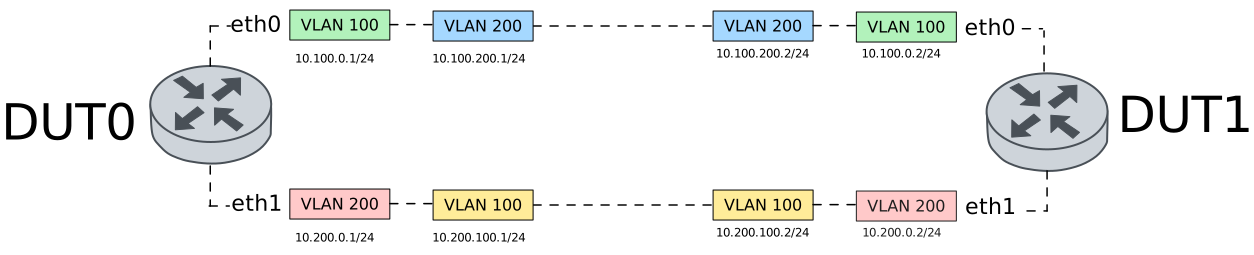
Test ICMP Connectivity Using 802.1Q
Description
Two VIF-C interfaces are configured in each node.
In DUT0, VLAN 100.200 is configured in
eth0 and VLAN 200.100 in
eth1. 802.1Q ethertype mode is used
for both interfaces.
The ping command is used to ensure there’s
link connectivity.
Scenario
Step 1: Set the following configuration in DUT0 :
set interfaces ethernet eth0 vif 100 address 10.100.0.1/24
set interfaces ethernet eth0 vif 100 ethertype 802.1q
set interfaces ethernet eth0 vif 100 vif-c 200 address 10.100.200.1/24
set interfaces ethernet eth1 vif 200 address 10.200.0.1/24
set interfaces ethernet eth1 vif 200 ethertype 802.1q
set interfaces ethernet eth1 vif 200 vif-c 100 address 10.200.100.1/24
set system login user admin authentication encrypted-password '$6$GSjsCj8gHLv$/VcqU6FLi6CT2Oxn0MJQ2C2tqnRDrYKNF8HIYWJp68nvXvPdFccDsT04.WtigUONbKYrgKg8d6rEs8PjljMkH0'
Step 2: Set the following configuration in DUT1 :
set interfaces ethernet eth0 vif 100 address 10.100.0.2/24
set interfaces ethernet eth0 vif 100 ethertype 802.1q
set interfaces ethernet eth0 vif 100 vif-c 200 address 10.100.200.2/24
set interfaces ethernet eth1 vif 200 address 10.200.0.2/24
set interfaces ethernet eth1 vif 200 ethertype 802.1q
set interfaces ethernet eth1 vif 200 vif-c 100 address 10.200.100.2/24
set system login user admin authentication encrypted-password '$6$GSjsCj8gHLv$/VcqU6FLi6CT2Oxn0MJQ2C2tqnRDrYKNF8HIYWJp68nvXvPdFccDsT04.WtigUONbKYrgKg8d6rEs8PjljMkH0'
Step 3: Ping IP address 10.100.0.2 from DUT0:
admin@DUT0$ ping 10.100.0.2 local-address 10.100.0.1 count 1 size 56 timeout 1Show output
PING 10.100.0.2 (10.100.0.2) from 10.100.0.1 : 56(84) bytes of data.
64 bytes from 10.100.0.2: icmp_seq=1 ttl=64 time=0.369 ms

--- 10.100.0.2 ping statistics ---
1 packets transmitted, 1 received, 0% packet loss, time 0ms
rtt min/avg/max/mdev = 0.369/0.369/0.369/0.000 ms
Step 4: Ping IP address 10.100.200.2 from DUT0:
admin@DUT0$ ping 10.100.200.2 local-address 10.100.200.1 count 1 size 56 timeout 1Show output
PING 10.100.200.2 (10.100.200.2) from 10.100.200.1 : 56(84) bytes of data.
64 bytes from 10.100.200.2: icmp_seq=1 ttl=64 time=0.402 ms

--- 10.100.200.2 ping statistics ---
1 packets transmitted, 1 received, 0% packet loss, time 0ms
rtt min/avg/max/mdev = 0.402/0.402/0.402/0.000 ms
Step 5: Ping IP address 10.200.0.2 from DUT0:
admin@DUT0$ ping 10.200.0.2 local-address 10.200.0.1 count 1 size 56 timeout 1Show output
PING 10.200.0.2 (10.200.0.2) from 10.200.0.1 : 56(84) bytes of data.
64 bytes from 10.200.0.2: icmp_seq=1 ttl=64 time=0.349 ms

--- 10.200.0.2 ping statistics ---
1 packets transmitted, 1 received, 0% packet loss, time 0ms
rtt min/avg/max/mdev = 0.349/0.349/0.349/0.000 ms
Step 6: Ping IP address 10.200.100.2 from DUT0:
admin@DUT0$ ping 10.200.100.2 local-address 10.200.100.1 count 1 size 56 timeout 1Show output
PING 10.200.100.2 (10.200.100.2) from 10.200.100.1 : 56(84) bytes of data.
64 bytes from 10.200.100.2: icmp_seq=1 ttl=64 time=0.301 ms

--- 10.200.100.2 ping statistics ---
1 packets transmitted, 1 received, 0% packet loss, time 0ms
rtt min/avg/max/mdev = 0.301/0.301/0.301/0.000 ms
Test ICMP Connectivity Using 802.1AD
Description
Two VIF-C interfaces are configured in each node.
In DUT0, VLAN 100.200 is configured in
eth0 and VLAN 200.100 in
eth1. 802.1AD ethertype mode is used
for both interfaces.
The ping command is used to ensure there’s
link connectivity.
Scenario
Step 1: Set the following configuration in DUT0 :
set interfaces ethernet eth0 vif 100 address 10.100.0.1/24
set interfaces ethernet eth0 vif 100 ethertype 802.1ad
set interfaces ethernet eth0 vif 100 vif-c 200 address 10.100.200.1/24
set interfaces ethernet eth1 vif 200 address 10.200.0.1/24
set interfaces ethernet eth1 vif 200 ethertype 802.1ad
set interfaces ethernet eth1 vif 200 vif-c 100 address 10.200.100.1/24
set system login user admin authentication encrypted-password '$6$GSjsCj8gHLv$/VcqU6FLi6CT2Oxn0MJQ2C2tqnRDrYKNF8HIYWJp68nvXvPdFccDsT04.WtigUONbKYrgKg8d6rEs8PjljMkH0'
Step 2: Set the following configuration in DUT1 :
set interfaces ethernet eth0 vif 100 address 10.100.0.2/24
set interfaces ethernet eth0 vif 100 ethertype 802.1ad
set interfaces ethernet eth0 vif 100 vif-c 200 address 10.100.200.2/24
set interfaces ethernet eth1 vif 200 address 10.200.0.2/24
set interfaces ethernet eth1 vif 200 ethertype 802.1ad
set interfaces ethernet eth1 vif 200 vif-c 100 address 10.200.100.2/24
set system login user admin authentication encrypted-password '$6$GSjsCj8gHLv$/VcqU6FLi6CT2Oxn0MJQ2C2tqnRDrYKNF8HIYWJp68nvXvPdFccDsT04.WtigUONbKYrgKg8d6rEs8PjljMkH0'
Step 3: Ping IP address 10.100.0.2 from DUT0:
admin@DUT0$ ping 10.100.0.2 local-address 10.100.0.1 count 1 size 56 timeout 1Show output
PING 10.100.0.2 (10.100.0.2) from 10.100.0.1 : 56(84) bytes of data.
64 bytes from 10.100.0.2: icmp_seq=1 ttl=64 time=0.455 ms

--- 10.100.0.2 ping statistics ---
1 packets transmitted, 1 received, 0% packet loss, time 0ms
rtt min/avg/max/mdev = 0.455/0.455/0.455/0.000 ms
Step 4: Ping IP address 10.100.200.2 from DUT0:
admin@DUT0$ ping 10.100.200.2 local-address 10.100.200.1 count 1 size 56 timeout 1Show output
PING 10.100.200.2 (10.100.200.2) from 10.100.200.1 : 56(84) bytes of data.
64 bytes from 10.100.200.2: icmp_seq=1 ttl=64 time=0.345 ms

--- 10.100.200.2 ping statistics ---
1 packets transmitted, 1 received, 0% packet loss, time 0ms
rtt min/avg/max/mdev = 0.345/0.345/0.345/0.000 ms
Step 5: Ping IP address 10.200.0.2 from DUT0:
admin@DUT0$ ping 10.200.0.2 local-address 10.200.0.1 count 1 size 56 timeout 1Show output
PING 10.200.0.2 (10.200.0.2) from 10.200.0.1 : 56(84) bytes of data.
64 bytes from 10.200.0.2: icmp_seq=1 ttl=64 time=0.324 ms

--- 10.200.0.2 ping statistics ---
1 packets transmitted, 1 received, 0% packet loss, time 0ms
rtt min/avg/max/mdev = 0.324/0.324/0.324/0.000 ms
Step 6: Ping IP address 10.200.100.2 from DUT0:
admin@DUT0$ ping 10.200.100.2 local-address 10.200.100.1 count 1 size 56 timeout 1Show output
PING 10.200.100.2 (10.200.100.2) from 10.200.100.1 : 56(84) bytes of data.
64 bytes from 10.200.100.2: icmp_seq=1 ttl=64 time=0.372 ms

--- 10.200.100.2 ping statistics ---
1 packets transmitted, 1 received, 0% packet loss, time 0ms
rtt min/avg/max/mdev = 0.372/0.372/0.372/0.000 ms