Rtc
This scenario shows how to configure NTP client/server authentication.
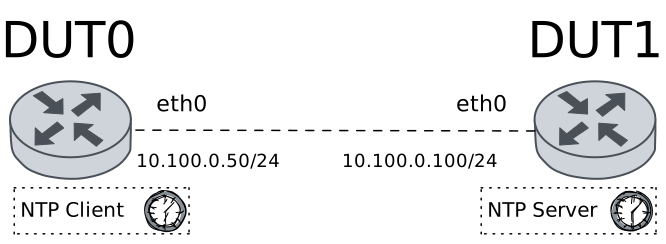
Test RTC Synchronization
Description
Checks that RTC is working properly on machines that have an RTC device.
Scenario
Step 1: Set the following configuration in DUT1 :
set interfaces ethernet eth0 address 10.100.0.100/24
set protocols static route 0.0.0.0/0 next-hop 10.100.0.50
set system login user admin authentication encrypted-password '$6$GSjsCj8gHLv$/VcqU6FLi6CT2Oxn0MJQ2C2tqnRDrYKNF8HIYWJp68nvXvPdFccDsT04.WtigUONbKYrgKg8d6rEs8PjljMkH0'
set system ntp master prefer
set system ntp master stratum 3
Step 2: Set the following configuration in DUT0 :
set interfaces ethernet eth0 address 10.100.0.50/24
set system login user admin authentication encrypted-password '$6$GSjsCj8gHLv$/VcqU6FLi6CT2Oxn0MJQ2C2tqnRDrYKNF8HIYWJp68nvXvPdFccDsT04.WtigUONbKYrgKg8d6rEs8PjljMkH0'
Step 3: Ping IP address 10.100.0.100 from DUT0:
admin@DUT0$ ping 10.100.0.100 count 1 size 56 timeout 1Show output
PING 10.100.0.100 (10.100.0.100) 56(84) bytes of data.
64 bytes from 10.100.0.100: icmp_seq=1 ttl=64 time=0.393 ms

--- 10.100.0.100 ping statistics ---
1 packets transmitted, 1 received, 0% packet loss, time 0ms
rtt min/avg/max/mdev = 0.393/0.393/0.393/0.000 ms
Step 4: Run command set date 2026-02-18 12:00:00 at DUT0 and expect this output:
Step 5: Run command set date ntp 10.100.0.100 at DUT0 and check if output does not contain the following tokens:
skipping this serverShow output
Date was successfully updated!
Step 6: Run command show date at DUT0 and check if output does not contain the following tokens:
WedShow output
Thu 19 Feb 2026 13:26:21 +00:00
Step 7: Run command set date hwclock from-system debug at DUT0 and expect this output:
Show output
hwclock from util-linux 2.38.1
System Time: 1771507581.689361
Trying to open: /dev/rtc0
Using the rtc interface to the clock.
Last drift adjustment done at 1771507581 seconds after 1969
Last calibration done at 1771507581 seconds after 1969
Hardware clock is on UTC time
Assuming hardware clock is kept in UTC time.
RTC type: 'rtc_cmos'
Using delay: 0.500000 seconds
missed it - 1771507581.689600 is too far past 1771507581.500000 (0.189600 > 0.001000)
1771507582.500000 is close enough to 1771507582.500000 (0.000000 < 0.002000)
Set RTC to 1771507582 (1771507581 + 1; refsystime = 1771507581.000000)
Setting Hardware Clock to 13:26:22 = 1771507582 seconds since 1969
ioctl(RTC_SET_TIME) was successful.
Not adjusting drift factor because the --update-drift option was not used.
New /etc/adjtime data:
0.000000 1771507581 0.000000
1771507581
UTC
Step 8: Run command set date hwclock to-system debug at DUT0 and expect this output:
Show output
hwclock from util-linux 2.38.1
System Time: 1771507582.591682
Trying to open: /dev/rtc0
Using the rtc interface to the clock.
Last drift adjustment done at 1771507581 seconds after 1969
Last calibration done at 1771507581 seconds after 1969
Hardware clock is on UTC time
Assuming hardware clock is kept in UTC time.
Waiting for clock tick...
...got clock tick
Time read from Hardware Clock: 2026/02/19 13:26:23
Hw clock time : 2026/02/19 13:26:23 = 1771507583 seconds since 1969
Time since last adjustment is 2 seconds
Calculated Hardware Clock drift is 0.000000 seconds
Calling settimeofday(NULL, 0) to lock the warp_clock function.
Calling settimeofday(1771507583.000000, NULL) to set the System time.
Step 9: Run command show date at DUT0 and check if output does not contain the following tokens:
WedShow output
Thu 19 Feb 2026 13:26:23 +00:00
Test RTC Synchronization With Drift
Description
Tests that RTC is working properly on machines that have an RTC device (while adjusting the drift too).
Scenario
Step 1: Set the following configuration in DUT1 :
set interfaces ethernet eth0 address 10.100.0.100/24
set protocols static route 0.0.0.0/0 next-hop 10.100.0.50
set system login user admin authentication encrypted-password '$6$GSjsCj8gHLv$/VcqU6FLi6CT2Oxn0MJQ2C2tqnRDrYKNF8HIYWJp68nvXvPdFccDsT04.WtigUONbKYrgKg8d6rEs8PjljMkH0'
set system ntp master prefer
set system ntp master stratum 3
Step 2: Set the following configuration in DUT0 :
set interfaces ethernet eth0 address 10.100.0.50/24
set system login user admin authentication encrypted-password '$6$GSjsCj8gHLv$/VcqU6FLi6CT2Oxn0MJQ2C2tqnRDrYKNF8HIYWJp68nvXvPdFccDsT04.WtigUONbKYrgKg8d6rEs8PjljMkH0'
Step 3: Ping IP address 10.100.0.100 from DUT0:
admin@DUT0$ ping 10.100.0.100 count 1 size 56 timeout 1Show output
PING 10.100.0.100 (10.100.0.100) 56(84) bytes of data.
64 bytes from 10.100.0.100: icmp_seq=1 ttl=64 time=0.373 ms

--- 10.100.0.100 ping statistics ---
1 packets transmitted, 1 received, 0% packet loss, time 0ms
rtt min/avg/max/mdev = 0.373/0.373/0.373/0.000 ms
Step 4: Run command set date 2026-02-18 12:00:00 at DUT0 and expect this output:
Step 5: Run command set date ntp 10.100.0.100 at DUT0 and check if output does not contain the following tokens:
skipping this serverShow output
Date was successfully updated!
Step 6: Run command show date at DUT0 and check if output does not contain the following tokens:
WedShow output
Thu 19 Feb 2026 13:26:31 +00:00
Step 7: Run command set date hwclock from-system update-drift debug at DUT0 and expect this output:
Show output
hwclock from util-linux 2.38.1
System Time: 1771507591.689190
Trying to open: /dev/rtc0
Using the rtc interface to the clock.
Last drift adjustment done at 1771507590 seconds after 1969
Last calibration done at 1771507590 seconds after 1969
Hardware clock is on UTC time
Assuming hardware clock is kept in UTC time.
Waiting for clock tick...
...got clock tick
Time read from Hardware Clock: 2026/02/19 13:26:32
Hw clock time : 2026/02/19 13:26:32 = 1771507592 seconds since 1969
Time since last adjustment is 2 seconds
Calculated Hardware Clock drift is 0.000000 seconds
RTC type: 'rtc_cmos'
Using delay: 0.500000 seconds
1771507592.500000 is close enough to 1771507592.500000 (0.000000 < 0.001000)
Set RTC to 1771507592 (1771507592 + 0; refsystime = 1771507592.000000)
Setting Hardware Clock to 13:26:32 = 1771507592 seconds since 1969
ioctl(RTC_SET_TIME) was successful.
Not adjusting drift factor because it has been less than four hours since the last calibration.
New /etc/adjtime data:
0.000000 1771507592 0.000000
1771507592
UTC
Step 8: Run command set date hwclock to-system debug at DUT0 and expect this output:
Show output
hwclock from util-linux 2.38.1
System Time: 1771507592.564646
Trying to open: /dev/rtc0
Using the rtc interface to the clock.
Last drift adjustment done at 1771507592 seconds after 1969
Last calibration done at 1771507592 seconds after 1969
Hardware clock is on UTC time
Assuming hardware clock is kept in UTC time.
Waiting for clock tick...
...got clock tick
Time read from Hardware Clock: 2026/02/19 13:26:33
Hw clock time : 2026/02/19 13:26:33 = 1771507593 seconds since 1969
Time since last adjustment is 1 second
Calculated Hardware Clock drift is 0.000000 seconds
Calling settimeofday(NULL, 0) to lock the warp_clock function.
Calling settimeofday(1771507593.000000, NULL) to set the System time.
Step 9: Run command show date at DUT0 and check if output does not contain the following tokens:
WedShow output
Thu 19 Feb 2026 13:26:33 +00:00