Mqprio
The following scenario shows how to configure a MQPRIO qdisc. MQPRIO is a hardware-offloaded multiqueue priority scheduling qdisc that requires external packet classification via traffic policies. This test verifies packet classification across multiple traffic classes including the default class.
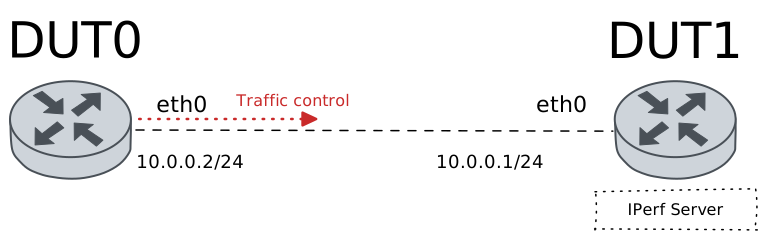
Test MQPRIO QDisc
Description
In this scenario, a MQPRIO qdisc is configured in DUT0
(eth0 interface) to achieve hardware-offloaded
multiqueue priority scheduling. Since MQPRIO does not support
software matches, external classification is performed via
traffic policies that set the class ID for packets.
- Multiple traffic classes are configured and tested:
Class 1: TCP packets destined to port 8080
Class 2: UDP packets destined to port 9090
Class 3: ICMP packets
Class 4: TCP packets destined to port 7070 (no bandwidth limit)
Class 6: Default class for unmatched traffic
Each class is tested individually to verify correct packet classification and counter updates.
Scenario
Step 1: Set the following configuration in DUT0 :
set interfaces ethernet eth0 address 10.0.0.2/24
set interfaces ethernet eth0 traffic control out QDISC
set interfaces ethernet eth0 traffic policy link-out CLASSIFIER
set system login user admin authentication encrypted-password '$6$GSjsCj8gHLv$/VcqU6FLi6CT2Oxn0MJQ2C2tqnRDrYKNF8HIYWJp68nvXvPdFccDsT04.WtigUONbKYrgKg8d6rEs8PjljMkH0'
set traffic control QDISC type mqprio class 1 bandwidth rate 150
set traffic control QDISC type mqprio class 1 description PORT_8080
set traffic control QDISC type mqprio class 2 bandwidth rate 300
set traffic control QDISC type mqprio class 2 description PORT_9090_TCP
set traffic control QDISC type mqprio class 3 bandwidth rate 200
set traffic control QDISC type mqprio class 3 description ICMP
set traffic control QDISC type mqprio class 4 description NO_BANDWIDTH_LIMIT
set traffic control QDISC type mqprio class 6 description DEFAULT
set traffic control QDISC type mqprio default-class 6
set traffic policy CLASSIFIER rule 1 selector PORT_8080
set traffic policy CLASSIFIER rule 1 set class 1
set traffic policy CLASSIFIER rule 2 selector PORT_9090
set traffic policy CLASSIFIER rule 2 set class 2
set traffic policy CLASSIFIER rule 3 selector ICMP
set traffic policy CLASSIFIER rule 3 set class 3
set traffic policy CLASSIFIER rule 4 selector PORT_7070
set traffic policy CLASSIFIER rule 4 set class 4
set traffic selector ICMP rule 1 protocol icmp
set traffic selector PORT_7070 rule 1 destination port 7070
set traffic selector PORT_7070 rule 1 protocol tcp
set traffic selector PORT_8080 rule 1 destination port 8080
set traffic selector PORT_8080 rule 1 protocol tcp
set traffic selector PORT_9090 rule 1 destination port 9090
set traffic selector PORT_9090 rule 1 protocol udp
Step 2: Set the following configuration in DUT1 :
set interfaces ethernet eth0 address 10.0.0.1/24
set system login user admin authentication encrypted-password '$6$GSjsCj8gHLv$/VcqU6FLi6CT2Oxn0MJQ2C2tqnRDrYKNF8HIYWJp68nvXvPdFccDsT04.WtigUONbKYrgKg8d6rEs8PjljMkH0'
Step 3: Ping IP address 10.0.0.1 from DUT0:
admin@DUT0$ ping 10.0.0.1 count 1 size 56 timeout 1Show output
PING 10.0.0.1 (10.0.0.1) 56(84) bytes of data.
64 bytes from 10.0.0.1: icmp_seq=1 ttl=64 time=0.409 ms

--- 10.0.0.1 ping statistics ---
1 packets transmitted, 1 received, 0% packet loss, time 0ms
rtt min/avg/max/mdev = 0.409/0.409/0.409/0.000 ms
Note
MQPRIO requires external classification. Traffic policies are used to set the class ID for packets before they reach the MQPRIO qdisc.
Step 4: Run command traffic control clear at DUT0.
Step 5: Initiate a bandwidth test from DUT0 to DUT1
admin@DUT1$ monitor test performance server port 8080
admin@DUT0$ monitor test performance client 10.0.0.1 duration 2 port 8080 parallel 1
Expect this output in
DUT0:Connecting to host 10.0.0.1, port 8080 [ 5] local 10.0.0.2 port 55246 connected to 10.0.0.1 port 8080 [ ID] Interval Transfer Bitrate Retr Cwnd [ 5] 0.00-1.00 sec 18.8 MBytes 158 Mbits/sec 0 230 KBytes [ 5] 1.00-2.00 sec 18.1 MBytes 152 Mbits/sec 0 280 KBytes - - - - - - - - - - - - - - - - - - - - - - - - - [ ID] Interval Transfer Bitrate Retr [ 5] 0.00-2.00 sec 36.9 MBytes 155 Mbits/sec 0 sender [ 5] 0.00-2.00 sec 35.6 MBytes 149 Mbits/sec receiver iperf Done.
Step 6: Run command traffic control show at DUT0 and expect this output:
Show output
Traffic control for interface 'eth0' - 'egress' mode

------------------------------------------------------------------------------------
ID   traffic control        type         parent  bytes sent  pkts sent  pkts dropped
------------------------------------------------------------------------------------
1:0  QDISC            mqprio             root      39162871      25885             0
1:1  QDISC            class 1            1:0       39162871      25885             0
1:2  QDISC            class 2            1:0              0          0             0
1:3  QDISC            class 3            1:0              0          0             0
1:4  QDISC            class 4            1:0              0          0             0
1:6  QDISC            class 6 (default)  1:0              0          0             0
Note
TCP traffic to port 8080 should be classified to class 1. The counters for class 1 should show packets/bytes.
Step 7: Run command traffic control clear at DUT0.
Step 8: Initiate a bandwidth test from DUT0 to DUT1
admin@DUT1$ monitor test performance server port 9090
admin@DUT0$ monitor test performance client 10.0.0.1 duration 2 udp port 9090 parallel 1 bandwidth 500M
Expect this output in
DUT0:Connecting to host 10.0.0.1, port 9090 [ 5] local 10.0.0.2 port 50840 connected to 10.0.0.1 port 9090 [ ID] Interval Transfer Bitrate Total Datagrams [ 5] 0.00-1.00 sec 36.1 MBytes 303 Mbits/sec 26160 [ 5] 1.00-2.00 sec 36.0 MBytes 302 Mbits/sec 26087 - - - - - - - - - - - - - - - - - - - - - - - - - [ ID] Interval Transfer Bitrate Jitter Lost/Total Datagrams [ 5] 0.00-2.00 sec 72.1 MBytes 303 Mbits/sec 0.000 ms 0/52247 (0%) sender [ 5] 0.00-2.00 sec 71.6 MBytes 300 Mbits/sec 0.065 ms 363/52198 (0.7%) receiver iperf Done.
Step 9: Run command traffic control show at DUT0 and expect this output:
Show output
Traffic control for interface 'eth0' - 'egress' mode

------------------------------------------------------------------------------------
ID   traffic control        type         parent  bytes sent  pkts sent  pkts dropped
------------------------------------------------------------------------------------
1:0  QDISC            mqprio             root      77849606      52264             0
1:1  QDISC            class 1            1:0              0          0             0
1:2  QDISC            class 2            1:0       77848076      52248             0
1:3  QDISC            class 3            1:0              0          0             0
1:4  QDISC            class 4            1:0              0          0             0
1:6  QDISC            class 6 (default)  1:0           1530         16             0
Note
UDP traffic to port 9090 should be classified to class 2.
Step 10: Run command traffic control clear at DUT0.
Step 11: Ping IP address 10.0.0.2 from DUT1:
admin@DUT1$ ping 10.0.0.2 count 10 size 56 timeout 1 interval 0.1Show output
PING 10.0.0.2 (10.0.0.2) 56(84) bytes of data.
64 bytes from 10.0.0.2: icmp_seq=1 ttl=64 time=0.329 ms
64 bytes from 10.0.0.2: icmp_seq=2 ttl=64 time=0.278 ms
64 bytes from 10.0.0.2: icmp_seq=3 ttl=64 time=0.224 ms
64 bytes from 10.0.0.2: icmp_seq=4 ttl=64 time=0.255 ms
64 bytes from 10.0.0.2: icmp_seq=5 ttl=64 time=0.333 ms
64 bytes from 10.0.0.2: icmp_seq=6 ttl=64 time=0.290 ms
64 bytes from 10.0.0.2: icmp_seq=7 ttl=64 time=0.259 ms
64 bytes from 10.0.0.2: icmp_seq=8 ttl=64 time=0.276 ms
64 bytes from 10.0.0.2: icmp_seq=9 ttl=64 time=0.251 ms
64 bytes from 10.0.0.2: icmp_seq=10 ttl=64 time=0.266 ms

--- 10.0.0.2 ping statistics ---
10 packets transmitted, 10 received, 0% packet loss, time 934ms
rtt min/avg/max/mdev = 0.224/0.276/0.333/0.032 ms
Step 12: Run command traffic control show at DUT0 and expect this output:
Show output
Traffic control for interface 'eth0' - 'egress' mode

------------------------------------------------------------------------------------
ID   traffic control        type         parent  bytes sent  pkts sent  pkts dropped
------------------------------------------------------------------------------------
1:0  QDISC            mqprio             root           980         10             0
1:1  QDISC            class 1            1:0              0          0             0
1:2  QDISC            class 2            1:0              0          0             0
1:3  QDISC            class 3            1:0            980         10             0
1:4  QDISC            class 4            1:0              0          0             0
1:6  QDISC            class 6 (default)  1:0              0          0             0
Note
ICMP packets should be classified to class 3.
Step 13: Run command traffic control clear at DUT0.
Step 14: Initiate a bandwidth test from DUT0 to DUT1
admin@DUT1$ monitor test performance server port 7070
admin@DUT0$ monitor test performance client 10.0.0.1 duration 2 port 7070 parallel 1
Expect this output in
DUT0:Connecting to host 10.0.0.1, port 7070 [ 5] local 10.0.0.2 port 34260 connected to 10.0.0.1 port 7070 [ ID] Interval Transfer Bitrate Retr Cwnd [ 5] 0.00-1.00 sec 114 MBytes 957 Mbits/sec 0 655 KBytes [ 5] 1.00-2.00 sec 112 MBytes 944 Mbits/sec 0 881 KBytes - - - - - - - - - - - - - - - - - - - - - - - - - [ ID] Interval Transfer Bitrate Retr [ 5] 0.00-2.00 sec 227 MBytes 951 Mbits/sec 0 sender [ 5] 0.00-2.01 sec 224 MBytes 937 Mbits/sec receiver iperf Done.
Step 15: Run command traffic control show at DUT0 and expect this output:
Show output
Traffic control for interface 'eth0' - 'egress' mode

------------------------------------------------------------------------------------
ID   traffic control        type         parent  bytes sent  pkts sent  pkts dropped
------------------------------------------------------------------------------------
1:0  QDISC            mqprio             root     246405581     162770             0
1:1  QDISC            class 1            1:0              0          0             0
1:2  QDISC            class 2            1:0              0          0             0
1:3  QDISC            class 3            1:0              0          0             0
1:4  QDISC            class 4            1:0      246405581     162770             0
1:6  QDISC            class 6 (default)  1:0              0          0             0
Note
TCP traffic to port 7070 should be classified to class 4, which has no bandwidth limit configured.
Step 16: Run command traffic control clear at DUT0.
Step 17: Initiate a bandwidth test from DUT0 to DUT1
admin@DUT1$ monitor test performance server port 5555
admin@DUT0$ monitor test performance client 10.0.0.1 duration 2 port 5555 parallel 1
Expect this output in
DUT0:Connecting to host 10.0.0.1, port 5555 [ 5] local 10.0.0.2 port 52090 connected to 10.0.0.1 port 5555 [ ID] Interval Transfer Bitrate Retr Cwnd [ 5] 0.00-1.00 sec 115 MBytes 961 Mbits/sec 0 626 KBytes [ 5] 1.00-2.00 sec 112 MBytes 944 Mbits/sec 0 956 KBytes - - - - - - - - - - - - - - - - - - - - - - - - - [ ID] Interval Transfer Bitrate Retr [ 5] 0.00-2.00 sec 227 MBytes 953 Mbits/sec 0 sender [ 5] 0.00-2.01 sec 224 MBytes 938 Mbits/sec receiver iperf Done.
Step 18: Run command traffic control show at DUT0 and expect this output:
Show output
Traffic control for interface 'eth0' - 'egress' mode

------------------------------------------------------------------------------------
ID   traffic control        type         parent  bytes sent  pkts sent  pkts dropped
------------------------------------------------------------------------------------
1:0  QDISC            mqprio             root     246900341     163096             0
1:1  QDISC            class 1            1:0              0          0             0
1:2  QDISC            class 2            1:0              0          0             0
1:3  QDISC            class 3            1:0              0          0             0
1:4  QDISC            class 4            1:0              0          0             0
1:6  QDISC            class 6 (default)  1:0      246900341     163096             0
Note
TCP traffic to port 5555 (which doesn’t match any rule) should be classified to the default class (class 6).