X509
These scenarios show how to establish a VPN IPsec site-to-site connection between two end-points using X.509 certificates.
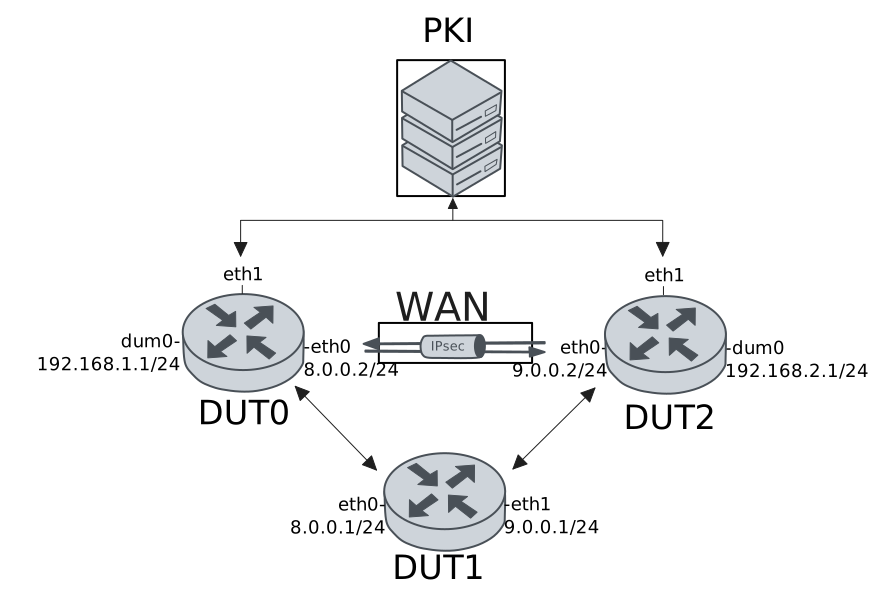
Test Local And Remote Auth With X509 Files
Description
In this scenario, both devices use pre-installed X.509 certificate files for local and remote authentication.
Scenario
Step 1: Set the following configuration in DUT1 :
set interfaces ethernet eth0 address 8.0.0.1/24
set interfaces ethernet eth1 address 9.0.0.1/24
set system login user admin authentication encrypted-password '$6$GSjsCj8gHLv$/VcqU6FLi6CT2Oxn0MJQ2C2tqnRDrYKNF8HIYWJp68nvXvPdFccDsT04.WtigUONbKYrgKg8d6rEs8PjljMkH0'
Step 2: Set the following configuration in DUT2 :
set interfaces dummy dum0 address 192.168.2.1/24
set interfaces ethernet eth0 address 9.0.0.2/24
set interfaces ethernet eth1 address 10.215.168.66/24
set protocols static route 0.0.0.0/0 next-hop 9.0.0.1
set system login user admin authentication encrypted-password '$6$GSjsCj8gHLv$/VcqU6FLi6CT2Oxn0MJQ2C2tqnRDrYKNF8HIYWJp68nvXvPdFccDsT04.WtigUONbKYrgKg8d6rEs8PjljMkH0'
set vpn ipsec auth-profile AUTH local ca-cert-file 'running://ca.pem'
set vpn ipsec auth-profile AUTH local ca-cert-file 'running://root.pem'
set vpn ipsec auth-profile AUTH local cert-file 'running://dut2.pem'
set vpn ipsec auth-profile AUTH local key file 'running://dut2.key'
set vpn ipsec auth-profile AUTH mirror-config false
set vpn ipsec auth-profile AUTH mode x509
set vpn ipsec auth-profile AUTH remote ca-cert-file 'running://ca.pem'
set vpn ipsec auth-profile AUTH remote ca-cert-file 'running://root.pem'
set vpn ipsec esp-group ESP-POLICY lifetime 28800
set vpn ipsec esp-group ESP-POLICY proposal 1 encryption null
set vpn ipsec esp-group ESP-POLICY proposal 1 hash sha1
set vpn ipsec esp-group ESP-POLICY proposal 1 pfs dh-group15
set vpn ipsec ike-group IKE-POLICY key-exchange ikev2
set vpn ipsec ike-group IKE-POLICY lifetime 28800
set vpn ipsec ike-group IKE-POLICY proposal 1 dh-group 15
set vpn ipsec ike-group IKE-POLICY proposal 1 encryption null
set vpn ipsec ike-group IKE-POLICY proposal 1 hash sha1
set vpn ipsec logging log-types any log-level 1
set vpn ipsec site-to-site peer PEER auth-profile AUTH
set vpn ipsec site-to-site peer PEER connection-type respond
set vpn ipsec site-to-site peer PEER ike-group IKE-POLICY
set vpn ipsec site-to-site peer PEER local-address 9.0.0.2
set vpn ipsec site-to-site peer PEER remote-address 8.0.0.2
set vpn ipsec site-to-site peer PEER tunnel 1 esp-group ESP-POLICY
set vpn ipsec site-to-site peer PEER tunnel 1 local prefix 192.168.2.0/24
set vpn ipsec site-to-site peer PEER tunnel 1 remote prefix 192.168.1.0/24
Step 3: Ping IP address 9.0.0.1 from DUT2:
admin@DUT2$ ping 9.0.0.1 count 1 size 56 timeout 1Show output
PING 9.0.0.1 (9.0.0.1) 56(84) bytes of data.
64 bytes from 9.0.0.1: icmp_seq=1 ttl=64 time=0.353 ms

--- 9.0.0.1 ping statistics ---
1 packets transmitted, 1 received, 0% packet loss, time 0ms
rtt min/avg/max/mdev = 0.353/0.353/0.353/0.000 ms
Step 4: Set the following configuration in DUT0 :
set interfaces dummy dum0 address 192.168.1.1/24
set interfaces ethernet eth0 address 8.0.0.2/24
set interfaces ethernet eth1 address 10.215.168.64/24
set protocols static route 0.0.0.0/0 next-hop 8.0.0.1
set system login user admin authentication encrypted-password '$6$GSjsCj8gHLv$/VcqU6FLi6CT2Oxn0MJQ2C2tqnRDrYKNF8HIYWJp68nvXvPdFccDsT04.WtigUONbKYrgKg8d6rEs8PjljMkH0'
set vpn ipsec auth-profile AUTH local ca-cert-file 'running://ca.pem'
set vpn ipsec auth-profile AUTH local ca-cert-file 'running://root.pem'
set vpn ipsec auth-profile AUTH local cert-file 'running://dut0.pem'
set vpn ipsec auth-profile AUTH local key file 'running://dut0.key'
set vpn ipsec auth-profile AUTH mirror-config false
set vpn ipsec auth-profile AUTH mode x509
set vpn ipsec auth-profile AUTH remote ca-cert-file 'running://ca.pem'
set vpn ipsec auth-profile AUTH remote ca-cert-file 'running://root.pem'
set vpn ipsec esp-group ESP-POLICY lifetime 28800
set vpn ipsec esp-group ESP-POLICY proposal 1 encryption null
set vpn ipsec esp-group ESP-POLICY proposal 1 hash sha1
set vpn ipsec esp-group ESP-POLICY proposal 1 pfs dh-group15
set vpn ipsec ike-group IKE-POLICY key-exchange ikev2
set vpn ipsec ike-group IKE-POLICY lifetime 28800
set vpn ipsec ike-group IKE-POLICY proposal 1 dh-group 15
set vpn ipsec ike-group IKE-POLICY proposal 1 encryption null
set vpn ipsec ike-group IKE-POLICY proposal 1 hash sha1
set vpn ipsec logging log-types any log-level 1
set vpn ipsec site-to-site peer PEER auth-profile AUTH
set vpn ipsec site-to-site peer PEER connection-type on-demand
set vpn ipsec site-to-site peer PEER ike-group IKE-POLICY
set vpn ipsec site-to-site peer PEER local-address 8.0.0.2
set vpn ipsec site-to-site peer PEER remote-address 9.0.0.2
set vpn ipsec site-to-site peer PEER tunnel 1 esp-group ESP-POLICY
set vpn ipsec site-to-site peer PEER tunnel 1 local prefix 192.168.1.0/24
set vpn ipsec site-to-site peer PEER tunnel 1 remote prefix 192.168.2.0/24
Step 5: Ping IP address 8.0.0.1 from DUT0:
admin@DUT0$ ping 8.0.0.1 count 1 size 56 timeout 1Show output
PING 8.0.0.1 (8.0.0.1) 56(84) bytes of data.
64 bytes from 8.0.0.1: icmp_seq=1 ttl=64 time=0.346 ms

--- 8.0.0.1 ping statistics ---
1 packets transmitted, 1 received, 0% packet loss, time 0ms
rtt min/avg/max/mdev = 0.346/0.346/0.346/0.000 ms
Step 6: Ping IP address 192.168.2.1 from DUT0:
admin@DUT0$ ping 192.168.2.1 local-address 192.168.1.1 count 1 size 56 timeout 1Show output
PING 192.168.2.1 (192.168.2.1) from 192.168.1.1 : 56(84) bytes of data.
64 bytes from 192.168.2.1: icmp_seq=1 ttl=64 time=17.8 ms

--- 192.168.2.1 ping statistics ---
1 packets transmitted, 1 received, 0% packet loss, time 0ms
rtt min/avg/max/mdev = 17.770/17.770/17.770/0.000 ms
Step 7: Ping IP address 192.168.1.1 from DUT2:
admin@DUT2$ ping 192.168.1.1 local-address 192.168.2.1 count 1 size 56 timeout 1Show output
PING 192.168.1.1 (192.168.1.1) from 192.168.2.1 : 56(84) bytes of data.
64 bytes from 192.168.1.1: icmp_seq=1 ttl=64 time=0.456 ms

--- 192.168.1.1 ping statistics ---
1 packets transmitted, 1 received, 0% packet loss, time 0ms
rtt min/avg/max/mdev = 0.456/0.456/0.456/0.000 ms
Step 8: Run command vpn ipsec show sa at DUT0 and check if output matches the following regular expressions:
vpn-peer-PEER: \#\d, ESTABLISHED, IKEv2
[1-9]\d* packets,
Show output
vpn-peer-PEER: #1, ESTABLISHED, IKEv2, dbef34725d74e4f3_i* 31534de4b7aa075e_r
  local  'C=ES, O=Teldat, CN=DUT0' @ 8.0.0.2[500]
  remote 'C=ES, O=Teldat, CN=DUT2' @ 9.0.0.2[500]
  NULL/HMAC_SHA1_96/PRF_HMAC_SHA1/MODP_3072
  established 1s ago, rekeying in 19513s
  peer-PEER-tunnel-1: #2, reqid 1, INSTALLED, TUNNEL, ESP:NULL/HMAC_SHA1_96
    installed 2s ago, rekeying in 17633s, expires in 28799s
    in  c5d2bb4f,    168 bytes,     2 packets,     0s ago
    out cdaf6ccd,    168 bytes,     2 packets,     0s ago
    local  192.168.1.0/24
    remote 192.168.2.0/24
Test Local Auth With SCEP And Remote Auth With X509 Files
Description
In this scenario, DUT0 uses SCEP for local authentication, while the remote peer is authenticated using X.509 certificate files.
Scenario
Step 1: Set the following configuration in DUT1 :
set interfaces ethernet eth0 address 8.0.0.1/24
set interfaces ethernet eth1 address 9.0.0.1/24
set system login user admin authentication encrypted-password '$6$GSjsCj8gHLv$/VcqU6FLi6CT2Oxn0MJQ2C2tqnRDrYKNF8HIYWJp68nvXvPdFccDsT04.WtigUONbKYrgKg8d6rEs8PjljMkH0'
Step 2: Set the following configuration in DUT2 :
set interfaces dummy dum0 address 192.168.2.1/24
set interfaces ethernet eth0 address 9.0.0.2/24
set interfaces ethernet eth1 address 10.215.168.66/24
set protocols static route 0.0.0.0/0 next-hop 9.0.0.1
set system certificate scep csr CSR cgi-path /scep
set system certificate scep csr CSR cipher aes
set system certificate scep csr CSR distinguished-names CN=DUT2
set system certificate scep csr CSR encrypted-password U2FsdGVkX1/UB8M3IBHYptMfUpMVb79sXessu2ODrdw=
set system certificate scep csr CSR port 8080
set system certificate scep csr CSR url 'http://10.215.168.1'
set system login user admin authentication encrypted-password '$6$GSjsCj8gHLv$/VcqU6FLi6CT2Oxn0MJQ2C2tqnRDrYKNF8HIYWJp68nvXvPdFccDsT04.WtigUONbKYrgKg8d6rEs8PjljMkH0'
set vpn ipsec auth-profile AUTH local ca-cert-file 'running://ca.pem'
set vpn ipsec auth-profile AUTH local ca-cert-file 'running://root.pem'
set vpn ipsec auth-profile AUTH local cert-file 'running://dut2.pem'
set vpn ipsec auth-profile AUTH local key file 'running://dut2.key'
set vpn ipsec auth-profile AUTH mirror-config false
set vpn ipsec auth-profile AUTH mode x509
set vpn ipsec auth-profile AUTH remote csr CSR
set vpn ipsec esp-group ESP-POLICY lifetime 28800
set vpn ipsec esp-group ESP-POLICY proposal 1 encryption null
set vpn ipsec esp-group ESP-POLICY proposal 1 hash sha1
set vpn ipsec esp-group ESP-POLICY proposal 1 pfs dh-group15
set vpn ipsec ike-group IKE-POLICY key-exchange ikev2
set vpn ipsec ike-group IKE-POLICY lifetime 28800
set vpn ipsec ike-group IKE-POLICY proposal 1 dh-group 15
set vpn ipsec ike-group IKE-POLICY proposal 1 encryption null
set vpn ipsec ike-group IKE-POLICY proposal 1 hash sha1
set vpn ipsec logging log-types any log-level 1
set vpn ipsec site-to-site peer PEER auth-profile AUTH
set vpn ipsec site-to-site peer PEER connection-type respond
set vpn ipsec site-to-site peer PEER ike-group IKE-POLICY
set vpn ipsec site-to-site peer PEER local-address 9.0.0.2
set vpn ipsec site-to-site peer PEER remote-address 8.0.0.2
set vpn ipsec site-to-site peer PEER tunnel 1 esp-group ESP-POLICY
set vpn ipsec site-to-site peer PEER tunnel 1 local prefix 192.168.2.0/24
set vpn ipsec site-to-site peer PEER tunnel 1 remote prefix 192.168.1.0/24
Step 3: Ping IP address 9.0.0.1 from DUT2:
admin@DUT2$ ping 9.0.0.1 count 1 size 56 timeout 1Show output
PING 9.0.0.1 (9.0.0.1) 56(84) bytes of data.
64 bytes from 9.0.0.1: icmp_seq=1 ttl=64 time=0.403 ms

--- 9.0.0.1 ping statistics ---
1 packets transmitted, 1 received, 0% packet loss, time 0ms
rtt min/avg/max/mdev = 0.403/0.403/0.403/0.000 ms
Step 4: Run command pki scep show CSR at DUT2 and check if output matches the following regular expressions:
ca\s+Valid
usercert\s+Valid
Show output
-------------------------------------------------------------------------------------------------
Certificate  Status           Usage                   NotBefore                  NotAfter
-------------------------------------------------------------------------------------------------
ca           Valid   Encipherment & Signature  Apr 16 09:19:39 2025 GMT  Apr 11 09:19:39 2045 GMT
usercert     Valid   -                         Feb 19 14:39:29 2026 GMT  Feb 19 14:39:29 2027 GMT
Step 5: Set the following configuration in DUT0 :
set interfaces dummy dum0 address 192.168.1.1/24
set interfaces ethernet eth0 address 8.0.0.2/24
set interfaces ethernet eth1 address 10.215.168.64/24
set protocols static route 0.0.0.0/0 next-hop 8.0.0.1
set system certificate scep csr CSR cgi-path /scep
set system certificate scep csr CSR cipher aes
set system certificate scep csr CSR distinguished-names CN=DUT0
set system certificate scep csr CSR encrypted-password U2FsdGVkX1+CGItTbAfRpf0EuX0ZcJPM+g3c1Mg0MuM=
set system certificate scep csr CSR port 8080
set system certificate scep csr CSR url 'http://10.215.168.1'
set system login user admin authentication encrypted-password '$6$GSjsCj8gHLv$/VcqU6FLi6CT2Oxn0MJQ2C2tqnRDrYKNF8HIYWJp68nvXvPdFccDsT04.WtigUONbKYrgKg8d6rEs8PjljMkH0'
set vpn ipsec auth-profile AUTH local csr CSR
set vpn ipsec auth-profile AUTH mirror-config false
set vpn ipsec auth-profile AUTH mode x509
set vpn ipsec auth-profile AUTH remote ca-cert-file 'running://ca.pem'
set vpn ipsec auth-profile AUTH remote ca-cert-file 'running://root.pem'
set vpn ipsec esp-group ESP-POLICY lifetime 28800
set vpn ipsec esp-group ESP-POLICY proposal 1 encryption null
set vpn ipsec esp-group ESP-POLICY proposal 1 hash sha1
set vpn ipsec esp-group ESP-POLICY proposal 1 pfs dh-group15
set vpn ipsec ike-group IKE-POLICY key-exchange ikev2
set vpn ipsec ike-group IKE-POLICY lifetime 28800
set vpn ipsec ike-group IKE-POLICY proposal 1 dh-group 15
set vpn ipsec ike-group IKE-POLICY proposal 1 encryption null
set vpn ipsec ike-group IKE-POLICY proposal 1 hash sha1
set vpn ipsec logging log-types any log-level 1
set vpn ipsec site-to-site peer PEER auth-profile AUTH
set vpn ipsec site-to-site peer PEER connection-type on-demand
set vpn ipsec site-to-site peer PEER ike-group IKE-POLICY
set vpn ipsec site-to-site peer PEER local-address 8.0.0.2
set vpn ipsec site-to-site peer PEER remote-address 9.0.0.2
set vpn ipsec site-to-site peer PEER tunnel 1 esp-group ESP-POLICY
set vpn ipsec site-to-site peer PEER tunnel 1 local prefix 192.168.1.0/24
set vpn ipsec site-to-site peer PEER tunnel 1 remote prefix 192.168.2.0/24
Step 6: Ping IP address 8.0.0.1 from DUT0:
admin@DUT0$ ping 8.0.0.1 count 1 size 56 timeout 1Show output
PING 8.0.0.1 (8.0.0.1) 56(84) bytes of data.
64 bytes from 8.0.0.1: icmp_seq=1 ttl=64 time=0.377 ms

--- 8.0.0.1 ping statistics ---
1 packets transmitted, 1 received, 0% packet loss, time 0ms
rtt min/avg/max/mdev = 0.377/0.377/0.377/0.000 ms
Step 7: Run command pki scep show CSR at DUT0 and check if output matches the following regular expressions:
ca\s+Valid
usercert\s+Valid
Show output
-------------------------------------------------------------------------------------------------
Certificate  Status           Usage                   NotBefore                  NotAfter
-------------------------------------------------------------------------------------------------
ca           Valid   Encipherment & Signature  Apr 16 09:19:39 2025 GMT  Apr 11 09:19:39 2045 GMT
usercert     Valid   -                         Feb 19 14:40:07 2026 GMT  Feb 19 14:40:07 2027 GMT
Step 8: Ping IP address 192.168.2.1 from DUT0:
admin@DUT0$ ping 192.168.2.1 local-address 192.168.1.1 count 1 size 56 timeout 1Show output
PING 192.168.2.1 (192.168.2.1) from 192.168.1.1 : 56(84) bytes of data.
64 bytes from 192.168.2.1: icmp_seq=1 ttl=64 time=0.646 ms

--- 192.168.2.1 ping statistics ---
1 packets transmitted, 1 received, 0% packet loss, time 0ms
rtt min/avg/max/mdev = 0.646/0.646/0.646/0.000 ms
Step 9: Ping IP address 192.168.1.1 from DUT2:
admin@DUT2$ ping 192.168.1.1 local-address 192.168.2.1 count 1 size 56 timeout 1Show output
PING 192.168.1.1 (192.168.1.1) from 192.168.2.1 : 56(84) bytes of data.
64 bytes from 192.168.1.1: icmp_seq=1 ttl=64 time=0.703 ms

--- 192.168.1.1 ping statistics ---
1 packets transmitted, 1 received, 0% packet loss, time 0ms
rtt min/avg/max/mdev = 0.703/0.703/0.703/0.000 ms
Step 10: Run command vpn ipsec show sa at DUT0 and check if output matches the following regular expressions:
vpn-peer-PEER: \#\d, ESTABLISHED, IKEv2
[1-9]\d* packets,
Show output
vpn-peer-PEER: #1, ESTABLISHED, IKEv2, 048a347b8e1c4f7a_i* 0a44c557137d4f41_r
  local  'CN=DUT0' @ 8.0.0.2[500]
  remote 'C=ES, O=Teldat, CN=DUT2' @ 9.0.0.2[500]
  NULL/HMAC_SHA1_96/PRF_HMAC_SHA1/MODP_3072
  established 2s ago, rekeying in 18438s
  peer-PEER-tunnel-1: #2, reqid 1, INSTALLED, TUNNEL, ESP:NULL/HMAC_SHA1_96
    installed 2s ago, rekeying in 16775s, expires in 28798s
    in  c82c93bd,    168 bytes,     2 packets,     0s ago
    out c2de1bd7,    168 bytes,     2 packets,     0s ago
    local  192.168.1.0/24
    remote 192.168.2.0/24
Test Local Auth With X509 Files And Remote Auth With SCEP
Description
In this scenario, DUT0 uses SCEP for remote authentication, while local authentication relies on X.509 certificate files.
Scenario
Step 1: Set the following configuration in DUT1 :
set interfaces ethernet eth0 address 8.0.0.1/24
set interfaces ethernet eth1 address 9.0.0.1/24
set system login user admin authentication encrypted-password '$6$GSjsCj8gHLv$/VcqU6FLi6CT2Oxn0MJQ2C2tqnRDrYKNF8HIYWJp68nvXvPdFccDsT04.WtigUONbKYrgKg8d6rEs8PjljMkH0'
Step 2: Set the following configuration in DUT2 :
set interfaces dummy dum0 address 192.168.2.1/24
set interfaces ethernet eth0 address 9.0.0.2/24
set interfaces ethernet eth1 address 10.215.168.66/24
set protocols static route 0.0.0.0/0 next-hop 9.0.0.1
set system certificate scep csr CSR cgi-path /scep
set system certificate scep csr CSR cipher aes
set system certificate scep csr CSR distinguished-names CN=DUT2
set system certificate scep csr CSR encrypted-password U2FsdGVkX1/qwQbTKOi9QIhHjftigdLRb4fBVfpyUts=
set system certificate scep csr CSR port 8080
set system certificate scep csr CSR url 'http://10.215.168.1'
set system login user admin authentication encrypted-password '$6$GSjsCj8gHLv$/VcqU6FLi6CT2Oxn0MJQ2C2tqnRDrYKNF8HIYWJp68nvXvPdFccDsT04.WtigUONbKYrgKg8d6rEs8PjljMkH0'
set vpn ipsec auth-profile AUTH local csr CSR
set vpn ipsec auth-profile AUTH mirror-config false
set vpn ipsec auth-profile AUTH mode x509
set vpn ipsec auth-profile AUTH remote ca-cert-file 'running://ca.pem'
set vpn ipsec auth-profile AUTH remote ca-cert-file 'running://root.pem'
set vpn ipsec esp-group ESP-POLICY lifetime 28800
set vpn ipsec esp-group ESP-POLICY proposal 1 encryption null
set vpn ipsec esp-group ESP-POLICY proposal 1 hash sha1
set vpn ipsec esp-group ESP-POLICY proposal 1 pfs dh-group15
set vpn ipsec ike-group IKE-POLICY key-exchange ikev2
set vpn ipsec ike-group IKE-POLICY lifetime 28800
set vpn ipsec ike-group IKE-POLICY proposal 1 dh-group 15
set vpn ipsec ike-group IKE-POLICY proposal 1 encryption null
set vpn ipsec ike-group IKE-POLICY proposal 1 hash sha1
set vpn ipsec logging log-types any log-level 1
set vpn ipsec site-to-site peer PEER auth-profile AUTH
set vpn ipsec site-to-site peer PEER connection-type respond
set vpn ipsec site-to-site peer PEER ike-group IKE-POLICY
set vpn ipsec site-to-site peer PEER local-address 9.0.0.2
set vpn ipsec site-to-site peer PEER remote-address 8.0.0.2
set vpn ipsec site-to-site peer PEER tunnel 1 esp-group ESP-POLICY
set vpn ipsec site-to-site peer PEER tunnel 1 local prefix 192.168.2.0/24
set vpn ipsec site-to-site peer PEER tunnel 1 remote prefix 192.168.1.0/24
Step 3: Ping IP address 9.0.0.1 from DUT2:
admin@DUT2$ ping 9.0.0.1 count 1 size 56 timeout 1Show output
PING 9.0.0.1 (9.0.0.1) 56(84) bytes of data.
64 bytes from 9.0.0.1: icmp_seq=1 ttl=64 time=0.383 ms

--- 9.0.0.1 ping statistics ---
1 packets transmitted, 1 received, 0% packet loss, time 0ms
rtt min/avg/max/mdev = 0.383/0.383/0.383/0.000 ms
Step 4: Run command pki scep show CSR at DUT2 and check if output matches the following regular expressions:
ca\s+Valid
usercert\s+Valid
Show output
-------------------------------------------------------------------------------------------------
Certificate  Status           Usage                   NotBefore                  NotAfter
-------------------------------------------------------------------------------------------------
ca           Valid   Encipherment & Signature  Apr 16 09:19:39 2025 GMT  Apr 11 09:19:39 2045 GMT
usercert     Valid   -                         Feb 19 14:40:55 2026 GMT  Feb 19 14:40:55 2027 GMT
Step 5: Set the following configuration in DUT0 :
set interfaces dummy dum0 address 192.168.1.1/24
set interfaces ethernet eth0 address 8.0.0.2/24
set interfaces ethernet eth1 address 10.215.168.64/24
set protocols static route 0.0.0.0/0 next-hop 8.0.0.1
set system certificate scep csr CSR cgi-path /scep
set system certificate scep csr CSR cipher aes
set system certificate scep csr CSR distinguished-names CN=DUT0
set system certificate scep csr CSR encrypted-password U2FsdGVkX19+TkdS5wrcLYQfHehhn/S2CuJpk+iYPDs=
set system certificate scep csr CSR port 8080
set system certificate scep csr CSR url 'http://10.215.168.1'
set system login user admin authentication encrypted-password '$6$GSjsCj8gHLv$/VcqU6FLi6CT2Oxn0MJQ2C2tqnRDrYKNF8HIYWJp68nvXvPdFccDsT04.WtigUONbKYrgKg8d6rEs8PjljMkH0'
set vpn ipsec auth-profile AUTH local ca-cert-file 'running://ca.pem'
set vpn ipsec auth-profile AUTH local ca-cert-file 'running://root.pem'
set vpn ipsec auth-profile AUTH local cert-file 'running://dut0.pem'
set vpn ipsec auth-profile AUTH local key file 'running://dut0.key'
set vpn ipsec auth-profile AUTH mirror-config false
set vpn ipsec auth-profile AUTH mode x509
set vpn ipsec auth-profile AUTH remote csr CSR
set vpn ipsec esp-group ESP-POLICY lifetime 28800
set vpn ipsec esp-group ESP-POLICY proposal 1 encryption null
set vpn ipsec esp-group ESP-POLICY proposal 1 hash sha1
set vpn ipsec esp-group ESP-POLICY proposal 1 pfs dh-group15
set vpn ipsec ike-group IKE-POLICY key-exchange ikev2
set vpn ipsec ike-group IKE-POLICY lifetime 28800
set vpn ipsec ike-group IKE-POLICY proposal 1 dh-group 15
set vpn ipsec ike-group IKE-POLICY proposal 1 encryption null
set vpn ipsec ike-group IKE-POLICY proposal 1 hash sha1
set vpn ipsec logging log-types any log-level 1
set vpn ipsec site-to-site peer PEER auth-profile AUTH
set vpn ipsec site-to-site peer PEER connection-type on-demand
set vpn ipsec site-to-site peer PEER ike-group IKE-POLICY
set vpn ipsec site-to-site peer PEER local-address 8.0.0.2
set vpn ipsec site-to-site peer PEER remote-address 9.0.0.2
set vpn ipsec site-to-site peer PEER tunnel 1 esp-group ESP-POLICY
set vpn ipsec site-to-site peer PEER tunnel 1 local prefix 192.168.1.0/24
set vpn ipsec site-to-site peer PEER tunnel 1 remote prefix 192.168.2.0/24
Step 6: Ping IP address 8.0.0.1 from DUT0:
admin@DUT0$ ping 8.0.0.1 count 1 size 56 timeout 1Show output
PING 8.0.0.1 (8.0.0.1) 56(84) bytes of data.
64 bytes from 8.0.0.1: icmp_seq=1 ttl=64 time=0.364 ms

--- 8.0.0.1 ping statistics ---
1 packets transmitted, 1 received, 0% packet loss, time 0ms
rtt min/avg/max/mdev = 0.364/0.364/0.364/0.000 ms
Step 7: Run command pki scep show CSR at DUT0 and check if output matches the following regular expressions:
ca\s+Valid
usercert\s+Valid
Show output
-------------------------------------------------------------------------------------------------
Certificate  Status           Usage                   NotBefore                  NotAfter
-------------------------------------------------------------------------------------------------
ca           Valid   Encipherment & Signature  Apr 16 09:19:39 2025 GMT  Apr 11 09:19:39 2045 GMT
usercert     Valid   -                         Feb 19 14:41:34 2026 GMT  Feb 19 14:41:34 2027 GMT
Step 8: Ping IP address 192.168.2.1 from DUT0:
admin@DUT0$ ping 192.168.2.1 local-address 192.168.1.1 count 1 size 56 timeout 1Show output
PING 192.168.2.1 (192.168.2.1) from 192.168.1.1 : 56(84) bytes of data.
64 bytes from 192.168.2.1: icmp_seq=1 ttl=64 time=0.478 ms

--- 192.168.2.1 ping statistics ---
1 packets transmitted, 1 received, 0% packet loss, time 0ms
rtt min/avg/max/mdev = 0.478/0.478/0.478/0.000 ms
Step 9: Ping IP address 192.168.1.1 from DUT2:
admin@DUT2$ ping 192.168.1.1 local-address 192.168.2.1 count 1 size 56 timeout 1Show output
PING 192.168.1.1 (192.168.1.1) from 192.168.2.1 : 56(84) bytes of data.
64 bytes from 192.168.1.1: icmp_seq=1 ttl=64 time=0.528 ms

--- 192.168.1.1 ping statistics ---
1 packets transmitted, 1 received, 0% packet loss, time 0ms
rtt min/avg/max/mdev = 0.528/0.528/0.528/0.000 ms
Step 10: Run command vpn ipsec show sa at DUT0 and check if output matches the following regular expressions:
vpn-peer-PEER: \#\d, ESTABLISHED, IKEv2
[1-9]\d* packets,
Show output
vpn-peer-PEER: #1, ESTABLISHED, IKEv2, 555083c0d55b4204_i* 5e479a565a0cb59f_r
  local  'C=ES, O=Teldat, CN=DUT0' @ 8.0.0.2[500]
  remote 'CN=DUT2' @ 9.0.0.2[500]
  NULL/HMAC_SHA1_96/PRF_HMAC_SHA1/MODP_3072
  established 1s ago, rekeying in 27409s
  peer-PEER-tunnel-1: #2, reqid 1, INSTALLED, TUNNEL, ESP:NULL/HMAC_SHA1_96
    installed 1s ago, rekeying in 20949s, expires in 28799s
    in  c7735482,    168 bytes,     2 packets,     0s ago
    out cbca919d,    168 bytes,     2 packets,     0s ago
    local  192.168.1.0/24
    remote 192.168.2.0/24
Test Local And Remote Auth With SCEP
Description
In this scenario, both devices use SCEP for local and remote authentication.
Scenario
Step 1: Set the following configuration in DUT1 :
set interfaces ethernet eth0 address 8.0.0.1/24
set interfaces ethernet eth1 address 9.0.0.1/24
set system login user admin authentication encrypted-password '$6$GSjsCj8gHLv$/VcqU6FLi6CT2Oxn0MJQ2C2tqnRDrYKNF8HIYWJp68nvXvPdFccDsT04.WtigUONbKYrgKg8d6rEs8PjljMkH0'
Step 2: Set the following configuration in DUT2 :
set interfaces dummy dum0 address 192.168.2.1/24
set interfaces ethernet eth0 address 9.0.0.2/24
set interfaces ethernet eth1 address 10.215.168.66/24
set protocols static route 0.0.0.0/0 next-hop 9.0.0.1
set system certificate scep csr CSR cgi-path /scep
set system certificate scep csr CSR cipher aes
set system certificate scep csr CSR distinguished-names CN=DUT2
set system certificate scep csr CSR encrypted-password U2FsdGVkX19vGm84U7xTzzIwvyHdz9C0bx8aH4I/9bc=
set system certificate scep csr CSR port 8080
set system certificate scep csr CSR url 'http://10.215.168.1'
set system login user admin authentication encrypted-password '$6$GSjsCj8gHLv$/VcqU6FLi6CT2Oxn0MJQ2C2tqnRDrYKNF8HIYWJp68nvXvPdFccDsT04.WtigUONbKYrgKg8d6rEs8PjljMkH0'
set vpn ipsec auth-profile AUTH local csr CSR
set vpn ipsec auth-profile AUTH mirror-config false
set vpn ipsec auth-profile AUTH mode x509
set vpn ipsec auth-profile AUTH remote csr CSR
set vpn ipsec esp-group ESP-POLICY lifetime 28800
set vpn ipsec esp-group ESP-POLICY proposal 1 encryption null
set vpn ipsec esp-group ESP-POLICY proposal 1 hash sha1
set vpn ipsec esp-group ESP-POLICY proposal 1 pfs dh-group15
set vpn ipsec ike-group IKE-POLICY key-exchange ikev2
set vpn ipsec ike-group IKE-POLICY lifetime 28800
set vpn ipsec ike-group IKE-POLICY proposal 1 dh-group 15
set vpn ipsec ike-group IKE-POLICY proposal 1 encryption null
set vpn ipsec ike-group IKE-POLICY proposal 1 hash sha1
set vpn ipsec logging log-types any log-level 1
set vpn ipsec site-to-site peer PEER auth-profile AUTH
set vpn ipsec site-to-site peer PEER connection-type respond
set vpn ipsec site-to-site peer PEER ike-group IKE-POLICY
set vpn ipsec site-to-site peer PEER local-address 9.0.0.2
set vpn ipsec site-to-site peer PEER remote-address 8.0.0.2
set vpn ipsec site-to-site peer PEER tunnel 1 esp-group ESP-POLICY
set vpn ipsec site-to-site peer PEER tunnel 1 local prefix 192.168.2.0/24
set vpn ipsec site-to-site peer PEER tunnel 1 remote prefix 192.168.1.0/24
Step 3: Ping IP address 9.0.0.1 from DUT2:
admin@DUT2$ ping 9.0.0.1 count 1 size 56 timeout 1Show output
PING 9.0.0.1 (9.0.0.1) 56(84) bytes of data.
64 bytes from 9.0.0.1: icmp_seq=1 ttl=64 time=0.381 ms

--- 9.0.0.1 ping statistics ---
1 packets transmitted, 1 received, 0% packet loss, time 0ms
rtt min/avg/max/mdev = 0.381/0.381/0.381/0.000 ms
Step 4: Run command pki scep show CSR at DUT2 and check if output matches the following regular expressions:
ca\s+Valid
usercert\s+Valid
Show output
-------------------------------------------------------------------------------------------------
Certificate  Status           Usage                   NotBefore                  NotAfter
-------------------------------------------------------------------------------------------------
ca           Valid   Encipherment & Signature  Apr 16 09:19:39 2025 GMT  Apr 11 09:19:39 2045 GMT
usercert     Valid   -                         Feb 19 14:42:23 2026 GMT  Feb 19 14:42:23 2027 GMT
Step 5: Set the following configuration in DUT0 :
set interfaces dummy dum0 address 192.168.1.1/24
set interfaces ethernet eth0 address 8.0.0.2/24
set interfaces ethernet eth1 address 10.215.168.64/24
set protocols static route 0.0.0.0/0 next-hop 8.0.0.1
set system certificate scep csr CSR cgi-path /scep
set system certificate scep csr CSR cipher aes
set system certificate scep csr CSR distinguished-names CN=DUT0
set system certificate scep csr CSR encrypted-password U2FsdGVkX184u9fWHbDANiAYB6jB0gI6PYrIEZyPGIE=
set system certificate scep csr CSR port 8080
set system certificate scep csr CSR url 'http://10.215.168.1'
set system login user admin authentication encrypted-password '$6$GSjsCj8gHLv$/VcqU6FLi6CT2Oxn0MJQ2C2tqnRDrYKNF8HIYWJp68nvXvPdFccDsT04.WtigUONbKYrgKg8d6rEs8PjljMkH0'
set vpn ipsec auth-profile AUTH local csr CSR
set vpn ipsec auth-profile AUTH mirror-config false
set vpn ipsec auth-profile AUTH mode x509
set vpn ipsec auth-profile AUTH remote csr CSR
set vpn ipsec esp-group ESP-POLICY lifetime 28800
set vpn ipsec esp-group ESP-POLICY proposal 1 encryption null
set vpn ipsec esp-group ESP-POLICY proposal 1 hash sha1
set vpn ipsec esp-group ESP-POLICY proposal 1 pfs dh-group15
set vpn ipsec ike-group IKE-POLICY key-exchange ikev2
set vpn ipsec ike-group IKE-POLICY lifetime 28800
set vpn ipsec ike-group IKE-POLICY proposal 1 dh-group 15
set vpn ipsec ike-group IKE-POLICY proposal 1 encryption null
set vpn ipsec ike-group IKE-POLICY proposal 1 hash sha1
set vpn ipsec logging log-types any log-level 1
set vpn ipsec site-to-site peer PEER auth-profile AUTH
set vpn ipsec site-to-site peer PEER connection-type on-demand
set vpn ipsec site-to-site peer PEER ike-group IKE-POLICY
set vpn ipsec site-to-site peer PEER local-address 8.0.0.2
set vpn ipsec site-to-site peer PEER remote-address 9.0.0.2
set vpn ipsec site-to-site peer PEER tunnel 1 esp-group ESP-POLICY
set vpn ipsec site-to-site peer PEER tunnel 1 local prefix 192.168.1.0/24
set vpn ipsec site-to-site peer PEER tunnel 1 remote prefix 192.168.2.0/24
Step 6: Ping IP address 8.0.0.1 from DUT0:
admin@DUT0$ ping 8.0.0.1 count 1 size 56 timeout 1Show output
PING 8.0.0.1 (8.0.0.1) 56(84) bytes of data.
64 bytes from 8.0.0.1: icmp_seq=1 ttl=64 time=0.663 ms

--- 8.0.0.1 ping statistics ---
1 packets transmitted, 1 received, 0% packet loss, time 0ms
rtt min/avg/max/mdev = 0.663/0.663/0.663/0.000 ms
Step 7: Run command pki scep show CSR at DUT0 and check if output matches the following regular expressions:
ca\s+Valid
usercert\s+Valid
Show output
-------------------------------------------------------------------------------------------------
Certificate  Status           Usage                   NotBefore                  NotAfter
-------------------------------------------------------------------------------------------------
ca           Valid   Encipherment & Signature  Apr 16 09:19:39 2025 GMT  Apr 11 09:19:39 2045 GMT
usercert     Valid   -                         Feb 19 14:43:01 2026 GMT  Feb 19 14:43:01 2027 GMT
Step 8: Ping IP address 192.168.2.1 from DUT0:
admin@DUT0$ ping 192.168.2.1 local-address 192.168.1.1 count 1 size 56 timeout 1Show output
PING 192.168.2.1 (192.168.2.1) from 192.168.1.1 : 56(84) bytes of data.
64 bytes from 192.168.2.1: icmp_seq=1 ttl=64 time=0.572 ms

--- 192.168.2.1 ping statistics ---
1 packets transmitted, 1 received, 0% packet loss, time 0ms
rtt min/avg/max/mdev = 0.572/0.572/0.572/0.000 ms
Step 9: Ping IP address 192.168.1.1 from DUT2:
admin@DUT2$ ping 192.168.1.1 local-address 192.168.2.1 count 1 size 56 timeout 1Show output
PING 192.168.1.1 (192.168.1.1) from 192.168.2.1 : 56(84) bytes of data.
64 bytes from 192.168.1.1: icmp_seq=1 ttl=64 time=0.511 ms

--- 192.168.1.1 ping statistics ---
1 packets transmitted, 1 received, 0% packet loss, time 0ms
rtt min/avg/max/mdev = 0.511/0.511/0.511/0.000 ms
Step 10: Run command vpn ipsec show sa at DUT0 and check if output matches the following regular expressions:
vpn-peer-PEER: \#\d, ESTABLISHED, IKEv2
[1-9]\d* packets,
Show output
vpn-peer-PEER: #1, ESTABLISHED, IKEv2, eac3384be9c58277_i* e988676a77bf36a6_r
  local  'CN=DUT0' @ 8.0.0.2[500]
  remote 'CN=DUT2' @ 9.0.0.2[500]
  NULL/HMAC_SHA1_96/PRF_HMAC_SHA1/MODP_3072
  established 1s ago, rekeying in 25341s
  peer-PEER-tunnel-1: #2, reqid 1, INSTALLED, TUNNEL, ESP:NULL/HMAC_SHA1_96
    installed 1s ago, rekeying in 22672s, expires in 28799s
    in  c5ed492a,    168 bytes,     2 packets,     0s ago
    out c877b528,    168 bytes,     2 packets,     0s ago
    local  192.168.1.0/24
    remote 192.168.2.0/24