Xfrm-Interface
Test suite to check IPsec with xfrm interface
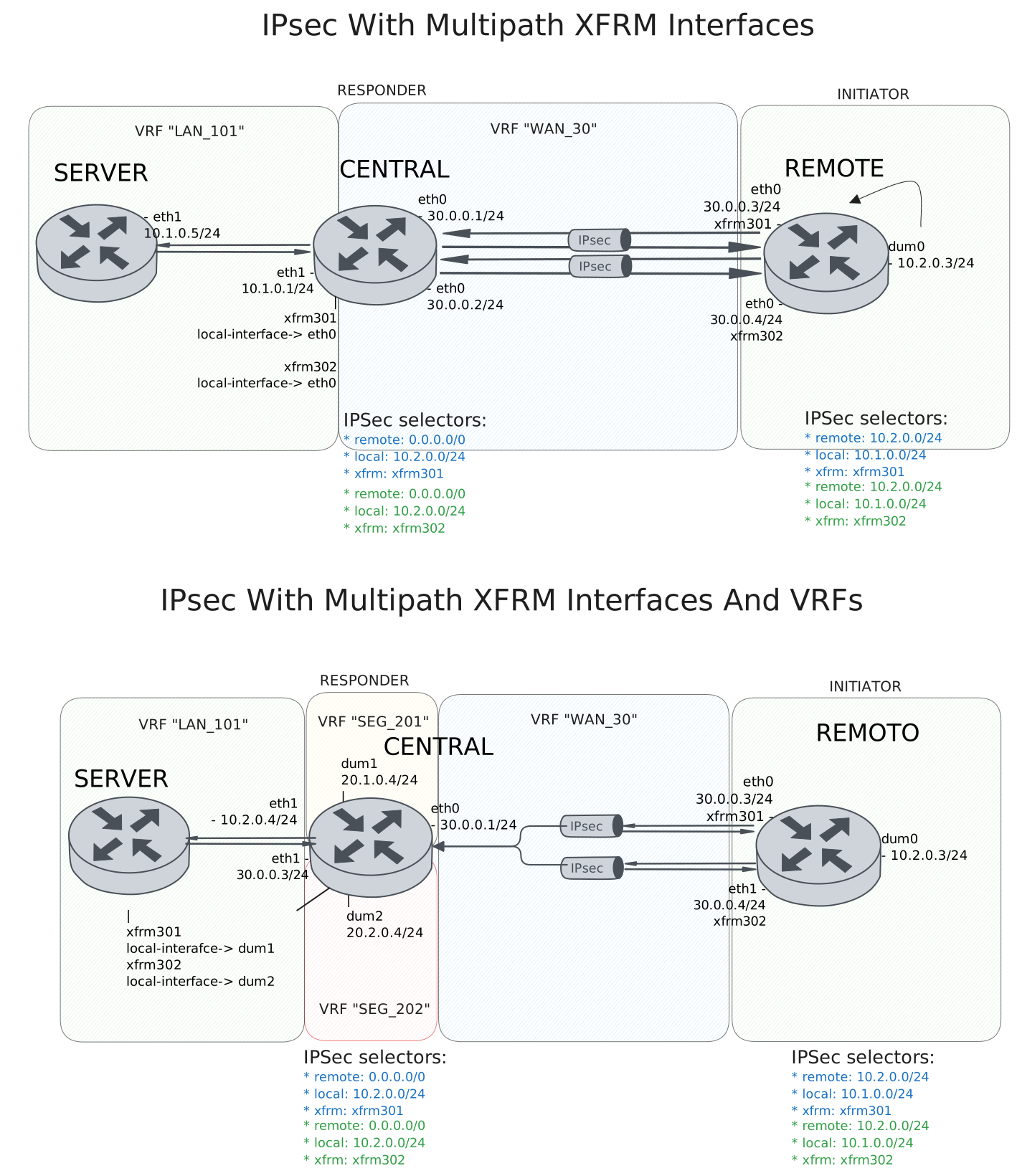
Test IPsec With Multipath XFRM Interfaces
Description
DUT0 and DUT1 are connected to each other through multiple IPsec tunnels with the same local and remote prefixes.
In this test case, we will check IPsec tunnels are correctly installing through two peers directly connected to the DUT0 and DUT1 devices.
Scenario
Step 1: Set the following configuration in DUT0 :
set interfaces ethernet eth0 address 30.0.0.1/24
set interfaces ethernet eth0 address 30.0.0.2/24
set interfaces ethernet eth0 vrf WAN_30
set interfaces ethernet eth1 address 10.1.0.1/24
set interfaces ethernet eth1 vrf LAN_101
set interfaces xfrm xfrm301 local-interface eth0
set interfaces xfrm xfrm301 mtu 1400
set interfaces xfrm xfrm301 multipath traffic-steering reverse
set interfaces xfrm xfrm301 vrf LAN_101
set interfaces xfrm xfrm302 local-interface eth0
set interfaces xfrm xfrm302 mtu 1400
set interfaces xfrm xfrm302 multipath traffic-steering reverse
set interfaces xfrm xfrm302 vrf LAN_101
set protocols vrf WAN_30 static route 10.1.0.0/24 next-hop-vrf LAN_101
set service ssh
set system login user admin authentication encrypted-password '$6$GSjsCj8gHLv$/VcqU6FLi6CT2Oxn0MJQ2C2tqnRDrYKNF8HIYWJp68nvXvPdFccDsT04.WtigUONbKYrgKg8d6rEs8PjljMkH0'
set system vrf LAN_101
set system vrf WAN_30
set system vrf main
set vpn ipsec auth-profile AUTH-SA global-secrets ike-psk test encrypted-secret U2FsdGVkX19k2v+O3kqjyiFlFYxU8gaVqB8H+/fH/ug=
set vpn ipsec auth-profile AUTH-SA local auth ike-psk id test
set vpn ipsec auth-profile AUTH-SA remote auth ike-psk id %any
set vpn ipsec esp-group CHILD-SA mode tunnel
set vpn ipsec esp-group CHILD-SA proposal 1 encryption aes256gcm128
set vpn ipsec esp-group CHILD-SA proposal 1 pfs dh-group19
set vpn ipsec ike-group IKE-SA key-exchange ikev2
set vpn ipsec ike-group IKE-SA proposal 1 dh-group 19
set vpn ipsec ike-group IKE-SA proposal 1 encryption aes256gcm128
set vpn ipsec ike-group IKE-SA proposal 1 hash sha256
set vpn ipsec site-to-site peer PEER301 auth-profile AUTH-SA
set vpn ipsec site-to-site peer PEER301 connection-type respond
set vpn ipsec site-to-site peer PEER301 default-esp-group CHILD-SA
set vpn ipsec site-to-site peer PEER301 ike-group IKE-SA
set vpn ipsec site-to-site peer PEER301 local-address 30.0.0.1
set vpn ipsec site-to-site peer PEER301 remote-address %any
set vpn ipsec site-to-site peer PEER301 tunnel 1 install-routes LAN_101
set vpn ipsec site-to-site peer PEER301 tunnel 1 local prefix 10.1.0.0/24
set vpn ipsec site-to-site peer PEER301 tunnel 1 remote prefix 0.0.0.0/0
set vpn ipsec site-to-site peer PEER301 tunnel 1 xfrm-interface-out xfrm301
set vpn ipsec site-to-site peer PEER302 auth-profile AUTH-SA
set vpn ipsec site-to-site peer PEER302 connection-type respond
set vpn ipsec site-to-site peer PEER302 default-esp-group CHILD-SA
set vpn ipsec site-to-site peer PEER302 ike-group IKE-SA
set vpn ipsec site-to-site peer PEER302 local-address 30.0.0.2
set vpn ipsec site-to-site peer PEER302 remote-address %any
set vpn ipsec site-to-site peer PEER302 tunnel 1 install-routes LAN_101
set vpn ipsec site-to-site peer PEER302 tunnel 1 local prefix 10.1.0.0/24
set vpn ipsec site-to-site peer PEER302 tunnel 1 remote prefix 0.0.0.0/0
set vpn ipsec site-to-site peer PEER302 tunnel 1 xfrm-interface-out xfrm302
Step 2: Set the following configuration in DUT1 :
set interfaces dummy dum0 address 10.2.0.3/24
set interfaces ethernet eth0 address 30.0.0.3/24
set interfaces ethernet eth0 address 30.0.0.4/24
set interfaces xfrm xfrm301 mtu 1400
set interfaces xfrm xfrm302 mtu 1400
set service ssh
set system login user admin authentication encrypted-password '$6$GSjsCj8gHLv$/VcqU6FLi6CT2Oxn0MJQ2C2tqnRDrYKNF8HIYWJp68nvXvPdFccDsT04.WtigUONbKYrgKg8d6rEs8PjljMkH0'
set system vrf main
set vpn ipsec auth-profile AUTH-SA global-secrets ike-psk test encrypted-secret U2FsdGVkX1+4o0VJMV7KVISbaotH3ixW+5DHlyVo1NE=
set vpn ipsec auth-profile AUTH-SA local auth ike-psk id test
set vpn ipsec auth-profile AUTH-SA remote auth ike-psk id %any
set vpn ipsec esp-group CHILD-SA mode tunnel
set vpn ipsec esp-group CHILD-SA proposal 1 encryption aes256gcm128
set vpn ipsec esp-group CHILD-SA proposal 1 pfs dh-group19
set vpn ipsec ike-group IKE-SA key-exchange ikev2
set vpn ipsec ike-group IKE-SA proposal 1 dh-group 19
set vpn ipsec ike-group IKE-SA proposal 1 encryption aes256gcm128
set vpn ipsec ike-group IKE-SA proposal 1 hash sha256
set vpn ipsec site-to-site peer PEER301 auth-profile AUTH-SA
set vpn ipsec site-to-site peer PEER301 connection-type initiate
set vpn ipsec site-to-site peer PEER301 default-esp-group CHILD-SA
set vpn ipsec site-to-site peer PEER301 ike-group IKE-SA
set vpn ipsec site-to-site peer PEER301 local-address 30.0.0.3
set vpn ipsec site-to-site peer PEER301 remote-address 30.0.0.1
set vpn ipsec site-to-site peer PEER301 tunnel 1 install-routes main
set vpn ipsec site-to-site peer PEER301 tunnel 1 local prefix 10.2.0.0/24
set vpn ipsec site-to-site peer PEER301 tunnel 1 remote prefix 10.1.0.0/24
set vpn ipsec site-to-site peer PEER301 tunnel 1 xfrm-interface-out xfrm301
set vpn ipsec site-to-site peer PEER302 auth-profile AUTH-SA
set vpn ipsec site-to-site peer PEER302 connection-type initiate
set vpn ipsec site-to-site peer PEER302 default-esp-group CHILD-SA
set vpn ipsec site-to-site peer PEER302 ike-group IKE-SA
set vpn ipsec site-to-site peer PEER302 local-address 30.0.0.4
set vpn ipsec site-to-site peer PEER302 remote-address 30.0.0.2
set vpn ipsec site-to-site peer PEER302 tunnel 1 install-routes main
set vpn ipsec site-to-site peer PEER302 tunnel 1 local prefix 10.2.0.0/24
set vpn ipsec site-to-site peer PEER302 tunnel 1 remote prefix 10.1.0.0/24
set vpn ipsec site-to-site peer PEER302 tunnel 1 xfrm-interface-out xfrm302
Step 3: Set the following configuration in DUT2 :
set interfaces ethernet eth1 address 10.1.0.5/24
set protocols static route 10.2.0.0/24 next-hop 10.1.0.1
set service ssh
set system login user admin authentication encrypted-password '$6$GSjsCj8gHLv$/VcqU6FLi6CT2Oxn0MJQ2C2tqnRDrYKNF8HIYWJp68nvXvPdFccDsT04.WtigUONbKYrgKg8d6rEs8PjljMkH0'
Note
Check that the IPsec tunnels are established and the routes are installed. The routes should be installed in the VRF LAN_101.
Step 4: Run command protocols vrf LAN_101 ip show route at DUT0 and check if output matches the following regular expressions:
K>\* 10\.2\.0\.0/24 \[0\/0\] is directly connected.*xfrm\d+.*\n.*xfrm\d+Show output
Codes: K - kernel route, C - connected, L - local, S - static,
       R - RIP, O - OSPF, I - IS-IS, B - BGP, E - EIGRP, N - NHRP,
       T - Table, v - VNC, V - VNC-Direct, A - Babel, F - PBR,
       f - OpenFabric, t - Table-Direct,
       > - selected route, * - FIB route, q - queued, r - rejected, b - backup
       t - trapped, o - offload failure

IPv4 unicast VRF LAN_101:
K>* 0.0.0.0/0 [255/8192] unreachable (ICMP unreachable), weight 1, 00:00:07
C>* 10.1.0.0/24 is directly connected, eth1, weight 1, 00:00:07
L>* 10.1.0.1/32 is directly connected, eth1, weight 1, 00:00:07
K>* 10.2.0.0/24 [0/0] is directly connected, xfrm302, weight 1, 00:00:02
  *                   is directly connected, xfrm301, weight 1, 00:00:02
Note
Check that both IPsec tunnels are established and traffic steering is working as expected. Once the remote client is trying to connect randomly from either of the two tunnels, hub always responds with the same tunnel.
Step 5: Run command vpn ipsec clear sa at DUT0 and expect this output:
Show output
Deleting IPSec SAs... 100.00%
Closed tunnels: 2
Step 6: Init an SSH connection from DUT1 to IP address 10.1.0.5 with the user admin:
admin@DUT1$ ssh admin@10.1.0.5 option StrictHostKeyChecking=no option UserKnownHostsFile=/dev/null local-address 10.2.0.3Show output
Warning: Permanently added '10.1.0.5' (ECDSA) to the list of known hosts.
admin@10.1.0.5's password:
Welcome to Teldat OSDx v4.2.8.4

This system includes free software.
Contact Teldat for licenses information and source code.

Last login: Thu Feb 19 13:36:47 2026 from 10.0.0.2
admin@osdx$
Step 7: Run command vpn ipsec show sa at DUT0 and expect this output:
Show output
vpn-peer-PEER301: #4, ESTABLISHED, IKEv2, 227d028ef82b0b7b_i c52170576be432b6_r*
  local  'test' @ 30.0.0.1[500]
  remote 'test' @ 30.0.0.3[500]
  AES_GCM_16-256/PRF_HMAC_SHA2_256/ECP_256
  established 0s ago, rekeying in 16130s
  peer-PEER301-tunnel-1: #4, reqid 1, INSTALLED, TUNNEL, ESP:AES_GCM_16-256
    installed 0s ago, rekeying in 3241s, expires in 3960s
    in  c54b53ee (-|0x0000012e),   5032 bytes,    24 packets,     1s ago
    out cf8f6664 (-|0x0000012e),   4944 bytes,    22 packets,     1s ago
    local  10.1.0.0/24
    remote 10.2.0.0/24
vpn-peer-PEER302: #3, ESTABLISHED, IKEv2, 6c436cee3db91051_i 45d601d856ab97e0_r*
  local  'test' @ 30.0.0.2[500]
  remote 'test' @ 30.0.0.4[500]
  AES_GCM_16-256/PRF_HMAC_SHA2_256/ECP_256
  established 0s ago, rekeying in 16282s
  peer-PEER302-tunnel-1: #3, reqid 2, INSTALLED, TUNNEL, ESP:AES_GCM_16-256
    installed 0s ago, rekeying in 3496s, expires in 3960s
    in  c5597f62 (-|0x0000012f),      0 bytes,     0 packets
    out cad289e5 (-|0x0000012f),      0 bytes,     0 packets
    local  10.1.0.0/24
    remote 10.2.0.0/24
Step 8: Run command vpn ipsec clear sa at DUT0 and expect this output:
Show output
Deleting IPSec SAs... 100.00%
Closed tunnels: 2
Step 9: Init an SSH connection from DUT1 to IP address 10.1.0.5 with the user admin:
admin@DUT1$ ssh admin@10.1.0.5 option StrictHostKeyChecking=no option UserKnownHostsFile=/dev/null local-address 10.2.0.3Show output
Warning: Permanently added '10.1.0.5' (ECDSA) to the list of known hosts.
admin@10.1.0.5's password:
Welcome to Teldat OSDx v4.2.8.4

This system includes free software.
Contact Teldat for licenses information and source code.

Last login: Thu Feb 19 14:54:51 2026 from 10.2.0.3
admin@osdx$
Step 10: Run command vpn ipsec show sa at DUT0 and expect this output:
Show output
vpn-peer-PEER302: #6, ESTABLISHED, IKEv2, 68808f2a2397b8c0_i 576efa7e2f6c1961_r*
  local  'test' @ 30.0.0.2[500]
  remote 'test' @ 30.0.0.4[500]
  AES_GCM_16-256/PRF_HMAC_SHA2_256/ECP_256
  established 0s ago, rekeying in 18769s
  peer-PEER302-tunnel-1: #6, reqid 2, INSTALLED, TUNNEL, ESP:AES_GCM_16-256
    installed 0s ago, rekeying in 3440s, expires in 3960s
    in  ca21b983 (-|0x0000012f),      0 bytes,     0 packets
    out c29202d3 (-|0x0000012f),      0 bytes,     0 packets
    local  10.1.0.0/24
    remote 10.2.0.0/24
vpn-peer-PEER301: #5, ESTABLISHED, IKEv2, 262b7157b5c0c88b_i 9069ecb2c95dd021_r*
  local  'test' @ 30.0.0.1[500]
  remote 'test' @ 30.0.0.3[500]
  AES_GCM_16-256/PRF_HMAC_SHA2_256/ECP_256
  established 1s ago, rekeying in 26149s
  peer-PEER301-tunnel-1: #5, reqid 1, INSTALLED, TUNNEL, ESP:AES_GCM_16-256
    installed 1s ago, rekeying in 3271s, expires in 3959s
    in  cb7ae79f (-|0x0000012e),   5032 bytes,    24 packets,     0s ago
    out c539a7ea (-|0x0000012e),   4856 bytes,    21 packets,     0s ago
    local  10.1.0.0/24
    remote 10.2.0.0/24
Note
Testing the traffic from the hub to the spoke. The difference is that the IPsec tunnel chosen by the hub not always the same as the one chosen by the spoke. So if the spoke responds to the hub through the another tunnel, the hub needs to change the tunnel to the one used by the spoke.
Step 11: Run command vpn ipsec clear sa at DUT0 and expect this output:
Show output
Deleting IPSec SAs... 100.00%
Closed tunnels: 2
Step 12: Init an SSH connection from DUT2 to IP address 10.2.0.3 with the user admin:
admin@DUT2$ ssh admin@10.2.0.3 option StrictHostKeyChecking=no option UserKnownHostsFile=/dev/null local-address 10.1.0.5Show output
Warning: Permanently added '10.2.0.3' (ECDSA) to the list of known hosts.
admin@10.2.0.3's password:
Welcome to Teldat OSDx v4.2.8.4

This system includes free software.
Contact Teldat for licenses information and source code.

Last login: Thu Feb 19 13:36:37 2026
admin@osdx$
Step 13: Run command vpn ipsec show sa at DUT0 and expect this output:
Show output
vpn-peer-PEER301: #8, ESTABLISHED, IKEv2, cf196fbded977c87_i 60d00fea0840cabe_r*
  local  'test' @ 30.0.0.1[500]
  remote 'test' @ 30.0.0.3[500]
  AES_GCM_16-256/PRF_HMAC_SHA2_256/ECP_256
  established 1s ago, rekeying in 16766s
  peer-PEER301-tunnel-1: #8, reqid 1, INSTALLED, TUNNEL, ESP:AES_GCM_16-256
    installed 1s ago, rekeying in 3363s, expires in 3959s
    in  cb5c7e7a (-|0x0000012e),      0 bytes,     0 packets
    out cce7641c (-|0x0000012e),     60 bytes,     1 packets,     0s ago
    local  10.1.0.0/24
    remote 10.2.0.0/24
vpn-peer-PEER302: #7, ESTABLISHED, IKEv2, 16678ab4064bdd89_i 8a4ae837f5466de6_r*
  local  'test' @ 30.0.0.2[500]
  remote 'test' @ 30.0.0.4[500]
  AES_GCM_16-256/PRF_HMAC_SHA2_256/ECP_256
  established 1s ago, rekeying in 17980s
  peer-PEER302-tunnel-1: #7, reqid 2, INSTALLED, TUNNEL, ESP:AES_GCM_16-256
    installed 1s ago, rekeying in 3271s, expires in 3959s
    in  c89b1c00 (-|0x0000012f),   5108 bytes,    24 packets,     0s ago
    out c17a8bdc (-|0x0000012f),   5340 bytes,    26 packets,     0s ago
    local  10.1.0.0/24
    remote 10.2.0.0/24
Step 14: Run command vpn ipsec clear sa at DUT0 and expect this output:
Show output
Deleting IPSec SAs... 100.00%
Closed tunnels: 2
Step 15: Init an SSH connection from DUT2 to IP address 10.2.0.3 with the user admin:
admin@DUT2$ ssh admin@10.2.0.3 option StrictHostKeyChecking=no option UserKnownHostsFile=/dev/null local-address 10.1.0.5Show output
Warning: Permanently added '10.2.0.3' (ECDSA) to the list of known hosts.
admin@10.2.0.3's password:
Welcome to Teldat OSDx v4.2.8.4

This system includes free software.
Contact Teldat for licenses information and source code.

Last login: Thu Feb 19 14:54:53 2026 from 10.1.0.5
admin@osdx$
Step 16: Run command vpn ipsec show sa at DUT0 and expect this output:
Show output
vpn-peer-PEER302: #10, ESTABLISHED, IKEv2, b9172cda69614f5d_i 5918b68fb680d5e7_r*
  local  'test' @ 30.0.0.2[500]
  remote 'test' @ 30.0.0.4[500]
  AES_GCM_16-256/PRF_HMAC_SHA2_256/ECP_256
  established 1s ago, rekeying in 16092s
  peer-PEER302-tunnel-1: #10, reqid 2, INSTALLED, TUNNEL, ESP:AES_GCM_16-256
    installed 1s ago, rekeying in 3303s, expires in 3959s
    in  c441625b (-|0x0000012f),   4856 bytes,    21 packets,     0s ago
    out c4fc4c6c (-|0x0000012f),   5084 bytes,    25 packets,     0s ago
    local  10.1.0.0/24
    remote 10.2.0.0/24
vpn-peer-PEER301: #9, ESTABLISHED, IKEv2, 43b566f6980ccbc1_i 4410fd1103336703_r*
  local  'test' @ 30.0.0.1[500]
  remote 'test' @ 30.0.0.3[500]
  AES_GCM_16-256/PRF_HMAC_SHA2_256/ECP_256
  established 1s ago, rekeying in 27313s
  peer-PEER301-tunnel-1: #9, reqid 1, INSTALLED, TUNNEL, ESP:AES_GCM_16-256
    installed 1s ago, rekeying in 3355s, expires in 3959s
    in  c31882eb (-|0x0000012e),      0 bytes,     0 packets
    out cfa3b5ea (-|0x0000012e),      0 bytes,     0 packets
    local  10.1.0.0/24
    remote 10.2.0.0/24
Test IPsec With Multipath XFRM Interfaces And VRFs
Description
The difference here is that the hub peer has its addresses behind the VRFs, it is not directly connected like in the previous test case.
Scenario
Step 1: Set the following configuration in DUT0 :
set interfaces dummy dum1 address 20.1.0.1/24
set interfaces dummy dum1 vrf SEG_201
set interfaces dummy dum2 address 20.2.0.1/24
set interfaces dummy dum2 vrf SEG_202
set interfaces ethernet eth0 address 30.0.0.1/24
set interfaces ethernet eth0 vrf WAN_30
set interfaces ethernet eth1 address 10.1.0.1/24
set interfaces ethernet eth1 vrf LAN_101
set interfaces xfrm xfrm301 local-interface dum1
set interfaces xfrm xfrm301 mtu 1400
set interfaces xfrm xfrm301 multipath traffic-steering reverse
set interfaces xfrm xfrm301 vrf LAN_101
set interfaces xfrm xfrm302 local-interface dum2
set interfaces xfrm xfrm302 mtu 1400
set interfaces xfrm xfrm302 multipath traffic-steering reverse
set interfaces xfrm xfrm302 vrf LAN_101
set protocols vrf SEG_201 static route 0.0.0.0/0 next-hop-vrf WAN_30
set protocols vrf SEG_201 static route 10.1.0.0/24 next-hop-vrf LAN_101
set protocols vrf SEG_202 static route 0.0.0.0/0 next-hop-vrf WAN_30
set protocols vrf SEG_202 static route 10.1.0.0/24 next-hop-vrf LAN_101
set protocols vrf WAN_30 static route 20.1.0.0/24 next-hop-vrf SEG_201
set protocols vrf WAN_30 static route 20.2.0.0/24 next-hop-vrf SEG_202
set service ssh
set system login user admin authentication encrypted-password '$6$GSjsCj8gHLv$/VcqU6FLi6CT2Oxn0MJQ2C2tqnRDrYKNF8HIYWJp68nvXvPdFccDsT04.WtigUONbKYrgKg8d6rEs8PjljMkH0'
set system vrf LAN_101
set system vrf SEG_201
set system vrf SEG_202
set system vrf WAN_30
set system vrf main
set vpn ipsec auth-profile AUTH-SA global-secrets ike-psk test encrypted-secret U2FsdGVkX1+42+VLOYHgTNivzQBp7Rve3aOeTuzZBSM=
set vpn ipsec auth-profile AUTH-SA local auth ike-psk id test
set vpn ipsec auth-profile AUTH-SA remote auth ike-psk id %any
set vpn ipsec esp-group CHILD-SA mode tunnel
set vpn ipsec esp-group CHILD-SA proposal 1 encryption aes256gcm128
set vpn ipsec esp-group CHILD-SA proposal 1 pfs dh-group19
set vpn ipsec ike-group IKE-SA key-exchange ikev2
set vpn ipsec ike-group IKE-SA proposal 1 dh-group 19
set vpn ipsec ike-group IKE-SA proposal 1 encryption aes256gcm128
set vpn ipsec ike-group IKE-SA proposal 1 hash sha256
set vpn ipsec site-to-site peer PEER301 auth-profile AUTH-SA
set vpn ipsec site-to-site peer PEER301 connection-type respond
set vpn ipsec site-to-site peer PEER301 default-esp-group CHILD-SA
set vpn ipsec site-to-site peer PEER301 ike-group IKE-SA
set vpn ipsec site-to-site peer PEER301 local-address 20.1.0.1
set vpn ipsec site-to-site peer PEER301 remote-address %any
set vpn ipsec site-to-site peer PEER301 tunnel 1 install-routes LAN_101
set vpn ipsec site-to-site peer PEER301 tunnel 1 local prefix 10.1.0.0/24
set vpn ipsec site-to-site peer PEER301 tunnel 1 remote prefix 0.0.0.0/0
set vpn ipsec site-to-site peer PEER301 tunnel 1 xfrm-interface-out xfrm301
set vpn ipsec site-to-site peer PEER302 auth-profile AUTH-SA
set vpn ipsec site-to-site peer PEER302 connection-type respond
set vpn ipsec site-to-site peer PEER302 default-esp-group CHILD-SA
set vpn ipsec site-to-site peer PEER302 ike-group IKE-SA
set vpn ipsec site-to-site peer PEER302 local-address 20.2.0.1
set vpn ipsec site-to-site peer PEER302 remote-address %any
set vpn ipsec site-to-site peer PEER302 tunnel 1 install-routes LAN_101
set vpn ipsec site-to-site peer PEER302 tunnel 1 local prefix 10.1.0.0/24
set vpn ipsec site-to-site peer PEER302 tunnel 1 remote prefix 0.0.0.0/0
set vpn ipsec site-to-site peer PEER302 tunnel 1 xfrm-interface-out xfrm302
Step 2: Set the following configuration in DUT1 :
set interfaces dummy dum0 address 10.2.0.3/24
set interfaces ethernet eth0 address 30.0.0.3/24
set interfaces ethernet eth0 address 30.0.0.4/24
set interfaces xfrm xfrm301 mtu 1400
set interfaces xfrm xfrm302 mtu 1400
set protocols static route 20.1.0.0/24 next-hop 30.0.0.1
set protocols static route 20.2.0.0/24 next-hop 30.0.0.1
set service ssh
set system login user admin authentication encrypted-password '$6$GSjsCj8gHLv$/VcqU6FLi6CT2Oxn0MJQ2C2tqnRDrYKNF8HIYWJp68nvXvPdFccDsT04.WtigUONbKYrgKg8d6rEs8PjljMkH0'
set system vrf main
set vpn ipsec auth-profile AUTH-SA global-secrets ike-psk test encrypted-secret U2FsdGVkX1+xoKByNzyohEVTTRv9VMYScqZE0+qaFJM=
set vpn ipsec auth-profile AUTH-SA local auth ike-psk id test
set vpn ipsec auth-profile AUTH-SA remote auth ike-psk id %any
set vpn ipsec esp-group CHILD-SA mode tunnel
set vpn ipsec esp-group CHILD-SA proposal 1 encryption aes256gcm128
set vpn ipsec esp-group CHILD-SA proposal 1 pfs dh-group19
set vpn ipsec ike-group IKE-SA key-exchange ikev2
set vpn ipsec ike-group IKE-SA proposal 1 dh-group 19
set vpn ipsec ike-group IKE-SA proposal 1 encryption aes256gcm128
set vpn ipsec ike-group IKE-SA proposal 1 hash sha256
set vpn ipsec site-to-site peer PEER301 auth-profile AUTH-SA
set vpn ipsec site-to-site peer PEER301 connection-type initiate
set vpn ipsec site-to-site peer PEER301 default-esp-group CHILD-SA
set vpn ipsec site-to-site peer PEER301 ike-group IKE-SA
set vpn ipsec site-to-site peer PEER301 local-address 30.0.0.3
set vpn ipsec site-to-site peer PEER301 remote-address 20.1.0.1
set vpn ipsec site-to-site peer PEER301 tunnel 1 install-routes main
set vpn ipsec site-to-site peer PEER301 tunnel 1 local prefix 10.2.0.0/24
set vpn ipsec site-to-site peer PEER301 tunnel 1 remote prefix 10.1.0.0/24
set vpn ipsec site-to-site peer PEER301 tunnel 1 xfrm-interface-out xfrm301
set vpn ipsec site-to-site peer PEER302 auth-profile AUTH-SA
set vpn ipsec site-to-site peer PEER302 connection-type initiate
set vpn ipsec site-to-site peer PEER302 default-esp-group CHILD-SA
set vpn ipsec site-to-site peer PEER302 ike-group IKE-SA
set vpn ipsec site-to-site peer PEER302 local-address 30.0.0.4
set vpn ipsec site-to-site peer PEER302 remote-address 20.2.0.1
set vpn ipsec site-to-site peer PEER302 tunnel 1 install-routes main
set vpn ipsec site-to-site peer PEER302 tunnel 1 local prefix 10.2.0.0/24
set vpn ipsec site-to-site peer PEER302 tunnel 1 remote prefix 10.1.0.0/24
set vpn ipsec site-to-site peer PEER302 tunnel 1 xfrm-interface-out xfrm302
Step 3: Set the following configuration in DUT2 :
set interfaces ethernet eth1 address 10.1.0.5/24
set protocols static route 10.2.0.0/24 next-hop 10.1.0.1
set service ssh
set system login user admin authentication encrypted-password '$6$GSjsCj8gHLv$/VcqU6FLi6CT2Oxn0MJQ2C2tqnRDrYKNF8HIYWJp68nvXvPdFccDsT04.WtigUONbKYrgKg8d6rEs8PjljMkH0'
Note
Check that the IPsec tunnels are established and the routes are installed. The routes should be installed in the VRF LAN_101.
Step 4: Run command protocols vrf LAN_101 ip show route at DUT0 and check if output matches the following regular expressions:
K>\* 10\.2\.0\.0/24 \[0\/0\] is directly connected.*xfrm\d+.*\n.*xfrm\d+Show output
Codes: K - kernel route, C - connected, L - local, S - static,
       R - RIP, O - OSPF, I - IS-IS, B - BGP, E - EIGRP, N - NHRP,
       T - Table, v - VNC, V - VNC-Direct, A - Babel, F - PBR,
       f - OpenFabric, t - Table-Direct,
       > - selected route, * - FIB route, q - queued, r - rejected, b - backup
       t - trapped, o - offload failure

IPv4 unicast VRF LAN_101:
K>* 0.0.0.0/0 [255/8192] unreachable (ICMP unreachable), weight 1, 00:00:08
C>* 10.1.0.0/24 is directly connected, eth1, weight 1, 00:00:07
L>* 10.1.0.1/32 is directly connected, eth1, weight 1, 00:00:07
K>* 10.2.0.0/24 [0/0] is directly connected, xfrm302, weight 1, 00:00:01
  *                   is directly connected, xfrm301, weight 1, 00:00:01
Note
Check that both IPsec tunnels are established and traffic steering is working as expected. Once the remote client is trying to connect randomly from either of the two tunnels, hub always responds with the same tunnel.
Step 5: Run command vpn ipsec clear sa at DUT0 and expect this output:
Show output
Deleting IPSec SAs... 100.00%
Closed tunnels: 2
Step 6: Init an SSH connection from DUT1 to IP address 10.1.0.5 with the user admin:
admin@DUT1$ ssh admin@10.1.0.5 option StrictHostKeyChecking=no option UserKnownHostsFile=/dev/null local-address 10.2.0.3Show output
Warning: Permanently added '10.1.0.5' (ECDSA) to the list of known hosts.
admin@10.1.0.5's password:
Welcome to Teldat OSDx v4.2.8.4

This system includes free software.
Contact Teldat for licenses information and source code.

Last login: Thu Feb 19 14:54:52 2026 from 10.2.0.3
admin@osdx$
Step 7: Run command vpn ipsec show sa at DUT0 and expect this output:
Show output
vpn-peer-PEER301: #4, ESTABLISHED, IKEv2, de4de87c22efb8a9_i bac55669b00597ca_r*
  local  'test' @ 20.1.0.1[500]
  remote 'test' @ 30.0.0.3[500]
  AES_GCM_16-256/PRF_HMAC_SHA2_256/ECP_256
  established 1s ago, rekeying in 17459s
  peer-PEER301-tunnel-1: #4, reqid 1, INSTALLED, TUNNEL, ESP:AES_GCM_16-256
    installed 1s ago, rekeying in 3469s, expires in 3959s
    in  cbe5ff24 (-|0x0000012e),   5032 bytes,    24 packets,     0s ago
    out cbc788f2 (-|0x0000012e),   4944 bytes,    22 packets,     0s ago
    local  10.1.0.0/24
    remote 10.2.0.0/24
vpn-peer-PEER302: #3, ESTABLISHED, IKEv2, 5d136f9d5b65f879_i ccebe614cea48bb0_r*
  local  'test' @ 20.2.0.1[500]
  remote 'test' @ 30.0.0.4[500]
  AES_GCM_16-256/PRF_HMAC_SHA2_256/ECP_256
  established 1s ago, rekeying in 22523s
  peer-PEER302-tunnel-1: #3, reqid 2, INSTALLED, TUNNEL, ESP:AES_GCM_16-256
    installed 1s ago, rekeying in 3357s, expires in 3959s
    in  c674cdf6 (-|0x0000012f),      0 bytes,     0 packets
    out c131bd4e (-|0x0000012f),      0 bytes,     0 packets
    local  10.1.0.0/24
    remote 10.2.0.0/24
Step 8: Run command vpn ipsec clear sa at DUT0 and expect this output:
Show output
Deleting IPSec SAs... 100.00%
Closed tunnels: 2
Step 9: Init an SSH connection from DUT1 to IP address 10.1.0.5 with the user admin:
admin@DUT1$ ssh admin@10.1.0.5 option StrictHostKeyChecking=no option UserKnownHostsFile=/dev/null local-address 10.2.0.3Show output
Warning: Permanently added '10.1.0.5' (ECDSA) to the list of known hosts.
admin@10.1.0.5's password:
Welcome to Teldat OSDx v4.2.8.4

This system includes free software.
Contact Teldat for licenses information and source code.

Last login: Thu Feb 19 14:55:14 2026 from 10.2.0.3
admin@osdx$
Step 10: Run command vpn ipsec show sa at DUT0 and expect this output:
Show output
vpn-peer-PEER302: #6, ESTABLISHED, IKEv2, 636aebbac2109d4b_i 43295ddb1c518536_r*
  local  'test' @ 20.2.0.1[500]
  remote 'test' @ 30.0.0.4[500]
  AES_GCM_16-256/PRF_HMAC_SHA2_256/ECP_256
  established 0s ago, rekeying in 20770s
  peer-PEER302-tunnel-1: #6, reqid 2, INSTALLED, TUNNEL, ESP:AES_GCM_16-256
    installed 0s ago, rekeying in 3328s, expires in 3960s
    in  c05cd69a (-|0x0000012f),      0 bytes,     0 packets
    out cc2e802b (-|0x0000012f),      0 bytes,     0 packets
    local  10.1.0.0/24
    remote 10.2.0.0/24
vpn-peer-PEER301: #5, ESTABLISHED, IKEv2, d30f0ee2791ebfc7_i 0e144ba3e6183016_r*
  local  'test' @ 20.1.0.1[500]
  remote 'test' @ 30.0.0.3[500]
  AES_GCM_16-256/PRF_HMAC_SHA2_256/ECP_256
  established 0s ago, rekeying in 15571s
  peer-PEER301-tunnel-1: #5, reqid 1, INSTALLED, TUNNEL, ESP:AES_GCM_16-256
    installed 0s ago, rekeying in 3380s, expires in 3960s
    in  cebd0d1b (-|0x0000012e),   5032 bytes,    24 packets,     0s ago
    out c308fa7e (-|0x0000012e),   4848 bytes,    21 packets,     0s ago
    local  10.1.0.0/24
    remote 10.2.0.0/24
Note
Testing the traffic from the hub to the spoke. The difference is that the IPsec tunnel chosen by the hub not always the same as the one chosen by the spoke. So if the spoke responds to the hub through the another tunnel, the hub needs to change the tunnel to the one used by the spoke.
Step 11: Run command vpn ipsec clear sa at DUT0 and expect this output:
Show output
Deleting IPSec SAs... 100.00%
Closed tunnels: 2
Step 12: Init an SSH connection from DUT2 to IP address 10.2.0.3 with the user admin:
admin@DUT2$ ssh admin@10.2.0.3 option StrictHostKeyChecking=no option UserKnownHostsFile=/dev/null local-address 10.1.0.5Show output
Warning: Permanently added '10.2.0.3' (ECDSA) to the list of known hosts.
admin@10.2.0.3's password:
Welcome to Teldat OSDx v4.2.8.4

This system includes free software.
Contact Teldat for licenses information and source code.

Last login: Thu Feb 19 14:54:54 2026 from 10.1.0.5
admin@osdx$
Step 13: Run command vpn ipsec show sa at DUT0 and expect this output:
Show output
vpn-peer-PEER301: #8, ESTABLISHED, IKEv2, ba21bdce20402949_i 16f5d78223b5b084_r*
  local  'test' @ 20.1.0.1[500]
  remote 'test' @ 30.0.0.3[500]
  AES_GCM_16-256/PRF_HMAC_SHA2_256/ECP_256
  established 0s ago, rekeying in 15377s
  peer-PEER301-tunnel-1: #8, reqid 1, INSTALLED, TUNNEL, ESP:AES_GCM_16-256
    installed 0s ago, rekeying in 3540s, expires in 3960s
    in  cb522350 (-|0x0000012e),      0 bytes,     0 packets
    out c05c47d0 (-|0x0000012e),     60 bytes,     1 packets,     1s ago
    local  10.1.0.0/24
    remote 10.2.0.0/24
vpn-peer-PEER302: #7, ESTABLISHED, IKEv2, 1ba4af9bba39bf99_i b50e30a25b7faaa9_r*
  local  'test' @ 20.2.0.1[500]
  remote 'test' @ 30.0.0.4[500]
  AES_GCM_16-256/PRF_HMAC_SHA2_256/ECP_256
  established 0s ago, rekeying in 16958s
  peer-PEER302-tunnel-1: #7, reqid 2, INSTALLED, TUNNEL, ESP:AES_GCM_16-256
    installed 0s ago, rekeying in 3351s, expires in 3960s
    in  ccabdfa5 (-|0x0000012f),   5032 bytes,    23 packets,     0s ago
    out c2ea2ddc (-|0x0000012f),   5076 bytes,    25 packets,     0s ago
    local  10.1.0.0/24
    remote 10.2.0.0/24
Step 14: Run command vpn ipsec clear sa at DUT0 and expect this output:
Show output
Deleting IPSec SAs... 100.00%
Closed tunnels: 2
Step 15: Init an SSH connection from DUT2 to IP address 10.2.0.3 with the user admin:
admin@DUT2$ ssh admin@10.2.0.3 option StrictHostKeyChecking=no option UserKnownHostsFile=/dev/null local-address 10.1.0.5Show output
Warning: Permanently added '10.2.0.3' (ECDSA) to the list of known hosts.
admin@10.2.0.3's password:
Welcome to Teldat OSDx v4.2.8.4

This system includes free software.
Contact Teldat for licenses information and source code.

Last login: Thu Feb 19 14:55:15 2026 from 10.1.0.5
admin@osdx$
Step 16: Run command vpn ipsec show sa at DUT0 and expect this output:
Show output
vpn-peer-PEER302: #10, ESTABLISHED, IKEv2, db7295ba50d1d9c2_i 4eceafb7cb57a906_r*
  local  'test' @ 20.2.0.1[500]
  remote 'test' @ 30.0.0.4[500]
  AES_GCM_16-256/PRF_HMAC_SHA2_256/ECP_256
  established 1s ago, rekeying in 22217s
  peer-PEER302-tunnel-1: #10, reqid 2, INSTALLED, TUNNEL, ESP:AES_GCM_16-256
    installed 1s ago, rekeying in 3261s, expires in 3959s
    in  cf6dc5b2 (-|0x0000012f),      0 bytes,     0 packets
    out c8afd3ae (-|0x0000012f),      0 bytes,     0 packets
    local  10.1.0.0/24
    remote 10.2.0.0/24
vpn-peer-PEER301: #9, ESTABLISHED, IKEv2, f932661f67cec3d8_i a1531985ec179590_r*
  local  'test' @ 20.1.0.1[500]
  remote 'test' @ 30.0.0.3[500]
  AES_GCM_16-256/PRF_HMAC_SHA2_256/ECP_256
  established 1s ago, rekeying in 21877s
  peer-PEER301-tunnel-1: #9, reqid 1, INSTALLED, TUNNEL, ESP:AES_GCM_16-256
    installed 1s ago, rekeying in 3331s, expires in 3959s
    in  c40926b4 (-|0x0000012e),   4944 bytes,    22 packets,     0s ago
    out c54bc613 (-|0x0000012e),   5084 bytes,    25 packets,     0s ago
    local  10.1.0.0/24
    remote 10.2.0.0/24