Check Connection
This scenario shows how to create a bridge interface and enable offloading to perform the forward processing in the hardware switch.
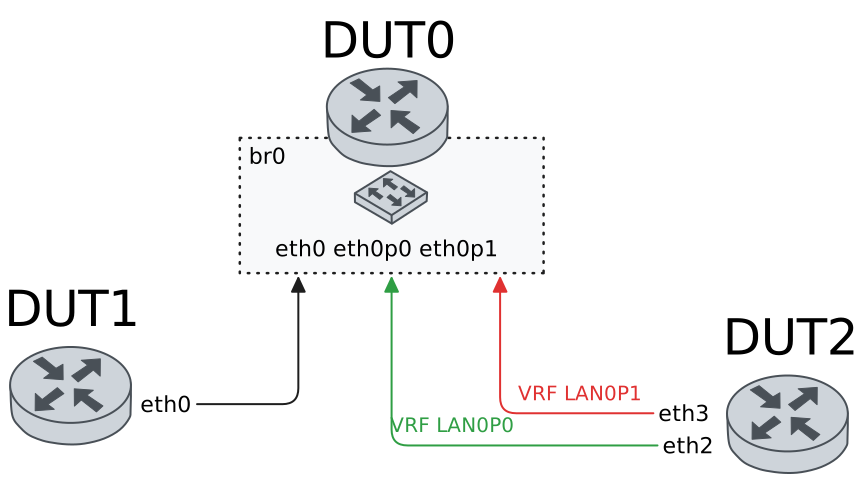
Test Hardware Bridge With Default VLAN
Description
In these scenarios, no VLAN are configured.
Scenario
Example 1
Step 1: Set the following configuration in DUT0 :
set interfaces bridge br0
set interfaces ethernet eth0p0 bridge-group bridge br0
set interfaces ethernet eth0p1 bridge-group bridge br0
set interfaces ethernet eth1 bridge-group bridge br0
set system login user admin authentication encrypted-password '$6$GSjsCj8gHLv$/VcqU6FLi6CT2Oxn0MJQ2C2tqnRDrYKNF8HIYWJp68nvXvPdFccDsT04.WtigUONbKYrgKg8d6rEs8PjljMkH0'
Step 2: Set the following configuration in DUT1 :
set interfaces ethernet eth0 address 192.168.1.2/24
set system login user admin authentication encrypted-password '$6$GSjsCj8gHLv$/VcqU6FLi6CT2Oxn0MJQ2C2tqnRDrYKNF8HIYWJp68nvXvPdFccDsT04.WtigUONbKYrgKg8d6rEs8PjljMkH0'
Step 3: Set the following configuration in DUT2 :
set interfaces ethernet eth2 address 192.168.1.3/24
set interfaces ethernet eth2 vrf LAN_PORT0
set interfaces ethernet eth3 address 192.168.1.4/24
set interfaces ethernet eth3 vrf LAN_PORT1
set system login user admin authentication encrypted-password '$6$GSjsCj8gHLv$/VcqU6FLi6CT2Oxn0MJQ2C2tqnRDrYKNF8HIYWJp68nvXvPdFccDsT04.WtigUONbKYrgKg8d6rEs8PjljMkH0'
set system vrf LAN_PORT0
set system vrf LAN_PORT1
Step 4: Ping IP address 192.168.1.4 from DUT2:
admin@DUT2$ ping 192.168.1.4 vrf LAN_PORT0 count 1 size 56 timeout 1Show output
ping: Warning: source address might be selected on device other than: LAN_PORT0
PING 192.168.1.4 (192.168.1.4) from 192.168.1.3 LAN_PORT0: 56(84) bytes of data.
64 bytes from 192.168.1.4: icmp_seq=1 ttl=64 time=0.935 ms

--- 192.168.1.4 ping statistics ---
1 packets transmitted, 1 received, 0% packet loss, time 0ms
rtt min/avg/max/mdev = 0.935/0.935/0.935/0.000 ms
Step 5: Ping IP address 192.168.1.3 from DUT1:
admin@DUT1$ ping 192.168.1.3 count 1 size 56 timeout 1Show output
PING 192.168.1.3 (192.168.1.3) 56(84) bytes of data.
64 bytes from 192.168.1.3: icmp_seq=1 ttl=64 time=0.580 ms

--- 192.168.1.3 ping statistics ---
1 packets transmitted, 1 received, 0% packet loss, time 0ms
rtt min/avg/max/mdev = 0.580/0.580/0.580/0.000 ms
Step 6: Ping IP address 192.168.1.4 from DUT1:
admin@DUT1$ ping 192.168.1.4 count 1 size 56 timeout 1Show output
PING 192.168.1.4 (192.168.1.4) 56(84) bytes of data.
64 bytes from 192.168.1.4: icmp_seq=1 ttl=64 time=0.993 ms

--- 192.168.1.4 ping statistics ---
1 packets transmitted, 1 received, 0% packet loss, time 0ms
rtt min/avg/max/mdev = 0.993/0.993/0.993/0.000 ms
Example 2
Step 1: Set the following configuration in DUT0 :
set interfaces bridge br0 hardware-offload eth0
set interfaces ethernet eth0p0 bridge-group bridge br0
set interfaces ethernet eth0p1 bridge-group bridge br0
set interfaces ethernet eth1 bridge-group bridge br0
set system login user admin authentication encrypted-password '$6$GSjsCj8gHLv$/VcqU6FLi6CT2Oxn0MJQ2C2tqnRDrYKNF8HIYWJp68nvXvPdFccDsT04.WtigUONbKYrgKg8d6rEs8PjljMkH0'
Step 2: Set the following configuration in DUT1 :
set interfaces ethernet eth0 address 192.168.1.2/24
set system login user admin authentication encrypted-password '$6$GSjsCj8gHLv$/VcqU6FLi6CT2Oxn0MJQ2C2tqnRDrYKNF8HIYWJp68nvXvPdFccDsT04.WtigUONbKYrgKg8d6rEs8PjljMkH0'
Step 3: Set the following configuration in DUT2 :
set interfaces ethernet eth2 address 192.168.1.3/24
set interfaces ethernet eth2 vrf LAN_PORT0
set interfaces ethernet eth3 address 192.168.1.4/24
set interfaces ethernet eth3 vrf LAN_PORT1
set system login user admin authentication encrypted-password '$6$GSjsCj8gHLv$/VcqU6FLi6CT2Oxn0MJQ2C2tqnRDrYKNF8HIYWJp68nvXvPdFccDsT04.WtigUONbKYrgKg8d6rEs8PjljMkH0'
set system vrf LAN_PORT0
set system vrf LAN_PORT1
Step 4: Ping IP address 192.168.1.4 from DUT2:
admin@DUT2$ ping 192.168.1.4 vrf LAN_PORT0 count 1 size 56 timeout 1Show output
ping: Warning: source address might be selected on device other than: LAN_PORT0
PING 192.168.1.4 (192.168.1.4) from 192.168.1.3 LAN_PORT0: 56(84) bytes of data.
64 bytes from 192.168.1.4: icmp_seq=1 ttl=64 time=0.501 ms

--- 192.168.1.4 ping statistics ---
1 packets transmitted, 1 received, 0% packet loss, time 0ms
rtt min/avg/max/mdev = 0.501/0.501/0.501/0.000 ms
Step 5: Ping IP address 192.168.1.3 from DUT1:
admin@DUT1$ ping 192.168.1.3 count 1 size 56 timeout 1Show output
PING 192.168.1.3 (192.168.1.3) 56(84) bytes of data.
64 bytes from 192.168.1.3: icmp_seq=1 ttl=64 time=0.565 ms

--- 192.168.1.3 ping statistics ---
1 packets transmitted, 1 received, 0% packet loss, time 0ms
rtt min/avg/max/mdev = 0.565/0.565/0.565/0.000 ms
Step 6: Ping IP address 192.168.1.4 from DUT1:
admin@DUT1$ ping 192.168.1.4 count 1 size 56 timeout 1Show output
PING 192.168.1.4 (192.168.1.4) 56(84) bytes of data.
64 bytes from 192.168.1.4: icmp_seq=1 ttl=64 time=1.05 ms

--- 192.168.1.4 ping statistics ---
1 packets transmitted, 1 received, 0% packet loss, time 0ms
rtt min/avg/max/mdev = 1.052/1.052/1.052/0.000 ms
Example 3
Step 1: Set the following configuration in DUT0 :
set interfaces bridge br0 address 192.168.1.1/24
set interfaces ethernet eth0p0 bridge-group bridge br0
set interfaces ethernet eth0p1 bridge-group bridge br0
set interfaces ethernet eth1 bridge-group bridge br0
set system login user admin authentication encrypted-password '$6$GSjsCj8gHLv$/VcqU6FLi6CT2Oxn0MJQ2C2tqnRDrYKNF8HIYWJp68nvXvPdFccDsT04.WtigUONbKYrgKg8d6rEs8PjljMkH0'
Step 2: Set the following configuration in DUT1 :
set interfaces ethernet eth0 address 192.168.1.2/24
set system login user admin authentication encrypted-password '$6$GSjsCj8gHLv$/VcqU6FLi6CT2Oxn0MJQ2C2tqnRDrYKNF8HIYWJp68nvXvPdFccDsT04.WtigUONbKYrgKg8d6rEs8PjljMkH0'
Step 3: Set the following configuration in DUT2 :
set interfaces ethernet eth2 address 192.168.1.3/24
set interfaces ethernet eth2 vrf LAN_PORT0
set interfaces ethernet eth3 address 192.168.1.4/24
set interfaces ethernet eth3 vrf LAN_PORT1
set system login user admin authentication encrypted-password '$6$GSjsCj8gHLv$/VcqU6FLi6CT2Oxn0MJQ2C2tqnRDrYKNF8HIYWJp68nvXvPdFccDsT04.WtigUONbKYrgKg8d6rEs8PjljMkH0'
set system vrf LAN_PORT0
set system vrf LAN_PORT1
Step 4: Ping IP address 192.168.1.4 from DUT2:
admin@DUT2$ ping 192.168.1.4 vrf LAN_PORT0 count 1 size 56 timeout 1Show output
ping: Warning: source address might be selected on device other than: LAN_PORT0
PING 192.168.1.4 (192.168.1.4) from 192.168.1.3 LAN_PORT0: 56(84) bytes of data.
64 bytes from 192.168.1.4: icmp_seq=1 ttl=64 time=0.923 ms

--- 192.168.1.4 ping statistics ---
1 packets transmitted, 1 received, 0% packet loss, time 0ms
rtt min/avg/max/mdev = 0.923/0.923/0.923/0.000 ms
Step 5: Ping IP address 192.168.1.3 from DUT1:
admin@DUT1$ ping 192.168.1.3 count 1 size 56 timeout 1Show output
PING 192.168.1.3 (192.168.1.3) 56(84) bytes of data.
64 bytes from 192.168.1.3: icmp_seq=1 ttl=64 time=0.557 ms

--- 192.168.1.3 ping statistics ---
1 packets transmitted, 1 received, 0% packet loss, time 0ms
rtt min/avg/max/mdev = 0.557/0.557/0.557/0.000 ms
Step 6: Ping IP address 192.168.1.4 from DUT1:
admin@DUT1$ ping 192.168.1.4 count 1 size 56 timeout 1Show output
PING 192.168.1.4 (192.168.1.4) 56(84) bytes of data.
64 bytes from 192.168.1.4: icmp_seq=1 ttl=64 time=0.940 ms

--- 192.168.1.4 ping statistics ---
1 packets transmitted, 1 received, 0% packet loss, time 0ms
rtt min/avg/max/mdev = 0.940/0.940/0.940/0.000 ms
Step 7: Ping IP address 192.168.1.1 from DUT2:
admin@DUT2$ ping 192.168.1.1 vrf LAN_PORT0 count 1 size 56 timeout 1Show output
ping: Warning: source address might be selected on device other than: LAN_PORT0
PING 192.168.1.1 (192.168.1.1) from 192.168.1.3 LAN_PORT0: 56(84) bytes of data.
64 bytes from 192.168.1.1: icmp_seq=1 ttl=64 time=0.527 ms

--- 192.168.1.1 ping statistics ---
1 packets transmitted, 1 received, 0% packet loss, time 0ms
rtt min/avg/max/mdev = 0.527/0.527/0.527/0.000 ms
Step 8: Ping IP address 192.168.1.1 from DUT2:
admin@DUT2$ ping 192.168.1.1 vrf LAN_PORT1 count 1 size 56 timeout 1Show output
ping: Warning: source address might be selected on device other than: LAN_PORT1
PING 192.168.1.1 (192.168.1.1) from 192.168.1.4 LAN_PORT1: 56(84) bytes of data.
64 bytes from 192.168.1.1: icmp_seq=1 ttl=64 time=0.546 ms

--- 192.168.1.1 ping statistics ---
1 packets transmitted, 1 received, 0% packet loss, time 0ms
rtt min/avg/max/mdev = 0.546/0.546/0.546/0.000 ms
Step 9: Ping IP address 192.168.1.1 from DUT1:
admin@DUT1$ ping 192.168.1.1 count 1 size 56 timeout 1Show output
PING 192.168.1.1 (192.168.1.1) 56(84) bytes of data.
64 bytes from 192.168.1.1: icmp_seq=1 ttl=64 time=0.503 ms

--- 192.168.1.1 ping statistics ---
1 packets transmitted, 1 received, 0% packet loss, time 0ms
rtt min/avg/max/mdev = 0.503/0.503/0.503/0.000 ms
Example 4
Step 1: Set the following configuration in DUT0 :
set interfaces bridge br0 address 192.168.1.1/24
set interfaces bridge br0 hardware-offload eth0
set interfaces ethernet eth0p0 bridge-group bridge br0
set interfaces ethernet eth0p1 bridge-group bridge br0
set interfaces ethernet eth1 bridge-group bridge br0
set system login user admin authentication encrypted-password '$6$GSjsCj8gHLv$/VcqU6FLi6CT2Oxn0MJQ2C2tqnRDrYKNF8HIYWJp68nvXvPdFccDsT04.WtigUONbKYrgKg8d6rEs8PjljMkH0'
Step 2: Set the following configuration in DUT1 :
set interfaces ethernet eth0 address 192.168.1.2/24
set system login user admin authentication encrypted-password '$6$GSjsCj8gHLv$/VcqU6FLi6CT2Oxn0MJQ2C2tqnRDrYKNF8HIYWJp68nvXvPdFccDsT04.WtigUONbKYrgKg8d6rEs8PjljMkH0'
Step 3: Set the following configuration in DUT2 :
set interfaces ethernet eth2 address 192.168.1.3/24
set interfaces ethernet eth2 vrf LAN_PORT0
set interfaces ethernet eth3 address 192.168.1.4/24
set interfaces ethernet eth3 vrf LAN_PORT1
set system login user admin authentication encrypted-password '$6$GSjsCj8gHLv$/VcqU6FLi6CT2Oxn0MJQ2C2tqnRDrYKNF8HIYWJp68nvXvPdFccDsT04.WtigUONbKYrgKg8d6rEs8PjljMkH0'
set system vrf LAN_PORT0
set system vrf LAN_PORT1
Step 4: Ping IP address 192.168.1.4 from DUT2:
admin@DUT2$ ping 192.168.1.4 vrf LAN_PORT0 count 1 size 56 timeout 1Show output
ping: Warning: source address might be selected on device other than: LAN_PORT0
PING 192.168.1.4 (192.168.1.4) from 192.168.1.3 LAN_PORT0: 56(84) bytes of data.
64 bytes from 192.168.1.4: icmp_seq=1 ttl=64 time=1.06 ms

--- 192.168.1.4 ping statistics ---
1 packets transmitted, 1 received, 0% packet loss, time 0ms
rtt min/avg/max/mdev = 1.063/1.063/1.063/0.000 ms
Step 5: Ping IP address 192.168.1.3 from DUT1:
admin@DUT1$ ping 192.168.1.3 count 1 size 56 timeout 1Show output
PING 192.168.1.3 (192.168.1.3) 56(84) bytes of data.
64 bytes from 192.168.1.3: icmp_seq=1 ttl=64 time=427 ms

--- 192.168.1.3 ping statistics ---
1 packets transmitted, 1 received, 0% packet loss, time 0ms
rtt min/avg/max/mdev = 426.908/426.908/426.908/0.000 ms
Step 6: Ping IP address 192.168.1.4 from DUT1:
admin@DUT1$ ping 192.168.1.4 count 1 size 56 timeout 1Show output
PING 192.168.1.4 (192.168.1.4) 56(84) bytes of data.
64 bytes from 192.168.1.4: icmp_seq=1 ttl=64 time=1.00 ms

--- 192.168.1.4 ping statistics ---
1 packets transmitted, 1 received, 0% packet loss, time 0ms
rtt min/avg/max/mdev = 1.000/1.000/1.000/0.000 ms
Step 7: Ping IP address 192.168.1.1 from DUT2:
admin@DUT2$ ping 192.168.1.1 vrf LAN_PORT0 count 1 size 56 timeout 1Show output
ping: Warning: source address might be selected on device other than: LAN_PORT0
PING 192.168.1.1 (192.168.1.1) from 192.168.1.3 LAN_PORT0: 56(84) bytes of data.
64 bytes from 192.168.1.1: icmp_seq=1 ttl=64 time=0.518 ms

--- 192.168.1.1 ping statistics ---
1 packets transmitted, 1 received, 0% packet loss, time 0ms
rtt min/avg/max/mdev = 0.518/0.518/0.518/0.000 ms
Step 8: Ping IP address 192.168.1.1 from DUT2:
admin@DUT2$ ping 192.168.1.1 vrf LAN_PORT1 count 1 size 56 timeout 1Show output
ping: Warning: source address might be selected on device other than: LAN_PORT1
PING 192.168.1.1 (192.168.1.1) from 192.168.1.4 LAN_PORT1: 56(84) bytes of data.
64 bytes from 192.168.1.1: icmp_seq=1 ttl=64 time=0.625 ms

--- 192.168.1.1 ping statistics ---
1 packets transmitted, 1 received, 0% packet loss, time 0ms
rtt min/avg/max/mdev = 0.625/0.625/0.625/0.000 ms
Step 9: Ping IP address 192.168.1.1 from DUT1:
admin@DUT1$ ping 192.168.1.1 count 1 size 56 timeout 1Show output
PING 192.168.1.1 (192.168.1.1) 56(84) bytes of data.
64 bytes from 192.168.1.1: icmp_seq=1 ttl=64 time=0.510 ms

--- 192.168.1.1 ping statistics ---
1 packets transmitted, 1 received, 0% packet loss, time 0ms
rtt min/avg/max/mdev = 0.510/0.510/0.510/0.000 ms
Test Hardware Bridge VLAN Aware
Description
In these scenarios, both DUT1 and DUT2 send tagged traffic (a VLAN-aware bridge is needed).
Scenario
Example 1
Step 1: Set the following configuration in DUT0 :
set interfaces bridge br0
set interfaces ethernet eth0p0 bridge-group bridge br0
set interfaces ethernet eth0p0 bridge-group vlan 100
set interfaces ethernet eth0p1 bridge-group bridge br0
set interfaces ethernet eth0p1 bridge-group vlan 100
set interfaces ethernet eth1 bridge-group bridge br0
set interfaces ethernet eth1 bridge-group vlan 100
set system login user admin authentication encrypted-password '$6$GSjsCj8gHLv$/VcqU6FLi6CT2Oxn0MJQ2C2tqnRDrYKNF8HIYWJp68nvXvPdFccDsT04.WtigUONbKYrgKg8d6rEs8PjljMkH0'
Step 2: Set the following configuration in DUT1 :
set interfaces ethernet eth0 vif 100 address 192.168.1.2/24
set system login user admin authentication encrypted-password '$6$GSjsCj8gHLv$/VcqU6FLi6CT2Oxn0MJQ2C2tqnRDrYKNF8HIYWJp68nvXvPdFccDsT04.WtigUONbKYrgKg8d6rEs8PjljMkH0'
Step 3: Set the following configuration in DUT2 :
set interfaces ethernet eth2 vif 100 address 192.168.1.3/24
set interfaces ethernet eth2 vif 100 vrf LAN_PORT0
set interfaces ethernet eth3 vif 100 address 192.168.1.4/24
set interfaces ethernet eth3 vif 100 vrf LAN_PORT1
set system login user admin authentication encrypted-password '$6$GSjsCj8gHLv$/VcqU6FLi6CT2Oxn0MJQ2C2tqnRDrYKNF8HIYWJp68nvXvPdFccDsT04.WtigUONbKYrgKg8d6rEs8PjljMkH0'
set system vrf LAN_PORT0
set system vrf LAN_PORT1
Step 4: Ping IP address 192.168.1.4 from DUT2:
admin@DUT2$ ping 192.168.1.4 vrf LAN_PORT0 count 1 size 56 timeout 1Show output
ping: Warning: source address might be selected on device other than: LAN_PORT0
PING 192.168.1.4 (192.168.1.4) from 192.168.1.3 LAN_PORT0: 56(84) bytes of data.
64 bytes from 192.168.1.4: icmp_seq=1 ttl=64 time=1.26 ms

--- 192.168.1.4 ping statistics ---
1 packets transmitted, 1 received, 0% packet loss, time 0ms
rtt min/avg/max/mdev = 1.262/1.262/1.262/0.000 ms
Step 5: Ping IP address 192.168.1.3 from DUT1:
admin@DUT1$ ping 192.168.1.3 count 1 size 56 timeout 1Show output
PING 192.168.1.3 (192.168.1.3) 56(84) bytes of data.
64 bytes from 192.168.1.3: icmp_seq=1 ttl=64 time=0.600 ms

--- 192.168.1.3 ping statistics ---
1 packets transmitted, 1 received, 0% packet loss, time 0ms
rtt min/avg/max/mdev = 0.600/0.600/0.600/0.000 ms
Step 6: Ping IP address 192.168.1.4 from DUT1:
admin@DUT1$ ping 192.168.1.4 count 1 size 56 timeout 1Show output
PING 192.168.1.4 (192.168.1.4) 56(84) bytes of data.
64 bytes from 192.168.1.4: icmp_seq=1 ttl=64 time=0.979 ms

--- 192.168.1.4 ping statistics ---
1 packets transmitted, 1 received, 0% packet loss, time 0ms
rtt min/avg/max/mdev = 0.979/0.979/0.979/0.000 ms
Example 2
Step 1: Set the following configuration in DUT0 :
set interfaces bridge br0 hardware-offload eth0
set interfaces ethernet eth0p0 bridge-group bridge br0
set interfaces ethernet eth0p0 bridge-group vlan 100
set interfaces ethernet eth0p1 bridge-group bridge br0
set interfaces ethernet eth0p1 bridge-group vlan 100
set interfaces ethernet eth1 bridge-group bridge br0
set interfaces ethernet eth1 bridge-group vlan 100
set system login user admin authentication encrypted-password '$6$GSjsCj8gHLv$/VcqU6FLi6CT2Oxn0MJQ2C2tqnRDrYKNF8HIYWJp68nvXvPdFccDsT04.WtigUONbKYrgKg8d6rEs8PjljMkH0'
Step 2: Set the following configuration in DUT1 :
set interfaces ethernet eth0 vif 100 address 192.168.1.2/24
set system login user admin authentication encrypted-password '$6$GSjsCj8gHLv$/VcqU6FLi6CT2Oxn0MJQ2C2tqnRDrYKNF8HIYWJp68nvXvPdFccDsT04.WtigUONbKYrgKg8d6rEs8PjljMkH0'
Step 3: Set the following configuration in DUT2 :
set interfaces ethernet eth2 vif 100 address 192.168.1.3/24
set interfaces ethernet eth2 vif 100 vrf LAN_PORT0
set interfaces ethernet eth3 vif 100 address 192.168.1.4/24
set interfaces ethernet eth3 vif 100 vrf LAN_PORT1
set system login user admin authentication encrypted-password '$6$GSjsCj8gHLv$/VcqU6FLi6CT2Oxn0MJQ2C2tqnRDrYKNF8HIYWJp68nvXvPdFccDsT04.WtigUONbKYrgKg8d6rEs8PjljMkH0'
set system vrf LAN_PORT0
set system vrf LAN_PORT1
Step 4: Ping IP address 192.168.1.4 from DUT2:
admin@DUT2$ ping 192.168.1.4 vrf LAN_PORT0 count 1 size 56 timeout 1Show output
ping: Warning: source address might be selected on device other than: LAN_PORT0
PING 192.168.1.4 (192.168.1.4) from 192.168.1.3 LAN_PORT0: 56(84) bytes of data.
64 bytes from 192.168.1.4: icmp_seq=1 ttl=64 time=0.479 ms

--- 192.168.1.4 ping statistics ---
1 packets transmitted, 1 received, 0% packet loss, time 0ms
rtt min/avg/max/mdev = 0.479/0.479/0.479/0.000 ms
Step 5: Ping IP address 192.168.1.3 from DUT1:
admin@DUT1$ ping 192.168.1.3 count 1 size 56 timeout 1Show output
PING 192.168.1.3 (192.168.1.3) 56(84) bytes of data.
64 bytes from 192.168.1.3: icmp_seq=1 ttl=64 time=0.565 ms

--- 192.168.1.3 ping statistics ---
1 packets transmitted, 1 received, 0% packet loss, time 0ms
rtt min/avg/max/mdev = 0.565/0.565/0.565/0.000 ms
Step 6: Ping IP address 192.168.1.4 from DUT1:
admin@DUT1$ ping 192.168.1.4 count 1 size 56 timeout 1Show output
PING 192.168.1.4 (192.168.1.4) 56(84) bytes of data.
64 bytes from 192.168.1.4: icmp_seq=1 ttl=64 time=1.13 ms

--- 192.168.1.4 ping statistics ---
1 packets transmitted, 1 received, 0% packet loss, time 0ms
rtt min/avg/max/mdev = 1.126/1.126/1.126/0.000 ms
Example 3
Step 1: Set the following configuration in DUT0 :
set interfaces bridge br0 vif 100 address 192.168.1.1/24
set interfaces bridge br0 vlan 100
set interfaces ethernet eth0p0 bridge-group bridge br0
set interfaces ethernet eth0p0 bridge-group vlan 100
set interfaces ethernet eth0p1 bridge-group bridge br0
set interfaces ethernet eth0p1 bridge-group vlan 100
set interfaces ethernet eth1 bridge-group bridge br0
set interfaces ethernet eth1 bridge-group vlan 100
set system login user admin authentication encrypted-password '$6$GSjsCj8gHLv$/VcqU6FLi6CT2Oxn0MJQ2C2tqnRDrYKNF8HIYWJp68nvXvPdFccDsT04.WtigUONbKYrgKg8d6rEs8PjljMkH0'
Step 2: Set the following configuration in DUT1 :
set interfaces ethernet eth0 vif 100 address 192.168.1.2/24
set system login user admin authentication encrypted-password '$6$GSjsCj8gHLv$/VcqU6FLi6CT2Oxn0MJQ2C2tqnRDrYKNF8HIYWJp68nvXvPdFccDsT04.WtigUONbKYrgKg8d6rEs8PjljMkH0'
Step 3: Set the following configuration in DUT2 :
set interfaces ethernet eth2 vif 100 address 192.168.1.3/24
set interfaces ethernet eth2 vif 100 vrf LAN_PORT0
set interfaces ethernet eth3 vif 100 address 192.168.1.4/24
set interfaces ethernet eth3 vif 100 vrf LAN_PORT1
set system login user admin authentication encrypted-password '$6$GSjsCj8gHLv$/VcqU6FLi6CT2Oxn0MJQ2C2tqnRDrYKNF8HIYWJp68nvXvPdFccDsT04.WtigUONbKYrgKg8d6rEs8PjljMkH0'
set system vrf LAN_PORT0
set system vrf LAN_PORT1
Step 4: Ping IP address 192.168.1.4 from DUT2:
admin@DUT2$ ping 192.168.1.4 vrf LAN_PORT0 count 1 size 56 timeout 1Show output
ping: Warning: source address might be selected on device other than: LAN_PORT0
PING 192.168.1.4 (192.168.1.4) from 192.168.1.3 LAN_PORT0: 56(84) bytes of data.
64 bytes from 192.168.1.4: icmp_seq=1 ttl=64 time=0.837 ms

--- 192.168.1.4 ping statistics ---
1 packets transmitted, 1 received, 0% packet loss, time 0ms
rtt min/avg/max/mdev = 0.837/0.837/0.837/0.000 ms
Step 5: Ping IP address 192.168.1.3 from DUT1:
admin@DUT1$ ping 192.168.1.3 count 1 size 56 timeout 1Show output
PING 192.168.1.3 (192.168.1.3) 56(84) bytes of data.
64 bytes from 192.168.1.3: icmp_seq=1 ttl=64 time=1.42 ms

--- 192.168.1.3 ping statistics ---
1 packets transmitted, 1 received, 0% packet loss, time 0ms
rtt min/avg/max/mdev = 1.418/1.418/1.418/0.000 ms
Step 6: Ping IP address 192.168.1.4 from DUT1:
admin@DUT1$ ping 192.168.1.4 count 1 size 56 timeout 1Show output
PING 192.168.1.4 (192.168.1.4) 56(84) bytes of data.
64 bytes from 192.168.1.4: icmp_seq=1 ttl=64 time=0.916 ms

--- 192.168.1.4 ping statistics ---
1 packets transmitted, 1 received, 0% packet loss, time 0ms
rtt min/avg/max/mdev = 0.916/0.916/0.916/0.000 ms
Step 7: Ping IP address 192.168.1.1 from DUT2:
admin@DUT2$ ping 192.168.1.1 vrf LAN_PORT0 count 1 size 56 timeout 1Show output
ping: Warning: source address might be selected on device other than: LAN_PORT0
PING 192.168.1.1 (192.168.1.1) from 192.168.1.3 LAN_PORT0: 56(84) bytes of data.
64 bytes from 192.168.1.1: icmp_seq=1 ttl=64 time=0.513 ms

--- 192.168.1.1 ping statistics ---
1 packets transmitted, 1 received, 0% packet loss, time 0ms
rtt min/avg/max/mdev = 0.513/0.513/0.513/0.000 ms
Step 8: Ping IP address 192.168.1.1 from DUT2:
admin@DUT2$ ping 192.168.1.1 vrf LAN_PORT1 count 1 size 56 timeout 1Show output
ping: Warning: source address might be selected on device other than: LAN_PORT1
PING 192.168.1.1 (192.168.1.1) from 192.168.1.4 LAN_PORT1: 56(84) bytes of data.
64 bytes from 192.168.1.1: icmp_seq=1 ttl=64 time=0.626 ms

--- 192.168.1.1 ping statistics ---
1 packets transmitted, 1 received, 0% packet loss, time 0ms
rtt min/avg/max/mdev = 0.626/0.626/0.626/0.000 ms
Step 9: Ping IP address 192.168.1.1 from DUT1:
admin@DUT1$ ping 192.168.1.1 count 1 size 56 timeout 1Show output
PING 192.168.1.1 (192.168.1.1) 56(84) bytes of data.
64 bytes from 192.168.1.1: icmp_seq=1 ttl=64 time=0.503 ms

--- 192.168.1.1 ping statistics ---
1 packets transmitted, 1 received, 0% packet loss, time 0ms
rtt min/avg/max/mdev = 0.503/0.503/0.503/0.000 ms
Example 4
Step 1: Set the following configuration in DUT0 :
set interfaces bridge br0 hardware-offload eth0
set interfaces bridge br0 vif 100 address 192.168.1.1/24
set interfaces bridge br0 vlan 100
set interfaces ethernet eth0p0 bridge-group bridge br0
set interfaces ethernet eth0p0 bridge-group vlan 100
set interfaces ethernet eth0p1 bridge-group bridge br0
set interfaces ethernet eth0p1 bridge-group vlan 100
set interfaces ethernet eth1 bridge-group bridge br0
set interfaces ethernet eth1 bridge-group vlan 100
set system login user admin authentication encrypted-password '$6$GSjsCj8gHLv$/VcqU6FLi6CT2Oxn0MJQ2C2tqnRDrYKNF8HIYWJp68nvXvPdFccDsT04.WtigUONbKYrgKg8d6rEs8PjljMkH0'
Step 2: Set the following configuration in DUT1 :
set interfaces ethernet eth0 vif 100 address 192.168.1.2/24
set system login user admin authentication encrypted-password '$6$GSjsCj8gHLv$/VcqU6FLi6CT2Oxn0MJQ2C2tqnRDrYKNF8HIYWJp68nvXvPdFccDsT04.WtigUONbKYrgKg8d6rEs8PjljMkH0'
Step 3: Set the following configuration in DUT2 :
set interfaces ethernet eth2 vif 100 address 192.168.1.3/24
set interfaces ethernet eth2 vif 100 vrf LAN_PORT0
set interfaces ethernet eth3 vif 100 address 192.168.1.4/24
set interfaces ethernet eth3 vif 100 vrf LAN_PORT1
set system login user admin authentication encrypted-password '$6$GSjsCj8gHLv$/VcqU6FLi6CT2Oxn0MJQ2C2tqnRDrYKNF8HIYWJp68nvXvPdFccDsT04.WtigUONbKYrgKg8d6rEs8PjljMkH0'
set system vrf LAN_PORT0
set system vrf LAN_PORT1
Step 4: Ping IP address 192.168.1.4 from DUT2:
admin@DUT2$ ping 192.168.1.4 vrf LAN_PORT0 count 1 size 56 timeout 1Show output
ping: Warning: source address might be selected on device other than: LAN_PORT0
PING 192.168.1.4 (192.168.1.4) from 192.168.1.3 LAN_PORT0: 56(84) bytes of data.
64 bytes from 192.168.1.4: icmp_seq=1 ttl=64 time=0.729 ms

--- 192.168.1.4 ping statistics ---
1 packets transmitted, 1 received, 0% packet loss, time 0ms
rtt min/avg/max/mdev = 0.729/0.729/0.729/0.000 ms
Step 5: Ping IP address 192.168.1.3 from DUT1:
admin@DUT1$ ping 192.168.1.3 count 1 size 56 timeout 1Show output
PING 192.168.1.3 (192.168.1.3) 56(84) bytes of data.
64 bytes from 192.168.1.3: icmp_seq=1 ttl=64 time=0.898 ms

--- 192.168.1.3 ping statistics ---
1 packets transmitted, 1 received, 0% packet loss, time 0ms
rtt min/avg/max/mdev = 0.898/0.898/0.898/0.000 ms
Step 6: Ping IP address 192.168.1.4 from DUT1:
admin@DUT1$ ping 192.168.1.4 count 1 size 56 timeout 1Show output
PING 192.168.1.4 (192.168.1.4) 56(84) bytes of data.
64 bytes from 192.168.1.4: icmp_seq=1 ttl=64 time=0.922 ms

--- 192.168.1.4 ping statistics ---
1 packets transmitted, 1 received, 0% packet loss, time 0ms
rtt min/avg/max/mdev = 0.922/0.922/0.922/0.000 ms
Step 7: Ping IP address 192.168.1.1 from DUT2:
admin@DUT2$ ping 192.168.1.1 vrf LAN_PORT0 count 1 size 56 timeout 1Show output
ping: Warning: source address might be selected on device other than: LAN_PORT0
PING 192.168.1.1 (192.168.1.1) from 192.168.1.3 LAN_PORT0: 56(84) bytes of data.
64 bytes from 192.168.1.1: icmp_seq=1 ttl=64 time=0.533 ms

--- 192.168.1.1 ping statistics ---
1 packets transmitted, 1 received, 0% packet loss, time 0ms
rtt min/avg/max/mdev = 0.533/0.533/0.533/0.000 ms
Step 8: Ping IP address 192.168.1.1 from DUT2:
admin@DUT2$ ping 192.168.1.1 vrf LAN_PORT1 count 1 size 56 timeout 1Show output
ping: Warning: source address might be selected on device other than: LAN_PORT1
PING 192.168.1.1 (192.168.1.1) from 192.168.1.4 LAN_PORT1: 56(84) bytes of data.
64 bytes from 192.168.1.1: icmp_seq=1 ttl=64 time=0.491 ms

--- 192.168.1.1 ping statistics ---
1 packets transmitted, 1 received, 0% packet loss, time 0ms
rtt min/avg/max/mdev = 0.491/0.491/0.491/0.000 ms
Step 9: Ping IP address 192.168.1.1 from DUT1:
admin@DUT1$ ping 192.168.1.1 count 1 size 56 timeout 1Show output
PING 192.168.1.1 (192.168.1.1) 56(84) bytes of data.
64 bytes from 192.168.1.1: icmp_seq=1 ttl=64 time=0.606 ms

--- 192.168.1.1 ping statistics ---
1 packets transmitted, 1 received, 0% packet loss, time 0ms
rtt min/avg/max/mdev = 0.606/0.606/0.606/0.000 ms
Test Hardware Bridge With PVID And Untagged
Description
In these scenarios, DUT2 sends tagged traffic, but DUT1 does not use VLANs.
Scenario
Example 1
Step 1: Set the following configuration in DUT0 :
set interfaces bridge br0
set interfaces ethernet eth0p0 bridge-group bridge br0
set interfaces ethernet eth0p0 bridge-group vlan 100
set interfaces ethernet eth0p1 bridge-group bridge br0
set interfaces ethernet eth0p1 bridge-group vlan 100
set interfaces ethernet eth1 bridge-group bridge br0
set interfaces ethernet eth1 bridge-group vlan 100 pvid
set interfaces ethernet eth1 bridge-group vlan 100 untagged
set system login user admin authentication encrypted-password '$6$GSjsCj8gHLv$/VcqU6FLi6CT2Oxn0MJQ2C2tqnRDrYKNF8HIYWJp68nvXvPdFccDsT04.WtigUONbKYrgKg8d6rEs8PjljMkH0'
Step 2: Set the following configuration in DUT1 :
set interfaces ethernet eth0 address 192.168.1.2/24
set system login user admin authentication encrypted-password '$6$GSjsCj8gHLv$/VcqU6FLi6CT2Oxn0MJQ2C2tqnRDrYKNF8HIYWJp68nvXvPdFccDsT04.WtigUONbKYrgKg8d6rEs8PjljMkH0'
Step 3: Set the following configuration in DUT2 :
set interfaces ethernet eth2 vif 100 address 192.168.1.3/24
set interfaces ethernet eth2 vif 100 vrf LAN_PORT0
set interfaces ethernet eth3 vif 100 address 192.168.1.4/24
set interfaces ethernet eth3 vif 100 vrf LAN_PORT1
set system login user admin authentication encrypted-password '$6$GSjsCj8gHLv$/VcqU6FLi6CT2Oxn0MJQ2C2tqnRDrYKNF8HIYWJp68nvXvPdFccDsT04.WtigUONbKYrgKg8d6rEs8PjljMkH0'
set system vrf LAN_PORT0
set system vrf LAN_PORT1
Step 4: Ping IP address 192.168.1.4 from DUT2:
admin@DUT2$ ping 192.168.1.4 vrf LAN_PORT0 count 1 size 56 timeout 1Show output
ping: Warning: source address might be selected on device other than: LAN_PORT0
PING 192.168.1.4 (192.168.1.4) from 192.168.1.3 LAN_PORT0: 56(84) bytes of data.
64 bytes from 192.168.1.4: icmp_seq=1 ttl=64 time=7.58 ms

--- 192.168.1.4 ping statistics ---
1 packets transmitted, 1 received, 0% packet loss, time 0ms
rtt min/avg/max/mdev = 7.577/7.577/7.577/0.000 ms
Step 5: Ping IP address 192.168.1.3 from DUT1:
admin@DUT1$ ping 192.168.1.3 count 1 size 56 timeout 1Show output
PING 192.168.1.3 (192.168.1.3) 56(84) bytes of data.
64 bytes from 192.168.1.3: icmp_seq=1 ttl=64 time=3.26 ms

--- 192.168.1.3 ping statistics ---
1 packets transmitted, 1 received, 0% packet loss, time 0ms
rtt min/avg/max/mdev = 3.263/3.263/3.263/0.000 ms
Step 6: Ping IP address 192.168.1.4 from DUT1:
admin@DUT1$ ping 192.168.1.4 count 1 size 56 timeout 1Show output
PING 192.168.1.4 (192.168.1.4) 56(84) bytes of data.
64 bytes from 192.168.1.4: icmp_seq=1 ttl=64 time=1.18 ms

--- 192.168.1.4 ping statistics ---
1 packets transmitted, 1 received, 0% packet loss, time 0ms
rtt min/avg/max/mdev = 1.178/1.178/1.178/0.000 ms
Example 2
Step 1: Set the following configuration in DUT0 :
set interfaces bridge br0 hardware-offload eth0
set interfaces ethernet eth0p0 bridge-group bridge br0
set interfaces ethernet eth0p0 bridge-group vlan 100
set interfaces ethernet eth0p1 bridge-group bridge br0
set interfaces ethernet eth0p1 bridge-group vlan 100
set interfaces ethernet eth1 bridge-group bridge br0
set interfaces ethernet eth1 bridge-group vlan 100 pvid
set interfaces ethernet eth1 bridge-group vlan 100 untagged
set system login user admin authentication encrypted-password '$6$GSjsCj8gHLv$/VcqU6FLi6CT2Oxn0MJQ2C2tqnRDrYKNF8HIYWJp68nvXvPdFccDsT04.WtigUONbKYrgKg8d6rEs8PjljMkH0'
Step 2: Set the following configuration in DUT1 :
set interfaces ethernet eth0 address 192.168.1.2/24
set system login user admin authentication encrypted-password '$6$GSjsCj8gHLv$/VcqU6FLi6CT2Oxn0MJQ2C2tqnRDrYKNF8HIYWJp68nvXvPdFccDsT04.WtigUONbKYrgKg8d6rEs8PjljMkH0'
Step 3: Set the following configuration in DUT2 :
set interfaces ethernet eth2 vif 100 address 192.168.1.3/24
set interfaces ethernet eth2 vif 100 vrf LAN_PORT0
set interfaces ethernet eth3 vif 100 address 192.168.1.4/24
set interfaces ethernet eth3 vif 100 vrf LAN_PORT1
set system login user admin authentication encrypted-password '$6$GSjsCj8gHLv$/VcqU6FLi6CT2Oxn0MJQ2C2tqnRDrYKNF8HIYWJp68nvXvPdFccDsT04.WtigUONbKYrgKg8d6rEs8PjljMkH0'
set system vrf LAN_PORT0
set system vrf LAN_PORT1
Step 4: Ping IP address 192.168.1.4 from DUT2:
admin@DUT2$ ping 192.168.1.4 vrf LAN_PORT0 count 1 size 56 timeout 1Show output
ping: Warning: source address might be selected on device other than: LAN_PORT0
PING 192.168.1.4 (192.168.1.4) from 192.168.1.3 LAN_PORT0: 56(84) bytes of data.
64 bytes from 192.168.1.4: icmp_seq=1 ttl=64 time=1.61 ms

--- 192.168.1.4 ping statistics ---
1 packets transmitted, 1 received, 0% packet loss, time 0ms
rtt min/avg/max/mdev = 1.610/1.610/1.610/0.000 ms
Step 5: Ping IP address 192.168.1.3 from DUT1:
admin@DUT1$ ping 192.168.1.3 count 1 size 56 timeout 1Show output
PING 192.168.1.3 (192.168.1.3) 56(84) bytes of data.
64 bytes from 192.168.1.3: icmp_seq=1 ttl=64 time=1.35 ms

--- 192.168.1.3 ping statistics ---
1 packets transmitted, 1 received, 0% packet loss, time 0ms
rtt min/avg/max/mdev = 1.353/1.353/1.353/0.000 ms
Step 6: Ping IP address 192.168.1.4 from DUT1:
admin@DUT1$ ping 192.168.1.4 count 1 size 56 timeout 1Show output
PING 192.168.1.4 (192.168.1.4) 56(84) bytes of data.
64 bytes from 192.168.1.4: icmp_seq=1 ttl=64 time=19.6 ms

--- 192.168.1.4 ping statistics ---
1 packets transmitted, 1 received, 0% packet loss, time 0ms
rtt min/avg/max/mdev = 19.609/19.609/19.609/0.000 ms
Example 3
Step 1: Set the following configuration in DUT0 :
set interfaces bridge br0 vif 100 address 192.168.1.1/24
set interfaces bridge br0 vlan 100
set interfaces ethernet eth0p0 bridge-group bridge br0
set interfaces ethernet eth0p0 bridge-group vlan 100
set interfaces ethernet eth0p1 bridge-group bridge br0
set interfaces ethernet eth0p1 bridge-group vlan 100
set interfaces ethernet eth1 bridge-group bridge br0
set interfaces ethernet eth1 bridge-group vlan 100 pvid
set interfaces ethernet eth1 bridge-group vlan 100 untagged
set system login user admin authentication encrypted-password '$6$GSjsCj8gHLv$/VcqU6FLi6CT2Oxn0MJQ2C2tqnRDrYKNF8HIYWJp68nvXvPdFccDsT04.WtigUONbKYrgKg8d6rEs8PjljMkH0'
Step 2: Set the following configuration in DUT1 :
set interfaces ethernet eth0 address 192.168.1.2/24
set system login user admin authentication encrypted-password '$6$GSjsCj8gHLv$/VcqU6FLi6CT2Oxn0MJQ2C2tqnRDrYKNF8HIYWJp68nvXvPdFccDsT04.WtigUONbKYrgKg8d6rEs8PjljMkH0'
Step 3: Set the following configuration in DUT2 :
set interfaces ethernet eth2 vif 100 address 192.168.1.3/24
set interfaces ethernet eth2 vif 100 vrf LAN_PORT0
set interfaces ethernet eth3 vif 100 address 192.168.1.4/24
set interfaces ethernet eth3 vif 100 vrf LAN_PORT1
set system login user admin authentication encrypted-password '$6$GSjsCj8gHLv$/VcqU6FLi6CT2Oxn0MJQ2C2tqnRDrYKNF8HIYWJp68nvXvPdFccDsT04.WtigUONbKYrgKg8d6rEs8PjljMkH0'
set system vrf LAN_PORT0
set system vrf LAN_PORT1
Step 4: Ping IP address 192.168.1.4 from DUT2:
admin@DUT2$ ping 192.168.1.4 vrf LAN_PORT0 count 1 size 56 timeout 1Show output
ping: Warning: source address might be selected on device other than: LAN_PORT0
PING 192.168.1.4 (192.168.1.4) from 192.168.1.3 LAN_PORT0: 56(84) bytes of data.
64 bytes from 192.168.1.4: icmp_seq=1 ttl=64 time=9.72 ms

--- 192.168.1.4 ping statistics ---
1 packets transmitted, 1 received, 0% packet loss, time 0ms
rtt min/avg/max/mdev = 9.722/9.722/9.722/0.000 ms
Step 5: Ping IP address 192.168.1.3 from DUT1:
admin@DUT1$ ping 192.168.1.3 count 1 size 56 timeout 1Show output
PING 192.168.1.3 (192.168.1.3) 56(84) bytes of data.
64 bytes from 192.168.1.3: icmp_seq=1 ttl=64 time=2.15 ms

--- 192.168.1.3 ping statistics ---
1 packets transmitted, 1 received, 0% packet loss, time 0ms
rtt min/avg/max/mdev = 2.147/2.147/2.147/0.000 ms
Step 6: Ping IP address 192.168.1.4 from DUT1:
admin@DUT1$ ping 192.168.1.4 count 1 size 56 timeout 1Show output
PING 192.168.1.4 (192.168.1.4) 56(84) bytes of data.
64 bytes from 192.168.1.4: icmp_seq=1 ttl=64 time=7.38 ms

--- 192.168.1.4 ping statistics ---
1 packets transmitted, 1 received, 0% packet loss, time 0ms
rtt min/avg/max/mdev = 7.380/7.380/7.380/0.000 ms
Step 7: Ping IP address 192.168.1.1 from DUT2:
admin@DUT2$ ping 192.168.1.1 vrf LAN_PORT0 count 1 size 56 timeout 1Show output
ping: Warning: source address might be selected on device other than: LAN_PORT0
PING 192.168.1.1 (192.168.1.1) from 192.168.1.3 LAN_PORT0: 56(84) bytes of data.
64 bytes from 192.168.1.1: icmp_seq=1 ttl=64 time=25.6 ms

--- 192.168.1.1 ping statistics ---
1 packets transmitted, 1 received, 0% packet loss, time 0ms
rtt min/avg/max/mdev = 25.608/25.608/25.608/0.000 ms
Step 8: Ping IP address 192.168.1.1 from DUT2:
admin@DUT2$ ping 192.168.1.1 vrf LAN_PORT1 count 1 size 56 timeout 1Show output
ping: Warning: source address might be selected on device other than: LAN_PORT1
PING 192.168.1.1 (192.168.1.1) from 192.168.1.4 LAN_PORT1: 56(84) bytes of data.
64 bytes from 192.168.1.1: icmp_seq=1 ttl=64 time=2.23 ms

--- 192.168.1.1 ping statistics ---
1 packets transmitted, 1 received, 0% packet loss, time 0ms
rtt min/avg/max/mdev = 2.225/2.225/2.225/0.000 ms
Step 9: Ping IP address 192.168.1.1 from DUT1:
admin@DUT1$ ping 192.168.1.1 count 1 size 56 timeout 1Show output
PING 192.168.1.1 (192.168.1.1) 56(84) bytes of data.
64 bytes from 192.168.1.1: icmp_seq=1 ttl=64 time=5.97 ms

--- 192.168.1.1 ping statistics ---
1 packets transmitted, 1 received, 0% packet loss, time 0ms
rtt min/avg/max/mdev = 5.970/5.970/5.970/0.000 ms
Example 4
Step 1: Set the following configuration in DUT0 :
set interfaces bridge br0 hardware-offload eth0
set interfaces bridge br0 vif 100 address 192.168.1.1/24
set interfaces bridge br0 vlan 100
set interfaces ethernet eth0p0 bridge-group bridge br0
set interfaces ethernet eth0p0 bridge-group vlan 100
set interfaces ethernet eth0p1 bridge-group bridge br0
set interfaces ethernet eth0p1 bridge-group vlan 100
set interfaces ethernet eth1 bridge-group bridge br0
set interfaces ethernet eth1 bridge-group vlan 100 pvid
set interfaces ethernet eth1 bridge-group vlan 100 untagged
set system login user admin authentication encrypted-password '$6$GSjsCj8gHLv$/VcqU6FLi6CT2Oxn0MJQ2C2tqnRDrYKNF8HIYWJp68nvXvPdFccDsT04.WtigUONbKYrgKg8d6rEs8PjljMkH0'
Step 2: Set the following configuration in DUT1 :
set interfaces ethernet eth0 address 192.168.1.2/24
set system login user admin authentication encrypted-password '$6$GSjsCj8gHLv$/VcqU6FLi6CT2Oxn0MJQ2C2tqnRDrYKNF8HIYWJp68nvXvPdFccDsT04.WtigUONbKYrgKg8d6rEs8PjljMkH0'
Step 3: Set the following configuration in DUT2 :
set interfaces ethernet eth2 vif 100 address 192.168.1.3/24
set interfaces ethernet eth2 vif 100 vrf LAN_PORT0
set interfaces ethernet eth3 vif 100 address 192.168.1.4/24
set interfaces ethernet eth3 vif 100 vrf LAN_PORT1
set system login user admin authentication encrypted-password '$6$GSjsCj8gHLv$/VcqU6FLi6CT2Oxn0MJQ2C2tqnRDrYKNF8HIYWJp68nvXvPdFccDsT04.WtigUONbKYrgKg8d6rEs8PjljMkH0'
set system vrf LAN_PORT0
set system vrf LAN_PORT1
Step 4: Ping IP address 192.168.1.4 from DUT2:
admin@DUT2$ ping 192.168.1.4 vrf LAN_PORT0 count 1 size 56 timeout 1Show output
ping: Warning: source address might be selected on device other than: LAN_PORT0
PING 192.168.1.4 (192.168.1.4) from 192.168.1.3 LAN_PORT0: 56(84) bytes of data.
64 bytes from 192.168.1.4: icmp_seq=1 ttl=64 time=11.3 ms

--- 192.168.1.4 ping statistics ---
1 packets transmitted, 1 received, 0% packet loss, time 2ms
rtt min/avg/max/mdev = 11.347/11.347/11.347/0.000 ms
Step 5: Ping IP address 192.168.1.3 from DUT1:
admin@DUT1$ ping 192.168.1.3 count 1 size 56 timeout 1Show output
PING 192.168.1.3 (192.168.1.3) 56(84) bytes of data.
64 bytes from 192.168.1.3: icmp_seq=1 ttl=64 time=4.00 ms

--- 192.168.1.3 ping statistics ---
1 packets transmitted, 1 received, 0% packet loss, time 0ms
rtt min/avg/max/mdev = 4.004/4.004/4.004/0.000 ms
Step 6: Ping IP address 192.168.1.4 from DUT1:
admin@DUT1$ ping 192.168.1.4 count 1 size 56 timeout 1Show output
PING 192.168.1.4 (192.168.1.4) 56(84) bytes of data.
64 bytes from 192.168.1.4: icmp_seq=1 ttl=64 time=1.08 ms

--- 192.168.1.4 ping statistics ---
1 packets transmitted, 1 received, 0% packet loss, time 0ms
rtt min/avg/max/mdev = 1.079/1.079/1.079/0.000 ms
Step 7: Ping IP address 192.168.1.1 from DUT2:
admin@DUT2$ ping 192.168.1.1 vrf LAN_PORT0 count 1 size 56 timeout 1Show output
ping: Warning: source address might be selected on device other than: LAN_PORT0
PING 192.168.1.1 (192.168.1.1) from 192.168.1.3 LAN_PORT0: 56(84) bytes of data.
64 bytes from 192.168.1.1: icmp_seq=1 ttl=64 time=0.698 ms

--- 192.168.1.1 ping statistics ---
1 packets transmitted, 1 received, 0% packet loss, time 0ms
rtt min/avg/max/mdev = 0.698/0.698/0.698/0.000 ms
Step 8: Ping IP address 192.168.1.1 from DUT2:
admin@DUT2$ ping 192.168.1.1 vrf LAN_PORT1 count 1 size 56 timeout 1Show output
ping: Warning: source address might be selected on device other than: LAN_PORT1
PING 192.168.1.1 (192.168.1.1) from 192.168.1.4 LAN_PORT1: 56(84) bytes of data.
64 bytes from 192.168.1.1: icmp_seq=1 ttl=64 time=1.34 ms

--- 192.168.1.1 ping statistics ---
1 packets transmitted, 1 received, 0% packet loss, time 0ms
rtt min/avg/max/mdev = 1.343/1.343/1.343/0.000 ms
Step 9: Ping IP address 192.168.1.1 from DUT1:
admin@DUT1$ ping 192.168.1.1 count 1 size 56 timeout 1Show output
PING 192.168.1.1 (192.168.1.1) 56(84) bytes of data.
64 bytes from 192.168.1.1: icmp_seq=1 ttl=64 time=0.573 ms

--- 192.168.1.1 ping statistics ---
1 packets transmitted, 1 received, 0% packet loss, time 0ms
rtt min/avg/max/mdev = 0.573/0.573/0.573/0.000 ms