Network Access Server
This scenario shows different Network Access Server (NAS) configurations: server failover and VRF-aware communication.
Test 802.1X Authentication Against NAS Through a VRF-Aware Interface
Description
This scenario shows how to configure 802.1X authentication. Authenticator-NAS communication if performed through a VRF-aware Ethernet interface.
Scenario
Step 1: Set the following configuration in DUT0 :
set interfaces ethernet eth0 address 10.215.168.64/24
set interfaces ethernet eth0 vrf WAN
set interfaces ethernet eth2 address 192.168.100.1/24
set interfaces ethernet eth2 authenticator 802.1x max-retransmissions 2
set interfaces ethernet eth2 authenticator aaa authentication list1
set interfaces ethernet eth2 authenticator log-level debug
set interfaces ethernet eth2 authenticator mode only-802.1x
set interfaces ethernet eth2 authenticator quiet-period 60
set interfaces ethernet eth2 authenticator reauth-period 0
set system aaa group radius radgroup1 local-vrf WAN
set system aaa group radius radgroup1 server serv1
set system aaa list list1 method 1 group radius radgroup1
set system aaa server radius serv1 address 10.215.168.1
set system aaa server radius serv1 encrypted-key U2FsdGVkX1/Ecwaglh24PHj57xcpruDDJ0rigjqU1LB3huJ0O8bMIX21/4N7CyCEpwWLajJTyl5Fx84MCMNRqQ==
set system login user admin authentication encrypted-password '$6$GSjsCj8gHLv$/VcqU6FLi6CT2Oxn0MJQ2C2tqnRDrYKNF8HIYWJp68nvXvPdFccDsT04.WtigUONbKYrgKg8d6rEs8PjljMkH0'
set system vrf WAN
Step 2: Ping IP address 10.215.168.1 from DUT0:
admin@DUT0$ ping 10.215.168.1 vrf WAN count 1 size 56 timeout 1Show output
ping: Warning: source address might be selected on device other than: WAN
PING 10.215.168.1 (10.215.168.1) from 10.215.168.64 WAN: 56(84) bytes of data.
64 bytes from 10.215.168.1: icmp_seq=1 ttl=64 time=0.188 ms

--- 10.215.168.1 ping statistics ---
1 packets transmitted, 1 received, 0% packet loss, time 0ms
rtt min/avg/max/mdev = 0.188/0.188/0.188/0.000 ms
Step 3: Set the following configuration in DUT1 :
set interfaces ethernet eth2 address 192.168.100.2/24
set interfaces ethernet eth2 supplicant encrypted-password U2FsdGVkX1/25TSuCOmfzC8GMqk/0RbbkRuM4uoTb/M=
set interfaces ethernet eth2 supplicant username testing
set system login user admin authentication encrypted-password '$6$GSjsCj8gHLv$/VcqU6FLi6CT2Oxn0MJQ2C2tqnRDrYKNF8HIYWJp68nvXvPdFccDsT04.WtigUONbKYrgKg8d6rEs8PjljMkH0'
Step 4: Run command interfaces ethernet eth2 supplicant show status at DUT1 and check if output contains the following tokens:
AuthorizedShow output
---------------------------------------------------
        Field                      Value
---------------------------------------------------
EAP State                                   SUCCESS
EAP TLS Cipher          ECDHE-RSA-AES256-GCM-SHA384
EAP TLS Version                             TLSv1.2
PAE State                             AUTHENTICATED
Supplicant Port Status                   Authorized
WPA State                                 COMPLETED
Step 5: Run command interfaces ethernet eth2 supplicant show stats at DUT1 and check if output matches the following regular expressions:
Port Status\s+AuthorizedShow output
-------------------------------
       Field           Value
-------------------------------
EAPoL Frames (Rx)            11
EAPoL Frames (Tx)            11
Invalid Frames (Rx)           0
Logoff Frames (Tx)            0
Port Status          Authorized
Req Frames (Rx)               9
Req ID Frames (Rx)            1
Resp Frames (Tx)             10
Start Frames (Tx)             1
Step 6: Run command interfaces ethernet eth2 authenticator show stats at DUT0 and check if output matches the following regular expressions:
Authentication Successes\s+1
Authentication Mode\s+802\.1X
Show output
---------------------------------------------
         Field                   Value
---------------------------------------------
Access Challenges                           9
Authentication Backend                 RADIUS
Authentication Failures                     0
Authentication Mode                    802.1X
Authentication Status     Authorized (802.1X)
Authentication Successes                    1
EAPoL frames (Rx)                          11
EAPoL frames (Tx)                          11
Quiet Period                               60
Reauthenticate                          FALSE
Reauthenticate Period                       0
Session Time                                0
Session User MAC            de:ad:be:ef:6c:12
Session User Name                     testing
Step 7: Ping IP address 192.168.100.1 from DUT1:
admin@DUT1$ ping 192.168.100.1 count 1 size 56 timeout 1Show output
PING 192.168.100.1 (192.168.100.1) 56(84) bytes of data.
64 bytes from 192.168.100.1: icmp_seq=1 ttl=64 time=0.280 ms

--- 192.168.100.1 ping statistics ---
1 packets transmitted, 1 received, 0% packet loss, time 0ms
rtt min/avg/max/mdev = 0.280/0.280/0.280/0.000 ms
Test MAB Authentication Against NAS Through a VRF-Aware Interface
Description
This scenario shows how to configure MAB authentication. Authenticator-NAS communication if performed through a VRF-aware Ethernet interface.
Scenario
Step 1: Set the following configuration in DUT0 :
set interfaces ethernet eth0 address 10.215.168.64/24
set interfaces ethernet eth0 vrf WAN
set interfaces ethernet eth2 address 192.168.100.1/24
set interfaces ethernet eth2 authenticator aaa authentication list1
set interfaces ethernet eth2 authenticator log-level debug
set interfaces ethernet eth2 authenticator mode only-MAB
set interfaces ethernet eth2 authenticator quiet-period 60
set interfaces ethernet eth2 authenticator reauth-period 0
set system aaa group radius radgroup1 local-vrf WAN
set system aaa group radius radgroup1 server serv1
set system aaa list list1 method 1 group radius radgroup1
set system aaa server radius serv1 address 10.215.168.1
set system aaa server radius serv1 encrypted-key U2FsdGVkX1+3lrJC3nokwx6nOIcZrJ9EjB041RzknmKaevMYGUt5zjzfVXnp0EhyRvbUFbdPnWPnM/fsj6umFw==
set system login user admin authentication encrypted-password '$6$GSjsCj8gHLv$/VcqU6FLi6CT2Oxn0MJQ2C2tqnRDrYKNF8HIYWJp68nvXvPdFccDsT04.WtigUONbKYrgKg8d6rEs8PjljMkH0'
set system vrf WAN
Step 2: Ping IP address 10.215.168.1 from DUT0:
admin@DUT0$ ping 10.215.168.1 vrf WAN count 1 size 56 timeout 1Show output
ping: Warning: source address might be selected on device other than: WAN
PING 10.215.168.1 (10.215.168.1) from 10.215.168.64 WAN: 56(84) bytes of data.
64 bytes from 10.215.168.1: icmp_seq=1 ttl=64 time=0.186 ms

--- 10.215.168.1 ping statistics ---
1 packets transmitted, 1 received, 0% packet loss, time 0ms
rtt min/avg/max/mdev = 0.186/0.186/0.186/0.000 ms
Step 3: Set the following configuration in DUT1 :
set interfaces ethernet eth2 address 192.168.100.2/24
set system login user admin authentication encrypted-password '$6$GSjsCj8gHLv$/VcqU6FLi6CT2Oxn0MJQ2C2tqnRDrYKNF8HIYWJp68nvXvPdFccDsT04.WtigUONbKYrgKg8d6rEs8PjljMkH0'
Step 4: Ping IP address 192.168.100.1 from DUT1:
admin@DUT1$ ping 192.168.100.1 count 1 size 56 timeout 1Show output
PING 192.168.100.1 (192.168.100.1) 56(84) bytes of data.
64 bytes from 192.168.100.1: icmp_seq=1 ttl=64 time=0.429 ms

--- 192.168.100.1 ping statistics ---
1 packets transmitted, 1 received, 0% packet loss, time 0ms
rtt min/avg/max/mdev = 0.429/0.429/0.429/0.000 ms
Step 5: Run command interfaces ethernet eth2 authenticator show stats at DUT0 and check if output matches the following regular expressions:
Authentication Successes\s+1
Authentication Mode\s+MAB
Show output
-------------------------------------------
         Field                  Value
-------------------------------------------
Access Challenges                         0
Authentication Backend               RADIUS
Authentication Failures                   0
Authentication Mode                     MAB
Authentication Status      Authorized (MAB)
Authentication Successes                  1
EAPoL frames (Rx)                         0
EAPoL frames (Tx)                         0
Quiet Period                             60
Reauthenticate                        FALSE
Reauthenticate Period                     0
Session Time                              0
Session User MAC          de:ad:be:ef:6c:12
Session User Name                       N/A
Step 6: Ping IP address 192.168.100.1 from DUT1:
admin@DUT1$ ping 192.168.100.1 count 1 size 56 timeout 1Show output
PING 192.168.100.1 (192.168.100.1) 56(84) bytes of data.
64 bytes from 192.168.100.1: icmp_seq=1 ttl=64 time=0.236 ms

--- 192.168.100.1 ping statistics ---
1 packets transmitted, 1 received, 0% packet loss, time 0ms
rtt min/avg/max/mdev = 0.236/0.236/0.236/0.000 ms
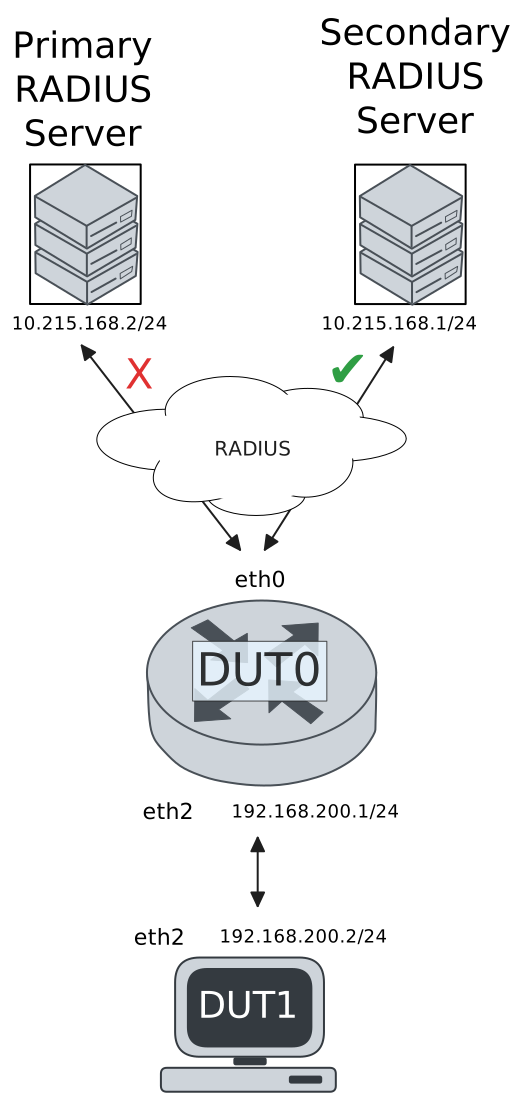
Test 802.1X Authentication With Server Failover
Description
This scenario shows how to configure 802.1X authentication. The primary Nework Access Server is not reachable, so the secondary is used instead.
Scenario
Step 1: Set the following configuration in DUT0 :
set interfaces ethernet eth0 address 10.215.168.64/24
set interfaces ethernet eth0 vrf WAN
set interfaces ethernet eth2 address 192.168.100.1/24
set interfaces ethernet eth2 authenticator 802.1x max-retransmissions 2
set interfaces ethernet eth2 authenticator aaa authentication list1
set interfaces ethernet eth2 authenticator log-level debug
set interfaces ethernet eth2 authenticator mode only-802.1x
set interfaces ethernet eth2 authenticator quiet-period 60
set interfaces ethernet eth2 authenticator reauth-period 0
set system aaa group radius radgroup0 local-vrf WAN
set system aaa group radius radgroup0 server MAIN
set system aaa group radius radgroup1 local-vrf WAN
set system aaa group radius radgroup1 server serv1
set system aaa list list1 method 0 group radius radgroup0
set system aaa list list1 method 1 group radius radgroup1
set system aaa server radius MAIN address 10.215.168.2
set system aaa server radius MAIN encrypted-key U2FsdGVkX19xcV+bjpcNuBFzspwnGG8ySEEehqTn9+aMvW8iTHQGhj0ByUKrdIe29zHrffzp6geAfvsh6VOJgA==
set system aaa server radius serv1 address 10.215.168.1
set system aaa server radius serv1 encrypted-key U2FsdGVkX18aDD8+yDYzbg7cVesDx3ocSZgS0ApycffvfKGPLdkIowltz5BmxEcu46lFi7YP3zAqPOu5ZyXHbg==
set system login user admin authentication encrypted-password '$6$GSjsCj8gHLv$/VcqU6FLi6CT2Oxn0MJQ2C2tqnRDrYKNF8HIYWJp68nvXvPdFccDsT04.WtigUONbKYrgKg8d6rEs8PjljMkH0'
set system vrf WAN
Step 2: Ping IP address 10.215.168.1 from DUT0:
admin@DUT0$ ping 10.215.168.1 vrf WAN count 1 size 56 timeout 1Show output
ping: Warning: source address might be selected on device other than: WAN
PING 10.215.168.1 (10.215.168.1) from 10.215.168.64 WAN: 56(84) bytes of data.
64 bytes from 10.215.168.1: icmp_seq=1 ttl=64 time=0.182 ms

--- 10.215.168.1 ping statistics ---
1 packets transmitted, 1 received, 0% packet loss, time 0ms
rtt min/avg/max/mdev = 0.182/0.182/0.182/0.000 ms
Step 3: Set the following configuration in DUT1 :
set interfaces ethernet eth2 address 192.168.100.2/24
set interfaces ethernet eth2 supplicant encrypted-password U2FsdGVkX19Q8fQdvWkak7nTuYCKJ7PgHz2Q06IZF2I=
set interfaces ethernet eth2 supplicant username testing
set system login user admin authentication encrypted-password '$6$GSjsCj8gHLv$/VcqU6FLi6CT2Oxn0MJQ2C2tqnRDrYKNF8HIYWJp68nvXvPdFccDsT04.WtigUONbKYrgKg8d6rEs8PjljMkH0'
Step 4: Run command interfaces ethernet eth2 supplicant show status at DUT1 and check if output contains the following tokens:
AuthorizedShow output
---------------------------------------------------
        Field                      Value
---------------------------------------------------
EAP State                                   SUCCESS
EAP TLS Cipher          ECDHE-RSA-AES256-GCM-SHA384
EAP TLS Version                             TLSv1.2
PAE State                             AUTHENTICATED
Supplicant Port Status                   Authorized
WPA State                                 COMPLETED
Step 5: Run command interfaces ethernet eth2 supplicant show stats at DUT1 and check if output matches the following regular expressions:
Port Status\s+AuthorizedShow output
-------------------------------
       Field           Value
-------------------------------
EAPoL Frames (Rx)            11
EAPoL Frames (Tx)            11
Invalid Frames (Rx)           0
Logoff Frames (Tx)            0
Port Status          Authorized
Req Frames (Rx)               9
Req ID Frames (Rx)            1
Resp Frames (Tx)             10
Start Frames (Tx)             1
Step 6: Run command interfaces ethernet eth2 authenticator show stats at DUT0 and check if output matches the following regular expressions:
Authentication Successes\s+1
Authentication Mode\s+802\.1X
Show output
---------------------------------------------
         Field                   Value
---------------------------------------------
Access Challenges                           9
Authentication Backend                 RADIUS
Authentication Failures                     0
Authentication Mode                    802.1X
Authentication Status     Authorized (802.1X)
Authentication Successes                    1
EAPoL frames (Rx)                          11
EAPoL frames (Tx)                          11
Quiet Period                               60
Reauthenticate                          FALSE
Reauthenticate Period                       0
Session Time                                0
Session User MAC            de:ad:be:ef:6c:12
Session User Name                     testing
Step 7: Ping IP address 192.168.100.1 from DUT1:
admin@DUT1$ ping 192.168.100.1 count 1 size 56 timeout 1Show output
PING 192.168.100.1 (192.168.100.1) 56(84) bytes of data.
64 bytes from 192.168.100.1: icmp_seq=1 ttl=64 time=0.338 ms

--- 192.168.100.1 ping statistics ---
1 packets transmitted, 1 received, 0% packet loss, time 0ms
rtt min/avg/max/mdev = 0.338/0.338/0.338/0.000 ms
Step 8: Run command system journal show | grep "osdx hostapd" at DUT0 and check if output contains the following tokens:
No response from Authentication server 10.215.168.2Show output
Mar 20 09:44:26.948432 osdx hostapd[134322]: eth2: IEEE 802.11 Fetching hardware channel/rate support not supported.
Mar 20 09:44:26.948446 osdx hostapd[134322]: eth2: RADIUS Authentication server 10.215.168.2:1812
Mar 20 09:44:26.948688 osdx hostapd[134322]: connect[radius]: No route to host
Mar 20 09:44:26.948486 osdx hostapd[134322]: eth2: IEEE 802.1X Initializing IEEE 802.1X: mode=802.1X, eap_server=0, eap_quiet_period=60, eap_max_retrans=2
Mar 20 09:44:26.948488 osdx hostapd[134322]: eth2: IEEE 802.1X IEEE 802.1X: Enabling packet capture discovery mode
Mar 20 09:44:26.976306 osdx hostapd[134322]: Discovery mode enabled on eth2
Mar 20 09:44:26.976364 osdx hostapd[134322]: eth2: interface state UNINITIALIZED->ENABLED
Mar 20 09:44:26.976364 osdx hostapd[134322]: eth2: AP-ENABLED
Mar 20 09:44:30.124121 osdx hostapd[134323]: eth2: STA de:ad:be:ef:6c:12 IEEE 802.1X: New STA de:ad:be:ef:6c:12 added
Mar 20 09:44:30.124135 osdx hostapd[134323]: eth2: IEEE 802.1X IEEE 802.1X: Disabling packet capture discovery mode
Mar 20 09:44:30.136362 osdx hostapd[134323]: eth2: STA de:ad:be:ef:6c:12 IEEE 802.1X: start authentication
Mar 20 09:44:30.136395 osdx hostapd[134323]: eth2: STA 01:80:c2:00:00:03 IEEE 802.1X: disabling transmission of periodic EAP-Request frames
Mar 20 09:44:30.136412 osdx hostapd[134323]: eth2: STA de:ad:be:ef:6c:12 IEEE 802.1X: received EAPOL-Start from STA
Mar 20 09:44:30.136426 osdx hostapd[134323]: eth2: STA de:ad:be:ef:6c:12 IEEE 802.1X: unauthorizing port
Mar 20 09:44:30.136439 osdx hostapd[134323]: eth2: STA 01:80:c2:00:00:03 IEEE 802.1X: Trying RADIUS authentication
Mar 20 09:44:30.136461 osdx hostapd[134323]: eth2: STA de:ad:be:ef:6c:12 IEEE 802.1X: Sending EAP Packet (identifier 127)
Mar 20 09:44:30.137796 osdx hostapd[134323]: eth2: STA de:ad:be:ef:6c:12 IEEE 802.1X: received EAP packet (code=2 id=127 len=12) from STA: EAP Response-Identity (1)
Mar 20 09:44:30.137809 osdx hostapd[134323]: eth2: STA de:ad:be:ef:6c:12 IEEE 802.1X: STA identity 'testing'
Mar 20 09:44:30.137839 osdx hostapd[134323]: eth2: RADIUS Authentication server 10.215.168.2:1812
Mar 20 09:44:30.140115 osdx hostapd[134323]: eth2: RADIUS Sending RADIUS message to authentication server
Mar 20 09:44:30.140379 osdx hostapd[134323]: eth2: RADIUS Next RADIUS client retransmit in 1 seconds
Mar 20 09:44:31.140429 osdx hostapd[134323]: eth2: STA de:ad:be:ef:6c:12 RADIUS: Resending RADIUS message (id=0)
Mar 20 09:44:31.140456 osdx hostapd[134323]: eth2: RADIUS Next RADIUS client retransmit in 2 seconds
Mar 20 09:44:33.140546 osdx hostapd[134323]: eth2: STA de:ad:be:ef:6c:12 RADIUS: Resending RADIUS message (id=0)
Mar 20 09:44:33.140577 osdx hostapd[134323]: eth2: RADIUS Next RADIUS client retransmit in 4 seconds
Mar 20 09:44:37.140843 osdx hostapd[134323]: eth2: RADIUS No response from Authentication server 10.215.168.2:1812 - failover (1º round)
Mar 20 09:44:37.140854 osdx hostapd[134323]: eth2: RADIUS Authentication server 10.215.168.1:1812
Mar 20 09:44:37.140898 osdx hostapd[134323]: eth2: STA de:ad:be:ef:6c:12 RADIUS: Resending RADIUS message (id=0)
Mar 20 09:44:37.140923 osdx hostapd[134323]: eth2: RADIUS Next RADIUS client retransmit in 2 seconds
Mar 20 09:44:37.141209 osdx hostapd[134323]: eth2: RADIUS Received 80 bytes from RADIUS server
Mar 20 09:44:37.141213 osdx hostapd[134323]: eth2: RADIUS Received RADIUS message
Mar 20 09:44:37.141217 osdx hostapd[134323]: eth2: STA de:ad:be:ef:6c:12 RADIUS: Received RADIUS packet matched with a pending request, round trip time 0.00 sec
Mar 20 09:44:37.141273 osdx hostapd[134323]: eth2: STA de:ad:be:ef:6c:12 IEEE 802.1X: decapsulated EAP packet (code=1 id=128 len=22) from RADIUS server: EAP-Request-MD5 (4)
Mar 20 09:44:37.141287 osdx hostapd[134323]: eth2: STA de:ad:be:ef:6c:12 IEEE 802.1X: Sending EAP Packet (identifier 128)
Mar 20 09:44:37.141599 osdx hostapd[134323]: eth2: STA de:ad:be:ef:6c:12 IEEE 802.1X: received EAP packet (code=2 id=128 len=6) from STA: EAP Response-unknown (3)
Mar 20 09:44:37.141652 osdx hostapd[134323]: eth2: RADIUS Sending RADIUS message to authentication server
Mar 20 09:44:37.141666 osdx hostapd[134323]: eth2: RADIUS Next RADIUS client retransmit in 1 seconds
Mar 20 09:44:37.141883 osdx hostapd[134323]: eth2: RADIUS Received 64 bytes from RADIUS server
Mar 20 09:44:37.141889 osdx hostapd[134323]: eth2: RADIUS Received RADIUS message
Mar 20 09:44:37.141892 osdx hostapd[134323]: eth2: STA de:ad:be:ef:6c:12 RADIUS: Received RADIUS packet matched with a pending request, round trip time 0.00 sec
Mar 20 09:44:37.141910 osdx hostapd[134323]: eth2: STA de:ad:be:ef:6c:12 IEEE 802.1X: decapsulated EAP packet (code=1 id=129 len=6) from RADIUS server: EAP-Request-PEAP (25)
Mar 20 09:44:37.141916 osdx hostapd[134323]: eth2: STA de:ad:be:ef:6c:12 IEEE 802.1X: Sending EAP Packet (identifier 129)
Mar 20 09:44:37.142305 osdx hostapd[134323]: eth2: STA de:ad:be:ef:6c:12 IEEE 802.1X: received EAP packet (code=2 id=129 len=194) from STA: EAP Response-PEAP (25)
Mar 20 09:44:37.142347 osdx hostapd[134323]: eth2: RADIUS Sending RADIUS message to authentication server
Mar 20 09:44:37.142362 osdx hostapd[134323]: eth2: RADIUS Next RADIUS client retransmit in 1 seconds
Mar 20 09:44:37.143346 osdx hostapd[134323]: eth2: RADIUS Received 1068 bytes from RADIUS server
Mar 20 09:44:37.143352 osdx hostapd[134323]: eth2: RADIUS Received RADIUS message
Mar 20 09:44:37.143355 osdx hostapd[134323]: eth2: STA de:ad:be:ef:6c:12 RADIUS: Received RADIUS packet matched with a pending request, round trip time 0.00 sec
Mar 20 09:44:37.143373 osdx hostapd[134323]: eth2: STA de:ad:be:ef:6c:12 IEEE 802.1X: decapsulated EAP packet (code=1 id=130 len=1004) from RADIUS server: EAP-Request-PEAP (25)
Mar 20 09:44:37.143379 osdx hostapd[134323]: eth2: STA de:ad:be:ef:6c:12 IEEE 802.1X: Sending EAP Packet (identifier 130)
Mar 20 09:44:37.143554 osdx hostapd[134323]: eth2: STA de:ad:be:ef:6c:12 IEEE 802.1X: received EAP packet (code=2 id=130 len=6) from STA: EAP Response-PEAP (25)
Mar 20 09:44:37.143606 osdx hostapd[134323]: eth2: RADIUS Sending RADIUS message to authentication server
Mar 20 09:44:37.143623 osdx hostapd[134323]: eth2: RADIUS Next RADIUS client retransmit in 1 seconds
Mar 20 09:44:37.143759 osdx hostapd[134323]: eth2: RADIUS Received 229 bytes from RADIUS server
Mar 20 09:44:37.143764 osdx hostapd[134323]: eth2: RADIUS Received RADIUS message
Mar 20 09:44:37.143767 osdx hostapd[134323]: eth2: STA de:ad:be:ef:6c:12 RADIUS: Received RADIUS packet matched with a pending request, round trip time 0.00 sec
Mar 20 09:44:37.143784 osdx hostapd[134323]: eth2: STA de:ad:be:ef:6c:12 IEEE 802.1X: decapsulated EAP packet (code=1 id=131 len=171) from RADIUS server: EAP-Request-PEAP (25)
Mar 20 09:44:37.143789 osdx hostapd[134323]: eth2: STA de:ad:be:ef:6c:12 IEEE 802.1X: Sending EAP Packet (identifier 131)
Mar 20 09:44:37.145581 osdx hostapd[134323]: eth2: STA de:ad:be:ef:6c:12 IEEE 802.1X: received EAP packet (code=2 id=131 len=103) from STA: EAP Response-PEAP (25)
Mar 20 09:44:37.145628 osdx hostapd[134323]: eth2: RADIUS Sending RADIUS message to authentication server
Mar 20 09:44:37.145644 osdx hostapd[134323]: eth2: RADIUS Next RADIUS client retransmit in 1 seconds
Mar 20 09:44:37.145955 osdx hostapd[134323]: eth2: RADIUS Received 115 bytes from RADIUS server
Mar 20 09:44:37.145960 osdx hostapd[134323]: eth2: RADIUS Received RADIUS message
Mar 20 09:44:37.145963 osdx hostapd[134323]: eth2: STA de:ad:be:ef:6c:12 RADIUS: Received RADIUS packet matched with a pending request, round trip time 0.00 sec
Mar 20 09:44:37.145978 osdx hostapd[134323]: eth2: STA de:ad:be:ef:6c:12 IEEE 802.1X: decapsulated EAP packet (code=1 id=132 len=57) from RADIUS server: EAP-Request-PEAP (25)
Mar 20 09:44:37.145984 osdx hostapd[134323]: eth2: STA de:ad:be:ef:6c:12 IEEE 802.1X: Sending EAP Packet (identifier 132)
Mar 20 09:44:37.146199 osdx hostapd[134323]: eth2: STA de:ad:be:ef:6c:12 IEEE 802.1X: received EAP packet (code=2 id=132 len=6) from STA: EAP Response-PEAP (25)
Mar 20 09:44:37.146230 osdx hostapd[134323]: eth2: RADIUS Sending RADIUS message to authentication server
Mar 20 09:44:37.146247 osdx hostapd[134323]: eth2: RADIUS Next RADIUS client retransmit in 1 seconds
Mar 20 09:44:37.146402 osdx hostapd[134323]: eth2: RADIUS Received 98 bytes from RADIUS server
Mar 20 09:44:37.146409 osdx hostapd[134323]: eth2: RADIUS Received RADIUS message
Mar 20 09:44:37.146413 osdx hostapd[134323]: eth2: STA de:ad:be:ef:6c:12 RADIUS: Received RADIUS packet matched with a pending request, round trip time 0.00 sec
Mar 20 09:44:37.146441 osdx hostapd[134323]: eth2: STA de:ad:be:ef:6c:12 IEEE 802.1X: decapsulated EAP packet (code=1 id=133 len=40) from RADIUS server: EAP-Request-PEAP (25)
Mar 20 09:44:37.146449 osdx hostapd[134323]: eth2: STA de:ad:be:ef:6c:12 IEEE 802.1X: Sending EAP Packet (identifier 133)
Mar 20 09:44:37.146622 osdx hostapd[134323]: eth2: STA de:ad:be:ef:6c:12 IEEE 802.1X: received EAP packet (code=2 id=133 len=43) from STA: EAP Response-PEAP (25)
Mar 20 09:44:37.146661 osdx hostapd[134323]: eth2: RADIUS Sending RADIUS message to authentication server
Mar 20 09:44:37.146674 osdx hostapd[134323]: eth2: RADIUS Next RADIUS client retransmit in 1 seconds
Mar 20 09:44:37.146834 osdx hostapd[134323]: eth2: RADIUS Received 131 bytes from RADIUS server
Mar 20 09:44:37.146840 osdx hostapd[134323]: eth2: RADIUS Received RADIUS message
Mar 20 09:44:37.146844 osdx hostapd[134323]: eth2: STA de:ad:be:ef:6c:12 RADIUS: Received RADIUS packet matched with a pending request, round trip time 0.00 sec
Mar 20 09:44:37.146863 osdx hostapd[134323]: eth2: STA de:ad:be:ef:6c:12 IEEE 802.1X: decapsulated EAP packet (code=1 id=134 len=73) from RADIUS server: EAP-Request-PEAP (25)
Mar 20 09:44:37.146870 osdx hostapd[134323]: eth2: STA de:ad:be:ef:6c:12 IEEE 802.1X: Sending EAP Packet (identifier 134)
Mar 20 09:44:37.147107 osdx hostapd[134323]: eth2: STA de:ad:be:ef:6c:12 IEEE 802.1X: received EAP packet (code=2 id=134 len=97) from STA: EAP Response-PEAP (25)
Mar 20 09:44:37.147144 osdx hostapd[134323]: eth2: RADIUS Sending RADIUS message to authentication server
Mar 20 09:44:37.147157 osdx hostapd[134323]: eth2: RADIUS Next RADIUS client retransmit in 1 seconds
Mar 20 09:44:37.147343 osdx hostapd[134323]: eth2: RADIUS Received 140 bytes from RADIUS server
Mar 20 09:44:37.147348 osdx hostapd[134323]: eth2: RADIUS Received RADIUS message
Mar 20 09:44:37.147352 osdx hostapd[134323]: eth2: STA de:ad:be:ef:6c:12 RADIUS: Received RADIUS packet matched with a pending request, round trip time 0.00 sec
Mar 20 09:44:37.147367 osdx hostapd[134323]: eth2: STA de:ad:be:ef:6c:12 IEEE 802.1X: decapsulated EAP packet (code=1 id=135 len=82) from RADIUS server: EAP-Request-PEAP (25)
Mar 20 09:44:37.147374 osdx hostapd[134323]: eth2: STA de:ad:be:ef:6c:12 IEEE 802.1X: Sending EAP Packet (identifier 135)
Mar 20 09:44:37.147559 osdx hostapd[134323]: eth2: STA de:ad:be:ef:6c:12 IEEE 802.1X: received EAP packet (code=2 id=135 len=37) from STA: EAP Response-PEAP (25)
Mar 20 09:44:37.147598 osdx hostapd[134323]: eth2: RADIUS Sending RADIUS message to authentication server
Mar 20 09:44:37.147610 osdx hostapd[134323]: eth2: RADIUS Next RADIUS client retransmit in 1 seconds
Mar 20 09:44:37.147799 osdx hostapd[134323]: eth2: RADIUS Received 104 bytes from RADIUS server
Mar 20 09:44:37.147806 osdx hostapd[134323]: eth2: RADIUS Received RADIUS message
Mar 20 09:44:37.147811 osdx hostapd[134323]: eth2: STA de:ad:be:ef:6c:12 RADIUS: Received RADIUS packet matched with a pending request, round trip time 0.00 sec
Mar 20 09:44:37.147834 osdx hostapd[134323]: eth2: STA de:ad:be:ef:6c:12 IEEE 802.1X: decapsulated EAP packet (code=1 id=136 len=46) from RADIUS server: EAP-Request-PEAP (25)
Mar 20 09:44:37.147841 osdx hostapd[134323]: eth2: STA de:ad:be:ef:6c:12 IEEE 802.1X: Sending EAP Packet (identifier 136)
Mar 20 09:44:37.148058 osdx hostapd[134323]: eth2: STA de:ad:be:ef:6c:12 IEEE 802.1X: received EAP packet (code=2 id=136 len=46) from STA: EAP Response-PEAP (25)
Mar 20 09:44:37.148099 osdx hostapd[134323]: eth2: RADIUS Sending RADIUS message to authentication server
Mar 20 09:44:37.148160 osdx hostapd[134323]: eth2: RADIUS Next RADIUS client retransmit in 1 seconds
Mar 20 09:44:37.148309 osdx hostapd[134323]: eth2: RADIUS Received 175 bytes from RADIUS server
Mar 20 09:44:37.148314 osdx hostapd[134323]: eth2: RADIUS Received RADIUS message
Mar 20 09:44:37.148318 osdx hostapd[134323]: eth2: STA de:ad:be:ef:6c:12 RADIUS: Received RADIUS packet matched with a pending request, round trip time 0.00 sec
Mar 20 09:44:37.148341 osdx hostapd[134323]: eth2: STA de:ad:be:ef:6c:12 IEEE 802.1X: old identity 'testing' updated with User-Name from Access-Accept 'testing'
Mar 20 09:44:37.148346 osdx hostapd[134323]: eth2: STA de:ad:be:ef:6c:12 IEEE 802.1X: decapsulated EAP packet (code=3 id=136 len=4) from RADIUS server: EAP Success
Mar 20 09:44:37.148437 osdx hostapd[134323]: eth2: STA de:ad:be:ef:6c:12 IEEE 802.1X: Sending EAP Packet (identifier 136)
Mar 20 09:44:37.148454 osdx hostapd[134323]: eth2: STA de:ad:be:ef:6c:12 IEEE 802.1X: authorizing port
Mar 20 09:44:37.148458 osdx hostapd[134323]: eth2: STA de:ad:be:ef:6c:12 RADIUS: starting accounting session AE6B7AC88572C733
Mar 20 09:44:37.148462 osdx hostapd[134323]: eth2: STA de:ad:be:ef:6c:12 IEEE 802.1X: authenticated - EAP type: 25 (PEAP)
Test MAB Authentication With Server Failover
Description
This scenario shows how to configure MAB authentication. The primary Nework Access Server is not reachable, so the secondary is used instead.
Scenario
Step 1: Set the following configuration in DUT0 :
set interfaces ethernet eth0 address 10.215.168.64/24
set interfaces ethernet eth0 vrf WAN
set interfaces ethernet eth2 address 192.168.100.1/24
set interfaces ethernet eth2 authenticator aaa authentication list1
set interfaces ethernet eth2 authenticator log-level debug
set interfaces ethernet eth2 authenticator mode only-MAB
set interfaces ethernet eth2 authenticator quiet-period 60
set interfaces ethernet eth2 authenticator reauth-period 0
set system aaa group radius radgroup0 local-vrf WAN
set system aaa group radius radgroup0 server MAIN
set system aaa group radius radgroup1 local-vrf WAN
set system aaa group radius radgroup1 server serv1
set system aaa list list1 method 0 group radius radgroup0
set system aaa list list1 method 1 group radius radgroup1
set system aaa server radius MAIN address 10.215.168.2
set system aaa server radius MAIN encrypted-key U2FsdGVkX18BoYFab/Xiy4WtagfO/RyCDK70ryRbOnzSuek1aSS8RdF4OA6RRKFmuwAffgwWlJvW1M5MfU8d9w==
set system aaa server radius serv1 address 10.215.168.1
set system aaa server radius serv1 encrypted-key U2FsdGVkX1/82ifzQ0GIuSn2WlSwGaZ45JQQ7HeQGAgg1RgnWQpgjulOzErEgOACYONbMB+E0L9No2YPWEo31A==
set system login user admin authentication encrypted-password '$6$GSjsCj8gHLv$/VcqU6FLi6CT2Oxn0MJQ2C2tqnRDrYKNF8HIYWJp68nvXvPdFccDsT04.WtigUONbKYrgKg8d6rEs8PjljMkH0'
set system vrf WAN
Step 2: Ping IP address 10.215.168.1 from DUT0:
admin@DUT0$ ping 10.215.168.1 vrf WAN count 1 size 56 timeout 1Show output
ping: Warning: source address might be selected on device other than: WAN
PING 10.215.168.1 (10.215.168.1) from 10.215.168.64 WAN: 56(84) bytes of data.
64 bytes from 10.215.168.1: icmp_seq=1 ttl=64 time=0.228 ms

--- 10.215.168.1 ping statistics ---
1 packets transmitted, 1 received, 0% packet loss, time 0ms
rtt min/avg/max/mdev = 0.228/0.228/0.228/0.000 ms
Step 3: Set the following configuration in DUT1 :
set interfaces ethernet eth2 address 192.168.100.2/24
set system login user admin authentication encrypted-password '$6$GSjsCj8gHLv$/VcqU6FLi6CT2Oxn0MJQ2C2tqnRDrYKNF8HIYWJp68nvXvPdFccDsT04.WtigUONbKYrgKg8d6rEs8PjljMkH0'
Step 4: Run command interfaces ethernet eth2 authenticator show stats at DUT0 and check if output matches the following regular expressions:
Authentication Successes\s+1
Authentication Mode\s+MAB
Show output
-------------------------------------------
         Field                  Value
-------------------------------------------
Access Challenges                         0
Authentication Backend               RADIUS
Authentication Failures                   0
Authentication Mode                     MAB
Authentication Status      Authorized (MAB)
Authentication Successes                  1
EAPoL frames (Rx)                         0
EAPoL frames (Tx)                         0
Quiet Period                             60
Reauthenticate                        FALSE
Reauthenticate Period                     0
Session Time                              0
Session User MAC          de:ad:be:ef:6c:12
Session User Name                       N/A
Step 5: Ping IP address 192.168.100.1 from DUT1:
admin@DUT1$ ping 192.168.100.1 count 1 size 56 timeout 1Show output
PING 192.168.100.1 (192.168.100.1) 56(84) bytes of data.
64 bytes from 192.168.100.1: icmp_seq=1 ttl=64 time=0.259 ms

--- 192.168.100.1 ping statistics ---
1 packets transmitted, 1 received, 0% packet loss, time 0ms
rtt min/avg/max/mdev = 0.259/0.259/0.259/0.000 ms
Step 6: Run command system journal show | grep "osdx hostapd" at DUT0 and check if output contains the following tokens:
No response from Authentication server 10.215.168.2Show output
Mar 20 09:44:46.981983 osdx hostapd[134967]: eth2: IEEE 802.11 Fetching hardware channel/rate support not supported.
Mar 20 09:44:46.981996 osdx hostapd[134967]: eth2: RADIUS Authentication server 10.215.168.2:1812
Mar 20 09:44:46.982196 osdx hostapd[134967]: connect[radius]: No route to host
Mar 20 09:44:46.982030 osdx hostapd[134967]: eth2: IEEE 802.1X Initializing IEEE 802.1X: mode=MAB-only, eap_server=0, eap_quiet_period=60, eap_max_retrans=5
Mar 20 09:44:46.982033 osdx hostapd[134967]: eth2: IEEE 802.1X IEEE 802.1X: Enabling packet capture discovery mode
Mar 20 09:44:46.997816 osdx hostapd[134967]: Discovery mode enabled on eth2
Mar 20 09:44:46.997876 osdx hostapd[134967]: eth2: interface state UNINITIALIZED->ENABLED
Mar 20 09:44:46.997876 osdx hostapd[134967]: eth2: AP-ENABLED
Mar 20 09:44:51.998006 osdx hostapd[134968]: eth2: STA de:ad:be:ef:6c:12 DRIVER: Device discovered, triggering MAB authentication
Mar 20 09:44:51.998054 osdx hostapd[134968]: eth2: STA de:ad:be:ef:6c:12 IEEE 802.1X: New STA de:ad:be:ef:6c:12 added
Mar 20 09:44:51.998064 osdx hostapd[134968]: eth2: IEEE 802.1X IEEE 802.1X: Disabling packet capture discovery mode
Mar 20 09:44:52.013852 osdx hostapd[134968]: eth2: STA de:ad:be:ef:6c:12 IEEE 802.1X: MAB-only mode: Starting MAB authentication
Mar 20 09:44:52.013877 osdx hostapd[134968]: eth2: STA de:ad:be:ef:6c:12 IEEE 802.1X: MAB: Starting RADIUS query
Mar 20 09:44:52.013891 osdx hostapd[134968]: eth2: STA de:ad:be:ef:6c:12 IEEE 802.1X: MAB: User-Name = de:ad:be:ef:6c:12
Mar 20 09:44:52.015545 osdx hostapd[134968]: eth2: STA de:ad:be:ef:6c:12 IEEE 802.1X: MAB: User-Password = de:ad:be:ef:6c:12
Mar 20 09:44:52.015555 osdx hostapd[134968]: eth2: RADIUS Authentication server 10.215.168.2:1812
Mar 20 09:44:52.015623 osdx hostapd[134968]: eth2: RADIUS Sending RADIUS message to authentication server
Mar 20 09:44:52.015653 osdx hostapd[134968]: eth2: RADIUS Next RADIUS client retransmit in 1 seconds
Mar 20 09:44:53.015741 osdx hostapd[134968]: eth2: STA de:ad:be:ef:6c:12 RADIUS: Resending RADIUS message (id=128)
Mar 20 09:44:53.015787 osdx hostapd[134968]: eth2: RADIUS Next RADIUS client retransmit in 2 seconds
Mar 20 09:44:55.015957 osdx hostapd[134968]: eth2: STA de:ad:be:ef:6c:12 RADIUS: Resending RADIUS message (id=128)
Mar 20 09:44:55.015984 osdx hostapd[134968]: eth2: RADIUS Next RADIUS client retransmit in 4 seconds
Mar 20 09:44:59.016975 osdx hostapd[134968]: eth2: RADIUS No response from Authentication server 10.215.168.2:1812 - failover (1º round)
Mar 20 09:44:59.016989 osdx hostapd[134968]: eth2: RADIUS Authentication server 10.215.168.1:1812
Mar 20 09:44:59.017043 osdx hostapd[134968]: eth2: STA de:ad:be:ef:6c:12 RADIUS: Resending RADIUS message (id=128)
Mar 20 09:44:59.017077 osdx hostapd[134968]: eth2: RADIUS Next RADIUS client retransmit in 2 seconds
Mar 20 09:44:59.017347 osdx hostapd[134968]: eth2: RADIUS Received 20 bytes from RADIUS server
Mar 20 09:44:59.017351 osdx hostapd[134968]: eth2: RADIUS Received RADIUS message
Mar 20 09:44:59.017355 osdx hostapd[134968]: eth2: STA de:ad:be:ef:6c:12 RADIUS: Received RADIUS packet matched with a pending request, round trip time 0.00 sec
Mar 20 09:44:59.017360 osdx hostapd[134968]: eth2: STA de:ad:be:ef:6c:12 IEEE 802.1X: MAB: Processing RADIUS response
Mar 20 09:44:59.017412 osdx hostapd[134968]: eth2: STA de:ad:be:ef:6c:12 IEEE 802.1X: MAB: Identity set to 'de:ad:be:ef:6c:12'
Mar 20 09:44:59.017416 osdx hostapd[134968]: eth2: STA de:ad:be:ef:6c:12 IEEE 802.1X: MAB: station successfully authenticated
Mar 20 09:44:59.017420 osdx hostapd[134968]: eth2: IEEE 802.1X IEEE 802.1X: Discovery already disabled
Mar 20 09:44:59.017431 osdx hostapd[134968]: eth2: STA de:ad:be:ef:6c:12 IEEE 802.1X: authorizing port
Mar 20 09:44:59.017435 osdx hostapd[134968]: eth2: STA de:ad:be:ef:6c:12 RADIUS: starting accounting session 35E2BE50B2D0B22E