Bfd Ospf
Test to check BFD protocol in OSPF.
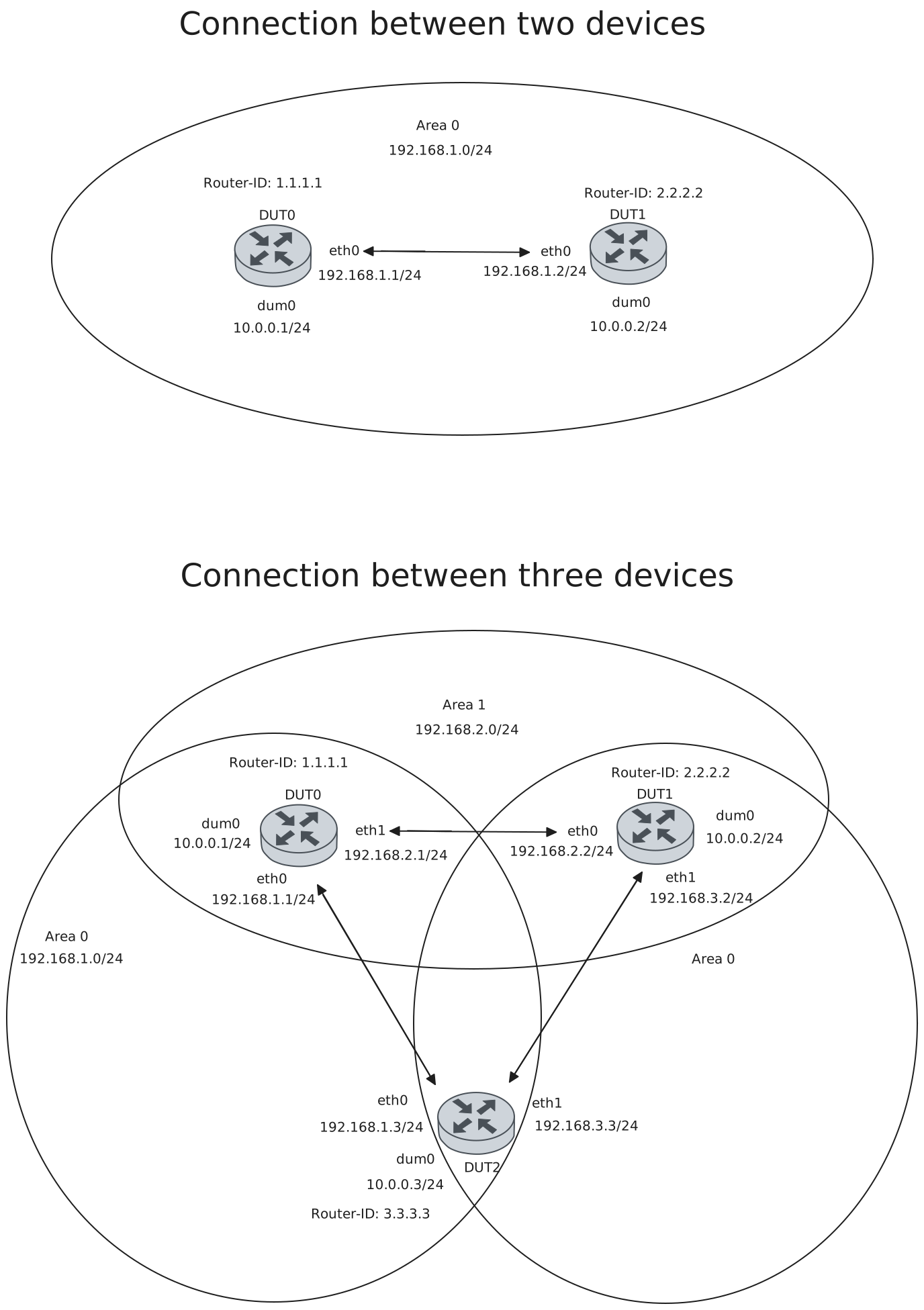
Test Connection
Description
Tests connection between two devices with BFD in OSPF by checking if they are each others peers and their status is up.
Scenario
Step 1: Set the following configuration in DUT0 :
set interfaces dummy dum0 address 10.0.0.1/24
set interfaces ethernet eth0 address 192.168.1.1/24
set interfaces ethernet eth0 ip ospf bfd
set interfaces ethernet eth0 ip ospf network point-to-point
set protocols ospf area 0 network 10.0.0.0/24
set protocols ospf area 0 network 192.168.1.0/24
set protocols ospf parameters router-id 1.1.1.1
set system login user admin authentication encrypted-password '$6$GSjsCj8gHLv$/VcqU6FLi6CT2Oxn0MJQ2C2tqnRDrYKNF8HIYWJp68nvXvPdFccDsT04.WtigUONbKYrgKg8d6rEs8PjljMkH0'
Step 2: Set the following configuration in DUT1 :
set interfaces dummy dum0 address 10.0.0.2/24
set interfaces ethernet eth0 address 192.168.1.2/24
set interfaces ethernet eth0 ip ospf bfd
set interfaces ethernet eth0 ip ospf network point-to-point
set protocols ospf area 0 network 10.0.0.0/24
set protocols ospf area 0 network 192.168.1.0/24
set protocols ospf parameters router-id 2.2.2.2
set system login user admin authentication encrypted-password '$6$GSjsCj8gHLv$/VcqU6FLi6CT2Oxn0MJQ2C2tqnRDrYKNF8HIYWJp68nvXvPdFccDsT04.WtigUONbKYrgKg8d6rEs8PjljMkH0'
Note
Check connectivity
Step 3: Ping IP address 192.168.1.2 from DUT0:
admin@DUT0$ ping 192.168.1.2 count 1 size 56 timeout 1Show output
PING 192.168.1.2 (192.168.1.2) 56(84) bytes of data.
64 bytes from 192.168.1.2: icmp_seq=1 ttl=64 time=0.216 ms

--- 192.168.1.2 ping statistics ---
1 packets transmitted, 1 received, 0% packet loss, time 0ms
rtt min/avg/max/mdev = 0.216/0.216/0.216/0.000 ms
Step 4: Ping IP address 192.168.1.1 from DUT1:
admin@DUT1$ ping 192.168.1.1 count 1 size 56 timeout 1Show output
PING 192.168.1.1 (192.168.1.1) 56(84) bytes of data.
64 bytes from 192.168.1.1: icmp_seq=1 ttl=64 time=0.178 ms

--- 192.168.1.1 ping statistics ---
1 packets transmitted, 1 received, 0% packet loss, time 0ms
rtt min/avg/max/mdev = 0.178/0.178/0.178/0.000 ms
Note
Check that they are each other’s neighbors
Step 5: Run command protocols ospf show neighbor at DUT0 and check if output matches the following regular expressions:
2.2.2.2Show output
Neighbor ID     Pri State           Up Time         Dead Time Address         Interface                        RXmtL RqstL DBsmL
2.2.2.2           1 Init/-          0.427s            39.572s 192.168.1.2     eth0:192.168.1.1                     0     0     0
Step 6: Run command protocols ospf show neighbor at DUT1 and check if output matches the following regular expressions:
1.1.1.1Show output
Neighbor ID     Pri State           Up Time         Dead Time Address         Interface                        RXmtL RqstL DBsmL
1.1.1.1           1 Full/-          0.402s            39.597s 192.168.1.1     eth0:192.168.1.2                     1     0     0
Note
Check that they are each other’s peers and that their status is up (the BFD session has beedn successfully established)
Step 7: Run command protocols bfd show peers at DUT0 and check if output matches the following regular expressions:
192.168.1.2
Status: up
Show output
BFD Peers:
        peer 192.168.1.2 vrf default interface eth0
                ID: 3821003860
                Remote ID: 1950894719
                Active mode
                Status: up
                Uptime: 2 second(s)
                Diagnostics: ok
                Remote diagnostics: ok
                Peer Type: dynamic
                RTT min/avg/max: 0/0/0 usec
                Local timers:
                        Detect-multiplier: 3
                        Receive interval: 300ms
                        Transmission interval: 300ms
                        Echo receive interval: 50ms
                        Echo transmission interval: disabled
                Remote timers:
                        Detect-multiplier: 3
                        Receive interval: 300ms
                        Transmission interval: 300ms
                        Echo receive interval: 50ms
Step 8: Run command protocols bfd show peers at DUT1 and check if output matches the following regular expressions:
192.168.1.1
Status: up
Show output
BFD Peers:
        peer 192.168.1.1 vrf default interface eth0
                ID: 1950894719
                Remote ID: 3821003860
                Active mode
                Status: up
                Uptime: 2 second(s)
                Diagnostics: ok
                Remote diagnostics: ok
                Peer Type: dynamic
                RTT min/avg/max: 0/0/0 usec
                Local timers:
                        Detect-multiplier: 3
                        Receive interval: 300ms
                        Transmission interval: 300ms
                        Echo receive interval: 50ms
                        Echo transmission interval: disabled
                Remote timers:
                        Detect-multiplier: 3
                        Receive interval: 300ms
                        Transmission interval: 300ms
                        Echo receive interval: 50ms
Test Connection With Three Devices
Description
Tests connection between three devices with BFD in OSPF by checking if they are each others peers and their status is up.
Scenario
Step 1: Set the following configuration in DUT0 :
set interfaces dummy dum0 address 10.0.0.1/24
set interfaces ethernet eth0 address 192.168.1.1/24
set interfaces ethernet eth0 ip ospf bfd
set interfaces ethernet eth0 ip ospf network point-to-point
set interfaces ethernet eth1 address 192.168.2.1/24
set interfaces ethernet eth1 ip ospf bfd
set interfaces ethernet eth1 ip ospf network point-to-point
set protocols ospf area 0 network 10.0.0.0/24
set protocols ospf area 0 network 192.168.1.0/24
set protocols ospf area 1 network 192.168.2.0/24
set protocols ospf parameters router-id 1.1.1.1
set system login user admin authentication encrypted-password '$6$GSjsCj8gHLv$/VcqU6FLi6CT2Oxn0MJQ2C2tqnRDrYKNF8HIYWJp68nvXvPdFccDsT04.WtigUONbKYrgKg8d6rEs8PjljMkH0'
Step 2: Set the following configuration in DUT1 :
set interfaces dummy dum0 address 10.0.0.2/24
set interfaces ethernet eth0 address 192.168.2.2/24
set interfaces ethernet eth0 ip ospf bfd
set interfaces ethernet eth0 ip ospf network point-to-point
set interfaces ethernet eth1 address 192.168.3.2/24
set interfaces ethernet eth1 ip ospf bfd
set interfaces ethernet eth1 ip ospf network point-to-point
set protocols ospf area 0 network 10.0.0.0/24
set protocols ospf area 1 network 192.168.2.0/24
set protocols ospf area 2 network 192.168.3.0/24
set protocols ospf parameters router-id 2.2.2.2
set system login user admin authentication encrypted-password '$6$GSjsCj8gHLv$/VcqU6FLi6CT2Oxn0MJQ2C2tqnRDrYKNF8HIYWJp68nvXvPdFccDsT04.WtigUONbKYrgKg8d6rEs8PjljMkH0'
Step 3: Set the following configuration in DUT2 :
set interfaces dummy dum0 address 10.0.0.3/24
set interfaces ethernet eth0 address 192.168.1.3/24
set interfaces ethernet eth0 ip ospf bfd
set interfaces ethernet eth0 ip ospf network point-to-point
set interfaces ethernet eth1 address 192.168.3.3/24
set interfaces ethernet eth1 ip ospf bfd
set interfaces ethernet eth1 ip ospf network point-to-point
set protocols ospf area 0 network 10.0.0.0/24
set protocols ospf area 0 network 192.168.1.0/24
set protocols ospf area 2 network 192.168.3.0/24
set protocols ospf parameters router-id 3.3.3.3
set system login user admin authentication encrypted-password '$6$GSjsCj8gHLv$/VcqU6FLi6CT2Oxn0MJQ2C2tqnRDrYKNF8HIYWJp68nvXvPdFccDsT04.WtigUONbKYrgKg8d6rEs8PjljMkH0'
Note
Check connectivity
Step 4: Ping IP address 192.168.1.3 from DUT0:
admin@DUT0$ ping 192.168.1.3 count 1 size 56 timeout 1Show output
PING 192.168.1.3 (192.168.1.3) 56(84) bytes of data.
64 bytes from 192.168.1.3: icmp_seq=1 ttl=64 time=0.321 ms

--- 192.168.1.3 ping statistics ---
1 packets transmitted, 1 received, 0% packet loss, time 0ms
rtt min/avg/max/mdev = 0.321/0.321/0.321/0.000 ms
Step 5: Ping IP address 192.168.2.2 from DUT0:
admin@DUT0$ ping 192.168.2.2 count 1 size 56 timeout 1Show output
PING 192.168.2.2 (192.168.2.2) 56(84) bytes of data.
64 bytes from 192.168.2.2: icmp_seq=1 ttl=64 time=0.390 ms

--- 192.168.2.2 ping statistics ---
1 packets transmitted, 1 received, 0% packet loss, time 0ms
rtt min/avg/max/mdev = 0.390/0.390/0.390/0.000 ms
Step 6: Ping IP address 192.168.2.1 from DUT1:
admin@DUT1$ ping 192.168.2.1 count 1 size 56 timeout 1Show output
PING 192.168.2.1 (192.168.2.1) 56(84) bytes of data.
64 bytes from 192.168.2.1: icmp_seq=1 ttl=64 time=0.286 ms

--- 192.168.2.1 ping statistics ---
1 packets transmitted, 1 received, 0% packet loss, time 0ms
rtt min/avg/max/mdev = 0.286/0.286/0.286/0.000 ms
Step 7: Ping IP address 192.168.3.3 from DUT1:
admin@DUT1$ ping 192.168.3.3 count 1 size 56 timeout 1Show output
PING 192.168.3.3 (192.168.3.3) 56(84) bytes of data.
64 bytes from 192.168.3.3: icmp_seq=1 ttl=64 time=0.397 ms

--- 192.168.3.3 ping statistics ---
1 packets transmitted, 1 received, 0% packet loss, time 0ms
rtt min/avg/max/mdev = 0.397/0.397/0.397/0.000 ms
Step 8: Ping IP address 192.168.1.1 from DUT2:
admin@DUT2$ ping 192.168.1.1 count 1 size 56 timeout 1Show output
PING 192.168.1.1 (192.168.1.1) 56(84) bytes of data.
64 bytes from 192.168.1.1: icmp_seq=1 ttl=64 time=0.242 ms

--- 192.168.1.1 ping statistics ---
1 packets transmitted, 1 received, 0% packet loss, time 0ms
rtt min/avg/max/mdev = 0.242/0.242/0.242/0.000 ms
Step 9: Ping IP address 192.168.3.2 from DUT2:
admin@DUT2$ ping 192.168.3.2 count 1 size 56 timeout 1Show output
PING 192.168.3.2 (192.168.3.2) 56(84) bytes of data.
64 bytes from 192.168.3.2: icmp_seq=1 ttl=64 time=0.236 ms

--- 192.168.3.2 ping statistics ---
1 packets transmitted, 1 received, 0% packet loss, time 0ms
rtt min/avg/max/mdev = 0.236/0.236/0.236/0.000 ms
Note
Check that they are each other’s neighbors
Step 10: Run command protocols ospf show neighbor at DUT0 and check if output matches the following regular expressions:
2.2.2.2
3.3.3.3
Show output
Neighbor ID     Pri State           Up Time         Dead Time Address         Interface                        RXmtL RqstL DBsmL
3.3.3.3           1 Full/-          1.825s            38.173s 192.168.1.3     eth0:192.168.1.1                     1     0     0
2.2.2.2           1 Full/-          5.905s            36.171s 192.168.2.2     eth1:192.168.2.1                     1     0     0
Step 11: Run command protocols ospf show neighbor at DUT1 and check if output matches the following regular expressions:
1.1.1.1
3.3.3.3
Show output
Neighbor ID     Pri State           Up Time         Dead Time Address         Interface                        RXmtL RqstL DBsmL
1.1.1.1           1 Full/-          5.984s            34.013s 192.168.2.1     eth0:192.168.2.2                     1     0     0
3.3.3.3           1 Full/-          3.907s            38.095s 192.168.3.3     eth1:192.168.3.2                     1     0     0
Step 12: Run command protocols ospf show neighbor at DUT2 and check if output matches the following regular expressions:
1.1.1.1
2.2.2.2
Show output
Neighbor ID     Pri State           Up Time         Dead Time Address         Interface                        RXmtL RqstL DBsmL
1.1.1.1           1 Full/-          1.992s            33.924s 192.168.1.1     eth0:192.168.1.3                     1     0     0
2.2.2.2           1 Full/-          3.995s            36.004s 192.168.3.2     eth1:192.168.3.3                     1     0     0
Note
Check that they are each other’s peers and that their status is up (the BFD session has beedn successfully established)
Step 13: Run command protocols bfd show peers at DUT0 and check if output matches the following regular expressions:
192.168.1.3
Status: up
192.168.2.2
Status: up
Show output
BFD Peers:
        peer 192.168.1.3 vrf default interface eth0
                ID: 3880648435
                Remote ID: 2233077320
                Active mode
                Status: up
                Uptime: 1 second(s)
                Diagnostics: ok
                Remote diagnostics: ok
                Peer Type: dynamic
                RTT min/avg/max: 0/0/0 usec
                Local timers:
                        Detect-multiplier: 3
                        Receive interval: 300ms
                        Transmission interval: 300ms
                        Echo receive interval: 50ms
                        Echo transmission interval: disabled
                Remote timers:
                        Detect-multiplier: 3
                        Receive interval: 300ms
                        Transmission interval: 300ms
                        Echo receive interval: 50ms

        peer 192.168.2.2 vrf default interface eth1
                ID: 3318790144
                Remote ID: 3305186295
                Active mode
                Status: up
                Uptime: 6 second(s)
                Diagnostics: ok
                Remote diagnostics: ok
                Peer Type: dynamic
                RTT min/avg/max: 0/0/0 usec
                Local timers:
                        Detect-multiplier: 3
                        Receive interval: 300ms
                        Transmission interval: 300ms
                        Echo receive interval: 50ms
                        Echo transmission interval: disabled
                Remote timers:
                        Detect-multiplier: 3
                        Receive interval: 300ms
                        Transmission interval: 300ms
                        Echo receive interval: 50ms
Step 14: Run command protocols bfd show peers at DUT1 and check if output matches the following regular expressions:
192.168.2.1
Status: up
192.168.3.3
Status: up
Show output
BFD Peers:
        peer 192.168.2.1 vrf default interface eth0
                ID: 3305186295
                Remote ID: 3318790144
                Active mode
                Status: up
                Uptime: 5 second(s)
                Diagnostics: ok
                Remote diagnostics: ok
                Peer Type: dynamic
                RTT min/avg/max: 0/0/0 usec
                Local timers:
                        Detect-multiplier: 3
                        Receive interval: 300ms
                        Transmission interval: 300ms
                        Echo receive interval: 50ms
                        Echo transmission interval: disabled
                Remote timers:
                        Detect-multiplier: 3
                        Receive interval: 300ms
                        Transmission interval: 300ms
                        Echo receive interval: 50ms

        peer 192.168.3.3 vrf default interface eth1
                ID: 3706911197
                Remote ID: 830296541
                Active mode
                Status: up
                Uptime: 2 second(s)
                Diagnostics: ok
                Remote diagnostics: ok
                Peer Type: dynamic
                RTT min/avg/max: 0/0/0 usec
                Local timers:
                        Detect-multiplier: 3
                        Receive interval: 300ms
                        Transmission interval: 300ms
                        Echo receive interval: 50ms
                        Echo transmission interval: disabled
                Remote timers:
                        Detect-multiplier: 3
                        Receive interval: 300ms
                        Transmission interval: 300ms
                        Echo receive interval: 50ms
Step 15: Run command protocols bfd show peers at DUT2 and check if output matches the following regular expressions:
192.168.1.1
Status: up
192.168.3.2
Status: up
Show output
BFD Peers:
        peer 192.168.3.2 vrf default interface eth1
                ID: 830296541
                Remote ID: 3706911197
                Active mode
                Status: up
                Uptime: 3 second(s)
                Diagnostics: ok
                Remote diagnostics: ok
                Peer Type: dynamic
                RTT min/avg/max: 0/0/0 usec
                Local timers:
                        Detect-multiplier: 3
                        Receive interval: 300ms
                        Transmission interval: 300ms
                        Echo receive interval: 50ms
                        Echo transmission interval: disabled
                Remote timers:
                        Detect-multiplier: 3
                        Receive interval: 300ms
                        Transmission interval: 300ms
                        Echo receive interval: 50ms

        peer 192.168.1.1 vrf default interface eth0
                ID: 2233077320
                Remote ID: 3880648435
                Active mode
                Status: up
                Uptime: 2 second(s)
                Diagnostics: ok
                Remote diagnostics: ok
                Peer Type: dynamic
                RTT min/avg/max: 0/0/0 usec
                Local timers:
                        Detect-multiplier: 3
                        Receive interval: 300ms
                        Transmission interval: 300ms
                        Echo receive interval: 50ms
                        Echo transmission interval: disabled
                Remote timers:
                        Detect-multiplier: 3
                        Receive interval: 300ms
                        Transmission interval: 300ms
                        Echo receive interval: 50ms
Test Profile
Description
Checks that all BFD profile configured parameters are shown.
Scenario
Step 1: Set the following configuration in DUT0 :
set interfaces dummy dum0 address 10.0.0.1/24
set interfaces ethernet eth0 address 192.168.1.1/24
set interfaces ethernet eth0 ip ospf bfd
set interfaces ethernet eth0 ip ospf network point-to-point
set protocols bfd profile PFL detect-multiplier 5
set protocols bfd profile PFL echo-interval 60
set protocols bfd profile PFL echo-mode
set protocols bfd profile PFL passive-mode
set protocols bfd profile PFL receive-interval 400
set protocols bfd profile PFL transmit-interval 400
set protocols ospf area 0 network 10.0.0.0/24
set protocols ospf area 0 network 192.168.1.0/24
set protocols ospf parameters router-id 1.1.1.1
set system login user admin authentication encrypted-password '$6$GSjsCj8gHLv$/VcqU6FLi6CT2Oxn0MJQ2C2tqnRDrYKNF8HIYWJp68nvXvPdFccDsT04.WtigUONbKYrgKg8d6rEs8PjljMkH0'
Step 2: Modify the following configuration lines in DUT0 :
set interfaces ethernet eth0 ip ospf bfd profile PFL
Step 3: Set the following configuration in DUT1 :
set interfaces dummy dum0 address 10.0.0.2/24
set interfaces ethernet eth0 address 192.168.1.2/24
set interfaces ethernet eth0 ip ospf bfd
set interfaces ethernet eth0 ip ospf network point-to-point
set protocols ospf area 0 network 10.0.0.0/24
set protocols ospf area 0 network 192.168.1.0/24
set protocols ospf parameters router-id 2.2.2.2
set system login user admin authentication encrypted-password '$6$GSjsCj8gHLv$/VcqU6FLi6CT2Oxn0MJQ2C2tqnRDrYKNF8HIYWJp68nvXvPdFccDsT04.WtigUONbKYrgKg8d6rEs8PjljMkH0'
Note
Check connectivity
Step 4: Ping IP address 192.168.1.2 from DUT0:
admin@DUT0$ ping 192.168.1.2 count 1 size 56 timeout 1Show output
PING 192.168.1.2 (192.168.1.2) 56(84) bytes of data.
64 bytes from 192.168.1.2: icmp_seq=1 ttl=64 time=0.379 ms

--- 192.168.1.2 ping statistics ---
1 packets transmitted, 1 received, 0% packet loss, time 0ms
rtt min/avg/max/mdev = 0.379/0.379/0.379/0.000 ms
Step 5: Ping IP address 192.168.1.1 from DUT1:
admin@DUT1$ ping 192.168.1.1 count 1 size 56 timeout 1Show output
PING 192.168.1.1 (192.168.1.1) 56(84) bytes of data.
64 bytes from 192.168.1.1: icmp_seq=1 ttl=64 time=0.207 ms

--- 192.168.1.1 ping statistics ---
1 packets transmitted, 1 received, 0% packet loss, time 0ms
rtt min/avg/max/mdev = 0.207/0.207/0.207/0.000 ms
Note
Check that they are each other’s neighbors
Step 6: Run command protocols ospf show neighbor at DUT0 and check if output matches the following regular expressions:
192.168.1.2Show output
Neighbor ID     Pri State           Up Time         Dead Time Address         Interface                        RXmtL RqstL DBsmL
2.2.2.2           1 Full/-          0.841s            39.156s 192.168.1.2     eth0:192.168.1.1                     1     0     0
Step 7: Run command protocols ospf show neighbor at DUT1 and check if output matches the following regular expressions:
192.168.1.1Show output
Neighbor ID     Pri State           Up Time         Dead Time Address         Interface                        RXmtL RqstL DBsmL
1.1.1.1           1 Full/-          0.924s            36.899s 192.168.1.1     eth0:192.168.1.2                     1     0     0
Note
Check that they are each other’s peers and that their status is up (the BFD session has beedn successfully established). Check that all configureed profile parameters are shown in DUT0
Step 8: Run command protocols bfd show peers at DUT0 and check if output matches the following regular expressions:
192.168.1.2
Status: up
Detect-multiplier: 5
Echo receive interval: 60ms
Echo transmission interval: 60ms
Passive mode
Receive interval: 400ms
Transmission interval: 400ms
Show output
BFD Peers:
        peer 192.168.1.2 vrf default interface eth0
                ID: 2775118793
                Remote ID: 3223718301
                Passive mode
                Status: up
                Uptime: 0 second(s)
                Diagnostics: ok
                Remote diagnostics: ok
                Peer Type: dynamic
                RTT min/avg/max: 198/198/198 usec
                Local timers:
                        Detect-multiplier: 5
                        Receive interval: 400ms
                        Transmission interval: 400ms
                        Echo receive interval: 60ms
                        Echo transmission interval: 60ms
                Remote timers:
                        Detect-multiplier: 3
                        Receive interval: 300ms
                        Transmission interval: 300ms
                        Echo receive interval: 50ms
Step 9: Run command protocols bfd show peers at DUT1 and check if output matches the following regular expressions:
192.168.1.1
Status: up
Show output
BFD Peers:
        peer 192.168.1.1 vrf default interface eth0
                ID: 3223718301
                Remote ID: 2775118793
                Active mode
                Status: up
                Uptime: 0 second(s)
                Diagnostics: ok
                Remote diagnostics: ok
                Peer Type: dynamic
                RTT min/avg/max: 0/0/0 usec
                Local timers:
                        Detect-multiplier: 3
                        Receive interval: 300ms
                        Transmission interval: 300ms
                        Echo receive interval: 50ms
                        Echo transmission interval: disabled
                Remote timers:
                        Detect-multiplier: 5
                        Receive interval: 400ms
                        Transmission interval: 400ms
                        Echo receive interval: 60ms